Introduction to Classes
|
|
Introduction to Classes |
|
Fundamentals of Classes |
In the previous two lessons, to use a variable, we were declaring it using one of the known data types. For example, we could use an integer to declare a variable that represented the number of bedrooms of a house. Here is an example: |
public class Exercise {
    public static void main(String[] args) {
       int bedrooms = 3;
    }
}
As opposed to a simple variable, you can use one or more variables to create a more complete or complex object. Instead of only one file, you can create a program with many of them. Each file can contain different instructions that, when put together, can create an application as complete as possible. |
A class is a technique of using one or a group of variables to be used as a foundation for a more detailed variable. To create a class, you start with the class keyword followed by a name and its body delimited by curly brackets. Here is an example of a class called House: class House
{
}
A class is created in a code file. As such, you can include it in the first file of your project. Here is an example:
You can also create a class in its own file. To create a class in NetBeans:
In the New File dialog box, in the Categories list, click Java. In the File Types list, click Java Class: |
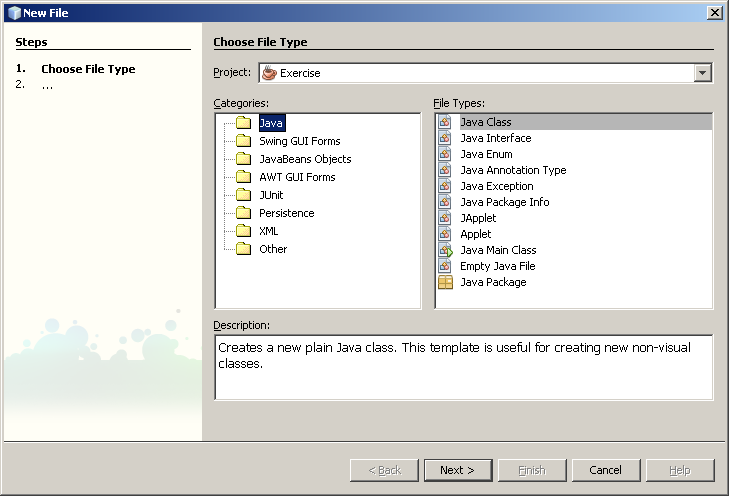
Then click Next. In the next page of the wizard, accept or specify the name of the class:
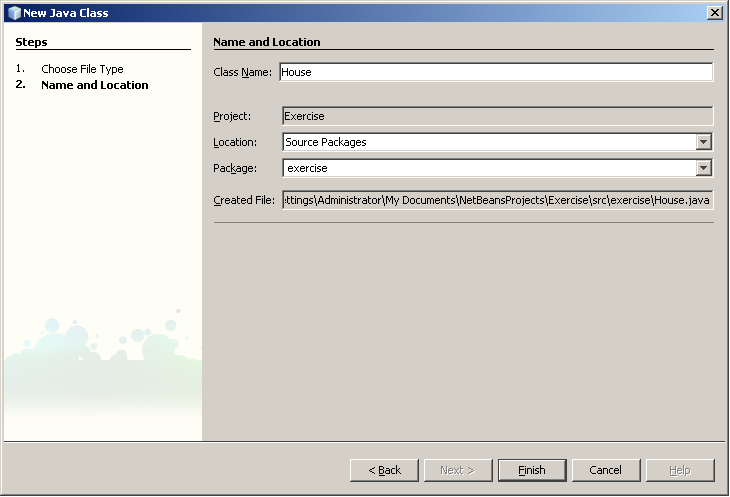
|
After specifying the name, click Finish. A new file named after the class with the .java extension would be added to your project. When a project is made of various files, each file is represented by a tab in the top section of the Code Editor. Therefore, to access a file, you can click its tab.
Like any normal variable, to use a class in your program, you can first declare a variable for it. Like the variables we introduced in the previous lesson, to declare a variable of a class, you can use its name followed by a name for the variable. For example, to declare a variable of the above House class, you could type the following: class House {
}
public class Main {
public static void main(String[] args) {
House property;
}
}
The variables we have declared so far are called value variables. This is because such variables of primitive types hold their value. You can use another type of variable. This time, when you declare the variable, its name does not hold the value of the variable; it holds a reference to the address where the actual variable is stored in memory. This reference type is the kind used to declare a variable for a class. To use a variable as reference, you must initialize it using an operator called new. Here is an example: class House {
}
public class Main {
public static void main(String[] args) {
House property = new House();
}
}
You can also first declare the variable. Then, on another line, you can allocate memory for it using the new operator. Here is an example: class House {
}
public class Main {
public static void main(String[] args) {
House property;
property = new House();
}
}
In Java, as well as Visual Basic, if you create a class in any of the files that belong to the same project, the class is made available to all other files of the same project.
When creating a class, if you want it to be accessible by code in other files, precede the class keyword with public when creating it. If the class keyword is preceded by public, the class must be created in its own file.
Consider a class named House: public class House {
}
The section between the curly brackets, { and }, of a class is referred to as its body. In the body of a class, you can create a list of the parts that make up the class. Each of these parts must be a complete variable with a name and a data type. For example, here are the characteristics that make up a house, declared as the parts of the above class and each declared as a variable: public class House {
String propertyNumber;
char propertyType;
byte Stories;
int bedrooms;
double Value;
}
The variables declared in the body of a class are referred to as its member variables. In Java, these member variables are called fields. The fields can be any type we have seen in the previous lesson. When creating a class, it is your job to decide what your object is made of.
After declaring an instance of a class, you can access each of its members and assign it the desired value. Here is an example:
public class Main {
    public static void main(String[] args) {
        House property = new House();

        property.propertyNumber = 283795;
        property.propertyType = "Single Family";
        property.Bedrooms = 4;
        property.MarketValue = 652880;
    }
}
Once a member variable has been initialized, you can use the period operator to access it and retrieve its value: public class Main {
public static void main(String[] args) {
House property = new House();
property.propertyNumber = 283795;
property.propertyType = "Single Family";
property.Bedrooms = 4;
property.MarketValue = 652880;
System.out.println("=//= Altair Realty =//=");
System.out.println("Properties Inventory"); ;
System.out.println("Property #: " + property.propertyNumber);
System.out.println("Property Type: " + property.propertyType);
System.out.println("Bedrooms: " + property.Bedrooms);
System.out.println("Market Value: " + property.MarketValue);
}
}
This would produce: =//= Altair Realty =//= Properties Inventory Property #: 283795 Property Type: Single Family Bedrooms: 4 Market Value: 652880.0
|
When you create a class, the fields are meant to describe it. For an example of a class named House, such aspects as the number of bedrooms or its market value, are used to describe it. Besides the characteristics used to describe it, an object can also perform actions or assignments. An action performed by a class is called a method. A method is simply a section of code that takes care of a particular detail for the functionality of the class. To create a method, you specify its name, which follows the rules we defined for variables. The name of a method is followed by parentheses. A method's job is to carry a specific assignment within a program. As such, it could provide a value once the assignment has been carried. In some cases, a method must produce a result. If it doesn't, then it is considered void. The type of value that a method can provide (or return) is written on the left side of the method name. If the method doesn't produce a result, type void to its left. The assignment that a method carries is included between an opening curly bracket "{" and a closing curly bracket "}". Here is an example: public class House {
long propertyNumber;
String propertyType;
byte Stories;
public int Bedrooms;
double MarketValue;
void Display() {
}
}
The most regularly used method of a Java program is called main. After creating a method, in its body delimited by its curly brackets, you can define the desired behavior. For example, you can write the member variables in the parentheses of System.out.print() or System.out.println(). Here are examples: public class House {
long propertyNumber;
String propertyType;
byte Stories;
public int Bedrooms;
double MarketValue;
void Display() {
System.out.println("=//= Altair Realty =//=");
System.out.println("Properties Inventory");
System.out.println("Property Type: " + propertyType);
System.out.println("Bedrooms: " + Bedrooms);
}
}
In the same way, you can create as many methods as you want in a class.
After creating a method, you can access it outside of its class. You do this following the same rules used to access a member variable, using the period operator. Unlike a member variable, the name of a class must be followed by parentheses. Here is an example: public class Main {
public static void main(String[] args) {
House property = new House();
property.propertyNumber = 283795;
property.propertyType = "Single Family";
property.Bedrooms = 4;
property.MarketValue = 652880;
property.Display();
}
}
Imagine you create a class. To access it in the main() method, you can declare its variable, as we have done so far. A variable you have declared of a class is also called an instance of the class. In the same way, you can declare various instances of the same class as necessary: class Book {
String Title;
String Author;
short YearPublished;
int NumberOfPages;
char CoverType;
}
public class Main {
public static void main(String[] args) {
Book written = new Book();
Book bought = new Book();
}
}
Each one of these instances gives you access to the members of the class but each instance holds the particular values of the members of its instance. Consider the results of the following program: class Book {
String Title;
String Author;
short YearPublished;
int NumberOfPages;
char CoverType;
}
public class Main {
public static void main(String[] args) {
Book First = new Book();
First.Title = "Psychology and Human Evolution";
First.Author = "Jeannot Lamm";
First.YearPublished = 1996;
First.NumberOfPages = 872;
First.CoverType = 'H';
System.out.println("Book Characteristics");
System.out.println("Title: " + First.Title);
System.out.println("Author: " + First.Author);
System.out.println("Year: " + First.YearPublished);
System.out.println("Pages: " + First.NumberOfPages);
System.out.println("Cover: " + First.CoverType);
Book Second = new Book();
Second.Title = "Java First Step";
Second.Author = "Alexandra Nyango";
Second.YearPublished = 2004;
Second.NumberOfPages = 604;
Second.CoverType = 'P';
System.out.println("Book Characteristics");
System.out.println("Title: " + Second.Title);
System.out.println("Author: " + Second.Author);
System.out.println("Year: " + Second.YearPublished);
System.out.println("Pages: " + Second.NumberOfPages);
System.out.println("Cover: " + Second.CoverType);
}
}
This would produce: Book Characteristics Title: Psychology and Human Evolution Author: Jeannot Lamm Year: 1996 Pages: 872 Cover: H Book Characteristics Title: Java First Step Author: Alexandra Nyango Year: 2004 Pages: 604 Cover: P All of the member variables and methods of classes we have used so far are referred to as instance members because, in order to access them, you must have an instance of a class declared in another class in which you want to access them. In your application, you can declare a class member and refer to it regardless of which instance of an object you are using. Such a member variable is called static. To declare a member variable of a class as static, type the static keyword on its left. Whenever you have a static member, in order to refer to it, you must "qualify" it in the class in which you want to call it. Qualifying a member means you must specify its class. Here is an example: class Book {
static String Title;
static String Author;
int yearPublished;
int Pages;
char CoverType;
}
public class Main {
public static void main(String[] args) {
Book First = new Book();
Book.Title = "Psychology and Human Evolution";
Book.Author = "Jeannot Lamm";
First.YearPublished = 1996;
First.Pages = 872;
First.CoverType = 'H';
System.out.println("Book Characteristics");
System.out.println("Title: " + Book.Title);
System.out.println("Author: " + Book.Author);
System.out.println("Year: " + First.YearPublished);
System.out.println("Pages: " + First.Pages);
System.out.println("Cover: " + First.CoverType);
Book Second = new Book();
Book.Title = "Java First Step";
Book.Author = "Alexandra Nyango";
Second.YearPublished = 2004;
Second.Pages = 604;
Second.CoverType = 'P';
System.out.println("Book Characteristics");
System.out.println("Title: " + Book.Title);
System.out.println("Author: " + Book.Author);
System.out.println("Year: " + Second.YearPublished);
System.out.println("Pages: " + Second.Pages);
System.out.println("Cover: " + Second.CoverType);
}
}
Notice that when a member variable has been declared as static, you don't need an instance of the class to access that member variable outside of the class. Based on this, if you declare all members of a class as static, you don't need to declare a variable of their class in order to access them. In the following example, the Title and Author fields of the Book class are accessed from the Exercise class without using an instance of the Book class: class Book {
public static String Title;
public static String Author;
}
public class Main {
public static void main(String[] args) {
Book.Title = "Psychology and Human Evolution";
Book.Author = "Jeannot Lamm";
System.out.println("Book Characteristics");
System.out.println("Title: " + Book.Title);
System.out.println("Author: " + Book.Author);
Book.Title = "Java First Step";
Book.Author = "Alexandra Miles";
System.out.println("Book Characteristics");
System.out.println("Title: " + Book.Title);
System.out.println("Author: " + Book.Author);
}
}
You can also declare member variables of the main class as static. If you are referring to a static member variable in the same class in which it was declared, you don't have to qualify it. Here is an example: public class Main {
static double Length;
static double Width;
public static void main(String[] args) {
System.out.println("Rectangles Characteristics");
Length = 22.55;
Width = 20.25;
System.out.println("\nRectangle 1");
System.out.println("Length: " + length);
System.out.println("Width: " + Width);
Length = 254.04;
Width = 408.62;
System.out.println("\nRectangle 2");
System.out.println("Length: " + length);
System.out.println("Width: " + Width);
}
}
Like a member variable, a method of a class can be defined as static. Consequently, this particular method can access any member of the class regardless of the instance if there are many instances of the class declared. To define a method as static, type the static keyword to its left. Here is an example: class Book {
static String Title;
static String Author;
static int Pages;
static double Price;
static void CreateBook() {
Title = "Psychology and Human Evolution";
Author = "Jeannot Lamm";
Pages = 472;
Price = 24.95;
}
static void ShowBook() {
System.out.println("Book Characteristics");
System.out.println("Title: " + Book.Title);
System.out.println("Author: " + Book.Author);
System.out.println("Pages: " + Pages);
System.out.printf("Price: " + Price);
}
}
public class Main {
public static void main(String[] args) {
Book.CreateBook();
Book.ShowBook();
}
}
This would produce: Book Characteristics Title: Psychology and Human Evolution Author: Jeannot Lamm Pages: 472 Price: 24.95
You can create a constant variable in a class. To create a constant variable, type the final keyword to the left of the variable. Once again, when declaring a constant, you must initialize it with an appropriate constant value. If a class contains member variables and methods, the (non-static) member variables are automatically available to the method(s) of the class, even member variables that are private. When accessing a member variable or a method from another method of the class, to indicate that the member you are accessing belongs to the same class, you can precede it with the this member and the period operator. Here are examples: public class House {
char propertyType;
int Bedrooms;
void Display() {
System.out.println("=//= Altair Realty =//=");
System.out.println("Properties Inventory"); ;
System.out.println("Property Type: " + this.propertyType);
System.out.println("Bedrooms: " + this.Bedrooms);
}
}
------------------------------------------------------------------ public class Main {
public static void main(String[] args) {
House property = new House();
property.propertyType = 'S';
property.Bedrooms = 3;
property.Display();
}
}
When using the this member variable (in C/C++, it is a pointer), you can access any member of a class within any method of the same class. There are rules you must observe when using this:
In the body of a method, you can declare one or more variables that would be used only by the method. A variable declared in the body of a method is referred to as a local variable. The variable cannot be accessed outside of the method it belongs to. After declaring a local variable, it is made available to the method and you can use it as you see fit, for example, you can assign it a value prior to using it.
If a method has carried an assignment and must make its result available to other methods or other classes, the method must return a value and cannot be void. To declare a method that returns a value, provide its return type to the left of its name. Here is an example: public class Exercise {
double calculate() {
}
}
After a method has performed its assignment, it must clearly demonstrate that it is returning a value. To do this, you use the return keyword followed by the value that the method is returning. The value returned must be of the same type specified as the return type of the method. Here is an example: public class Exercise {
double calculate() {
return 24.55;
}
}
A method can also return an expression, provided the expression produces a value that is conform to the return type. Here is an example: public class Exercise {
double calculate() {
return 24.55 * 4.16;
}
}
When a method returns a value, the compiler considers such a method as if it were a regular value. This means that you can use System.out.print() or System.out.println() to display its value. To do this, simply type the name of the method and its parentheses in the parentheses of System.out.print() or System.out.println(). Remember that in the main class of an application, that is, in the class that contains the main() method, main() is created as static. Therefore, if you want to access a method other than main, you can create the method as static and then access it directly in main. Here is an example: public class Exercise {
static double calculate() {
return 24.55 * 4.16;
}
public static void main(String[] args) {
System.out.println(calculate());
}
}
This would produce: 102.128 Otherwise, if the method is not created as static, you must declare an instance of the class in main and use that instance to access the method using the period operator. Here is an example: public class Exercise {
double calculate() {
return 24.55 * 4.16;
}
public static void main(String[] args) {
Exercise exo = new Exercise();
System.out.println(exo.calculate());
}
}
We have seen how to call a method from the parentheses of another method that needs its result. In the same way, a method that returns a value can be assigned to a variable of the same type. Here is an example: public class Exercise {
double calculate() {
return 24.55 * 4.16;
}
public static void main(String[] args) {
Exercise exo = new Exercise();
double value = exo.calculate();
System.out.println(value);
}
}
So far, we have used the main() method as it is defined by default when you create an application. This default implementation of the main() method is of type void. Another way to implement the main() method is to make it return an integer. The rule is the same as for any method of type int. The main() method can return any type of integer as long as it is a valid integer. |
|
|
|
||
| Previous | Copyright © 2008-2016, FunctionX, Inc. | Next |
|
|
||