Introduction to Functions

Introduction to Functions
Fundamentals of Functions
Introduction
A function is a section of code used to solve a particular problem. There are various categories of functions you will use in your projects. The primary category is a function you create.
Creating a Function
You can create a function in a webpage. You must first create a <SCRIPT> section in the document. You can add it in either the head or the body section. The primary formula to create a function is:
function function-name(){}
Start with the function keyword and end with (){}. A function must have a name. Although there are some rules you must follow and some you can ignore, in our lessons, when the name is in one word, we will use lowercase. Wehn the name is a combination of words, the first word will be in lowercase, the first letter of each subsequent word will be in uppercase.
A function must have parentheses. Depending on some situations, the parentheses may have something. At this time, we will leave them empty. The section from { to } is referred to as the body of the function. That's where you will write your code. For example, you can declare a variable. If a function is short, you write everything in one line. Here is an example:
<!DOCTYPE html>
<html>
<head>
<title>Exercise</title>
</head>
<body>

<script>
    function move() { var number; }
</script>
</body>
</html>
If the function is using many pieces of code, you can spread it on many lines, such as putting the last curly bracket on its own line.
Just as you can create one function, you can create as many as you need.
In the body of a function, you can write the code you need. For example, as mentioned in the previous lesson, you can access the controls of a form. In the same way, you can create all types of expressions.
 Practical Learning: Introducing Functions
body {
    background-color: white;
}

form                        { padding:          1em;
                              background-color: #e0d4c0;
                              border:           1px solid maroon; }
form div                    { padding:          4px;
                              margin:           0 0 1px 0; }
input[type=number]          { width:            80px;
                              float:            right;
                              border:           1px solid maroon; }
input[type=number]:focus    { outline:          1px solid #ff6a00; }
input[type=button]          { border:           0;
                              border-radius:    10px;
                              font-size:        14px;
                              width:            130px;
                              margin-left:      100px;
                              background-color: brown;
                              padding:          0.75em;
                              color:            yellow;    }
input[type=button]:hover    { color:            white;
                              cursor:           pointer;
                              background-color: chocolate; }
form > fieldset > div > div { margin:           0 0 5px 0  }
.container h1               { margin:           auto;
                              width:            600px;     }
.container form             { margin:           auto;
                              width:            280px;     }
.centered { text-align: center; }<!DOCTYPE html>
<html>
<head>
<meta charset="utf-8" />
<title>ESCAPE: Bill Evaluation</title>
<link rel="stylesheet" type="text/css" href="CableCompany.css" />
</head>
<body>
<div class="container">
<h1 class="centered">ESCAPE</h1>
<h2 class="centered">Eastern Shore Cable and Production Entertainment</h2>
<h3 class="centered">Bill Evaluation</h3>
</div>
<div class="container">
<form name="BillEvaluation" method="post">
<fieldset>
<legend>Cable TV Services</legend>
<div>
<label for="CableTVBasicFee">Cable TV Basic Fee:</label>
<input type="number" id="CableTVBasicFee" name="CableTVBasicFee" value="0.00" />
</div>
<div>
<label for="DVRService">DVR Service:</label>
<input type="number" id="DVRService" name="DVRService" value="0.00" />
</div>
<div>
<label for="SportsPackage">Sports Package:</label>
<input type="number" id="SportsPackage" name="SportsPackage" value="0.00" />
</div>
<div>
<div>
<input type="button" name="btnEvaluate" value="Evaluate" />
</div>
</div>
<div>
<label for="PaymentAmount">Payment Amount:</label>
<input type="number" id="PaymentAmount" name="PaymentAmount" value="0.00" />
</div>
</fieldset>
</form>
</div>
<script>
function evaluatePayment() {
'use strict';
var basicFee = 24.95;
var dvr = 9.95;
var sport = 8.95;
var amount = basicFee + dvr + sport;
document.BillEvaluation.CableTVBasicFee.value = basicFee;
document.BillEvaluation.DVRService.value = dvr;
document.BillEvaluation.SportsPackage.value = sport;
document.BillEvaluation.PaymentAmount.value = amount;
}
</script>
</body>
</html>Calling a Function
Introduction
After creating a function, accessing it is referred to as calling it. In order to call a function, you must know and use its name. Then, in the place where you want to use it, type the name of the function followed by parentheses. If the function is simply called, you should (sometimes must) end the call with a semicolon. Here is an example:
<script>
    function getFullName() {
        var fName = document.EmploymentApplication.firstName.value;
        var lName = document.EmploymentApplication.lastName.value;

        var employeeName = fName + " " + lName;
        document.EmploymentApplication.fullName.value = employeeName;
    }

    function communicate() {
        getFullName();
    }
</script>
We were introduced to events in the first lesson. If a function performs an action that should be dealt with when an event occurs on a tag, you can call the function in the quotes of the event. Don't use a semicolon.
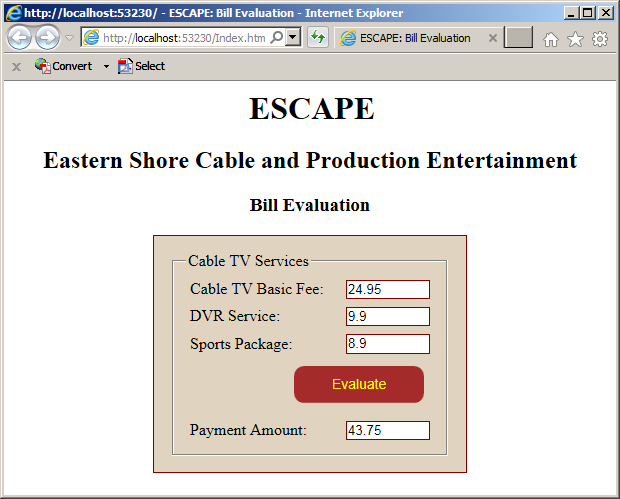
Practical Learning: Calling a Function
<!DOCTYPE html>
<html>
<head>
<meta charset="utf-8" />
<title>ESCAPE: Bill Evaluation</title>
<link rel="stylesheet" type="text/css" href="CableCompany.css" />
</head>
<body>
<div class="container">
    <h1 class="centered">ESCAPE</h1>
    <h2 class="centered">Eastern Shore Cable and Production Entertainment</h2>
    <h3 class="centered">Bill Evaluation</h3>
</div>

<div class="container">
    <form name="BillEvaluation" method="post">
        <fieldset>
            <legend>Cable TV Services</legend>
            <div>
                <label for="CableTVBasicFee">Cable TV Basic Fee:</label>
                <input type="number" id="CableTVBasicFee" name="CableTVBasicFee" value="0.00" />
            </div>
            <div>
                <label for="DVRService">DVR Service:</label>
                <input type="number" id="DVRService" name="DVRService" value="0.00" />
            </div>
            <div>
                <label for="SportPackage">Sports Package:</label>
                <input type="number" id="SportsPackage" name="SportsPackage" value="0.00" />
            </div>
            <div>
                <div>
                    <input type="button" name="btnEvaluate" value="Evaluate" onclick="evaluatePayment()" />
                </div>
            </div>
            <div>
                <label for="PaymentAmount">Payment Amount:</label>
                <input type="number" id="PaymentAmount" name="PaymentAmount" value="0.00" />
            </div>
        </fieldset>
    </form>
</div>

<script>
    function evaluatePayment() {
        'use strict';
        var basicFee = 24.95;
        var dvr = 9.90;
        var sport = 8.90;

        var amount = basicFee + dvr + sport;

        document.BillEvaluation.CableTVBasicFee.value = basicFee;
        document.BillEvaluation.DVRService.value = dvr;
        document.BillEvaluation.SportsPackage.value = sport;
        document.BillEvaluation.PaymentAmount.value = amount;
    }
</script>
</body>
</html>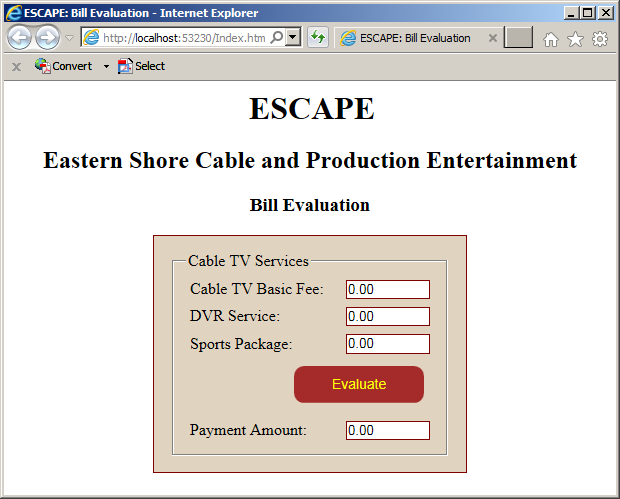
Immediately Calling a Function
Earlier, we specified that you need the name of a function in order to call it. The JavaScript language provides a special way to create a function that is immediately called as soon as its associated webpage opens. The formula to create the function is:
(function() {
	statement1
    statement2
    . . .
    statement_n
})();
To proceed, define the function like any other, but include the whole function between parentheses. Outside those parentheses, to call the function, some some empty parentheses.
Introduction to Parameters and Arguments
Introduction to the Parameters of a Function
To perform its action(s), a function may need some values. If you are creating a function that will need external values, you must indicate it. To do this, in the parantheses of the function, enter a name that represents a value. Here is an example of a function that will need one value:
<script>
    function evaluateWeklySalary(salary) {
    }
</script>
The name you provide to the function is called a parameter. In the body of the function, you can use the parameter or ignore it completely. Otherwise, when using the parameter, you can involve it in any operation you want. Here is an example:
<script>
    'use strict';

    function evaluateWeklySalary(salary) {
        var netPay = salary * 40;

        document.SalaryEvaluation.hourlyRate.value = salary;
    }
</script>
Calling a Function that Uses a Parameter
To call a function that uses a parameter, you must provide a value for the parameter. The value provided in the parentheses of the function is called an argument. The action of providing a value in the parentheses of the function is referred to as passing an argument.
There are various ways you can pass an argument to a function. If you have the value you want to use, provide it in the parentheses of the function. Here is an example:
<!DOCTYPE html>
<html>
<head>
<title>Salary Evaluation</title>
</head>
<body>
<h1>Salary Evaluation</h1>

<form name="SalaryEvaluation">
    <table>
        <tr>
            <td>Hourly Rate:</td>
            <td><input type="text" name="hourlyRate" /></td>
        </tr>
        <tr>
            <td>Net Pay:</td>
            <td><input type="text" name="netPay" /></td>
        </tr>
    </table>
</form>

<script>
    'use strict';

    function evaluateWeklySalary(salary) {
        var netPay = salary * 40;

        document.SalaryEvaluation.hourlyRate.value = salary;
        document.SalaryEvaluation.netPay.value = netPay;
    }

    evaluateWeklySalary(24.75);
</script>
</body>
</html>
If the value is stored in a variable, you can pass the name of the variable to the function. Here is an example:
<!DOCTYPE html>
<html>
<head>
<title>Salary Evaluation</title>
</head>
<body>
<h1>Salary Evaluation</h1>

<form name="SalaryEvaluation">
    <table>
        <tr>
            <td>Hourly Rate:</td>
            <td><input type="text" name="hourlyRate" /></td>
        </tr>
        <tr>
            <td>Net Pay:</td>
            <td><input type="text" name="netPay" /></td>
        </tr>
    </table>
</form>

<script>
    'use strict';

    var hourlyWage = 37.64;

    function evaluateWeklySalary(salary) {
        var netPay = salary * 40;

        document.SalaryEvaluation.hourlyRate.value = salary;
        document.SalaryEvaluation.netPay.value = netPay;
    }

    evaluateWeklySalary(hourlyWage);
</script>
</body>
</html>
A Function With Many Parameters
A function can use as many parameters as you judge them necessary. When creating such a function, in its parentheses, provide a name for each parameter. The parameters are separated by commas. Here is an example:
<script>
    function showTimeWorked(timeWorked, payRate) {

    }
<script>
As mentioned earlier, you don't have to use the parameters in the body of the function. Otherwise, in the body of the function, you can use the parameters any appropriate way you want. Here is an example:
<script>
    function evaluateWeklySalary(payRate, time) {
        var netPay = payRate * time;
    }
</script>
Calling a Function of many Parameters
When calling a function that uses many parameters, you must provide a value for each parameter in the order the parameters appear in the parentheses. Here is an example:
<!DOCTYPE html>
<html>
<head>
<title>Salary Evaluation</title>
</head>
<body>
<h1>Salary Evaluation</h1>

<form name="SalaryEvaluation">
    <table>
        <tr>
            <td>Hourly Rate:</td>
            <td><input type="text" name="hourlyRate" /></td>
        </tr>
        <tr>
            <td>Time Worked:</td>
            <td><input type="text" name="timeWorked" /></td>
        </tr>
        <tr>
            <td>Net Pay:</td>
            <td><input type="text" name="netPay" /></td>
        </tr>
    </table>
</form>

<script>
    'use strict';
    function evaluateWeklySalary(payRate, time) {
        var netPay = payRate * time;

        document.SalaryEvaluation.hourlyRate.value = payRate;
        document.SalaryEvaluation.timeWorked.value = time;
        document.SalaryEvaluation.netPay.value = netPay;
    }

    evaluateWeklySalary(17.52, 38);
</script>
</body>
</html>
Intermediate Characteristics of Functions
Function Overloading
Function overloading is the ability to have two or more functions with the same name in the same document. To have method overloading, each version of the overloaded function must have a different number of parameters. Here is an example:
function calculateBiweeklySalary() {

}

function calculateBiweeklySalary(yearlySalary) {

}

function calculateBiweeklySalary(payRate, monthlySalary) {

}
Default Arguments
When you call a function that has a parameter, you must remember to provide a value for the parameter. A function is said to have a default argument if the argument is primarily specified. For such a function, a value is assigned to the parameter when the function is created. When such as function is called, you can omit passing an argument. A function can also have many parameters where all of them would have dfeault values. A fuction can have many parameters with only some of them having default values.
The Scope and Lifetime of a Variable
Introduction
The scope of a variable is the extent to which it is available to other sections of a website. To manage this, a variable is said to have local or global scope.
Local Variables
A variable is said to be local if it is declared in the body of a function. Here is an example:
<script>
    function evaluateWeklySalary() {
        var time = 44.50;
    }
<script>
When a variable is declared locally, it can be accessed only by code inside the same curly brackets. If you try accessing such a variable outside its curly brackets, you would receive an error. The following code will produce an error because the time variable that is declared locally is being accessed outside that function:
<!DOCTYPE html>
<html>
<head>
<title>Salary Evaluation</title>
</head>
<body>
<h1>Salary Evaluation</h1>

<form name="SalaryEvaluation">
    <table>
        <tr>
            <td>Hourly Rate:</td>
            <td><input type="text" name="hourlyRate" /></td>
        </tr>
        <tr>
            <td>Time Worked:</td>
            <td><input type="text" name="timeWorked" /></td>
        </tr>
        <tr>
            <td>Net Pay:</td>
            <td><input type="text" name="netPay" /></td>
        </tr>
    </table>
</form>

<script>
    'use strict';
    function evaluateWeklySalary(salary) {
        var time = 44.50;
        var netPay = salary * time;

        document.SalaryEvaluation.hourlyRate.value = salary;
        document.SalaryEvaluation.timeWorked.value = time;
        document.SalaryEvaluation.netPay.value = netPay;
    }

    evaluateWeklySalary(22.28, time);
</script>
</body>
</html>
A Web Page-Based Variable
A variable that is declared in a webpage but outside any a function can be accessed by any function in the same webpage. Here is an example:
<!DOCTYPE html>
<html>
<head>
<title>Salary Evaluation</title>
</head>
<body>
<h1>Salary Evaluation</h1>

<script>
    var salary = 14.75;
</script>

<form name="SalaryEvaluation">
    <table>
        <tr>
            <td>Hourly Rate:</td>
            <td><input type="text" name="hourlyRate" /></td>
        </tr>
        <tr>
            <td>Time Worked:</td>
            <td><input type="text" name="timeWorked" /></td>
        </tr>
        <tr>
            <td>Net Pay:</td>
            <td><input type="text" name="netPay" /></td>
        </tr>
    </table>
</form>

<script>
    'use strict';
    var time = 44.00;

    function evaluateWeklySalary() {
        var netPay = salary * time;

        document.SalaryEvaluation.hourlyRate.value = salary;
        document.SalaryEvaluation.timeWorked.value = time;
        document.SalaryEvaluation.netPay.value = netPay;
    }

    evaluateWeklySalary(salary, time);
</script>
</body>
</html>
Letting a Variable
Consider the following code:
<!DOCTYPE html>
<html>
<head>
<meta charset="utf-8" />
<title>Aphorism</title>
</head>
<body>
<h1>Aphorism</h1>

<p id="definition"></p>

<script>
    var aphorism = "Absence of evidence...";

    function define() {
        var result = document.querySelector("#definition");

        result.innerHTML = aphorism;
    }

    define();
</script>
</body>
</html>
This would produce:

JavaScript is one of the languages that allow you to use the same name to declare various variables outside and inside a function. Here is an example:
<!DOCTYPE html>
<html>
<head>
<meta charset="utf-8" />
<title>Aphorism</title>
</head>
<body>
<h1>Aphorism</h1>

<p id="definition"></p>

<script>
    var aphorism = "Absence of evidence...";

    function define() {
        var aphorism = "Evidence of Absence!";

        var result = document.querySelector("#definition");

        result.innerHTML = aphorism;
    }

    define();
</script>
</body>
</html>
This would produce:
When declaring a variable in JavaScript, if you want to delimit the scope of that variable, such as an area delimited by curly brackets, instead var, JavaScript provides the let keyword. Use it to declare the variable.
A Function that Returns a Value
Introduction
If a function has carried its assignment, it may produce a result that other functions may need. Such a function is said to return a value. Once again, when creating the function, define what you want in it. There are many ways you can indicate that a function returns a value. The primary technique is that, before the closing curly bracket, type the return keyword followed by the value and a semicolon. Here is an example:
<script>
    function evaluateWeklySalary() {
        var netPay = salary * time;

        return netPay;
    }
</script>
Introduction to Calling a Function that Returns a Value
To use the value that a function returns, you must call that function. If you want, you can assign its call to a local variable. Here is an example:
<!DOCTYPE html>
<html>
<head>
<title>Salary Evaluation</title>
</head>
<body>
<h1>Salary Evaluation</h1>
<form name="SalaryEvaluation">
<table>
<tr>
<td>Hourly Rate:</td>
<td><input type="text" name="hourlyRate" /></td>
</tr>
<tr>
<td>Time Worked:</td>
<td><input type="text" name="timeWorked" /></td>
</tr>
<tr>
<td>Net Pay:</td>
<td><input type="text" name="netPay" /></td>
</tr>
<tr>
<td> </td>
<td><input type="button" value="Show Values" onclick="present()" /></td>
</tr>
</table>
</form>
<script>
'use strict';
var time = 44.00;
var salary = 14.75;
function evaluateWeklySalary() {
var netPay = salary * time;
return netPay;
}
function present() {
var weeklySalary;
weeklySalary = evaluateWeklySalary();
document.SalaryEvaluation.hourlyRate.value = salary;
document.SalaryEvaluation.timeWorked.value = time;
document.SalaryEvaluation.netPay.value = weeklySalary;
}
</script>
</body>
</html>
Techniques of Calling a Function that Returns a Value
You can call a function that returns a value as you do for one that doen't return a value. In the above code, we first declared a variable in one line and called the function in another line. This is done in case the values of the variable may change. Otherwise, you can declare the variable on the same line where you are calling the function. Here is an example:
<script>
    'use strict';
    var time = 44.00;
    var salary = 14.75;

    function evaluateWeklySalary() {
        var netPay = salary * time;

        return netPay;
    }

    function present() {
        var weeklySalary = evaluateWeklySalary();

        document.SalaryEvaluation.hourlyRate.value = salary;
        document.SalaryEvaluation.timeWorked.value = time;
        document.SalaryEvaluation.netPay.value = weeklySalary;

    }
</script>
In the previous two examples, we declared a variable to store the return value of the function. This is done if you plan to use the variable many times, or call the function many times, or if the value of the variable will change more than once. Here are examples:
<!DOCTYPE html>
<html>
<head>
<title>Salary Evaluation</title>
</head>
<body>
<h1>Salary Evaluation</h1>
<form name="SalaryEvaluation">
<table>
<tr>
<td>Hourly Rate:</td>
<td><input type="text" name="hourlyRate" /></td>
</tr>
</table>
<table>
<tr>
<td>Time Worked</td>
<td>Week 1</td>
<td>Week 2</td>
</tr>
<tr>
<td>Monday</td>
<td><input type="text" name="mondayWeek1" /></td>
<td><input type="text" name="mondayWeek2" /></td>
</tr>
<tr>
<td>Tuesday</td>
<td><input type="text" name="tuesdayWeek1" /></td>
<td><input type="text" name="tuesdayWeek2" /></td>
</tr>
<tr>
<td>Wednesday</td>
<td><input type="text" name="wednesdayWeek1" /></td>
<td><input type="text" name="wednesdayWeek2" /></td>
</tr>
<tr>
<td>Thursday</td>
<td><input type="text" name="thursdayWeek1" /></td>
<td><input type="text" name="thursdayWeek2" /></td>
</tr>
<tr>
<td>Friday</td>
<td><input type="text" name="fridayWeek1" /></td>
<td><input type="text" name="fridayWeek2" /></td>
</tr>
<tr>
<td>Time Worked:</td>
<td><input type="text" name="timeWeek1" /></td>
<td><input type="text" name="timeWeek2" /></td>
</tr>
<tr>
<td>Weekly Salary:</td>
<td><input type="text" name="weeklySalary1" /></td>
<td><input type="text" name="weeklySalary2" /></td>
</tr>
<tr>
<td> </td>
<td style="text-align: right">Net Pay:</td>
<td><input type="text" name="netPay" /></td>
</tr>
<tr>
<td> </td>
<td> </td>
<td><input type="button" value="Show Values" onclick="present()" /></td>
</tr>
</table>
</form>
<script>
'use strict';
var rate = 24.59;
var mon1 = 8.00, tue1 = 10.50, wed1 = 9.00, thu1 = 8.50, fri1 = 8.00;
var mon2 = 10.00, tue2 = 7.00, wed2 = 6.50, thu2 = 9.00, fri2 = 9.50;
function calculateTime(day1, day2, day3, day4, day5) {
var total = day1 + day2 + day3 + day4 + day5;
return total;
}
function add(value1, value2) {
return value1 + value2;
}
function multiply(value1, value2) {
return value1 * value2;
}
function present() {
var week1Time = calculateTime(mon1, tue1, wed1, thu1, fri1);
var week2Time = calculateTime(mon2, tue2, wed2, thu2, fri2);
var week1Salary = multiply(rate, week1Time);
var week2Salary = multiply(rate, week2Time);
var netPay = week1Salary + week2Salary;
document.SalaryEvaluation.mondayWeek1.value = mon1;
document.SalaryEvaluation.tuesdayWeek1.value = tue1;
document.SalaryEvaluation.wednesdayWeek1.value = wed1;
document.SalaryEvaluation.thursdayWeek1.value = thu1;
document.SalaryEvaluation.fridayWeek1.value = fri1;
document.SalaryEvaluation.mondayWeek2.value = mon2;
document.SalaryEvaluation.tuesdayWeek2.value = tue2;
document.SalaryEvaluation.wednesdayWeek2.value = wed2;
document.SalaryEvaluation.thursdayWeek2.value = thu2;
document.SalaryEvaluation.fridayWeek2.value = fri2;
document.SalaryEvaluation.hourlyRate.value = rate;
document.SalaryEvaluation.timeWeek1.value = week1Time;
document.SalaryEvaluation.timeWeek2.value = week2Time;
document.SalaryEvaluation.weeklySalary1.value = week1Salary;
document.SalaryEvaluation.weeklySalary2.value = week2Salary;
document.SalaryEvaluation.netPay.value = netPay;
}
</script>
</body>
</html>
If you are planning to call the function once, of if you don't need to store its value in a variable, you can call the function directly where its value is needed. Here is an example:
<script>
    'use strict';
    var rate = 24.59;
    var mon1 =  8.00, tue1 = 10.50, wed1 = 9.00, thu1 = 8.50, fri1 = 8.00;
    var mon2 = 10.00, tue2 =  7.00, wed2 = 6.50, thu2 = 9.00, fri2 = 9.50;

    function calculateTime(day1, day2, day3, day4, day5) {
        var total = day1 + day2 + day3 + day4 + day5;

        return total;
    }

    function add(value1, value2) {
        return value1 + value2;
    }

    function multiply(value1, value2) {
        return value1 * value2;
    }

    function present() {
        var week1Salary = multiply(rate, calculateTime(mon1, tue1, wed1, thu1, fri1));
        var week2Salary = multiply(rate, calculateTime(mon2, tue2, wed2, thu2, fri2));
        var netPay = week1Salary + week2Salary;

        document.SalaryEvaluation.mondayWeek1.value = mon1;
        document.SalaryEvaluation.tuesdayWeek1.value = tue1;
        document.SalaryEvaluation.wednesdayWeek1.value = wed1;
        document.SalaryEvaluation.thursdayWeek1.value = thu1;
        document.SalaryEvaluation.fridayWeek1.value = fri1;

        document.SalaryEvaluation.mondayWeek2.value = mon2;
        document.SalaryEvaluation.tuesdayWeek2.value = tue2;
        document.SalaryEvaluation.wednesdayWeek2.value = wed2;
        document.SalaryEvaluation.thursdayWeek2.value = thu2;
        document.SalaryEvaluation.fridayWeek2.value = fri2;

        document.SalaryEvaluation.hourlyRate.value = rate;
        document.SalaryEvaluation.timeWeek1.value = calculateTime(mon1, tue1, wed1, thu1, fri1);
        document.SalaryEvaluation.timeWeek2.value = calculateTime(mon2, tue2, wed2, thu2, fri2);
        document.SalaryEvaluation.weeklySalary1.value = week1Salary;
        document.SalaryEvaluation.weeklySalary2.value = week2Salary;
        document.SalaryEvaluation.netPay.value = netPay;
    }
</script>
Here is another version of the same code:
<script>
    'use strict';
    var rate = 24.59;
    var mon1 =  8.00, tue1 = 10.50, wed1 = 9.00, thu1 = 8.50, fri1 = 8.00;
    var mon2 = 10.00, tue2 =  7.00, wed2 = 6.50, thu2 = 9.00, fri2 = 9.50;

    function calculateTime(day1, day2, day3, day4, day5) {
        var total = day1 + day2 + day3 + day4 + day5;

        return total;
    }

    function add(value1, value2) {
        return value1 + value2;
    }

    function multiply(value1, value2) {
        return value1 * value2;
    }

    function present() {
        var netPay = multiply(rate, calculateTime(mon1, tue1, wed1, thu1, fri1)) + multiply(rate, calculateTime(mon2, tue2, wed2, thu2, fri2));

        document.SalaryEvaluation.mondayWeek1.value = mon1;
        document.SalaryEvaluation.tuesdayWeek1.value = tue1;
        document.SalaryEvaluation.wednesdayWeek1.value = wed1;
        document.SalaryEvaluation.thursdayWeek1.value = thu1;
        document.SalaryEvaluation.fridayWeek1.value = fri1;

        document.SalaryEvaluation.mondayWeek2.value = mon2;
        document.SalaryEvaluation.tuesdayWeek2.value = tue2;
        document.SalaryEvaluation.wednesdayWeek2.value = wed2;
        document.SalaryEvaluation.thursdayWeek2.value = thu2;
        document.SalaryEvaluation.fridayWeek2.value = fri2;

        document.SalaryEvaluation.hourlyRate.value = rate;
        document.SalaryEvaluation.timeWeek1.value = calculateTime(mon1, tue1, wed1, thu1, fri1);
        document.SalaryEvaluation.timeWeek2.value = calculateTime(mon2, tue2, wed2, thu2, fri2);
        document.SalaryEvaluation.weeklySalary1.value = multiply(rate, calculateTime(mon1, tue1, wed1, thu1, fri1));
        document.SalaryEvaluation.weeklySalary2.value = multiply(rate, calculateTime(mon2, tue2, wed2, thu2, fri2));
        document.SalaryEvaluation.netPay.value = netPay;
    }
</script>
Nesting a Function
Introduction
Nesting a function is the ability to create a function in the body of another function. JavaScript is one of the languages that support this feature.
Creating a Nested Function
To nest a function, in the body of an existing function, create a function using the function keyword, the parentheses, and a body delimited by curly brackets. The nested function doesn't need a name. Assign that nested function to a variable. In the body of the nested function, perform the operations you want. Here is an example:
<script>
    'use strict';
    var rate = 28.75;
    var work = 41.50;

    function present() {
        var calculate = function () {
            var total = rate * work;
        }
    }
</script>
</body>
</html>
When a function has been nested, it is hidden from outside its nesting (or parent) function. This means that the objects outside the nesting function cannot directly access the nested function and the outside functions cannot call it. Of course the parent function can be called by anything in the script. If the nested function contains operations that other objects or functions may need, you can first call the nested function somewhere in the body of its parent function. After that, a call to its parent function would give access to the nested function. Here is an example:
<!DOCTYPE html>
<html>
<head>
<title>Salary Evaluation</title>
</head>
<body>
<h1>Salary Evaluation</h1>
<form name="SalaryEvaluation">
<table>
<tr>
<td>Hourly Rate:</td>
<td><input type="text" name="hourlyRate" /></td>
</tr>
<tr>
<td>Time Worked:</td>
<td><input type="text" name="timeWorked" /></td>
</tr>
<tr>
<td> </td>
<td><input type="button" name="btnCalculate" value="Calculate" onclick="present()" /></td>
</tr>
<tr>
<td>Total Salary:</td>
<td><input type="text" name="totalSalary" /></td>
</tr>
</table>
</form>
<script>
'use strict';
var rate = 28.75;
var work = 41.50;
function present() {
var calculate = function () {
var total = rate * work;
document.SalaryEvaluation.hourlyRate.value = rate;
document.SalaryEvaluation.timeWorked.value = work;
document.SalaryEvaluation.totalSalary.value = total;
}
calculate();
}
</script>
</body>
</html>
In the same way, you can create as many functions as you want in the body of an existing function. Once again, in the outside objects and functions need the jobs of the nested functions, you must call the nested functions before the end of the parent function. When the parent function is called, all the nested functions also execute (provide you had called them). Otherwise, you can call the nested functions inside the nesting function. Here are examples:
<!DOCTYPE html>
<html>
<head>
<title>Salary Evaluation</title>
</head>
<body>
<h1>Salary Evaluation</h1>
<form name="SalaryEvaluation">
<table>
<tr>
<td style="font-weight: 800;">Hourly Rate:</td>
<td><input type="text" name="hourlyRate" style="width: 80px" /></td>
<td> </td>
</tr>
<tr>
<td> </td>
<td style="font-weight: 600;">Week 1</td>
<td style="font-weight: 600;">Week 2</td>
</tr>
<tr>
<td style="font-weight: 800;">Time Worked:</td>
<td><input type="text" name="timeWorkedWeek1" style="width: 80px" /></td>
<td><input type="text" name="timeWorkedWeek2" style="width: 80px" /></td>
</tr>
<tr>
<td style="font-weight: 800;">Weekly Salaries:</td>
<td><input type="text" name="salaryWeek1" style="width: 80px" /></td>
<td><input type="text" name="salaryWeek2" style="width: 80px" /></td>
</tr>
<tr>
<td> </td>
<td style="font-weight: 800;">Net Pay:</td>
<td><input type="text" name="netPay" style="width: 80px" /></td>
</tr>
<tr>
<td> </td>
<td> </td>
<td><input type="button" name="btnCalculate" value="Calculate" onclick="present()" /></td>
</tr>
</table>
</form>
<script>
'use strict';
var rate = 23.78;
var week1 = 42.00;
var week2 = 44.50;
function present() {
var calculate1 = function () {
return rate * week1;
}
var calculate2 = function () {
return rate * week2;
}
var calculateTotal = function () {
var salary1 = calculate1();
var salary2 = calculate2();
return salary1 + salary2;
}
document.SalaryEvaluation.hourlyRate.value = rate;
document.SalaryEvaluation.timeWorkedWeek1.value = week1;
document.SalaryEvaluation.timeWorkedWeek2.value = week2;
document.SalaryEvaluation.salaryWeek1.value = calculate1();
document.SalaryEvaluation.salaryWeek2.value = calculate2();
document.SalaryEvaluation.netPay.value = calculateTotal();
}
</script>
</body>
</html>
Passing Arguments to a Nested Function
You can create a nested function that uses one or more parameters. Create the function like any other. When you decide to call the nested function, remember to provide a value for each parameter. Here are examples:
<!DOCTYPE html>
<html>
<head>
<title>Salary Evaluation</title>
</head>
<body>
<h1>Salary Evaluation</h1>
<form name="SalaryEvaluation">
<table>
<tr>
<td style="font-weight: 800;">Hourly Rate:</td>
<td><input type="text" name="hourlyRate" style="width: 80px" /></td>
<td> </td>
</tr>
<tr>
<td> </td>
<td style="font-weight: 600;">Week 1</td>
<td style="font-weight: 600;">Week 2</td>
</tr>
<tr>
<td style="font-weight: 800;">Time Worked:</td>
<td><input type="text" name="timeWorkedWeek1" style="width: 80px" /></td>
<td><input type="text" name="timeWorkedWeek2" style="width: 80px" /></td>
</tr>
<tr>
<td style="font-weight: 800;">Weekly Salaries:</td>
<td><input type="text" name="salaryWeek1" style="width: 80px" /></td>
<td><input type="text" name="salaryWeek2" style="width: 80px" /></td>
</tr>
<tr>
<td> </td>
<td style="font-weight: 800;">Net Pay:</td>
<td><input type="text" name="netPay" style="width: 80px" /></td>
</tr>
<tr>
<td> </td>
<td> </td>
<td><input type="button" name="btnCalculate" value="Calculate" onclick="present()" /></td>
</tr>
</table>
</form>
<script>
'use strict';
var rate = 17.83;
var week1 = 39.00;
var week2 = 42.00;
function present() {
// This is an example of a nested function that takes an argument
function doItToMe(something) {
}
// Here are examples nested functions that take two arguments each
var addition = function (value1, value2) { return value1 + value2; }
var multiplication = function (value1, value2) { return value1 * value2; }
var calculateTotal = function () {
// Calling a nested function
var salary1 = multiplication(rate, week1);
var salary2 = multiplication(rate, week2);
// Calling another nested function
return addition(salary1, salary2);
}
document.SalaryEvaluation.hourlyRate.value = rate;
document.SalaryEvaluation.timeWorkedWeek1.value = week1;
document.SalaryEvaluation.timeWorkedWeek2.value = week2;
// Calling a nested function
document.SalaryEvaluation.salaryWeek1.value = multiplication(rate, week1);
// Calling a nested function
document.SalaryEvaluation.salaryWeek2.value = multiplication(rate, week2);
document.SalaryEvaluation.netPay.value = calculateTotal();
}
// Calling a nested function that takes an argument
doItToMe('anything');
</script>
</body>
</html>
|
|
||
| Previous | Copyright © 2018-2019, FunctionX | Next |
|
|
||