Introduction to Built-In Objects

Introduction to Built-In Objects
Introduction to DOM Interfaces
Overview
The Document Object Model, or DOM, is a library that contains the definitions of all of the objects used to create and populate a webpage. As is the case for the .NET Framework, the DOM is filled with interfaces and classes. The necessary classes used for webpages implement those interfaces. Unlike the .NET Framework where the names of interfaces start with I, the names of interfaces in the DOM usually start with an uppercase letter. The classes that implement those interfaces use the same name but are in lowercase.
To assist you in performing some of the most routine operations, the JavaScript language provides many ready-made objects that you can directly use in your code.
An HTML Element
As you may know already, a webpage is a text-based document that contains text-based tags the instruct the browser what to do with the document. The tags are created using standardized formats. To support the tags of a webpage, the DOM provides a class named Element. This class contains the common characteristics (properties) that describe all or most tags. The class also contains methods for the actions that a tag can take.
Introduction to the Document of a Web Page
Overview
As you are probably aware already, a webpage starts as normal text-based document in which you add the necessary HTML tags to create the desired content. To support the document as an object, the DOM provides an interface named Document. To give you access to the webpage, the DOM provides a class named document that implements the Document interface.
The Root of a Web Page
The most fundamental tag of a webpage is named HTML. It includes, and serves as the parent of, everything or every other tag on a webpage. Therefore, it is called the root element.
To give you access to the root element of a webpage, the Document interface is equipped with a property named documentElement:
var element = document.documentElement;
The Document.documentElement property holds a collection of all the elements or HTML tags of a webpage.
Writing to a Document
To allow you to programmatically write something to a webpage, the Document interface is equipped with a method named write. Its syntax is:
document.write(markup);
This method takes a string as argument. You can pass a regular string to the method. One of the strengths of the Document.write() method is thaat its argument can include HTML markup. It this case, the method would produce the word, paragraph, or section as it is meant to display as an HTML formatted item.
Locating an Element in a Web Page
Locating an Element by its Identifier
When creating a tag in a webpage, you can add an identifier to it. This is done by adding an ID attribute to the tag. Assign a name to the ID attribute. In the same way, you can add the ID attribute to as many tags as you want. The name of the ID attribute must be unique for each tag in the same webpage.
To let you access a tag based on its ID attribute, the Document interface is equipped with a method named getElementById. Its syntax is:
var element = document.getElementById(id);
This method produces an Element object.
Querying by Selection
The DOM provides a general way to locate an element in a webpage. This is done using a method named querySelector of the document class. The syntax of the document.querySelector() method is:
element = document.querySelector(selectors);
This method takes a string as argument. The content of that string depends on the category of item you are trying to access. One way to use this methos is to first add a CSS class to a tag. The doesn't have to exist in a style section or a CSS file. This means that you can add a CSS class to a tag and give it any value. Then, to access the tag based on the CSS class, pass the value of the class to the document.querySelector() method. The value you pass must be preceded by a period.
The Object Object
Introduction
The most fundamental class in JavaScript is named Object. This class encompasses practically everything on the webpage. To put it another way, everything you can see on a webpage, that is, every element that appears in the browser, is directly or indirectly an object of type Object.
The most fundamental way to use the Object class is to declare a variable of it.
The new Operator
To let you initialize an object, the JavaScript language (in fact all or most C-based languages, which includes C#) supports an operator named new, which we encountered already in C#. Therefore, to initialize an Object variable, use the new operator as we saw in C#. Here is an example:
<!DOCTYPE html>
<html>
<head>
<meta charset="utf-8" />
<title>Exercise</title>
</head>
<body>
<script type="text/javascript">
    var staff = new Object();
</script>
</body>
</html>
After declaring the variable, you can access the members of the class. The Object class is equipped with various properties and methods.
The Constructor of an Object
One of the most important characteristics of the Object class is that it can be used to create an object as an item of a class. To make this possible, the Object class is equipped with a default constructor that takes no argument. To create an object using the Object class, declare a variable using the var keyword. Initialize it using. The formula to follow is:
var variable-name = new Object();
After that, attach the desired properties as we have been doing so far. Here is an example:
<!DOCTYPE html>
<html>
<head>
    <title>ESCAPE - Bill Evaluation</title>
    <link rel="stylesheet" type="text/css" href="~/CableCompany.css" />
</head>
<body>
    <div class="container">
        <h1 class="centered">ESCAPE</h1>
        <h2 class="centered">Eastern Shore Cable and Production Entertainment</h2>
        <h3 class="centered">Bill Evaluation</h3>
    </div>

    <div class="container">
        <form name="BillEvaluation" method="post">
            <fieldset>
                <legend>Cable TV Services</legend>
                <div>
                    <label for="CableTVBasicFee">Cable TV Basic Fee:</label>
                    <input type="number" id="CableTVBasicFee" name="CableTVBasicFee" value="0.00" />
                </div>
                <div>
                    <label for="DVRService">DVR Service:</label>
                    <input type="number" id="DVRService" name="DVRService" value="0.00" />
                </div>
                <div>
                    <label for="SportPackage">Sport Package:</label>
                    <input type="number" id="SportsPackage" name="SportsPackage" value="0.00" />
                </div>
                <div>
                    <label for="SportPackage">Total Amount:</label>
                    <input type="number" id="totalAmount" name="totalAmount" value="0.00" />
                </div>
            </fieldset>
        </form>
    </div>

    <script>
        var bill = new Object();

        bill.basicFee = 32.70;
        bill.dvr = 10.45;
        bill.sports = 12.20;

        bill.total = function () {
            return this.basicFee + this.dvr + this.sports;
        }

        document.BillEvaluation.CableTVBasicFee.value = bill.basicFee;
        document.BillEvaluation.DVRService.value = bill.dvr;
        document.BillEvaluation.SportsPackage.value = bill.sports;
        document.BillEvaluation.totalAmount.value = bill.total();
    </script>

</body>
</html>
You can pass one or more parameters to the Object class. The parameter can be any type. In fact, you can pass the definition of an object to an object. The members are attached using the colon-based technique. Here is an example:
var bill = new Object({
    basicFee : 32.70,
    dvr : 10.45,
    sports : 12.20,

    total : function () {
        return this.basicFee + this.dvr + this.sports;
    }
});
To let you access the object that was defined in the parentheses, the Object class is equipped with a method named create. When calling it, pass the Object variable as argument. Assign the call to a new variable and access the members of the object by that new variable. Here is an example:
. . .

<script>
    var bill = new Object({
        basicFee : 32.70,
        dvr : 10.45,
        sports : 12.20,

        total : function () {
            return this.basicFee + this.dvr + this.sports;
        }
    });

    var pay = Object.create(bill);

    document.BillEvaluation.CableTVBasicFee.value = pay.basicFee;
    document.BillEvaluation.DVRService.value = pay.dvr;
    document.BillEvaluation.SportsPackage.value = pay.sports;
    document.BillEvaluation.totalAmount.value = pay.total();
</script>

</body>
</html>
Numbers
Introduction
JavaScript supports numbers in many ways. The primary way is through a class named Number. You can use this class to initiate a number. To do this, declare a variable and initialize it using the new operator. Pass the desired expression or number to the constructor of this class. Here are examples:
<script>
    function create(start, rent, plays) {
        var bill = {};

        bill.basicFee = start;
        bill.dvr = rent;
        bill.sports = plays;
        bill.fccFee = 1.05;
        bill.total = function () {
            return this.basicFee + this.dvr + this.sports + this.fccFee;
        };
        bill.calcTaxes = function (rate) {
            var taxes = this.total() * rate / 100;

            return taxes;
        }

        return bill;
    };

    var first = new Number(28.85);
    var recorder = new Number(8.95);
    ar play = new Number(12.95);
    var pay = create(first, recorder, play);
</script>
Converting a Number
Converting, or parsing, a number consists of analyzing it to make it possible to use it appropriately. The Number class provides its own mechanism to perform a conversion. To convert a number, use its constructor as a method. As mentioned already, it takes an object as argument. You can use that argument as a Boolean disjunction. The formula to follow is:
Number(expression || 0);
Pass an expression or a value to Number followed by || 0. If the expression or value is successfully converted to a number, this method returns that number. If the conversion fails, the || 0 expression indicates that the method should returns 0. You can then assign the method call to a variable:
variable = Number(expression || 0);
Formatting a Number
One of the most important features of the Number class is its ability to format a number so it can be displayed the way you want to the user. The class does this through various methods.
To let you format a number to an exponential, the Number class provides a method named toExponential. To let you format a number to a precision of your choice, the class provides a method named toPrecision. To allow you to format a number to a fixed precision, the Number class provides a method named toFixed. Its syntax is:
toFixed([digits])
This method takes one argument that is optional. The value of this argument is a number between 0 and 20. The value represents the number digits that would appear after the decimal point. If you don't pass this argument, the method would use 0. Otherwise, make sure you pass a value of your choice.
 Practical Learning: Formatting Numbers
<!DOCTYPE html>
<html>
<head>
<meta charset="utf-8" />
<title>ESCAPE - Bill Evaluation</title>
<script src="WaterBill.js"></script>
<script src="Customer.js"></script>
<link rel="stylesheet" type="text/css" href="CableCompany.css" />
</head>
<body>
<div class="container">
    <h1 class="centered">ESCAPE</h1>
    <h2 class="centered">Eastern Shore Cable and Production Entertainment</h2>
    <h3 class="centered">Bill Evaluation</h3>
</div>

<div class="container">
    <form name="BillEvaluation" method="post">
        <fieldset>
            <legend>Customer Information</legend>
            <div>
                <label for="accountNumber">Account #:</label>
                <input type="text" id="accountNumber" name="accountNumber" />
            </div>
            <div>
                <label for="customerName">Full Name:</label>
                <input type="text" id="customerName" name="customerName" />
            </div>
        </fieldset>
        <hr />
        <fieldset>
            <legend>Cable TV Services</legend>
            <div>
                <label for="CableTVBasicFee">Cable TV Basic Fee:</label>
                <input type="number" id="CableTVBasicFee" name="CableTVBasicFee" value="0.00" />
            </div>
            <div>
                <label for="DVRService">DVR Service:</label>
                <input type="number" id="DVRService" name="DVRService" value="0.00" />
            </div>
            <div>
                <label for="SportsPackage">Sports Package:</label>
                <input type="number" id="SportsPackage" name="SportsPackage" value="0.00" />
            </div>
            <div>
                <label for="fccFee">FCC Fee:</label>
                <input type="number" id="fccFee" name="fccFee" value="0.00" />
            </div>
            <div>
                <label for="subTotal">Sub-Total:</label>
                <input type="number" id="subTotal" name="subTotal" value="0.00" />
            </div>
            <div>
                <label for="countyTaxes">County Taxes:</label>
                <input type="number" id="countyTaxes" name="countyTaxes" value="0.00" />
            </div>
            <div>
                <label for="stateTaxes">State Taxes:</label>
                <input type="number" id="stateTaxes" name="stateTaxes" value="0.00" />
            </div>
            <div>
                <label for="paymentAmount">Payment Amount:</label>
                <input type="number" id="paymentAmount" name="paymentAmount" value="0.00" />
            </div>
        </fieldset>
    </form>
</div>

<script>
    var primary = new Number(32.60);
    var renting = new Number(9.95);
    var play = new Number(9.70);
    var pay = create(primary, renting, play);
    var client = new Customer('408-2057-81', 'Julius', 'Amadeo', '8725 Henrietta Road');

    var local = new Number(pay.calcTaxes(0.15));
    var state = new Number(pay.calcTaxes(0.05));

    document.BillEvaluation.CableTVBasicFee.value = pay.basicFee.toFixed(2);
    document.BillEvaluation.DVRService.value = pay.dvr.toFixed(2);
    document.BillEvaluation.SportsPackage.value = pay.sports.toFixed(2);
    document.BillEvaluation.fccFee.value = pay.fccFee.toFixed(2);
    document.BillEvaluation.subTotal.value = pay.subTotal().toFixed(2);
    document.BillEvaluation.countyTaxes.value = local.toFixed(2);
    document.BillEvaluation.stateTaxes.value = state.toFixed(2);
    document.BillEvaluation.paymentAmount.value = (pay.subTotal() + local + state).toFixed(2);
    document.BillEvaluation.accountNumber.value = client.AccountNumber;
    document.BillEvaluation.customerName.value = client.FullName();
</script>
</body>
</html>
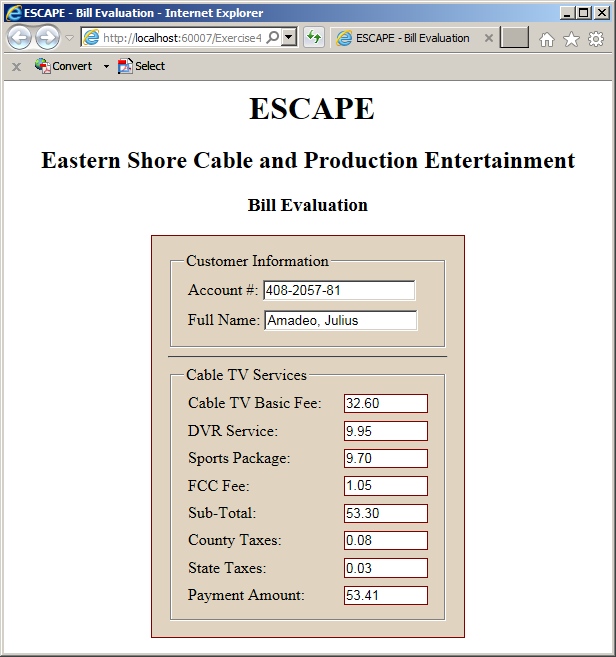
The Window of a Web Page
Introduction
A webpage is an object displays in an application called a browser. A webpage is surrounded by borders. It has a title bar and may contain tabs. It presents a wide area that presents the content aimed at serving the visitor of a website.
To support the window in a browser, the DOM provides an interface named Window. To give you access to that window, a class named window implements that interface.
A Message Box
A message box is one of the types of windows you can display in a browser. To support it, the Window interface provides a method named alert. Its syntax is:
window.alert(message);
To access a property of an object in a webpage, type the name of the object, a period, and the desired property. Here are examples:
This method takes a string as an optional argument.
Loading the Window of a Web Page
When a browser is asked to display a webpage, the browser has to check and/or validate a few things. At one time, if everything is alright, the webpage displays, but just before displaying the webpage, the browser fires an event named load. To use this event, add an attribute named onload to the HTML tag to which you want to apply it.
If you want to do something on the webpage as soon as it displays, apply the onload event to the window object. Usually, you add this event as an attribute to the <BODY> tag of the webpage.
The Location of a Document
Introduction
The Internet is large network of connected computers. The most important aspect of the Internet is that the connected computers hold billions of documents that are of interest to Web visitors. To access one of those documents, a person must use an application such as a browser and provide the address of the document.
The place where the document is stored is called a location. To support the concept of document location, the DOM provides an interface named Location. To let you use that interface, the DOM provides an object named location that implements the Location interface.
To make it easy for you to deal with the location of a document, both the Window and the Document interfaces are equipped with a property named location. This means that when using either the window object or the document object, you can access the location object from them.
The URL of a Document
The most important piece of information about a document on the internet is address, that is, how and where to find the document. To support this aspect, the Location interface is equipped with a property named href:
string = object.href;
object.href = string;
This read-write property, on one hand, allows you to provide the address of a document you want to access. This is done by assigning a string as location to this property.
Data and Time Values in JavaScript
Introduction
To support date and time values, JavaScript provides an object named Date.
Create a Date
To create a date value, declare a variable of type Date. Initialize it with the new operator and this class. The constructor of this class can take three arguments as follows:
var variable = new Date(year, month, day);
The Current Date/Time
If you declare a variable and initialize it with new Date();, the variable automatically assumes the current date and time.
Practical Learning: Ending the Lesson
|
|
||
| Previous | Copyright © 2017-2019, FunctionX | Next |
|
|
||