Introduction to Dipendency Injection

Introduction to Dipendency Injection
Fundamentals of Dipendency Injection
Introduction
As you may know already, sometimes you need to provide a service to a component. The component needs that other object in order to do its job. For this reason, the service that must be provided is referred to as a dependency. AngularJS provides various options to let you specify the dependency of a component.
Dependency injection is the approach you use to specify how a service will be provided to a component (a controller, a service, etc...) You have various options.
 Practical Learning: Introducing Dependencies
body {
    background-color: white;
}

.bold          { font-weight: 600;   }
.ng-model      { width:       90px;  }
.work-contents { margin:      auto;
                 width:       650px; }
.pay-contents  { margin:      auto;
                 width:       525px; }
.large-text    { width:       125px; }
.font { font-family: Georgia, 'Times New Roman', Times, serif; }var appPayroll = angular.module("appPayroll", []);
appPayroll.controller("PayrollController", calculate);
function calculate($scope) {
$scope.totalTime = function (a, b, c, d, e) {
return Number(a || 0) + Number(b || 0) + Number(c || 0) + Number(d || 0) + Number(e || 0);
}
$scope.regularTime = function (a, b, c, d, e) {
var total = Number(a || 0) + Number(b || 0) + Number(c || 0) + Number(d || 0) + Number(e || 0);
if (total <= 40.00)
return total;
else
return 40.00;
}
$scope.overtime = function (a, b, c, d, e) {
var total = Number(a || 0) + Number(b || 0) + Number(c || 0) + Number(d || 0) + Number(e || 0);
if (total <= 40.00)
return 0.00;
else
return total - 40.00;
}
$scope.regularPay = function (a, b, c, d, e, f) {
var regTime = $scope.regularTime(b, c, d, e, f);
return Number(a || 0) * regTime;
}
$scope.overtimePay = function (a, b, c, d, e, f) {
var over = $scope.overtime(b, c, d, e, f);
return Number(a || 0) * over;
}
$scope.weeklyPay = function (x, y) {
return x + y;
}
$scope.totalPay = function (x, y) {
return x + y;
}
}using System.Web.Optimization;
namespace PayrollPreparation5
{
public class BundleConfig
{
// For more information on bundling, visit https://go.microsoft.com/fwlink/?LinkId=301862
public static void RegisterBundles(BundleCollection bundles)
{
bundles.Add(new ScriptBundle("~/bundles/jquery").Include(
"~/Scripts/jquery-{version}.js",
"~/Scripts/angular.js",
"~/Scripts/SalaryController.js"));
bundles.Add(new ScriptBundle("~/bundles/jqueryval").Include(
"~/Scripts/jquery.validate*"));
// Use the development version of Modernizr to develop with and learn from. Then, when you're
// ready for production, use the build tool at https://modernizr.com to pick only the tests you need.
bundles.Add(new ScriptBundle("~/bundles/modernizr").Include(
"~/Scripts/modernizr-*"));
bundles.Add(new ScriptBundle("~/bundles/bootstrap").Include(
"~/Scripts/bootstrap.js"));
bundles.Add(new StyleBundle("~/Content/css").Include(
"~/Content/bootstrap.css",
"~/Content/site.css",
"~/Content/PayrollPreparation.css"));
}
}
}using System.Web.Mvc;
namespace PayrollPreparation5.Controllers
{
public class HomeController : Controller
{
public ActionResult Index()
{
return View();
}
public ActionResult About()
{
ViewBag.Message = "Your application description page.";
return View();
}
public ActionResult Contact()
{
ViewBag.Message = "Your contact page.";
return View();
}
public ActionResult PayrollPreparation()
{
return View();
}
}
}<!DOCTYPE html>
<html>
<head>
<meta charset="utf-8" />
<meta name="viewport" content="width=device-width, initial-scale=1.0">
<title>Fun Department Store :: @ViewBag.Title</title>
@Styles.Render("~/Content/css")
@Scripts.Render("~/bundles/modernizr")
</head>
<body>
<div class="navbar navbar-inverse navbar-fixed-top">
<div class="container">
<div class="navbar-header">
<button type="button" class="navbar-toggle" data-toggle="collapse" data-target=".navbar-collapse">
<span class="icon-bar"></span>
<span class="icon-bar"></span>
<span class="icon-bar"></span>
</button>
@Html.ActionLink("Fun Department Store", "Index", "Home", new { area = "" }, new { @class = "navbar-brand" })
</div>
<div class="navbar-collapse collapse">
<ul class="nav navbar-nav">
<li>@Html.ActionLink("Payroll Evaluation", "PayrollPreparation", "Home")</li>
<li>@Html.ActionLink("About", "About", "Home")</li>
<li>@Html.ActionLink("Contact", "Contact", "Home")</li>
</ul>
</div>
</div>
</div>
<div class="container body-content">
@RenderBody()
<hr />
<footer>
<p class="text-center common-font">© @DateTime.Now.Year - Fun Department Store (FDS)</p>
</footer>
</div>
@Scripts.Render("~/bundles/jquery")
@Scripts.Render("~/bundles/bootstrap")
@RenderSection("scripts", required: false)
</body>
</html>@{
ViewBag.Title = "Payroll Preparation";
}
@Scripts.Render("~/bundles/jquery")
<div ng-app="appPayroll">
<h2 class="font text-center bold">Payroll Preparation</h2>
<hr />
<form name="PayrollEvaluation" method="post" ng-controller="PayrollController">
<div class="work-contents font">
<table>
<tr>
<td class="bold large-text">Hourly Salary:</td>
<td colspan="5"><input type="text" class="form-control ng-model" ng-model="hourlySalary" /></td>
</tr>
</table>
<table class="table table-striped">
<tr>
<td class="bold">Time Worked</td>
<td class="bold text-center">Monday</td>
<td class="bold text-center">Tuesday</td>
<td class="bold text-center">Wednesday</td>
<td class="bold text-center">Thursday</td>
<td class="bold text-center">Friday</td>
</tr>
<tr>
<td class="bold">Week 1:</td>
<td><input type="number" class="form-control ng-model" ng-model="Monday1" /></td>
<td><input type="number" class="form-control ng-model" ng-model="Tuesday1" /></td>
<td><input type="number" class="form-control ng-model" ng-model="Wednesday1" /></td>
<td><input type="number" class="form-control ng-model" ng-model="Thursday1" /></td>
<td><input type="number" class="form-control ng-model" ng-model="Friday1" /></td>
</tr>
<tr>
<td class="bold">Week 1:</td>
<td><input type="number" class="form-control ng-model" ng-model="Monday2" /></td>
<td><input type="number" class="form-control ng-model" ng-model="Tuesday2" /></td>
<td><input type="number" class="form-control ng-model" ng-model="Wednesday2" /></td>
<td><input type="number" class="form-control ng-model" ng-model="Thursday2" /></td>
<td><input type="number" class="form-control ng-model" ng-model="Friday2" /></td>
</tr>
</table>
</div>
<div class="pay-contents font">
<table class="table table-striped">
<tr>
<td> </td>
<td class="text-center bold" colspan="2">Week 1</td>
<td class="text-center bold" colspan="2">Week 2</td>
</tr>
<tr>
<td> </td>
<td class="text-center bold">Time</td>
<td class="text-center bold">Pay</td>
<td class="text-center bold">Time</td>
<td class="text-center bold">Pay</td>
</tr>
<tr>
<td class="bold">Regular:</td>
<td class="text-center bold">{{regularTime(Monday1, Tuesday1, Wednesday1, Thursday1, Friday1) | number : 2}}</td>
<td class="text-center bold">{{regularPay(hourlySalary, Monday1, Tuesday1, Wednesday1, Thursday1, Friday1) | number : 2}}</td>
<td class="text-center bold">{{regularTime(Monday2, Tuesday2, Wednesday2, Thursday2, Friday2) | number : 2}}</td>
<td class="text-center bold">{{regularPay(hourlySalary, Monday2, Tuesday2, Wednesday2, Thursday2, Friday2) | number : 2}}</td>
</tr>
<tr>
<td class="bold">Overtime:</td>
<td class="text-center bold">{{overtime(Monday1, Tuesday1, Wednesday1, Thursday1, Friday1) | number : 2}}</td>
<td class="text-center bold">{{overtimePay(hourlySalary, Monday1, Tuesday1, Wednesday1, Thursday1, Friday1) | number : 2}}</td>
<td class="text-center bold">{{overtime(Monday2, Tuesday2, Wednesday2, Thursday2, Friday2) | number : 2}}</td>
<td class="text-center bold">{{overtimePay(hourlySalary, Monday2, Tuesday2, Wednesday2, Thursday2, Friday2) | number : 2}}</td>
</tr>
<tr>
<td class="bold">Biweekly Summary:</td>
<td class="text-center bold">{{totalTime(Monday1, Tuesday1, Wednesday1, Thursday1, Friday1) | number : 2}}</td>
<td class="text-center bold">{{weeklyPay(regularPay(hourlySalary, Monday1, Tuesday1, Wednesday1, Thursday1, Friday1), overtimePay(hourlySalary, Monday1, Tuesday1, Wednesday1, Thursday1, Friday1)) | number : 2}}</td>
<td class="text-center bold">{{totalTime(Monday2, Tuesday2, Wednesday2, Thursday2, Friday2) | number : 2}}</td>
<td class="text-center bold">{{weeklyPay(regularPay(hourlySalary, Monday2, Tuesday2, Wednesday2, Thursday2, Friday2), overtimePay(hourlySalary, Monday2, Tuesday2, Wednesday2, Thursday2, Friday2)) | number : 2}}</td>
</tr>
<tr>
<td> </td>
<td> </td>
<td> </td>
<td class="bold">Total Pay:</td>
<td class="text-center bold">{{totalPay((weeklyPay(regularPay(hourlySalary, Monday1, Tuesday1, Wednesday1, Thursday1, Friday1), overtimePay(hourlySalary, Monday1, Tuesday1, Wednesday1, Thursday1, Friday1))),(weeklyPay(regularPay(hourlySalary, Monday2, Tuesday2, Wednesday2, Thursday2, Friday2), overtimePay(hourlySalary, Monday2, Tuesday2, Wednesday2, Thursday2, Friday2)))) | number : 2}}</td>
</tr>
</table>
</div>
</form>
</div>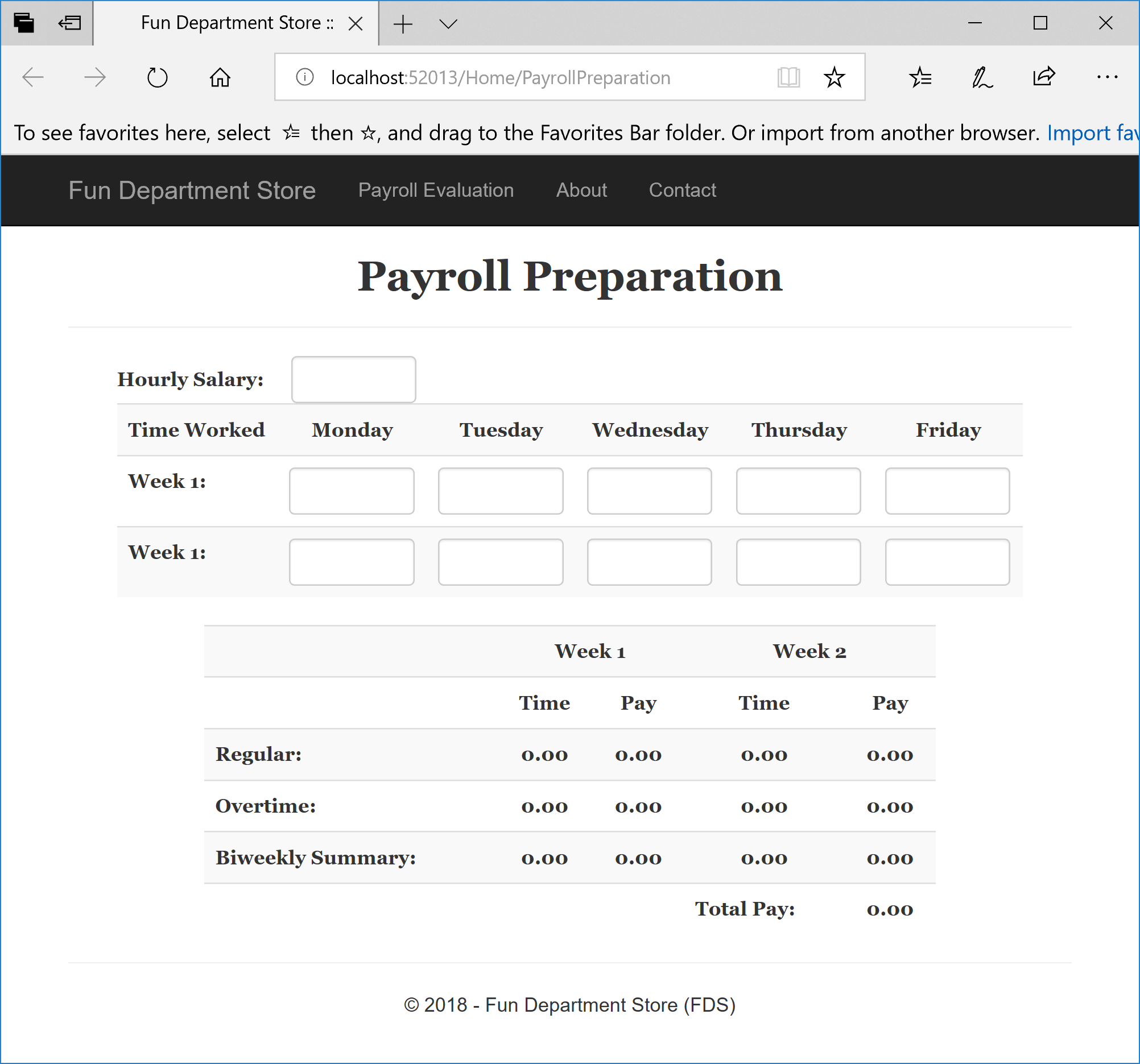
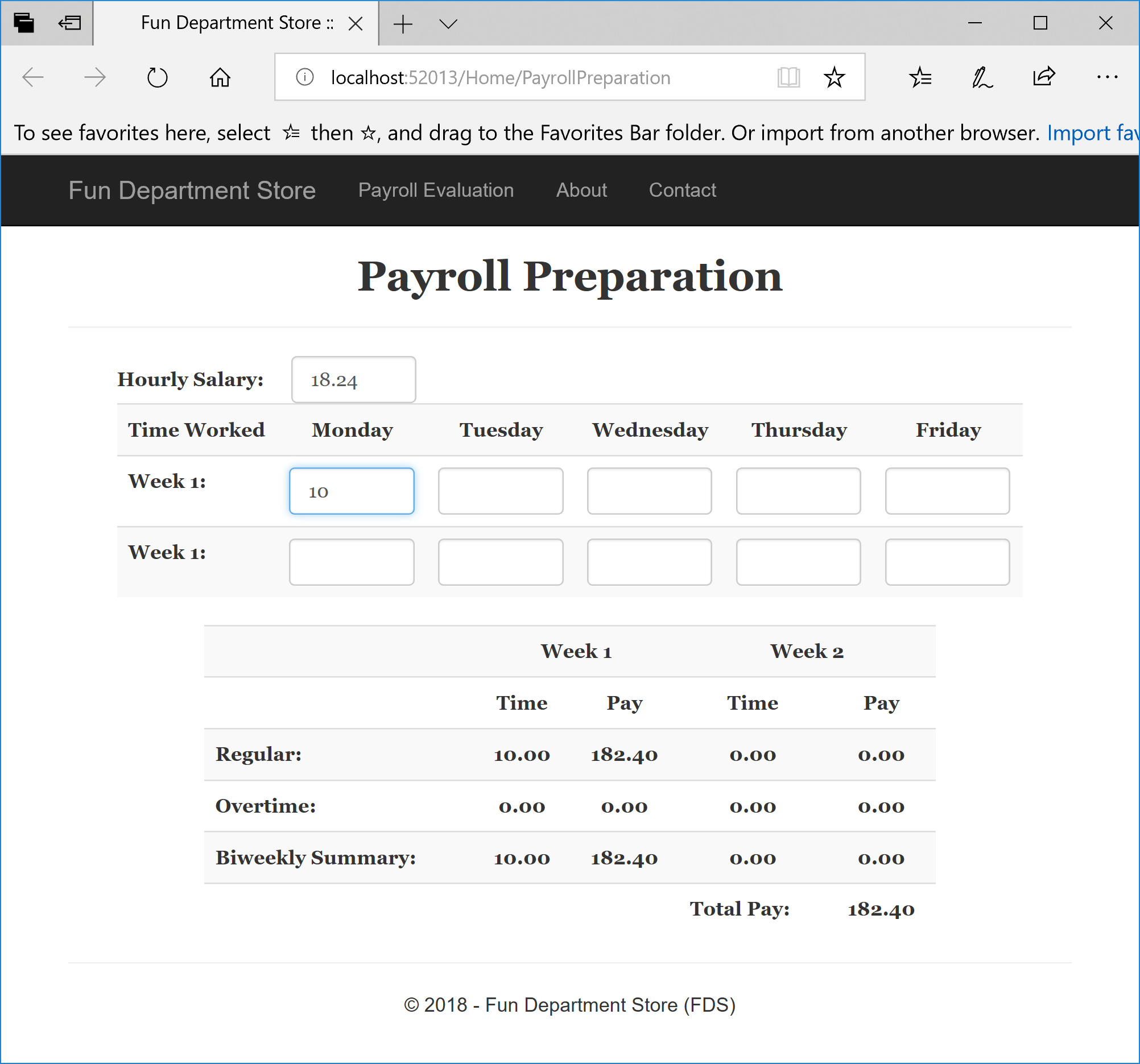
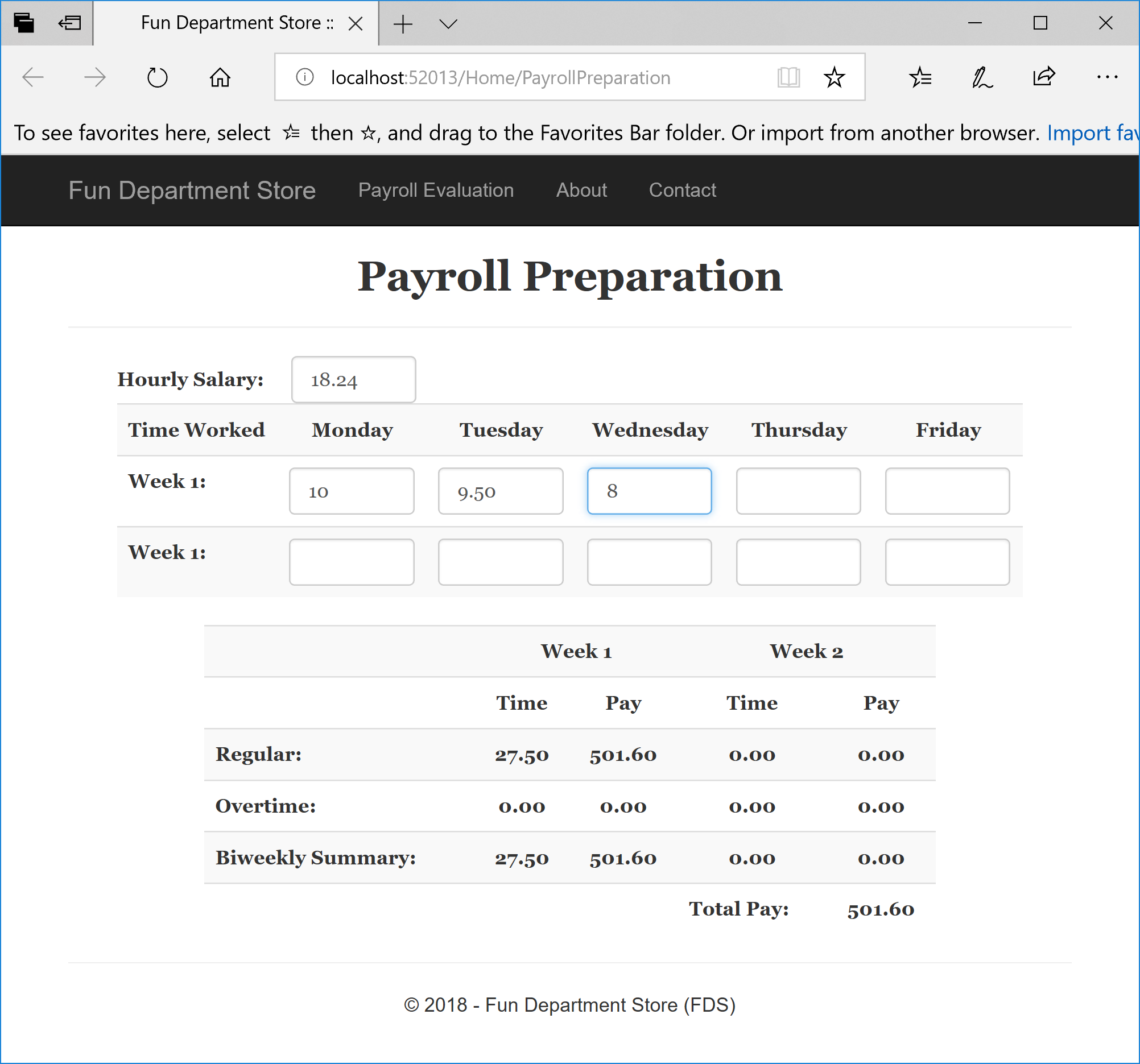
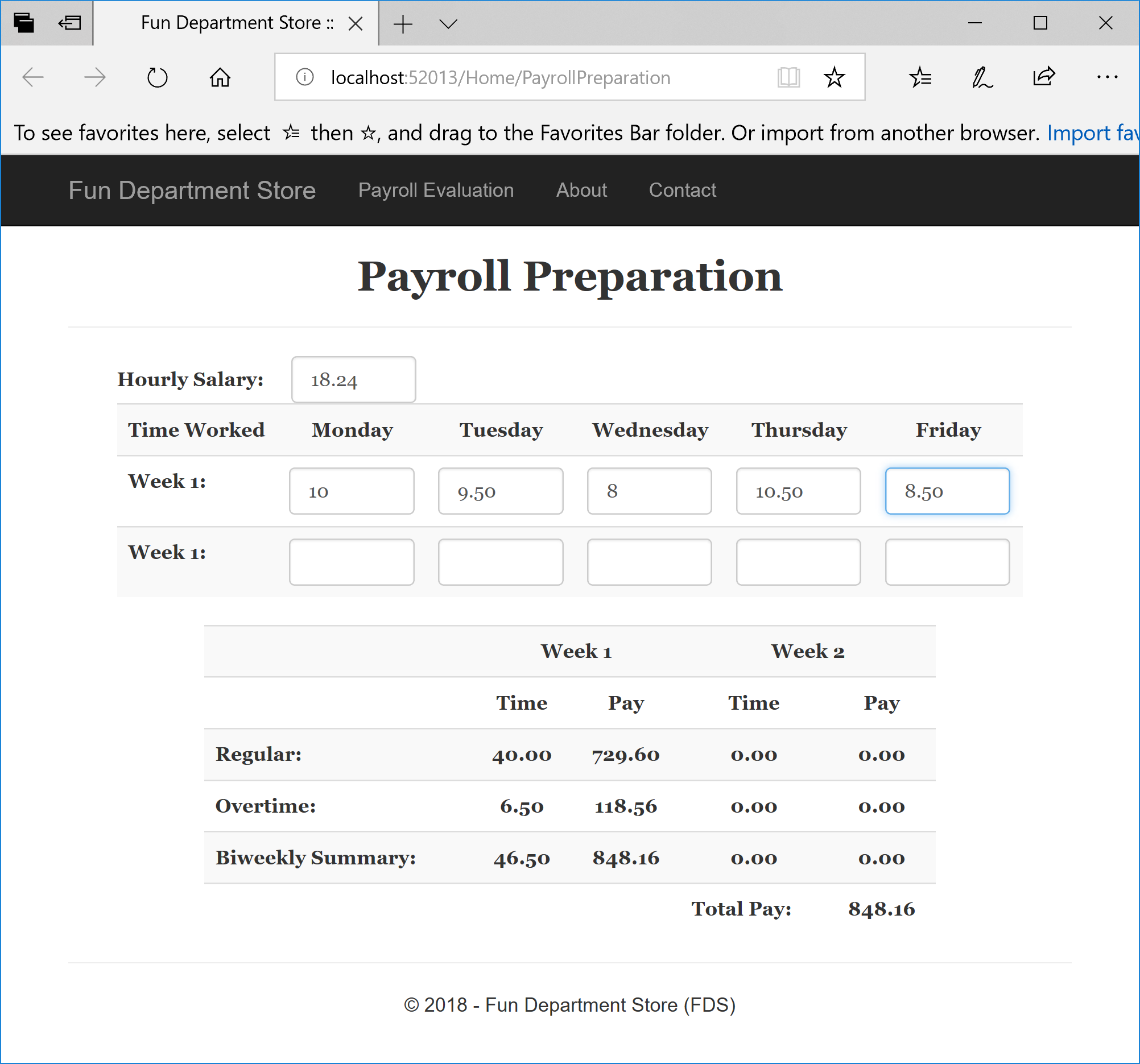
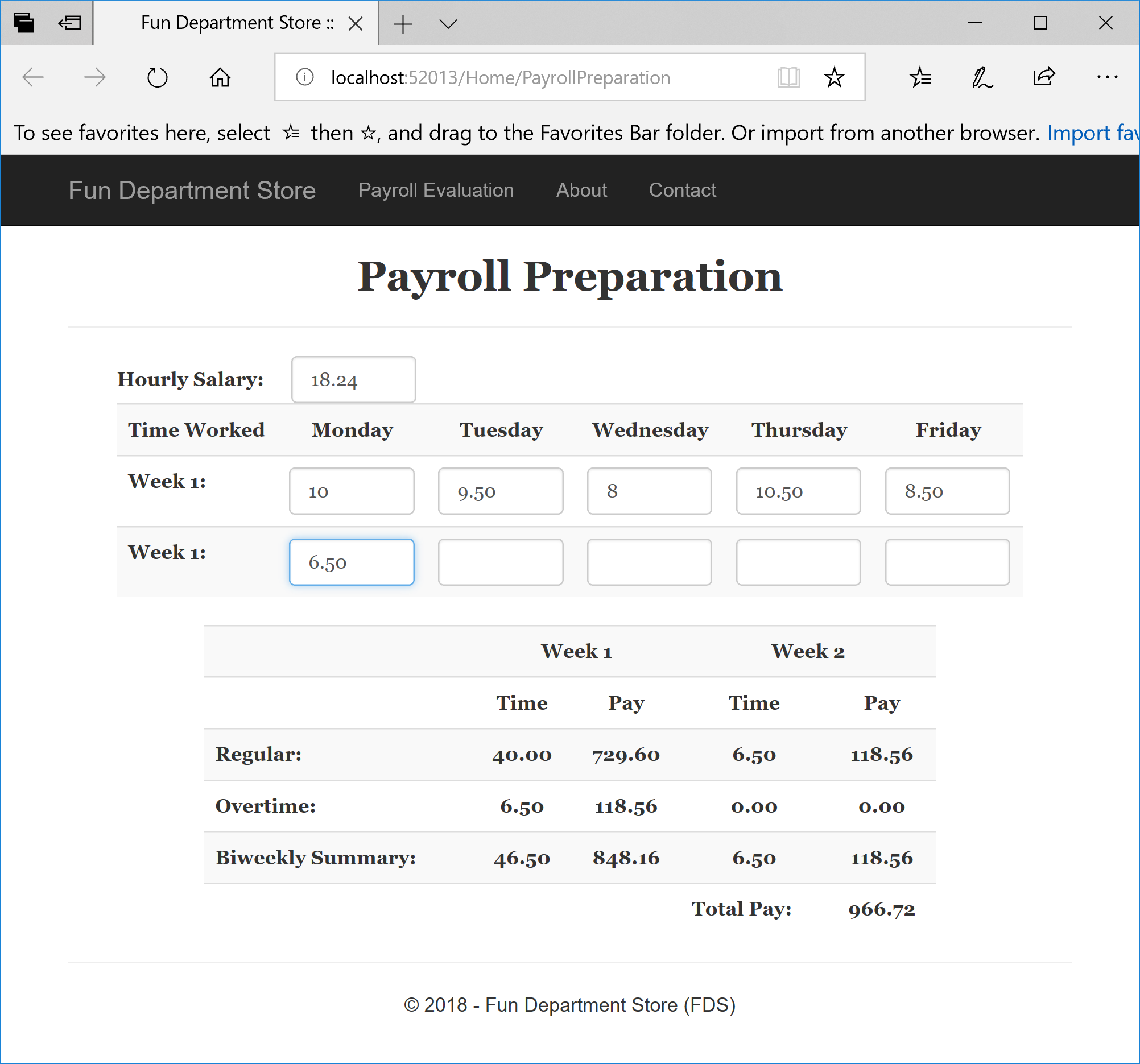
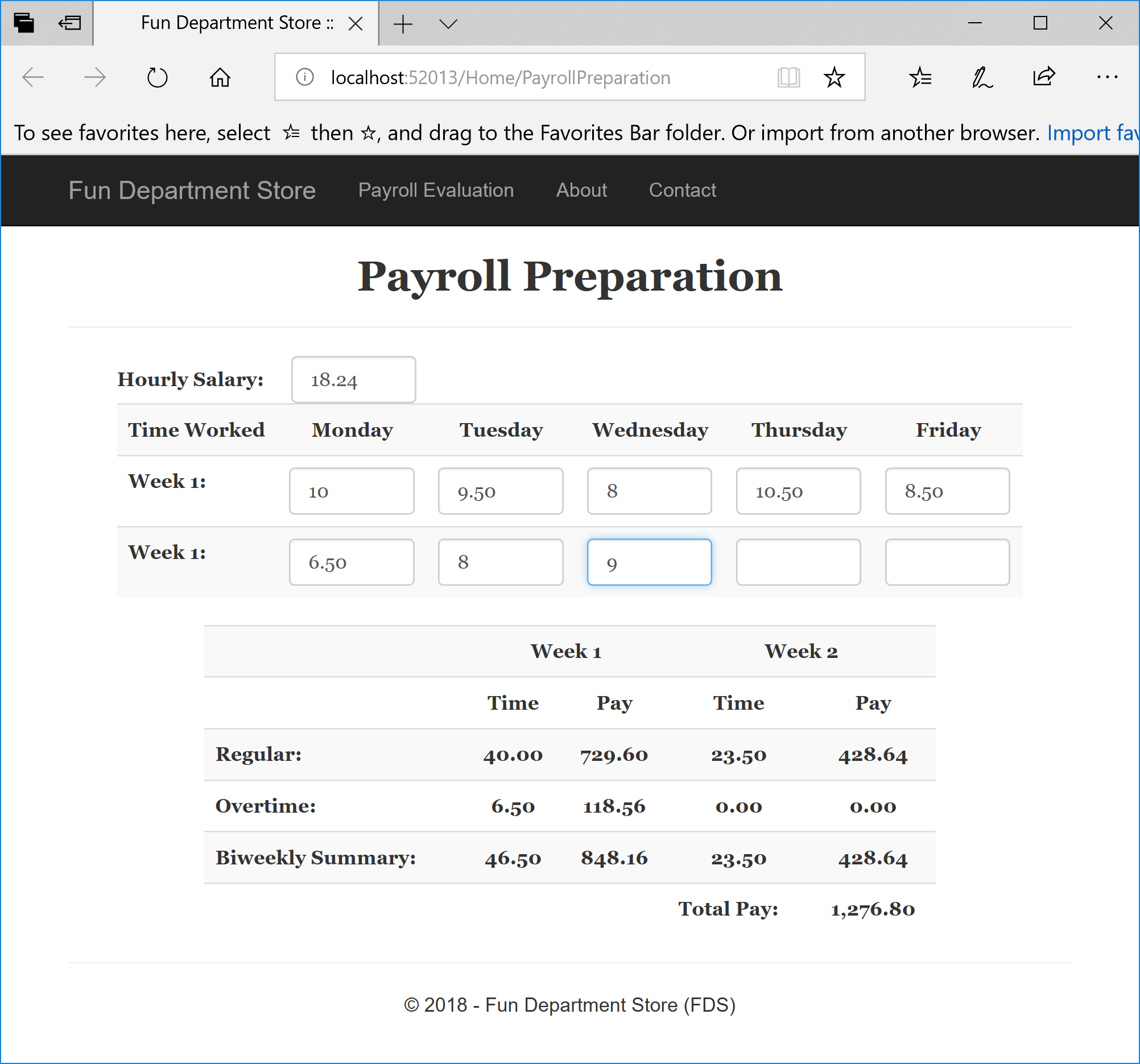
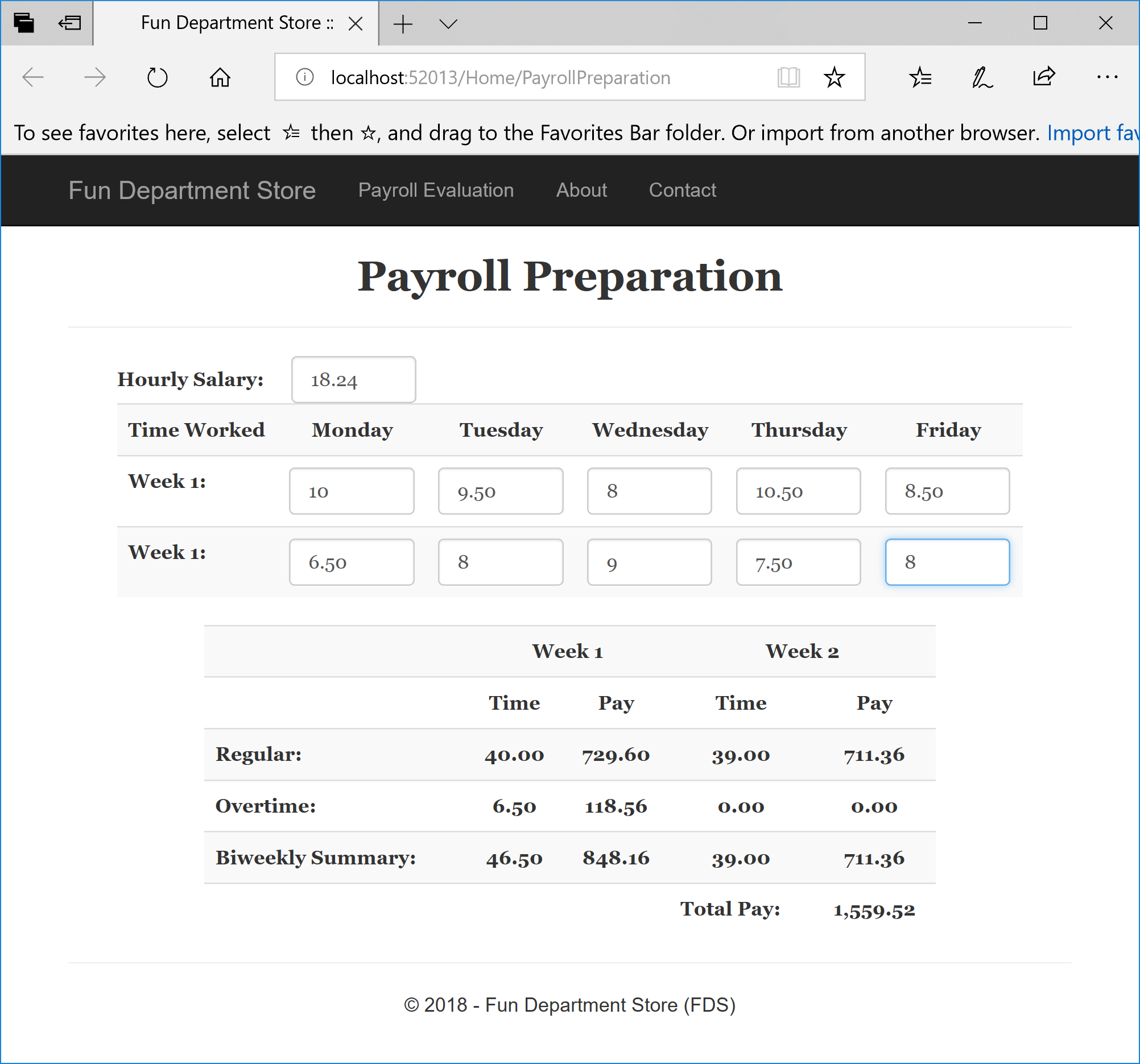
Hourly Salary: 18.24
Week 1
    Monday:        10
    Tuesday:	    9.50
    Wednesday:      8
    Thursday:	   10.50
    Friday:	        8.50
Week 2
    Monday:        6.50
    Tuesday:	   8
    Wednesday:     9
    Thursday:	   7.50
    Friday:	       8
function calculate() {
    this.taxFilingsStatus = [ 'Single', 'Married' ];

    var taxableSalary = 0.00;
    var allowanceRate = 77.90;

    this.withheldAllowances = function (exmpt) { return allowanceRate * exmpt; }
    this.taxedAmount = function (sal, exmpt) { return sal - (allowanceRate * exmpt); };

    this.taxesBasedOnStatus = function (sal, status, exmpt) {
        var withheldAmount = 0;
        var taxableSalary = sal - (allowanceRate * exmpt);

        switch (status) {
            case 'Single':
                if (taxableSalary <= 44) {
                    withheldAmount = 0;
                }
                else if ((taxableSalary > 44) && (taxableSalary <= 224)) {
                    withheldAmount = (taxableSalary - 44) * 10 / 100;
                }
                else if ((taxableSalary > 224) && (taxableSalary <= 774)) {
                    withheldAmount = 18.00 + ((taxableSalary - 224) * 15 / 100);
                }
                else if ((taxableSalary > 774) && (taxableSalary <= 1812)) {
                    withheldAmount = 100.50 + ((taxableSalary - 774) * 25 / 100);
                }
                else if ((taxableSalary > 1812) && (taxableSalary <= 3730)) {
                    withheldAmount = 360.00 + ((taxableSalary - 1812) * 28 / 100);
                }
                else if ((taxableSalary > 3730) && (taxableSalary <= 8058)) {
                    withheldAmount = 897.04 + ((taxableSalary - 3730) * 33 / 100);
                }
                else if ((taxableSalary > 8058) && (taxableSalary <= 8090)) {
                    withheldAmount = 2325.28 + ((taxableSalary - 8058) * 35 / 100);
                }
                else { // if (taxableSalary > 8090)
                    withheldAmount = 2336.48 + ((taxableSalary - 8090) * 39.60 / 100);
                }

                break;

            case 'Married':
                if (taxableSalary <= 166) {
                    withheldAmount = 0;
                }
                else if ((taxableSalary > 166) && (taxableSalary <= 525)) {
                    withheldAmount = (taxableSalary - 166) * 10 / 100;
                }
                else if ((taxableSalary > 525) && (taxableSalary <= 1626)) {
                    withheldAmount = 35.90 + ((taxableSalary - 525) * 15 / 100);
                }
                else if ((taxableSalary > 1626) && (taxableSalary <= 3111)) {
                    withheldAmount = 201.05 + ((taxableSalary - 1626) * 25 / 100);
                }
                else if ((taxableSalary > 3111) && (taxableSalary <= 4654)) {
                    withheldAmount = 572.30 + ((taxableSalary - 3111) * 28 / 100);
                }
                else if ((taxableSalary > 4654) && (taxableSalary <= 8180)) {
                    withheldAmount = 1004.34 + ((taxableSalary - 4654) * 33 / 100);
                }
                else if ((taxableSalary > 8160) && (taxableSalary <= 9218)) {
                    withheldAmount = 2167.92 + ((taxableSalary - 8180) * 35 / 100);
                }
                else { // if (taxableSalary > 9218)
                    withheldAmount = 2531.22 + ((taxableSalary - 9218) * 39.60 / 100);
                }
                break;

            default:
                withheldAmount = 0.00;
                break;
        }

        return withheldAmount;
    }
}

appPayroll.service('taxesService', calculate);
Passing Objects to a Controller or Service
The classic way to pass arguments to a function or method is to include the value(s) or object(s) in the parentheses of the function. Here is an example:
function process(algebra) {
    this.result = algebra.multiply(248)
}
This concept also applies to the way you pass a component argument to another component (service, controller, etc). Here is an example:
<!DOCTYPE html>
<html>
<head>
<meta charset="utf-8" />
<title>Exercise</title>
<script src="Scripts/angular.min.js"></script>
</head>
<body>
<script type="text/javascript">
    var app = angular.module("appExercise", []);

    function calculate() {
        this.multiply = function (a) {
            return a * 2;
        }
    }
    app.service("algebra", calculate);

    function process(algebra) {
        this.result = algebra.multiply(248)
    }
    app.controller("ExerciseController", process);
</script>

<div ng-app="appExercise">
    <p ng-controller="ExerciseController as ec">248 * 2 = {{ec.result}}</p></div>
</body>
</html>
When it comes to a component that is created from a function, remember that you can create their constructor as the second argument of the component. Here is an example:
var app = angular.module("appExercise", []);

function calculate() {
    this.multiply = function (a) {
        return a * 2;
    }
}
app.service("algebra", calculate);

app.controller("ExerciseController", function (algebra) {
        this.result = algebra.multiply(248)
});
In both cases. you can pass as many arguments as you judge them necessary. In fact, a constructor of a controller or service can take more than one service as arguments. Here is an example:
var app = angular.module("appExercise", []);

function calculate() {
    this.multiply = function (a) {
        return a * 2;
    }
}
app.service("algebra", calculate);

app.controller("ExerciseController", function ($scope, algebra) {
        this.result = algebra.multiply(248)
});
Practical Learning: Passing Objects to a Controller or Service
function processPayroll(taxesService) {
    this.filingStatus = taxesService.taxFilingsStatus;

    this.proceed = function () {
        var dependents = Number(this.exemptions || 0);
        var salary = Number(this.grossSalary || 0);

        this.allowances = taxesService.withheldAllowances(dependents)
        this.taxableGrossWages = taxesService.taxedAmount(salary, dependents);
        this.federalIncomeTax = taxesService.taxesBasedOnStatus(salary, this.filingsStatus, dependents);
    }
}

appPayroll.controller("TaxesController", processPayroll);using System.Web.Optimization;
namespace PayrollPreparation5
{
public class BundleConfig
{
// For more information on bundling, visit https://go.microsoft.com/fwlink/?LinkId=301862
public static void RegisterBundles(BundleCollection bundles)
{
bundles.Add(new ScriptBundle("~/bundles/jquery").Include(
"~/Scripts/jquery-{version}.js",
"~/Scripts/angular.js",
"~/Scripts/SalaryController.js",
"~/Scripts/TaxesController.js",
"~/Scripts/TaxesWithholdingService.js"));
bundles.Add(new ScriptBundle("~/bundles/jqueryval").Include(
"~/Scripts/jquery.validate*"));
// Use the development version of Modernizr to develop with and learn from. Then, when you're
// ready for production, use the build tool at https://modernizr.com to pick only the tests you need.
bundles.Add(new ScriptBundle("~/bundles/modernizr").Include(
"~/Scripts/modernizr-*"));
bundles.Add(new ScriptBundle("~/bundles/bootstrap").Include(
"~/Scripts/bootstrap.js"));
bundles.Add(new StyleBundle("~/Content/css").Include(
"~/Content/bootstrap.css",
"~/Content/site.css",
"~/Content/PayrollPreparation.css"));
}
}
}@{
ViewBag.Title = "Payroll Preparation";
}
@Scripts.Render("~/bundles/jquery")
<div ng-app="appPayroll">
<h2 class="font text-center bold">Payroll Preparation</h2>
<hr />
<form name="PayrollEvaluation" method="post" ng-controller="PayrollController">
<div class="work-contents font">
<table>
<tr>
<td class="bold large-text">Hourly Salary:</td>
<td colspan="5"><input type="text" class="form-control ng-model" ng-model="hourlySalary" /></td>
</tr>
</table>
<table class="table table-striped">
<tr>
<td class="bold">Time Worked</td>
<td class="bold text-center">Monday</td>
<td class="bold text-center">Tuesday</td>
<td class="bold text-center">Wednesday</td>
<td class="bold text-center">Thursday</td>
<td class="bold text-center">Friday</td>
</tr>
<tr>
<td class="bold">Week 1:</td>
<td><input type="number" class="form-control ng-model" ng-model="Monday1" /></td>
<td><input type="number" class="form-control ng-model" ng-model="Tuesday1" /></td>
<td><input type="number" class="form-control ng-model" ng-model="Wednesday1" /></td>
<td><input type="number" class="form-control ng-model" ng-model="Thursday1" /></td>
<td><input type="number" class="form-control ng-model" ng-model="Friday1" /></td>
</tr>
<tr>
<td class="bold">Week 1:</td>
<td><input type="number" class="form-control ng-model" ng-model="Monday2" /></td>
<td><input type="number" class="form-control ng-model" ng-model="Tuesday2" /></td>
<td><input type="number" class="form-control ng-model" ng-model="Wednesday2" /></td>
<td><input type="number" class="form-control ng-model" ng-model="Thursday2" /></td>
<td><input type="number" class="form-control ng-model" ng-model="Friday2" /></td>
</tr>
</table>
</div>
<div class="pay-contents font">
<table class="table table-striped">
<tr>
<td> </td>
<td class="text-center bold" colspan="2">Week 1</td>
<td class="text-center bold" colspan="2">Week 2</td>
</tr>
<tr>
<td> </td>
<td class="text-center bold">Time</td>
<td class="text-center bold">Pay</td>
<td class="text-center bold">Time</td>
<td class="text-center bold">Pay</td>
</tr>
<tr>
<td class="bold">Regular:</td>
<td class="text-center bold">{{regularTime(Monday1, Tuesday1, Wednesday1, Thursday1, Friday1) | number : 2}}</td>
<td class="text-center bold">{{regularPay(hourlySalary, Monday1, Tuesday1, Wednesday1, Thursday1, Friday1) | number : 2}}</td>
<td class="text-center bold">{{regularTime(Monday2, Tuesday2, Wednesday2, Thursday2, Friday2) | number : 2}}</td>
<td class="text-center bold">{{regularPay(hourlySalary, Monday2, Tuesday2, Wednesday2, Thursday2, Friday2) | number : 2}}</td>
</tr>
<tr>
<td class="bold">Overtime:</td>
<td class="text-center bold">{{overtime(Monday1, Tuesday1, Wednesday1, Thursday1, Friday1) | number : 2}}</td>
<td class="text-center bold">{{overtimePay(hourlySalary, Monday1, Tuesday1, Wednesday1, Thursday1, Friday1) | number : 2}}</td>
<td class="text-center bold">{{overtime(Monday2, Tuesday2, Wednesday2, Thursday2, Friday2) | number : 2}}</td>
<td class="text-center bold">{{overtimePay(hourlySalary, Monday2, Tuesday2, Wednesday2, Thursday2, Friday2) | number : 2}}</td>
</tr>
<tr>
<td class="bold">Biweekly Summary:</td>
<td class="text-center bold">{{totalTime(Monday1, Tuesday1, Wednesday1, Thursday1, Friday1) | number : 2}}</td>
<td class="text-center bold">{{weeklyPay(regularPay(hourlySalary, Monday1, Tuesday1, Wednesday1, Thursday1, Friday1), overtimePay(hourlySalary, Monday1, Tuesday1, Wednesday1, Thursday1, Friday1)) | number : 2}}</td>
<td class="text-center bold">{{totalTime(Monday2, Tuesday2, Wednesday2, Thursday2, Friday2) | number : 2}}</td>
<td class="text-center bold">{{weeklyPay(regularPay(hourlySalary, Monday2, Tuesday2, Wednesday2, Thursday2, Friday2), overtimePay(hourlySalary, Monday2, Tuesday2, Wednesday2, Thursday2, Friday2)) | number : 2}}</td>
</tr>
<tr>
<td> </td>
<td> </td>
<td> </td>
<td class="bold">Total Pay:</td>
<td class="text-center bold">{{totalPay((weeklyPay(regularPay(hourlySalary, Monday1, Tuesday1, Wednesday1, Thursday1, Friday1), overtimePay(hourlySalary, Monday1, Tuesday1, Wednesday1, Thursday1, Friday1))),(weeklyPay(regularPay(hourlySalary, Monday2, Tuesday2, Wednesday2, Thursday2, Friday2), overtimePay(hourlySalary, Monday2, Tuesday2, Wednesday2, Thursday2, Friday2)))) | number : 2}}</td>
</tr>
</table>
</div>
</form>
<hr />
<div class="pay-contents">
<form name="TaxesEvaluation" method="post" ng-controller="TaxesController as tc">
<table class="table table-striped">
<tr>
<td class="left-col">Gross Salary:</td>
<td><input type="number" class="form-control" ng-model="tc.grossSalary" ng-change="tc.proceed()" /></td>
</tr>
<tr>
<td>Filing as:</td>
<td>
<select class="form-control" ng-model="tc.filingsStatus" ng-change="tc.proceed()">
<option ng-repeat="fs in tc.filingStatus">{{fs}}</option>
</select>
</td>
</tr>
<tr>
<td>Exemptions:</td>
<td><input type="number" class="form-control" ng-model="tc.exemptions" ng-change="tc.proceed()" /></td>
</tr>
<tr>
<td>Allowances:</td>
<td>{{tc.allowances | number: 2}}</td>
</tr>
<tr>
<td>Taxable Gross Wages:</td>
<td>{{tc.taxableGrossWages | number: 2}}</td>
</tr>
<tr>
<td>Federal Income Tax:</td>
<td>{{tc.federalIncomeTax | number: 2}}</td>
</tr>
</table>
</form>
</div>
</div>|
|
||
| Previous | Copyright © 2018-2022, FunctionX | Next |
|
|
||