Options on Conditional Statements

Options on Conditional Statements
When Switching some Cases
We have see various ways to use the IF...ELSE IF ... ELSE IF and ELSE conditional statement to validate some conditions on a value. When you use the IF...ELSE IF ... ELSE IF and ELSE, each condition must be evaluated. As an alternative, Transact-SQL provides an operator named CASE. It allows you to create a section with one or more condition but only the necessary condition would be considered. The formula to use the CASE condition is:
CASE expression
    WHEN value1 THEN result
    WHEN value2 THEN result
    . . .
    WHEN value_n THEN result
END
Start with the CASE keyword. Add a line below it with the END keyword. The section between the CASE line and the END line is the body of the Case condition. After the CASE keyword, provde the value that will be evaluated. In some cases, that value can be the name of a variable. In this case, you can first declare a variable. At the time you are using that variable in the CASE condition, make sure that variable has a value. This could be done as follows:
DECLARE @number INT = 248;

CASE @number

END
In the body of the CASE condition, you can list the possible conditions that the expression can fulfill. To create each condition, start it with a keyword named WHEN. Type that word followed by a value that the expression may have. To indicate what to do in case the value if valid, type a keyword named THEN followed by what to do. The WHEN...THEN statement must not end with a semicolon. Here is an example:
DECLARE @number INT = 248;

CASE @number
WHEN 248 THEN N'That number is correct.'
END
The above code would not do anything (in fact, it would produce an error). You must indicate how the result would be used. You have many options. As one option, you may way to display the value. As seen in previous lessons, you can use SELECT or PRINT. To use one of them, you can write them before the CASE statement. Here is an example:
DECLARE @number INT = 248;

PRINT
CASE @number
WHEN 248 THEN N'That number is correct.'
END
This would produce:
That number is correct.
As another option, you can get the value produced by a CASE operation and store that value in a variable you should have previously declared. You can then use that variable any way you want. Here is an example:
DECLARE @number INT = 248;
DECLARE @conclusion NVARCHAR(100);

SET @conclusion =
CASE @number
WHEN 248 THEN N'That number is correct.'
END

PRINT @conclusion
 Practical Learning: Introducing Conditional Statements
Indentation
SQL is not an indentation-based language (like F#, Python, etc); but to make your code easy to humanly read, you should indent your code as much as possible. This is very relevant when creating a CASE statement. As you may know, indentation is done by pushing a line of code 4 characters to the right. Here is an example:
DECLARE @number INT = 248;

PRINT
CASE @number
    WHEN 248 THEN N'That number is correct.'
END
If the CASE section provides its result to a previous item such as a variable or PRINT/SELECT, you can indent the whole CASE section. Here is an example:
DECLARE @number INT = 248,
        @conclusion NVARCHAR(100);

SET @conclusion =
    CASE @number
        WHEN 248 THEN N'That number is correct.'
    END

PRINT @conclusion
Considering many Cases
In the above code, we considered only one possibility. In most cases, you will want to address many possible values that the variable could hold. To do that, create a WHEN section for each possible value. Here is an example:
DECLARE @grossSalary DECIMAL(10, 2) = 748.75,
        @incomeTax DECIMAL(10, 2);

PRINT N'Frequency by which the payroll is processed:';
PRINT N'1 - Weekly';
PRINT N'2 - Biweekly';
PRINT N'3 - Semimonthly';
PRINT N'4 - Monthly';

DECLARE @frequency INT = 2;

SET @incomeTax =
    CASE @frequency
        WHEN 1 THEN 271.08 + (@grossSalary * 24 / 100)
        WHEN 2 THEN 541.82 + (@grossSalary * 24 / 100)
        WHEN 3 THEN 587.12 + (@grossSalary * 24 / 100)
        WHEN 4 THEN 1174.12 + (@grossSalary * 24 / 100)
    END

DECLARE @strGrossSalary NVARCHAR(10) = @grossSalary
DECLARE @strIncomeTax NVARCHAR(10) = @incomeTax

PRINT N'============================================';
PRINT N'Payroll Evaluation';
PRINT N'--------------------------------------------';
PRINT N'Gross Salary: ' + @strGrossSalary;
PRINT N'Income Tax:   ' + @strIncomeTax;
PRINT N'============================================';
This would produce:
Frequency by which the payroll is processed:
1 - Weekly
2 - Biweekly
3 - Semimonthly
4 - Monthly
============================================
Payroll Evaluation
--------------------------------------------
Gross Salary: 748.75
Income Tax:   721.52
============================================
By the way, in the above code, we provide the list of possibilities in ascending order. This is not required. Simply create each WHEN section anywhere in the CASE body. Here is an example:
DECLARE @grossSalary DECIMAL(10, 2) = 748.75,
        @incomeTax DECIMAL(10, 2);

PRINT N'Frequency by which the payroll is processed:';
PRINT N'1 - Weekly';
PRINT N'2 - Biweekly';
PRINT N'3 - Semimonthly';
PRINT N'4 - Monthly';

DECLARE @frequency INT = 4;

SET @incomeTax =
    CASE @frequency
        WHEN 2 THEN 541.82 + (@grossSalary * 24 / 100)
        WHEN 4 THEN 1174.12 + (@grossSalary * 24 / 100)
        WHEN 1 THEN 271.08 + (@grossSalary * 24 / 100)
        WHEN 3 THEN 587.12 + (@grossSalary * 24 / 100)
    END

DECLARE @strGrossSalary NVARCHAR(10) = @grossSalary
DECLARE @strIncomeTax NVARCHAR(10) = @incomeTax

PRINT N'============================================';
PRINT N'Payroll Evaluation';
PRINT N'--------------------------------------------';
PRINT N'Gross Salary: ' + @strGrossSalary;
PRINT N'Income Tax:   ' + @strIncomeTax;
PRINT N'============================================';
This would produce:
Frequency by which the payroll is processed:
1 - Weekly
2 - Biweekly
3 - Semimonthly
4 - Monthly
============================================
Payroll Evaluation
--------------------------------------------
Gross Salary: 748.75
Income Tax:   1353.82
============================================
What CASE...ELSE?
In most cases, you may know the only values you want to consider for a CASE statement. If you use a value that no WHEN statement can address, the result would be NULL. Here is an example:
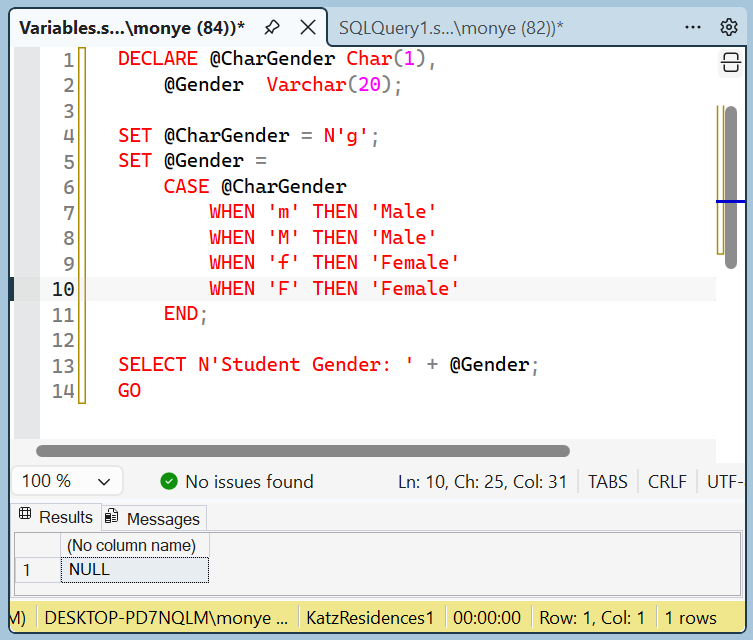
This means that, in some other cases, an unpredictable value may be considered. To assist you with this, Transact-SQL provides a keyword named ELSE. It can be used as one of the possibilities of CASE statement. In this case, the formula of a CASE statement becomes:
CASE expression
    WHEN value1 THEN result
    WHEN value2 THEN result
    WHEN value_n THEN result

    ELSE alternative
END
The ELSE statement must be created after the WHEN...THEN section. This means that it must appear as the last option. As a result, the ELSE statement is used when none of the values of the WHEN statements fits. Here is an example:
DECLARE @CharGender Char(1),
	@Gender  Varchar(20);
SET @CharGender = N'g';
SET @Gender =
    CASE @CharGender
        WHEN 'm' THEN 'Male'
        WHEN 'M' THEN 'Male'
        WHEN 'f' THEN 'Female'
        WHEN 'F' THEN 'Female'
        ELSE 'Unknown'
    END;

SELECT N'Student Gender: ' + @Gender;
GO
This would produce:
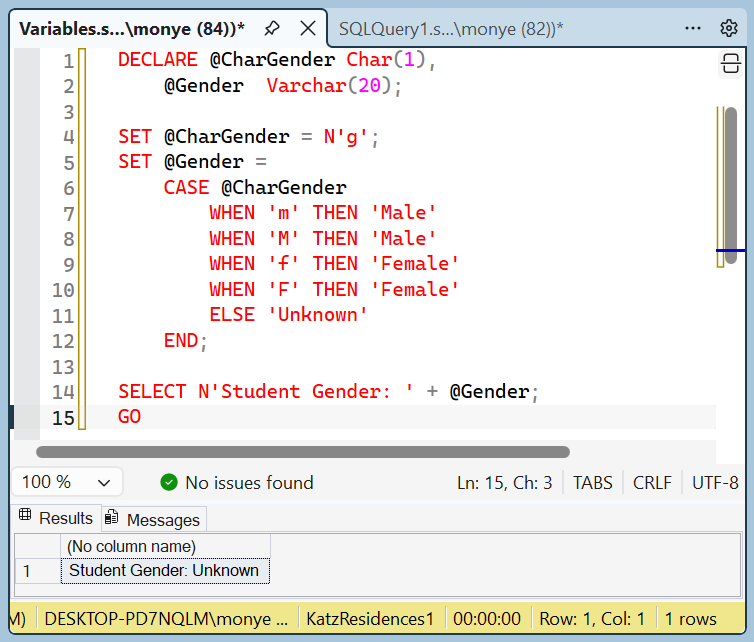
This means that it is a valuable safeguard to always include an ELSE sub-statement in a CASE statement.
A Case with Conditional Operators
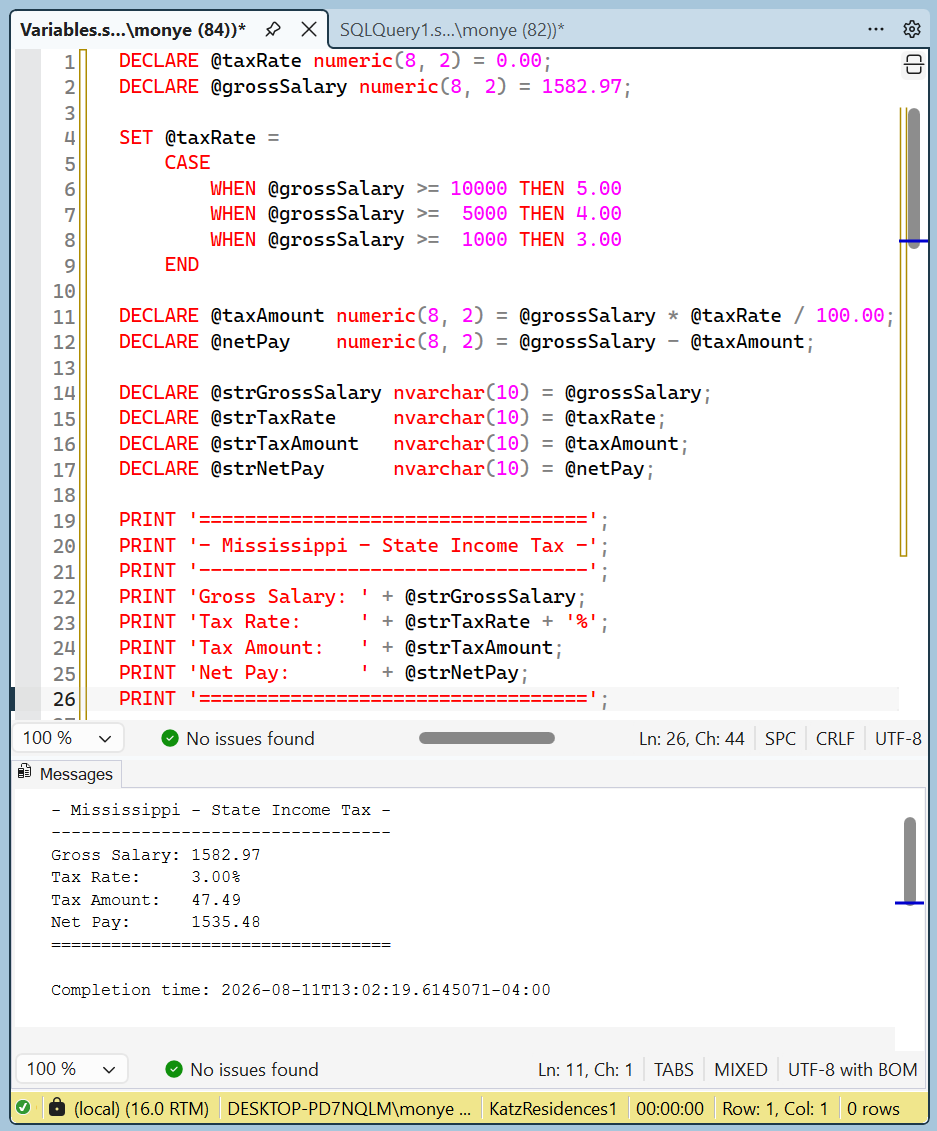
So far, we considered only some constant values for each WHEN statement. As an alternative, you can ask each WHEN statement to conditionally consider its value. In this case, you can use one of the conditional operators were studied alredy. To do this, after a WHEN keyword, type a Boolean operator and a value to evaluate. If the operation produces a True result, you can then present a desired outcome after the THEN operator. Here are examples:
DECLARE @taxRate numeric(8, 2) = 0.00;
DECLARE @grossSalary numeric(8, 2) = 1582.97;

SET @taxRate =
    CASE
        WHEN @grossSalary >= 10000 THEN 5.00
        WHEN @grossSalary >=  5000 THEN 4.00
        WHEN @grossSalary >=  1000 THEN 3.00
    END

DECLARE @taxAmount numeric(8, 2) = @grossSalary * @taxRate / 100.00;
DECLARE @netPay    numeric(8, 2) = @grossSalary - @taxAmount;

DECLARE @strGrossSalary nvarchar(10) = @grossSalary;
DECLARE @strTaxRate     nvarchar(10) = @taxRate;
DECLARE @strTaxAmount   nvarchar(10) = @taxAmount;
DECLARE @strNetPay      nvarchar(10) = @netPay;

PRINT '==================================';
PRINT '- Mississippi - State Income Tax -';
PRINT '----------------------------------';
PRINT 'Gross Salary: ' + @strGrossSalary;
PRINT 'Tax Rate:     ' + @strTaxRate + '%';
PRINT 'Tax Amount:   ' + @strTaxAmount;
PRINT 'Net Pay:      ' + @strNetPay;
PRINT '==================================';
Practical Learning: When Introducing Cases
-- Stellar Water Point
/* Types of Accounts
OTH - Other
BUS - General Business
RES - Residential Household
SGO - Social/Government/Non-Profit Organization
UUO - Unidentified or Unclassified Type of Organization
WAT - Water Intensive Business (Laudromat, Hair Salon, Restaurant, etc */

DECLARE @acntNbr             NVarChar(15) = N'9249-379-6848';
DECLARE @type                nchar(3) = N'BUS';
DECLARE @counterReadingStart numeric  = 5205;
DECLARE @counterReadingEnd   numeric  = 5222;

DECLARE @consumption  int = @counterReadingEnd - @counterReadingStart;
DECLARE @HCFTotal     numeric(10, 2) = @consumption * 748.05;
DECLARE @gallons      numeric = @consumption * 748.05;;

DECLARE @firstTier    numeric(10, 2);
DECLARE @secondTier   numeric(10, 2);
DECLARE @lastTier     numeric(10, 2);

DECLARE @sewerCharges numeric(10, 2);
DECLARE @environmentCharges numeric(10, 2);
DECLARE @serviceCharges     numeric(10, 2);

DECLARE @acntType NVARCHAR(120);

SET @acntType =
    CASE
        WHEN @type = N'RES' THEN N'RES - Residential Household'
        WHEN @type = N'SGO' THEN N'SGO - Social/Government/Non-Profit Organization'
        WHEN @type = N'BUS' THEN N'BUS - General Business'
        WHEN @type = N'UUO' THEN N'UUO - Unidentified or Unclassified Type of Organization'
        WHEN @type = N'WAT' THEN N'WAT - Water Intensive Business (Laudromat, Hair Salon, Restaurant, etc'
        ELSE                     N'OTH - Other'
    END

SET @firstTier =
    CASE
        WHEN @type = N'RES' THEN @HCFTotal * 41.50 / 10000.00
        WHEN @type = N'SGO' THEN @HCFTotal * 46.00 / 10000.00
        WHEN @type = N'BUS' THEN @HCFTotal * 45.00 / 10000.00
        WHEN @type = N'UUO' THEN @HCFTotal * 25.00 / 10000.00
        WHEN @type = N'WAT' THEN @HCFTotal * 50.00 / 10000.00
        ELSE                     @HCFTotal * 48.00 / 10000.00
    END

SET @secondTier =
    CASE
        WHEN @type = N'RES' THEN @HCFTotal * 32.50 / 10000.00
        WHEN @type = N'SGO' THEN @HCFTotal * 50.00 / 10000.00
        WHEN @type = N'BUS' THEN @HCFTotal * 45.00 / 10000.00
        WHEN @type = N'UUO' THEN @HCFTotal * 35.00 / 10000.00
        WHEN @type = N'WAT' THEN @HCFTotal * 40.00 / 10000.00
        ELSE                     @HCFTotal * 32.00 / 10000.00
    END

SET @lastTier =
    CASE
        WHEN @type = N'RES' THEN @HCFTotal * 26.00 / 10000.00
        WHEN @type = N'SGO' THEN @HCFTotal *  4.00 / 10000.00
        WHEN @type = N'BUS' THEN @HCFTotal * 25.00 / 10000.00
        WHEN @type = N'UUO' THEN @HCFTotal * 40.00 / 10000.00
        WHEN @type = N'WAT' THEN @HCFTotal * 10.00 / 10000.00
        ELSE                     @HCFTotal * 20.00 / 10000.00
    END

DECLARE @waterCharges numeric(10, 2) = @firstTier + @secondTier + @lastTier;

SET @sewerCharges =
    CASE
        WHEN @type = N'RES' THEN @waterCharges *  6.826941 / 100
        WHEN @type = N'SGO' THEN @waterCharges *  4.162522 / 100
        WHEN @type = N'BUS' THEN @waterCharges *  8.315136 / 100
        WHEN @type = N'UUO' THEN @waterCharges * 10.626147 / 100
        WHEN @type = N'WAT' THEN @waterCharges * 12.025135 / 100
        ELSE                     @waterCharges *  9.202615 / 100
    END

SET @environmentCharges =
    CASE
        WHEN @type = N'RES' THEN @waterCharges * 0.022724
        WHEN @type = N'SGO' THEN @waterCharges * 0.118242
        WHEN @type = N'BUS' THEN @waterCharges * 0.161369
        WHEN @type = N'UUO' THEN @waterCharges * 0.082477
        WHEN @type = N'WAT' THEN @waterCharges * 0.413574
        ELSE                     @waterCharges * 0.221842
    END

SET @serviceCharges =
    CASE
        WHEN @type = N'RES' THEN @waterCharges * 0.145748
        WHEN @type = N'SGO' THEN @waterCharges * 0.102246
        WHEN @type = N'BUS' THEN @waterCharges * 0.242627
        WHEN @type = N'UUO' THEN @waterCharges * 0.186692
        WHEN @type = N'WAT' THEN @waterCharges * 0.412628
        ELSE                     @waterCharges * 0.210248
    END

DECLARE @totalCharges numeric(10, 2) = @waterCharges + @sewerCharges + @environmentCharges + @serviceCharges;

DECLARE @localTaxes numeric(10, 2);
DECLARE @stateTaxes numeric(10, 2);

SET @localTaxes =
    CASE
        WHEN @type = N'RES' THEN @totalCharges * 0.031574
        WHEN @type = N'SGO' THEN @totalCharges * 0.035026
        WHEN @type = N'BUS' THEN @totalCharges * 0.122517
        WHEN @type = N'UUO' THEN @totalCharges * 0.105737
        WHEN @type = N'WAT' THEN @totalCharges * 0.153248
        ELSE                     @totalCharges * 0.125148
    END

SET @stateTaxes =
    CASE
        WHEN @type = N'RES' THEN @totalCharges * 0.016724
        WHEN @type = N'SGO' THEN @totalCharges * 0.008779
        WHEN @type = N'BUS' THEN @totalCharges * 0.042448
        WHEN @type = N'UUO' THEN @totalCharges * 0.067958
        WHEN @type = N'WAT' THEN @totalCharges * 0.081622
        ELSE                     @totalCharges * 0.013746
    END

DECLARE @amountDue numeric(10, 2) = @totalCharges + @localTaxes + @stateTaxes;

DECLARE @lateAmountDue numeric(10, 2);

SET @lateAmountDue =
    CASE
        WHEN @type = N'RES' THEN @amountDue + 8.95
        WHEN @type = N'SGO' THEN @amountDue + (@amountDue / 4.575)
        WHEN @type = N'BUS' THEN @amountDue + (@amountDue / 12.315)
        WHEN @type = N'UUO' THEN @amountDue + (@amountDue / 7.425)
        WHEN @type = N'WAT' THEN @amountDue + (@amountDue / 15.225)
        ELSE                     @amountDue + (@amountDue / 6.735)
    END

DECLARE @strCounterReadingStart   nvarchar(10);
DECLARE @strCounterReadingEnd     nvarchar(10);
DECLARE @strTotalGallonsConsumed  nvarchar(10);
DECLARE @strHCFTotal              nvarchar(10);
DECLARE @strGallons               nvarchar(10);
DECLARE @strFirstTierConsumption  nvarchar(10);
DECLARE @strSecondTierConsumption nvarchar(10);
DECLARE @strLastTierConsumption   nvarchar(10);
DECLARE @strWaterUseCharges       nvarchar(10);
DECLARE @strSewerCharges          nvarchar(10);
DECLARE @strEnvironmentCharges    nvarchar(10);
DECLARE @strServiceCharges        nvarchar(10);
DECLARE @strTotalCharges          nvarchar(10);
DECLARE @strLocalTaxes            nvarchar(10);
DECLARE @strStateTaxes            nvarchar(10);
DECLARE @strAmountDue             nvarchar(10);
DECLARE @strLateAmountDue         nvarchar(10);

SET @strCounterReadingStart       = @counterReadingStart;
SET @strCounterReadingEnd         = @counterReadingEnd;
SET @strTotalGallonsConsumed      = @consumption;
SET @strHCFTotal                  = @HCFTotal;
SET @strGallons                   = @gallons;
SET @strFirstTierConsumption      = @firstTier;
SET @strSecondTierConsumption     = @secondTier;
SET @strLastTierConsumption       = @lastTier;
SET @strWaterUseCharges           = @waterCharges;
SET @strSewerCharges              = @sewerCharges;
SET @strEnvironmentCharges        = @environmentCharges;
SET @strServiceCharges            = @serviceCharges;
SET @strTotalCharges              = @totalCharges;
SET @strLocalTaxes                = @localTaxes;
SET @strStateTaxes                = @stateTaxes;
SET @strAmountDue                 = @amountDue;
SET @strLateAmountDue             = @lateAmountDue;

PRINT '======================================================';
PRINT 'Stellar Water Point - Customer Invoice';
PRINT '------------------------------------------------------';
PRINT 'Account Number:             ' + @acntNbr;
PRINT 'Account Type:               ' + @acntType;
PRINT '======================================================';
PRINT 'Meter Reading';
PRINT '------------------------------------------------------';
PRINT 'Counter Reading Start:      ' + @strCounterReadingStart;
PRINT 'Counter Reading End:        ' + @strCounterReadingEnd;
PRINT 'Total Gallons Consumed:     ' + @strTotalGallonsConsumed;
PRINT 'HCF Total                   ' + @strHCFTotal;
PRINT 'Gallons                     ' + @strGallons;
PRINT '======================================================';
PRINT 'Therms Evaluation';
PRINT '------------------------------------------------------';
PRINT 'First Tier Consumption:     ' + @strFirstTierConsumption;
PRINT 'Second Tier Consumption:    ' + @strSecondTierConsumption;
PRINT 'Last Tier Consumption:      ' + @strLastTierConsumption;
PRINT '------------------------------------------------------';
PRINT 'Water Use Charges:          ' + @strWaterUseCharges;
PRINT 'Sewer Charges:              ' + @strSewerCharges;
PRINT '======================================================';
PRINT 'Bill Values';
PRINT '------------------------------------------------------';
PRINT 'Environment Charges:        ' + @strEnvironmentCharges;
PRINT 'Service Charges:            ' + @strServiceCharges;
PRINT 'Total Charges:              ' + @strTotalCharges;
PRINT 'Local Taxes:                ' + @strLocalTaxes;
PRINT 'State Taxes:                ' + @strStateTaxes;
PRINT '------------------------------------------------------';
PRINT 'Amount Due:                 ' + @strAmountDue;
PRINT 'Late Amount Due:            ' + @strLateAmountDue;
PRINT '======================================================';====================================================== Stellar Water Point - Customer Invoice ------------------------------------------------------ Account Number: 9249-379-6848 Account Type: BUS - General Business ====================================================== Meter Reading ------------------------------------------------------ Counter Reading Start: 5205 Counter Reading End: 5222 Total Gallons Consumed: 17 HCF Total 12716.85 Gallons 12717 ====================================================== Therms Evaluation ------------------------------------------------------ First Tier Consumption: 57.23 Second Tier Consumption: 57.23 Last Tier Consumption: 31.79 ------------------------------------------------------ Water Use Charges: 146.25 Sewer Charges: 12.16 ====================================================== Bill Values ------------------------------------------------------ Environment Charges: 23.60 Service Charges: 35.48 Total Charges: 217.49 Local Taxes: 26.65 State Taxes: 9.23 ------------------------------------------------------ Amount Due: 253.37 Late Amount Due: 273.94 ======================================================
To let you examine a condition and evaluate it before taking action, Transact-SQL provides a keyword named WHILE. The basic formula to use it is:
WHILE expression
    statement
When implementing this statement, first provide an expression after the WHILE keyword. The expression must produce a True or a False result. If the expression is true, then the interpreter executes the statement. After executing the statement, the expression is checked again. As long as the expression is true, it will keep executing the statement. When or once the expression becomes false, it stops executing the statement. This scenario can be illustrated as follows:
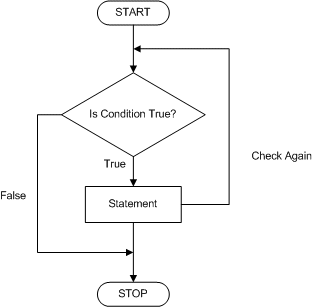
Here is an example:
DECLARE @Number As int

WHILE @Number < 5
    SELECT @Number AS Number
GO
To effectively execute a WHILE condition, you should make sure you provide a mechanism for the interpreter to get a referenced value for the condition, variable, or expression being checked. This is sometimes in the form of a variable being initialized although it could be some other expression. Such a while condition could be illustrated as follows:
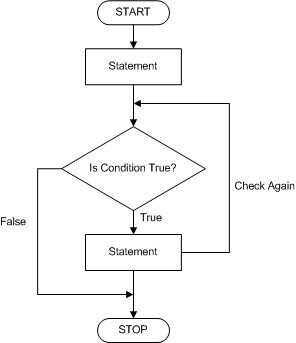
Such a Here is an example:
DECLARE @Number As int

SET @Number = 1

WHILE @Number < 5
    PRINT @Number
	SET @Number = @Number + 1
GO
Beginning and Ending a Statement
One of the issues with a loop, including a WHILE condition, is that it could run forever until the computer crashes (for example, don't execute the above code). The solution is to indicate to the SQL interpreter when to stop. To make this possible, Transact-SQL provides two keywords: BEGIN and END. These keywords are used to delimit a body in some conditions, including a WHILE statement.
Practical Learning: Beginning and Ending a Statement
DECLARE @Number As int

SET @Number = 1

WHILE @Number < 5
    BEGIN
        PRINT @Number
        SET @Number = @Number + 1
    END
GO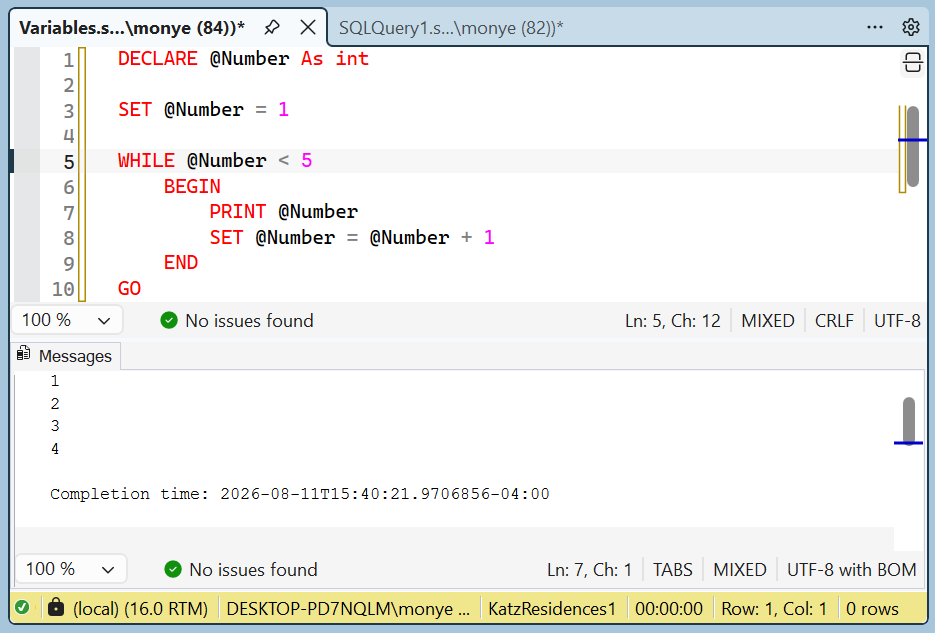
Other Conditional Operators
To let you validate something as being possible, Transact-SQL provides an operator named IS. For example, to acknowledge that something is NULL, you can use the IS NULL expression.
Practical Learning: Creating an IS Statement
-- Square Calculation
DECLARE @Side As Decimal(10,3),
        @Perimeter As Decimal(10,3),
        @Area As Decimal(10,3);

SET     @Perimeter = @Side * 4;
SET     @Area = @Side * @Side;

IF @Side IS NULL
	PRINT N'A null value is not welcome'
ELSE IF @Side > 0
    BEGIN
	SELECT @Side AS Side;
	SELECT @Perimeter AS Perimeter ;
	SELECT @Area AS Area;
    END;
ELSE
	PRINT N'You must provide a positive value';
GO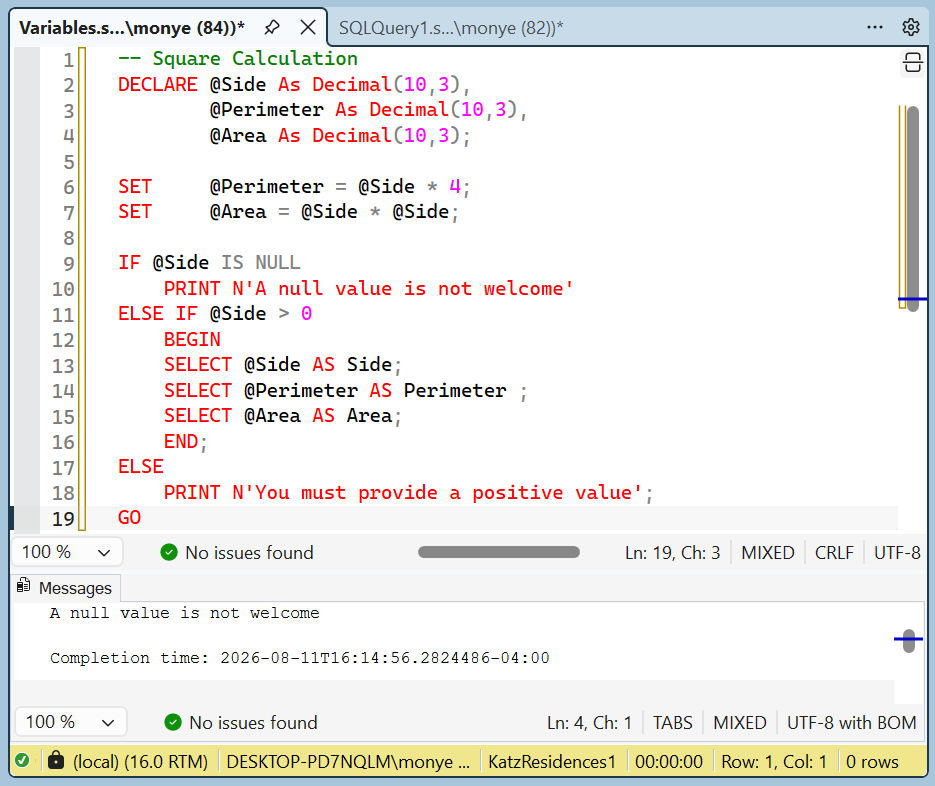
DECLARE @Side      As Decimal(10,3),
        @Perimeter As Decimal(10,3),
        @Area      As Decimal(10,3);

SET     @Side      = 48.126;
SET     @Perimeter = @Side * 4;
SET     @Area      = @Side * @Side;

IF @Side IS NULL
	PRINT N'A null value is not welcome'
ELSE IF @Side > 0
    BEGIN
        SELECT @Side AS Side;
        SELECT @Perimeter AS Perimeter ;
        SELECT @Area AS Area;
    END;
ELSE
    PRINT N'You must provide a positive value';
GO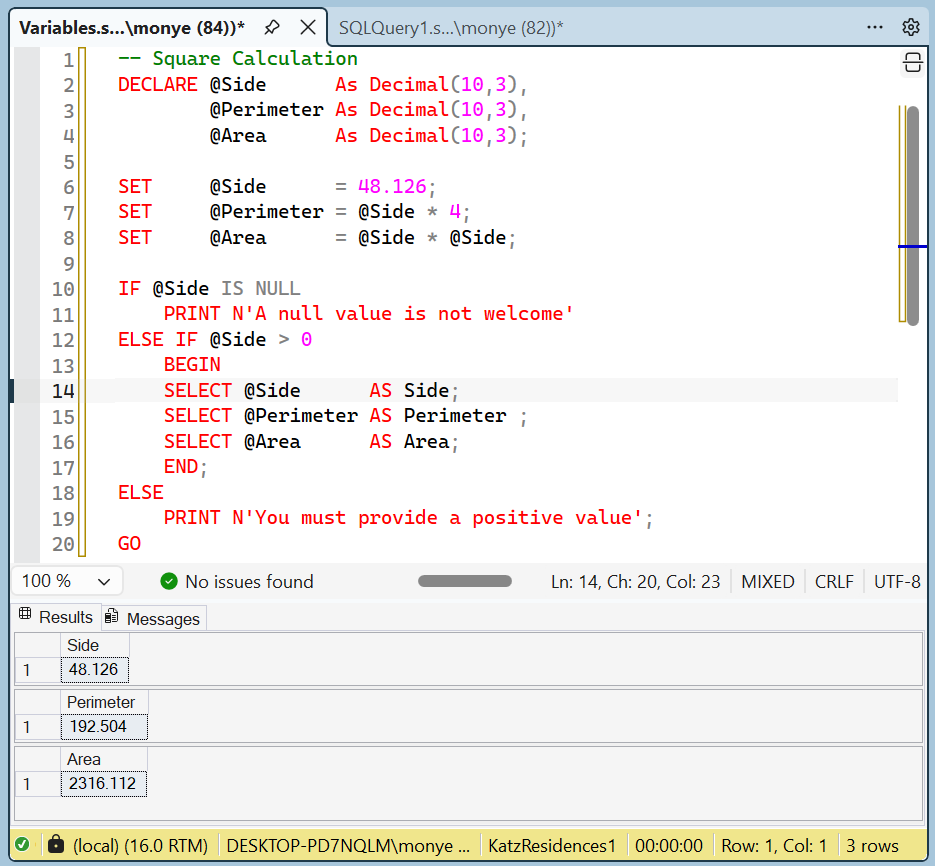
To deny the presence, the availability, or the existence of a value, you can use the NOT operator. This operator is primarily used to reverse a Boolean value. For example, we have learned that FALSE is the opposite of TRUE. In the same way, TRUE is the opposite of FALSE. If you want to compare a value as not being TRUE, the NOT TRUE would produce the same result as the FALSE value. For the same reason, the expression NOT FALSE is the same as TRUE.
Practical Learning: Ending the Lesson
|
|
|||
| Previous | Copyright © 2007-2026, FunctionX | Last Update: Tuesday 11 August 2026, 16:23 | Next |
|
|
|||