Introduction to Views

Introduction to Views
Fundamentals of Views
Introduction
From studying data analysis, we know that a query is a technique of isolating a series of columns and/or records of a table. This is usually done for the purpose of data analysis. This can also be done to create a new list of items for any particular reason. Most of the time, a query is created temporarily, such as during data analysis. After using such a temporary list, it is then dismissed.
Many database applications, including Microsoft SQL Server, allow you to create a query and be able to save it for later use, or even to use it as if it were its own pseudo-table. This is the idea behind a view.
A view is a series of records retrieved from one or more existing tables, or as a combination of one or more views and one or more tables.
 Practical Learning: Introducing Views

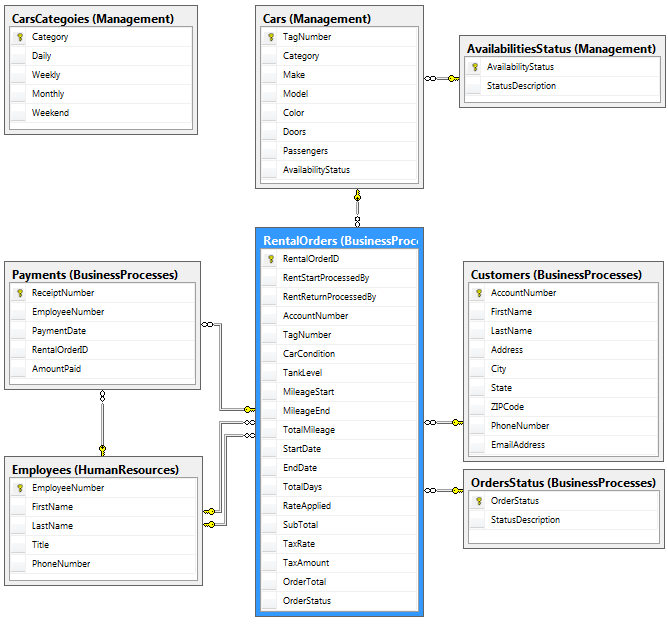
Visually Creating a View
Before creating a view, you must first decide where its columns and records would come from. Obviously the easiest view is one whose columns and records come from one table. To create a view, you can use the Object Explorer, a Query Editor, the Command Prompt, or Windows PowerShell.
Before starting the view, you would have to specify the table(s) that would be involved. To create a view from the Object Explorer, you can expand the database, right-click Views and click New View... This would open the Add Table dialog box:

The basic functionality is exactly the same as we reviewed for the Query Designer:
After selecting the source object, you can either double-click it or you can click it once and click Add. In in the previous lesson, we saw that you could add more than one existing table.
|
|
|
The View Designer |
After selecting the objects, they would display in the window. The View Designer toolbar would be added:

If the View Designer toolbar is not visible:
The window from which you create a view, the View
Designer, displays four sections. These are the same sections for the Query
Designer. Each section is represented on the View Designer toolbar by
a button: the Show Diagram Pane button
 ,
the Show Criteria Pane button
,
the Show Criteria Pane button
 ,
the Show SQL Pane button
,
the Show SQL Pane button
 ,
and the Show Result Pane button
,
and the Show Result Pane button
 .
.
If you don't want a particular section or you want to hide some sections, you can right-click anywhere in the table, position the mouse on Pane and click the name of the section. To hide any section, you can right-click anywhere in the window, position the mouse on Pane and click one of the selections:
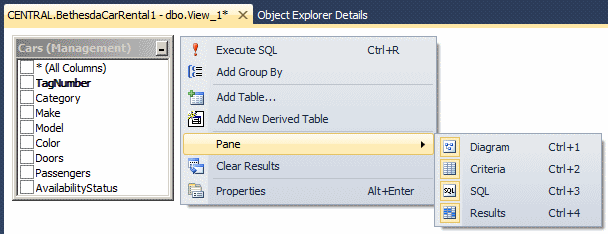
When a section is displaying, its menu option is surrounded. To select a column:
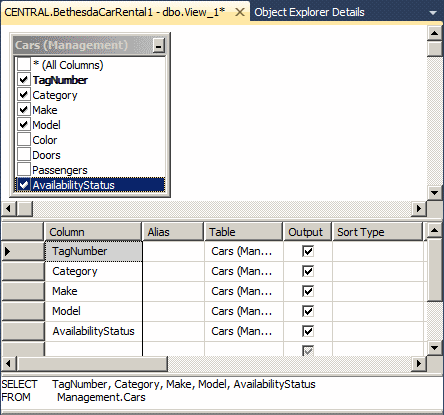
The structure of a view can be considered complete when the SELECT statement is as complete as possible. At any time, to test the results of a view, you can run it. To see the result of a query:

Any of these actions would cause the bottom section of the view to display the results of the query.
|
|
|
Saving a View |
As stated already, one of the reasons for creating a view is to be able to use it over and over again. To achieve this, the view must be saved. Like most objects in Microsoft SQL Server, a view must be saved and given a name.
To save a view from the view window, you can click the
Save button on the toolbar
 .
You can also attempt to close the window. You would then be prompted to
save it.
.
You can also attempt to close the window. You would then be prompted to
save it.
When saving a view, you must give it a name that follows the rules and suggestions of SQL. In our lessons, here are the rules we will use to name our views:
After saving a view, it becomes part of the Views node of its database: a node would be created for it and its name would appear in the Views node of its database.
|
|

To programmatically create a view, you use the following formula:
CREATE VIEW [SchemaName.]ViewName
AS
SELECT Statement
Microsoft SQL Server can generate skeleton code of a view for you. To use it, first create an empty Query Editor. Display the Template Explorer and expand the View node. From the View node, drag Create View and drop it in the Query Editor.
The creation of a view starts with the CREATE VIEW expression followed by a name. After the name of the view, use the AS keyword to indicate that you are ready to define the view.
Because a view is primarily a query, it is defined using a SELECT statement, using the same rules we studied for data analysis. Here is an example of a view:
USE rosh;
GO

CREATE VIEW FemaleStudents
AS
SELECT FirstName, LastName, Gender, ParentsNames
FROM Registration.Students;
GO
After creating the SQL statement that defines the view, you must execute the statement.
|
Encrypting a View |
When creating a view, if you want, you can encrypt its entry in the database engine. The formula to follow to do this is:
CREATE VIEW [SchemaName.]ViewName
WITH ENCRYPTION
AS
SELECT Statement
Hee is an example:
CREATE VIEW Personnel.EmployeesIdentifications
WITH ENCRYPTION
AS
    SELECT EmplNbr,
    	   FirstName,
    	   LastName
    FROM Personnel.Employees;
GO
|
Opening or Executing a View |
|
Opening a View |
As stated already, a view is a technique of selecting records to view or use over an over again. After a view has been created, you can open it. You have two main options:
|
Executing a View |
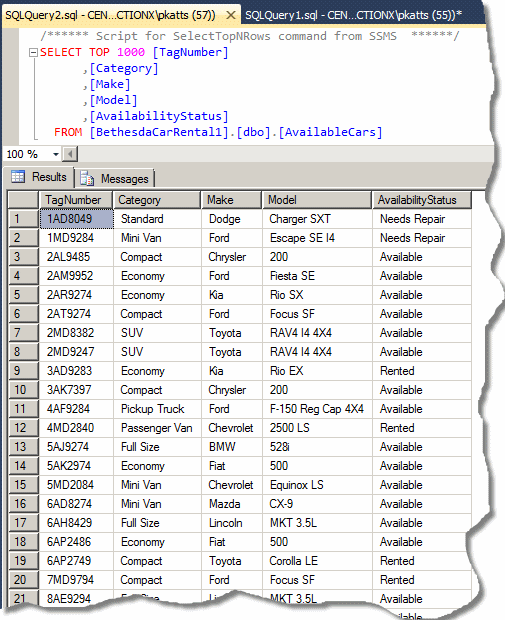
Executing a view consists of seeing its results. You have various options. To view the results of a view:
|
|
|
The Properties of a View |
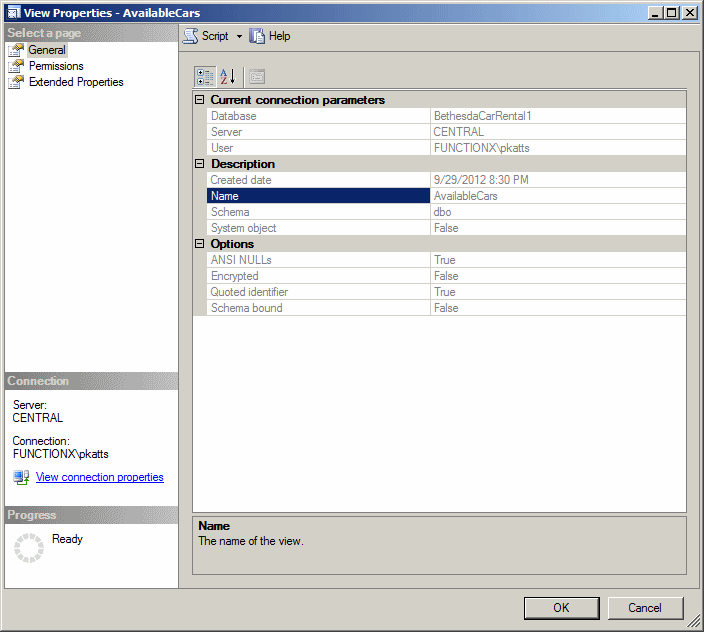
In Transact-SQL, a view is considered an object. As such, it can be viewed, changed, or deleted. Like any regular object, a view has its own characteristics. To see them, you can right-click the view and click Properties. A View Properties dialog box would come up. It can give you information such as the name of the database the view belongs to, the date the view was created, etc.
|
|
|
Renaming a View |
After creating and executing a view, you can change its name with little worries with regards to its functionality.
To visually rename a view, in the Object Explorer, right-click the name of the view and click Rename. the name of the view will be highlighted without its schema. You can then type the new name.
To programmatically rename a view, open a Query Editor and use the following formula:
sp_rename CurrentViewName, NewName;
If the view uses a schema other than dbo, you must include it in the CurrentViewName. Here is an example:
sp_rename N'Personnel.StaffMembers', N'EmployeesNames';
GO
When renaming a view, you must take care of the permissions associated with it because those permissions will be lost.
|
Altering a View |
After a view has been created, either by you or someone else, you may find out that it has an unnecessary column, it needs a missing column, it includes unnecessary records, or some records are missing. Fortunately, you can change the structure or the code of a view. This is referred to as altering a view.
Most of the time, normal users are never asked to modify a view. There are many options to modify a view:
The basic formula to programmatically modify a view is:
ALTER VIEW ViewName
AS
SELECT Statement
You start the alteration with the ALTER VIEW expression followed by the name of the view. After the name of the view, use the AS keyword to specify that you are ready to show the change. After the AS keyword, you can then define the view as you see fit. For example, you can create a SELECT statement that includes a modification of the existing code or a completely new statement.
Here is an example:
ALTER VIEW FemaleStudents
AS
SELECT FirstName,
       LastName,
       DateOfBirth,
       Gender,
       ParentsNames
FROM Registration.Students;
GO
Instead of modifying a view, if you find it altogether useless, you can remove it from its database. You must first consider who will have that responsibility. Obviously, users are never or hardly asked to remove a view.
A developer who has to delete a view must have the DELETE permission.
To delete a view:
The formula to programmatically delete a view is:
DROP VIEW ViewName
On the right side of the DROP VIEW expression, enter the name of the undesired view. Here is an example:
DROP VIEW FemaleStudents;
GO
Then execute the statement. You will not be warned before the interpreter deletes the view.
Views and Schemas
Introduction
When creating a view, you have the option of specifying its schema. In reality, like every object in the database, a view must be owned by a schema. You have many options. By default, when you create a view, if you don't specify a schema, it would be owne by dbo.
Instead of using dbo, you can use another schema of your choice and assign it to the view. If you had already created a schema in your database, you can use it or create a new schema.
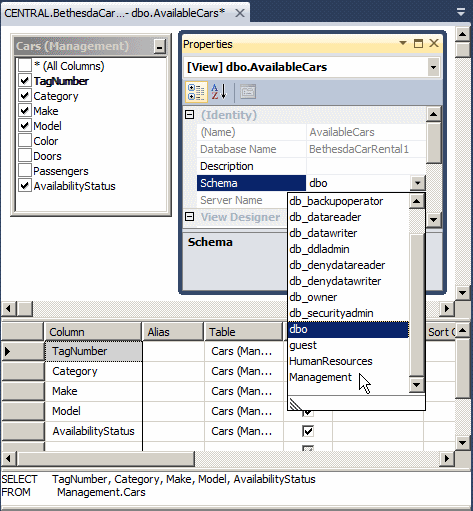
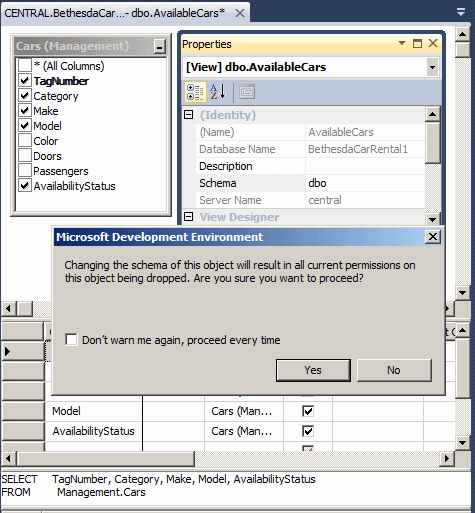
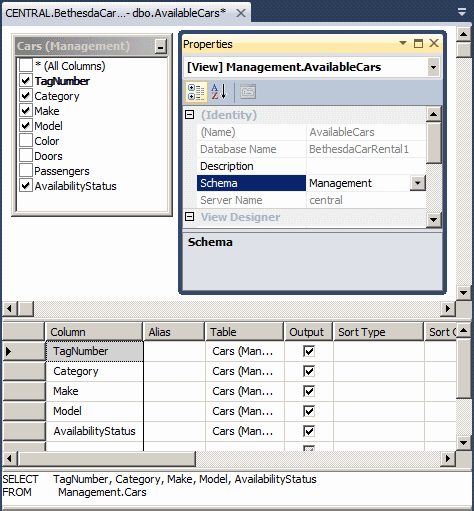
To visually assign a schem to a view:
In the Properties window, click Schema, then click the arrow of its combo box and select from the list. If you are creating a view with code, precede the name of the view with the name of the schema.
Once/when a view belongs to a schema, in which case the view is not using the default dbo schema, the developer must have the ALTER permission on that schema. As mentioned for tables, you should know how to plan the permissions among schemas and views, namely what rights to grant, which ones to deny, and when to revoke a permission.
|
|
CREATE VIEW BusinessProcesses.OrderProcessingStart
AS
    SELECT RentStartProcessedBy,
	   AccountNumber,
	   TagNumber,
	   CarCondition,
	   TankLevel,
	   MileageStart,
	   StartDate,
	   OrderStatus
    FROM BusinessProcesses.RentalOrders;
|
Binding a View to its Parent |
When you have created a view, you know that the records it displays are tied to its parent table. Consider the following example:
CREATE DATABASE Exercise2;
GO
USE Exercise2;
GO
CREATE SCHEMA Personnel;
GO
CREATE TABLE Personnel.Employees
(
	EmplNbr nchar(10),
	FirstName nvarchar(20),
	LastName nvarchar(20),
	Salary money,
	FullTime bit
);
GO
INSERT INTO Personnel.Employees
VALUES(N'524-880', N'Barbara', N'Grisby', 14.85, 1),
	  (N'688-364', N'Terrence', N'North', 22.05, NULL),
	  (N'461-852', N'Michael', N'Goldsmith', 22.14, 0),
	  (N'264-853', N'David', N'Ecker', 20.04, 1),
	  (N'207-025', N'Julie', N'Flanell', 36.55, 1),
      (N'684-946', N'Kevin', N'Rhems', 15.86, NULL);
GO
CREATE VIEW Personnel.Identifications
AS
SELECT EmplNbr, FirstName, LastName
FROM Personnel.Employees;
GO

SELECT * FROM Personnel.Employees;
GO
SELECT * FROM Personnel.Identifications;
GO
This would produce:
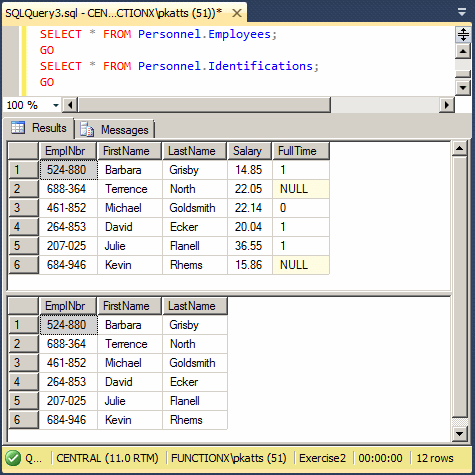
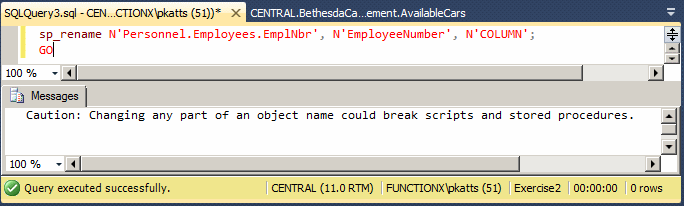
For one reason or another, you may have to make modifications on the parent table. For example, you may want to change the data type and/or name of a column but without touching the view(s) that depend on that table. What would happen? Consider the following example that renames a column on a table:
sp_rename N'Personnel.Employees.EmplNbr', N'EmployeeNumber', N'COLUMN';
GO
This code would execute successfully and the column would be renamed:
After renaming the column, you can use it in a SELECT statement of the table:
SELECT EmployeeNumber [Empl #],
       FirstName [First Name],
       LastName [Last name],
       Salary,
       FullTime [Full-Time?]
FROM Personnel.Employees;
GO
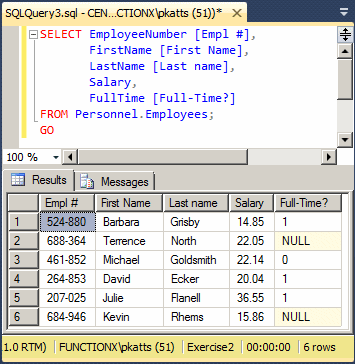
Since the view would still be using the previous definition of the table, in this case the previous name of the column, if the user tries executing the view, the database engine would produce an error. Here is an example:
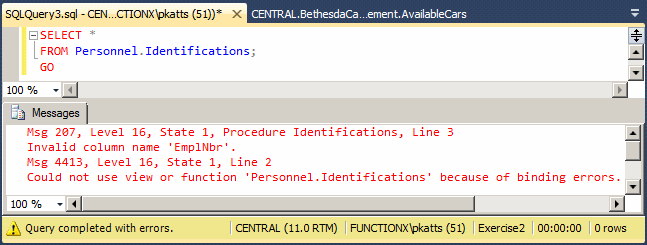
The solution is to prevent any changes on a parent table if that change would affect the view(s) that depend on that table. To set this, if you are visually creating the view, in the Properties window, set the Bind to Schema field to Yes. It the view exists already, open it in Design and, in the Properties window, set the Bind to Schema field to Yes.
It you are creating the view with code, before the AS keyword, add the WITH SCHEMABINDING flag. The formula to follow is:
CREATE VIEW [SchemaName.]ViewName
WITH SCHEMABINDING
AS
SELECT Statement
Hee is an example:
CREATE VIEW Personnel.EmploymentStatus
WITH SCHEMABINDING
AS
    SELECT FirstName, LastName, FullTime
    FROM Personnel.Employees;
GO
You can then execute the view when necessary. Here is an example:
SELECT * FROM Personnel.EmploymentStatus;
GO
This would produce:
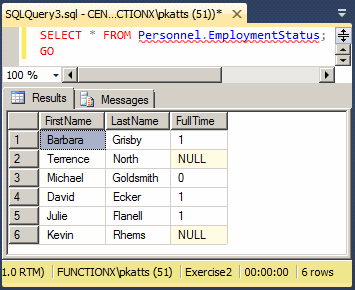
Now, imagine you want to change something on the parent table. For this example, let's try to change the data type of the FullTime column:
ALTER TABLE Personnel.Employees
ALTER COLUMN FullTime int;
GO
If you make the modification visually using the View Designer, or if you try executing the code, when you execute it, you would receive an error. Here is an example:
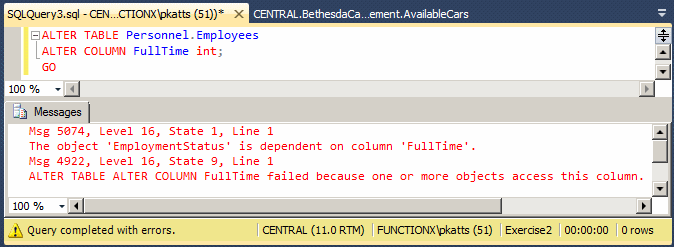
This means that the database engine will not allow you to change something on the table if that change will make the dependent view(s) to stop working. But, you can change anything on the parent table as long as no dependent view would be affected.
|
Data Entry Using a View |
|
Introduction |
As seen so far, a view is a selected list of records from a table. As you may suspect, the easiest view is probably one created from one table. Imagine you have a table of employees and you want to create a view that lists only their names. You may create a view as follows:
CREATE DATABASE Exercise;
GO
USE Exercise;
GO
CREATE SCHEMA Personnel;
GO
CREATE TABLE Personnel.Employees
(
	EmplNbr nchar(10),
	FirstName nvarchar(20),
	LastName nvarchar(20),
	Salary money,
	FullTime bit
);
GO

CREATE VIEW Personnel.Identifications
AS
    SELECT EmplNbr, FirstName, LastName
    FROM Personnel.Employees;
GO
On such a view that is based on one table, you can perform data entry, using the view, rather than the table.
|
Performing Data Entry |
If you perform data entry using a view, the data you provide would be entered on the base table. This means that the table would be updated automatically. Based on this feature, you can create a view purposely intended to update a table so that, in the view, you would include only the columns that need to be updated.
As long as a view allows it, you can perform data entry visually or using code.
To visually add a record, in the Object Explorer of the SQL Server Management Studio, after expanding the Databases and the Views nodes, right-click the view and click Edit Top 200 Rows. Once the view is opened, you can create the records.
To create a record using a Data Definition Language (DDL) command, use the INSERT keyword. If the view already contains the necessary columns, add the VALUES keyword as in the following formula:
INSERT [INTO] ViewName VALUES(Column1, Column2, Column_n);
Alternatively, after the name of the table, put the list of columns in parentheses. In both cases, in the parentheses of VALUES, type the necessary values.
|
|
| Rent Start Processed By | Account Number | Tag Number | Car Condition | Tank Level | Mileage Start | Start Date | Order Status |
| 20480 | 720480 | DFP924 | Excellent | Empty | 12728 | 12/10/2012 | Car With Customer |
| 24793 | 270840 | 4AF9284 | Good | 1/2 Tank | 24715 | 12/10/2012 | Car With Customer |
| 38240 | 830483 | BND927 | Good | Full | 6064 | 12/10/2012 | Car With Customer |
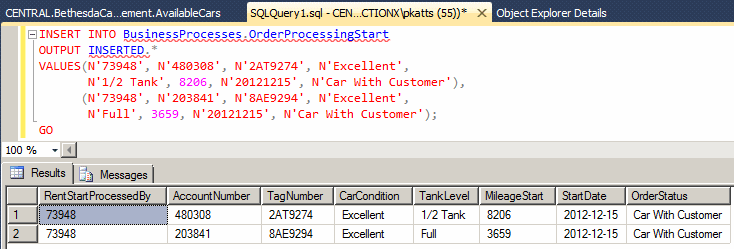
INSERT INTO BusinessProcesses.OrderProcessingStart
VALUES(N'73948', N'480308', N'2AT9274', N'Excellent',
       N'1/2 Tank', 8206, N'20121215', N'Car With Custoomer'),
      (N'73948', N'203841', N'8AE9294', N'Excellent',
       N'Full', 3659, N'20121215', N'Car With Custoomer');
GO
Based on our previous description, here is an example of creating a creating a record using a view with code:
INSERT INTO Personnel.StaffMembers
VALUES(N'29730', N'Philippe', N'Addy');
GO
Just as done with table, you can create many records with with one INSERT ... VALUES statement. Add each set of values in its own parentheses. Here are examples:
INSERT INTO Personnel.Identifications
VALUES(N'28084', N'Joan', N'Shepherd'),
      (N'79272', N'Joshua', N'Anderson'),
      (N'22803', N'Gregory', N'Swanson'),
      (N'83084', N'Josephine', N'Anderson');
GO
As done for a table, after creating one or more records, if you want to see the result, add an OUTPUT.INSERTED expression after the name of the view. If you want to show the names of columns, use the following formula:
INSERT INTO TableName
OUTPUT INSERTED.Columns
VALUES(Value_1, Value_2, Value_X)
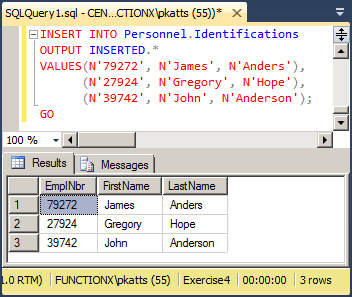
If you want to show all columns, use the asterisk. Here is an example:
INSERT INTO Personnel.Identifications
OUTPUT INSERTED.*
VALUES(N'79272', N'James', N'Anders'),
      (N'27924', N'Gregory', N'Hope'),
      (N'39742', N'John', N'Anderson');
GO
This would produce:
|
|
INSERT INTO Presentation.AvailableUnits
OUTPUT INSERTED.*
VALUES(113, 1, 1, 895.00, NULL),
      (215, 0, 1, 785.00, N'Available'),
      (314, 3, 1, 1225.00, N'Occupied');
GO
SELECT * FROM BusinessProcesses.RentalOrders;
GO

A View With Alias Names
It is important to know that a view is more of a table type than any other object. This means that a view is not a function but it can use a function. The word argument here only means that some values can be passed to a view but these values can be specified only when creating the view. They are not real arguments.
When structuring a view, you can create placeholders for columns and pass them in the parentheses of the view. This would be done as follows:
CREATE VIEW CarIdentifier([Tag #], Manufacturer, [Type of Car], Available)
. . .
If you use this technique, the names passed in the parentheses of the view are the captions that would be displayed in place of the columns of the view. This technique allows you to specify the strings of your choice for the columns. If you want a column header to display the actual name of the column, write it the same. Otherwise, you can use any string you want for the column. If the name is in one word, you can just type it. If the name includes various words, include them between an opening square bracket "[" and a closing square bracket "]".
After listing the necessary strings as the captions of columns, in your SELECT statement of the view, you must use the exact same number of columns as the number of arguments of the view. In fact, each column of your SELECT statement should correspond to an argument of the same order.
Because, as we stated already, a view is not a function and the values passed to the view are not real arguments, when executing the view, don't specify the names of arguments. Simply create a SELECT statement and specify the name of the view as the source.
Practical
Learning: Ending the Lesson
|
|
|||
| Previous | Copyright © 2000-2026, FunctionX | Thursday 26 May 2022 | Next |
|
|
|||