AngularJS Simple Application: Payroll Evaluation

AngularJS Simple Application: Payroll Evaluation
Introduction
AngularJS is a JavaScript library that can be used to create and manage the webpages of a website. We are learning to use AngularJS in an ASP.NET application. In this introductory exercise, we will create a simple ASP.NET Core project. The project will have a Web page that has a Web form equipped with various Web controls, mostly text boxes. Using AngularJS code, we will get the values that the user types, namely the time worked for a day in the week, for each day. Still using AngularJS code, we will perform the calculations necessary to evaluate a weekly salary. We will then display the results of our calculations.
 Practical Learning: Creating the Application
html {
  font-size: 14px;
}

@media (min-width: 768px) {
  html {
    font-size: 16px;
  }
}

.btn:focus, .btn:active:focus, .btn-link.nav-link:focus, .form-control:focus, .form-check-input:focus {
  box-shadow: 0 0 0 0.1rem white, 0 0 0 0.25rem #258cfb;
}

html {
  position: relative;
  min-height: 100%;
}

body {
  margin-bottom: 60px;
}

.form-floating > .form-control-plaintext::placeholder, .form-floating > .form-control::placeholder {
  color: var(--bs-secondary-color);
  text-align: end;
}

.form-floating > .form-control-plaintext:focus::placeholder, .form-floating > .form-control:focus::placeholder {
  text-align: start;
}

.encloser    { margin: auto;
               width:  450px; }
.common-font { font-family: Garamond, Georgia, Cambria, 'Times New Roman', Times, serif; }
Creating an AngularJS Module
Our application will use limited functionality but we still need a module.
Practical Learning: Creating an Angular Module
var appPayroll = angular.module('appPayroll', []);Using a Controller
In our application, we will perform some small calculations that will produce some numeric values. The primary values will come from a form in a webpage. To perform those calculations, we will use a function. We will create that function in an AngularJS controller, which means we will need to create and use a controller.
Practical Learning: Creating a Controller
// Create an Angular module
var appPayroll = angular.module('appPayroll', []);
// Create an Angular controller
appPayroll.controller("PayController", function () {
    /* Create a function to have a section of code
     * where the calculations are made. */
    this.calculate = function () {
        // Get the numbers from a form in a webpage
        var hSal          = this.hourlySalary;
        var hSal          = parseFloat(this.hourlySalary);
        var mon           = parseFloat(this.monday);
        var tue           = parseFloat(this.tuesday);
        var wed           = parseFloat(this.wednesday);
        var thu           = parseFloat(this.thursday);
        var fri           = parseFloat(this.friday);

        // Calculate the sum of the numbers in the day text boxes
        var timeWorked    = mon + tue + wed + thu + fri;

        // Declare some variables for the values that will be produced
        var regTime       = timeWorked;
        var regPay        = hSal * timeWorked;
        var overtime      = 0.00;
        var overPay       = 0.00;

        /* Use a conditional statement to find out whether
         * the employee worked more than 40 hours for the week. */
        if (timeWorked    > 40.00) {
            regTime       = 40.00;
            regPay        = hSal * 40.00;
            overtime      = timeWorked - 40.00;
            overPay       = hSal * 1.50 * overtime;
        }

        /* Calculate the total salary for the week
         * by adding the regular pay to the overtime pay. */
        var weeklyPay     = regPay + overPay;

        // Display the calculated values in the appropriate text boxes
        this.hourlySalary = hSal;
        this.regularTime  = regTime;
        this.overTime     = overtime;
        this.regularPay   = regPay;
        this.overTimePay  = overPay;
        this.netPay       = weeklyPay;
    }
});
A Web Form for AngularJS
When you create an HTML webform that supports AngularJS operations. you must add some customer attributes to the HTML tags of the webpage and the Web controls. We will apply some examples.
Practical Learning: Creating a Web For for AngularJS
@page
@model IndexModel
@{
    ViewData["Title"] = "Payroll Evaluation";
}

<h2 class="text-center common-font fw-bold">Payroll Evaluation</h2>

<hr />

<div ng-app="appPayroll">
    <form method="post" class="common-font encloser" ng-controller="PayController as pay">
        <div class="row mb-2">
            <label for="txtFirstName" class="col-form-label col-sm-5 fw-bold">First Name:</label>
            <div class="col-sm-7">
                <input id="txtFirstName" class="form-control" ng-model="pay.firstName" />
            </div>
        </div>

        <div class="row mb-2">
            <label for="txtLastName" class="fw-bold col-sm-5 col-form-label">Last Name:</label>
            <div class="col-sm-7">
                <input id="txtLastName" class="form-control" ng-model="pay.lastName" />
            </div>
        </div>

        <div class="row mb-2">
            <label for="txtHourlySalary" class="fw-bold col-sm-5 col-form-label">Hourly Salary:</label>
            <div class="col-sm-7">
                <input type="text" id="txtHourlySalary"
                       class="form-control" ng-model="pay.hourlySalary" />
            </div>
        </div>

        <div class="row mb-2">
            <label for="txtMonday" class="fw-bold col-sm-5 col-form-label">Monday:</label>
            <div class="col-sm-7">
                <input type="text" id="txtMonday" name="txtMonday"
                       class="form-control" ng-model="pay.monday" />
            </div>
        </div>

        <div class="row mb-2">
            <label for="txtTuesday" class="fw-bold col-sm-5 col-form-label">Tuesday:</label>
            <div class="col-sm-7">
                <input type="text" id="txtTuesday" name="txtTuesday"
                       class="form-control" ng-model="pay.tuesday" />
            </div>
        </div>

        <div class="row mb-2">
            <label for="txtWednesday" class="fw-bold col-sm-5 col-form-label">Wednesday:</label>
            <div class="col-sm-7">
                <input type="text" id="txtWednesday" class="form-control" ng-model="pay.wednesday" />
            </div>
        </div>

        <div class="row mb-2">
            <label for="txtThursday" class="fw-bold col-sm-5 col-form-label">Thursday:</label>
            <div class="col-sm-7">
                <input type="text" id="txtThursday" class="form-control" ng-model="pay.thursday" />
            </div>
        </div>

        <div class="row mb-2">
            <label for="txtFriday" class="fw-bold col-sm-5 col-form-label">Friday:</label>
            <div class="col-sm-7">
                <input type="text" id="txtFriday" class="form-control" ng-model="pay.friday" />
            </div>
        </div>

        <div class="row mb-2">
            <label class="fw-bold col-sm-6 col-form-label"></label>
            <div class="col-sm-6">
                <input type="button" value="Calculate" id="btnCalculate"
                       class="btn btn-primary" ng-click="pay.calculate()" />
            </div>
        </div>

        <div class="row mb-2">
            <label for="txtEmployeeName" class="fw-bold col-sm-5 col-form-label">Employee Name:</label>
            <div class="col-sm-7">
                <span id="employeeName" class="form-control">{{pay.firstName}} {{pay.lastName}}</span>
            </div>
        </div>

        <hr />

        <div class="row mb-2">
            <label for="txtRegularTime" class="fw-bold col-sm-5 col-form-label">Regular Time:</label>
            <div class="col-sm-7">
                <span id="regularTime" class="form-control">{{pay.regularTime | number:2}}</span>
            </div>
        </div>

        <div class="row mb-2">
            <label for="txtOverTime" class="fw-bold col-sm-5 col-form-label">Over Time:</label>
            <div class="col-sm-7">
                <span id="overTime" class="form-control">{{pay.overTime | number:2}}</span>
            </div>
        </div>

        <div class="row mb-2">
            <label for="txtRegularPay" class="fw-bold col-sm-5 col-form-label">Regular Pay:</label>
            <div class="col-sm-7">
                <span id="txtRegularPay" class="form-control">{{pay.regularPay | number:2}}</span>
            </div>
        </div>

        <div class="row mb-2">
            <label for="txtOvertimePay" class="fw-bold col-sm-5 col-form-label">Overtime Pay:</label>
            <div class="col-sm-7">
                <span id="txtOvertimePay" class="form-control">{{pay.overTimePay | number:2}}</span>
            </div>
        </div>

        <div class="row mb-2">
            <label for="txtNetPay" class="fw-bold col-sm-5 col-form-label">Net Pay:</label>
            <div class="col-sm-7">
                <span id="txtNetPay" class="form-control">{{pay.netPay | number:2}}</span>
            </div>
        </div>
    </form>
</div>
Finalizing the Application
If you create a Web application that supports AngularJS, you have many options to present the application to a user. For our example, we will keep our application simple.
Practical Learning: Finalizing the Application
<!DOCTYPE html>
<html lang="en">
<head>
<meta charset="utf-8" />
<meta name="viewport" content="width=device-width, initial-scale=1.0" />
<title>@ViewData["Title"] - Payroll Evaluation</title>
<script type="importmap"></script>
<link rel="stylesheet" href="~/lib/bootstrap/dist/css/bootstrap.min.css" />
<link rel="stylesheet" href="~/css/site.css" asp-append-version="true" />
<link rel="stylesheet" href="~/PayrollEvaluation1.styles.css" asp-append-version="true" />
</head>
<body>
<header>
<nav class="navbar navbar-expand-sm navbar-toggleable-sm navbar-light bg-white border-bottom box-shadow mb-3">
<div class="container">
<a class="navbar-brand" asp-area="" asp-page="/Index">Payroll Evaluation</a>
<button class="navbar-toggler" type="button" data-bs-toggle="collapse" data-bs-target=".navbar-collapse" aria-controls="navbarSupportedContent"
aria-expanded="false" aria-label="Toggle navigation">
<span class="navbar-toggler-icon"></span>
</button>
<div class="navbar-collapse collapse d-sm-inline-flex justify-content-between">
<ul class="navbar-nav flex-grow-1">
<li class="nav-item">
<a class="nav-link text-dark" asp-area="" asp-page="/Index">Home</a>
</li>
<li class="nav-item">
<a class="nav-link text-dark" asp-area="" asp-page="/Privacy">Privacy</a>
</li>
</ul>
</div>
</div>
</nav>
</header>
<div class="container">
<main role="main" class="pb-3">
@RenderBody()
</main>
</div>
<footer class="border-top footer text-muted">
<div class="container">
<p class="common-font text-center">© 2001-@DateTime.Today.Year - Payroll Evaluation - <a asp-area="" asp-page="/Privacy">Privacy</a></p>
</div>
</footer>
<script src="~/lib/jquery/dist/jquery.min.js"></script>
<script src="~/lib/bootstrap/dist/js/bootstrap.bundle.min.js"></script>
<script src="~/js/site.js" asp-append-version="true"></script>
<script src="https://ajax.googleapis.com/ajax/libs/angularjs/1.6.7/angular.js"></script>
<script src="~/js/PayPreparation.js" asp-append-version="true"></script>
@await RenderSectionAsync("Scripts", required: false)
</body>
</html>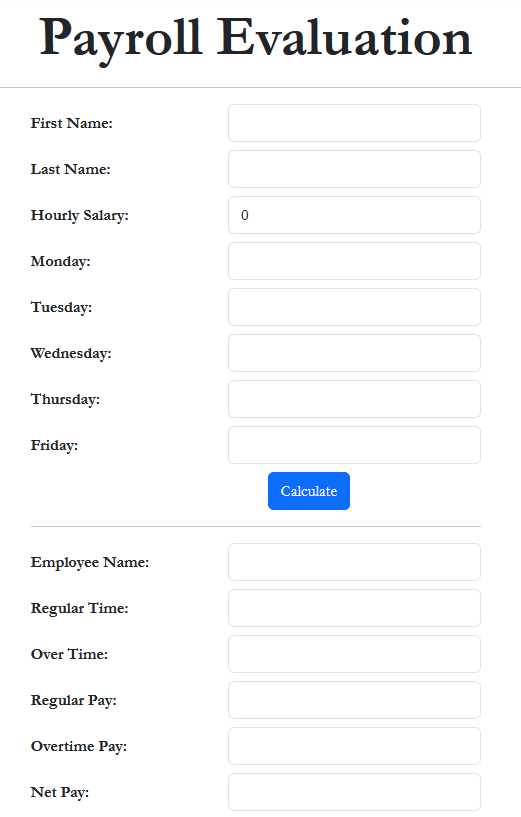
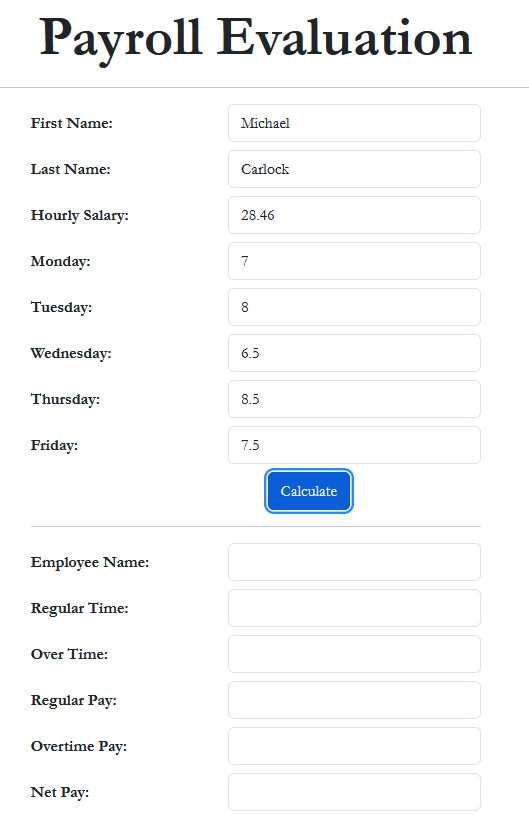
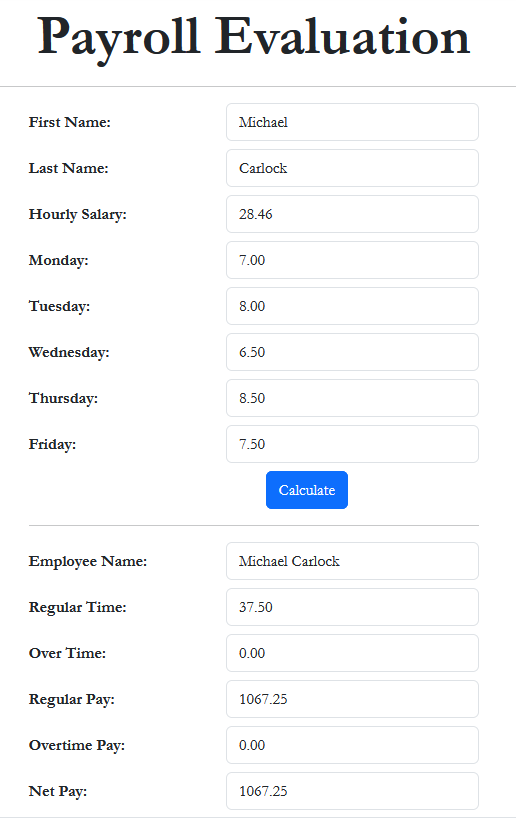
First Name:    Michael
Last Name:     Carlock
Hourly Salary: 28.46
Monday:        7
Tuesday:       8
Wednesday:     6.5
Thursday:      8.5
Friday:        7.5
| First Name: | Catherine |
| Last Name: | Busbey |
| Hourly Salary: | 24.37 |
| Monday | 9.5 |
| Tuesday: | 8 |
| Wednesday: | 10.5 |
| Thursday: | 9 |
| Friday: | 8.5 |

|
|
|||
| Home | Copyright © 2021-2026, FunctionX | Tuesday 17 December 2024, 21:16 | Home |
|
|
|||