JavaScript Application: Payroll Evaluation - 1 Week

JavaScript Application: Payroll Evaluation - 1 Week
Introduction
 Practical Learning: Creating the Application
html {
  font-size: 14px;
}

@media (min-width: 768px) {
  html {
    font-size: 16px;
  }
}

.btn:focus, .btn:active:focus, .btn-link.nav-link:focus, .form-control:focus, .form-check-input:focus {
  box-shadow: 0 0 0 0.1rem white, 0 0 0 0.25rem #258cfb;
}

html {
  position: relative;
  min-height: 100%;
}

body {
  margin-bottom: 60px;
}

.form-floating > .form-control-plaintext::placeholder, .form-floating > .form-control::placeholder {
  color: var(--bs-secondary-color);
  text-align: end;
}

.form-floating > .form-control-plaintext:focus::placeholder, .form-floating > .form-control:focus::placeholder {
  text-align: start;
}

.encloser    { margin:      auto;
               width:       350px; }
.common-font { font-family: Garamond, Georgia, Cambria, 'Times New Roman', Times, serif }@{
ViewData["Title"] = "Home Page";
}
<h3 class="display-4 text-center fw-bold common-font">Payroll Evaluation</h3>
<hr />
<form name="PayrollEvaluation" method="post" class="common-font encloser">
<div class="row mb-2">
<label for="txtFirstName" class="col-form-label col-sm-5 fw-bold">First Name:</label>
<div class="col-sm-7">
<input name="txtFirstName" class="form-control" />
</div>
</div>
<div class="row mb-2">
<label for="txtLastName" class="fw-bold col-sm-5 col-form-label">Last Name:</label>
<div class="col-sm-7">
<input name="txtLastName" class="form-control" />
</div>
</div>
<div class="row mb-2">
<label for="txtHourlySalary" class="fw-bold col-sm-5 col-form-label">Hourly Salary:</label>
<div class="col-sm-7">
<input name="txtHourlySalary" class="form-control" />
</div>
</div>
<div class="row mb-2">
<label for="txtMonday" class="fw-bold col-sm-5 col-form-label">Monday:</label>
<div class="col-sm-7">
<input name="txtMonday" class="form-control" />
</div>
</div>
<div class="row mb-2">
<label for="txtTuesday" class="fw-bold col-sm-5 col-form-label">Tuesday:</label>
<div class="col-sm-7">
<input name="txtTuesday" class="form-control" />
</div>
</div>
<div class="row mb-2">
<label for="txtWednesday" class="fw-bold col-sm-5 col-form-label">Wednesday:</label>
<div class="col-sm-7">
<input name="txtWednesday" class="form-control" />
</div>
</div>
<div class="row mb-2">
<label for="txtThursday" class="fw-bold col-sm-5 col-form-label">Thursday:</label>
<div class="col-sm-7">
<input name="txtThursday" class="form-control" />
</div>
</div>
<div class="row mb-2">
<label for="txtFriday" class="fw-bold col-sm-5 col-form-label">Friday:</label>
<div class="col-sm-7">
<input name="txtFriday" class="form-control" />
</div>
</div>
<div class="row mb-2">
<label class="fw-bold col-sm-6 col-form-label"></label>
<div class="col-sm-6">
<input type="button" value="Calculate" id="btnCalculate" onclick="EvaluatePayroll()" class="btn btn-primary" />
</div>
</div>
<hr />
<div class="row mb-2">
<label for="txtEmployeeName" class="fw-bold col-sm-5 col-form-label">Employee Name:</label>
<div class="col-sm-7">
<input class="form-control" name="txtEmployeeName" />
</div>
</div>
<div class="row mb-2">
<label for="txtRegularTime" class="fw-bold col-sm-5 col-form-label">Regular Time:</label>
<div class="col-sm-7">
<input id="txtRegularTime" class="form-control" />
</div>
</div>
<div class="row mb-2">
<label for="txtOverTime" class="fw-bold col-sm-5 col-form-label">Over Time:</label>
<div class="col-sm-7">
<input id="txtOverTime" class="form-control" />
</div>
</div>
<div class="row mb-2">
<label for="txtRegularPay" class="fw-bold col-sm-5 col-form-label">Regular Pay:</label>
<div class="col-sm-7">
<input id="txtRegularPay" class="form-control" />
</div>
</div>
<div class="row mb-2">
<label for="txtOvertimePay" class="fw-bold col-sm-5 col-form-label">Overtime Pay:</label>
<div class="col-sm-7">
<input id="txtOvertimePay" class="form-control" />
</div>
</div>
<div class="row mb-2">
<label for="txtNetPay" class="fw-bold col-sm-5 col-form-label">Net Pay:</label>
<div class="col-sm-7">
<input id="txtNetPay" class="form-control" />
</div>
</div>
</form>
<script type="text/javascript">
function EvaluatePayroll() {
var strFirstName = document.PayrollEvaluation.txtFirstName.value;
var strLastName = document.PayrollEvaluation.txtLastName.value;
var hourlySalary = Number(document.PayrollEvaluation.txtHourlySalary.value);
var monday = Number(document.PayrollEvaluation.txtMonday.value);
var tuesday = Number(document.PayrollEvaluation.txtTuesday.value);
var wednesday = Number(document.PayrollEvaluation.txtWednesday.value);
var thursday = Number(document.PayrollEvaluation.txtThursday.value);
var friday = Number(document.PayrollEvaluation.txtFriday.value);
var totalTime = monday + tuesday + wednesday + thursday + friday;
var ovtSalary = hourlySalary * 1.5;
var regularTime = 0.00;
var overTime = 0.00;
var regularPay = 0.00;
var overtimePay = 0.00;
if (totalTime < 40)
{
regularTime = totalTime;
regularPay = hourlySalary * totalTime;
overTime = 0.00;
overtimePay = 0.00;
}
else // if (totalTime >= 40)
{
regularTime = 40;
overTime = totalTime - 40;
regularPay = hourlySalary * 40;
overtimePay = overTime * ovtSalary;
}
document.PayrollEvaluation.txtEmployeeName.value = strFirstName + " " + strLastName;
document.PayrollEvaluation.txtRegularTime.value = regularTime.toFixed(2);
document.PayrollEvaluation.txtOverTime.value = overTime.toFixed(2);
document.PayrollEvaluation.txtRegularPay.value = regularPay.toFixed(2);
document.PayrollEvaluation.txtOvertimePay.value = overtimePay.toFixed(2);
document.PayrollEvaluation.txtNetPay.value = (regularPay + overtimePay).toFixed(2);
}
</script>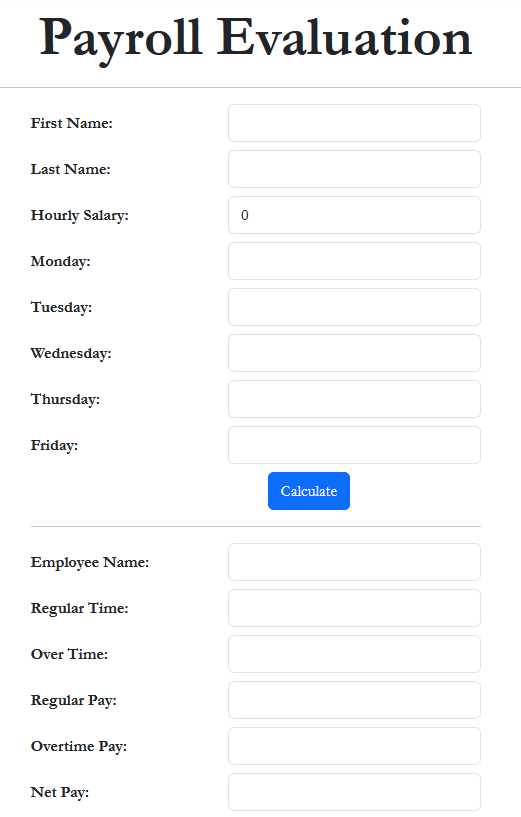
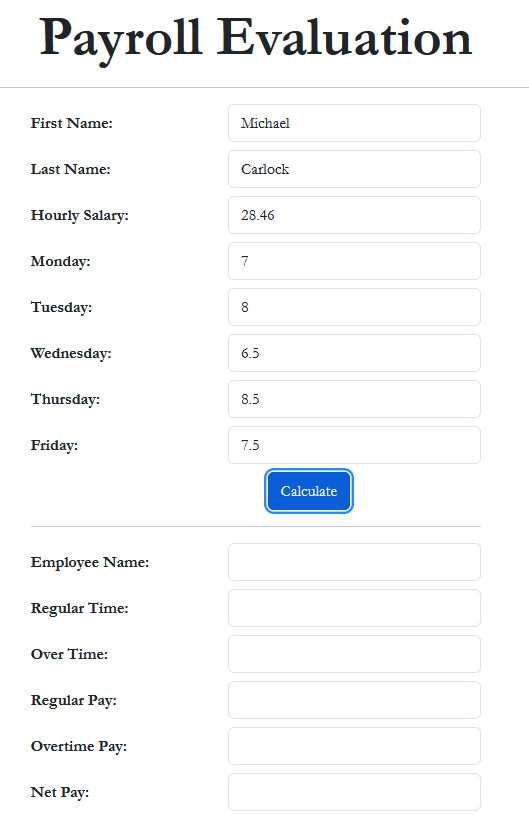
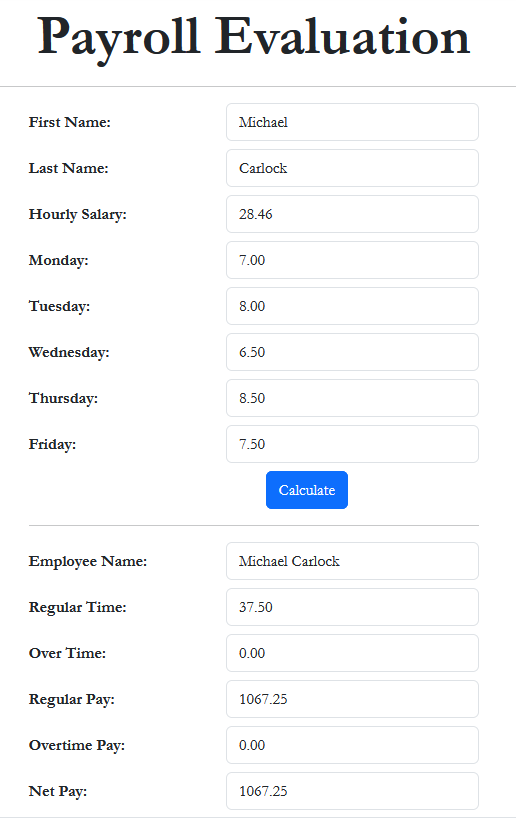
First Name:    Michael
Last Name:     Carlock
Hourly Salary: 28.46
Monday:        7
Tuesday:       8
Wednesday:     6.5
Thursday:      8.5
Friday:        7.5
First Name:    Catherine
Last Name:     Busbey
Hourly Salary: 24.37
Monday:        9.5
Tuesday:       8
Wednesday:     10.5
Thursday:      9
Friday:        8.5

|
|
|||
| Home | Copyright © 2021-2026, FunctionX | Monday 13 April 2026, 19:11 | Home |
|
|
|||