Windows Forms Example Application: Compounded Interest

Windows Forms Example Application: Compounded Interest
Description
The compounded interest is the amount of money paid as interest on a loan. This example uses some radio buttons to let the user select the frequency by which to perform the calculation.
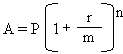 |
P = Principal |
| r = Annual (Interest) Rate | |
| m = Number of Compounding Periods per Year | |
| n = Total Number of Compounding Periods | |
| A = Amount Earned After n periods |
 Practical Learning: Creating the Application

| Control | Name | Text | Additional Properties | |
| GroupBox |  |
Loan Setup | ||
| Label |  |
Principal: | ||
| TextBox |  |
TxtPrincipal | TextAlign: Right | |
| Label | |
Interest Rate: | ||
| TextBox | |
TxtInterestRate | TextAlign: Right | |
| Label | |
% | ||
| Label | |
Periods: | ||
| TextBox | |
TxtPeriods | TextAlign: Text | |
| Label | |
years | ||
| GroupBox | |
Compound Frequency | ||
| RadioButton |  |
RdoMonthly | Monthly | |
| RadioButton | |
RdoQuarterly | Quarterly | |
| RadioButton | |
RdoSemiannually | Semiannually | |
| RadioButton | |
RdoAnnually | Annually | |
| GroupBox | |
Calculations Results | ||
| Label | |
Interest Earned: | ||
| TextBox | |
TxtInterestEarned | 0.00 | TextAlign: Right |
| Label | |
Amount Earned: | ||
| TextBox | |
TxtFutureValue | 0.00 | TextAlign: Right |
| Button |  |
btnCalculate | Calculate | |
| Button | |
btnClose | Close | |
Public Class Exercise
    Private Sub BtnCalculateClick(sender As Object, e As EventArgs) Handles BtnCalculate.Click
        Dim Principal = 0.00
        Dim interestRate = 0.00
        Dim periods = 0.00
        Dim compoundType

        REM Retrieve the value of the principal
        Try

            Principal = CDbl(TxtPrincipal.Text)
        Catch fe As FormatException
            MsgBox("You must provide a valid value for the loan amount. " +
                   Environment.NewLine +
                   "The error produced is: " + fe.Message,
                   MsgBoxStyle.OkOnly Or MsgBoxStyle.Information,
                   "Compound Interest")
        End Try

        REM Retrieve the interest rate
        Try
            interestRate = CDbl(TxtInterestRate.Text) / 100
        Catch fe As FormatException
            MsgBox("You must provide a valid value for the interest rate applied on the loan." +
                   Environment.NewLine + "The error produced is: " + fe.Message,
                   MsgBoxStyle.OkOnly Or MsgBoxStyle.Information,
                                "Compound Interest")
        End Try

        REM Get the number of years
        Try
            periods = CDbl(TxtPeriods.Text)
        Catch fe As FormatException
            MsgBox("You must provide a valid number of years for the duration of the loan." +
                   Environment.NewLine +
                   "The error produced is: " + fe.Message,
                   MsgBoxStyle.OkOnly Or MsgBoxStyle.Information,
                                "Compound Interest")
        End Try

        REM Find out what radio button was clicked to apply the compound frequency
        If RdoMonthly.Checked Then
            compoundType = 12
        ElseIf (RdoQuarterly.Checked) Then
            compoundType = 4
        ElseIf (RdoSemiannually.Checked) Then
            compoundType = 2
        Else
            compoundType = 1
        End If

        REM These values will make the calculation easier to read
        Dim i = interestRate / compoundType
        Dim n = compoundType * periods

        REM Perform the necessary calculations
        Dim ratePerPeriod = interestRate / periods
        Dim futureValue = Principal * Math.Pow(1 + i, n)
        Dim interestEarned = futureValue - Principal

        REM Display the values in the appropriate text boxes
        TxtInterestEarned.Text = Format(interestEarned, "STANDARD")
        TxtFutureValue.Text = Format(futureValue, "STANDARD")
    End Sub
End ClassPrivate Sub BtnCloseClick(sender As Object, e As EventArgs) Handles BtnClose.Click
End
End Sub
Principal: 16500
Interest Rate: 12.75
Periods:       5


|
|
|||
| Home | Copyright © 2010-2026, FunctionX | Friday 27 December 2024, 13:02 | Home |
|
|
|||