WinForms ADO.NET: Stellar Water Point

WinForms ADO.NET: Stellar Water Point
Application Setup
Introduction
A Windows Forms application is a graphical program that uses one or more forms with Windows controls that make an application very user-friendly. One of the options offered by a Windows Forms application is to support a database where values or records can be created and managed.
In this exercise, we will create a Microsoft SQL Server database used in a Windows Forms application. To create and manage records, we will use ADO.NET abd the C# language.
 Practical Learning: Introducing the Application
A Database for an Application
As mentioned above, our water distribution application will use a database. You can create the database using Microsoft SQL Server or in the Visual Studio application as a local database. When setting up the database, we will create tables for water meters, customers, and water bills.
Practical Learning: Preparing a Database
USE master;
GO
IF DB_ID (N'StellarWaterPoint1') IS NOT NULL
	DROP DATABASE StellarWaterPoint;
GO
CREATE DATABASE StellarWaterPoint;
GO
USE StellarWaterPoint;
GO
USE master;
GO
IF DB_ID (N'StellarWaterPoint') IS NOT NULL
	DROP DATABASE StellarWaterPoint;
GO
CREATE DATABASE StellarWaterPoint;
GO
USE StellarWaterPoint;
GO

CREATE TABLE WaterMeters
(
	WaterMeterId int identity(1, 1),
	MeterNumber  nvarchar(15) not null,
	Make         nvarchar(25) null,
	Model        nvarchar(15) not null,
	MeterSize    nvarchar(15),
	CONSTRAINT   PK_WaterMeters PRIMARY KEY(WaterMeterId)
);
GO

CREATE TABLE AccountsTypes
(
	AccountTypeId  int identity(1, 1),
	AccountType    nvarchar(5) not null,
	TypeDefinition nvarchar(250) null,
	CONSTRAINT   PK_AccountsTypes PRIMARY KEY(AccountTypeId)
);
GO

CREATE TABLE Customers
(
	CustomerId    int identity(1, 1),
	AccountNumber nvarchar(15)  not null,
	AccountName   nvarchar(200) not null,
	AccountType   nvarchar(5),
	MeterNumber   nvarchar(15),
	[Address]     nvarchar(150),
	City          nvarchar(25),
	County        nvarchar(35),
	[State]       nvarchar(35),
	ZIPCode       nvarchar(12),
	CONSTRAINT    PK_Customers PRIMARY KEY(CustomerId)
);
GO

CREATE TABLE WaterBills
(
	WaterBillId           int identity(1, 1),
	WaterBillNumber       int          not null,
	AccountNumber         nvarchar(15) not null,
	MeterReadingStartDate nvarchar(50) not null,
	MeterReadingEndDate   nvarchar(50) not null,
	CounterReadingStart   nvarchar(15),
	CounterReadingEnd     nvarchar(15),
	BillingDays           int          not null,
	TotalHCF              nvarchar(15),
	TotalGallons          nvarchar(15),
	FirstTierConsumption  nvarchar(15),
	SecondTierConsumption nvarchar(15),
	LastTierConsumption   nvarchar(15),
	WaterCharges          nvarchar(15),
	SewerCharges          nvarchar(15),
	EnvironmentCharges    nvarchar(15),
	ServiceCharges        nvarchar(15),
	TotalCharges          nvarchar(15),
	LocalTaxes            nvarchar(15),
	StateTaxes            nvarchar(15),
	PaymentDueDate        nvarchar(50),
	AmountDue             nvarchar(15),
	LatePaymentDueDate    nvarchar(50),
	LateAmountDue         nvarchar(15),
	CONSTRAINT            PK_WaterBills PRIMARY KEY(WaterBillId)
);
GO
---------------------------------------------------------------------
INSERT INTO AccountsTypes(AccountType, TypeDefinition)
VALUES(N'OTH', N'Other'),
      (N'BUS', N'General Business'),
      (N'RES', N'Residential Household'),
      (N'SGO', N'Social/Government/Non-Profit Organization'),
      (N'UUO', N'Unidentified or Unclassified Type of Organization'),
      (N'WAT', N'Water Intensive Business (Laudromat, Hair Salon, Restaurant, etc)');
GO

CREATE VIEW CustomersAccounts
AS
	SELECT client.CustomerId    CustId,
           client.AccountNumber AcntNbr,
		   client.AccountName   AcntName,
		   acntTypes.AccountType + N' - ' + acntTypes.TypeDefinition AcntType,
		   client.MeterNumber   Meter,
		   client.[Address]     [Address],
		   client.City		    City,
		   client.County        County,
		   client.[State]       [State],
		   client.ZIPCode	    PostalCode
	FROM   Customers client INNER JOIN AccountsTypes acntTypes
	       ON client.AccountType = acntTypes.AccountType;
GO

CREATE VIEW WaterBillSummary
AS
	SELECT bills.WaterBillId,
           bills.WaterBillNumber,
           clients.AccountNumber + N' - ' + clients.AccountName +
		                           N' in ' + City +
								   N', ' + [State] +
								   N'. Mtr #: ' + clients.MeterNumber +
								   N', Acnt Type: ' + acntTypes.AccountType +
								   N' - ' + acntTypes.TypeDefinition AccountDetails,
           bills.MeterReadingStartDate,
           bills.MeterReadingEndDate,
           bills.BillingDays,
           bills.CounterReadingStart,
           bills.CounterReadingEnd,
           bills.TotalHCF,
           bills.TotalGallons,
           bills.PaymentDueDate,
           bills.AmountDue
	FROM   WaterBills bills
	       INNER JOIN Customers clients
           ON bills.AccountNumber = clients.AccountNumber
		   INNER JOIN AccountsTypes acntTypes
	       ON clients.AccountType = acntTypes.AccountType;
GO

CREATE PROCEDURE GetWaterMeter @MtrNbr nvarchar(15)
AS
    BEGIN
        SELECT Make +
			   N' '   + Model +
			   N' (Mtr Size: ' + MeterSize + N')'
        FROM   WaterMeters
        WHERE  MeterNumber = @MtrNbr
    END;
GO

CREATE PROCEDURE IdentifyClient @AcntNbr nvarchar(15)
AS
    BEGIN
        SELECT clients.CustomerId    CustId,
               clients.AccountNumber AcntNbr,
               clients.AccountName   AcntName,
               acntTypes.AccountType + N' - ' + acntTypes.TypeDefinition TypeDef,
			   meters.MeterNumber	 MtrNbr,
               meters.Make + N' ' + meters.Model + N' (Mtr Size: ' + meters.MeterSize + N')' WaterDetails,
               clients.[Address]     [Address],
               clients.City          City,
               clients.County        County,
               clients.[State]       [State],
               clients.ZIPCode       ZIPCode
	    FROM   Customers clients
               INNER JOIN WaterMeters meters
	           ON clients.MeterNumber = meters.MeterNumber
	           INNER JOIN AccountsTypes acntTypes
	           ON clients.AccountType = acntTypes.AccountType
        WHERE clients.AccountNumber = @AcntNbr
    END;
GO

CREATE PROCEDURE GetWaterBillDetails @BillNbr int
AS
    BEGIN
        SELECT bills.WaterBillId,
               clients.AccountNumber,
               clients.AccountName,
        	   clients.MeterNumber + N' - ' + meters.Make + N' ' + meters.Model + N' (Mtr Size: ' + meters.MeterSize + N')' WaterMeter,
      		   acntTypes.AccountType + N' - ' + acntTypes.TypeDefinition AccountType,
               clients.[Address],
               clients.City,
               clients.County,
               clients.[State],
               clients.ZIPCode,
               bills.MeterReadingStartDate,
	           bills.MeterReadingEndDate,
               bills.CounterReadingStart,
	           bills.CounterReadingEnd,
    	       bills.BillingDays,
	           bills.TotalHCF,
	           bills.TotalGallons,
    	       bills.FirstTierConsumption,
	           bills.SecondTierConsumption,
	           bills.LastTierConsumption,
    	       bills.WaterCharges,
	           bills.SewerCharges,
	           bills.EnvironmentCharges,
    	       bills.ServiceCharges,
	           bills.TotalCharges,
	           bills.LocalTaxes,
    	       bills.StateTaxes,
	           bills.PaymentDueDate,
    	       bills.AmountDue,
	           bills.LatePaymentDueDate,
	           bills.LateAmountDue
    	FROM   WaterBills bills
	           INNER JOIN Customers clients
               ON bills.AccountNumber = clients.AccountNumber
    		   INNER JOIN AccountsTypes acntTypes
	           ON clients.AccountType = acntTypes.AccountType
               INNER JOIN WaterMeters meters
	           ON clients.MeterNumber = meters.MeterNumber
        WHERE  bills.WaterBillNumber  = @BillNbr
	END;
GOSupporting ADO.NET
To perform the database operations of our application, we will use ADO.NET.
Practical Learning: Supporting ADO.NET
Water Meters
Introduction
Our application will use forms to create water meter records, to view a record of a water meter, to edit or to delete the record of a water meter.
Displaying Water Meters
To let the user see a list of the water meters in the database, we will use a form equipped with a list view.
Practical Learning: Displaying Water Meters
| (Name) | Text | Width |
| colWaterMeterId | Id | 40 |
| colMeterNumber | Meter # | 150 |
| colMake | Make | 300 |
| colModel | Model | 150 |
| colMeterSize | Meter Size | 150 |
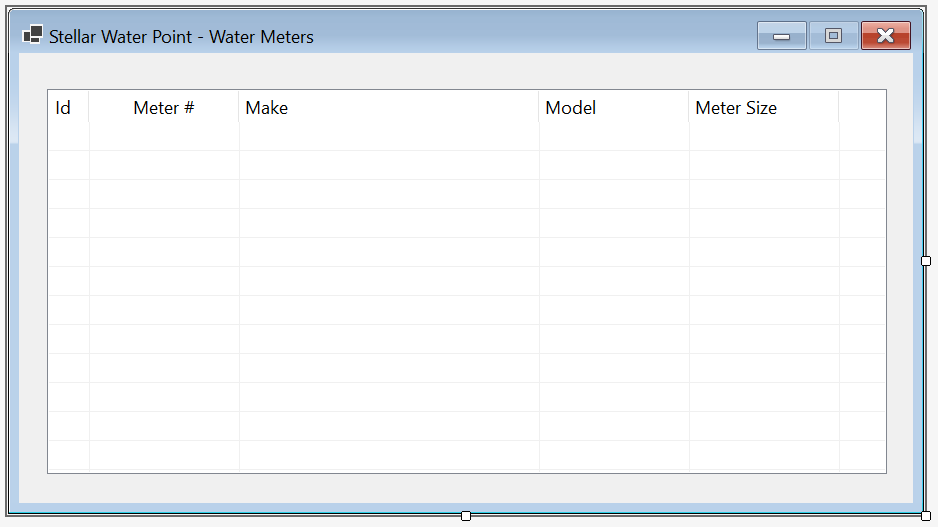
| Control | (Name) | Other Properties | |
| ListView |  |
LvwWaterMeters | FullRowSelect: True GridLines: True View: Details |
Imports Microsoft.Data.SqlClient

Public Class WaterMetersCentral

    Private Sub ShowWaterMeters()
        LvwWaterMeters.Items.Clear()

        Using ScStellarWaterPoint As SqlConnection =
                        New SqlConnection("Data Source=(local);" &
                                          "Database=StellarWaterPoint;" &
                                          "Integrated Security=SSPI;" &
                                          "TrustServerCertificate=True;")
            Dim CmdWaterMeters As SqlCommand = New SqlCommand("SELECT ALL * FROM WaterMeters;", ScStellarWaterPoint)

            ScStellarWaterPoint.Open()
            CmdWaterMeters.ExecuteNonQuery()

            Dim sdaWaterMeters As SqlDataAdapter = New SqlDataAdapter(CmdWaterMeters)

            Dim dsWaterMeters As DataSet = New DataSet("WaterMetersSet")

            sdaWaterMeters.Fill(dsWaterMeters)

            For Each DrWaterMeter As DataRow In dsWaterMeters.Tables(0).Rows
                Dim LviWaterMeter As ListViewItem = New ListViewItem(CStr(DrWaterMeter(0)))
                LviWaterMeter.SubItems.Add(CStr(DrWaterMeter(1)))
                LviWaterMeter.SubItems.Add(CStr(DrWaterMeter(2)))
                LviWaterMeter.SubItems.Add(CStr(DrWaterMeter(3)))
                LviWaterMeter.SubItems.Add(CStr(DrWaterMeter(4)))
                LvwWaterMeters.Items.Add(LviWaterMeter)
            Next
        End Using
    End Sub

    Private Sub WaterMetersCentral_Load(sender As Object, e As EventArgs) Handles MyBase.Load
        ShowWaterMeters()
    End Sub
End Class

| Control | (Name) | Text | Font | |
| Button |  |
BtnWaterMeters | Water &Meters... | Times New Roman, 24pt, style=Bold |
Public Class WaterDistribution
    Private Sub BtnWaterMeters_Click(sender As Object, e As EventArgs) Handles BtnWaterMeters.Click
        Dim Central As WaterMetersCentral = New WaterMetersCentral()

        Central.Show()
    End Sub
End Class
A Water Meter Record
Our application will have a list of water meters. A record for each water meter must be created. To make this happen, we will equip the application with an appropriate form.
Practical Learning: Creating a Water Meter Record

| Control | (Name) | Text | Other Properties | |
| Label |  |
&Meter #: | ||
| MaskedTextBox |  |
MtbMeterNumber | Masked: 000-000-000 | |
| Label | |
M&ake: | ||
| TextBox |  |
txtMake | Modifiers: Public | |
| Label | |
M&odel: | ||
| TextBox | |
txtModel | Modifiers: Public | |
| Label | |
Me&ter Size: | ||
| TextBox | |
txtMeterSize | Modifiers: Public | |
| Button | |
BtnOK | &OK | DialogResult: OK |
| Button | |
BtnCancel | &Cancel | DialogResult: Cancel |
FormBorderStyle: FixedDialog
Text:            Stellar Water Point - Water Meter Setup
StartPosition:   CenterScreen
AcceptButton:    BtnOK
CancelButton:    BtnCancel
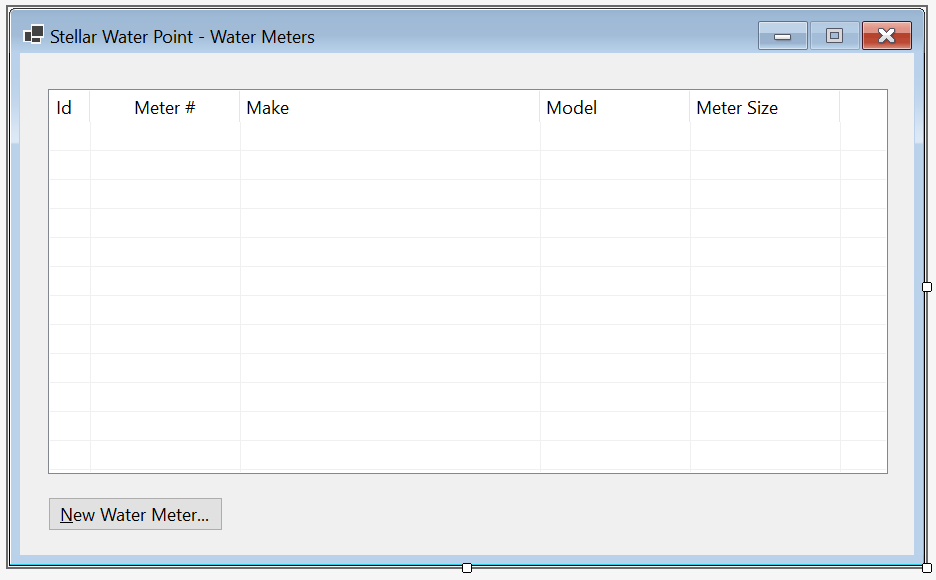
| Control | (Name) | Other Properties | |
| ListView | |
LvwWaterMeters | |
| Button | |
BtnNewWaterMeter | &New Water Meter... |
Imports Microsoft.Data.SqlClient

Public Class WaterMetersCentral

    Private Sub ShowWaterMeters()
        LvwWaterMeters.Items.Clear()

        Using ScStellarWaterPoint As SqlConnection =
                        New SqlConnection("Data Source=(local);" &
                                          "Database=StellarWaterPoint;" &
                                          "Integrated Security=SSPI;" &
                                          "TrustServerCertificate=True;")
            Dim CmdWaterMeters As SqlCommand = New SqlCommand("SELECT ALL * FROM WaterMeters;", ScStellarWaterPoint)

            ScStellarWaterPoint.Open()
            CmdWaterMeters.ExecuteNonQuery()

            Dim sdaWaterMeters As SqlDataAdapter = New SqlDataAdapter(CmdWaterMeters)

            Dim dsWaterMeters As DataSet = New DataSet("WaterMetersSet")

            sdaWaterMeters.Fill(dsWaterMeters)

            For Each DrWaterMeter As DataRow In dsWaterMeters.Tables(0).Rows
                Dim LviWaterMeter As ListViewItem = New ListViewItem(CStr(DrWaterMeter(0)))
                LviWaterMeter.SubItems.Add(CStr(DrWaterMeter(1)))
                LviWaterMeter.SubItems.Add(CStr(DrWaterMeter(2)))
                LviWaterMeter.SubItems.Add(CStr(DrWaterMeter(3)))
                LviWaterMeter.SubItems.Add(CStr(DrWaterMeter(4)))
                LvwWaterMeters.Items.Add(LviWaterMeter)
            Next
        End Using
    End Sub

    Private Sub WaterMetersCentral_Load(sender As Object, e As EventArgs) Handles MyBase.Load
        ShowWaterMeters()
    End Sub

    Private Sub BtnNewWaterMeter_Click(sender As Object, e As EventArgs) Handles BtnNewWaterMeter.Click
        Dim Create = New WaterMetersCreate()

        If Create.ShowDialog() = DialogResult.OK Then
            If String.IsNullOrEmpty(Create.MtbMeterNumber.Text) Then
                MsgBox("You must specify a meter number for the water meter; " &
                       "otherwise the record cannot be created.",
                       MsgBoxStyle.OkOnly, "Stellar Water Point")
                Exit Sub
            End If

            Using ScStellarWaterPoint As SqlConnection =
                        New SqlConnection("Data Source=(local);" &
                                          "Database=StellarWaterPoint;" &
                                          "Integrated Security=SSPI;" &
                                          "TrustServerCertificate=True;")
                Dim cmdWaterMeters As SqlCommand = New SqlCommand("INSERT INTO WaterMeters(MeterNumber, Make, Model, MeterSize)" &
                                                                  "VALUES(N'" & Create.MtbMeterNumber.Text & "', " &
                                                                  "       N'" & Create.TxtMake.Text & "', " &
                                                                  "       N'" & Create.TxtModel.Text & "', " &
                                                                  "       N'" & Create.TxtMeterSize.Text & "');",
                                                                  ScStellarWaterPoint)

                ScStellarWaterPoint.Open()
                cmdWaterMeters.ExecuteNonQuery()

                MsgBox("The water meter record has been created.",
                       MsgBoxStyle.OkOnly, "Stellar Water Point")
            End Using
        End If

        ShowWaterMeters()
    End Sub
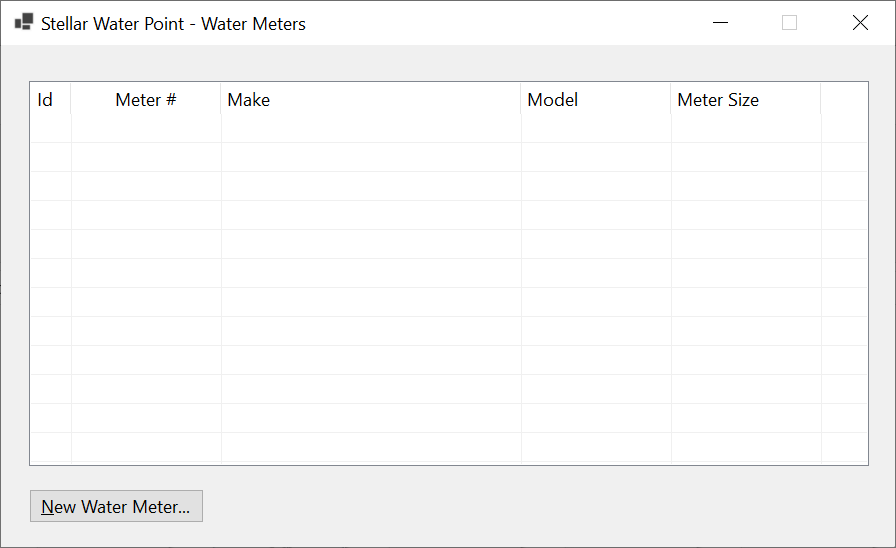
End Class

| Meter # | Make | Model | Meter Size |
| 392-494-572 | Constance Technologies | TG-4822 | 5/8 Inches |
| 938-705-869 | Stan Wood | 66-G | 1 Inch |
| 588-279-663 | Estellano | NCF-226 | 3/4 Inches |
Water Meter Details
Sometimes, a user may want to check the values of a water meter record. To support this, we will add an appropriate form to our application.
Practical Learning: Creating a Water Meter Record
| Control | (Name) | Text | |
| Button | |
BtnFindWateMeter | &Find Water Meter |
| Button | |
BtnClose | &Close |
Imports Microsoft.Data.SqlClient

Public Class WaterMetersDetails
    Private Sub BtnFindWaterMeter_Click(sender As Object, e As EventArgs) Handles BtnFindWaterMeter.Click
        If MtbMeterNumber.Text.Replace("-", "").Replace(" ", "") = "" Then
            MsgBox("You must specify a valid meter number for an existing water meter.",
                            MsgBoxStyle.OkOnly, "Stellar Water Point")
            TxtMake.Text=NOTHING
            TxtModel.Text=NOTHING
            TxtMeterSize.Text=NOTHING
            Exit Sub
        End If

        Using ScStellarWaterPoint As SqlConnection =
                        New SqlConnection("Data Source=(local);" &
                                          "Database=StellarWaterPoint;" &
                                          "Integrated Security=SSPI;" &
                                          "TrustServerCertificate=True;")
            Dim CmdWaterMeters As SqlCommand = New SqlCommand("SELECT ALL * FROM WaterMeters " &
                                                       "WHERE MeterNumber = N'" & MtbMeterNumber.Text & "';",
                                                       ScStellarWaterPoint)

            ScStellarWaterPoint.Open()
            CmdWaterMeters.ExecuteNonQuery()

            Dim sdaWaterMeters As SqlDataAdapter = New SqlDataAdapter(CmdWaterMeters)

            Dim DsWaterMeters = New DataSet("WaterMetersSet")

            sdaWaterMeters.Fill(DsWaterMeters)

            For Each DrWaterMeter As DataRow In DsWaterMeters.Tables(0).Rows
                TxtMake.Text = DrWaterMeter(2)
                TxtModel.Text = DrWaterMeter(3)
                TxtMeterSize.Text = DrWaterMeter(4)
            Next
        End Using
    End Sub

    Private Sub BtnClose_Click(sender As Object, e As EventArgs) Handles BtnClose.Click
        Close()
    End Sub
End Class
| Control | (Name) | Other Properties | |
| ListView | |
LvwWaterMeters | No Change |
| Button | |
BtnNewWaterMeter | &New Water Meter... |
| Button | |
BtnViewWaterMeter | &View Water Meter... |
Private Sub BtnWaterMeterDetails_Click(sender As Object, e As EventArgs) Handles BtnWaterMeterDetails.Click
    Dim Details As New WaterMetersDetails

    Details.Show()
End Sub

Updating a Water Meter Record
One of the routine operations performed on a database is to change the details of a record. To support this operation for a water meter, we will create a form that can be used to update the information of a water meter.
Practical Learning: Updating a Water Meter

| Control | (Name) | Text | |
| Button | |
BtnUpdateWateMeter | &Update Water Meter |
Imports Microsoft.Data.SqlClient

Public Class WaterMetersEditor
    Private Sub BtnFindWaterMeter_Click(sender As Object, e As EventArgs) Handles BtnFindWaterMeter.Click
        If MtbMeterNumber.Text.Replace("-", "").Replace(" ", "") = "" Then
            MsgBox("You must specify a valid meter number for an existing water meter.",
                   MsgBoxStyle.OkOnly, "Stellar Water Point")
            TxtMake.Text=NOTHING
            TxtModel.Text=NOTHING
            TxtMeterSize.Text=NOTHING
            Exit Sub
        End If

        Using ScStellarWaterPoint As SqlConnection =
                        New SqlConnection("Data Source=(local);" &
                                          "Database=StellarWaterPoint;" &
                                          "Integrated Security=SSPI;" &
                                          "TrustServerCertificate=True;")
            Dim CmdWaterMeters As SqlCommand = New SqlCommand("SELECT ALL * FROM WaterMeters " &
                                                       "WHERE MeterNumber = N'" & MtbMeterNumber.Text & "';",
                                                       ScStellarWaterPoint)

            ScStellarWaterPoint.Open()
            CmdWaterMeters.ExecuteNonQuery()

            Dim sdaWaterMeters As SqlDataAdapter = New SqlDataAdapter(CmdWaterMeters)
            Dim DsWaterMeters As DataSet = New DataSet("WaterMetersSet")

            sdaWaterMeters.Fill(DsWaterMeters)

            For Each DrWaterMeter As DataRow In DsWaterMeters.Tables(0).Rows
                TxtWaterMeterId.Text = CStr(DrWaterMeter(1))
                TxtMake.Text = CStr(DrWaterMeter(2))
                TxtModel.Text = CStr(DrWaterMeter(3))
                TxtMeterSize.Text = CStr(DrWaterMeter(4))
            Next
        End Using
    End Sub

    Private Sub BtnUpdateWaterMeter_Click(sender As Object, e As EventArgs) Handles BtnUpdateWaterMeter.Click
        If MtbMeterNumber.Text.Replace("-", "").Replace(" ", "") = "" Then
            MsgBox("You must specify a meter number for the water meter; " &
                            "otherwise the record cannot be created.",
                            MsgBoxStyle.OkOnly, "Stellar Water Point")
            Exit Sub
        End If

        Using ScStellarWaterPoint As SqlConnection =
                        New SqlConnection("Data Source=(local);" &
                                          "Database=StellarWaterPoint;" &
                                          "Integrated Security=SSPI;" &
                                          "TrustServerCertificate=True;")
            Dim CmdWaterMeters As SqlCommand = New SqlCommand("UPDATE WaterMeters SET Make      = N'" & TxtMake.Text & "' WHERE MeterNumber = N'" & MtbMeterNumber.Text & "';" &
                                                              "UPDATE WaterMeters SET Model     = N'" & TxtModel.Text & "' WHERE MeterNumber = N'" & MtbMeterNumber.Text & "';" &
                                                              "UPDATE WaterMeters SET MeterSize = N'" & TxtMeterSize.Text & "' WHERE MeterNumber = N'" & MtbMeterNumber.Text & "';",
                                                              ScStellarWaterPoint)

            ScStellarWaterPoint.Open()
            CmdWaterMeters.ExecuteNonQuery()

            MsgBox("The water meter record has been updated.",
                            MsgBoxStyle.OkOnly, "Stellar Water Point")
        End Using

        Close()
    End Sub

    Private Sub BtnClose_Click(sender As Object, e As EventArgs) Handles BtnClose.Click
        Close()
    End Sub
End Class
| Control | (Name) | Other Properties | |
| ListView | |
LvwWaterMeters | |
| Button | |
BtnNewWaterMeter | &New Water Meter... |
| Button | |
BtnViewWaterMeter | &View Water Meter... |
| Button | |
BtnEditWaterMeter | &Edit Water Meter... |
Private Sub BtnWaterMeterEitor_Click(sender As Object, e As EventArgs) Handles BtnWaterMeterEditor.Click
    Dim Editor As New WaterMetersEditor

    Editor.ShowDialog()

    ShowWaterMeters()
End Sub


| Make: | Stanford Trend | Model: | 266G |
| Meter Size: | 1 1/2 Inches |

Removing a Water Meter from the Database
If a water meter has become useless and you want to make sure it is no more available for customer use, you can delete its record. To assist the user, we will create a form for that operation.
Practical Learning: Deleting a Water Meter Record

| Control | (Name) | Text | |
| Button | |
BtnDeleteWateMeter | &Delete Water Meter |
Imports Microsoft.Data.SqlClient

Public Class WaterMetersDelete
    Private Sub BtnFindWaterMeter_Click(sender As Object, e As EventArgs) Handles BtnFindWaterMeter.Click
        If MtbMeterNumber.Text.Replace("-", "").Replace(" ", "") = "" Then
            MsgBox("You must specify a valid meter number for an existing water meter.",
                   MsgBoxStyle.OkOnly, "Stellar Water Point")
            TxtMake.Text=NOTHING
            TxtModel.Text=NOTHING
            TxtMeterSize.Text=NOTHING
            Exit Sub
        End If

        Using ScStellarWaterPoint As SqlConnection =
                        New SqlConnection("Data Source=(local);" &
                                          "Database=StellarWaterPoint;" &
                                          "Integrated Security=SSPI;" &
                                          "TrustServerCertificate=True;")
            Dim CmdWaterMeters As SqlCommand = New SqlCommand("SELECT ALL * FROM WaterMeters " &
                                                           "WHERE MeterNumber = N'" & MtbMeterNumber.Text & "';",
                                                           ScStellarWaterPoint)

            ScStellarWaterPoint.Open()
            CmdWaterMeters.ExecuteNonQuery()

            Dim SdaWaterMeters As SqlDataAdapter = New SqlDataAdapter(CmdWaterMeters)
            Dim DsWaterMeters As DataSet = New DataSet("WaterMetersSet")

            SdaWaterMeters.Fill(dsWaterMeters)

            For Each DrWaterMeter As DataRow In dsWaterMeters.Tables(0).Rows
                TxtMake.Text = DrWaterMeter(2)
                TxtModel.Text = DrWaterMeter(3)
                TxtMeterSize.Text = DrWaterMeter(4)
            Next
        End Using
    End Sub

    Private Sub BtnDeleteWaterMeter_Click(sender As Object, e As EventArgs) Handles BtnDeleteWaterMeter.Click
        If MtbMeterNumber.Text.Replace("-", "").Replace(" ", "") = "" Then
            MsgBox("You must specify a meter number for the water meter; " &
                        "otherwise the record cannot be created.",
                        MsgBoxStyle.OkOnly, "Stellar Water Point")
            Exit Sub
        End If

        Using ScStellarWaterPoint As SqlConnection =
                    New SqlConnection("Data Source=(local);" &
                                      "Database=StellarWaterPoint;" &
                                      "Integrated Security=SSPI;" &
                                      "TrustServerCertificate=True;")
            Dim CmdWaterMeters As SqlCommand = New SqlCommand("DELETE WaterMeters WHERE MeterNumber = N'" & MtbMeterNumber.Text & "';",
                                               ScStellarWaterPoint)

            ScStellarWaterPoint.Open()
            CmdWaterMeters.ExecuteNonQuery()

            MsgBox("The water meter record has been deleted.",
                        MsgBoxStyle.OkOnly, "Stellar Water Point")
        End Using

        Close()
    End Sub

    Private Sub BtnClose_Click(sender As Object, e As EventArgs) Handles BtnClose.Click
        Close()
    End Sub
End Class
| Control | (Name) | Text | Anchor | Other Properties | |
| ListView | |
LvwWaterMeters | Top, Bottom, Left, Right | FullRowSelect: True GridLines: True View: Details |
|
| Button | |
BtnNewWaterMeter | &New Water Meter... | Bottom, Right | |
| Button | |
BtnViewWaterMeter | &View Water Meter... | Bottom, Right | |
| Button | |
BtnEditWaterMeter | &Edit Water Meter... | Bottom, Right | |
| Button | |
BtnDeleteWaterMeter | &Delete Water Meter... | Bottom, Right | |
Imports Microsoft.Data.SqlClient

Public Class WaterMetersCentral

    Private Sub ShowWaterMeters()
        LvwWaterMeters.Items.Clear()

        Using ScStellarWaterPoint As SqlConnection =
                        New SqlConnection("Data Source=(local);" &
                                          "Database=StellarWaterPoint;" &
                                          "Integrated Security=SSPI;" &
                                          "TrustServerCertificate=True;")
            Dim CmdWaterMeters As SqlCommand = New SqlCommand("SELECT ALL * FROM WaterMeters;", ScStellarWaterPoint)

            ScStellarWaterPoint.Open()
            CmdWaterMeters.ExecuteNonQuery()

            Dim sdaWaterMeters As SqlDataAdapter = New SqlDataAdapter(CmdWaterMeters)

            Dim dsWaterMeters As DataSet = New DataSet("WaterMetersSet")

            sdaWaterMeters.Fill(dsWaterMeters)

            For Each DrWaterMeter As DataRow In dsWaterMeters.Tables(0).Rows
                Dim LviWaterMeter As ListViewItem = New ListViewItem(CStr(DrWaterMeter(0)))
                LviWaterMeter.SubItems.Add(CStr(DrWaterMeter(1)))
                LviWaterMeter.SubItems.Add(CStr(DrWaterMeter(2)))
                LviWaterMeter.SubItems.Add(CStr(DrWaterMeter(3)))
                LviWaterMeter.SubItems.Add(CStr(DrWaterMeter(4)))
                LvwWaterMeters.Items.Add(LviWaterMeter)
            Next
        End Using
    End Sub

    Private Sub WaterMetersCentral_Load(sender As Object, e As EventArgs) Handles MyBase.Load
        ShowWaterMeters()
    End Sub

    Private Sub BtnNewWaterMeter_Click(sender As Object, e As EventArgs) Handles BtnNewWaterMeter.Click
        Dim Create = New WaterMetersCreate()

        If Create.ShowDialog() = DialogResult.OK Then
            If String.IsNullOrEmpty(Create.MtbMeterNumber.Text) Then
                MsgBox("You must specify a meter number for the water meter; " &
                       "otherwise the record cannot be created.",
                       MsgBoxStyle.OkOnly, "Stellar Water Point")
                Exit Sub
            End If

            Using ScStellarWaterPoint As SqlConnection =
                        New SqlConnection("Data Source=(local);" &
                                          "Database=StellarWaterPoint;" &
                                          "Integrated Security=SSPI;" &
                                          "TrustServerCertificate=True;")
                Dim cmdWaterMeters As SqlCommand = New SqlCommand("INSERT INTO WaterMeters(MeterNumber, Make, Model, MeterSize)" &
                                                                  "VALUES(N'" & Create.MtbMeterNumber.Text & "', " &
                                                                  "       N'" & Create.TxtMake.Text & "', " &
                                                                  "       N'" & Create.TxtModel.Text & "', " &
                                                                  "       N'" & Create.TxtMeterSize.Text & "');",
                                                                  ScStellarWaterPoint)

                ScStellarWaterPoint.Open()
                cmdWaterMeters.ExecuteNonQuery()

                MsgBox("The water meter record has been created.",
                       MsgBoxStyle.OkOnly, "Stellar Water Point")
            End Using
        End If

        ShowWaterMeters()
    End Sub

    Private Sub BtnWaterMeterDetails_Click(sender As Object, e As EventArgs) Handles BtnWaterMeterDetails.Click
        Dim Details As New WaterMetersDetails

        Details.Show()
    End Sub

    Private Sub BtnWaterMeterEitor_Click(sender As Object, e As EventArgs) Handles BtnWaterMeterEditor.Click
        Dim Editor As New WaterMetersEditor

        Editor.ShowDialog()

        ShowWaterMeters()
    End Sub

    Private Sub BtnDeleteWaterMeter_Click(sender As Object, e As EventArgs) Handles BtnDeleteWaterMeter.Click
        Dim Delete As New WaterMetersDelete

        Delete.ShowDialog()

        ShowWaterMeters()
    End Sub

    Private Sub BtnClose_Click(sender As Object, e As EventArgs) Handles BtnClose.Click
        Close()
    End Sub
End Class


USE StellarWaterPoint1;
GO
DROP TABLE WaterMeters;
GO
CREATE TABLE WaterMeters
(
	WaterMeterId int identity(1, 1),
	MeterNumber  nvarchar(15) not null,
	Make         nvarchar(25) null,
	Model        nvarchar(15) not null,
	MeterSize    nvarchar(15),
	CONSTRAINT   PK_WaterMeters PRIMARY KEY(WaterMeterId)
);
GO
INSERT INTO WaterMeters(MeterNumber, Make, Model, MeterSize)
VALUES(N'392-494-572', N'Constance Technologies', N'TG-4822',  N'5/8 Inches'  ),
      (N'938-725-869', N'Stanford Trend',         N'266G',     N'1 1/2 Inches'),
      (N'588-279-663', N'Estellano',              N'NCF-226',  N'4 Inches'    ),
      (N'186-962-805', N'Lansome',                N'2800',     N'1 1/2 Inches'),
      (N'379-386-979', N'Planetra',               N'P-2020',   N'4 Inches'    ),
      (N'580-742-825', N'Kensa Sons',             N'KS2000A',  N'1 3/4 Inches'),
      (N'849-351-444', N'Raynes Energica',        N'a1088',    N'2 Inches'    ),
      (N'208-428-308', N'Constance Technologies', N'808D',     N'3/4 Inches'  ),
      (N'738-588-249', N'Warrington',             N'W4242',    N'5/8 Inches'  ),
      (N'496-813-794', N'Estellano',              N'NCF-226',  N'3/4 Inches'  ),
      (N'862-715-006', N'Warrington',             N'W-4040',   N'1/2 Inch'    ),
      (N'649-358-184', N'Raynes Energica',        N'b1700',    N'1 1/2 Inches'),
      (N'928-317-924', N'Gongola',                N'GN1000',   N'2 Inch'      ),
      (N'595-753-147', N'Grass Grill',            N'CRC-1000', N'1 Inch'      ),
      (N'799-528-461', N'Kensa Sons',             N'K-584-L',  N'3/4 Inches'  ),
      (N'386-468-057', N'Estellano',              N'NCF-226',  N'3/4 Inches'  ),
      (N'938-275-294', N'Constance Technologies', N'TT-8822',  N'4 Inches'    ),
      (N'288-427-585', N'Planetra',               N'P-2020',   N'1/2 Inch'    ),
      (N'394-835-297', N'Raynes Energica',        N'i2022',    N'3/4 Inches'  ),
      (N'847-252-246', N'Master Stream',          N'2000-MS',  N'1 1/2 Inches'),
      (N'349-725-848', N'Planetra',               N'P-8000',   N'4 Inches'    ),
      (N'713-942-058', N'Master Stream',          N'3366-MS',  N'3/4 Inches'  ),
      (N'747-581-379', N'Warrington',             N'W4242',    N'5/8 Inches'  ),
      (N'582-755-263', N'Kensa Sons',             N'KS2000A',  N'1 Inch'      ),
      (N'827-260-758', N'Raynes Energica',        N'a1088',    N'1-1/4 Inch'  ),
      (N'837-806-836', N'Lansome',                N'7400',     N'5/8 Inches'  ),
      (N'207-964-835', N'Constance Technologies', N'TG-6220',  N'5/8 Inches'  ),
      (N'296-837-495', N'Raynes Energica',        N'QG505',    N'4 Inches'    ),
      (N'468-359-486', N'Grass Grill',            N'KLP-8822', N'1-1/4 Inch'  ),
      (N'931-486-003', N'Planetra',               N'P-2020',   N'1/2 Inch'    ),
      (N'483-770-648', N'Warren',                 N'WWW',      N'0.1 Inches'  ),
      (N'592-824-957', N'Kensa Sons',             N'D-497-H',  N'3/4 Inches'  ),
      (N'293-835-704', N'Gongola',                N'GOL1000',  N'1/2 Inch'    ),
      (N'739-777-749', N'Warrington',             N'W2200W',   N'3/4 Inches'  ),
      (N'374-886-284', N'Raynes Energica',        N'i2022',    N'3/4 Inches'  ),
      (N'186-959-757', N'Kensa Sons',             N'M-686-G',  N'1 1/2 Inches'),
      (N'594-827-359', N'Planetra',               N'P-8000',   N'1 Inch'      ),
      (N'394-739-242', N'Master Stream',          N'9393-TT',  N'5/8 Inches'  ),
      (N'529-283-752', N'Constance Technologies', N'404T',     N'3/4 Inches'  ),
      (N'295-770-695', N'Warrington',             N'W-2286',   N'1-1/4 Inch'  ),
      (N'739-749-737', N'Kensa Sons',             N'KS2000A',  N'1 Inch'      ),
      (N'947-528-317', N'Gondola',                N'GDL-5000', N'1 Inch'      ),
      (N'630-207-055', N'Lansome',                N'2800',     N'3/4 Inches'  ),
      (N'827-508-248', N'Standard Trend',         N'428T',     N'3/4 Inches'  ),
      (N'293-924-869', N'Grass Grill',            N'CRC-2020', N'1/2 Inch'    ),
      (N'928-247-580', N'Gondola',                N'GOL2000',  N'0.34 Inch'   ),
      (N'682-537-380', N'Planetra',               N'P-2020',   N'1-1/4 Inch'  ),
      (N'470-628-850', N'Estellano',              N'WRT-482',  N'3/4 Inches'  ),
      (N'649-373-505', N'Constance Technologies', N'BD-7000',  N'5/8 Inches'  ),
      (N'306-842-497', N'Lansome',                N'9000',     N'3/4 Inches'  );
GO
Customers
Introduction
Customers are the entities that use the services of the bussiness whose application we are building. In this seciton, we will createthe forms that can assist a user with customers-based operations.
Practical Learning: Introducing Customers
Customers Accounts
Our application will use a database that contains a list of customers. As seen with water meter records, some time to time, a user will want to view the customers records. To display a list of customers, we will create a form equipped with a list view.
Practical Learning: Displaying Customers Accounts
| Control | (Name) | Other Properties | |
| ListView | |
LvwCustomers | FullRowSelect: True GridLines: True View: Details |
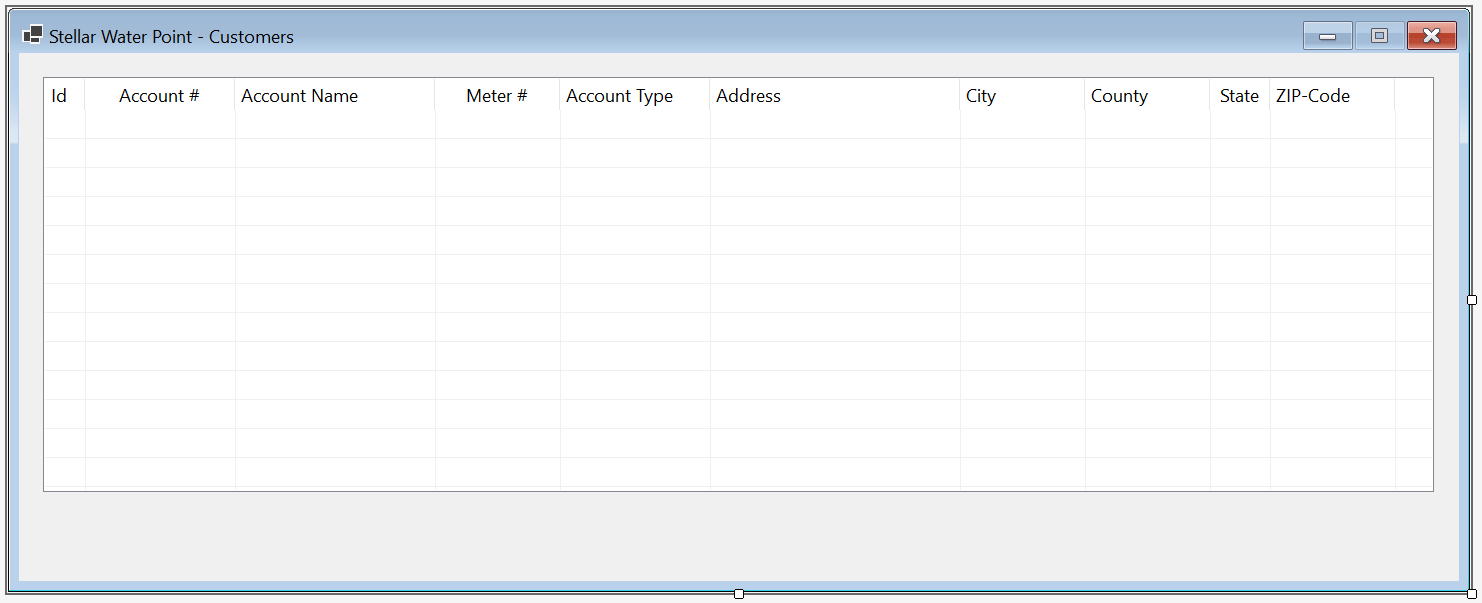
| (Name) | Text | TextAlign | Width |
| colCustomerId | Id | 40 | |
| colAccountNumber | Account # | Center | 150 |
| colAccountName | Account Name | 200 | |
| colMeterNumber | Meter # | Center | 150 |
| colAccountType | Account Type | 475 | |
| colAddress | Address | 250 | |
| colCity | City | 125 | |
| colCounty | County | 125 | |
| colState | State | Center | |
| colZIPCode | ZIP-Code | Center | 125 |
Imports Microsoft.Data.SqlClient

Public Class CustomersCentral
    Private Sub ShowCustomers()
        Using ScStellarWaterPoint As SqlConnection =
                        New SqlConnection("Data Source=(local);" &
                                          "Database=StellarWaterPoint;" &
                                          "Integrated Security=SSPI;" &
                                          "TrustServerCertificate=True;")
            Dim CmdCustomers As SqlCommand = New SqlCommand("Select ALL * FROM CustomersAccounts ORDER BY CustId;",
                                                            ScStellarWaterPoint)
            ScStellarWaterPoint.Open()
            CmdCustomers.ExecuteNonQuery()

            Dim SdaCustomers As SqlDataAdapter = New SqlDataAdapter(CmdCustomers)

            Dim DsCustomers As DataSet = New DataSet("CustomersSet")

            SdaCustomers.Fill(DsCustomers)

            LvwCustomers.Items.Clear()

            For Each DrCustomer As DataRow In DsCustomers.Tables(0).Rows
                Dim LviCustomer As ListViewItem = New ListViewItem(CStr(DrCustomer(0)))

                LviCustomer.SubItems.Add(DrCustomer(1))
                LviCustomer.SubItems.Add(DrCustomer(2))
                LviCustomer.SubItems.Add(DrCustomer(3))

                If IsDBNull(DrCustomer(4)) Then
                    LviCustomer.SubItems.Add("")
                Else
                    LviCustomer.SubItems.Add(DrCustomer(4))
                End If

                If IsDBNull(DrCustomer(5)) Then
                    LviCustomer.SubItems.Add("")
                Else
                    LviCustomer.SubItems.Add(DrCustomer(5))
                End If

                If IsDBNull(DrCustomer(6)) Then
                    LviCustomer.SubItems.Add("")
                Else
                    LviCustomer.SubItems.Add(DrCustomer(6))
                End If

                If IsDBNull(DrCustomer(7)) Then
                    LviCustomer.SubItems.Add("")
                Else
                    LviCustomer.SubItems.Add(DrCustomer(7))
                End If

                If IsDBNull(DrCustomer(8)) Then
                    LviCustomer.SubItems.Add("")
                Else
                    LviCustomer.SubItems.Add(DrCustomer(8))
                End If

                If IsDBNull(DrCustomer(9)) Then
                    LviCustomer.SubItems.Add("")
                Else
                    LviCustomer.SubItems.Add(DrCustomer(9))
                End If

                LvwCustomers.Items.Add(LviCustomer)
            Next
        End Using
    End Sub

    Private Sub CustomersCentral_Load(sender As Object, e As EventArgs) Handles MyBase.Load
        ShowCustomers()
    End Sub
End Class
| Control | (Name) | Text | Font | |
| Button | |
BtnCustomers | &Customers... | Times New Roman, 24pt, style=Bold |
Private Sub BtnCustomers_Click(sender As Object, e As EventArgs) Handles BtnCustomers.Click
    Dim Central = New CustomersCentral

    Central.Show()
End Sub
A Customer's Account
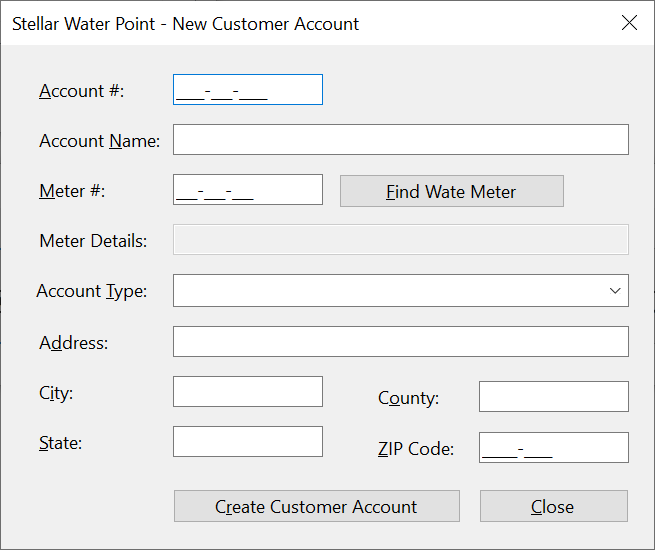
As mentioned already, our application will use a database that contains a list of customers. This means that a customer must have an account. We will create a form to let the user create an account. Each customer account must have an associated water meter.
Practical Learning: Creating a Customer Account
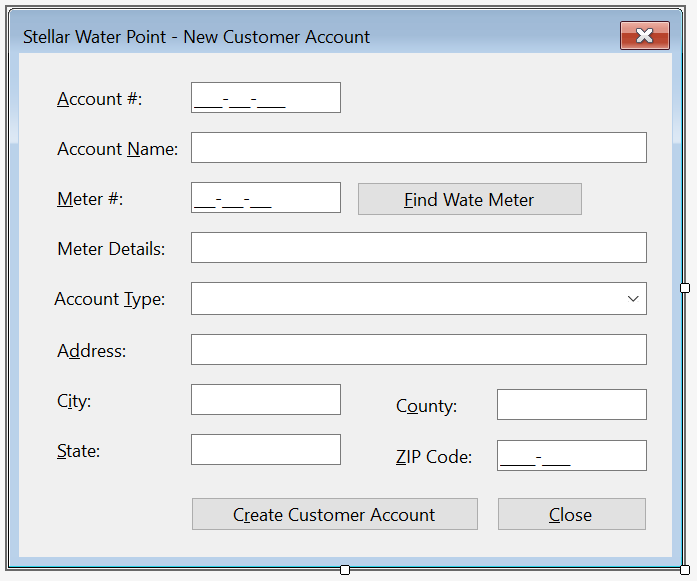
| Control | (Name) | Text | Modifiers | Other Properties | |
| Label | |
&Account #: | |||
| MaskedTextBox | |
MtbAccountNumber | Public | Masked: 0000-000-0000 | |
| Label | |
&Account Name: | |||
| TextBox | |
txtAccountName | Public | ||
| Label | |
&Meter #: | |||
| MaskedTextBox | |
MtbMeterNumber | Public | Masked: 000-000-000 | |
| Button | |
BtnFindWaterMeter | &Find Water Meter | ||
| Label | |
Meter &Details: | |||
| TextBox | |
txtMeterDetails | Enabled: False | ||
| Label | |
&Account Type: | |||
| ComboBox |  |
cbxAccountsTypes | Public | ||
| Label | |
&Address: | |||
| TextBox | |
txtAddress | Public | ||
| Label | |
C&ity: | |||
| TextBox | |
txtCity | Public | ||
| Label | |
C&ounty: | |||
| TextBox | |
txtCounty | Public | ||
| Label | |
&State: | |||
| TextBox | |
txtState | Public | ||
| Label | |
&ZIP-Code: | |||
| MaskedTextBox | |
MtbZIPCode | Public | Masked: Zip-Code | |
| Button | |
BtnSaveCustomerAccount | S&ave Customer Account | DialogResult: OK | |
| Button | |
BtnClose | &Close | DialogResult: Cancel | |
FormBorderStyle: FixedDialog
Text:            Stellar Water Point - Customer Account Setup
StartPosition:   CenterScreen
AcceptButton:    BtnSaveCustomerAccount
CancelButton:    BtnClose
MinimizeBox:     False
MaximizeBox:     False
Imports Microsoft.Data.SqlClient

Public Class CustomersCreate
    Private Sub CustomersCreate_Load(sender As Object, e As EventArgs) Handles MyBase.Load
        Using ScStellarWaterPoint As SqlConnection =
                            New SqlConnection("Data Source=(local);" &
                                              "Database=StellarWaterPoint;" &
                                              "Integrated Security=SSPI;" &
                                              "TrustServerCertificate=True;")
            Dim CmdAccountTypes As SqlCommand = New SqlCommand("SELECT AccountType,   " &
                                                               "       TypeDefinition " &
                                                               "FROM   AccountsTypes;  ",
                                                               ScStellarWaterPoint)


            ScStellarWaterPoint.Open()
            CmdAccountTypes.ExecuteNonQuery()

            Dim SdaAccountTypes As SqlDataAdapter = New SqlDataAdapter(CmdAccountTypes)

            Dim DsAccountTypes As DataSet = New DataSet("AccountTypesSet")

            SdaAccountTypes.Fill(DsAccountTypes)

            For Each DrAccountType As DataRow In DsAccountTypes.Tables(0).Rows
                CbxAccountsTypes.Items.Add(DrAccountType(0).ToString() & " - " & DrAccountType(1))
            Next
        End Using
    End Sub

    Private Sub BtnFindWaterMeter_Click(sender As Object, e As EventArgs) Handles BtnFindWaterMeter.Click
        If MtbMeterNumber.Text.Replace("-", "").Replace(" ", "") = "" Then
            MsgBox("You must specify a valid meter number for an existing water meter.",
                   MsgBoxStyle.OkOnly, "Stellar Water Point")
            TxtMeterDetails.Text = String.Empty
            Exit Sub
        End If

        Using ScStellarWaterPoint As SqlConnection =
                        New SqlConnection("Data Source=(local);" &
                                          "Database=StellarWaterPoint;" &
                                          "Integrated Security=SSPI;" &
                                          "TrustServerCertificate=True;")
            Dim CmdWaterMeters As SqlCommand = New SqlCommand("GetWaterMeter",
                                                       ScStellarWaterPoint)

            CmdWaterMeters.CommandType = CommandType.StoredProcedure

            Dim SpWaterMeter As SqlParameter = New SqlParameter()
            SpWaterMeter.ParameterName = "@MtrNbr"
            SpWaterMeter.DbType = DbType.String
            SpWaterMeter.Value = MtbMeterNumber.Text
            SpWaterMeter.Direction = ParameterDirection.Input
            CmdWaterMeters.Parameters.Add(SpWaterMeter)

            ScStellarWaterPoint.Open()
            CmdWaterMeters.ExecuteNonQuery()

            Dim SdaWaterMeters As SqlDataAdapter = New SqlDataAdapter(CmdWaterMeters)

            Dim DsWaterMeters As DataSet = New DataSet("WaterMetersSet")

            SdaWaterMeters.Fill(DsWaterMeters)

            If DsWaterMeters.Tables(0).Rows.Count = 0 Then
                MsgBox("There is no water meter with that meter number.",
                       MsgBoxStyle.OkOnly, "Stellar Water Point")
                TxtMeterDetails.Text = String.Empty
                Exit Sub
            End If

            For Each DrWaterMeter As DataRow In DsWaterMeters.Tables(0).Rows
                TxtMeterDetails.Text = DrWaterMeter(0)
            Next
        End Using
    End Sub
End Class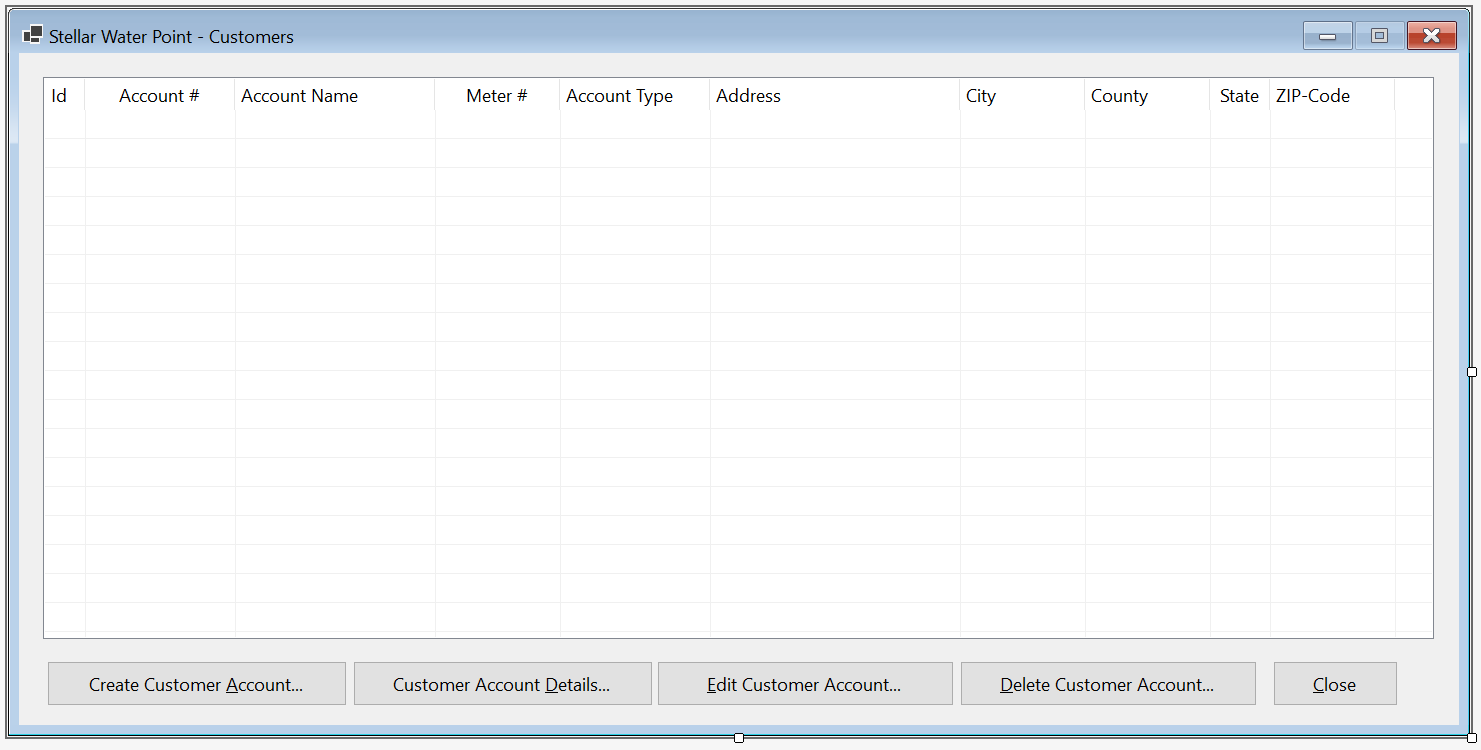
| Control | (Name) | Other Properties | |
| ListView | |
LvwCustomers | |
| Button | |
BtnCreateCustomerAccount | &Create Customer Account... |
Imports Microsoft.Data.SqlClient

Public Class CustomersCentral

        . . .

    Private Sub BtnCreateCustomerAccount_Click(sender As Object, e As EventArgs) Handles BtnCreateCustomerAccount.Click
        Dim Create = New CustomersCreate()

        If Create.ShowDialog() = DialogResult.OK Then
            If Create.MtbAccountNumber.Text.Replace("-", "").Replace(" ", "") = "" Then
                MsgBox("You must create a New, valid, And unique account number For the New customer; " &
                       "otherwise the Customer accountrecord cannot be created.",
                       MsgBoxStyle.OkOnly, "Stellar Water Point")
                Exit Sub
            End If

            If Create.MtbMeterNumber.Text.Replace("-", "").Replace(" ", "") = "" Then
                MsgBox("You must specify a meter number For the water meter; " &
                       "otherwise the record cannot be created.",
                       MsgBoxStyle.OkOnly, "Stellar Water Point")
                Exit Sub
            End If

            Dim StrAccountType = String.Empty

            If String.IsNullOrEmpty(Create.CbxAccountsTypes.Text) Then
                StrAccountType = "OTH"
            Else
                StrAccountType = Create.CbxAccountsTypes.Text.Substring(0, 3)
            End If

            Using ScStellarWaterPoint As SqlConnection =
                            New SqlConnection("Data Source=(local);" &
                                              "Database= StellarWaterPoint;" &
                                              "Integrated Security=SSPI;" &
                                              "TrustServerCertificate=True;")
                Dim CmdCustomers As SqlCommand = New SqlCommand("INSERT INTO Customers(AccountNumber,            " &
                                                                "                      AccountName,              " &
                                                                "                      AccountType,              " &
                                                                "                      MeterNumber,              " &
                                                                "                      [Address],                " &
                                                                "                      City,                     " &
                                                                "                      County,                   " &
                                                                "                      [State],                  " &
                                                                "                      ZIPCode)                  " &
                                                                "VALUES(N'" & Create.MtbAccountNumber.Text & "', " &
                                                                "       N'" & Create.TxtAccountName.Text & "', " &
                                                                "       N'" & StrAccountType & "', " &
                                                                "       N'" & Create.MtbMeterNumber.Text & "', " &
                                                                "       N'" & Create.TxtAddress.Text & "', " &
                                                                "       N'" & Create.TxtCity.Text & "', " &
                                                                "       N'" & Create.TxtCounty.Text & "', " &
                                                                "       N'" & Create.TxtState.Text & "', " &
                                                                "       N'" & Create.MtbZIPCode.Text & "');",
                                                                ScStellarWaterPoint)

                ScStellarWaterPoint.Open()
                CmdCustomers.ExecuteNonQuery()

                MsgBox("The customer account has been created.",
                       MsgBoxStyle.OkOnly, "Stellar Water Point")
            End Using
        End If

        ShowCustomers()
    End Sub
End Class

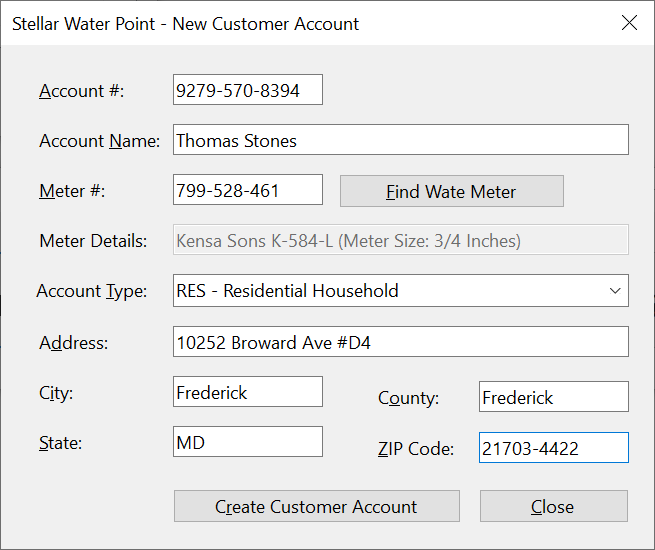
Account #:    9279-570-8394
Account Name: Thomas Stones
Meter #:      799-528-461
Account Type: RES - Residential Household
Address:      10252 Broward Ave #D4
City:         Frederick
County:       Frederick
State:        MD
ZIP-Code:     21703-4422
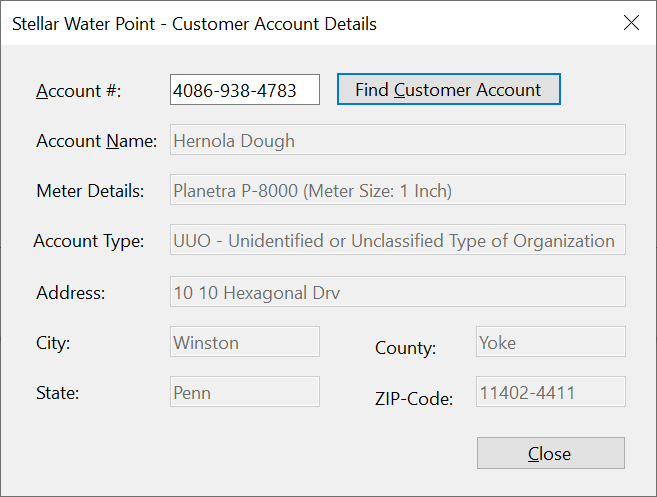
| Account # | Account Name | Meter # | Account Type | Address | City | County | State | ZIP-Code |
| 4086-938-4783 | Hernola Dough | 594-827-359 | UUO - Unidentified or Unclassified Type of Organization | 10 10 Hexagonal Drv | Winston | Yoke | Penn | 11402-4411 |
| 7080-583-5947 | Sunny Yard | 827-508-248 | WAT - Water Intensive Business(Laudromat, Hair Salon, Restaurant, etc | 663 Sherry Wood East Street | Shimpstown | Franklin | PA | 17236-2626 |

A Review of a Customer's Account
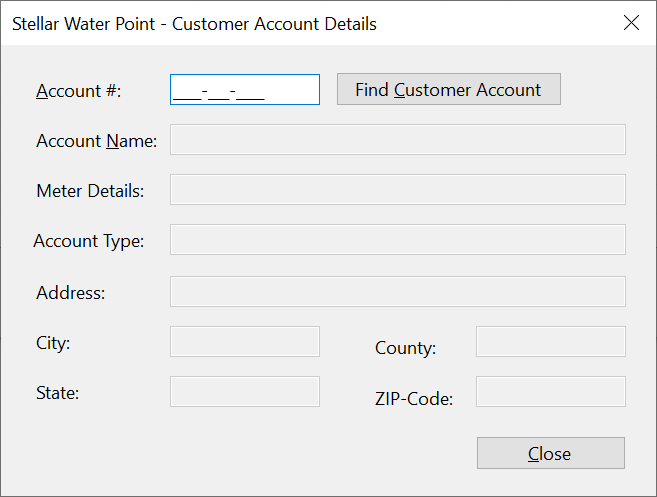
Some time to time, a user will want to review the details of a customer's account. We will create a form to assist the user with this.
Practical Learning: Creating a Water Meter Record

| Control | (Name) | Text | Enabled | Other Properties | |
| Label | |
&Account #: | |||
| MaskedTextBox | |
MtbAccountNumber | Masked: 0000-000-0000 | ||
| Button | |
BtnFindCustomerAccount | &Find Customer Account | ||
| Label | |
Account Name: | |||
| TextBox | |
txtAccountName | False | ||
| Label | |
Meter #: | |||
| TextBox | |
txtMeterNumber | False | ||
| Label | |
Meter Details: | |||
| TextBox | |
txtMeterDetails | False | ||
| Label | |
Account Type: | |||
| TextBox | |
txtAccountType | False | ||
| Label | |
Address: | |||
| TextBox | |
txtAddress | False | ||
| Label | |
City: | |||
| TextBox | |
txtCity | False | ||
| Label | |
County: | |||
| TextBox | |
txtCounty | False | ||
| Label | |
State: | |||
| TextBox | |
txtState | False | ||
| Label | |
ZIP-Code: | False | ||
| TextBox | |
txtZIPCode | False | ||
| Label | |
Customer Id: | |||
| TextBox | |
txtCustomerId | False | ||
| Button | |
BtnClose | &Close | ||
FormBorderStyle: FixedDialog
Text:            Stellar Water Point - Customer Account Setup
StartPosition:   CenterScreen
MinimizeBox:     False
MaximizeBox:     False
Imports Microsoft.Data.SqlClient

Public Class CustomersDetails
    Private Sub BtnFindCustomerAccount_Click(sender As Object, e As EventArgs) Handles BtnFindCustomerAccount.Click
        If MtbAccountNumber.Text.Replace("-", "").Replace(" ", "") = "" Then
            MsgBox("You must first type a valid account number of an existing customer, " &
                   "then click the Find Customer Account button.",
                   MsgBoxStyle.OkOnly, "Stellar Water Point")
            Exit Sub
        End If

        Using ScStellarWaterPoint As SqlConnection =
                        New SqlConnection("Data Source=(local);" &
                                          "Database=StellarWaterPoint;" &
                                          "Integrated Security=SSPI;" &
                                          "TrustServerCertificate=True;")
            Dim CmdCustomers As SqlCommand = New SqlCommand("IdentifyClient", ScStellarWaterPoint)

            CmdCustomers.CommandType = CommandType.StoredProcedure

            Dim SpCustomer As SqlParameter = New SqlParameter()
            SpCustomer.ParameterName = "@AcntNbr"
            SpCustomer.DbType = DbType.String
            SpCustomer.Value = MtbAccountNumber.Text
            SpCustomer.Direction = ParameterDirection.Input
            CmdCustomers.Parameters.Add(SpCustomer)

            ScStellarWaterPoint.Open()
            CmdCustomers.ExecuteNonQuery()

            Dim SdaCustomers As SqlDataAdapter = New SqlDataAdapter(CmdCustomers)
            Dim DsCustomers As DataSet = New DataSet("CustomersSet")

            SdaCustomers.Fill(DsCustomers)

            If DsCustomers.Tables(0).Rows.Count > 0 Then
                For Each DrClient As DataRow In DsCustomers.Tables(0).Rows
                    TxtCustomerId.Text = DrClient(0)
                    TxtAccountName.Text = DrClient(2)
                    TxtAccountType.Text = DrClient(3)
                    TxtMeterDetails.Text = DrClient(4) & " - " & DrClient(5)
                    TxtAddress.Text = DrClient(6)
                    TxtCity.Text = DrClient(7)
                    TxtCounty.Text = DrClient(8)
                    TxtState.Text = DrClient(9)
                    TxtZIPCode.Text = DrClient(10)
                Next
            Else
                MsgBox("The account number you typed is not in our system.",
                                MsgBoxStyle.OkOnly, "Stellar Water Point")
                TxtCustomerId.Text = String.Empty
                TxtAccountName.Text = String.Empty
                TxtAccountType.Text = String.Empty
                TxtMeterDetails.Text = String.Empty
                TxtAddress.Text = String.Empty
                TxtCity.Text = String.Empty
                TxtCounty.Text = String.Empty
                TxtState.Text = String.Empty
                TxtZIPCode.Text = String.Empty
            End If
        End Using
    End Sub

    Private Sub BtnClose_Click(sender As Object, e As EventArgs) Handles BtnClose.Click
        Close()
    End Sub
End Class
| Control | (Name) | Other Properties | |
| Button | |
BtnViewCustomerAccount | &View Customer Account... |
Private Sub BtnCustomerAccountDetails_Click(sender As Object, e As EventArgs) Handles BtnCustomerAccountDetails.Click
    Dim Details = New CustomersDetails()

    Details.Show()
End Sub

Updating a Customer's Account
Some time to time, a piece of information changes about a customer's account. When that happens, a user must update such an account. To assist the users in performing such an operation, we will create a form.
Practical Learning: Updating a Water Meter

| Control | (Name) | Text | Other Properties | |
| Button | |
BtnFindCustomerAccount | &Find Customer Account | |
| Button | |
BtnUpdateWateMeter | &Update Water Meter | DialogResult: OK |
| Button | |
BtnClose | &Close | DialogResult: Cancel |
FormBorderStyle: FixedDialog
Text:            Stellar Water Point - Customer Account Editor
StartPosition:   CenterScreen
AcceptButton:    BtnUpdateWateMeter
CancelButton:    BtnClose
MinimizeBox:     False
MaximizeBox:     False
Imports Microsoft.Data.SqlClient

Public Class CustomersEditor
    Private Sub CustomersEditor_Load(sender As Object, e As EventArgs) Handles MyBase.Load
        Using ScStellarWaterPoint As SqlConnection =
                            New SqlConnection("Data Source=(local);" &
                                              "Database=StellarWaterPoint;" &
                                              "Integrated Security=SSPI;" &
                                              "TrustServerCertificate=True;")
            Dim CmdAccountTypes As SqlCommand = New SqlCommand("SELECT AccountType,   " &
                                                            "       TypeDefinition " &
                                                            "FROM   AccountsTypes;  ",
                                                            ScStellarWaterPoint)


            ScStellarWaterPoint.Open()
            CmdAccountTypes.ExecuteNonQuery()

            Dim SdaAccountTypes As SqlDataAdapter = New SqlDataAdapter(CmdAccountTypes)

            Dim DsAccountTypes As DataSet = New DataSet("AccountTypesSet")

            SdaAccountTypes.Fill(DsAccountTypes)

            For Each DrAccountType As DataRow In dsAccountTypes.Tables(0).Rows
                CbxAccountsTypes.Items.Add(DrAccountType(0).ToString() & " - " & DrAccountType(1))
            Next
        End Using
    End Sub
End ClassImports Microsoft.Data.SqlClient
Public Class CustomersEditor
. . .
Private Sub BtnFindCustomerAccount_Click(sender As Object, e As EventArgs) Handles BtnFindCustomerAccount.Click
If MtbAccountNumber.Text.Replace("-", "").Replace(" ", "") = "" Then
MsgBox("You must first type a valid account number of an existing customer, " &
"then click the Find Customer Account button.",
MsgBoxStyle.OkOnly, "Stellar Water Point")
Exit Sub
End If
Using ScStellarWaterPoint As SqlConnection =
New SqlConnection("Data Source=(local);" &
"Database=StellarWaterPoint;" &
"Integrated Security=SSPI;" &
"TrustServerCertificate=True;")
Dim CmdCustomers As SqlCommand = New SqlCommand("IdentifyClient", ScStellarWaterPoint) With {
.CommandType = CommandType.StoredProcedure
}
Dim SpCustomer As SqlParameter = New SqlParameter With {
.ParameterName = "@AcntNbr",
.DbType = DbType.String,
.Value = MtbAccountNumber.Text,
.Direction = ParameterDirection.Input
}
CmdCustomers.Parameters.Add(SpCustomer)
ScStellarWaterPoint.Open()
CmdCustomers.ExecuteNonQuery()
Dim SdaCustomers As SqlDataAdapter = New SqlDataAdapter(CmdCustomers)
Dim DsCustomers As DataSet = New DataSet("CustomersSet")
SdaCustomers.Fill(DsCustomers)
If DsCustomers.Tables(0).Rows.Count > 0 Then
For Each DrClient As DataRow In DsCustomers.Tables(0).Rows
TxtCustomerId.Text = DrClient(0)
TxtAccountName.Text = DrClient(2)
CbxAccountsTypes.Text = DrClient(3)
MtbMeterNumber.Text = DrClient(4)
TxtMeterDetails.Text = DrClient(5)
TxtAddress.Text = DrClient(6)
TxtCity.Text = DrClient(7)
TxtCounty.Text = DrClient(8)
TxtState.Text = DrClient(9)
MtbZIPCode.Text = DrClient(10)
Next
Else
MsgBox("The account number you typed is not in our system.",
MsgBoxStyle.OkOnly, "Stellar Water Point")
TxtCustomerId.Text = String.Empty
TxtAccountName.Text = String.Empty
CbxAccountsTypes.Text = String.Empty
MtbMeterNumber.Text = ""
TxtMeterDetails.Text = String.Empty
TxtAddress.Text = String.Empty
TxtCity.Text = String.Empty
TxtCounty.Text = String.Empty
TxtState.Text = String.Empty
MtbZIPCode.Text = String.Empty
End If
End Using
End Sub
End ClassImports Microsoft.Data.SqlClient
Public Class CustomersEditor
. . .
Private Sub BtnFindWaterMeter_Click(sender As Object, e As EventArgs) Handles BtnFindWaterMeter.Click
If MtbMeterNumber.Text.Replace("-", "").Replace(" ", "") = "" Then
MsgBox("You must specify a valid meter number for an existing water meter.",
MsgBoxStyle.OkOnly, "Stellar Water Point")
TxtMeterDetails.Text = String.Empty
Exit Sub
End If
Using ScStellarWaterPoint As SqlConnection =
New SqlConnection("Data Source=(local);" &
"Database=StellarWaterPoint;" &
"Integrated Security=SSPI;" &
"TrustServerCertificate=True;")
Dim CmdWaterMeters As SqlCommand = New SqlCommand("GetWaterMeter",
ScStellarWaterPoint) With {
.CommandType = CommandType.StoredProcedure
}
Dim SpWaterMeter As New SqlParameter With {
.ParameterName = "@MtrNbr",
.DbType = DbType.String,
.Value = MtbMeterNumber.Text,
.Direction = ParameterDirection.Input
}
CmdWaterMeters.Parameters.Add(SpWaterMeter)
ScStellarWaterPoint.Open()
CmdWaterMeters.ExecuteNonQuery()
Dim SdaWaterMeters As SqlDataAdapter = New SqlDataAdapter(CmdWaterMeters)
Dim DsWaterMeters As DataSet = New DataSet("WaterMetersSet")
SdaWaterMeters.Fill(DsWaterMeters)
If DsWaterMeters.Tables(0).Rows.Count = 0 Then
MsgBox("There is no water meter with that meter number.",
MsgBoxStyle.OkOnly, "Stellar Water Point")
TxtMeterDetails.Text = String.Empty
Exit Sub
End If
For Each DrWaterMeter As DataRow In DsWaterMeters.Tables(0).Rows
TxtMeterDetails.Text = DrWaterMeter(0)
Next
End Using
End Sub
End ClassImports Microsoft.Data.SqlClient
Public Class CustomersEditor
. . .
Private Sub BtnUpdateCustomerAccount_Click(sender As Object, e As EventArgs) Handles BtnUpdateCustomerAccount.Click
If MtbAccountNumber.Text.Replace("-", "").Replace(" ", "") = "" Then
MsgBox("You must provide a valid existing account number for the customer whose record you want to update; " &
"otherwise the Customer account cannot be updated.",
MsgBoxStyle.OkOnly, "Stellar Water Point")
Exit Sub
End If
If MtbMeterNumber.Text.Replace("-", "").Replace(" ", "") = "" Then
MsgBox("You provide a valid meter number for an existing water meter; " &
"otherwise the customer account cannot be updated.",
MsgBoxStyle.OkOnly, "Stellar Water Point")
Exit Sub
End If
Dim strAccountType As String = Nothing
If String.IsNullOrEmpty(CbxAccountsTypes.Text) Then
strAccountType = "OTH"
Else
strAccountType = CbxAccountsTypes.Text.Substring(0, 3)
End If
Using ScStellarWaterPoint As SqlConnection =
New SqlConnection("Data Source=(local);" &
"Database=StellarWaterPoint;" &
"Integrated Security=SSPI;" &
"TrustServerCertificate=True;")
Dim CmdCustomers As SqlCommand = New SqlCommand("UPDATE Customers SET AccountName = N'" & TxtAccountName.Text & "' WHERE AccountNumber = N'" & MtbAccountNumber.Text & "';" &
"UPDATE Customers SET MeterNumber = N'" & MtbMeterNumber.Text & "' WHERE AccountNumber = N'" & MtbAccountNumber.Text & "';" &
"UPDATE Customers SET AccountType = N'" & strAccountType & "' WHERE AccountNumber = N'" & MtbAccountNumber.Text & "';" &
"UPDATE Customers SET [Address] = N'" & TxtAddress.Text & "' WHERE AccountNumber = N'" & MtbAccountNumber.Text & "';" &
"UPDATE Customers SET City = N'" & TxtCity.Text & "' WHERE AccountNumber = N'" & MtbAccountNumber.Text & "';" &
"UPDATE Customers SET County = N'" & TxtCounty.Text & "' WHERE AccountNumber = N'" & MtbAccountNumber.Text & "';" &
"UPDATE Customers SET [State] = N'" & TxtState.Text & "' WHERE AccountNumber = N'" & MtbAccountNumber.Text & "';" &
"UPDATE Customers SET ZIPCode = N'" & MtbZIPCode.Text & "' WHERE AccountNumber = N'" & MtbAccountNumber.Text & "';",
ScStellarWaterPoint)
ScStellarWaterPoint.Open()
CmdCustomers.ExecuteNonQuery()
MsgBox("The customer account has been updated.",
MsgBoxStyle.OkOnly, "Stellar Water Point")
End Using
Close()
End Sub
End Class
    Private Sub BtnClose_Click(sender As Object, e As EventArgs) Handles BtnClose.Click
        Close()
    End Sub
End Class
| Control | (Name) | Text | Other Properties | |
| ListView | |
LvwCustomers | No Change | |
| Button | |
BtnNewCustomerAccount | No Change | |
| Button | |
BtnViewCustomerAccount | No Change | |
| Button | |
BtnEditCustomerAccount | &Edit Customer Account... | |
Private Sub BtnCustomerAccountEditor_Click(sender As Object, e As EventArgs) Handles BtnCustomerAccountEditor.Click
    Dim Editor = New CustomersEditor()

    Editor.ShowDialog()

    ShowCustomers()
End Sub


Account Name: Bernotte Doughnuts
Meter #:      580-742-825 and click Find Water Meter
Account Type: BUS	- General Business
Address:      10103 Hexagon Drive
City:         Winterstown
County:       York
State:        PA
ZIP-Code:     17402-8828


Deleting a Customer's Account
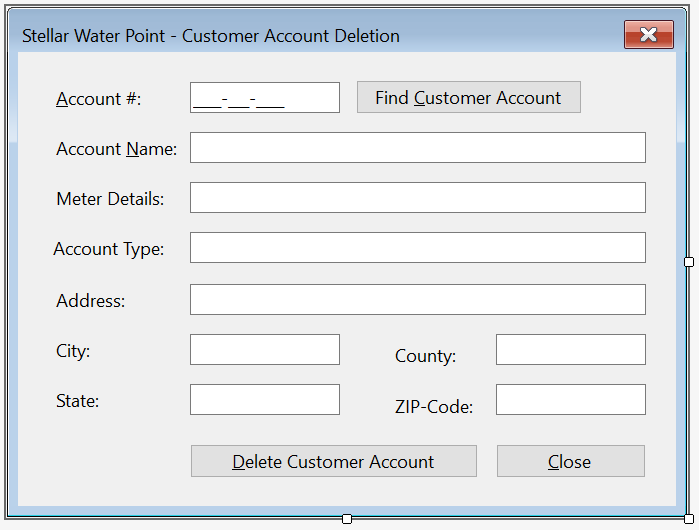
If a customer's account is not necessary anymore, the user can remove that account. To assist the user with this operation, we will create a form with necessary buttons.
Practical Learning: Deleting a Customer Account
| Control | (Name) | Text | Othe Properties | |
| Button | |
BtnDeleteCustomerAccount | &Delete Water Meter | DialogResult: OK |
| Button | |
BtnClose | &Close | DialogResult: Cancel |
FormBorderStyle: FixedDialog
Text:            Stellar Water Point - Customer Account Deletion
StartPosition:   CenterScreen
AcceptButton:    BtnDeleteCustomerAccount
CancelButton:    BtnClose
MinimizeBox:     False
MaximizeBox:     False
Imports Microsoft.Data.SqlClient

Public Class CustomersDelete
    Private Sub BtnFindCustomerAccount_Click(sender As Object, e As EventArgs) Handles BtnFindCustomerAccount.Click
        If MtbAccountNumber.Text.Replace("-", "").Replace(" ", "") = "" Then
            MsgBox("You must first type a valid account number of an existing customer, " &
                   "then click the Find Customer Account button.",
                   MsgBoxStyle.OkOnly, "Stellar Water Point")
            Exit Sub
        End If

        Using ScStellarWaterPoint As SqlConnection =
                        New SqlConnection("Data Source=(local);" &
                                          "Database=StellarWaterPoint;" &
                                          "Integrated Security=SSPI;" &
                                          "TrustServerCertificate=True;")
            Dim CmdCustomers As SqlCommand = New SqlCommand("IdentifyClient", ScStellarWaterPoint) With {
                .CommandType = CommandType.StoredProcedure
            }

            Dim SpCustomer As SqlParameter = New SqlParameter With {
                .ParameterName = "@AcntNbr",
                .DbType = DbType.String,
                .Value = MtbAccountNumber.Text,
                .Direction = ParameterDirection.Input
            }

            CmdCustomers.Parameters.Add(SpCustomer)

            ScStellarWaterPoint.Open()
            CmdCustomers.ExecuteNonQuery()

            Dim SdaCustomers As SqlDataAdapter = New SqlDataAdapter(CmdCustomers)
            Dim DsCustomers As DataSet = New DataSet("CustomersSet")

            SdaCustomers.Fill(DsCustomers)

            If DsCustomers.Tables(0).Rows.Count > 0 Then
                For Each DrClient As DataRow In DsCustomers.Tables(0).Rows
                    TxtCustomerId.Text = DrClient(0)
                    TxtAccountName.Text = DrClient(2)
                    TxtAccountType.Text = DrClient(3)
                    TxtMeterDetails.Text = DrClient(4) & " - " & DrClient(5)
                    TxtAddress.Text = DrClient(6)
                    TxtCity.Text = DrClient(7)
                    TxtCounty.Text = DrClient(8)
                    TxtState.Text = DrClient(9)
                    TxtZIPCode.Text = DrClient(10)
                Next
            Else
                MsgBox("The account number you typed is not in our system.",
                                MsgBoxStyle.OkOnly, "Stellar Water Point")
                TxtCustomerId.Text = String.Empty
                TxtAccountName.Text = String.Empty
                TxtAccountType.Text = String.Empty
                TxtMeterDetails.Text = String.Empty
                TxtAddress.Text = String.Empty
                TxtCity.Text = String.Empty
                TxtCounty.Text = String.Empty
                TxtState.Text = String.Empty
                TxtZIPCode.Text = String.Empty
            End If
        End Using
    End Sub
End ClassImports Microsoft.Data.SqlClient
Public Class CustomersDelete
. . .
Private Sub BtnDeleteCustomerAccount_Click(sender As Object, e As EventArgs) Handles BtnDeleteCustomerAccount.Click
If MtbAccountNumber.Text.Replace("-", "").Replace(" ", "") = "" Then
MsgBox("You must provide a valid existing account number for the customer whose record you want to update; " &
"otherwise the Customer account cannot be updated.",
MsgBoxStyle.OkOnly, "Stellar Water Point")
TxtCustomerId.Text = Nothing
TxtAccountName.Text = Nothing
TxtMeterDetails.Text = Nothing
TxtAccountType.Text = Nothing
TxtAddress.Text = Nothing
TxtCity.Text = Nothing
TxtCounty.Text = Nothing
TxtState.Text = Nothing
TxtZIPCode.Text = Nothing
Exit Sub
End If
Using ScStellarWaterPoint As SqlConnection =
New SqlConnection("Data Source=(local);" &
"Database=StellarWaterPoint;" &
"Integrated Security=SSPI;" &
"TrustServerCertificate=True;")
Dim CmdCustomers As SqlCommand = New SqlCommand("DELETE Customers WHERE AccountNumber = N'" & MtbAccountNumber.Text & "';",
ScStellarWaterPoint)
ScStellarWaterPoint.Open()
CmdCustomers.ExecuteNonQuery()
MsgBox("The customer account has been deleted.",
MsgBoxStyle.OkOnly, "Stellar Water Point")
End Using
Close()
End Sub
End ClassPrivate Sub BtnClose_Click(sender As Object, e As EventArgs) Handles BtnClose.Click
Close()
End Sub
| Control | (Name) | Text | Anchor | Other Properties | |
| ListView | |
LvwCustomers | Top, Bottom, Left, Right | FullRowSelect: True GridLines: True View: Details |
|
| Button | |
BtnCreateCustomerAcount | C&reate Customer Acount... | Bottom, Right | |
| Button | |
BtnViewCustomerAcount | &View CustomerAcount... | Bottom, Right | |
| Button | |
BtnEditCustomerAcount | &Edit CustomerAcount... | Bottom, Right | |
| Button | |
BtnDeleteCustomerAcount | &Delete Customer Acount... | Bottom, Right | |
| Button | |
BtnClose | &Close | Bottom, Right | |
Private Sub BtnDeleteCustomerAccount_Click(sender As Object, e As EventArgs) Handles BtnDeleteCustomerAccount.Click
Dim Delete = New CustomersDelete()
Delete.ShowDialog()
ShowCustomers()
End Sub


Water Bills
Introduction
A water bill is a summary that indicates how much water a customer consumed and the value of that consumption. Our application will include the forms necessary to process water bills operations.
Practical Learning: Preparing Bills
Friend Class WaterBillManager
Friend Shared Function CalculateTiers(Acnt As String, Total As Double) As (a As Double, b As Double, c As Double)
Dim Results As (Tier1 As Double, Tier2 As Double, Tier3 As Double) = (0.00, 0.00, 0.00)
Select Case Acnt
Case "RES"
Results.Tier1 = Total * 39.35 / 10000.0
Results.Tier2 = Total * 18.25 / 10000.0
Results.Tier3 = Total * 11.65 / 10000.0
Case "SGO"
Results.Tier1 = Total * 41.38 / 10000.0
Results.Tier2 = Total * 15.26 / 10000.0
Results.Tier3 = Total * 8.13 / 10000.0
Case "BUS"
Results.Tier1 = Total * 51.25 / 10000.0
Results.Tier2 = Total * 34.65 / 10000.0
Results.Tier3 = Total * 15.1 / 10000.0
Case "UUO"
Results.Tier1 = Total * 25.0 / 10000.0
Results.Tier2 = Total * 35.0 / 10000.0
Results.Tier3 = Total * 40.0 / 10000.0
Case "WAT"
Results.Tier1 = (Total / 6) * 3 * 50.0 / 10000.0
Results.Tier2 = (Total / 6) * 2 * 35.0 / 10000.0
Results.Tier3 = Total * 15.0 / 10000.0
Case Else
Results.Tier1 = Total * (48.0 / 10000.0)
Results.Tier2 = Total * (32.0 / 10000.0)
Results.Tier3 = Total * (20.0 / 10000.0)
End Select
Return Results
End Function
Friend Shared Function CalculateSewerCharges(Acnt As String, Total As Double) As Double
Dim Result As Double
If Acnt = "RES" Then
Result = Total * 1.028641 / 100.0
ElseIf Acnt = "SGO" Then
Result = Total * 4.162522 / 100.0
ElseIf Acnt = "BUS" Then
Result = Total * 8.446369 / 100.0
ElseIf Acnt = "UUO" Then
Result = Total * 10.622471 / 100.0
ElseIf Acnt = "WAT" Then
Result = Total * 12.053152 / 100.0
Else ' if acnt = "OTH" then
Result = Total * 9.206252 / 100.0
End If
Return Result
End Function
Friend Shared Function CalculateEnvironmentCharges(Acnt As String, Total As Double) As Double
Dim Result As Double
Select Case Acnt
Case "RES"
Result = Total * 0.004524
Case "SGO"
Result = Total * 0.118242
Case "BUS"
Result = Total * 0.161369
Case "UUO"
Result = Total * 0.082477
Case "WAT"
Result = Total * 0.413574
Case Else
Result = Total * 0.221842
End Select
Return Result
End Function
Friend Shared Function CalculateServiceCharges(Acnt As String, Total As Double) As Double
Select Case Acnt
Case "RES"
Return Total * 0.006248
Case "SGO"
Return Total * 0.102246
Case "BUS"
Return Total * 0.155227
Case "UUO"
Return Total * 0.186692
Case "WAT"
Return Total * 0.412628
Case Else
Return Total * 0.210248
End Select
End Function
Friend Shared Function CalculateLocalTaxes(Acnt As String, Total As Double) As Double
Select Case Acnt
Case "RES"
Return Total * 0.035749
Case "SGO"
Return Total * 0.044026
Case "BUS"
Return Total * 0.122517
Case "UUO"
Return Total * 0.105737
Case "WAT"
Return Total * 0.153248
Case Else
Return Total * 0.125148
End Select
End Function
Friend Shared Function CalculateStateTaxes(Acnt As String, Total As Double) As Double
Select Case Acnt
Case "RES"
Return Total * 0.007124
Case "SGO"
Return Total * 0.008779
Case "BUS"
Return Total * 0.042448
Case "UUO"
Return Total * 0.067958
Case "WAT"
Return Total * 0.081622
Case Else
Return Total * 0.013746
End Select
End Function
Friend Shared Function SetPaymentDueDate(Acnt As String, Dt As Date) As Date
Dim TsPaymentDueDate As TimeSpan = New TimeSpan(1, 0, 0, 0)
If Acnt = "RES" Then
TsPaymentDueDate = New TimeSpan(15, 0, 0, 0)
ElseIf Acnt = "SGO" Then
TsPaymentDueDate = New TimeSpan(20, 0, 0, 0)
ElseIf Acnt = "BUS" Then
TsPaymentDueDate = New TimeSpan(30, 0, 0, 0)
ElseIf Acnt = "UUO" Then
TsPaymentDueDate = New TimeSpan(15, 0, 0, 0)
ElseIf Acnt = "WAT" Then
TsPaymentDueDate = New TimeSpan(40, 0, 0, 0)
Else
TsPaymentDueDate = New TimeSpan(35, 0, 0, 0)
End If
Return Dt + TsPaymentDueDate
End Function
Friend Shared Function SetLatePaymentDueDate(Acnt As String, Dt As Date) As Date
Select Case Acnt
Case "RES"
Return Dt + New TimeSpan(30, 0, 0, 0)
Case "SGO"
Return Dt + New TimeSpan(40, 0, 0, 0)
Case "BUS"
Return Dt + New TimeSpan(50, 0, 0, 0)
Case "UUO"
Return Dt + New TimeSpan(60, 0, 0, 0)
Case "WAT"
Return Dt + New TimeSpan(65, 0, 0, 0)
Case Else
Return Dt + New TimeSpan(45, 0, 0, 0)
End Select
End Function
Friend Shared Function CalculateLateAmountDue(Acnt As String, Amt As Double) As Double
Select Case Acnt
Case "RES"
Return Amt + 8.95
Case "SGO"
Return Amt + (Amt / 4.575)
Case "BUS"
Return Amt + (Amt / 12.315)
Case "UUO"
Return Amt + (Amt / 7.425)
Case "WAT"
Return Amt + (Amt / 15.225)
Case Else
Return Amt + (Amt / 6.735)
End Select
End Function
End ClassA List of Water Bills
A water bill must contain as much information as possible. In our application, when displaying a list of water bills, we will show only select pieces of information.
Practical Learning: Viewing Water Bills
| Control | (Name) | Text | Other Properties | |
| ListView | |
LvwWaterBills | FullRowSelect: True GridLines: True View: Details |
|
| Button | |
BtnCreateWaterBill | Close | &Create Water Bill... |

| (Name) | Text | TextAlign | Width |
| colWaterBillId | Id | 40 | |
| colBillNumber | Bill # | Center | 80 |
| colAccountSummary | Account Summary | 1125 | |
| colStartDate | Start Date | Center | 120 |
| colEndDate | End Date | Center | 120 |
| colBillingDays | Days | Center | |
| colCounterStart | Counter Start | Right | 125 |
| colCounterEnd | Counter End | Right | 125 |
| colTotalHCF | Total HCF | Right | 100 |
| colGallons | Gallons | Right | 80 |
| colPaymentDueDate | Pmt Due Date | Center | 125 |
| colAmountDue | Amt Due | Right | 90 |
Imports Microsoft.Data.SqlClient
Public Class WaterBillsCentral
Private Sub ShowWaterBills()
LvwWaterBills.Items.Clear()
Using ScStellarWaterPoint As SqlConnection =
New SqlConnection("Data Source=(local);" &
"Database=StellarWaterPoint;" &
"Integrated Security=SSPI;" &
"TrustServerCertificate=True;")
Dim CmdWaterBills As SqlCommand = New SqlCommand("SELECT ALL * FROM WaterBillSummary " &
"ORDER BY WaterBillId;",
ScStellarWaterPoint)
ScStellarWaterPoint.Open()
CmdWaterBills.ExecuteNonQuery()
Dim SdaWaterBills As SqlDataAdapter = New SqlDataAdapter(CmdWaterBills)
Dim DsWaterBills As DataSet = New DataSet("WaterBillsSet")
SdaWaterBills.Fill(DsWaterBills)
For Each DrWaterBill As DataRow In DsWaterBills.Tables(0).Rows
Dim lviWaterBill As ListViewItem = New ListViewItem(CStr(DrWaterBill(0))) ' Water Bill Id
lviWaterBill.SubItems.Add(DrWaterBill(1)) ' Water Bill Number
lviWaterBill.SubItems.Add(DrWaterBill(2)) ' Account Summary
lviWaterBill.SubItems.Add(DrWaterBill(3)) ' Meter Reading Start Date
lviWaterBill.SubItems.Add(DrWaterBill(4)) ' Meter Reading End Date
lviWaterBill.SubItems.Add(DrWaterBill(5)) ' Billing Days
lviWaterBill.SubItems.Add(DrWaterBill(6)) ' Counter Reading Start
lviWaterBill.SubItems.Add(DrWaterBill(7)) ' Counter Reading End
lviWaterBill.SubItems.Add(DrWaterBill(8)) ' Total HCF
lviWaterBill.SubItems.Add(DrWaterBill(9)) ' Gallons
lviWaterBill.SubItems.Add(DrWaterBill(10)) ' Payment Due Date
lviWaterBill.SubItems.Add(DrWaterBill(11)) ' Amount Due
LvwWaterBills.Items.Add(lviWaterBill)
Next
End Using
End Sub
Private Sub WaterBillsCentral_Load(sender As Object, e As EventArgs) Handles MyBase.Load
ShowWaterBills()
End Sub
End Class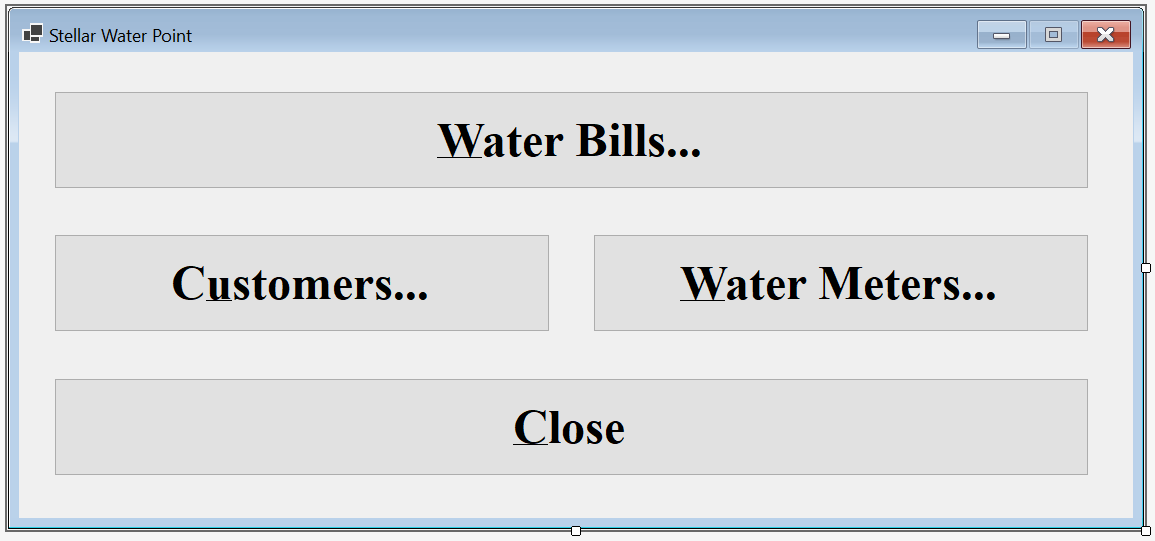
| Control | (Name) | Text | Font | |
| Button | |
BtnWaterBills | Water &Bills... | Times New Roman, 24pt, style=Bold |
| Button | |
BtnClose | &Close | Times New Roman, 24pt, style=Bold |
Public Class WaterDistribution
Private Sub BtnWaterBills_Click(sender As Object, e As EventArgs) Handles BtnWaterBills.Click
Dim Central = New WaterBillsCentral()
Central.Show()
End Sub
Private Sub BtnCustomers_Click(sender As Object, e As EventArgs) Handles BtnCustomers.Click
Dim Central = New CustomersCentral
Central.Show()
End Sub
Private Sub BtnWaterMeters_Click(sender As Object, e As EventArgs) Handles BtnWaterMeters.Click
Dim Central = New WaterMetersCentral()
Central.Show()
End Sub
Private Sub BtnClose_Click(sender As Object, e As EventArgs) Handles BtnClose.Click
    Close()
End Sub
End ClassA Water Bill
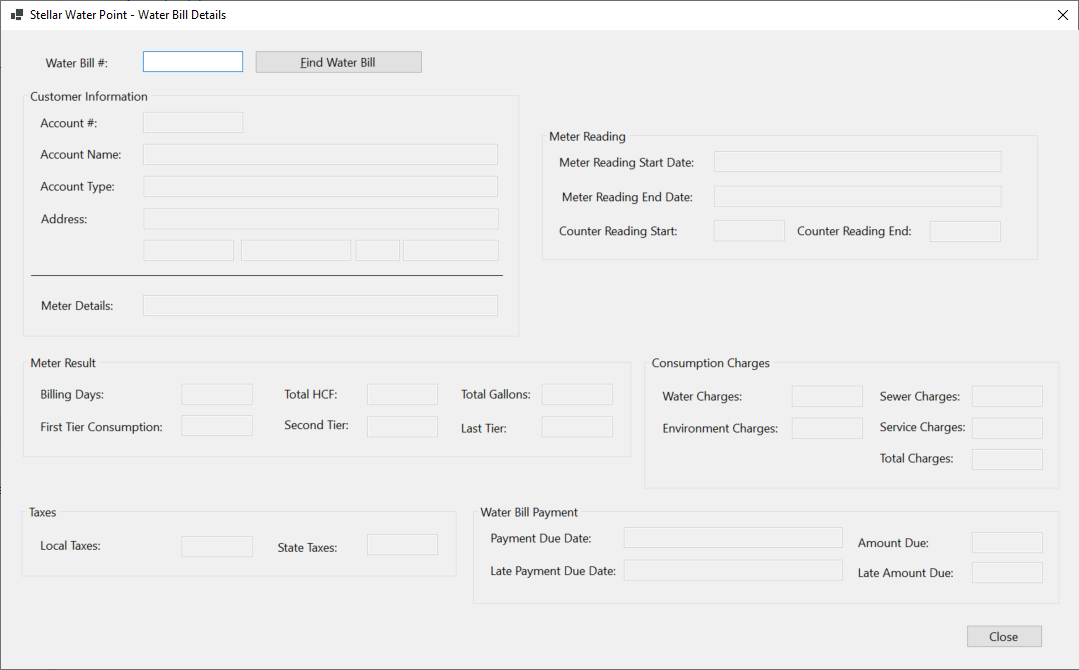
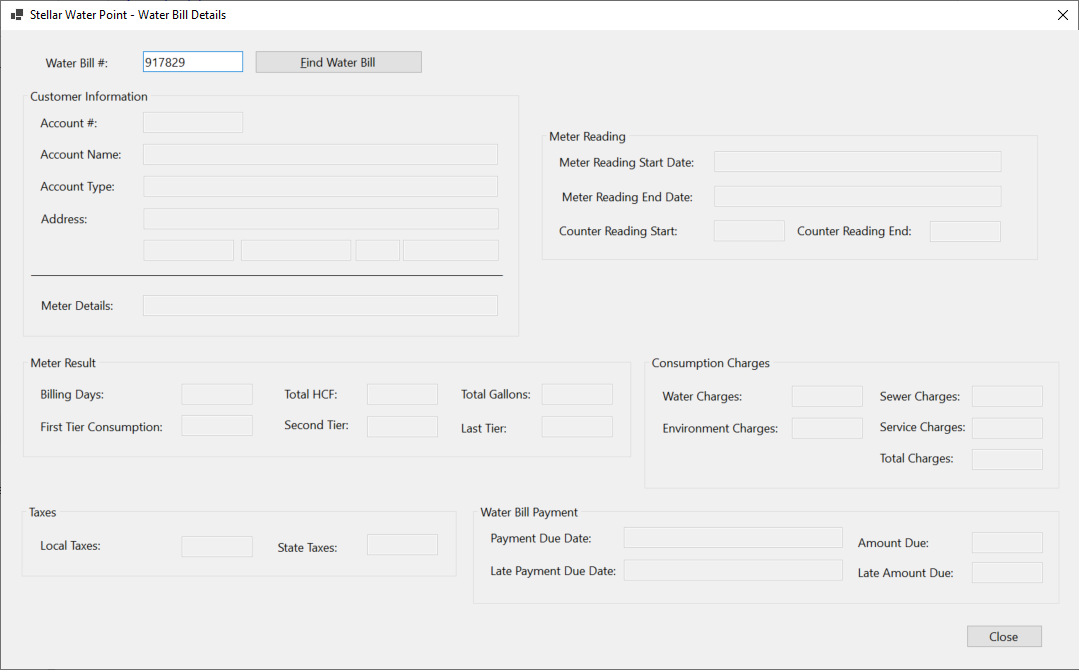
A water bill is a collection of information that includes the identification of the customer who consumed the water, the period during which water was consumed, how much water was consumed, how much that consumption is worth, etc. We will create a form hat a user can use to create and process a water bill.
Practical Learning: Processing a Water Bill

| Control | (Name) | Text | TextAlign | Other Properties | |
| Label | |
&Water Bill #: | |||
| TextBox | |
txtWaterBillNumber | |||
| GroupBox |  |
Customer Information | |||
| Label | |
Account #: | |||
| MaskedTextBox | |
MtbAccountNumber | Masked: 0000-000-0000 | ||
| Button | |
BtnFindCustomerAccount | Find Customer Account | ||
| Label | |
Customer Name: | |||
| TextBox | |
txtCustomerName | |||
| Label | |
Meter Details: | |||
| TextBox | |
txtMeterDetails | Modifiers: Public | ||
| Label | |
Address: | |||
| TextBox | |
txtAddress | |||
| TextBox | |
txtCity | |||
| TextBox | |
txtCounty | |||
| TextBox | |
txtState | |||
| TextBox | |
txtZIPCode | |||
| GroupBox | |
Meter Reading | |||
| Label | |
Meter Reading Start Date: | |||
| DateTimePicker |  |
dtpMeterReadingStartDate | |||
| Label | |
Meter Reading End Date: | |||
| DateTimePicker | |
dtpMeterReadingEndDate | |||
| Label | |
Counter Reading Start: | |||
| TextBox | |
txtCounterReadingStart | Right | ||
| Label | |
Counter Reading End: | |||
| TextBox | |
txtCounterReadingEnd | Right | ||
| Button | |
BtnEvaluateWaterBill | &Evaluate Water Bill | ||
| GroupBox | |
Meter Result | |||
| Label | |
Billing Days: | |||
| TextBox | |
txtBillingDays | Right | ||
| Label | |
Total HCF: | |||
| TextBox | |
txtTotalHCF | Right | ||
| Label | |
Total Gallons: | |||
| TextBox | |
txtTotalGallons | Right | ||
| Label | |
First Tier Consumption: | |||
| TextBox | |
txtFirstTierConsumption | Right | ||
| Label | |
Second Tier: | |||
| TextBox | |
txtSecondTierConsumption | Right | ||
| Label | |
Last Tier: | |||
| TextBox | |
txtLastTierConsumption | Right | ||
| GroupBox | |
Consumption Charges | |||
| Label | |
Water Charges: | |||
| TextBox | |
txtWaterCharges | Right | ||
| Label | |
Sewer Charges: | |||
| TextBox | |
txtSewerCharges | Right | ||
| Label | |
Environment Charges: | |||
| TextBox | |
txtEnvironmentCharges | Right | ||
| Label | |
Total Charges: | |||
| TextBox | |
txtTotalCharges | Right | ||
| GroupBox | |
Taxes | |||
| Label | |
Local Taxes: | |||
| TextBox | |
txtLocalTaxes | Right | ||
| Label | |
State Taxes: | |||
| TextBox | |
txtStateTaxes | Right | ||
| GroupBox | |
Water Bill Payment | |||
| Label | |
Payment Due Date: | |||
| DateTimePicker | |
dtpPaymentDueDate | Right | ||
| Label | |
Amount Due: | |||
| TextBox | |
txtAmountDue | Right | ||
| Label | |
Late Payment Due Date: | |||
| DateTimePicker | |
dtpLatePaymentDueDate | |||
| Label | |
Late Amount Due: | |||
| TextBox | |
txtLateAmountDue | Right | ||
| Button | |
BtnSaveWaterBill | Save Water Bill | ||
| Button | |
BtnClose | Close | ||
Imports Microsoft.Data.SqlClient

Public Class WaterBillsCreate
    Private Sub BtnFindCustomerAccount_Click(sender As Object, e As EventArgs) Handles BtnFindCustomerAccount.Click
        If MtbAccountNumber.Text.Replace("-", "").Replace(" ", "") = "" Then
            MsgBox("You must first type a valid account number of an existing customer, " &
                   "then click the Find Customer Account button.",
                   MsgBoxStyle.OkOnly, "Stellar Water Point")
            Exit Sub
        End If

        Using ScStellarWaterPoint As SqlConnection =
                        New SqlConnection("Data Source=(local);" &
                                          "Database=StellarWaterPoint;" &
                                          "Integrated Security=SSPI;" &
                                          "TrustServerCertificate=True;")
            Dim CmdCustomers As SqlCommand = New SqlCommand("IdentifyClient", ScStellarWaterPoint)

            CmdCustomers.CommandType = CommandType.StoredProcedure

            Dim SpCustomer As SqlParameter = New SqlParameter()
            SpCustomer.ParameterName = "@AcntNbr"
            SpCustomer.DbType = DbType.String
            SpCustomer.Value = MtbAccountNumber.Text
            SpCustomer.Direction = ParameterDirection.Input
            CmdCustomers.Parameters.Add(SpCustomer)

            ScStellarWaterPoint.Open()
            CmdCustomers.ExecuteNonQuery()

            Dim SdaCustomers As SqlDataAdapter = New SqlDataAdapter(CmdCustomers)
            Dim DsCustomers As DataSet = New DataSet("CustomersSet")

            SdaCustomers.Fill(DsCustomers)

            If DsCustomers.Tables(0).Rows.Count > 0 Then
                For Each DrClient As DataRow In DsCustomers.Tables(0).Rows
                    TxtAccountName.Text = DrClient(2)
                    TxtMeterDetails.Text = DrClient(3) & " - " & DrClient(4)
                    TxtAccountType.Text = DrClient(5)
                    TxtAddress.Text = DrClient(6)
                    TxtCity.Text = DrClient(7)
                    TxtCounty.Text = DrClient(8)
                    TxtState.Text = DrClient(9)
                    TxtZIPCode.Text = DrClient(10)
                Next
            Else
                MsgBox("The account number you typed is not in our system.",
                       MsgBoxStyle.OkOnly, "Stellar Water Point")
                TxtAccountName.Text = Nothing
                TxtMeterDetails.Text = Nothing
                TxtAccountType.Text = Nothing
                TxtAddress.Text = Nothing
                TxtCity.Text = Nothing
                TxtCounty.Text = Nothing
                TxtState.Text = Nothing
                TxtZIPCode.Text = Nothing
            End If
        End Using
    End Sub
End ClassPrivate Sub DtpMeterReadingEndDate_ValueChanged(sender As Object, e As EventArgs) Handles DtpMeterReadingEndDate.ValueChanged
TxtBillingDays.Text = DateDiff(DateInterval.Day, DtpMeterReadingStartDate.Value, DtpMeterReadingEndDate.Value) + 1
End SubImports Microsoft.Data.SqlClient
Public Class WaterBillsCreate
. . .
Private Sub BtnEvaluateWaterBill_Click(sender As Object, e As EventArgs) Handles BtnEvaluateWaterBill.Click
Dim CounterStart As Double = 0, CounterEnd = 0
Try
CounterStart = CDbl(TxtCounterReadingStart.Text)
Catch FeCRStart As FormatException
MsgBox("You must enter a valid value in the Counter Reading Start text box. " &
"The error produced is: " & FeCRStart.Message,
MsgBoxStyle.OkOnly, "Stellar Water Point")
End Try
Try
CounterEnd = CDbl(TxtCounterReadingEnd.Text)
Catch FeCREnd As FormatException
MsgBox("You must enter a valid value in the Counter Reading End text box. " &
"The error produced is: " & FeCREnd.Message,
MsgBoxStyle.OkOnly, "Stellar Water Point")
End Try
Dim Consumption As Double = CounterEnd - CounterStart
Dim Gallons As Double = Consumption * 748.05
Dim StrAccountType As String = TxtAccountType.Text.Substring(1, 3)
Dim Tiers As (first As Double, second As Double, last As Double) = WaterBillManager.CalculateTiers(StrAccountType, Gallons)
Dim WaterCharges = Tiers.first + Tiers.second + Tiers.last
Dim SewerCharges = WaterBillManager.CalculateSewerCharges(StrAccountType, WaterCharges)
Dim EnvCharges = WaterBillManager.CalculateEnvironmentCharges(StrAccountType, WaterCharges)
Dim SrvCharges = WaterBillManager.CalculateServiceCharges(StrAccountType, WaterCharges)
Dim TotalCharges = WaterCharges + SewerCharges + EnvCharges + SrvCharges
Dim LocalTaxes = WaterBillManager.CalculateLocalTaxes(StrAccountType, WaterCharges)
Dim StateTaxes = WaterBillManager.CalculateStateTaxes(StrAccountType, WaterCharges)
Dim AmtDue = TotalCharges + LocalTaxes + StateTaxes
TxtTotalHCF.Text = Consumption
TxtTotalGallons.Text = Math.Ceiling(Gallons)
TxtFirstTierConsumption.Text = FormatNumber(Tiers.first, 2)
TxtSecondTierConsumption.Text = FormatNumber(Tiers.second)
TxtLastTierConsumption.Text = FormatNumber(Tiers.last)
TxtWaterCharges.Text = FormatNumber(WaterCharges)
TxtSewerCharges.Text = FormatNumber(SewerCharges)
TxtEnvironmentCharges.Text = FormatNumber(EnvCharges)
TxtServiceCharges.Text = FormatNumber(SrvCharges)
TxtTotalCharges.Text = FormatNumber(TotalCharges)
TxtLocalTaxes.Text = FormatNumber(LocalTaxes)
TxtStateTaxes.Text = FormatNumber(StateTaxes)
DtpPaymentDueDate.Value = WaterBillManager.SetPaymentDueDate(StrAccountType, DtpMeterReadingEndDate.Value)
TxtAmountDue.Text = FormatNumber(AmtDue)
DtpLatePaymentDueDate.Value = WaterBillManager.SetLatePaymentDueDate(StrAccountType, DtpMeterReadingEndDate.Value)
TxtLateAmountDue.Text = FormatNumber(WaterBillManager.CalculateLateAmountDue(StrAccountType, AmtDue))
End Sub
End ClassPrivate Sub BtnSaveWaterBill_Click(sender As Object, e As EventArgs) Handles BtnSaveWaterBill.Click
If String.IsNullOrEmpty(TxtWaterBillNumber.Text) Then
MsgBox("You must specify a bil number for the water bill; " &
"otherwise the record cannot be created.",
MsgBoxStyle.OkOnly, "Stellar Water Point")
Exit Sub
End If
If MtbAccountNumber.Text.Replace("-", "").Replace(" ", "") = "" Then
MsgBox("You must enter a valid account number for the customer whose bill you are preparing. " &
"You must also provide the other required values such as the meter reading start date and value, " &
"and the meter reading end date and value. Then click the Evaluate Water Bill button.",
MsgBoxStyle.OkOnly, "Stellar Water Point")
Exit Sub
End If
Using ScStellarWaterPoint As SqlConnection =
New SqlConnection("Data Source=(local);" &
"Database=StellarWaterPoint;" &
"Integrated Security=SSPI;" &
"TrustServerCertificate=True;")
Dim CmdWaterBills As SqlCommand = New SqlCommand("INSERT INTO WaterBills(WaterBillNumber, " &
" AccountNumber, " &
" MeterReadingStartDate, " &
" MeterReadingEndDate, " &
" CounterReadingStart, " &
" CounterReadingEnd, " &
" BillingDays, " &
" TotalHCF, " &
" TotalGallons, " &
" FirstTierConsumption, " &
" SecondTierConsumption, " &
" LastTierConsumption, " &
" WaterCharges, " &
" SewerCharges, " &
" EnvironmentCharges, " &
" ServiceCharges, " &
" TotalCharges, " &
" LocalTaxes, " &
" StateTaxes, " &
" PaymentDueDate, " &
" AmountDue, " &
" LatePaymentDueDate, " &
" LateAmountDue) " &
"VALUES(" & TxtWaterBillNumber.Text & ", " &
" N'" & MtbAccountNumber.Text & "', " &
" N'" & FormatDateTime(DtpMeterReadingStartDate.Value, DateFormat.ShortDate) & "', " &
" N'" & FormatDateTime(DtpMeterReadingEndDate.Value, DateFormat.ShortDate) & "', " &
" " & TxtCounterReadingStart.Text & ", " &
" " & TxtCounterReadingEnd.Text & ", " &
" " & TxtBillingDays.Text & ", " &
" " & TxtTotalHCF.Text & ", " &
" " & TxtTotalGallons.Text & ", " &
" " & TxtFirstTierConsumption.Text & ", " &
" " & TxtSecondTierConsumption.Text & ", " &
" " & TxtLastTierConsumption.Text & ", " &
" " & TxtWaterCharges.Text & ", " &
" " & TxtSewerCharges.Text & ", " &
" " & TxtEnvironmentCharges.Text & ", " &
" " & TxtServiceCharges.Text & ", " &
" " & TxtTotalCharges.Text & ", " &
" " & TxtLocalTaxes.Text & ", " &
" " & TxtStateTaxes.Text & ", " &
" N'" & FormatDateTime(DtpPaymentDueDate.Value, DateFormat.ShortDate) & "', " &
" " & TxtAmountDue.Text & ", " &
" N'" & FormatDateTime(DtpLatePaymentDueDate.Value, DateFormat.ShortDate) & "', " &
" " & TxtLateAmountDue.Text & ");",
ScStellarWaterPoint)
ScStellarWaterPoint.Open()
CmdWaterBills.ExecuteNonQuery()
MsgBox("The Water bill has been processed.",
MsgBoxStyle.OkOnly, "Stellar Water Point")
Close()
End Using
End SubPrivate Sub BtnClose_Click(sender As Object, e As EventArgs) Handles BtnClose.Click
Close()
End Sub
| Control | (Name) | Text | Other Properties | |
| ListView | |
LvwWaterBills | No Change | |
| Button | |
BtnCreateWaterBill | Close | &Create Water Bill... |
Private Sub BtnProcessWaterBill_Click(sender As Object, e As EventArgs) Handles BtnProcessWaterBill.Click
    Dim Create As WaterBillsCreate = New WaterBillsCreate()

    Create.ShowDialog()

    ShowWaterBills()
End Sub
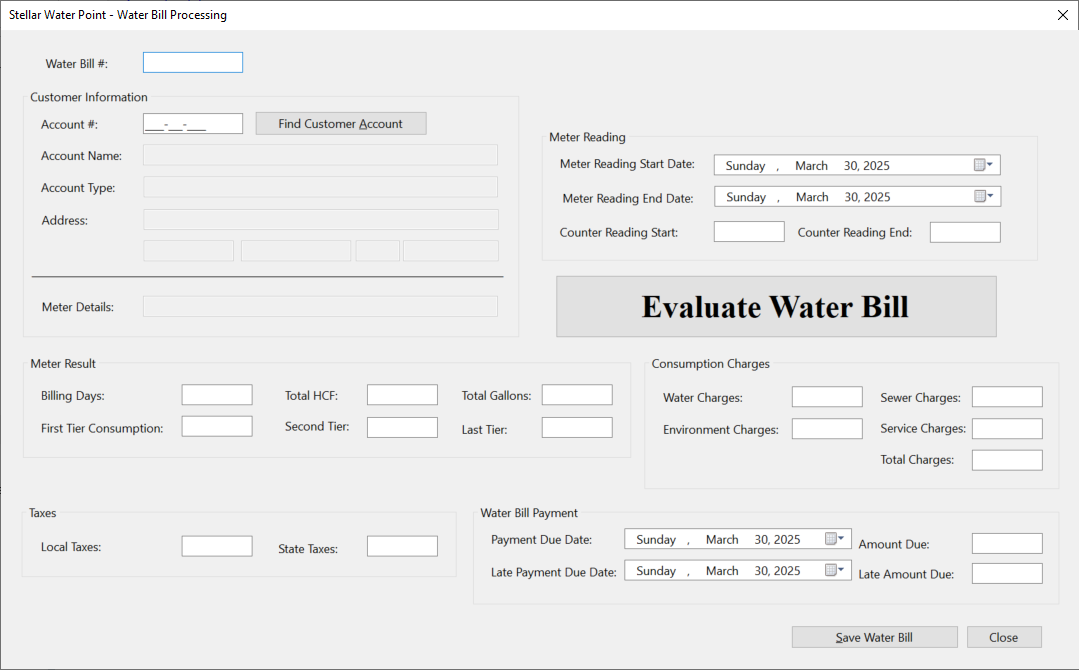
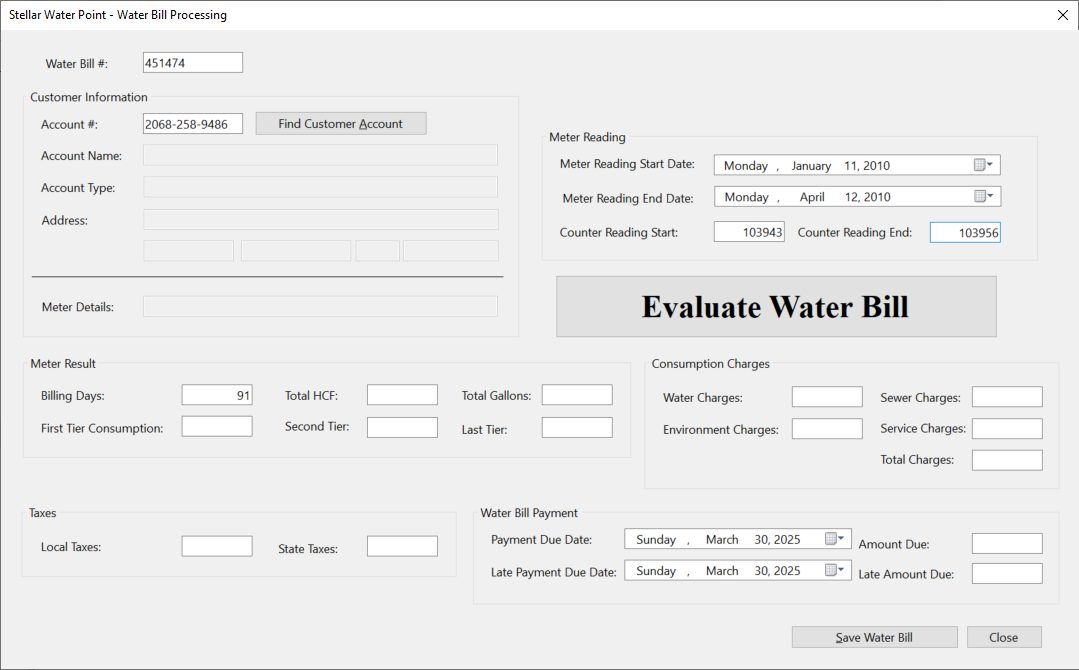
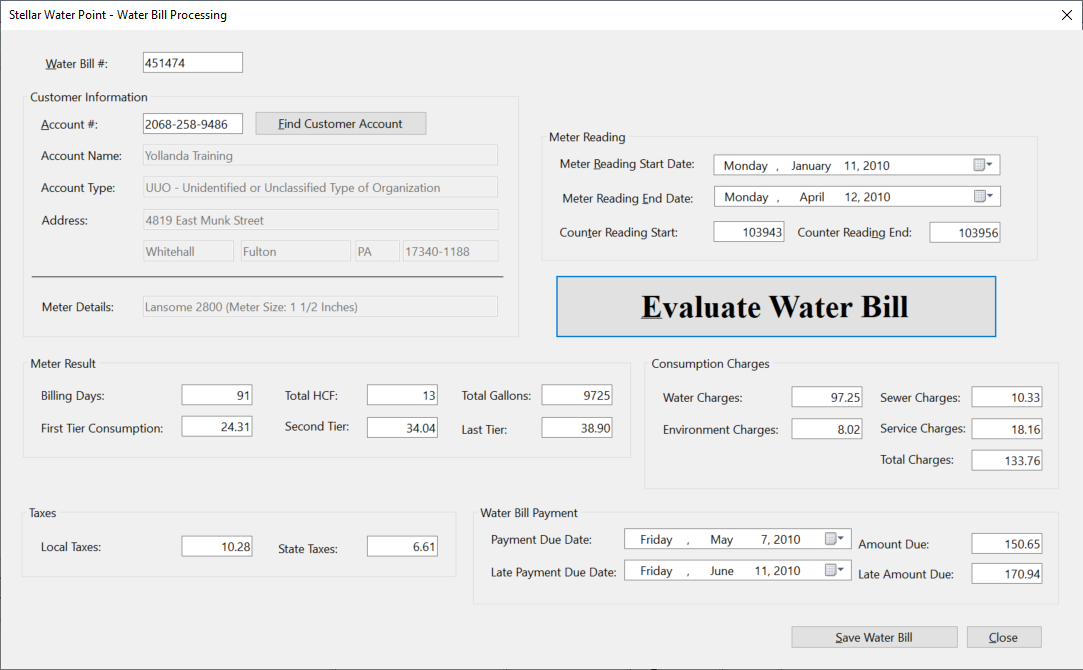
| Water Bill # | Account # | Reading Start Date | Reading End Date | Counter Reading Start | Counter Reading End |
| 451474 | 2068-258-9486 | 01/11/2010 | 04/12/2010 | 103943 | 103956 |
| 923633 | 5293-957-3395 | 01/17/2010 | 08/18/2010 | 256945 | 256972 |
| 917829 | 9279-570-8394 | 02/15/2010 | 05/14/2010 | 5205 | 5222 |
| 202666 | 6986-829-3741 | 03/08/2010 | 06/06/2010 | 5679 | 5690 |
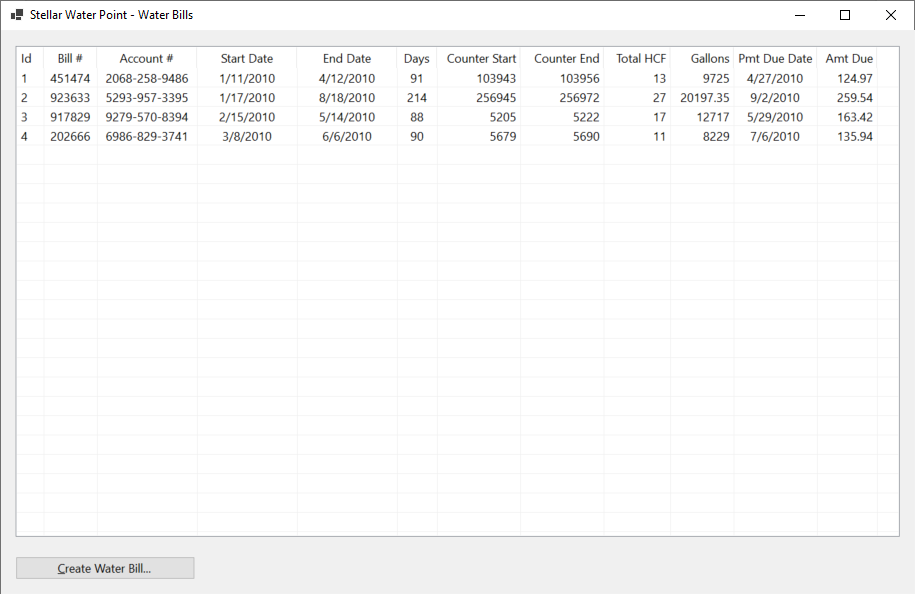
Details on a Water Bill
Probably the simplest operation that a user can perform on a water bill to only view its details. To make this happen, we will create and provide a form.
Practical Learning: Creating a Water Meter Record

| Control | (Name) | Text | TextAlign | Enabled | |
| Label | |
Water Bill #: | |||
| TextBox | |
txtWaterBillNumber | |||
| Button | |
BtnFindWaterBill | Find Water Bill | ||
| GroupBox | |
Customer Information | |||
| Label | |
Account #: | |||
| TextBox | |
txtAccountNumber | False | ||
| Label | |
Customer Name: | |||
| TextBox | |
txtCustomerName | False | ||
| Label | |
Meter Details: | |||
| TextBox | |
txtMeterDetails | False | ||
| Label | |
Address: | |||
| TextBox | |
txtAddress | False | ||
| TextBox | |
txtCity | False | ||
| TextBox | |
txtCounty | False | ||
| TextBox | |
txtState | False | ||
| TextBox | |
txtZIPCode | False | ||
| GroupBox | |
Meter Reading | |||
| Label | |
Meter Reading Start Date: | |||
| TextBox | |
txtMeterReadingStartDate | False | ||
| Label | |
Meter Reading End Date: | |||
| TextBox | |
txtMeterReadingEndDate | False | ||
| Label | |
Counter Reading Start: | |||
| TextBox | |
txtCounterReadingStart | False | ||
| Label | |
Counter Reading End: | |||
| TextBox | |
txtCounterReadingEnd | False | ||
| GroupBox | |
Meter Result | |||
| Label | |
Billing Days: | |||
| TextBox | |
txtBillingDays | Right | False | |
| Label | |
Total Gallons: | |||
| TextBox | |
txtTotalGallons | Right | False | |
| Label | |
Total CCF: | |||
| TextBox | |
txtTotalHCF | Right | False | |
| Label | |
First Tier Consumption: | |||
| TextBox | |
txtFirstTierConsumption | Right | False | |
| Label | |
Second Tier: | |||
| TextBox | |
txtSecondTierConsumption | Right | False | |
| Label | |
Last Tier: | |||
| TextBox | |
txtLastTierConsumption | Right | False | |
| GroupBox | |
Consumption Charges | |||
| Label | |
Water Charges: | |||
| TextBox | |
txtWaterCharges | Right | False | |
| Label | |
Sewer Charges: | |||
| TextBox | |
txtSewerCharges | Right | False | |
| Label | |
Environment Charges: | |||
| TextBox | |
txtEnvironmentCharges | Right | False | |
| Label | |
Total Charges: | |||
| TextBox | |
txtTotalCharges | Right | False | |
| GroupBox | |
Taxes | |||
| Label | |
Local Taxes: | |||
| TextBox | |
txtLocalTaxes | Right | False | |
| Label | |
State Taxes: | |||
| TextBox | |
txtStateTaxes | Right | False | |
| GroupBox | |
Water Bill Payment | |||
| Label | |
Payment Due Date: | |||
| TextBox | |
txtPaymentDueDate | False | ||
| Label | |
Amount Due: | |||
| TextBox | |
txtAmountDue | Right | False | |
| Label | |
Late Payment Due Date: | |||
| TextBox | |
txtLatePaymentDueDate | False | ||
| Label | |
Late Amount Due: | |||
| TextBox | |
txtLateAmountDue | Right | False | |
| Button | |
BtnClose | Close | ||
FormBorderStyle: FixedDialog
Text:            Stellar Water Point - Water Bill Details
StartPosition:   CenterScreen
MinimizeBox:     False
MaximizeBox:     False
Imports Microsoft.Data.SqlClient

Public Class WaterBillsDetails
    Private Sub ResetForm()
        TxtWaterBillId.Text = Nothing
        TxtAccountNumber.Text = Nothing
        TxtAccountName.Text = Nothing
        TxtMeterDetails.Text = Nothing
        TxtAccountType.Text = Nothing
        TxtAddress.Text = Nothing
        TxtCity.Text = Nothing
        TxtCounty.Text = Nothing
        TxtState.Text = Nothing
        TxtZIPCode.Text = Nothing
        TxtMeterReadingStartDate.Text = Nothing
        TxtMeterReadingEndDate.Text = Nothing
        TxtCounterReadingStart.Text = Nothing
        TxtCounterReadingEnd.Text = Nothing
        TxtBillingDays.Text = Nothing
        TxtTotalHCF.Text = Nothing
        TxtTotalGallons.Text = Nothing
        TxtFirstTierConsumption.Text = Nothing
        TxtSecondTierConsumption.Text = Nothing
        TxtLastTierConsumption.Text = Nothing
        TxtWaterCharges.Text = Nothing
        TxtSewerCharges.Text = Nothing
        TxtEnvironmentCharges.Text = Nothing
        TxtServiceCharges.Text = Nothing
        TxtTotalCharges.Text = Nothing
        TxtLocalTaxes.Text = Nothing
        TxtStateTaxes.Text = Nothing
        TxtPaymentDueDate.Text = Nothing
        TxtAmountDue.Text = Nothing
        TxtLatePaymentDueDate.Text = Nothing
        TxtLateAmountDue.Text = Nothing
    End Sub

    Private Sub BtnFindWaterBill_Click(sender As Object, e As EventArgs) Handles BtnFindWaterBill.Click
        If String.IsNullOrEmpty(TxtWaterBillNumber.Text) Then
            MsgBox("You must first type an existing water bill number, " &
                   "then click the Find Water Bill button.",
                   MsgBoxStyle.OkOnly, "Stellar Water Point")
            ResetForm()
            Exit Sub
        End If

        Using ScStellarWaterPoint As SqlConnection =
                        New SqlConnection("Data Source=(local);" &
                                          "Database=StellarWaterPoint;" &
                                          "Integrated Security=SSPI;" &
                                          "TrustServerCertificate=True;")
            Dim CmdWaterBills As SqlCommand = New SqlCommand("GetWaterBillDetails", ScStellarWaterPoint)

            CmdWaterBills.CommandType = CommandType.StoredProcedure

            Dim SpWaterBill = New SqlParameter()
            SpWaterBill.ParameterName = "@BillNbr"
            SpWaterBill.DbType = DbType.Int32
            SpWaterBill.Value = TxtWaterBillNumber.Text
            spWaterBill.Direction = ParameterDirection.Input
            CmdWaterBills.Parameters.Add(SpWaterBill)

            ScStellarWaterPoint.Open()
            CmdWaterBills.ExecuteNonQuery()

            Dim SdaWaterBills = New SqlDataAdapter(CmdWaterBills)
            Dim DsWaterBills As DataSet = New DataSet("WaterBillsSet")

            SdaWaterBills.Fill(DsWaterBills)

            If DsWaterBills.Tables(0).Rows.Count > 0 Then
                For Each DrWaterBill As DataRow In DsWaterBills.Tables(0).Rows
                    TxtWaterBillId.Text = DrWaterBill(0)
                    TxtAccountNumber.Text = DrWaterBill(1)
                    TxtAccountName.Text = DrWaterBill(2)
                    TxtMeterDetails.Text = DrWaterBill(3)
                    TxtAccountType.Text = DrWaterBill(4)
                    TxtAddress.Text = DrWaterBill(5)
                    TxtCity.Text = DrWaterBill(6)
                    TxtCounty.Text = DrWaterBill(7)
                    TxtState.Text = DrWaterBill(8)
                    TxtZIPCode.Text = DrWaterBill(9)
                    TxtMeterReadingStartDate.Text = FormatDateTime(DrWaterBill(10), DateFormat.LongDate)
                    TxtMeterReadingEndDate.Text = FormatDateTime(DrWaterBill(11), DateFormat.LongDate)
                    TxtCounterReadingStart.Text = DrWaterBill(12)
                    TxtCounterReadingEnd.Text = DrWaterBill(13)
                    TxtBillingDays.Text = DrWaterBill(14)
                    TxtTotalHCF.Text = DrWaterBill(15)
                    TxtTotalGallons.Text = DrWaterBill(16)
                    TxtFirstTierConsumption.Text = DrWaterBill(17)
                    TxtSecondTierConsumption.Text = DrWaterBill(18)
                    TxtLastTierConsumption.Text = DrWaterBill(19)
                    TxtWaterCharges.Text = DrWaterBill(20)
                    TxtSewerCharges.Text = DrWaterBill(21)
                    TxtEnvironmentCharges.Text = DrWaterBill(22)
                    TxtServiceCharges.Text = DrWaterBill(23)
                    TxtTotalCharges.Text = DrWaterBill(24)
                    TxtLocalTaxes.Text = DrWaterBill(25)
                    TxtStateTaxes.Text = DrWaterBill(26)
                    TxtPaymentDueDate.Text = FormatDateTime(DrWaterBill(27), DateFormat.LongDate)
                    TxtAmountDue.Text = DrWaterBill(28)
                    TxtLatePaymentDueDate.Text = FormatDateTime(DrWaterBill(29), DateFormat.LongDate)
                    TxtLateAmountDue.Text = DrWaterBill(30)
                Next
            Else
                MsgBox("The water bill number you typed is not in our system.",
                       MsgBoxStyle.OkOnly, "Stellar Water Point")
                ResetForm()
            End If
        End Using
    End Sub
End ClassPrivate Sub BtnClose_Click(sender As Object, e As EventArgs) Handles BtnClose.Click
Close()
End Sub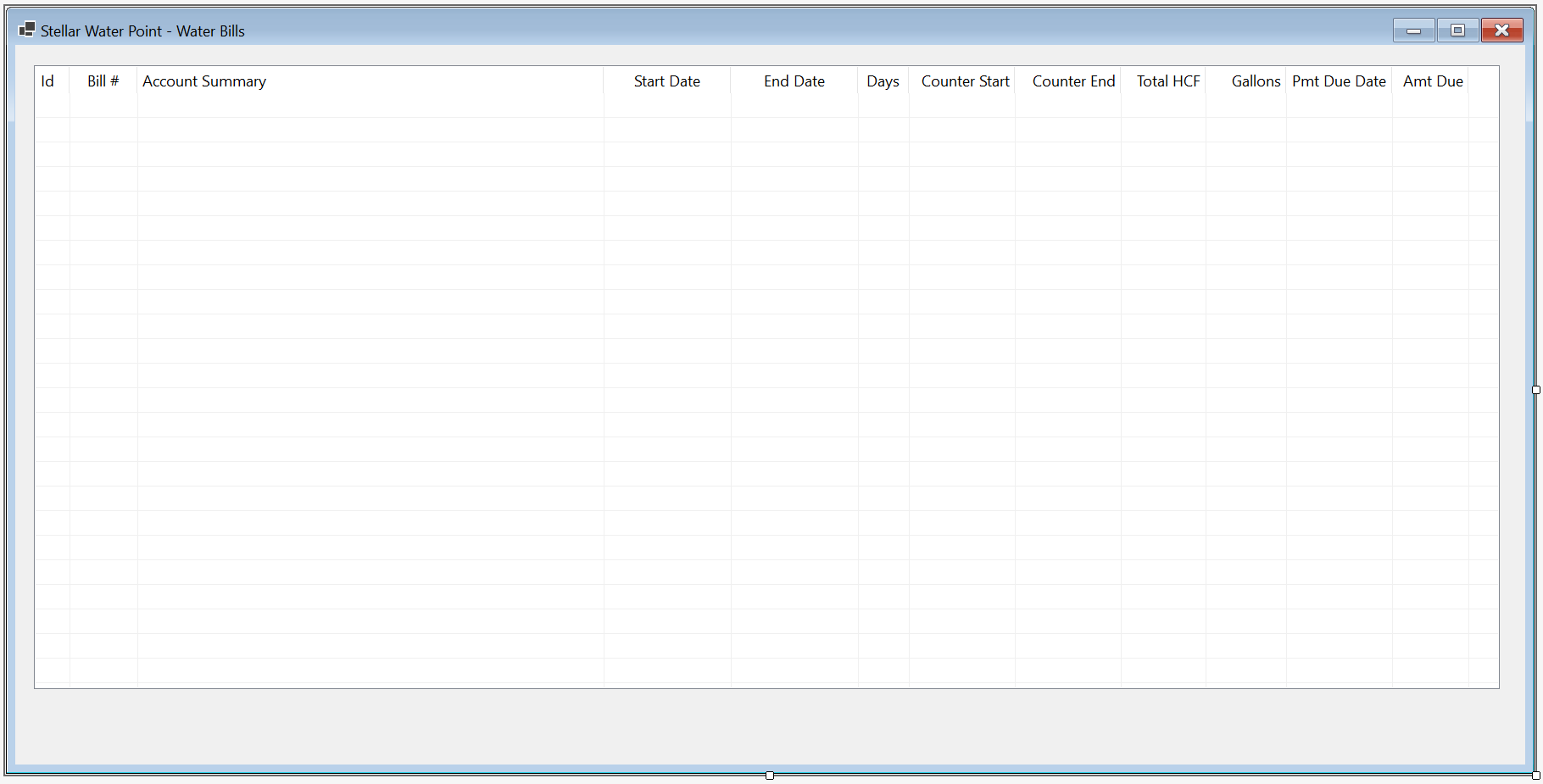
| Control | (Name) | Other Properties | |
| Button | |
BtnViewWaterBill | &View Water Bill... |
Private Sub BtnWaterBillDetails_Click(sender As Object, e As EventArgs) Handles BtnWaterBillDetails.Click
    Dim Details As WaterBillsDetails = New WaterBillsDetails

    Details.Show()
End Sub
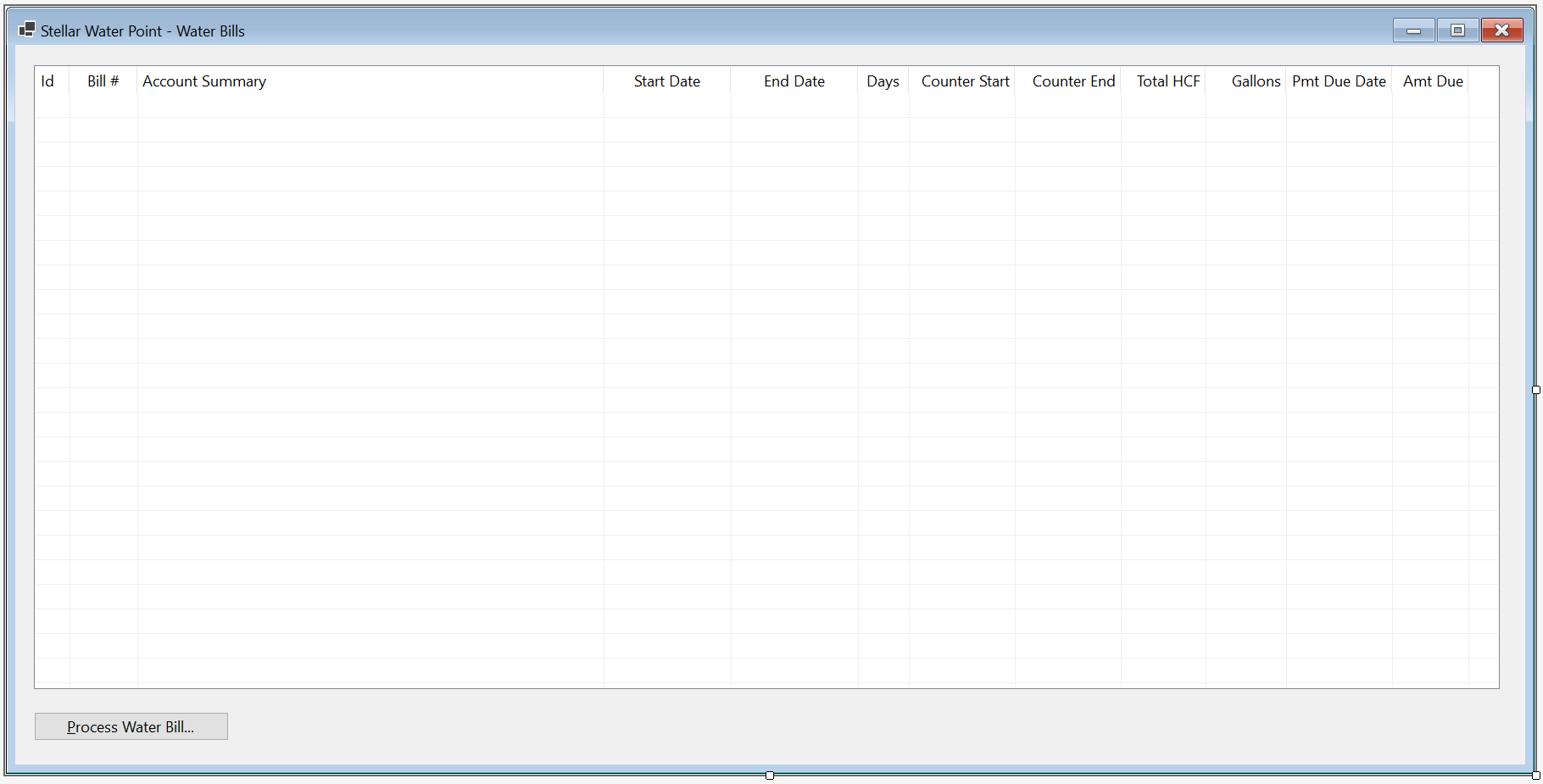


Water Bill Edition
Although it doesn't happen regularly, some information can change about an existing water bill. If that happens, the user must be able to update the water bill. For this reason, we will create and provide a form that supports that operation.
Practical Learning: Editing a Water Bill

| Control | (Name) | Text | TextAlign | Enabled | Modifiers | Other Properties | |
| Label | |
Water Bill #: | |||||
| TextBox | |
txtWaterBillNumber | Public | ||||
| Button | |
BtnFindWaterBill | &Find Water Bill | ||||
| GroupBox | |
Customer Information | |||||
| Label | |
Account #: | |||||
| MaskedTextBox | |
MtbAccountNumber | Public | Masked: 0000-000-0000 | |||
| Button | |
BtnFindCustomerAccount | Find Customer Account | ||||
| Label | |
Account Name: | |||||
| TextBox | |
txtAccountName | False | ||||
| Label | |
Meter Details: | |||||
| TextBox | |
txtMeterDetails | Public | ||||
| Label | |
Address: | |||||
| TextBox | |
txtAddress | False | ||||
| TextBox | |
txtCity | False | ||||
| TextBox | |
txtCounty | False | ||||
| TextBox | |
txtState | False | ||||
| TextBox | |
MtbZIPCode | False | ||||
| GroupBox | |
Meter Reading | |||||
| Label | |
Meter Reading Start Date: | |||||
| DateTimePicker | |
dtpMeterReadingStartDate | Public | ||||
| Label | |
Meter Reading End Date: | |||||
| DateTimePicker | |
dtpMeterReadingEndDate | Public | ||||
| Label | |
Counter Reading Start: | |||||
| TextBox | |
txtCounterReadingStart | Public | ||||
| Label | |
Counter Reading End: | |||||
| TextBox | |
txtCounterReadingEnd | Public | ||||
| Button | |
BtnEvaluateWaterBill | Evaluate Water Bill | ||||
| GroupBox | |
Meter Result | |||||
| Label | |
Billing Days: | |||||
| TextBox | |
txtBillingDays | Right | Public | |||
| Label | |
Total Gallons: | |||||
| TextBox | |
txtTotalGallons | Right | Public | |||
| Label | |
Total HCF: | |||||
| TextBox | |
txtTotalHCF | Right | Public | |||
| Label | |
First Tier Consumption: | |||||
| TextBox | |
txtFirstTierConsumption | Right | Public | |||
| Label | |
Second Tier: | |||||
| TextBox | |
txtSecondTierConsumption | Right | Public | |||
| Label | |
Last Tier: | |||||
| TextBox | |
txtLastTierConsumption | Right | Public | |||
| GroupBox | |
Consumption Charges | |||||
| Label | |
Water Charges: | |||||
| TextBox | |
txtWaterCharges | Right | Public | |||
| Label | |
Sewer Charges: | |||||
| TextBox | |
txtSewerCharges | Right | Public | |||
| Label | |
Environment Charges: | |||||
| TextBox | |
txtEnvironmentCharges | Right | Public | |||
| Label | |
Total Charges: | |||||
| TextBox | |
txtTotalCharges | Right | Public | |||
| GroupBox | |
Taxes | |||||
| Label | |
Local Taxes: | |||||
| TextBox | |
txtLocalTaxes | Right | Public | |||
| Label | |
State Taxes: | |||||
| TextBox | |
txtStateTaxes | Right | Public | |||
| GroupBox | |
Water Bill Payment | |||||
| Label | |
Payment Due Date: | |||||
| DateTimePicker | |
dtpPaymentDueDate | Public | ||||
| Label | |
Amount Due: | |||||
| TextBox | |
txtAmountDue | Right | Public | |||
| Label | |
Late Payment Due Date: | |||||
| DateTimePicker | |
dtpLatePaymentDueDate | Public | ||||
| Label | |
Late Amount Due: | |||||
| TextBox | |
txtLateAmountDue | Right | Public | |||
| Button | |
BtnUpdateWaterBill | Update Water Bill | DialogResult: OK | |||
| Button | |
BtnClose | Close | DialogResult: Cancel | |||
FormBorderStyle: FixedDialog
Text:            Stellar Water Point - Water Bill Edition
StartPosition:   CenterScreen
MinimizeBox:     False
MaximizeBox:     False
AcceptButton:    BtnUpdateWaterBill
CancelButton:    BtnClose
Imports Microsoft.Data.SqlClient

Public Class WaterBillsEditor
    Private Sub ResetForm()
        TxtWaterBillId.Text = Nothing
        MtbAccountNumber.Text = Nothing
        TxtAccountName.Text = Nothing
        TxtMeterDetails.Text = Nothing
        TxtAccountType.Text = Nothing
        TxtAddress.Text = Nothing
        TxtCity.Text = Nothing
        TxtCounty.Text = Nothing
        TxtState.Text = Nothing
        TxtZIPCode.Text = Nothing
        TxtCounterReadingStart.Text = Nothing
        TxtCounterReadingEnd.Text = Nothing
        TxtBillingDays.Text = Nothing
        TxtTotalHCF.Text = Nothing
        TxtTotalGallons.Text = Nothing
        TxtFirstTierConsumption.Text = Nothing
        TxtSecondTierConsumption.Text = Nothing
        TxtLastTierConsumption.Text = Nothing
        TxtWaterCharges.Text = Nothing
        TxtSewerCharges.Text = Nothing
        TxtEnvironmentCharges.Text = Nothing
        TxtServiceCharges.Text = Nothing
        TxtTotalCharges.Text = Nothing
        TxtLocalTaxes.Text = Nothing
        TxtStateTaxes.Text = Nothing
        TxtAmountDue.Text = Nothing
        TxtLateAmountDue.Text = Nothing
    End Sub

    Private Sub BtnFindWaterBill_Click(sender As Object, e As EventArgs) Handles BtnFindWaterBill.Click
        If String.IsNullOrEmpty(TxtWaterBillNumber.Text) Then
            MsgBox("You must first type an existing water bill number, " &
                   "then click the Find Water Bill button.",
                   MsgBoxStyle.OkOnly, "Stellar Water Point")
            ResetForm()
            Exit Sub
        End If

        Using ScStellarWaterPoint As SqlConnection =
                        New SqlConnection("Data Source=(local);" &
                                          "Database=StellarWaterPoint;" &
                                          "Integrated Security=SSPI;" &
                                          "TrustServerCertificate=True;")
            Dim CmdWaterBills As SqlCommand = New SqlCommand("GetWaterBillDetails", ScStellarWaterPoint)

            CmdWaterBills.CommandType = CommandType.StoredProcedure

            Dim SpWaterBill = New SqlParameter()
            SpWaterBill.ParameterName = "@BillNbr"
            SpWaterBill.DbType = DbType.Int32
            SpWaterBill.Value = TxtWaterBillNumber.Text
            spWaterBill.Direction = ParameterDirection.Input
            CmdWaterBills.Parameters.Add(SpWaterBill)

            ScStellarWaterPoint.Open()
            CmdWaterBills.ExecuteNonQuery()

            Dim SdaWaterBills = New SqlDataAdapter(CmdWaterBills)
            Dim DsWaterBills = New DataSet("WaterBillsSet")

            SdaWaterBills.Fill(DsWaterBills)

            If dsWaterBills.Tables(0).Rows.Count > 0 Then
                For Each DrWaterBill As DataRow In dsWaterBills.Tables(0).Rows
                    TxtWaterBillId.Text = DrWaterBill(0).ToString()
                    MtbAccountNumber.Text = DrWaterBill(1).ToString()
                    TxtAccountName.Text = DrWaterBill(2)
                    TxtMeterDetails.Text = DrWaterBill(3)
                    TxtAccountType.Text = DrWaterBill(4)
                    TxtAddress.Text = DrWaterBill(5)
                    TxtCity.Text = DrWaterBill(6)
                    TxtCounty.Text = DrWaterBill(7)
                    TxtState.Text = DrWaterBill(8)
                    TxtZIPCode.Text = DrWaterBill(9)
                    DtpMeterReadingStartDate.Value = FormatDateTime(DrWaterBill(10))
                    DtpMeterReadingEndDate.Value = FormatDateTime(DrWaterBill(11))
                    TxtCounterReadingStart.Text = DrWaterBill(12)
                    TxtCounterReadingEnd.Text = DrWaterBill(13)
                    TxtBillingDays.Text = DrWaterBill(14)
                    TxtTotalHCF.Text = DrWaterBill(15)
                    TxtTotalGallons.Text = DrWaterBill(16)
                    TxtFirstTierConsumption.Text = DrWaterBill(17)
                    TxtSecondTierConsumption.Text = DrWaterBill(18)
                    TxtLastTierConsumption.Text = DrWaterBill(19)
                    TxtWaterCharges.Text = DrWaterBill(20)
                    TxtSewerCharges.Text = DrWaterBill(21)
                    TxtEnvironmentCharges.Text = DrWaterBill(22)
                    TxtServiceCharges.Text = DrWaterBill(23)
                    TxtTotalCharges.Text = DrWaterBill(24)
                    TxtLocalTaxes.Text = DrWaterBill(25)
                    TxtStateTaxes.Text = DrWaterBill(26)
                    DtpPaymentDueDate.Value = FormatDateTime(DrWaterBill(27))
                    TxtAmountDue.Text = DrWaterBill(28)
                    DtpLatePaymentDueDate.Value = FormatDateTime(DrWaterBill(29))
                    TxtLateAmountDue.Text = DrWaterBill(30)
                Next
            Else
                MsgBox("The water bill number you typed is not in our system.",
                       MsgBoxStyle.OkOnly, "Stellar Water Point")
                ResetForm()
            End If
        End Using
    End Sub
End ClassPrivate Sub BtnFindCustomerAccount_Click(sender As Object, e As EventArgs) Handles BtnFindCustomerAccount.Click
If MtbAccountNumber.Text.Replace("-", "").Replace(" ", "") = "" Then
MsgBox("You must first type a valid account number of an existing customer, " &
"then click the Find Customer Account button.",
MsgBoxStyle.OkOnly, "Stellar Water Point")
Exit Sub
End If
Using ScStellarWaterPoint As SqlConnection =
New SqlConnection("Data Source=(local);" &
"Database=StellarWaterPoint;" &
"Integrated Security=SSPI;" &
"TrustServerCertificate=True;")
Dim CmdCustomers As SqlCommand = New SqlCommand("IdentifyClient", ScStellarWaterPoint)
CmdCustomers.CommandType = CommandType.StoredProcedure
Dim SpCustomer As SqlParameter = New SqlParameter()
SpCustomer.ParameterName = "@AcntNbr"
SpCustomer.DbType = DbType.String
SpCustomer.Value = MtbAccountNumber.Text
SpCustomer.Direction = ParameterDirection.Input
CmdCustomers.Parameters.Add(SpCustomer)
ScStellarWaterPoint.Open()
CmdCustomers.ExecuteNonQuery()
Dim SdaCustomers = New SqlDataAdapter(CmdCustomers)
Dim DsCustomers = New DataSet("CustomersSet")
SdaCustomers.Fill(DsCustomers)
If dsCustomers.Tables(0).Rows.Count > 0 Then
For Each DrClient As DataRow In DsCustomers.Tables(0).Rows
TxtAccountName.Text = DrClient(2)
TxtAccountType.Text = DrClient(3)
TxtMeterDetails.Text = DrClient(4) & " - " & DrClient(5)
TxtAddress.Text = DrClient(6)
TxtCity.Text = DrClient(7)
TxtCounty.Text = DrClient(8)
TxtState.Text = DrClient(9)
TxtZIPCode.Text = DrClient(10)
Next
Else
MsgBox("The account number you typed is not in our system.",
MsgBoxStyle.OkOnly, "Stellar Water Point")
TxtAccountName.Text = Nothing
TxtMeterDetails.Text = Nothing
TxtAccountType.Text = Nothing
TxtAddress.Text = Nothing
TxtCity.Text = Nothing
TxtCounty.Text = Nothing
TxtState.Text = Nothing
TxtZIPCode.Text = Nothing
End If
End Using
End SubPrivate Sub DtpMeterReadingEndDate_ValueChanged(sender As Object, e As EventArgs) Handles DtpMeterReadingEndDate.ValueChanged
TxtBillingDays.Text = DateDiff(DateInterval.Day, DtpMeterReadingStartDate.Value, DtpMeterReadingEndDate.Value) + 1
End SubPrivate Sub BtnEvaluateWaterBill_Click(sender As Object, e As EventArgs) Handles BtnEvaluateWaterBill.Click
Dim CounterStart As Double = 0, CounterEnd = 0
Try
CounterStart = CDbl(TxtCounterReadingStart.Text)
Catch FeCRStart As FormatException
MsgBox("You must enter a valid value in the Counter Reading Start text box. " &
"The error produced is: " & FeCRStart.Message,
MsgBoxStyle.OkOnly, "Stellar Water Point")
End Try
Try
CounterEnd = CDbl(TxtCounterReadingEnd.Text)
Catch FeCREnd As FormatException
MsgBox("You must enter a valid value in the Counter Reading End text box. " &
"The error produced is: " & FeCREnd.Message,
MsgBoxStyle.OkOnly, "Stellar Water Point")
End Try
Dim Consumption As Double = CounterEnd - CounterStart
Dim Gallons As Double = Consumption * 748.05
Dim StrAccountType As String = TxtAccountType.Text.Substring(1, 3)
Dim Tiers As (first As Double, second As Double, last As Double) = WaterBillManager.CalculateTiers(StrAccountType, Gallons)
Dim WaterCharges = Tiers.first + Tiers.second + Tiers.last
Dim SewerCharges = WaterBillManager.CalculateSewerCharges(StrAccountType, WaterCharges)
Dim EnvCharges = WaterBillManager.CalculateEnvironmentCharges(StrAccountType, WaterCharges)
Dim SrvCharges = WaterBillManager.CalculateServiceCharges(StrAccountType, WaterCharges)
Dim TotalCharges = WaterCharges + SewerCharges + EnvCharges + SrvCharges
Dim LocalTaxes = WaterBillManager.CalculateLocalTaxes(StrAccountType, WaterCharges)
Dim StateTaxes = WaterBillManager.CalculateStateTaxes(StrAccountType, WaterCharges)
Dim AmtDue = TotalCharges + LocalTaxes + StateTaxes
TxtTotalHCF.Text = Consumption
TxtTotalGallons.Text = Math.Ceiling(Gallons)
TxtFirstTierConsumption.Text = FormatNumber(Tiers.first, 2)
TxtSecondTierConsumption.Text = FormatNumber(Tiers.second)
TxtLastTierConsumption.Text = FormatNumber(Tiers.last)
TxtWaterCharges.Text = FormatNumber(WaterCharges)
TxtSewerCharges.Text = FormatNumber(SewerCharges)
TxtEnvironmentCharges.Text = FormatNumber(EnvCharges)
TxtServiceCharges.Text = FormatNumber(SrvCharges)
TxtTotalCharges.Text = FormatNumber(TotalCharges)
TxtLocalTaxes.Text = FormatNumber(LocalTaxes)
TxtStateTaxes.Text = FormatNumber(StateTaxes)
DtpPaymentDueDate.Value = WaterBillManager.SetPaymentDueDate(StrAccountType, DtpMeterReadingEndDate.Value)
TxtAmountDue.Text = FormatNumber(AmtDue)
DtpLatePaymentDueDate.Value = WaterBillManager.SetLatePaymentDueDate(StrAccountType, DtpMeterReadingEndDate.Value)
TxtLateAmountDue.Text = FormatNumber(WaterBillManager.CalculateLateAmountDue(StrAccountType, AmtDue))
End SubPrivate Sub BtnUpdateWaterBill_Click(sender As Object, e As EventArgs) Handles BtnUpdateWaterBill.Click
If String.IsNullOrEmpty(TxtWaterBillNumber.Text) Then
MsgBox("You must specify a bil number for the water bill; " &
"otherwise the record cannot be created.",
MsgBoxStyle.OkOnly, "Stellar Water Point")
Exit Sub
End If
If MtbAccountNumber.Text.Replace("-", "").Replace(" ", "") = "" Then
MsgBox("You must enter a valid account number for the customer whose bill you are preparing. " &
"You must also provide the other required values. You can then change the necessary values.",
MsgBoxStyle.OkOnly, "Stellar Water Point")
Exit Sub
End If
Using ScStellarWaterPoint As SqlConnection =
New SqlConnection("Data Source=(local);" &
"Database=StellarWaterPoint;" &
"Integrated Security=SSPI;" &
"TrustServerCertificate=True;")
Dim CmdWaterBills As SqlCommand = New SqlCommand("UPDATE WaterBills SET AccountNumber = N'" & MtbAccountNumber.Text & "' WHERE WaterBillNumber = " & TxtWaterBillNumber.Text & ";" &
"UPDATE WaterBills SET MeterReadingStartDate = N'" & FormatDateTime(DtpMeterReadingStartDate.Value, DateFormat.ShortDate) & "' WHERE WaterBillNumber = " & TxtWaterBillNumber.Text & ";" &
"UPDATE WaterBills SET MeterReadingEndDate = N'" & FormatDateTime(DtpMeterReadingEndDate.Value, DateFormat.ShortDate) & "' WHERE WaterBillNumber = " & TxtWaterBillNumber.Text & ";" &
"UPDATE WaterBills SET CounterReadingStart = " & TxtCounterReadingStart.Text & " WHERE WaterBillNumber = " & TxtWaterBillNumber.Text & ";" &
"UPDATE WaterBills SET CounterReadingEnd = " & TxtCounterReadingEnd.Text & " WHERE WaterBillNumber = " & TxtWaterBillNumber.Text & ";" &
"UPDATE WaterBills SET BillingDays = " & TxtBillingDays.Text & " WHERE WaterBillNumber = " & TxtWaterBillNumber.Text & ";" &
"UPDATE WaterBills SET TotalHCF = " & TxtTotalHCF.Text & " WHERE WaterBillNumber = " & TxtWaterBillNumber.Text & ";" &
"UPDATE WaterBills SET TotalGallons = " & TxtTotalGallons.Text & " WHERE WaterBillNumber = " & TxtWaterBillNumber.Text & ";" &
"UPDATE WaterBills SET FirstTierConsumption = " & TxtFirstTierConsumption.Text & " WHERE WaterBillNumber = " & TxtWaterBillNumber.Text & ";" &
"UPDATE WaterBills SET SecondTierConsumption = " & TxtSecondTierConsumption.Text & " WHERE WaterBillNumber = " & TxtWaterBillNumber.Text & ";" &
"UPDATE WaterBills SET LastTierConsumption = " & TxtLastTierConsumption.Text & " WHERE WaterBillNumber = " & TxtWaterBillNumber.Text & ";" &
"UPDATE WaterBills SET WaterCharges = " & TxtWaterCharges.Text & " WHERE WaterBillNumber = " & TxtWaterBillNumber.Text & ";" &
"UPDATE WaterBills SET SewerCharges = " & TxtSewerCharges.Text & " WHERE WaterBillNumber = " & TxtWaterBillNumber.Text & ";" &
"UPDATE WaterBills SET EnvironmentCharges = " & TxtEnvironmentCharges.Text & " WHERE WaterBillNumber = " & TxtWaterBillNumber.Text & ";" &
"UPDATE WaterBills SET ServiceCharges = " & TxtServiceCharges.Text & " WHERE WaterBillNumber = " & TxtWaterBillNumber.Text & ";" &
"UPDATE WaterBills SET TotalCharges = " & TxtTotalCharges.Text & " WHERE WaterBillNumber = " & TxtWaterBillNumber.Text & ";" &
"UPDATE WaterBills SET LocalTaxes = " & TxtLocalTaxes.Text & " WHERE WaterBillNumber = " & TxtWaterBillNumber.Text & ";" &
"UPDATE WaterBills SET StateTaxes = " & TxtStateTaxes.Text & " WHERE WaterBillNumber = " & TxtWaterBillNumber.Text & ";" &
"UPDATE WaterBills SET PaymentDueDate = N'" & FormatDateTime(DtpPaymentDueDate.Value, DateFormat.ShortDate) & "' WHERE WaterBillNumber = " & TxtWaterBillNumber.Text & ";" &
"UPDATE WaterBills SET AmountDue = " & TxtAmountDue.Text & " WHERE WaterBillNumber = " & TxtWaterBillNumber.Text & ";" &
"UPDATE WaterBills SET LatePaymentDueDate = N'" & FormatDateTime(DtpLatePaymentDueDate.Value, DateFormat.ShortDate) & "' WHERE WaterBillNumber = " & TxtWaterBillNumber.Text & ";" &
"UPDATE WaterBills SET LateAmountDue = " & TxtLateAmountDue.Text & " WHERE WaterBillNumber = " & TxtWaterBillNumber.Text & ";",
ScStellarWaterPoint)
ScStellarWaterPoint.Open()
CmdWaterBills.ExecuteNonQuery()
MsgBox("The Water bill has been processed.",
MsgBoxStyle.OkOnly, "Stellar Water Point")
Close()
End Using
End SubPrivate Sub BtnClose_Click(sender As Object, e As EventArgs) Handles BtnClose.Click
Close()
End Sub
| Control | (Name) | Text | |
| ListView | |
LvwWaterBills | |
| Button | |
BtnNewWaterBill | |
| Button | |
BtnViewWaterBill | |
| Button | |
BtnEditWaterBill | &Edit Water Bill... |
Private Sub BtnWaterBillEditor_Click(sender As Object, e As EventArgs) Handles BtnWaterBillEditor.Click
    Dim Editor As WaterBillsEditor = New WaterBillsEditor

    Editor.ShowDialog()

    ShowWaterBills()
End Sub


Account #:                9249-379-6848 and click Find Customer Account
Meter Reading Start Date: 1/19/2010
Meter Reading End Date:   4/17/2010
Counter Reading Start:    256953
Counter Reading End:      256966


Deleting a Water Bill
If something is completely wrong about a water bill so much that such a water bill must be removed from the application, the water bill must be deleted. To assist the user with such an operation, we will create the necessary form.
Practical Learning: Deleting a Customer Account

| Control | (Name) | Text | |
| Button | |
BtnDeleteWaterBill | &Delete Water Bill |
FormBorderStyle: FixedDialog
Text:            Stellar Water Point - Water Bill Deletion
StartPosition:   CenterScreen
MinimizeBox:     False
MaximizeBox:     False
ShowInTaskbar:   False
Imports Microsoft.Data.SqlClient

Public Class WaterBillsDelete
    Private Sub ResetForm()
        TxtWaterBillId.Text = Nothing
        TxtAccountNumber.Text = Nothing
        TxtAccountName.Text = Nothing
        TxtMeterDetails.Text = Nothing
        TxtAccountType.Text = Nothing
        TxtAddress.Text = Nothing
        TxtCity.Text = Nothing
        TxtCounty.Text = Nothing
        TxtState.Text = Nothing
        TxtZIPCode.Text = Nothing
        TxtMeterReadingStartDate.Text = Nothing
        TxtMeterReadingEndDate.Text = Nothing
        TxtCounterReadingStart.Text = Nothing
        TxtCounterReadingEnd.Text = Nothing
        TxtBillingDays.Text = Nothing
        TxtTotalHCF.Text = Nothing
        TxtTotalGallons.Text = Nothing
        TxtFirstTierConsumption.Text = Nothing
        TxtSecondTierConsumption.Text = Nothing
        TxtLastTierConsumption.Text = Nothing
        TxtWaterCharges.Text = Nothing
        TxtSewerCharges.Text = Nothing
        TxtEnvironmentCharges.Text = Nothing
        TxtServiceCharges.Text = Nothing
        TxtTotalCharges.Text = Nothing
        TxtLocalTaxes.Text = Nothing
        TxtStateTaxes.Text = Nothing
        TxtPaymentDueDate.Text = Nothing
        TxtAmountDue.Text = Nothing
        TxtLatePaymentDueDate.Text = Nothing
        TxtLateAmountDue.Text = Nothing
    End Sub

    Private Sub BtnFindWaterBill_Click(sender As Object, e As EventArgs) Handles BtnFindWaterBill.Click
        If String.IsNullOrEmpty(TxtWaterBillNumber.Text) Then
            MsgBox("You must first type an existing water bill number, " &
                   "then click the Find Water Bill button.",
                   MsgBoxStyle.OkOnly, "Stellar Water Point")
            ResetForm()
            Exit Sub
        End If

        Using ScStellarWaterPoint As SqlConnection =
                        New SqlConnection("Data Source=(local);" &
                                          "Database=StellarWaterPoint;" &
                                          "Integrated Security=SSPI;" &
                                          "TrustServerCertificate=True;")
            Dim CmdWaterBills As SqlCommand = New SqlCommand("GetWaterBillDetails", ScStellarWaterPoint)

            CmdWaterBills.CommandType = CommandType.StoredProcedure

            Dim SpWaterBill = New SqlParameter()
            SpWaterBill.ParameterName = "@BillNbr"
            SpWaterBill.DbType = DbType.Int32
            SpWaterBill.Value = TxtWaterBillNumber.Text
            SpWaterBill.Direction = ParameterDirection.Input
            CmdWaterBills.Parameters.Add(SpWaterBill)

            ScStellarWaterPoint.Open()
            CmdWaterBills.ExecuteNonQuery()

            Dim SdaWaterBills = New SqlDataAdapter(CmdWaterBills)
            Dim DsWaterBills As DataSet = New DataSet("WaterBillsSet")

            SdaWaterBills.Fill(DsWaterBills)

            If DsWaterBills.Tables(0).Rows.Count > 0 Then
                For Each DrWaterBill As DataRow In DsWaterBills.Tables(0).Rows
                    TxtWaterBillId.Text = DrWaterBill(0)
                    TxtAccountNumber.Text = DrWaterBill(1)
                    TxtAccountName.Text = DrWaterBill(2)
                    TxtMeterDetails.Text = DrWaterBill(3)
                    TxtAccountType.Text = DrWaterBill(4)
                    TxtAddress.Text = DrWaterBill(5)
                    TxtCity.Text = DrWaterBill(6)
                    TxtCounty.Text = DrWaterBill(7)
                    TxtState.Text = DrWaterBill(8)
                    TxtZIPCode.Text = DrWaterBill(9)
                    TxtMeterReadingStartDate.Text = FormatDateTime(DrWaterBill(10), DateFormat.LongDate)
                    TxtMeterReadingEndDate.Text = FormatDateTime(DrWaterBill(11), DateFormat.LongDate)
                    TxtCounterReadingStart.Text = DrWaterBill(12)
                    TxtCounterReadingEnd.Text = DrWaterBill(13)
                    TxtBillingDays.Text = DrWaterBill(14)
                    TxtTotalHCF.Text = DrWaterBill(15)
                    TxtTotalGallons.Text = DrWaterBill(16)
                    TxtFirstTierConsumption.Text = DrWaterBill(17)
                    TxtSecondTierConsumption.Text = DrWaterBill(18)
                    TxtLastTierConsumption.Text = DrWaterBill(19)
                    TxtWaterCharges.Text = DrWaterBill(20)
                    TxtSewerCharges.Text = DrWaterBill(21)
                    TxtEnvironmentCharges.Text = DrWaterBill(22)
                    TxtServiceCharges.Text = DrWaterBill(23)
                    TxtTotalCharges.Text = DrWaterBill(24)
                    TxtLocalTaxes.Text = DrWaterBill(25)
                    TxtStateTaxes.Text = DrWaterBill(26)
                    TxtPaymentDueDate.Text = FormatDateTime(DrWaterBill(27), DateFormat.LongDate)
                    TxtAmountDue.Text = DrWaterBill(28)
                    TxtLatePaymentDueDate.Text = FormatDateTime(DrWaterBill(29), DateFormat.LongDate)
                    TxtLateAmountDue.Text = DrWaterBill(30)
                Next
            Else
                MsgBox("The water bill number you typed is not in our system.",
                       MsgBoxStyle.OkOnly, "Stellar Water Point")
                ResetForm()
            End If
        End Using
    End Sub
End ClassPrivate Sub BtnDeleteWaterBill_Click(sender As Object, e As EventArgs) Handles BtnDeleteWaterBill.Click
If String.IsNullOrEmpty(TxtWaterBillNumber.Text) Then
MsgBox("You must first type a bill number for the water bill you want to delete, " &
"then click the Find Water Bill button.",
MsgBoxStyle.OkOnly, "Stellar Water Point")
Exit Sub
End If
Using ScStellarWaterPoint As SqlConnection =
New SqlConnection("Data Source=(local);" &
"Database=StellarWaterPoint;" &
"Integrated Security=SSPI;" &
"TrustServerCertificate=True;")
Dim CmdWaterBills As SqlCommand = New SqlCommand("DELETE FROM WaterBills WHERE WaterBillNumber = " & TxtWaterBillNumber.Text,
ScStellarWaterPoint)
ScStellarWaterPoint.Open()
CmdWaterBills.ExecuteNonQuery()
MsgBox("The Water bill numbered " & TxtWaterBillNumber.Text & " has been removed from our system.",
MsgBoxStyle.OkOnly, "Stellar Water Point")
Close()
End Using
End SubPrivate Sub BtnClose_Click(sender As Object, e As EventArgs) Handles BtnClose.Click
Close()
End Sub
| Control | (Name) | Text | Other Properties | |
| ListView | |
LvwWaterBills | Anchor: Bottom, Top, Bottom, Left, Right | |
| Button | |
BtnCreateWaterBill | &Create Water Bill... | Anchor: Bottom, Right |
| Button | |
BtnViewWaterBill | &View Water Bill... | Anchor: Bottom, Right |
| Button | |
BtnEditWaterBill | &Edit Water Bill... | Anchor: Bottom, Right |
| Button | |
BtnDeleteWaterBill | &Delete Water Bill... | Anchor: Bottom, Right |
| Button | |
BtnClose | &Close | Anchor: Bottom, Right |
Private Sub BtnDeleteWaterBill_Click(sender As Object, e As EventArgs) Handles BtnDeleteWaterBill.Click
    Dim Delete As WaterBillsDelete = New WaterBillsDelete

    Delete.ShowDialog()

    ShowWaterBills()
End SubPrivate Sub BtnClose_Click(sender As Object, e As EventArgs) Handles BtnClose.Click
Me.Close()
End Sub


|
|
|||
| Home | Copyright © 2003-2026, FunctionX | Saturday 11 April 2026, 10:03 | |
|
|
|||