WinForms XML - Stellar Water Point

WinForms XML - Stellar Water Point
Application Setup
Introduction
Hi, for our exercise, we will create a text-based database Windows Forms application. We will use XML to store the records of our database.
 Practical Learning: Introducing the Application
The Main Form of the Application
Our application will use a central form to access the other forms. We will use the default form for that purpose.
Practical Learning: Preparing the Central Form of the Application
Public Class WaterDistribution
    Private Sub Exercise_Load(sender As Object, e As EventArgs) Handles MyBase.Load Handles MyBase.Load
        Rem If the directory for the database doesn't yet exist, create it
        Directory.CreateDirectory("C:\Stellar Water Point1")
    End Sub
End Class
Water Meters
Introduction
Our application will use forms to create water meter records, to view a record of a water meter, to edit or to delete the record of a water meter.
Displaying Water Meters
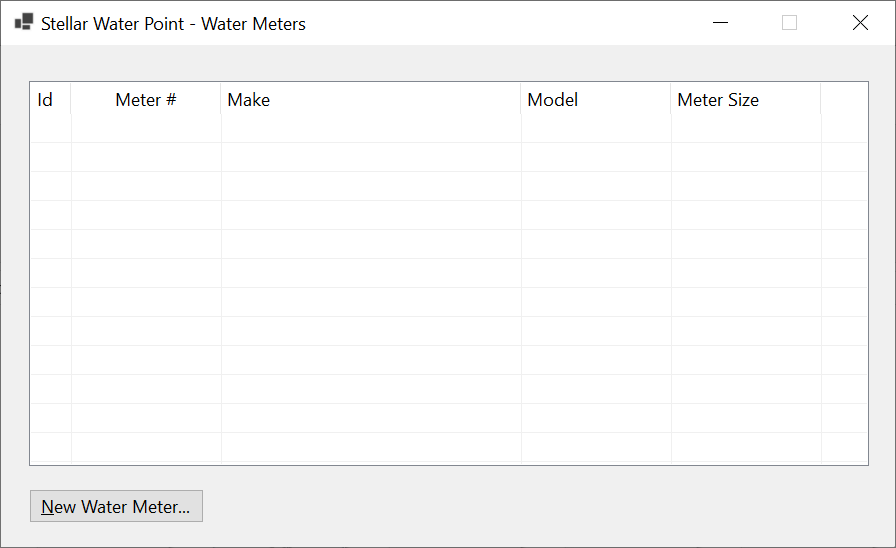
To let the user see a list of the water meters in the database, we will use a form equipped with a list view.
Practical Learning: Displaying Water Meters
| (Name) | Text | Width |
| ColWaterMeterId | Id | 40 |
| ColMeterNumber | Meter # | 150 |
| ColMake | Make | 300 |
| ColModel | Model | 150 |
| ColMeterSize | Meter Size | 150 |
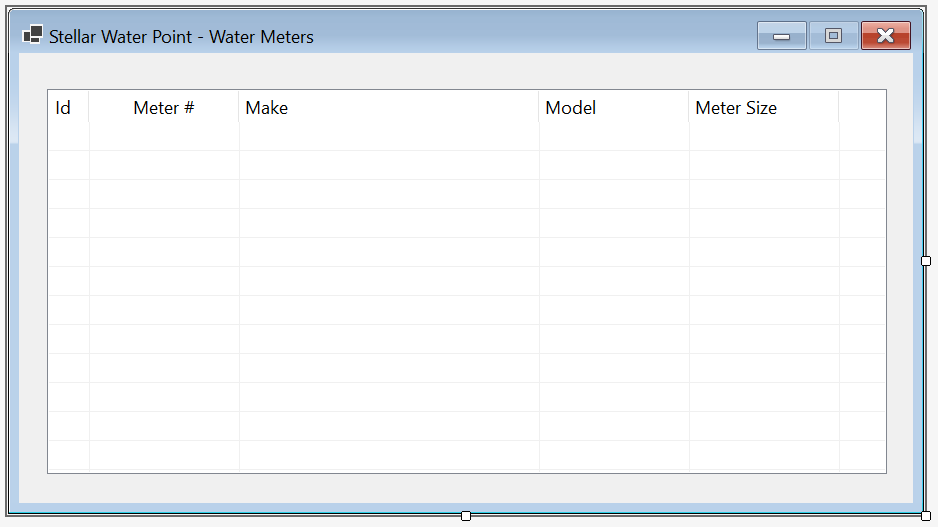
| Control | (Name) | Other Properties | |
| ListView |  |
LvwWaterMeters | FullRowSelect: True GridLines: True View: Details |
Imports System.IO
Imports System.Xml

Public Class MeterCentral
    Private Sub ShowWaterMeters()
        Dim xdWaterMeters As XmlDocument = New XmlDocument()
        Dim strFileWaterMeters As String = "C:\Stellar Water Point10\WaterMeters.xml"

        If File.Exists(strFileWaterMeters) Then
            Using fsWaterMeters As FileStream = New FileStream(strFileWaterMeters, FileMode.Open,
                                                                 FileAccess.Read, FileShare.Read)

                xdWaterMeters.Load(fsWaterMeters)

                Dim xnlWaterMeters As XmlNodeList = xdWaterMeters.DocumentElement.ChildNodes

                LvwWaterMeters.Items.Clear()

                For Each xnWaterMeter As XmlNode In xnlWaterMeters
                    Dim lviWaterMeter As ListViewItem = New ListViewItem(xnWaterMeter.FirstChild.InnerText)

                    lviWaterMeter.SubItems.Add(xnWaterMeter.FirstChild.NextSibling.InnerText)
                    lviWaterMeter.SubItems.Add(xnWaterMeter.FirstChild.NextSibling.NextSibling.InnerText)
                    lviWaterMeter.SubItems.Add(xnWaterMeter.FirstChild.NextSibling.NextSibling.NextSibling.InnerText)
                    lviWaterMeter.SubItems.Add(xnWaterMeter.FirstChild.NextSibling.NextSibling.NextSibling.NextSibling.InnerText)

                    LvwWaterMeters.Items.Add(lviWaterMeter)
                Next
            End Using
        End If
    End Sub

    Private Sub MeterCentral_Load(sender As Object, e As EventArgs) Handles MyBase.Load
        ShowWaterMeters()
    End Sub
End Class
| Control | (Name) | Text | Font | |
| Button |  |
BtnWaterMeters | &Water Meters... | Times New Roman, 24pt, style=Bold |
Imports System.IO

Public Class WaterDistribution
    Private Sub Exercise_Load(sender As Object, e As EventArgs) Handles MyBase.Load
        REM If the directory for the database doesn't yet exist, create it
        Directory.CreateDirectory("C:\Stellar Water Point10")
    End Sub

    Private Sub BtnWaterMeters_Click(sender As Object, e As EventArgs) Handles BtnWaterMeters.Click
        Dim Central As MeterCentral = New MeterCentral()

        Central.ShowDialog()
    End Sub
End Class
A Water Meter Record
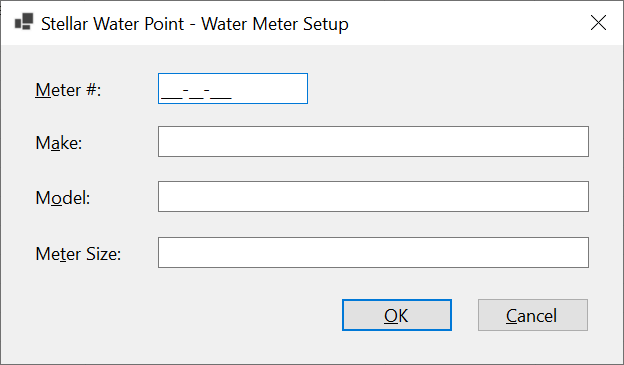
Our application will have a list of water meters. A record for each water meter must be created. To make this happen, we will equip the application with an appropriate form.
Practical Learning: Creating a Water Meter Record

| Control | (Name) | Text | Modifiers | Other Properties | |
| Label |  |
&Meter #: | |||
| MaskedTextBox |  |
MtbMeterNumber | Public | Masked: 000-000-000 | |
| Label | |
Meter &Id: | |||
| TextBox |  |
TxtWaterMeterId | Public | ||
| Label | |
M&ake: | |||
| TextBox | |
TxtMake | Public | ||
| Label | |
M&odel: | |||
| TextBox | |
TxtModel | Public | ||
| Label | |
Me&ter Size: | |||
| TextBox | |
TxtMeterSize | Public | ||
| Button | |
BtnOK | &OK | DialogResult: OK | |
| Button | |
BtnCancel | &Cancel | DialogResult: Cancel | |
FormBorderStyle: FixedDialog
Text:            Stellar Water Point - Water Meter Setup
StartPosition:   CenterScreen
AcceptButton:    BtnOK
CancelButton:    BtnCancel
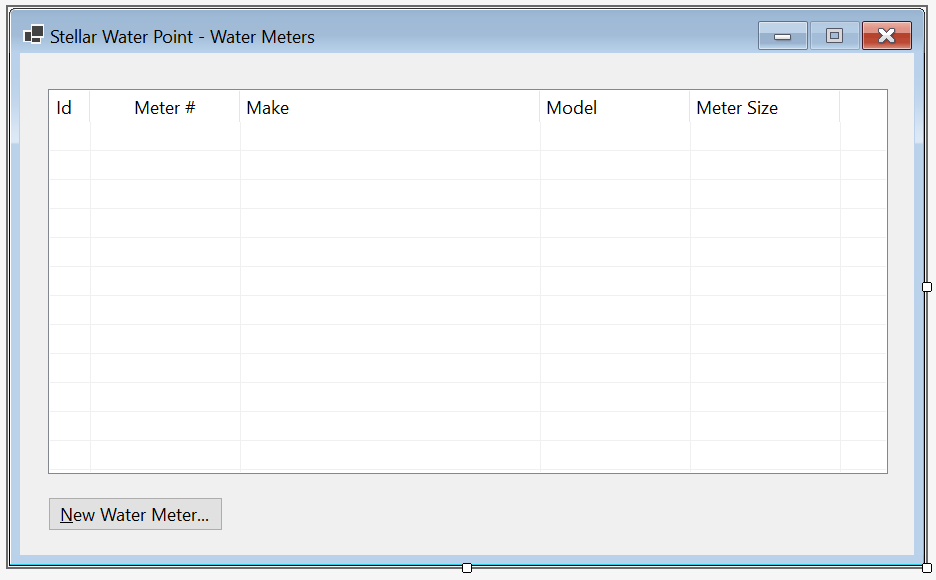
| Control | (Name) | Other Properties | |
| ListView | |
LvwWaterMeters | FullRowSelect: True GridLines: True View: Details |
| Button | |
BtnNewWaterMeter | &New Water Meter... |
Imports System.IO
Imports System.Xml

Public Class MeterCentral
    Private Sub ShowWaterMeters()
        REM Create a reference to the XML's DOM object
        Dim xdWaterMeters As XmlDocument = New XmlDocument()
        REM Indicate the file that holds a list of water meters
        Dim strFileWaterMeters As String = "C:\Stellar Water Point10\WaterMeters.xml"

        REM Check whether a file that holds a list of water meters exists
        If File.Exists(strFileWaterMeters) Then
            REM If that file exists, open it
            Using fsWaterMeters As FileStream = New FileStream(strFileWaterMeters, FileMode.Open,
                                                                 FileAccess.Read, FileShare.Read)

                REM Get the list of water meters from the file and store
                REM the records in the previously created DOM object.
                xdWaterMeters.Load(fsWaterMeters)

                REM If there is at least one record for the water meters,
                REM create an XmlNodeList list and transmit it to
                REM a collection that wille be used in the view page.
                Dim xnlWaterMeters As XmlNodeList = xdWaterMeters.DocumentElement.ChildNodes

                LvwWaterMeters.Items.Clear()

                For Each xnWaterMeter As XmlNode In xnlWaterMeters
                    Dim lviWaterMeter As ListViewItem = New ListViewItem(xnWaterMeter.FirstChild.InnerText)

                    lviWaterMeter.SubItems.Add(xnWaterMeter.FirstChild.NextSibling.InnerText)
                    lviWaterMeter.SubItems.Add(xnWaterMeter.FirstChild.NextSibling.NextSibling.InnerText)
                    lviWaterMeter.SubItems.Add(xnWaterMeter.FirstChild.NextSibling.NextSibling.NextSibling.InnerText)
                    lviWaterMeter.SubItems.Add(xnWaterMeter.FirstChild.NextSibling.NextSibling.NextSibling.NextSibling.InnerText)

                    LvwWaterMeters.Items.Add(lviWaterMeter)
                Next
            End Using
        End If
    End Sub

    Private Sub MeterCentral_Load(sender As Object, e As EventArgs) Handles MyBase.Load
        ShowWaterMeters()
    End Sub

    Private Sub BtnNewWaterMeter_Click(sender As Object, e As EventArgs) Handles BtnNewWaterMeter.Click
        Dim wm = New Create
        Dim fiWaterMeters As FileInfo = Nothing
        Dim xdWaterMeters = New XmlDocument
        Dim strWaterMeters = "C:\Stellar Water Point10\WaterMeters.xml"

        If wm.ShowDialog = DialogResult.OK Then
            fiWaterMeters = New FileInfo(strWaterMeters)

            If fiWaterMeters.Exists Then
                Using fsWaterMeters = New FileStream(fiWaterMeters.FullName, FileMode.Open,
                                                          FileAccess.Read, FileShare.Read)

                    xdWaterMeters.Load(fsWaterMeters)
                End Using
            Else
                Using fsWaterMeters = New FileStream(fiWaterMeters.FullName, FileMode.Create,
                                                          FileAccess.Write, FileShare.Write)

                    xdWaterMeters.LoadXml("<?xml version=""1.0"" encoding=""utf-8""?>" +
                                                  "<water-meters></water-meters>")
                    xdWaterMeters.Save(fsWaterMeters)
                End Using
            End If
        End If

        Using fsWaterMeters = New FileStream(fiWaterMeters.FullName, FileMode.OpenOrCreate,
                                              FileAccess.ReadWrite, FileShare.ReadWrite)

            Dim xeWaterMeter = xdWaterMeters.CreateElement("water-meter")

            xeWaterMeter.InnerXml = "<water-meter-id>" + wm.TxtWaterMeterId.Text + "</water-meter-id>" +
                                    "<meter-number>" + wm.MtbMeterNumber.Text + "</meter-number>" +
                                    "<make>" + wm.TxtMake.Text + "</make>" +
                                    "<model>" + wm.TxtModel.Text + "</model>" +
                                    "<meter-size>" + wm.TxtMeterSize.Text + "</meter-size>"

            xdWaterMeters.DocumentElement.AppendChild(xeWaterMeter)
            xdWaterMeters.Save(fsWaterMeters)
        End Using

        ShowWaterMeters()
    End Sub
End Class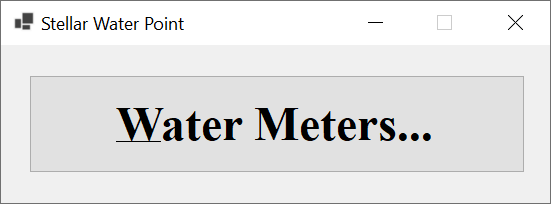
| Meter Id | Meter # | Make | Model | Meter Size |
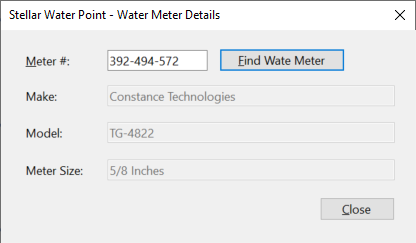
| 1 | 392-494-572 | Constance Technologies | TG-4822 | 5/8 Inches |
| 2 | 938-705-869 | Stan Wood | 66-G | 1 Inch |
| 3 | 588-279-663 | Estellano | NCF-226 | 3/4 Inches |
Water Meter Details
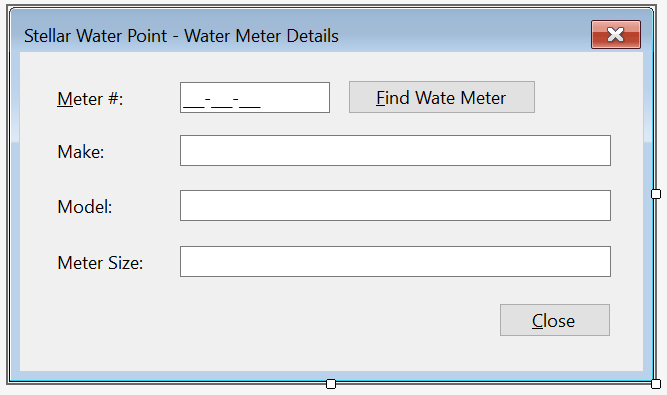
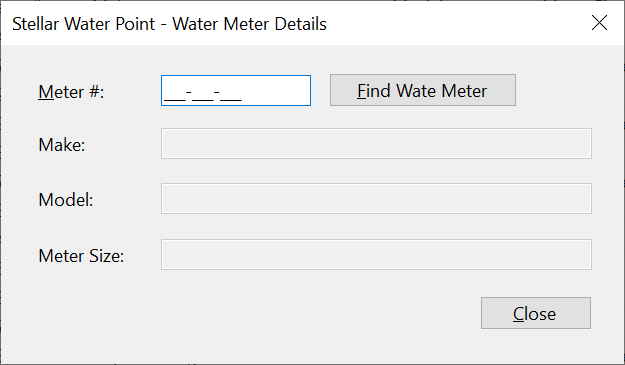
Sometimes, a user may want to check the values of a water meter record. To support this, we will add an appropriate form to our application.
Practical Learning: Creating a Water Meter Record
| Control | (Name) | Text | |
| Button | |
BtnFindWateMeter | &Find Water Meter |
| Button | |
BtnClose | &Close |
Imports System.IO
Imports System.Xml

Public Class Details
    Private Sub BtnFindWateMeter_Click(sender As Object, e As EventArgs) Handles BtnFindWaterMeter.Click
        If String.IsNullOrEmpty(MtbMeterNumber.Text) Then
            MsgBox("You must type a meter number and then click the Find button.",
                                "Stellar Water Point", MsgBoxStyle.OkOnly Or MsgBoxStyle.Information)
            Exit Sub
        End If

        Dim xdWaterMeters As XmlDocument = New XmlDocument()
        Dim strWaterMeters As String = "C:\Stellar Water Point10\WaterMeters.xml"
        Dim fiWaterMeters As FileInfo = New FileInfo(strWaterMeters)

        If fiWaterMeters.Exists Then
            Using fsWaterMeters As FileStream = New FileStream(fiWaterMeters.FullName, FileMode.Open, FileAccess.Read, FileShare.Read)
                xdWaterMeters.Load(fsWaterMeters)
                Dim xnlWaterMeters As XmlNodeList = xdWaterMeters.DocumentElement.SelectNodes("//meter-number[.='" + MtbMeterNumber.Text + "']")

                For Each xnWaterMeter As XmlNode In xnlWaterMeters
                    TxtWaterMeterId.Text = xnWaterMeter.PreviousSibling.InnerText
                    TxtMake.Text = xnWaterMeter.NextSibling.InnerText
                    TxtModel.Text = xnWaterMeter.NextSibling.NextSibling.InnerText
                    TxtMeterSize.Text = xnWaterMeter.NextSibling.NextSibling.NextSibling.InnerText
                Next
            End Using
        End If
    End Sub
End ClassImports System.IO
Imports System.Xml
Public Class Details
Private Sub BtnFindWateMeter_Click(sender As Object, e As EventArgs) Handles BtnFindWaterMeter.Click
REM If the user clicks the Find button,
REM make sure there Is a meter number in the top text box.
If String.IsNullOrEmpty(MtbMeterNumber.Text) Then
REM If the user didn't type a meter number,
REM display a message box to inform the user.
MsgBox("You must type a meter number and then click the Find button.",
"Stellar Water Point", MsgBoxStyle.OkOnly Or MsgBoxStyle.Information)
REM If the user didn't type a meter number but clicked Find, don't do anything
Exit Sub
End If
REM We will need a reference to an XML Dom object as an XmlDocument variable
Dim xdWaterMeters As XmlDocument = New XmlDocument()
REM This is the name and path of the file that holds the records of water meters
Dim strWaterMeters As String = "C:\Stellar Water Point10\WaterMeters.xml"
REM We will process the file of water meters using a FileInfo object
Dim fiWaterMeters As FileInfo = New FileInfo(strWaterMeters)
REM We need to find out whether a file for water meters was previously created.
If fiWaterMeters.Exists Then
REM If that file exists, create a stream of it. Open that file with a read-only status
Using fsWaterMeters As FileStream = New FileStream(fiWaterMeters.FullName, FileMode.Open, FileAccess.Read, FileShare.Read)
REM Get the list of water meter records and put those records in the XML Dom object created earlier.
xdWaterMeters.Load(fsWaterMeters)
REM Use XPath to locate the water meter that has
REM the same meter number as the one in the Meter # text box.
REM Store the water meter in an XmlNodeList variable.
Dim xnlWaterMeters As XmlNodeList = xdWaterMeters.DocumentElement.SelectNodes("//meter-number[.='" + MtbMeterNumber.Text + "']")
REM If there Is a water meter in the database with
REM the number that the user typed, locate that water meter
REM and display each of its values in the appropriate text box.
For Each xnWaterMeter As XmlNode In xnlWaterMeters
TxtWaterMeterId.Text = xnWaterMeter.PreviousSibling.InnerText
TxtMake.Text = xnWaterMeter.NextSibling.InnerText
TxtModel.Text = xnWaterMeter.NextSibling.NextSibling.InnerText
TxtMeterSize.Text = xnWaterMeter.NextSibling.NextSibling.NextSibling.InnerText
Next
End Using
End If
End Sub
Private Sub BtnClose_Click(sender As Object, e As EventArgs) Handles BtnClose.Click
Close()
End Sub
End Class
| Control | (Name) | Other Properties | |
| ListView | |
LvwWaterMeters | No Change |
| Button | |
BtnNewWaterMeter | &New Water Meter... |
| Button | |
BtnViewWaterMeter | &View Water Meter... |
Imports System.IO
Imports System.Xml

Public Class MeterCentral
    Private Sub ShowWaterMeters()
        . . .
    End Sub
    Private Sub MeterCentral_Load(sender As Object, e As EventArgs) Handles MyBase.Load
        ShowWaterMeters()
    End Sub

    Private Sub BtnNewWaterMeter_Click(sender As Object, e As EventArgs) Handles BtnNewWaterMeter.Click
        . . .
    End Sub

    Private Sub BtnWaterMeterDetails_Click(sender As Object, e As EventArgs) Handles BtnWaterMeterDetails.Click
        Dim waterMeterDetails As Details = New Details()

        waterMeterDetails.Show()
    End Sub
End Class
Updating a Water Meter Details
One of the routine operations performed on a database is to change the details of a record. To support this operation for a water meter, we will create a form that can be used to update the information of a water meter.
Practical Learning: Updating a Water Meter

| Control | (Name) | Text | |
| Button | |
BtnFindWateMeter | &Find Water Meter |
| Button | |
BtnUpdateWateMeter | &Update Water Meter |
| Button | |
BtnClose | &Close |
Imports System.IO
Imports System.Xml

Public Class Editor
    Private Sub BtnFindWaterMeter_Click(sender As Object, e As EventArgs) Handles BtnFindWaterMeter.Click
        If String.IsNullOrEmpty(MtbMeterNumber.Text) Then
            MsgBox("You must type a meter number and then click the Find button.",
            MsgBoxStyle.OkOnly Or MsgBoxStyle.Information,
                                "Stellar Water Point")
            Exit Sub
        End If

        Dim xdWaterMeters As XmlDocument = New XmlDocument()
        Dim strWaterMeters As String = "C:\Stellar Water Point10\WaterMeters.xml"
        Dim fiWaterMeters As FileInfo = New FileInfo(strWaterMeters)

        If fiWaterMeters.Exists Then
            Using fsWaterMeters As FileStream = New FileStream(fiWaterMeters.FullName, FileMode.Open, FileAccess.Read, FileShare.Read)
                xdWaterMeters.Load(fsWaterMeters)
                Dim xnlWaterMeters As XmlNodeList = xdWaterMeters.DocumentElement.SelectNodes("//meter-number[.='" + MtbMeterNumber.Text + "']")

                For Each xnWaterMeter As XmlNode In xnlWaterMeters
                    TxtWaterMeterId.Text = xnWaterMeter.PreviousSibling.InnerText
                    TxtMake.Text = xnWaterMeter.NextSibling.InnerText
                    TxtModel.Text = xnWaterMeter.NextSibling.NextSibling.InnerText
                    TxtMeterSize.Text = xnWaterMeter.NextSibling.NextSibling.NextSibling.InnerText
                Next
            End Using
        End If
    End Sub
End ClassImports System.IO
Imports System.Xml
Public Class Editor
Private Sub BtnFindWaterMeter_Click(sender As Object, e As EventArgs) Handles BtnFindWaterMeter.Click
. . .
End Sub
Private Sub BtnUpdateWateMeter_Click(sender As Object, e As EventArgs) Handles BtnUpdateWateMeter.Click
Dim xdWaterMeters As XmlDocument = New XmlDocument()
Dim strWaterMeters As String = "C:\Stellar Water Point10\WaterMeters.xml"
Dim fiWaterMeters As FileInfo = New FileInfo(strWaterMeters)
If fiWaterMeters.Exists Then
Using fsWaterMeters As FileStream = New FileStream(fiWaterMeters.FullName, FileMode.Open, FileAccess.Read, FileShare.Read)
xdWaterMeters.Load(fsWaterMeters)
Dim xnlWaterMeters As XmlNodeList = xdWaterMeters.DocumentElement.SelectNodes("//meter-number[.='" + MtbMeterNumber.Text + "']")
For Each xnWaterMeter As XmlNode In xnlWaterMeters
xnWaterMeter.ParentNode.InnerXml = "<water-meter-id>" + TxtWaterMeterId.Text + "</water-meter-id>" +
"<meter-number>" + MtbMeterNumber.Text + "</meter-number>" +
"<make>" + TxtMake.Text + "</make>" +
"<model>" + TxtModel.Text + "</model>" +
"<meter-size>" + TxtMeterSize.Text + "</meter-size>"
Next
End Using
Using fsWaterMeters As FileStream = New FileStream(fiWaterMeters.FullName, FileMode.OpenOrCreate, FileAccess.ReadWrite, FileShare.ReadWrite)
xdWaterMeters.Save(fsWaterMeters)
End Using
End If
Close()
End Sub
End ClassImports System.IO
Imports System.Xml
Public Class Editor
Private Sub BtnFindWaterMeter_Click(sender As Object, e As EventArgs) Handles BtnFindWaterMeter.Click
REM If the user clicks the Find button,
REM make sure there is a meter number in the top text box.
If String.IsNullOrEmpty(MtbMeterNumber.Text) Then
REM If the user didn't type a meter number,
REM display a message box to inform the user.
MsgBox("You must type a meter number and then click the Find button.",
MsgBoxStyle.OkOnly Or MsgBoxStyle.Information,
"Stellar Water Point")
REM If the user didn't type a meter number but clicked Find, don't do anything
Exit Sub
End If
REM We will need a reference to an XML Dom object as an XmlDocument variable
Dim xdWaterMeters As XmlDocument = New XmlDocument()
REM This is the name and path of the file that holds the records of water meters
Dim strWaterMeters As String = "C:\Stellar Water Point11\WaterMeters.xml"
REM We will process the file of water meters using a FileInfo object
Dim fiWaterMeters As FileInfo = New FileInfo(strWaterMeters)
REM We need to find out whether a file for water meters was previously created.
If fiWaterMeters.Exists Then
REM If that file exists, create a stream of it. Open that file with a read-only status
Using fsWaterMeters As FileStream = New FileStream(fiWaterMeters.FullName, FileMode.Open, FileAccess.Read, FileShare.Read)
REM Get the list of water meter records
REM and put those records in the XML Dom object created earlier.
xdWaterMeters.Load(fsWaterMeters)
REM Use XPath to locate the water meter that has
REM the same meter number as the one in the Meter # text box.
REM Store the water meter in an XmlNodeList variable.
Dim xnlWaterMeters As XmlNodeList = xdWaterMeters.DocumentElement.SelectNodes("//meter-number[.='" + MtbMeterNumber.Text + "']")
REM If there is a water meter in the database with
REM the number that the user typed, locate that water meter
REM and display each of its values in the appropriate text box.
For Each xnWaterMeter As XmlNode In xnlWaterMeters
TxtWaterMeterId.Text = xnWaterMeter.PreviousSibling.InnerText
TxtMake.Text = xnWaterMeter.NextSibling.InnerText
TxtModel.Text = xnWaterMeter.NextSibling.NextSibling.InnerText
TxtMeterSize.Text = xnWaterMeter.NextSibling.NextSibling.NextSibling.InnerText
Next
End Using
End If
End Sub
Private Sub BtnUpdateWateMeter_Click(sender As Object, e As EventArgs) Handles BtnUpdateWateMeter.Click
REM We will need a reference to an XML Dom object as an XmlDocument variable
Dim xdWaterMeters As XmlDocument = New XmlDocument()
REM This is the name and path of the file that holds the records of water meters
Dim strWaterMeters As String = "C:\Stellar Water Point11\WaterMeters.xml"
REM We will process the file of water meters using a FileInfo object
Dim fiWaterMeters As FileInfo = New FileInfo(strWaterMeters)
REM We need to find out whether a file for water meters was previously created.
If fiWaterMeters.Exists Then
REM If that file exists, create a stream of it. Open that file with a read-only status
Using fsWaterMeters As FileStream = New FileStream(fiWaterMeters.FullName, FileMode.Open, FileAccess.Read, FileShare.Read)
REM Get the list of water meter records
REM and put those records in the XML Dom object created earlier.
xdWaterMeters.Load(fsWaterMeters)
REM Use XPath to locate the water meter that has
REM the same meter number as the one in the Meter # text box.
REM Store the water meter in an XmlNodeList variable.
Dim xnlWaterMeters As XmlNodeList = xdWaterMeters.DocumentElement.SelectNodes("//meter-number[.='" + MtbMeterNumber.Text + "']")
REM Check each record of the water meters.
For Each xnWaterMeter As XmlNode In xnlWaterMeters
REM If you find a record whose water meter is
REM the same as the meter number that the user typed,
REM change the values of the Make, the Model,
REM and the Meter Size based on the values
REM the user typed in the corresponding text boxes.
xnWaterMeter.ParentNode.InnerXml = "<water-meter-id>" + TxtWaterMeterId.Text + "</water-meter-id>" +
"<meter-number>" + MtbMeterNumber.Text + "</meter-number>" +
"<make>" + TxtMake.Text + "</make>" +
"<model>" + TxtModel.Text + "</model>" +
"<meter-size>" + TxtMeterSize.Text + "</meter-size>"
Next
End Using
REM Now that a water meter has been changed/update
REM (and the file of water meters has changed), save the new version of the file.
Using fsWaterMeters As FileStream = New FileStream(fiWaterMeters.FullName, FileMode.OpenOrCreate, FileAccess.ReadWrite, FileShare.ReadWrite)
xdWaterMeters.Save(fsWaterMeters)
End Using
End If
REM If the user has updated a record, we will assume that,
REM in most cases (such as usually in real life),
REM a user updates one record and moves to other activities.
REM For this record, after the user has updated a record,
REM we will clode the form.
Close()
End Sub
Private Sub BtnClose_Click(sender As Object, e As EventArgs) Handles BtnClose.Click
Close()
End Sub
End Class
| Control | (Name) | Text | |
| Button | |
BtnEditWaterMeter | &Edit Water Meter... |
Private Sub BtnEditWaterMeter_Click(sender As Object, e As EventArgs) Handles BtnEditWaterMeter.Click
    Dim Editor = New MeterEditor

    Editor.ShowDialog()

    ShowWaterMeters()
End Sub

| Make: | Stanford Trend | Model: | 266G |
| Meter Size: | 1 1/2 Inches |


Removing a Water Meter from the Database
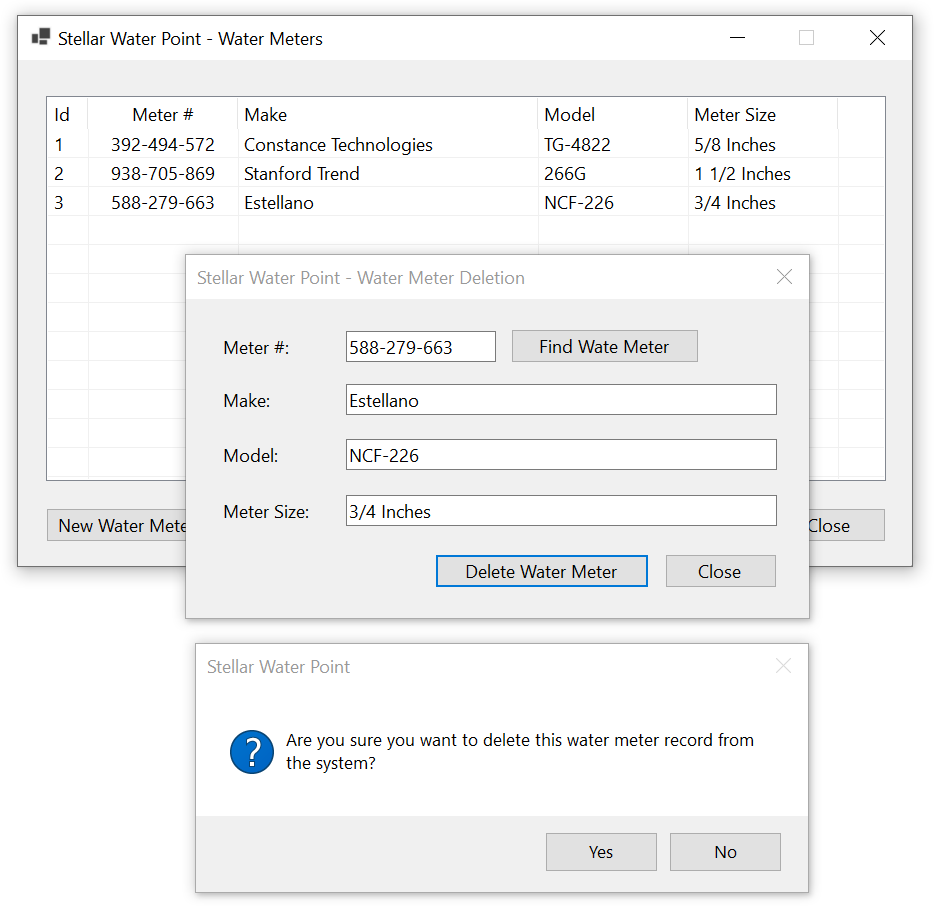
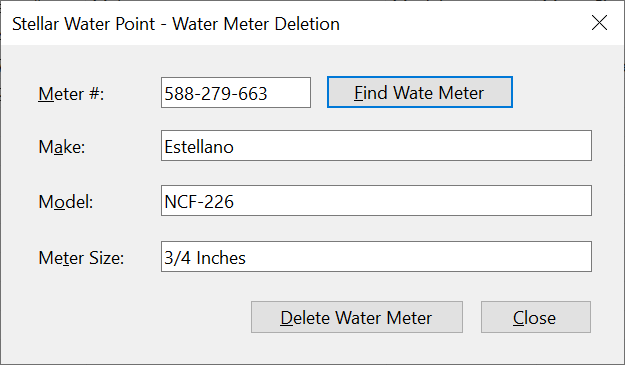
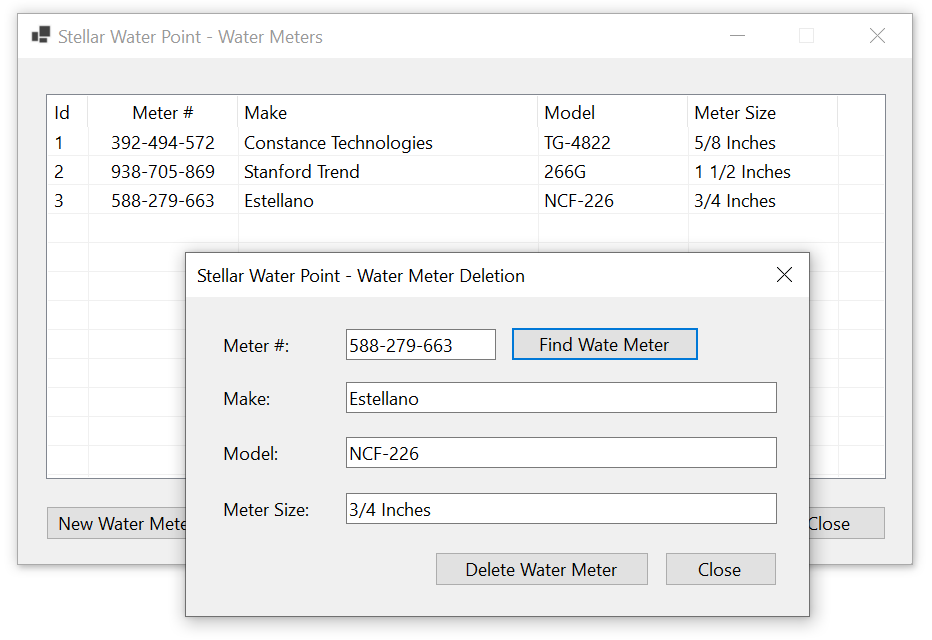
If a water meter has become useless and you want to make sure it is no more available for customer use, you can delete its record. To assist the user, we will create a form for that operation.
Practical Learning: Deleting a Water Meter Record
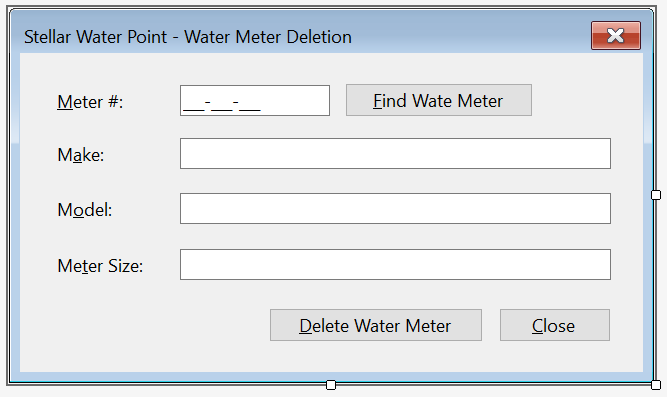
| Control | (Name) | Text | |
| Button | |
BtnDeleteWateMeter | &Delete Water Meter |
Imports System.IO
Imports System.Xml

Public Class Delete
    Private Sub BtnFindWaterMeter_Click(sender As Object, e As EventArgs) Handles BtnFindWaterMeter.Click
        Dim xdWaterMeters As XmlDocument = New XmlDocument()
        Dim strWaterMeters As String = "C:\Stellar Water Point11\WaterMeters.xml"

        Dim fiWaterMeters As FileInfo = New FileInfo(strWaterMeters)

        If fiWaterMeters.Exists Then
            Using fsWaterMeters As FileStream = New FileStream(fiWaterMeters.FullName, FileMode.Open, FileAccess.Read, FileShare.Read)

                xdWaterMeters.Load(fsWaterMeters)
                Dim xnlWaterMeters As XmlNodeList = xdWaterMeters.DocumentElement.SelectNodes("//meter-number[.='" + MtbMeterNumber.Text + "']")

                For Each xnWaterMeter As XmlNode In xnlWaterMeters)
                        TxtMake.Text = xnWaterMeter.NextSibling.InnerText
                    TxtModel.Text = xnWaterMeter.NextSibling.NextSibling.InnerText
                    TxtMeterSize.Text = xnWaterMeter.NextSibling.NextSibling.NextSibling.InnerText
                Next
            End Using
        End If
    End Sub
End ClassPrivate Sub BtnDeleteWateMeter_Click(sender As Object, e As EventArgs) Handles BtnDeleteWateMeter.Click
Dim xdWaterMeters As XmlDocument = New XmlDocument()
Dim strWaterMeters As String = "C:\Stellar Water Point11\WaterMeters.xml"
If String.IsNullOrEmpty(MtbMeterNumber.Text) Then
MsgBox("You must type a water meter number if you want to delete one.",
MsgBoxStyle.OkOnly Or MsgBoxStyle.Information,
"Stellar Water Point")
Exit Sub
End If
If File.Exists(strWaterMeters) = False Then
MsgBox("There is no file for the water meters in the system.",
MsgBoxStyle.OkOnly Or MsgBoxStyle.Information,
"Stellar Water Point")
Exit Sub
End If
xdWaterMeters.Load(strWaterMeters)
Dim xnlWaterMeters As XmlNodeList = xdWaterMeters.DocumentElement.GetElementsByTagName("meter-number")
For Each xnWaterMeter As XmlNode In xnlWaterMeters
If xnWaterMeter.InnerText = MtbMeterNumber.Text Then
If MsgBox("Are you sure you want to delete this water meter record from the system?",
MsgBoxStyle.YesNo Or MsgBoxStyle.Information,
"Stellar Water Point") = MsgBoxResult.Yes Then
xdWaterMeters.DocumentElement.RemoveChild(xnWaterMeter.ParentNode)
Exit For
End If
End If
Next
xdWaterMeters.Save(strWaterMeters)
Close()
End SubImports System.IO
Imports System.Xml
Public Class Delete
Private Sub BtnFindWaterMeter_Click(sender As Object, e As EventArgs) Handles BtnFindWaterMeter.Click
' If the user clicks the Find button,
' make sure there is a meter number in the top text box.
If String.IsNullOrEmpty(MtbMeterNumber.Text) Then
' If the user didn't type a meter number,
' display a message box to inform the user.
MsgBox("You must type a meter number and then click the Find button.",
MsgBoxStyle.OkOnly Or MsgBoxStyle.Information,
"Stellar Water Point")
' If the user didn't type a meter number but clicked Find, don't do anything
End If
' We will need a reference to an XML Dom object as an XmlDocument variable
Dim xdWaterMeters As XmlDocument = New XmlDocument()
' This is the name and path of the file that holds the records of water meters
Dim strWaterMeters As String = "C:\Stellar Water Point11\WaterMeters.xml"
'We will process the file of water meters using a FileInfo object
Dim fiWaterMeters As FileInfo = New FileInfo(strWaterMeters)
REM We need to find out whether a file for water meters was previously created.
If fiWaterMeters.Exists Then
' If that file exists, create a stream of it. Open that file with a read-only status
Using fsWaterMeters As FileStream = New FileStream(fiWaterMeters.FullName, FileMode.Open, FileAccess.Read, FileShare.Read)
' Get the list of water meter records
' and put those records in the XML Dom object created earlier.
xdWaterMeters.Load(fsWaterMeters)
' Use XPath to locate the water meter that has
' the same meter number as the one in the Meter # text box.
' Store the water meter in an XmlNodeList variable.
Dim xnlWaterMeters As XmlNodeList = xdWaterMeters.DocumentElement.SelectNodes("//meter-number[.='" + MtbMeterNumber.Text + "']")
REM If there is a water meter in the database with
REM the number that the user typed, locate that water meter
REM and display each of its values in the appropriate text box.
For Each xnWaterMeter As XmlNode In xnlWaterMeters
TxtWaterMeterId.Text = xnWaterMeter.PreviousSibling.InnerText
TxtMake.Text = xnWaterMeter.NextSibling.InnerText
TxtModel.Text = xnWaterMeter.NextSibling.NextSibling.InnerText
TxtMeterSize.Text = xnWaterMeter.NextSibling.NextSibling.NextSibling.InnerText
Next
End Using
End If
End Sub
Private Sub BtnDeleteWateMeter_Click(sender As Object, e As EventArgs) Handles BtnDeleteWateMeter.Click
' If the user clicks the Delete button, make sure that
' the right text box contains a meter number
If String.IsNullOrEmpty(MtbMeterNumber.Text) Then
' If the user didn't provide a meter number, display a message box ...
MsgBox("You must type a water meter number if you want to delete one.",
MsgBoxStyle.OkOnly Or MsgBoxStyle.Information, "Stellar Water Point")
' .. and stop the operation.
Exit Sub
End If
' Create an XML Dom object
Dim xdWaterMeters As XmlDocument = New XmlDocument()
' Get the file that holds a list of water meters
' and assign that file to a string variable.
Dim strWaterMeters As String = "C:\Stellar Water Point11\WaterMeters.xml"
' If the user provided a meter number and clicked the Find button,
' check whether a file for water meters was previously created.
If Not File.Exists(strWaterMeters) Then
MsgBox("There is no file for the water meters in the system.",
MsgBoxStyle.OkOnly Or MsgBoxStyle.Information,
"Stellar Water Point")
' .. and stop the operation.
Exit Sub
End If
' Since a file of water meters exists, open it.
' Store the list of water meters in the XML Dom object that was previously created.
xdWaterMeters.Load(strWaterMeters)
' From the list of XML elements, get a list of elements based one named meter-number.
Dim xnlWaterMeters As XmlNodeList = xdWaterMeters.DocumentElement.GetElementsByTagName("meter-number")
' Visit each XML node from the list
For Each xnWaterMeter As XmlNode In xnlWaterMeters
' When you get to an element, check whether its meter number is
' the same number the user had typed.
If xnWaterMeter.InnerText = MtbMeterNumber.Text Then
' If you find that meter number, enquire from
' the user if the water meter must be deleted.
' To get that information, display a message box with a Yes and a No buttons.
If MsgBox("Are you sure you want to delete this water meter record from the system?",
MsgBoxStyle.YesNo Or MsgBoxStyle.Information,
"Stellar Water Point") = MsgBoxResult.Yes Then
' If the user had clicked Yes, delete the water meter.
xdWaterMeters.DocumentElement.RemoveChild(xnWaterMeter.ParentNode)
Exit For
End If
End If
Next
REM Since the list of water meters has been changed, save its new version
xdWaterMeters.Save(strWaterMeters)
REM After the deletion operation, close the dialog box and
REM return to the MeterCentral form of water meters.
Close()
End Sub
Private Sub BtnClose_Click(sender As Object, e As EventArgs) Handles BtnClose.Click
Close()
End Sub
End Class
| Control | (Name) | Text | Anchor | Other Properties | |
| ListView | |
LvwWaterMeters | Top, Bottom, Left, Right | FullRowSelect: True GridLines: True View: Details |
|
| Button | |
BtnNewWaterMeter | &New Water Meter... | Bottom, Right | |
| Button | |
BtnViewWaterMeter | &View Water Meter... | Bottom, Right | |
| Button | |
BtnEditWaterMeter | &Edit Water Meter... | Bottom, Right | |
| Button | |
BtnDeleteWaterMeter | &Delete Water Meter... | Bottom, Right | |
Imports System.IO
Imports System.Xml

Public Class MeterCentral
    Private Sub ShowWaterMeters()
        Dim xdWaterMeters As XmlDocument = New XmlDocument()
        Dim strFileWaterMeters As String = "C:\Stellar Water Point11\WaterMeters.xml"

        If File.Exists(strFileWaterMeters) Then
            Using fsWaterMeters As FileStream = New FileStream(strFileWaterMeters, FileMode.Open,
                                                                 FileAccess.Read, FileShare.Read)

                xdWaterMeters.Load(fsWaterMeters)

                Dim xnlWaterMeters As XmlNodeList = xdWaterMeters.DocumentElement.ChildNodes

                LvwWaterMeters.Items.Clear()

                For Each xnWaterMeter As XmlNode In xnlWaterMeters
                    Dim lviWaterMeter As ListViewItem = New ListViewItem(xnWaterMeter.FirstChild.InnerText)

                    lviWaterMeter.SubItems.Add(xnWaterMeter.FirstChild.NextSibling.InnerText)
                    lviWaterMeter.SubItems.Add(xnWaterMeter.FirstChild.NextSibling.NextSibling.InnerText)
                    lviWaterMeter.SubItems.Add(xnWaterMeter.FirstChild.NextSibling.NextSibling.NextSibling.InnerText)
                    lviWaterMeter.SubItems.Add(xnWaterMeter.FirstChild.NextSibling.NextSibling.NextSibling.NextSibling.InnerText)

                    LvwWaterMeters.Items.Add(lviWaterMeter)
                Next
            End Using
        End If
    End Sub

    Private Sub MeterCentral_Load(sender As Object, e As EventArgs) Handles MyBase.Load
        ShowWaterMeters()
    End Sub

    Private Sub BtnNewWaterMeter_Click(sender As Object, e As EventArgs) Handles BtnNewWaterMeter.Click
        Dim wm = New Create
        Dim fiWaterMeters As FileInfo = Nothing
        Dim xdWaterMeters = New XmlDocument
        Dim strWaterMeters = "C:\Stellar Water Point11\WaterMeters.xml"

        If wm.ShowDialog = DialogResult.OK Then
            fiWaterMeters = New FileInfo(strWaterMeters)

            If fiWaterMeters.Exists Then
                Using fsWaterMeters = New FileStream(fiWaterMeters.FullName, FileMode.Open,
                                                          FileAccess.Read, FileShare.Read)

                    xdWaterMeters.Load(fsWaterMeters)
                End Using
            Else
                Using fsWaterMeters = New FileStream(fiWaterMeters.FullName, FileMode.Create,
                                                          FileAccess.Write, FileShare.Write)

                    xdWaterMeters.LoadXml("<?xml version=""1.0"" encoding=""utf-8""?>" +
                                          "<water-meters></water-meters>")
                    xdWaterMeters.Save(fsWaterMeters)
                End Using
            End If
        End If

        Using fsWaterMeters = New FileStream(fiWaterMeters.FullName, FileMode.OpenOrCreate,
                                              FileAccess.ReadWrite, FileShare.ReadWrite)

            Dim xeWaterMeter = xdWaterMeters.CreateElement("water-meter")

            xeWaterMeter.InnerXml = "<water-meter-id>" + wm.TxtWaterMeterId.Text + "</water-meter-id>" +
                                    "<meter-number>" + wm.MtbMeterNumber.Text + "</meter-number>" +
                                    "<make>" + wm.TxtMake.Text + "</make>" +
                                    "<model>" + wm.TxtModel.Text + "</model>" +
                                    "<meter-size>" + wm.TxtMeterSize.Text + "</meter-size>"

            xdWaterMeters.DocumentElement.AppendChild(xeWaterMeter)
            xdWaterMeters.Save(fsWaterMeters)
        End Using

        ShowWaterMeters()
    End Sub

    Private Sub BtnViewWaterMeter_Click(sender As Object, e As EventArgs) Handles BtnViewWaterMeter.Click
        Dim WaterMeterDetails = New Details

        WaterMeterDetails.Show()
    End Sub

    Private Sub BtnEditWaterMeter_Click(sender As Object, e As EventArgs) Handles BtnEditWaterMeter.Click
        REM Get a reference to the dialog box that is used
        REM to update the details of a water meter.
        Dim Edit = New Editor
        REM Display that dialog box
        Editor.ShowDialog()

        REM After using the dialog box, make an attempt to display the list of water meters.
        ShowWaterMeters()
    End Sub

    Private Sub BtnDeleteWaterMeter_Click(sender As Object, e As EventArgs) Handles BtnDeleteWaterMeter.Click
        Dim Deletion As New Delete

        Deletion.ShowDialog()

        ShowWaterMeters()
    End Sub

    Private Sub BtnClose_Click(sender As Object, e As EventArgs) Handles BtnClose.Click
        Close()
    End Sub
End Class


Customers
Introduction
Customers are the entities that use the services of the bussiness whose application we are building. In this seciton, we will createthe forms that can assist a user with customers-based operations.
Customers Accounts
Our application will use a database that contains a list of customers. As seen with water meter records, some time to time, a user will want to view the customers records. To display a list of customers, we will create a form equipped with a list view.
Practical Learning: Displaying Customers Accounts
| Control | (Name) | Other Properties | |
| ListView | |
LvwCustomers | FullRowSelect: True GridLines: True View: Details |
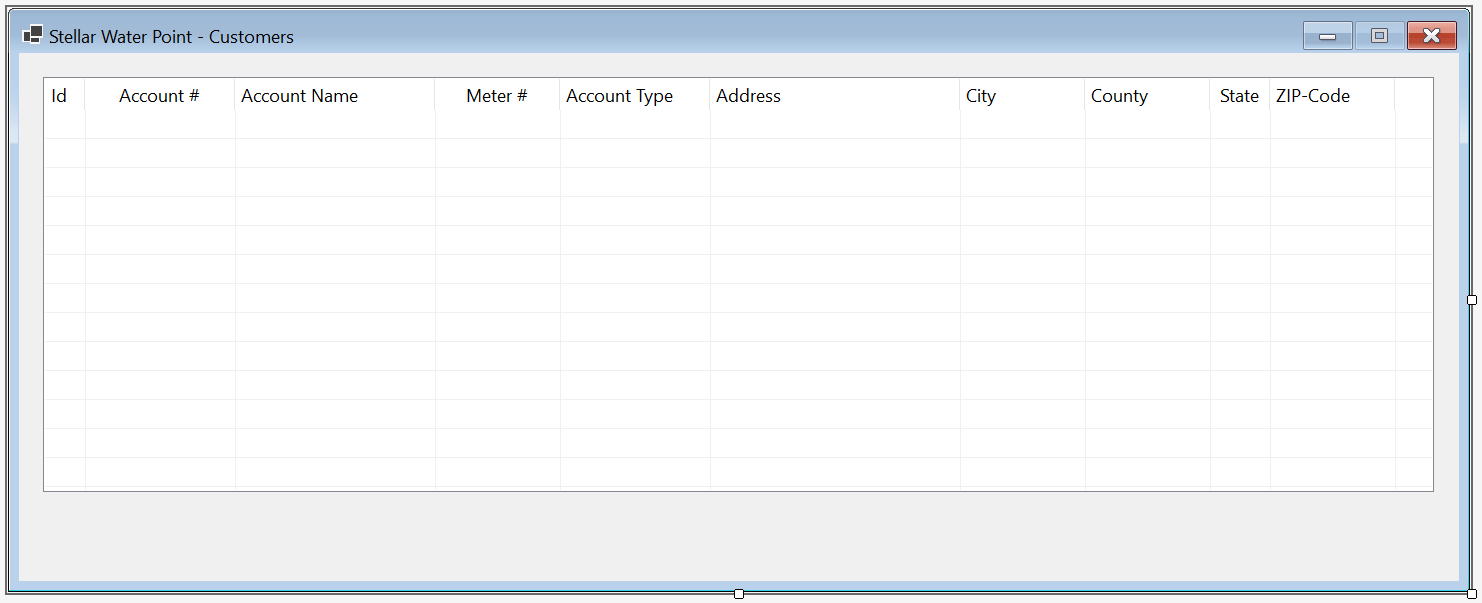
| (Name) | Text | TextAlign | Width |
| ColCustomerId | Id | 40 | |
| ColAccountNumber | Account # | Center | 150 |
| ColAccountName | Account Name | 200 | |
| ColMeterNumber | Meter # | Center | 150 |
| ColAccountType | Account Type | 575 | |
| ColAddress | Address | 250 | |
| ColCity | City | 125 | |
| ColCounty | County | 125 | |
| ColState | State | Center | |
| ColZIPCode | ZIP-Code | Center | 125 |
Imports System.IO
Imports System.Xml

Public Class ClientCentral
    Sub ShowCustomers()
        Dim i As Integer = 1

        LvwCustomers.Items.Clear()

        Dim xdCustomers As XmlDocument = New XmlDocument()
        Dim strCustomers As String = "C:\Stellar Water Point12\Customers.xml"

        Dim fiCustomers As FileInfo = New FileInfo(strCustomers)

        If fiCustomers.Exists Then
            Using fsCustomers As FileStream = New FileStream(fiCustomers.FullName, FileMode.Open, FileAccess.Read, FileShare.Read)
                xdCustomers.Load(fsCustomers)
                Dim xnlCustomers As XmlNodeList = xdCustomers.DocumentElement.ChildNodes

                For Each xnCustomer As XmlNode In xnlCustomers
                    Dim lviCustomer As ListViewItem = New ListViewItem(i.ToString())

                    lviCustomer.SubItems.Add(xnCustomer.FirstChild.InnerText)   ' Account #
                    lviCustomer.SubItems.Add(xnCustomer.FirstChild.NextSibling.InnerText)   ' Account Name
                    lviCustomer.SubItems.Add(xnCustomer.FirstChild.NextSibling.NextSibling.InnerText) REM Meter #
                    lviCustomer.SubItems.Add(xnCustomer.FirstChild.NextSibling.NextSibling.NextSibling.InnerText)   ' Account Type
                    lviCustomer.SubItems.Add(xnCustomer.FirstChild.NextSibling.NextSibling.NextSibling.NextSibling.InnerText)   ' Address
                    lviCustomer.SubItems.Add(xnCustomer.FirstChild.NextSibling.NextSibling.NextSibling.NextSibling.NextSibling.InnerText)   ' City
                    lviCustomer.SubItems.Add(xnCustomer.FirstChild.NextSibling.NextSibling.NextSibling.NextSibling.NextSibling.NextSibling.InnerText)   ' County
                    lviCustomer.SubItems.Add(xnCustomer.FirstChild.NextSibling.NextSibling.NextSibling.NextSibling.NextSibling.NextSibling.NextSibling.InnerText)   ' State
                    lviCustomer.SubItems.Add(xnCustomer.FirstChild.NextSibling.NextSibling.NextSibling.NextSibling.NextSibling.NextSibling.NextSibling.NextSibling.InnerText) REM ZIP-Code

                    LvwCustomers.Items.Add(lviCustomer)

                    i = i + 1
                Next
            End Using
        End If
    End Sub

    Private Sub ClientCentral_Load(sender As Object, e As EventArgs) Handles MyBase.Load
        ShowCustomers()
    End Sub
End Class
| Control | (Name) | Text | Font | |
| Button | |
BtnCustomers | &Customers... | Times New Roman, 24pt, style=Bold |
Imports System.IO

Public Class WaterDistribution
    Private Sub Exercise_Load(sender As Object, e As EventArgs) Handles MyBase.Load
        REM If the directory for the database doesn't yet exist, create it
        Directory.CreateDirectory("C:\Stellar Water Point12")
    End Sub

    Private Sub BtnCustomers_Click(sender As Object, e As EventArgs) Handles BtnCustomers.Click
        Dim Central As ClientCentral = New ClientCentral()

        Central.ShowDialog()
    End Sub

    Private Sub BtnWaterMeters_Click(sender As Object, e As EventArgs) Handles BtnWaterMeters.Click
        Dim Central = New MeterCentral

        Central.ShowDialog()
    End Sub
End Class
A Customer's Account
As mentioned already, our application will use a database that contains a list of customers. This means that a customer must have an account. We will create a form to let the user create an account. Each customer account must have an associated water meter.
Practical Learning: Creating a Customer Account
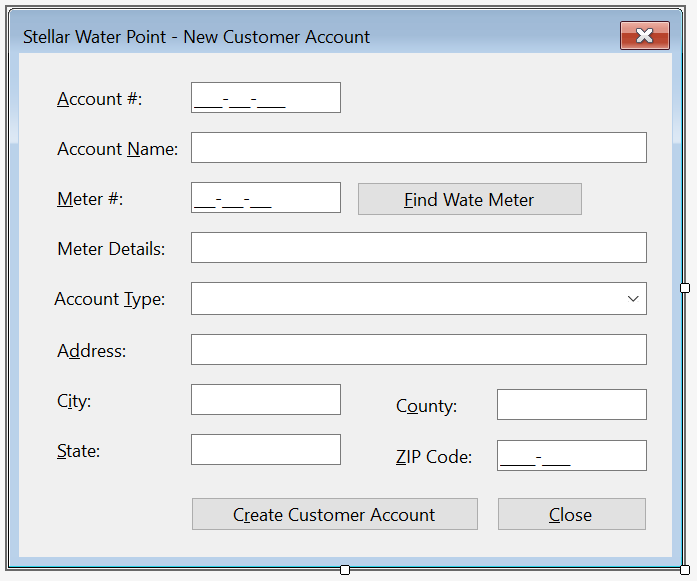
| Control | (Name) | Text | Other Properties | |
| Label | |
&Account #: | ||
| MaskedTextBox | |
MtbAccountNumber | Masked: 0000-000-0000 | |
| Label | |
&Account Name: | ||
| TextBox | |
TxtAccountName | ||
| Label | |
&Meter #: | ||
| MaskedTextBox | |
MtbMeterNumber | Masked: 000-000-000 | |
| Button | |
BtnFindWaterMeter | &Find Water Meter | |
| Label | |
Meter &Details: | ||
| TextBox | |
TxtMeterDetails | Enabled: False | |
| Label | |
&Account Type: | ||
| ComboBox |  |
cbxAccountsTypes | Items:
OTH - Other BUS - General Business RES - Residential Household SGO - Social/Government/Non - Profit Organization UUO - Unidentified or Unclassified Type of Organization WAT - Water Intensive Business(Laudromat, Hair Salon, Restaurant, etc |
|
| Label | |
&Address: | ||
| TextBox | |
TxtAddress | ||
| Label | |
C&ity: | ||
| TextBox | |
TxtCity | ||
| Label | |
C&ounty: | ||
| TextBox | |
TxtCounty | ||
| Label | |
&State: | ||
| TextBox | |
TxtState | ||
| Label | |
&ZIP-Code: | ||
| MaskedTextBox | |
MtbZIPCode | Masked: Zip-Code | |
| Button | |
BtnSaveCustomerAccount | S&ave Customer Account | DialogResult: OK |
| Button | |
BtnClose | &Close | DialogResult: Cancel |
FormBorderStyle: FixedDialog
Text:            Stellar Water Point - Customer Account Setup
StartPosition:   CenterScreen
AcceptButton:    BtnSaveCustomerAccount
CancelButton:    BtnClose
MinimizeBox:     False
MaximizeBox:     False
Imports System.IO
Imports System.Xml

Public Class ClientCreate
    Private Sub BtnFindWaterMeter_Click(sender As Object, e As EventArgs) Handles BtnFindWaterMeter.Click
        REM Create an XML Dom object
        Dim xdWaterMeters As XmlDocument = New XmlDocument()
        REM Declare a string variable and assign the file of water meters to it
        Dim strWaterMeters As String = "C:\Stellar Water Point12\WaterMeters.xml"
        REM Create a FileInfo object to manage the file that has the water meters
        Dim fiWaterMeters As FileInfo = New FileInfo(strWaterMeters)

        REM Find out whether a file for water meters exists already
        If fiWaterMeters.Exists Then
            REM If a file for water meters exists already, create a Stream object for it
            Using fsWaterMeters As FileStream = New FileStream(fiWaterMeters.FullName, FileMode.Open,
                                                              FileAccess.Read, FileShare.Read)
                REM From the file of water meters, store the list of water meters
                REM in the XML Dom that was previously created.
                xdWaterMeters.Load(fsWaterMeters)

                REM Check the list of water meters.
                REM Find a water meter that has the same name as the meter number that the user typed.
                Dim xnlWaterMeters As XmlNodeList = xdWaterMeters.DocumentElement.SelectNodes("//meter-number[.='" + MtbMeterNumber.Text + "']")

                REM If such a water meter exists...
                For Each xnWaterMeter As XmlNode In xnlWaterMeters
                    REM ... store its details in the meter details text box.
                    TxtMeterDetails.Text = xnWaterMeter.NextSibling.InnerText + " " +
                                           xnWaterMeter.NextSibling.NextSibling.InnerText + " (Meter Size: " +
                                           xnWaterMeter.NextSibling.NextSibling.NextSibling.InnerText + ")"
                Next
            End Using
        End If
    End Sub
End Class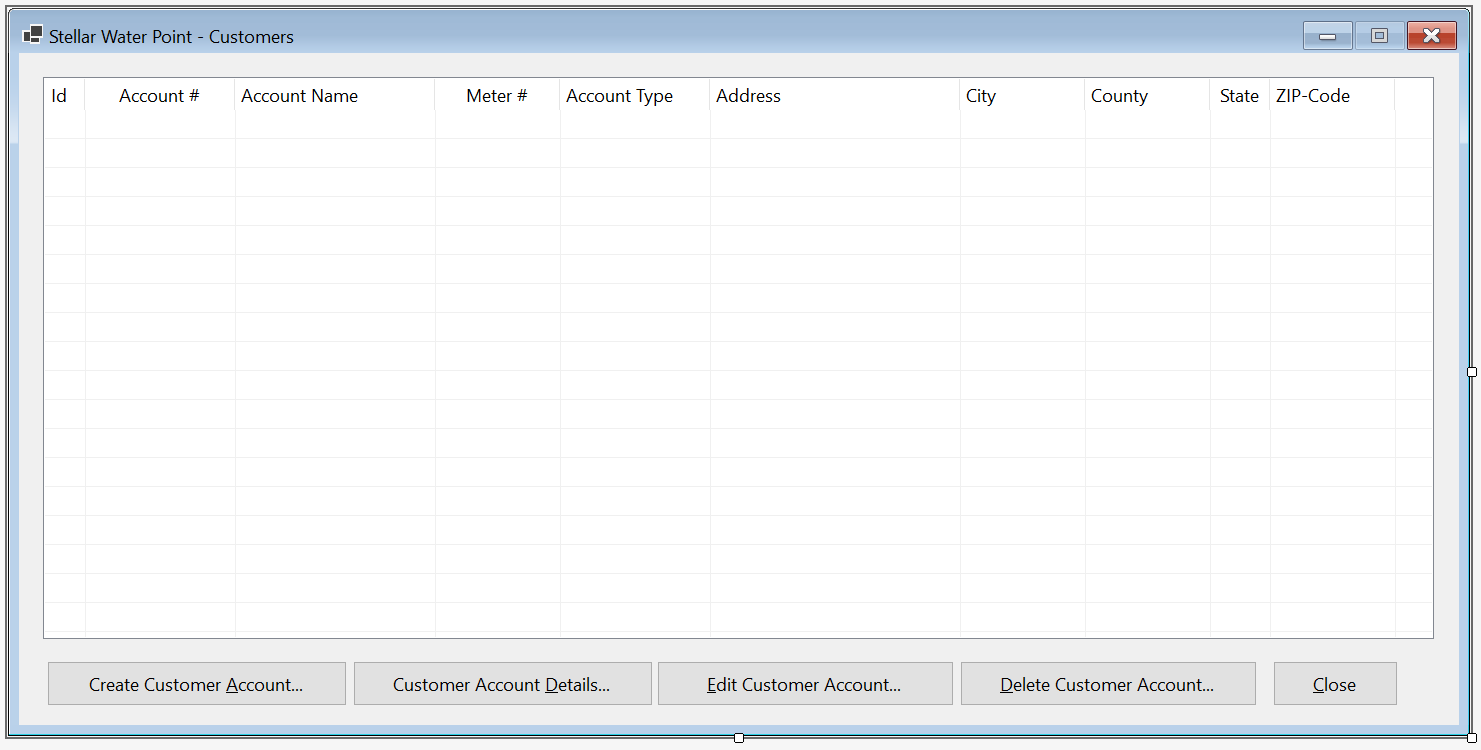
| Control | (Name) | Other Properties | |
| ListView | |
LvwCustomers | |
| Button | |
BtnCreateCustomerAccount | &Create Customer Account... |
Private Sub BtnCreateCustomerAccount_Click(sender As Object, e As EventArgs) Handles BtnCreateCustomerAccount.Click
    Dim Create As ClientCreate = New ClientCreate()

    If create.ShowDialog() = MsgBoxResult.Ok Then
        ' Make sure the user provides an account number for the new account.
        ' If not, don't create the account.
        If String.IsNullOrEmpty(create.MtbAccountNumber.Text) Then
            MsgBox("You must provide an account number for the new customer. " +
                            "Otherwise, the account cannot be created.",
                            MsgBoxStyle.OkOnly Or MsgBoxStyle.Information,
                            "Stellar Water Point")


        End If

        ' If the meter details text box is empty, it means the user didn't enter
        ' a meter number, in which case there is no water meter associated
        ' with the account. The account cannot be created.
        If String.IsNullOrEmpty(create.TxtMeterDetails.Text) Then
            MsgBox("You must enter a water meter to associate with a new customer's account.",
                            MsgBoxStyle.OkOnly Or MsgBoxStyle.Information,
                            "Stellar Water Point")
        End If

        ' Create a FileInfo object that will be used to manage a file
        Dim fiCustomers As FileInfo = Nothing
        ' Create an XML Dom
        Dim xdCustomers As XmlDocument = New XmlDocument()
        ' Declare a string variable for the file that contains a list of customers
        Dim strCustomers As String = "C:\Stellar Water Point12\Customers.xml"

        ' Pass the file of customers to the FileInfo object that was started
        fiCustomers = New FileInfo(strCustomers)

        ' Find out whether that file was already created
        If fiCustomers.Exists Then
            ' If that file was already created, open it through
            ' the Stream object that was previously initiated.
            Using fsCustomers = New FileStream(fiCustomers.FullName, FileMode.Open,
                                                FileAccess.Read, FileShare.Read)
                ' Pass the Stream object to the XML Dom that was previously created.
                xdCustomers.Load(fsCustomers)
            End Using
        Else
            ' If the file of customers was not created already, start by
            ' initializing the Stream object that was previously initiated.
            Using fsCustomers = New FileStream(fiCustomers.FullName, FileMode.Create, FileAccess.Write, FileShare.Write)
                ' Create a root to start the XML file
                xdCustomers.LoadXml("<?xml version=""1.0"" encoding=""utf-8""?>" +
                                        "<customers></customers>")
                ' Once the file has been started, save it
                xdCustomers.Save(fsCustomers)
            End Using
        End If

        ' Now that we have an XML file for customers, open it
        Using fsCustomers = New FileStream(fiCustomers.FullName, FileMode.OpenOrCreate, FileAccess.ReadWrite, FileShare.ReadWrite)
            ' We want to create an XML element to be added to the XML file.
            ' To start, create an XML element named "customer".
            Dim xeCustomer As XmlElement = xdCustomers.CreateElement("customer")

            ' Create/Format the child nodes of the "customer" element
            xeCustomer.InnerXml = "<account-number>" + Create.MtbAccountNumber.Text + "</account-number>" +
                                  "<account-name>" + Create.TxtAccountName.Text + "</account-name>" +
                                  "<meter-number>" + Create.MtbMeterNumber.Text + "</meter-number>" +
                                  "<account-type>" + Create.CbxAccountsTypes.Text + "</account-type>" +
                                  "<address>" + Create.TxtAddress.Text + "</address>" +
                                  "<city>" + Create.TxtCity.Text + "</city>" +
                                  "<county>" + Create.TxtCounty.Text + "</county>" +
                                  "<state>" + Create.TxtState.Text + "</state>" +
                                  "<zip-code>" + Create.MtbZIPCode.Text + "</zip-code>"
            xdCustomers.DocumentElement.AppendChild(xeCustomer)
            xdCustomers.Save(fsCustomers)
        End Using
    End If

    ShowCustomers()
End Sub

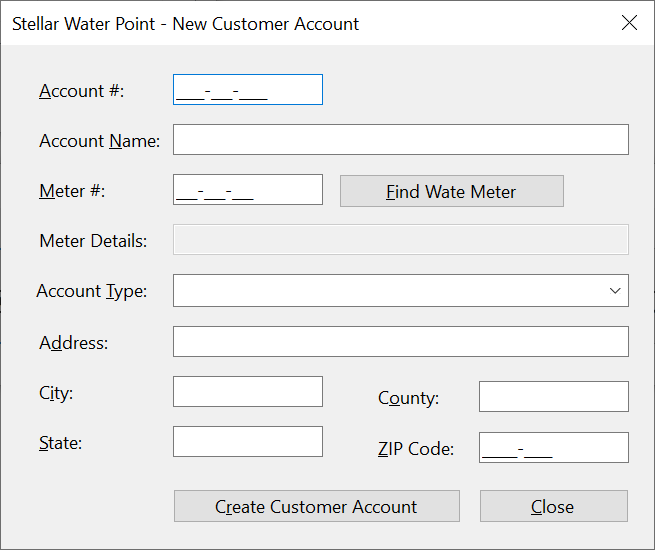
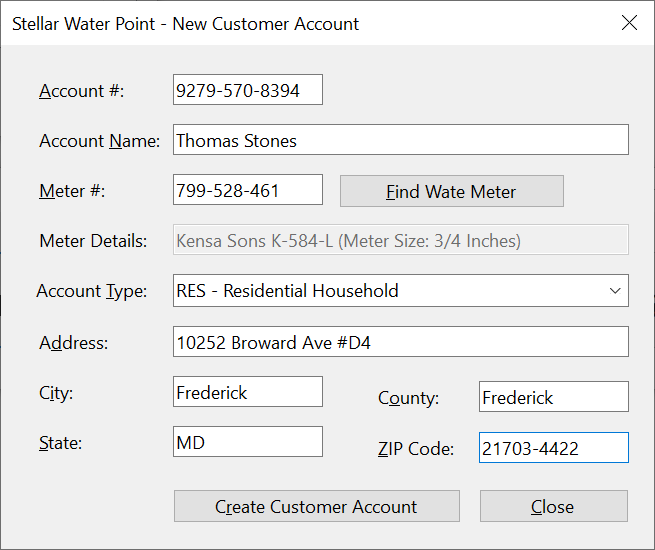
Account #:    9279-570-8394
Account Name: Thomas Stones
Meter #:      799-528-461
Account Type: RES - Residential Household
Address:      10252 Broward Ave #D4
City:         Frederick
County:       Frederick
State:        MD
ZIP-Code:     21703-4422
| Account # | Account Name | Meter # | Account Type | Address | City | County | State | ZIP-Code |
| 4086-938-4783 | Hernola Dough | 594-827-359 | UUO - Unidentified or Unclassified Type of Organization | 10 10 Hexagonal Drv | Winston | Yoke | Penn | 11402-4411 |
| 7080-583-5947 | Sunny Yard | 827-508-248 | WAT - Water Intensive Business(Laudromat, Hair Salon, Restaurant, etc | 663 Sherry Wood East Street | Shimpstown | Franklin | PA | 17236-2626 |

A Review of a Customer's Account
Some time to time, a user will want to review the details of a customer's account. We will create a form to assist the user with this.
Practical Learning: Creating a Water Meter Record
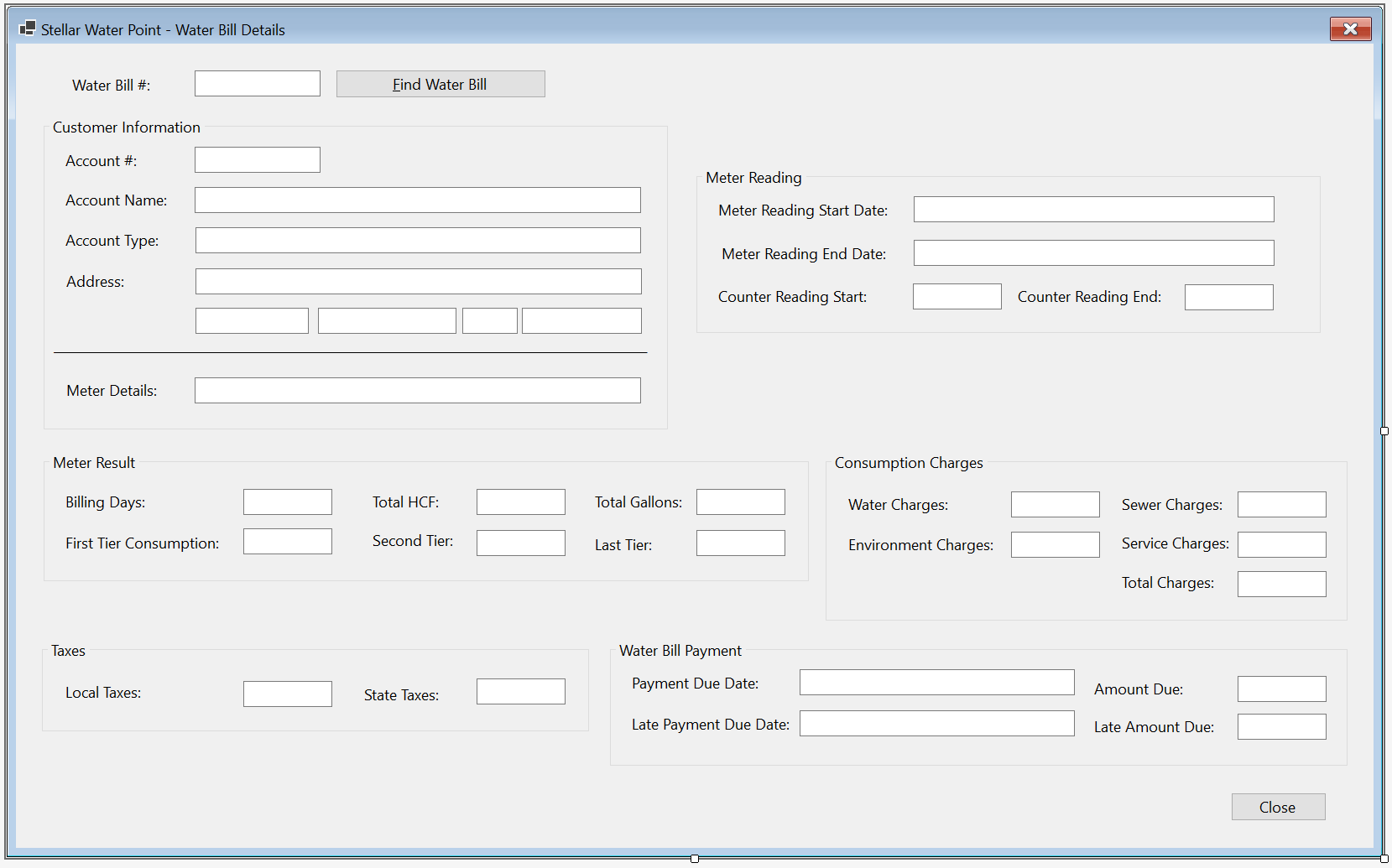
| Control | (Name) | Text | Enabled | Other Properties | |
| Label | |
&Account #: | |||
| MaskedTextBox | |
MtbAccountNumber | Masked: 0000-000-0000 | ||
| Button | |
BtnFindCustomerAccount | &Find Customer Account | ||
| Label | |
Account Name: | |||
| TextBox | |
TxtAccountName | False | ||
| Label | |
Meter Details: | |||
| TextBox | |
TxtMeterDetails | False | ||
| Label | |
Account Type: | |||
| TextBox | |
TxtAccountType | False | ||
| Label | |
Address: | |||
| TextBox | |
TxtAddress | False | ||
| Label | |
City: | |||
| TextBox | |
TxtCity | False | ||
| Label | |
County: | |||
| TextBox | |
TxtCounty | False | ||
| Label | |
State: | |||
| TextBox | |
TxtState | False | ||
| Label | |
ZIP-Code: | |||
| TextBox | |
TxtZIPCode | False | ||
| Button | |
BtnClose | &Close | ||
FormBorderStyle: FixedDialog
Text:            Stellar Water Point - Customer Account Setup
StartPosition:   CenterScreen
MinimizeBox:     False
MaximizeBox:     False
Private Sub BtnFindCustomerAccount_Click(sender As Object, e As EventArgs) Handles BtnFindCustomerAccount.Click
    Dim xdCustomers As XmlDocument = New XmlDocument()
    Dim strCustomers = "C:\Stellar Water Point12\Customers.xml"

    Dim fiCustomers As FileInfo = New FileInfo(strCustomers)

    Dim strMeterNumber As String = Nothing

    If fiCustomers.Exists Then
        Using fsCustomers As FileStream = New FileStream(fiCustomers.FullName, FileMode.Open, FileAccess.Read, FileShare.Read)
            xdCustomers.Load(fsCustomers)
            Dim xnlCustomers As XmlNodeList = xdCustomers.DocumentElement.SelectNodes("//account-number[.='" + MtbAccountNumber.Text + "']")

            If xnlCustomers.Count = 0 Then
                    MsgBox("There is no customer with that account number",
                           MsgBoxStyle.OkOnly Or MsgBoxStyle.Information,
                           "Stellar Water Point")
                    TxtAccountName.Text = String.Empty
                    TxtMeterDetails.Text = String.Empty
                    strMeterNumber = String.Empty
                    TxtAccountType.Text = String.Empty
                    TxtAddress.Text = String.Empty
                    TxtCity.Text = String.Empty
                    TxtCounty.Text = String.Empty
                    TxtState.Text = String.Empty
                    TxtZIPCode.Text = String.Empty
                    Exit Sub
            Else
                    REM Check each node of the XML record and display its values in each Windows control on the form
                    For Each xnCustomer As XmlNode In xnlCustomers
                        ' MtbAccountNumber.Text = xnCustomer.NextSibling.InnerText   ' Meter #
                        TxtAccountName.Text = xnCustomer.NextSibling.InnerText ' Account Name
                        TxtMeterDetails.Text = xnCustomer.NextSibling.NextSibling.InnerText   ' Meter Details
                        strMeterNumber = xnCustomer.NextSibling.NextSibling.InnerText   ' Meter Number
                        TxtAccountType.Text = xnCustomer.NextSibling.NextSibling.NextSibling.InnerText   ' Account Type
                        TxtAddress.Text = xnCustomer.NextSibling.NextSibling.NextSibling.NextSibling.InnerText   ' Address
                        TxtCity.Text = xnCustomer.NextSibling.NextSibling.NextSibling.NextSibling.NextSibling.InnerText   ' City
                        TxtCounty.Text = xnCustomer.NextSibling.NextSibling.NextSibling.NextSibling.NextSibling.InnerText   ' County
                        TxtState.Text = xnCustomer.NextSibling.NextSibling.NextSibling.NextSibling.NextSibling.NextSibling.NextSibling.InnerText   ' State
                        TxtZIPCode.Text = xnCustomer.NextSibling.NextSibling.NextSibling.NextSibling.NextSibling.NextSibling.NextSibling.NextSibling.InnerText ' ZIP-Code
                    Next
            End If
        End Using
    End If

    Dim xdWaterMeters As XmlDocument = New XmlDocument()
    Dim strWaterMeters As String = "C:\Stellar Water Point12\WaterMeters.xml"

    Dim fiWaterMeters As FileInfo = New FileInfo(strWaterMeters)

    If fiWaterMeters.Exists Then
        Using fsWaterMeters As FileStream = New FileStream(fiWaterMeters.FullName, FileMode.Open, FileAccess.Read, FileShare.Read)
            xdWaterMeters.Load(fsWaterMeters)
            Dim xnlWaterMeters As XmlNodeList = xdWaterMeters.DocumentElement.SelectNodes("//meter-number[.='" + strMeterNumber + "']")

            For Each xnWaterMeter As XmlNode In xnlWaterMeters
                TxtMeterDetails.Text = xnWaterMeter.NextSibling.InnerText + " " +
                                           xnWaterMeter.NextSibling.NextSibling.InnerText + " (Meter Size: " +
                                           xnWaterMeter.NextSibling.NextSibling.NextSibling.InnerText + ")"
            Next
        End Using
    End If
End SubImports System.IO
Imports System.Xml
Public Class ClientDetails
Private Sub BtnFindCustomerAccount_Click(sender As Object, e As EventArgs) Handles BtnFindCustomerAccount.Click
' Create an XML DOM object for the customers records
Dim xdCustomers As XmlDocument = New XmlDocument()
' Declare a variable for a file that holds the list of customers
Dim strCustomers = "C:\Stellar Water Point12\Customers.xml"
' Create a FileInfo object for the customers
Dim fiCustomers As FileInfo = New FileInfo(strCustomers)
' We will need to know the water meter associated with this customer account
Dim strMeterNumber As String = Nothing
' Check whether the file that holds a list of customers exists
If fiCustomers.Exists Then
REM If that exists, open it and pass it to a FileStream object
Using fsCustomers As FileStream = New FileStream(fiCustomers.FullName, FileMode.Open, FileAccess.Read, FileShare.Read)
REM Get the list of customers and pass the records to the XML DOM object created earlier
xdCustomers.Load(fsCustomers)
REM Create an XmlNodeList list of customers using XPath
Dim xnlCustomers As XmlNodeList = xdCustomers.DocumentElement.SelectNodes("//account-number[.='" + MtbAccountNumber.Text + "']")
If xnlCustomers.Count = 0 Then
MsgBox("There is no customer with that account number",
MsgBoxStyle.OkOnly Or MsgBoxStyle.Information,
"Stellar Water Point")
TxtAccountName.Text = String.Empty
TxtMeterDetails.Text = String.Empty
strMeterNumber = String.Empty
TxtAccountType.Text = String.Empty
TxtAddress.Text = String.Empty
TxtCity.Text = String.Empty
TxtCounty.Text = String.Empty
TxtState.Text = String.Empty
TxtZIPCode.Text = String.Empty
Exit Sub
Else
REM Check each node of the XML record and display its values in each Windows control on the form
For Each xnCustomer As XmlNode In xnlCustomers
' MtbAccountNumber.Text = xnCustomer.NextSibling.InnerText ' Meter #
TxtAccountName.Text = xnCustomer.NextSibling.InnerText ' Account Name
TxtMeterDetails.Text = xnCustomer.NextSibling.NextSibling.InnerText ' Meter Details
strMeterNumber = xnCustomer.NextSibling.NextSibling.InnerText ' Meter Number
TxtAccountType.Text = xnCustomer.NextSibling.NextSibling.NextSibling.InnerText ' Account Type
TxtAddress.Text = xnCustomer.NextSibling.NextSibling.NextSibling.NextSibling.InnerText ' Address
TxtCity.Text = xnCustomer.NextSibling.NextSibling.NextSibling.NextSibling.NextSibling.InnerText ' City
TxtCounty.Text = xnCustomer.NextSibling.NextSibling.NextSibling.NextSibling.NextSibling.InnerText ' County
TxtState.Text = xnCustomer.NextSibling.NextSibling.NextSibling.NextSibling.NextSibling.NextSibling.NextSibling.InnerText ' State
TxtZIPCode.Text = xnCustomer.NextSibling.NextSibling.NextSibling.NextSibling.NextSibling.NextSibling.NextSibling.NextSibling.InnerText ' ZIP-Code
Next
End If
End Using
End If
REM Create an XML DOM object for the water meters records
Dim xdWaterMeters As XmlDocument = New XmlDocument()
REM Declare a variable for a file that holds the list of water meters
Dim strWaterMeters As String = "C:\Stellar Water Point12\WaterMeters.xml"
REM Create a FileInfo object for the customers
Dim fiWaterMeters As FileInfo = New FileInfo(strWaterMeters)
REM Check whether the file that holds a list of water meters exists
If fiWaterMeters.Exists Then
' Get the list of water meters and pass the records to the XML DOM object
Using fsWaterMeters As FileStream = New FileStream(fiWaterMeters.FullName, FileMode.Open, FileAccess.Read, FileShare.Read)
' Get the list of water meters and pass the records to the XML DOM object
xdWaterMeters.Load(fsWaterMeters)
' Create an XmlNodeList list of water meters using XPath
Dim xnlWaterMeters As XmlNodeList = xdWaterMeters.DocumentElement.SelectNodes("//meter-number[.='" + strMeterNumber + "']")
' Check each node of the XML record
For Each xnWaterMeter As XmlNode In xnlWaterMeters
' Get the values for the water meter.
' Create a sentence and display it in the Meter Details text box.
TxtMeterDetails.Text = xnWaterMeter.NextSibling.InnerText + " " +
xnWaterMeter.NextSibling.NextSibling.InnerText + " (Meter Size: " +
xnWaterMeter.NextSibling.NextSibling.NextSibling.InnerText + ")"
Next
End Using
End If
End Sub
Private Sub BtnClose_Click(sender As Object, e As EventArgs) Handles BtnClose.Click
Close()
End Sub
End Class
| Control | (Name) | Other Properties | |
| Button | |
BtnViewCustomerAccount | &View Customer Account... |
Private Sub BtnViewCustomerDetails_Click(sender As Object, e As EventArgs) Handles BtnViewCustomerDetails.Click
    Dim Details As ClientDetails = New ClientDetails

    Details.ShowDialog()
End Sub

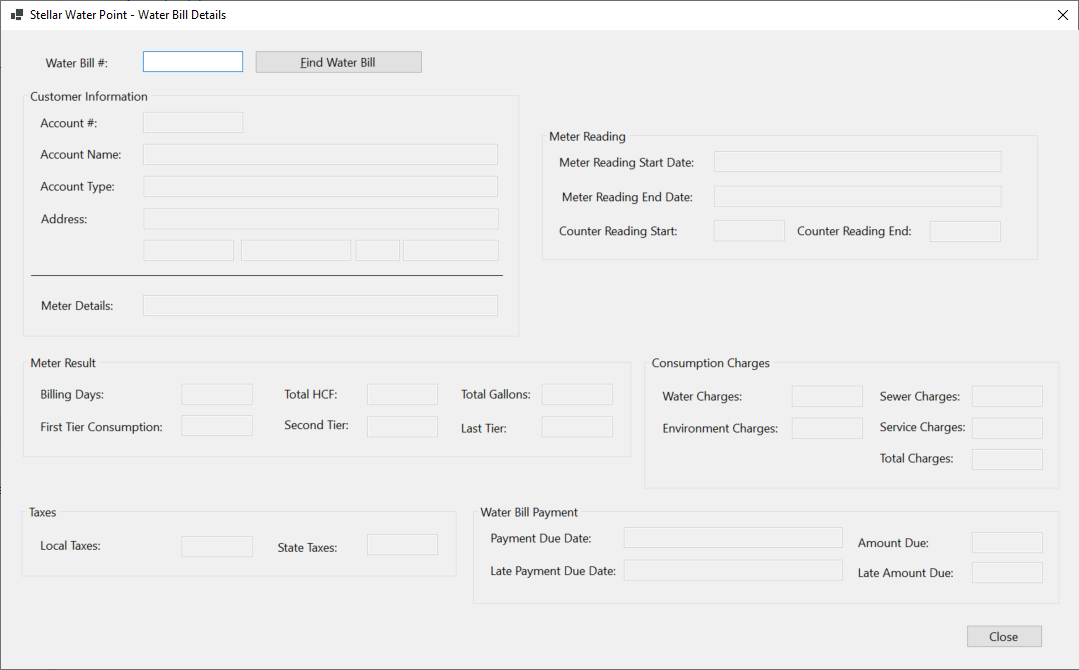
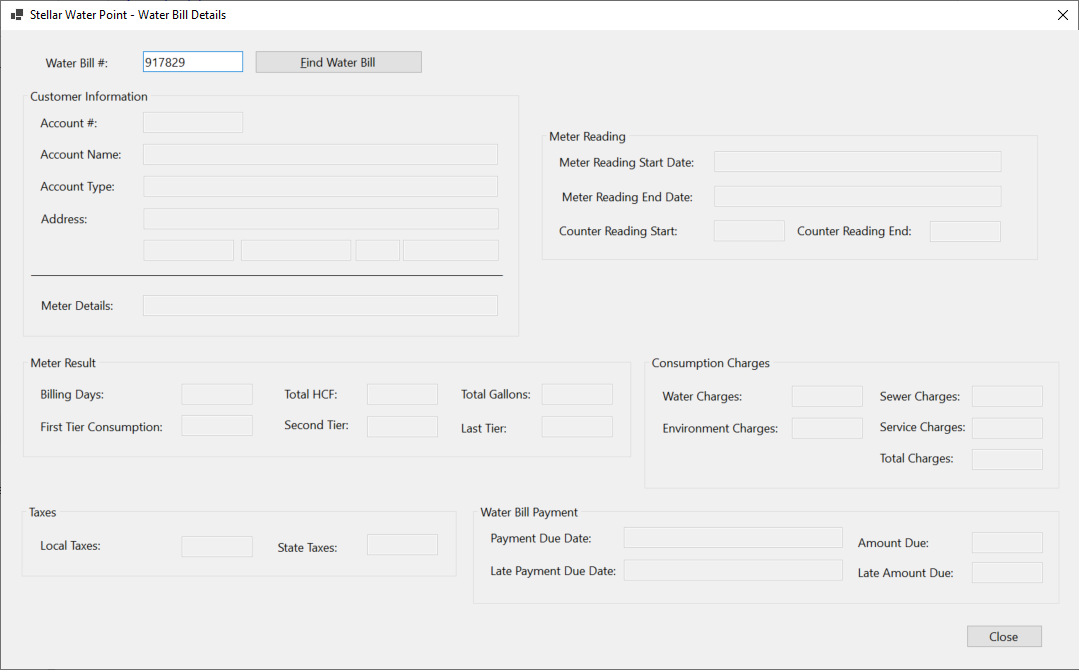
Updating a Customer's Account
Some time to time, a piece of information changes about a customer's account. When that happens, a user must update such an account. To assist the users in performing such an operation, we will create a form.
Practical Learning: Updating a Water Meter

| Control | (Name) | Text | Other Properties | |
| Button | |
BtnFindCustomerAccount | &Find Customer Account | |
| Button | |
BtnUpdateWateMeter | &Update Water Meter | DialogResult: OK |
| Button | |
BtnClose | &Close | DialogResult: Cancel |
FormBorderStyle: FixedDialog
Text:            Stellar Water Point - Customer Account Editor
StartPosition:   CenterScreen
AcceptButton:    BtnUpdateWateMeter
CancelButton:    BtnClose
MinimizeBox:     False
MaximizeBox:     False
Imports System.IO
Imports System.Xml

Public Class ClientEditor
    Private Sub BtnFindCustomerAccount_Click(sender As Object, e As EventArgs) Handles BtnFindCustomerAccount.Click
        Dim xdCustomers As XmlDocument = New XmlDocument()
        Dim strCustomers = "C:\Stellar Water Point12\Customers.xml"

        Dim fiCustomers As FileInfo = New FileInfo(strCustomers)

        Dim strMeterNumber = Nothing

        If fiCustomers.Exists Then
            Using fsCustomers As FileStream = New FileStream(fiCustomers.FullName, FileMode.Open, FileAccess.Read, FileShare.Read)
                xdCustomers.Load(fsCustomers)
                Dim xnlCustomers As XmlNodeList = xdCustomers.DocumentElement.SelectNodes("//account-number[.='" + MtbAccountNumber.Text + "']")

                For Each xnCustomer As XmlNode In xnlCustomers
                    ' MtbAccountNumber.Text = xnCustomer.NextSibling.InnerText   rem Meter #
                    TxtAccountName.Text = xnCustomer.NextSibling.InnerText REM Account Name
                    MtbMeterNumber.Text = xnCustomer.NextSibling.NextSibling.InnerText   REM Meter Number
                    strMeterNumber = xnCustomer.NextSibling.NextSibling.InnerText   REM Meter Number
                    CbxAccountsTypes.Text = xnCustomer.NextSibling.NextSibling.NextSibling.InnerText   REM Account Type
                    TxtAddress.Text = xnCustomer.NextSibling.NextSibling.NextSibling.NextSibling.InnerText   REM Address
                    TxtCity.Text = xnCustomer.NextSibling.NextSibling.NextSibling.NextSibling.NextSibling.InnerText   REM City
                    TxtCounty.Text = xnCustomer.NextSibling.NextSibling.NextSibling.NextSibling.NextSibling.NextSibling.InnerText   REM County
                    TxtState.Text = xnCustomer.NextSibling.NextSibling.NextSibling.NextSibling.NextSibling.NextSibling.NextSibling.InnerText   REM State
                    MtbZIPCode.Text = xnCustomer.NextSibling.NextSibling.NextSibling.NextSibling.NextSibling.NextSibling.NextSibling.NextSibling.InnerText REM ZIP-Code
                Next
            End Using
        End If

        Dim xdWaterMeters As XmlDocument = New XmlDocument()
        Dim strWaterMeters As String = "C:\Stellar Water Point12\WaterMeters.xml"

        Dim fiWaterMeters As FileInfo = New FileInfo(strWaterMeters)

        If fiWaterMeters.Exists Then
            Using fsWaterMeters As FileStream = New FileStream(fiWaterMeters.FullName, FileMode.Open, FileAccess.Read, FileShare.Read)
                xdWaterMeters.Load(fsWaterMeters)
                Dim xnlWaterMeters As XmlNodeList = xdWaterMeters.DocumentElement.SelectNodes("//meter-number[.='" + strMeterNumber + "']")

                For Each xnWaterMeter As XmlNode In xnlWaterMeters
                    TxtMeterDetails.Text = xnWaterMeter.NextSibling.InnerText + " " +
                                               xnWaterMeter.NextSibling.NextSibling.InnerText + " (Meter Size: " +
                                               xnWaterMeter.NextSibling.NextSibling.NextSibling.InnerText + ")"
                Next
            End Using
        End If
    End Sub
End ClassImports System.IO
Imports System.Xml
Public Class ClientEditor
Private Sub BtnFindCustomerAccount_Click(sender As Object, e As EventArgs) Handles BtnFindCustomerAccount.Click
Dim xdCustomers As XmlDocument = New XmlDocument()
Dim strCustomers = "C:\Stellar Water Point12\Customers.xml"
Dim fiCustomers As FileInfo = New FileInfo(strCustomers)
Dim strMeterNumber = Nothing
If fiCustomers.Exists Then
Using fsCustomers As FileStream = New FileStream(fiCustomers.FullName, FileMode.Open, FileAccess.Read, FileShare.Read)
xdCustomers.Load(fsCustomers)
Dim xnlCustomers As XmlNodeList = xdCustomers.DocumentElement.SelectNodes("//account-number[.='" + MtbAccountNumber.Text + "']")
For Each xnCustomer As XmlNode In xnlCustomers
' MtbAccountNumber.Text = xnCustomer.NextSibling.InnerText rem Meter #
TxtAccountName.Text = xnCustomer.NextSibling.InnerText REM Account Name
MtbMeterNumber.Text = xnCustomer.NextSibling.NextSibling.InnerText REM Meter Number
strMeterNumber = xnCustomer.NextSibling.NextSibling.InnerText REM Meter Number
CbxAccountsTypes.Text = xnCustomer.NextSibling.NextSibling.NextSibling.InnerText REM Account Type
TxtAddress.Text = xnCustomer.NextSibling.NextSibling.NextSibling.NextSibling.InnerText REM Address
TxtCity.Text = xnCustomer.NextSibling.NextSibling.NextSibling.NextSibling.NextSibling.InnerText REM City
TxtCounty.Text = xnCustomer.NextSibling.NextSibling.NextSibling.NextSibling.NextSibling.NextSibling.InnerText REM County
TxtState.Text = xnCustomer.NextSibling.NextSibling.NextSibling.NextSibling.NextSibling.NextSibling.NextSibling.InnerText REM State
MtbZIPCode.Text = xnCustomer.NextSibling.NextSibling.NextSibling.NextSibling.NextSibling.NextSibling.NextSibling.NextSibling.InnerText REM ZIP-Code
Next
End Using
End If
Dim xdWaterMeters As XmlDocument = New XmlDocument()
Dim strWaterMeters As String = "C:\Stellar Water Point12\WaterMeters.xml"
Dim fiWaterMeters As FileInfo = New FileInfo(strWaterMeters)
If fiWaterMeters.Exists Then
Using fsWaterMeters As FileStream = New FileStream(fiWaterMeters.FullName, FileMode.Open, FileAccess.Read, FileShare.Read)
xdWaterMeters.Load(fsWaterMeters)
Dim xnlWaterMeters As XmlNodeList = xdWaterMeters.DocumentElement.SelectNodes("//meter-number[.='" + strMeterNumber + "']")
For Each xnWaterMeter As XmlNode In xnlWaterMeters
TxtMeterDetails.Text = xnWaterMeter.NextSibling.InnerText + " " +
xnWaterMeter.NextSibling.NextSibling.InnerText + " (Meter Size: " +
xnWaterMeter.NextSibling.NextSibling.NextSibling.InnerText + ")"
Next
End Using
End If
End Sub
Private Sub BtnFindWaterMeter_Click(sender As Object, e As EventArgs) Handles BtnFindWaterMeter.Click
Dim xdWaterMeters As XmlDocument = New XmlDocument()
Dim strWaterMeters As String = "C:\Stellar Water Point12\WaterMeters.xml"
Dim fiWaterMeters As FileInfo = New FileInfo(strWaterMeters)
If fiWaterMeters.Exists Then
Using fsWaterMeters As FileStream = New FileStream(fiWaterMeters.FullName, FileMode.Open,
FileAccess.Read, FileShare.Read)
xdWaterMeters.Load(fsWaterMeters)
Dim xnlWaterMeters As XmlNodeList = xdWaterMeters.DocumentElement.SelectNodes("//meter-number[.='" + MtbMeterNumber.Text + "']")
For Each xnWaterMeter As XmlNode In xnlWaterMeters
TxtMeterDetails.Text = xnWaterMeter.NextSibling.InnerText + " " +
xnWaterMeter.NextSibling.NextSibling.InnerText + " (Meter Size: " +
xnWaterMeter.NextSibling.NextSibling.NextSibling.InnerText + ")"
Next
End Using
End If
End Sub
End Class
| Control | (Name) | Text | Other Properties | |
| ListView | |
LvwCustomers | No Change | |
| Button | |
BtnNewCustomerAccount | No Change | |
| Button | |
BtnViewCustomerAccount | No Change | |
| Button | |
BtnEditCustomerAccount | &Edit Water Meter... | |
Private Sub BtnEditCustomerAccount_Click(sender As Object, e As EventArgs) Handles BtnEditCustomerAccount.Click
    Dim Editor As ClientEditor = New ClientEditor()
    Dim xdCustomers As XmlDocument = New XmlDocument()
    Dim strCustomers = "C:\Stellar Water Point12\Customers.xml"

    If editor.ShowDialog() = MsgBoxResult.Ok Then
        xdCustomers.Load(strCustomers)

        Dim xnlCustomers = xdCustomers.DocumentElement.GetElementsByTagName("account-number")

        For Each xnCustomer As XmlNode In xnlCustomers
            If xnCustomer.InnerText.Contains(editor.MtbAccountNumber.Text) Then
                xnCustomer.ParentNode.InnerXml = "<account-number>" + Editor.MtbAccountNumber.Text + "</account-number>" +
                                      "<account-name>" + Editor.TxtAccountName.Text + "</account-name>" +
                                      "<meter-number>" + Editor.MtbMeterNumber.Text + "</meter-number>" +
                                      "<account-type>" + Editor.CbxAccountsTypes.Text + "</account-type>" +
                                      "<address>" + Editor.TxtAddress.Text + "</address>" +
                                      "<city>" + Editor.TxtCity.Text + "</city>" +
                                      "<county>" + Editor.TxtCounty.Text + "</county>" +
                                      "<state>" + Editor.TxtState.Text + "</state>" +
                                      "<zip-code>" + Editor.MtbZIPCode.Text + "</zip-code>"

                xdCustomers.Save(strCustomers)
                Exit For
            End If
        Next
    End If

    ShowCustomers()
End Sub


Account Name: Bernotte's Doughnuts
Meter #:      580-742-825 and click Find Water Meter
Account Type: BUS	- General Business
Address:      10103 Hexagon Drive
City:         Winterstown
County:       York
State:        PA
ZIP-Code:     17402-8828


Deleting a Customer's Account
If a customer's account is not necessary anymore, the user can remove that account. To assist the user with this operation, we will create a form with necessary buttons.
Practical Learning: Deleting a Customer Account
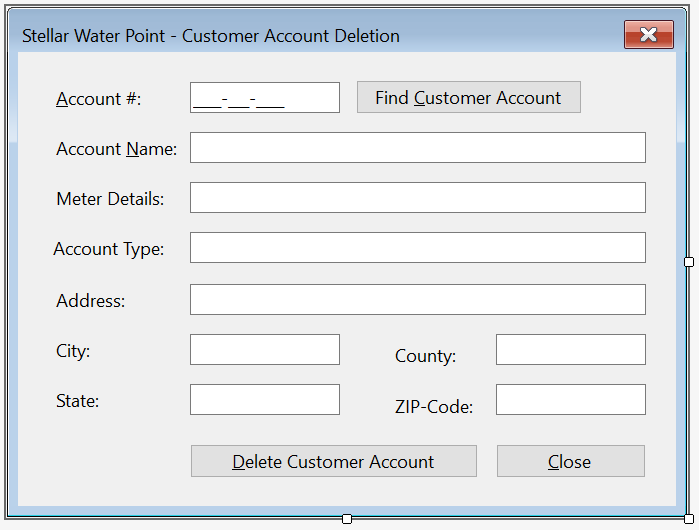
| Control | (Name) | Text | Othe Properties | |
| Button | |
BtnDeleteCustomerAccount | &Delete Water Meter | DialogResult: OK |
| Button | |
BtnClose | &Close | DialogResult: Cancel |
FormBorderStyle: FixedDialog
Text:            Stellar Water Point - Customer Account Deletion
StartPosition:   CenterScreen
AcceptButton:    BtnDeleteCustomerAccount
CancelButton:    BtnClose
MinimizeBox:     False
MaximizeBox:     False
Imports System.IO
Imports System.Xml

Public Class ClientDelete
    Private Sub BtnFindCustomerAccount_Click(sender As Object, e As EventArgs) Handles BtnFindCustomerAccount.Click
        ' Create an XML DOM object for the customers records
        Dim xdCustomers As XmlDocument = New XmlDocument()
        ' Declare a variable for a file that holds the list of customers
        Dim strCustomers = "C:\Stellar Water Point12\Customers.xml"

        ' Create a FileInfo object for the customers
        Dim fiCustomers As FileInfo = New FileInfo(strCustomers)

        ' We will need to know the water meter associated with this customer account
        Dim strMeterNumber = Nothing

        ' Check whether the file that holds a list of customers exists
        If fiCustomers.Exists Then
            ' If that exists, open it and pass it to a FileStream object
            Using fsCustomers As FileStream = New FileStream(fiCustomers.FullName, FileMode.Open, FileAccess.Read, FileShare.Read)
                ' Get the list of customers and pass the records to the XML DOM object created earlier
                xdCustomers.Load(fsCustomers)

                ' Create an XmlNodeList list of customers using XPath
                Dim xnlCustomers As XmlNodeList = xdCustomers.DocumentElement.SelectNodes("//account-number[.='" + MtbAccountNumber.Text + "']")

                If xnlCustomers.Count = 0 Then
                    MsgBox("There is no customer with that account number",
                           MsgBoxStyle.OkOnly Or MsgBoxStyle.Information,
                           "Stellar Water Point")
                    TxtAccountName.Text = String.Empty
                    TxtMeterDetails.Text = String.Empty
                    strMeterNumber = String.Empty
                    TxtAccountType.Text = String.Empty
                    TxtAddress.Text = String.Empty
                    TxtCity.Text = String.Empty
                    TxtCounty.Text = String.Empty
                    TxtState.Text = String.Empty
                    TxtZIPCode.Text = String.Empty
                    Exit Sub
                Else
                    ' Check each node of the XML record and display its values in each Windows control on the form
                    For Each xnCustomer As XmlNode In xnlCustomers
                        ' MtbAccountNumber.Text = xnCustomer.NextSibling.InnerText
                        TxtAccountName.Text = xnCustomer.NextSibling.InnerText
                        TxtMeterDetails.Text = xnCustomer.NextSibling.NextSibling.InnerText
                        strMeterNumber = xnCustomer.NextSibling.NextSibling.InnerText
                        TxtAccountType.Text = xnCustomer.NextSibling.NextSibling.NextSibling.InnerText
                        TxtAddress.Text = xnCustomer.NextSibling.NextSibling.NextSibling.NextSibling.InnerText
                        TxtCity.Text = xnCustomer.NextSibling.NextSibling.NextSibling.NextSibling.NextSibling.InnerText
                        TxtCounty.Text = xnCustomer.NextSibling.NextSibling.NextSibling.NextSibling.NextSibling.NextSibling.InnerText
                        TxtState.Text = xnCustomer.NextSibling.NextSibling.NextSibling.NextSibling.NextSibling.NextSibling.NextSibling.InnerText
                        TxtZIPCode.Text = xnCustomer.NextSibling.NextSibling.NextSibling.NextSibling.NextSibling.NextSibling.NextSibling.NextSibling.InnerText
                    Next
                End If
            End Using
        End If

        ' Create an XML DOM object for the water meters records
        Dim xdWaterMeters As XmlDocument = New XmlDocument()
        ' Declare a variable for a file that holds the list of water meters
        Dim strWaterMeters As String = "C:\Stellar Water Point12\WaterMeters.xml"

        ' Create a FileInfo object for the customers
        Dim fiWaterMeters As FileInfo = New FileInfo(strWaterMeters)

        REM Check whether the file that holds a list of water meters exists
        If fiWaterMeters.Exists Then
            REM Get the list of water meters and pass the records to the XML DOM object
            Using fsWaterMeters As FileStream = New FileStream(fiWaterMeters.FullName, FileMode.Open, FileAccess.Read, FileShare.Read)
                ' Get the list of water meters and pass the records to the XML DOM object
                xdWaterMeters.Load(fsWaterMeters)

                ' Create an XmlNodeList list of water meters using XPath
                Dim xnlWaterMeters As XmlNodeList = xdWaterMeters.DocumentElement.SelectNodes("//meter-number[.='" + strMeterNumber + "']")

                REM Check each node of the XML record
                For Each xnWaterMeter As XmlNode In xnlWaterMeters
                    '  Get the values for the water meter.
                    '  Create a sentence and display it in the Meter Details text box.
                    TxtMeterDetails.Text = xnWaterMeter.NextSibling.InnerText + " " +
                                               xnWaterMeter.NextSibling.NextSibling.InnerText + " (Meter Size: " +
                                               xnWaterMeter.NextSibling.NextSibling.NextSibling.InnerText + ")"
                Next
            End Using
        End If
    End Sub
End Class
| Control | (Name) | Text | Anchor | Other Properties | |
| ListView | |
LvwCustomers | Top, Bottom, Left, Right | FullRowSelect: True GridLines: True View: Details |
|
| Button | |
BtnCreateCustomerAcount | C&reate Customer Acount... | Bottom, Right | |
| Button | |
BtnViewCustomerAcount | &View CustomerAcount... | Bottom, Right | |
| Button | |
BtnEditCustomerAcount | &Edit CustomerAcount... | Bottom, Right | |
| Button | |
BtnDeleteCustomerAcount | &Delete Customer Acount... | Bottom, Right | |
| Button | |
BtnClose | &Close | Anchor: Bottom, Right | |
Imports System.IO
Imports System.Xml

Public Class ClientCentral
    Sub ShowCustomers()
        Dim i As Integer = 1

        LvwCustomers.Items.Clear()

        Dim xdCustomers As XmlDocument = New XmlDocument()
        Dim strCustomers As String = "C:\Stellar Water Point12\Customers.xml"

        Dim fiCustomers As FileInfo = New FileInfo(strCustomers)

        If fiCustomers.Exists Then
            Using fsCustomers As FileStream = New FileStream(fiCustomers.FullName, FileMode.Open, FileAccess.Read, FileShare.Read)
                xdCustomers.Load(fsCustomers)
                Dim xnlCustomers As XmlNodeList = xdCustomers.DocumentElement.ChildNodes

                For Each xnCustomer As XmlNode In xnlCustomers
                    Dim lviCustomer As ListViewItem = New ListViewItem(i.ToString())

                    lviCustomer.SubItems.Add(xnCustomer.FirstChild.InnerText)   ' Account #
                    lviCustomer.SubItems.Add(xnCustomer.FirstChild.NextSibling.InnerText)   ' Account Name
                    lviCustomer.SubItems.Add(xnCustomer.FirstChild.NextSibling.NextSibling.InnerText) REM Meter #
                    lviCustomer.SubItems.Add(xnCustomer.FirstChild.NextSibling.NextSibling.NextSibling.InnerText)   ' Account Type
                    lviCustomer.SubItems.Add(xnCustomer.FirstChild.NextSibling.NextSibling.NextSibling.NextSibling.InnerText)   ' Address
                    lviCustomer.SubItems.Add(xnCustomer.FirstChild.NextSibling.NextSibling.NextSibling.NextSibling.NextSibling.InnerText)   ' City
                    lviCustomer.SubItems.Add(xnCustomer.FirstChild.NextSibling.NextSibling.NextSibling.NextSibling.NextSibling.NextSibling.InnerText)   ' County
                    lviCustomer.SubItems.Add(xnCustomer.FirstChild.NextSibling.NextSibling.NextSibling.NextSibling.NextSibling.NextSibling.NextSibling.InnerText)   ' State
                    lviCustomer.SubItems.Add(xnCustomer.FirstChild.NextSibling.NextSibling.NextSibling.NextSibling.NextSibling.NextSibling.NextSibling.NextSibling.InnerText) REM ZIP-Code

                    LvwCustomers.Items.Add(lviCustomer)

                    i = i + 1
                Next
            End Using
        End If
    End Sub

    Private Sub ClientCentral_Load(sender As Object, e As EventArgs) Handles MyBase.Load
        ShowCustomers()
    End Sub

    Private Sub BtnCreateCustomerAccount_Click(sender As Object, e As EventArgs) Handles BtnCreateCustomerAccount.Click
        Dim Create As ClientCreate = New ClientCreate()

        If create.ShowDialog() = MsgBoxResult.Ok Then
            ' Make sure the user provides an account number for the new account.
            ' If not, don't create the account.
            If String.IsNullOrEmpty(create.MtbAccountNumber.Text) Then
                MsgBox("You must provide an account number for the new customer. " +
                                "Otherwise, the account cannot be created.",
                                MsgBoxStyle.OkOnly Or MsgBoxStyle.Information,
                                "Stellar Water Point")


            End If

            ' If the meter details text box is empty, it means the user didn't enter
            ' a meter number, in which case there is no water meter associated
            ' with the account. The account cannot be created.
            If String.IsNullOrEmpty(create.TxtMeterDetails.Text) Then
                MsgBox("You must enter a water meter to associate with a new customer's account.",
                                MsgBoxStyle.OkOnly Or MsgBoxStyle.Information,
                                "Stellar Water Point")
            End If

            ' Create a FileInfo object that will be used to manage a file
            Dim fiCustomers As FileInfo = Nothing
            ' Create an XML Dom
            Dim xdCustomers As XmlDocument = New XmlDocument()
            ' Declare a string variable for the file that contains a list of customers
            Dim strCustomers As String = "C:\Stellar Water Point12\Customers.xml"

            ' Pass the file of customers to the FileInfo object that was started
            fiCustomers = New FileInfo(strCustomers)

            ' Find out whether that file was already created
            If fiCustomers.Exists Then
                ' If that file was already created, open it through
                ' the Stream object that was previously initiated.
                Using fsCustomers = New FileStream(fiCustomers.FullName, FileMode.Open,
                                                    FileAccess.Read, FileShare.Read)
                    ' Pass the Stream object to the XML Dom that was previously created.
                    xdCustomers.Load(fsCustomers)
                End Using
            Else
                ' If the file of customers was not created already, start by
                ' initializing the Stream object that was previously initiated.
                Using fsCustomers = New FileStream(fiCustomers.FullName, FileMode.Create, FileAccess.Write, FileShare.Write)
                    ' Create a root to start the XML file
                    xdCustomers.LoadXml("<?xml version=""1.0"" encoding=""utf-8""?>" +
                                            "<customers></customers>")
                    ' Once the file has been started, save it
                    xdCustomers.Save(fsCustomers)
                End Using
            End If

            ' Now that we have an XML file for customers, open it
            Using fsCustomers = New FileStream(fiCustomers.FullName, FileMode.OpenOrCreate, FileAccess.ReadWrite, FileShare.ReadWrite)
                ' We want to create an XML element to be added to the XML file.
                ' To start, create an XML element named "customer".
                Dim xeCustomer As XmlElement = xdCustomers.CreateElement("customer")

                ' Create/Format the child nodes of the "customer" element
                xeCustomer.InnerXml = "<account-number>" + Create.MtbAccountNumber.Text + "</account-number>" +
                                      "<account-name>" + Create.TxtAccountName.Text + "</account-name>" +
                                      "<meter-number>" + Create.MtbMeterNumber.Text + "</meter-number>" +
                                      "<account-type>" + Create.CbxAccountsTypes.Text + "</account-type>" +
                                      "<address>" + Create.TxtAddress.Text + "</address>" +
                                      "<city>" + Create.TxtCity.Text + "</city>" +
                                      "<county>" + Create.TxtCounty.Text + "</county>" +
                                      "<state>" + Create.TxtState.Text + "</state>" +
                                      "<zip-code>" + Create.MtbZIPCode.Text + "</zip-code>"
                xdCustomers.DocumentElement.AppendChild(xeCustomer)
                xdCustomers.Save(fsCustomers)
            End Using
        End If

        ShowCustomers()
    End Sub

    Private Sub BtnViewCustomerDetails_Click(sender As Object, e As EventArgs) Handles BtnViewCustomerDetails.Click
        Dim Details As ClientDetails = New ClientDetails

        Details.ShowDialog()
    End Sub

    Private Sub BtnEditCustomerAccount_Click(sender As Object, e As EventArgs) Handles BtnEditCustomerAccount.Click
        Dim Editor As ClientEditor = New ClientEditor()
        Dim xdCustomers As XmlDocument = New XmlDocument()
        Dim strCustomers = "C:\Stellar Water Point12\Customers.xml"

        If editor.ShowDialog() = MsgBoxResult.Ok Then
            xdCustomers.Load(strCustomers)

            Dim xnlCustomers = xdCustomers.DocumentElement.GetElementsByTagName("account-number")

            For Each xnCustomer As XmlNode In xnlCustomers
                If xnCustomer.InnerText.Contains(editor.MtbAccountNumber.Text) Then
                    xnCustomer.ParentNode.InnerXml = "<account-number>" + Editor.MtbAccountNumber.Text + "</account-number>" +
                                          "<account-name>" + Editor.TxtAccountName.Text + "</account-name>" +
                                          "<meter-number>" + Editor.MtbMeterNumber.Text + "</meter-number>" +
                                          "<account-type>" + Editor.CbxAccountsTypes.Text + "</account-type>" +
                                          "<address>" + Editor.TxtAddress.Text + "</address>" +
                                          "<city>" + Editor.TxtCity.Text + "</city>" +
                                          "<county>" + Editor.TxtCounty.Text + "</county>" +
                                          "<state>" + Editor.TxtState.Text + "</state>" +
                                          "<zip-code>" + Editor.MtbZIPCode.Text + "</zip-code>"

                    xdCustomers.Save(strCustomers)
                    Exit For
                End If
            Next
        End If

        ShowCustomers()
    End Sub

    Private Sub BtnDeleteCustomerAccount_Click(sender As Object, e As EventArgs) Handles BtnDeleteCustomerAccount.Click
        ' Here is the dialog box that the user will use to locate and delete a customer account
        Dim Delete As ClientDelete = New ClientDelete()
        '  Create an XML DOM object
        Dim xdCustomers As XmlDocument = New XmlDocument()
        '  Specify the file that holds a database of customers
        Dim strCustomers = "C:\Stellar Water Point12\Customers.xml"

        ' Open the Delete dialog box.
        ' Find out if the user clicked the Delete Customer Account button to close the Delete dialog box.
        If Delete.ShowDialog() = MsgBoxResult.Ok Then
            ' If there is no file for the list of customers, don't do nothing
            If Not File.Exists(strCustomers) Then
                MsgBox("There is no file for the customers accounts in the system.",
                                    "Stellar Water Point",
                                    MsgBoxStyle.OkOnly Or MsgBoxStyle.Information)
                Exit Sub
            End If

            ' If the user didn't provide a valid account number, don't do nothing
            If String.IsNullOrEmpty(Delete.MtbAccountNumber.Text) Then
                MsgBox("You must type an account number for the customer whose account you want to delete one.",
                                    "Stellar Water Point", MsgBoxStyle.OkOnly Or MsgBoxStyle.Information)
                Exit Sub
            End If

            ' Open the file of customers records and put those records in our XML DOM object
            xdCustomers.Load(strCustomers)

            ' Create an XmlNodeList list of the customers records.
            ' Use the Account Number node as reference.
            Dim xnlCustomers As XmlNodeList = xdCustomers.DocumentElement.GetElementsByTagName("account-number")

            ' Check each customer record as an XML element
            For Each xnCustomer As XmlNode In xnlCustomers
                ' When you reach an element, find out whether its value is
                ' the same as the account number the user typed on the form.
                If xnCustomer.InnerText = Delete.MtbAccountNumber.Text Then
                    ' If you find a matching record, find whether the user really wants to delete the record.
                    If MsgBox("Are you sure you want to remove this customer's account from the system?",
                                        "Stellar Water Point",
                                        MsgBoxStyle.YesNo Or MsgBoxStyle.Question) = MsgBoxResult.Yes Then
                        ' If the user really wants to delete the record, delete it...
                        xdCustomers.DocumentElement.RemoveChild(xnCustomer.ParentNode)
                        ' and stop searching
                        Exit For
                    End If
                End If
            Next

            ' After removing the record, save the new version of the file
            xdCustomers.Save(strCustomers)
        End If

        ' Now that the user has closed the Delete dialog box (and probably deleted the XML file),
        ' redisplay the list of customers.
        ShowCustomers()
    End Sub

    Private Sub BtnClose_Click(sender As Object, e As EventArgs) Handles BtnClose.Click
        Close()
    End Sub
End Class
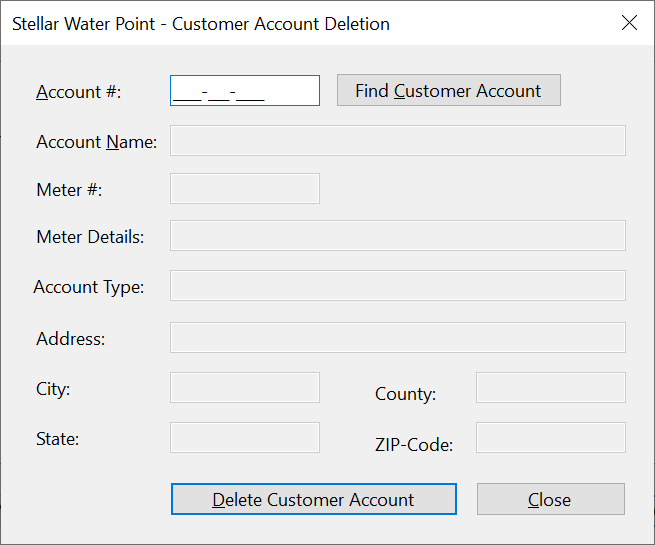


Water Bills
Introduction
A water bill is a summary that indicates how much water a customer consumed and the value of that consumption. Our application will include the forms necessary to process water bills operations.
A List of Water Bills
A water bill must contain as much information as possible. In our application, when displaying a list of water bills, we will show only select pieces of information.
Practical Learning: Viewing Water Bills
| Control | (Name) | Text | Other Properties | |
| ListView | |
LvwWaterBills | FullRowSelect: True GridLines: True View: Details |
|
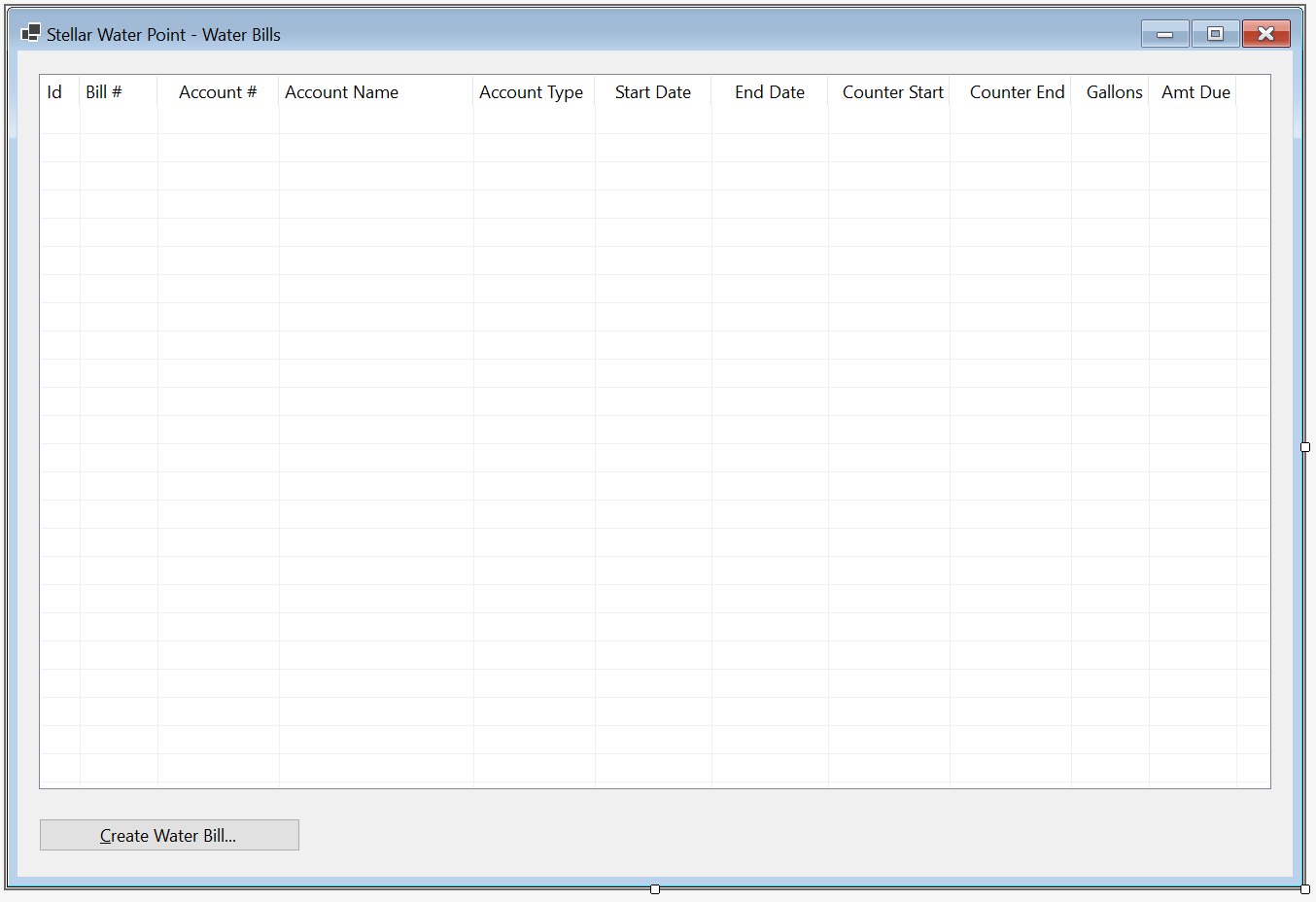
| (Name) | Text | TextAlign | Width |
| ColWaterBillId | Id | 40 | |
| ColBillNumber | Bill # | Center | 80 |
| ColAccountNumber | Account # | Center | 150 |
| ColStartDate | Start Date | Center | 150 |
| ColEndDate | End Date | Center | 150 |
| ColBillingDays | Days | Center | |
| ColCounterStart | Counter Start | Right | 125 |
| ColCounterEnd | Counter End | Right | 125 |
| ColTotalHCF | Total HCF | Right | 100 |
| ColGallons | Gallons | Right | 80 |
| ColPaymentDueDate | Pmt Due Date | Center | 125 |
| ColAmountDue | Amt Due | Right | 90 |
Imports System.IO
Imports System.Xml

Public Class BillsCentral

    Private Sub ShowWaterBills()
        LvwWaterBills.Items.Clear()

        Dim xdWaterBills As XmlDocument = New XmlDocument()
        Dim strWaterBills = "C:\Stellar Water Point12\WaterBills.xml"

        Dim fiWaterBills As FileInfo = New FileInfo(strWaterBills)

        If fiWaterBills.Exists Then
            Using fsWaterBills As New FileStream(fiWaterBills.FullName, FileMode.Open, FileAccess.Read, FileShare.Read)
                xdWaterBills.Load(fsWaterBills)

                Dim xnlWaterBills As XmlNodeList = xdWaterBills.DocumentElement.ChildNodes

                Dim i As Integer = 1

                For Each xnWaterBill As XmlNode In xnlWaterBills
                    Dim lviWaterBill As ListViewItem = New ListViewItem(i.ToString())

                    lviWaterBill.SubItems.Add(xnWaterBill.FirstChild.InnerText)
                    lviWaterBill.SubItems.Add(xnWaterBill.FirstChild.NextSibling.InnerText)
                    lviWaterBill.SubItems.Add(xnWaterBill.FirstChild.NextSibling.NextSibling.InnerText)
                    lviWaterBill.SubItems.Add(xnWaterBill.FirstChild.NextSibling.NextSibling.NextSibling.InnerText)
                    lviWaterBill.SubItems.Add(xnWaterBill.FirstChild.NextSibling.NextSibling.NextSibling.NextSibling.InnerText)
                    lviWaterBill.SubItems.Add(xnWaterBill.FirstChild.NextSibling.NextSibling.NextSibling.NextSibling.NextSibling.InnerText)
                    lviWaterBill.SubItems.Add(xnWaterBill.FirstChild.NextSibling.NextSibling.NextSibling.NextSibling.NextSibling.NextSibling.InnerText)
                    lviWaterBill.SubItems.Add(xnWaterBill.FirstChild.NextSibling.NextSibling.NextSibling.NextSibling.NextSibling.NextSibling.NextSibling.InnerText)
                    lviWaterBill.SubItems.Add(xnWaterBill.FirstChild.NextSibling.NextSibling.NextSibling.NextSibling.NextSibling.NextSibling.NextSibling.NextSibling.InnerText.ToString())
                    lviWaterBill.SubItems.Add(xnWaterBill.FirstChild.NextSibling.NextSibling.NextSibling.NextSibling.NextSibling.NextSibling.NextSibling.NextSibling.NextSibling.NextSibling.NextSibling.NextSibling.NextSibling.NextSibling.NextSibling.NextSibling.NextSibling.NextSibling.NextSibling.InnerText)
                    lviWaterBill.SubItems.Add(xnWaterBill.FirstChild.NextSibling.NextSibling.NextSibling.NextSibling.NextSibling.NextSibling.NextSibling.NextSibling.NextSibling.NextSibling.NextSibling.NextSibling.NextSibling.NextSibling.NextSibling.NextSibling.NextSibling.NextSibling.NextSibling.NextSibling.InnerText)

                    LvwWaterBills.Items.Add(lviWaterBill)

                    i = i + 1
                Next
            End Using
        End If
    End Sub

    Private Sub BillsCentral_Load(sender As Object, e As EventArgs) Handles MyBase.Load
        ShowWaterBills()
    End Sub
End Class
| Control | (Name) | Text | Font | |
| Button | |
BtnWaterBills | Water &Bills... | Times New Roman, 24pt, style=Bold |
| Button | |
BtnClose | &Close | Times New Roman, 24pt, style=Bold |
Imports System.IO

Public Class WaterDistribution
    Private Sub Exercise_Load(sender As Object, e As EventArgs) Handles MyBase.Load
        REM If the directory for the database doesn't yet exist, create it
        Directory.CreateDirectory("C:\Stellar Water Point12")
    End Sub

    Private Sub BtnWaterBills_Click(sender As Object, e As EventArgs) Handles BtnWaterBills.Click
        Dim Central As BillsCentral = New BillsCentral()

        Central.Show()
    End Sub

    Private Sub BtnCustomers_Click(sender As Object, e As EventArgs) Handles BtnCustomers.Click
        Dim Central = New ClientCentral

        Central.Show()
    End Sub

    Private Sub BtnWaterMeters_Click(sender As Object, e As EventArgs) Handles BtnWaterMeters.Click
        Dim Central = New MeterCentral

        Central.ShowDialog()
    End Sub

    Private Sub BtnClose_Click(sender As Object, e As EventArgs) Handles BtnClose.Click
        Close()
    End Sub
End Class
A Water Bill
A water bill is a collection of information that includes the identification of the customer who consumed the water, the period during which water was consumed, how much water was consumed, how much that consumption is worth, etc. We will create a form hat a user can use to create and process a water bill.
Practical Learning: Processing a Water Bill

| Control | (Name) | Text | Other Properties | |
| Label | |
Water Bill #: | ||
| TextBox | |
TxtBillNumber | ||
| GroupBox |  |
Customer Information | ||
| Label | |
Account #: | ||
| MaskedTextBox | |
MtbAccountNumber | Masked: 0000-000-0000 | |
| Button | |
BtnFindCustomerAccount | Find Customer Account | |
| Label | |
Customer Name: | ||
| TextBox | |
TxtCustomerName | ||
| Label | |
Meter Details: | ||
| TextBox | |
TxtMeterDetails | Modifiers: Public | |
| Label | |
Address: | ||
| TextBox | |
TxtAddress | ||
| TextBox | |
TxtCity | ||
| TextBox | |
TxtCounty | ||
| TextBox | |
TxtState | ||
| TextBox | |
TxtZIPCode | ||
| GroupBox | |
Meter Reading | ||
| Label | |
Meter Reading Start Date: | ||
| DateTimePicker |  |
DtpMeterReadingStartDate | ||
| Label | |
Meter Reading End Date: | ||
| DateTimePicker | |
DtpMeterReadingEndDate | ||
| Label | |
Counter Reading Start: | ||
| TextBox | |
TxtCounterReadingStart | ||
| Label | |
Counter Reading End: | ||
| TextBox | |
TxtCounterReadingEnd | ||
| Button | |
BtnEvaluateWaterBill | Evaluate Water Bill | |
| GroupBox | |
Meter Result | ||
| Label | |
Billing Days: | ||
| TextBox | |
TxtBillingDays | TextAlign: Right | |
| Label | |
Total HCF: | ||
| TextBox | |
TxtTotalHCF | TextAlign: Right | |
| Label | |
Total Gallons: | ||
| TextBox | |
TxtTotalGallons | TextAlign: Right | |
| Label | |
First Tier Consumption: | ||
| TextBox | |
TxtFirstTierConsumption | TextAlign: Right | |
| Label | |
Second Tier: | ||
| TextBox | |
TxtSecondTierConsumption | TextAlign: Right | |
| Label | |
Last Tier: | ||
| TextBox | |
TxtLastTierConsumption | TextAlign: Right | |
| GroupBox | |
Consumption Charges | ||
| Label | |
Water Charges: | ||
| TextBox | |
TxtWaterCharges | TextAlign: Right | |
| Label | |
Sewer Charges: | ||
| TextBox | |
TxtSewerCharges | TextAlign: Right | |
| Label | |
Environment Charges: | ||
| TextBox | |
TxtEnvironmentCharges | TextAlign: Right | |
| Label | |
Service Charges: | ||
| TextBox | |
TxtServiceCharges | TextAlign: Right | |
| Label | |
Total Charges: | ||
| TextBox | |
TxtTotalCharges | TextAlign: Right | |
| GroupBox | |
Taxes | ||
| Label | |
Local Taxes: | ||
| TextBox | |
TxtLocalTaxes | TextAlign: Right | |
| Label | |
State Taxes: | ||
| TextBox | |
TxtStateTaxes | TextAlign: Right | |
| GroupBox | |
Water Bill Payment | ||
| Label | |
Payment Due Date: | ||
| DateTimePicker | |
DtpPaymentDueDate | ||
| Label | |
Amount Due: | ||
| TextBox | |
TxtAmountDue | TextAlign: Right | |
| Label | |
Late Payment Due Date: | ||
| DateTimePicker | |
DtpLatePaymentDueDate | ||
| Label | |
Late Amount Due: | ||
| TextBox | |
TxtLateAmountDue | TextAlign: Right | |
| Button | |
BtnSaveWaterBill | Save Water Bill | |
| Button | |
BtnClose | Close | |
Imports System.IO
Imports System.Xml

Public Class BillCreate
    Private Sub BtnFindCustomerAccount_Click(sender As Object, e As EventArgs) Handles BtnFindCustomerAccount.Click
        Dim xdCustomers As XmlDocument = New XmlDocument()
        Dim strCustomers = "C:\Stellar Water Point12\Customers.xml"

        Dim fiCustomers As FileInfo = New FileInfo(strCustomers)

        Dim strMeterNumber = String.Empty

        If fiCustomers.Exists Then
            Using fsCustomers As FileStream = New FileStream(fiCustomers.FullName, FileMode.Open, FileAccess.Read, FileShare.Read)
                xdCustomers.Load(fsCustomers)
                Dim xnlCustomers As XmlNodeList = xdCustomers.DocumentElement.SelectNodes("//account-number[.='" + MtbAccountNumber.Text + "']")

                For Each xnCustomer As XmlNode In xnlCustomers
                    TxtAccountName.Text = xnCustomer.NextSibling.InnerText
                    strMeterNumber = xnCustomer.NextSibling.NextSibling.InnerText
                    TxtAccountType.Text = xnCustomer.NextSibling.NextSibling.NextSibling.InnerText
                    TxtAddress.Text = xnCustomer.NextSibling.NextSibling.NextSibling.NextSibling.InnerText
                    TxtCity.Text = xnCustomer.NextSibling.NextSibling.NextSibling.NextSibling.NextSibling.InnerText
                    TxtCounty.Text = xnCustomer.NextSibling.NextSibling.NextSibling.NextSibling.NextSibling.NextSibling.InnerText
                    TxtState.Text = xnCustomer.NextSibling.NextSibling.NextSibling.NextSibling.NextSibling.NextSibling.NextSibling.InnerText
                    TxtZIPCode.Text = xnCustomer.NextSibling.NextSibling.NextSibling.NextSibling.NextSibling.NextSibling.NextSibling.NextSibling.InnerText
                Next
            End Using
        End If

        Dim xdWaterMeters As XmlDocument = New XmlDocument()
        Dim strWaterMeters As String = "C:\Stellar Water Point12\WaterMeters.xml"

        Dim fiWaterMeters As FileInfo = New FileInfo(strWaterMeters)

        If fiWaterMeters.Exists Then
            Using fsWaterMeters As FileStream = New FileStream(fiWaterMeters.FullName, FileMode.Open, FileAccess.Read, FileShare.Read)
                xdWaterMeters.Load(fsWaterMeters)
                Dim xnlWaterMeters As XmlNodeList = xdWaterMeters.DocumentElement.SelectNodes("//meter-number[.='" + strMeterNumber + "']")

                For Each xnWaterMeter As XmlNode In xnlWaterMeters
                    TxtMeterDetails.Text = xnWaterMeter.NextSibling.InnerText + " " +
                                           xnWaterMeter.NextSibling.NextSibling.InnerText + " (Meter Size: " +
                                           xnWaterMeter.NextSibling.NextSibling.NextSibling.InnerText + ")"
                Next
            End Using
        End If
    End Sub
End Class
Private Sub DtpMeterReadingEndDate_ValueChanged(sender As Object, e As EventArgs) Handles DtpMeterReadingEndDate.ValueChanged
    TxtBillingDays.Text = DateDiff(DateInterval.Day, DtpMeterReadingStartDate.Value, DtpMeterReadingEndDate.Value) + 1
End SubPrivate Function CalculateTiers(acnt As String, total As Double) As (a As Double, b As Double, c As Double) Dim Results = (0.00, 0.00, 0.00) Select Case acnt Case "RES" Results.Item1 = total * 38.35 / 10000.0 Results.Item2 = total * 18.25 / 10000.0 Results.Item3 = total * 11.65 / 10000.0 Case "SGO" Results.Item1 = total * 41.38 / 10000.0 Results.Item2 = total * 15.26 / 10000.0 Results.Item3 = total * 8.13 / 10000.0 Case "BUS" Results.Item1 = total * 51.25 / 10000.0 Results.Item2 = total * 34.65 / 10000.0 Results.Item3 = total * 14.1 / 10000.0 Case "UUO" Results.Item1 = total * 25 / 10000.0 Results.Item2 = total * 35 / 10000.0 Results.Item3 = total * 40 / 10000.0 Case "WAT" Results.Item1 = total * 48 / 10000.0 Results.Item2 = total * 32 / 10000.0 Results.Item3 = total * 20 / 10000.0 Case Else Results.Item1 = total * 25.0 / 10000.0 Results.Item2 = total * 35.0 / 10000.0 Results.Item3 = total * 40.0 / 10000.0 End Select Return Results End Function Private Function CalculateSewerCharges(acnt As String, total As Double) As Double Dim Result As Double If acnt = "RES" Then Result = total * 1.028641 / 100.0 ElseIf acnt = "SGO" Then Result = total * 8.162522 / 100.0 ElseIf acnt = "BUS" Then Result = total * 22.446369 / 100.0 ElseIf acnt = "UUO" Then Result = total * 10.262475 / 100.0 ElseIf acnt = "WAT" Then Result = total * 22.628522 / 100.0 Else REM if acnt="OTH)" Result = total * 10.626147 / 100.0 End If Return Result End Function Private Function CalculateEnvironmentCharges(acnt As String, total As Double) As Double Dim result As Double Select Case acnt Case "RES" result = total * 0.004524 Case "SGO" result = total * 0.118524 Case "BUS" result = total * 0.086369 Case "UUO" result = total * 0.166369 Case "WAT" result = total * 0.115368 Case Else result = total * 0.115248 End Select Return result End Function Private Function CalculateServiceCharges(acnt As String, total As Double) As Double Select Case acnt Case "RES" Return total * 0.006248 Case "SGO" Return total * 0.102246 Case "BUS" Return total * 0.155227 Case "UUO" Return total * 0.186692 Case "WAT" Return total * 0.128724 Case Else Return total * 0.210248 End Select End Function Private Function CalculateLocalTaxes(acnt As String, total As Double) As Double Select Case acnt Case "RES" Return total * 0.035749 Case "SGO" Return total * 0.044026 Case "BUS" Return total * 0.162479 Case "UUO" Return total * 0.105737 Case "WAT" Return total * 0.063648 Case Else Return total * 0.125148 End Select End Function Private Function CalculateStateTaxes(acnt As String, total As Double) As Double Select Case acnt Case "RES" Return total * 0.007124 Case "SGO" Return total * 0.008779 Case "BUS" Return total * 0.035759 Case "UUO" Return total * 0.067958 Case "WAT" Return total * 0.026857 Case Else Return total * 0.013746 End Select End Function Private Function SetPaymentDueDate(acnt As String, Datum As Date) As Date Dim Days As Integer If acnt = "RES" Then Days = 15 ElseIf acnt = "SGO" Then Days = 40 ElseIf acnt = "BUS" Then Days = 30 ElseIf acnt = "UUO" Then Days = 25 ElseIf acnt = "WAT" Then Days = 45 Else Days = 35 End If Return DateAdd(DateInterval.Day, Days, Datum) End Function Private Function SetLatePaymentDueDate(acnt As String, Datum As Date) As Date Select Case acnt Case "RES" Return DateAdd(DateInterval.Day, 25, Datum) Case "SGO" Return DateAdd(DateInterval.Day, 40, Datum) Case "BUS" Return DateAdd(DateInterval.Day, 45, Datum) Case "UUO" Return DateAdd(DateInterval.Day, 30, Datum) Case "WAT" Return DateAdd(DateInterval.Day, 65, Datum) Case Else Return DateAdd(DateInterval.Day, 45, Datum) End Select End Function Private Function CalculateLateAmountDue(acnt As String, amt As Double) As Double Select Case acnt Case "RES" Return amt + 8.95 Case "SGO" Return amt + (amt / 4.125) Case "BUS" Return amt + (amt / 12.315) Case "UUO" Return amt + (amt / 7.425) Case "WAT" Return amt + (amt / 12.225) Case Else Return amt + (amt / 6.735) End Select End Function Private Sub BtnEvaluateWaterBill_Click(sender As Object, e As EventArgs) Handles BtnEvaluateWaterBill.Click Dim CounterStart = 0 Dim CounterEnd = 0 Try CounterStart = CDbl(TxtCounterReadingStart.Text) Catch feCRStart As FormatException MsgBox("There was a problem with the value of the " + "Counter Reading Start. The error produced is: " + feCRStart.Message, MsgBoxStyle.OkOnly Or MsgBoxStyle.Information, "Stellar Water Point") End Try Try CounterEnd = CDbl(TxtCounterReadingEnd.Text) Catch feCREnd As FormatException MsgBox("There was a problem with the value of the " + "Counter Reading End. The error produced is: " + feCREnd.Message, MsgBoxStyle.OkOnly Or MsgBoxStyle.Information, "Stellar Water Point") End Try Dim Consumption = CounterEnd - CounterStart Dim Gallons = Consumption * 748.05 Dim StrAccountType = Microsoft.VisualBasic.Left(TxtAccountType.Text, 3) Dim Tiers As (first As Double, second As Double, last As Double) = CalculateTiers(StrAccountType, Gallons) Dim waterCharges = Tiers.first + Tiers.second + Tiers.last Dim sewerCharges = CalculateSewerCharges(StrAccountType, waterCharges) Dim envCharges = CalculateEnvironmentCharges(StrAccountType, waterCharges) Dim srvCharges = CalculateServiceCharges(StrAccountType, waterCharges) Dim totalCharges = waterCharges + sewerCharges + envCharges + srvCharges Dim localTaxes = CalculateLocalTaxes(StrAccountType, totalCharges) Dim stateTaxes = CalculateStateTaxes(StrAccountType, totalCharges) Dim amtDue = totalCharges + localTaxes + stateTaxes TxtTotalHCF.Text = CStr(Consumption) TxtTotalGallons.Text = CInt(Gallons) TxtFirstTierConsumption.Text = FormatNumber(Tiers.first) TxtSecondTierConsumption.Text = FormatNumber(Tiers.second) TxtLastTierConsumption.Text = FormatNumber(Tiers.last) TxtWaterCharges.Text = FormatNumber(waterCharges) TxtSewerCharges.Text = FormatNumber(sewerCharges) TxtEnvironmentCharges.Text = FormatNumber(envCharges) TxtServiceCharges.Text = FormatNumber(srvCharges) TxtTotalCharges.Text = FormatNumber(totalCharges) TxtLocalTaxes.Text = FormatNumber(localTaxes) TxtStateTaxes.Text = FormatNumber(stateTaxes) dtpPaymentDueDate.Value = SetPaymentDueDate(StrAccountType, DtpMeterReadingEndDate.Value) TxtAmountDue.Text = amtDue.ToString("F") dtpLatePaymentDueDate.Value = SetLatePaymentDueDate(StrAccountType, DtpMeterReadingEndDate.Value) TxtLateAmountDue.Text = CalculateLateAmountDue(StrAccountType, amtDue).ToString("F") End Sub
Imports System.IO
Imports System.Xml
Public Class BillCreate
Private Sub BtnFindCustomerAccount_Click(sender As Object, e As EventArgs) Handles BtnFindCustomerAccount.Click
Dim xdCustomers As XmlDocument = New XmlDocument()
Dim strCustomers = "C:\Stellar Water Point12\Customers.xml"
Dim fiCustomers As FileInfo = New FileInfo(strCustomers)
Dim strMeterNumber = String.Empty
If fiCustomers.Exists Then
Using fsCustomers As FileStream = New FileStream(fiCustomers.FullName, FileMode.Open, FileAccess.Read, FileShare.Read)
xdCustomers.Load(fsCustomers)
Dim xnlCustomers As XmlNodeList = xdCustomers.DocumentElement.SelectNodes("//account-number[.='" + MtbAccountNumber.Text + "']")
For Each xnCustomer As XmlNode In xnlCustomers
TxtAccountName.Text = xnCustomer.NextSibling.InnerText
strMeterNumber = xnCustomer.NextSibling.NextSibling.InnerText
TxtAccountType.Text = xnCustomer.NextSibling.NextSibling.NextSibling.InnerText
TxtAddress.Text = xnCustomer.NextSibling.NextSibling.NextSibling.NextSibling.InnerText
TxtCity.Text = xnCustomer.NextSibling.NextSibling.NextSibling.NextSibling.NextSibling.InnerText
TxtCounty.Text = xnCustomer.NextSibling.NextSibling.NextSibling.NextSibling.NextSibling.NextSibling.InnerText
TxtState.Text = xnCustomer.NextSibling.NextSibling.NextSibling.NextSibling.NextSibling.NextSibling.NextSibling.InnerText
TxtZIPCode.Text = xnCustomer.NextSibling.NextSibling.NextSibling.NextSibling.NextSibling.NextSibling.NextSibling.NextSibling.InnerText
Next
End Using
End If
Dim xdWaterMeters As XmlDocument = New XmlDocument()
Dim strWaterMeters As String = "C:\Stellar Water Point12\WaterMeters.xml"
Dim fiWaterMeters As FileInfo = New FileInfo(strWaterMeters)
If fiWaterMeters.Exists Then
Using fsWaterMeters As FileStream = New FileStream(fiWaterMeters.FullName, FileMode.Open, FileAccess.Read, FileShare.Read)
xdWaterMeters.Load(fsWaterMeters)
Dim xnlWaterMeters As XmlNodeList = xdWaterMeters.DocumentElement.SelectNodes("//meter-number[.='" + strMeterNumber + "']")
For Each xnWaterMeter As XmlNode In xnlWaterMeters
TxtMeterDetails.Text = xnWaterMeter.NextSibling.InnerText + " " +
xnWaterMeter.NextSibling.NextSibling.InnerText + " (Meter Size: " +
xnWaterMeter.NextSibling.NextSibling.NextSibling.InnerText + ")"
Next
End Using
End If
End Sub
Private Sub DtpMeterReadingEndDate_ValueChanged(sender As Object, e As EventArgs) Handles DtpMeterReadingEndDate.ValueChanged
TxtBillingDays.Text = DateDiff(DateInterval.Day, DtpMeterReadingStartDate.Value, DtpMeterReadingEndDate.Value) + 1
End Sub
Private Function CalculateTiers(acnt As String, total As Double) As (a As Double, b As Double, c As Double)
    Dim Results = (0.00, 0.00, 0.00)

    Select Case acnt
        Case "RES"
            Results.Item1 = total * 38.35 / 10000.0
            Results.Item2 = total * 18.25 / 10000.0
            Results.Item3 = total * 11.65 / 10000.0

        Case "SGO"
            Results.Item1 = total * 41.38 / 10000.0
            Results.Item2 = total * 15.26 / 10000.0
            Results.Item3 = total * 8.13 / 10000.0

        Case "BUS"
            Results.Item1 = total * 51.25 / 10000.0
            Results.Item2 = total * 34.65 / 10000.0
            Results.Item3 = total * 14.1 / 10000.0

        Case "UUO"
            Results.Item1 = total * 25 / 10000.0
            Results.Item2 = total * 35 / 10000.0
            Results.Item3 = total * 40 / 10000.0

        Case "WAT"
            Results.Item1 = total * 48 / 10000.0
            Results.Item2 = total * 32 / 10000.0
            Results.Item3 = total * 20 / 10000.0

        Case Else
            Results.Item1 = total * 25.0 / 10000.0
            Results.Item2 = total * 35.0 / 10000.0
            Results.Item3 = total * 40.0 / 10000.0
    End Select

    Return Results
End Function

Private Function CalculateSewerCharges(acnt As String, total As Double) As Double
    Dim Result As Double

    If acnt = "RES" Then
        Result = total * 1.028641 / 100.0
    ElseIf acnt = "SGO" Then
        Result = total * 8.162522 / 100.0
    ElseIf acnt = "BUS" Then
        Result = total * 22.446369 / 100.0
    ElseIf acnt = "UUO" Then
        Result = total * 10.262475 / 100.0
    ElseIf acnt = "WAT" Then
        Result = total * 22.628522 / 100.0
    Else REM if acnt="OTH)"
        Result = total * 10.626147 / 100.0
    End If

    Return Result
End Function

Private Function CalculateEnvironmentCharges(acnt As String, total As Double) As Double
    Dim result As Double

    Select Case acnt
        Case "RES"
            result = total * 0.004524

        Case "SGO"
            result = total * 0.118524

        Case "BUS"
            result = total * 0.086369

        Case "UUO"
            result = total * 0.166369

        Case "WAT"
            result = total * 0.115368

        Case Else
            result = total * 0.115248

    End Select

    Return result
End Function

Private Function CalculateServiceCharges(acnt As String, total As Double) As Double
    Select Case acnt
        Case "RES"
            Return total * 0.006248

        Case "SGO"
            Return total * 0.102246

        Case "BUS"
            Return total * 0.155227

        Case "UUO"
            Return total * 0.186692

        Case "WAT"
            Return total * 0.128724

        Case Else
            Return total * 0.210248
    End Select
End Function

Private Function CalculateLocalTaxes(acnt As String, total As Double) As Double
    Select Case acnt
        Case "RES"
            Return total * 0.035749

        Case "SGO"
            Return total * 0.044026

        Case "BUS"
            Return total * 0.162479

        Case "UUO"
            Return total * 0.105737

        Case "WAT"
            Return total * 0.063648

        Case Else
            Return total * 0.125148
    End Select
End Function

Private Function CalculateStateTaxes(acnt As String, total As Double) As Double
    Select Case acnt
        Case "RES"
            Return total * 0.007124

        Case "SGO"
            Return total * 0.008779

        Case "BUS"
            Return total * 0.035759

        Case "UUO"
            Return total * 0.067958

        Case "WAT"
            Return total * 0.026857

        Case Else
            Return total * 0.013746
    End Select
End Function

Private Function SetPaymentDueDate(acnt As String, Datum As Date) As Date
    Dim Days As Integer

    If acnt = "RES" Then
        Days = 15
    ElseIf acnt = "SGO" Then
        Days = 40
    ElseIf acnt = "BUS" Then
        Days = 30
    ElseIf acnt = "UUO" Then
        Days = 25
    ElseIf acnt = "WAT" Then
        Days = 45
    Else
        Days = 35
    End If

    Return DateAdd(DateInterval.Day, Days, Datum)
End Function

Private Function SetLatePaymentDueDate(acnt As String, Datum As Date) As Date
    Select Case acnt
        Case "RES"
            Return DateAdd(DateInterval.Day, 25, Datum)

        Case "SGO"
            Return DateAdd(DateInterval.Day, 40, Datum)

        Case "BUS"
            Return DateAdd(DateInterval.Day, 45, Datum)

        Case "UUO"
            Return DateAdd(DateInterval.Day, 30, Datum)

        Case "WAT"
            Return DateAdd(DateInterval.Day, 65, Datum)

        Case Else
            Return DateAdd(DateInterval.Day, 45, Datum)
    End Select
End Function

Private Function CalculateLateAmountDue(acnt As String, amt As Double) As Double
    Select Case acnt
        Case "RES"
            Return amt + 8.95
        Case "SGO"
            Return amt + (amt / 4.125)
        Case "BUS"
            Return amt + (amt / 12.315)
        Case "UUO"
            Return amt + (amt / 7.425)
        Case "WAT"
            Return amt + (amt / 12.225)
        Case Else
            Return amt + (amt / 6.735)
    End Select
End Function

Private Sub BtnEvaluateWaterBill_Click(sender As Object, e As EventArgs) Handles BtnEvaluateWaterBill.Click
    Dim CounterStart = 0
    Dim CounterEnd = 0

    Try
        CounterStart = CDbl(TxtCounterReadingStart.Text)
    Catch feCRStart As FormatException
        MsgBox("There was a problem with the value of the " +
               "Counter Reading Start. The error produced is: " + feCRStart.Message,
               MsgBoxStyle.OkOnly Or MsgBoxStyle.Information,
               "Stellar Water Point")
    End Try

    Try
        CounterEnd = CDbl(TxtCounterReadingEnd.Text)
    Catch feCREnd As FormatException
        MsgBox("There was a problem with the value of the " +
               "Counter Reading End. The error produced is: " + feCREnd.Message,
               MsgBoxStyle.OkOnly Or MsgBoxStyle.Information,
               "Stellar Water Point")
    End Try

    Dim Consumption = CounterEnd - CounterStart
    Dim Gallons = Consumption * 748.05
    Dim StrAccountType = Microsoft.VisualBasic.Left(TxtAccountType.Text, 3)
    Dim Tiers As (first As Double, second As Double, last As Double) = CalculateTiers(StrAccountType, Gallons)

    Dim waterCharges = Tiers.first + Tiers.second + Tiers.last
    Dim sewerCharges = CalculateSewerCharges(StrAccountType, waterCharges)
    Dim envCharges = CalculateEnvironmentCharges(StrAccountType, waterCharges)
    Dim srvCharges = CalculateServiceCharges(StrAccountType, waterCharges)
    Dim totalCharges = waterCharges + sewerCharges + envCharges + srvCharges
    Dim localTaxes = CalculateLocalTaxes(StrAccountType, totalCharges)
    Dim stateTaxes = CalculateStateTaxes(StrAccountType, totalCharges)
    Dim amtDue = totalCharges + localTaxes + stateTaxes

    TxtTotalHCF.Text = CStr(Consumption)
    TxtTotalGallons.Text = CInt(Gallons)
    TxtFirstTierConsumption.Text = FormatNumber(Tiers.first)
    TxtSecondTierConsumption.Text = FormatNumber(Tiers.second)
    TxtLastTierConsumption.Text = FormatNumber(Tiers.last)
    TxtWaterCharges.Text = FormatNumber(waterCharges)
    TxtSewerCharges.Text = FormatNumber(sewerCharges)
    TxtEnvironmentCharges.Text = FormatNumber(envCharges)
    TxtServiceCharges.Text = FormatNumber(srvCharges)
    TxtTotalCharges.Text = FormatNumber(totalCharges)
    TxtLocalTaxes.Text = FormatNumber(localTaxes)
    TxtStateTaxes.Text = FormatNumber(stateTaxes)
    dtpPaymentDueDate.Value = SetPaymentDueDate(StrAccountType, DtpMeterReadingEndDate.Value)
    TxtAmountDue.Text = amtDue.ToString("F")
    dtpLatePaymentDueDate.Value = SetLatePaymentDueDate(StrAccountType, DtpMeterReadingEndDate.Value)
    TxtLateAmountDue.Text = CalculateLateAmountDue(StrAccountType, amtDue).ToString("F")
End Sub
Private Sub BtnSaveWaterBill_Click(sender As Object, e As EventArgs) Handles BtnSaveWaterBill.Click
If String.IsNullOrEmpty(TxtWaterBillNumber.Text) Then
MsgBox("You must type a bill number." +
"Otherwise, the account cannot be saved.",
MsgBoxStyle.OkOnly Or MsgBoxStyle.Information,
"Stellar Water Point")
Exit Sub
End If
If String.IsNullOrEmpty(TxtCounterReadingStart.Text) Then
MsgBox("You must enter the start value of the water bill counter." +
"Otherwise, the account cannot be saved.",
MsgBoxStyle.OkOnly Or MsgBoxStyle.Information,
"Stellar Water Point")
Exit Sub
End If
If String.IsNullOrEmpty(MtbAccountNumber.Text) Then
MsgBox("You must type an account number of a customer." +
"Otherwise, the account cannot be saved.",
MsgBoxStyle.OkOnly Or MsgBoxStyle.Information,
"Stellar Water Point")
Exit Sub
End If
Dim xdWaterBills As XmlDocument = New XmlDocument()
Dim strWaterBills = "C:\Stellar Water Point12\WaterBills.xml"
Dim fiWaterBills = New FileInfo(strWaterBills)
If fiWaterBills.Exists Then
Using fsWaterBills = New FileStream(fiWaterBills.FullName, FileMode.Open, FileAccess.Read, FileShare.Read)
xdWaterBills.Load(fsWaterBills)
End Using
Else
Using fsWaterBills = New FileStream(fiWaterBills.FullName, FileMode.Create, FileAccess.Write, FileShare.Write)
xdWaterBills.LoadXml("<?xml version=""1.0"" encoding=""utf-8""?>" +
"<water-bills></water-bills>")
xdWaterBills.Save(fsWaterBills)
End Using
End If
Using fsWaterBills = New FileStream(fiWaterBills.FullName, FileMode.OpenOrCreate, FileAccess.ReadWrite, FileShare.ReadWrite)
Dim xeWaterBill = xdWaterBills.CreateElement("water-bill")
xeWaterBill.InnerXml = "<bill-number>" + TxtWaterBillNumber.Text + "</bill-number>" +
"<account-number>" + MtbAccountNumber.Text + "</account-number>" +
"<meter-reading-start-date>" + DtpMeterReadingStartDate.Value.ToShortDateString() + "</meter-reading-start-date>" +
"<meter-reading-end-date>" + DtpMeterReadingEndDate.Value.ToShortDateString() + "</meter-reading-end-date>" +
"<billing-days>" + TxtBillingDays.Text + "</billing-days>" +
"<counter-reading-start>" + TxtCounterReadingStart.Text + "</counter-reading-start>" +
"<counter-reading-end>" + TxtCounterReadingEnd.Text + "</counter-reading-end>" +
"<total-hcf>" + TxtTotalHCF.Text + "</total-hcf>" +
"<total-gallons>" + TxtTotalGallons.Text + "</total-gallons>" +
"<first-tier-consumption>" + TxtFirstTierConsumption.Text + "</first-tier-consumption>" +
"<second-tier-consumption>" + TxtSecondTierConsumption.Text + "</second-tier-consumption>" +
"<last-tier-consumption>" + TxtLastTierConsumption.Text + "</last-tier-consumption>" +
"<water-charges>" + TxtWaterCharges.Text + "</water-charges>" +
"<sewer-charges>" + TxtSewerCharges.Text + "</sewer-charges>" +
"<environment-charges>" + TxtEnvironmentCharges.Text + "</environment-charges>" +
"<service-charges>" + TxtEnvironmentCharges.Text + "</service-charges>" +
"<total-charges>" + TxtTotalCharges.Text + "</total-charges>" +
"<state-taxes>" + TxtStateTaxes.Text + "</state-taxes>" +
"<local-taxes>" + TxtLocalTaxes.Text + "</local-taxes>" +
"<payment-due-date>" + DtpPaymentDueDate.Value.ToShortDateString() + "</payment-due-date>" +
"<amount-due>" + TxtAmountDue.Text + "</amount-due>" +
"<late-payment-due-date>" + DtpLatePaymentDueDate.Value.ToShortDateString() + "</late-payment-due-date>" +
"<late-amount-due>" + TxtLateAmountDue.Text + "</late-amount-due>"
xdWaterBills.DocumentElement.AppendChild(xeWaterBill)
xdWaterBills.Save(fsWaterBills)
End Using
Close()
End Sub
Private Sub BtnClose_Click(sender As Object, e As EventArgs) Handles BtnClose.Click
Close()
End Sub
End Class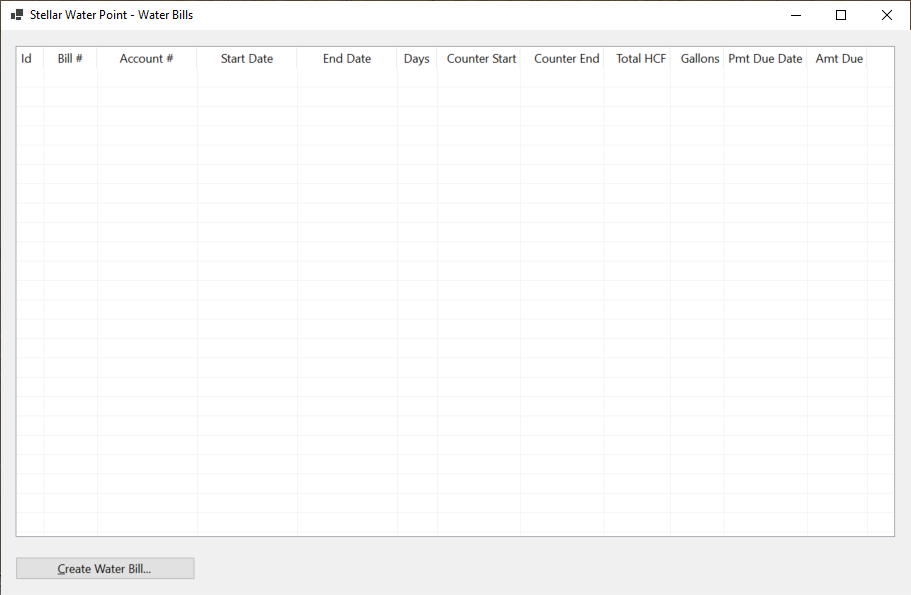
| Control | (Name) | Text | Other Properties | |
| ListView | |
LvwWaterBills | No Change | |
| Button | |
BtnCreateWaterBill | Close | &Create Water Bill... |
Private Sub BtnCreateWaterBill_Click(sender As Object, e As EventArgs) Handles BtnCreateCustomerAccount.Click
    Dim Create As New BillCreate

    Create.ShowDialog()

    ShowWaterBills()
End Sub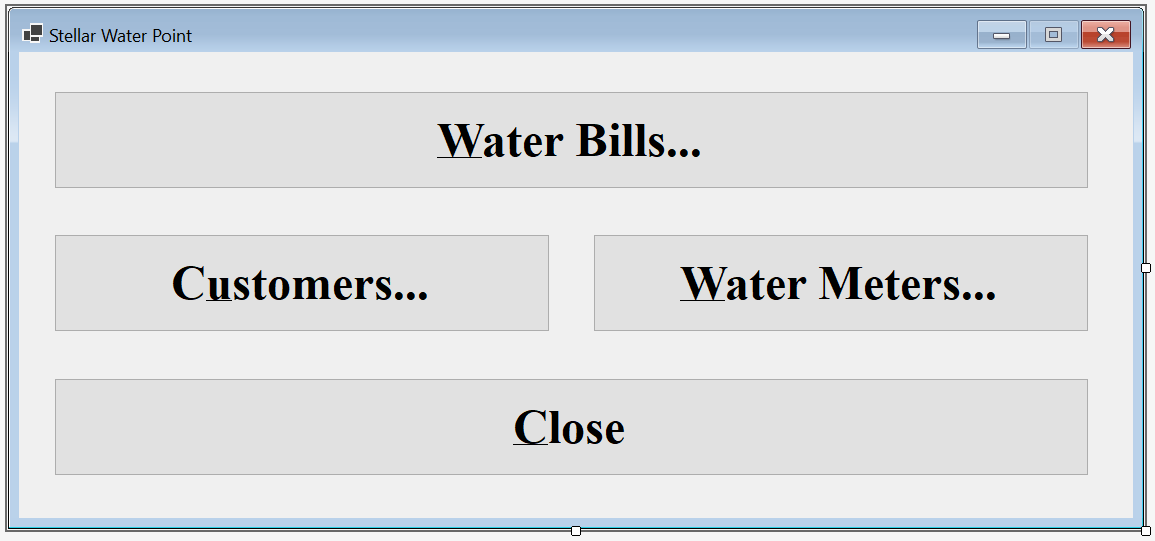
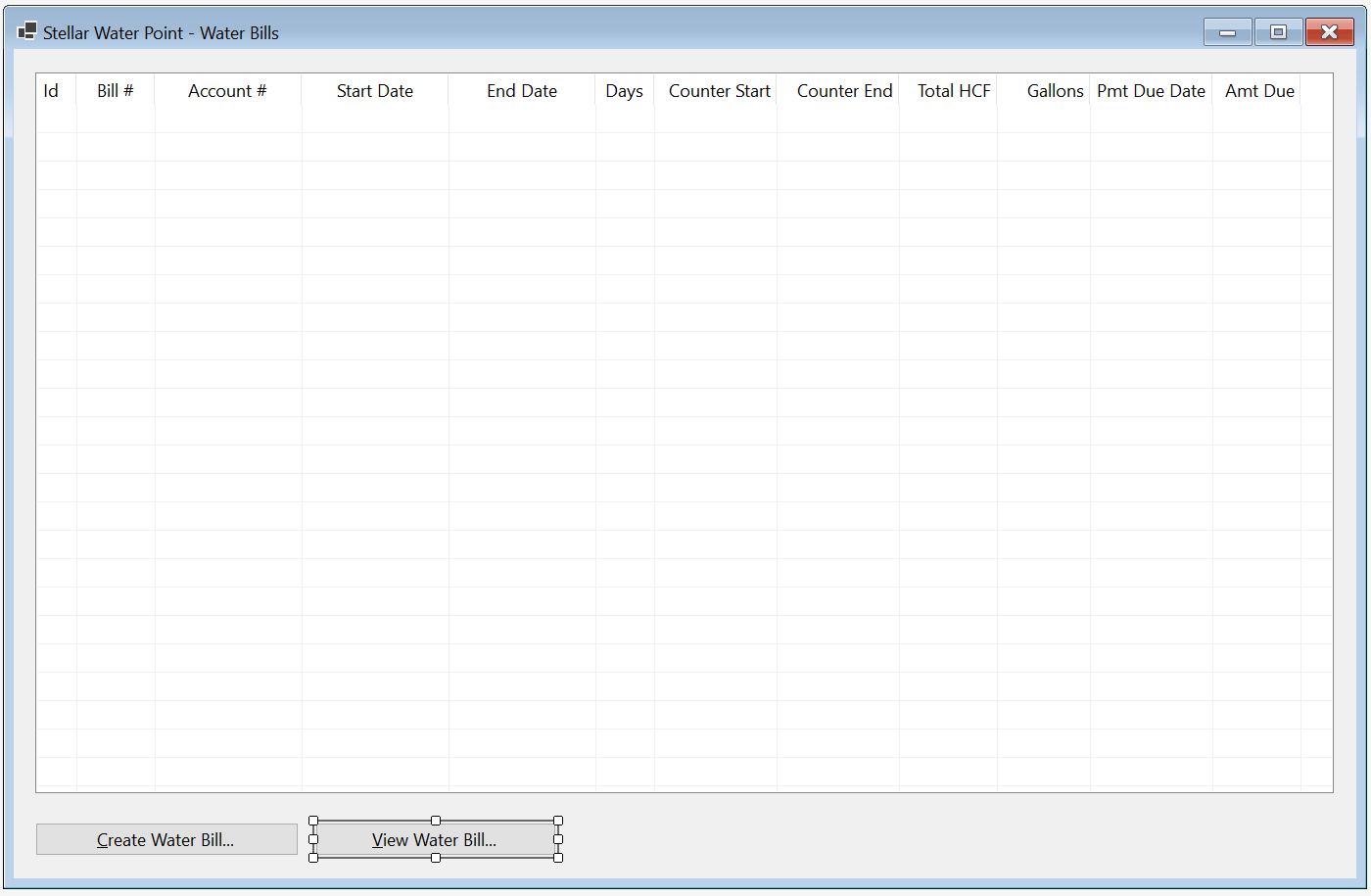
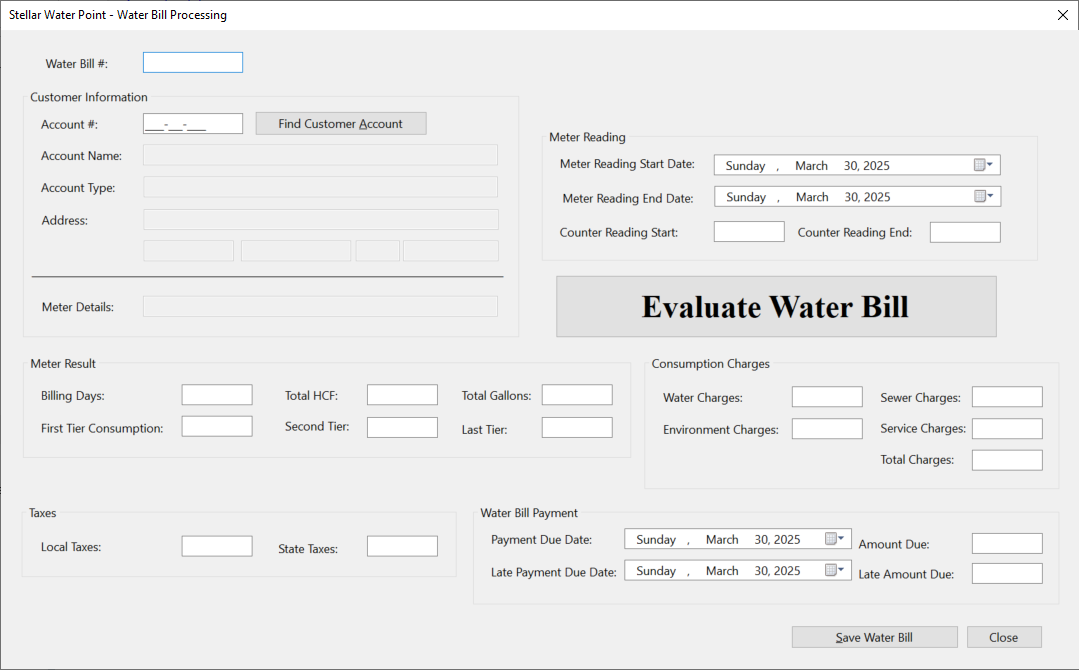
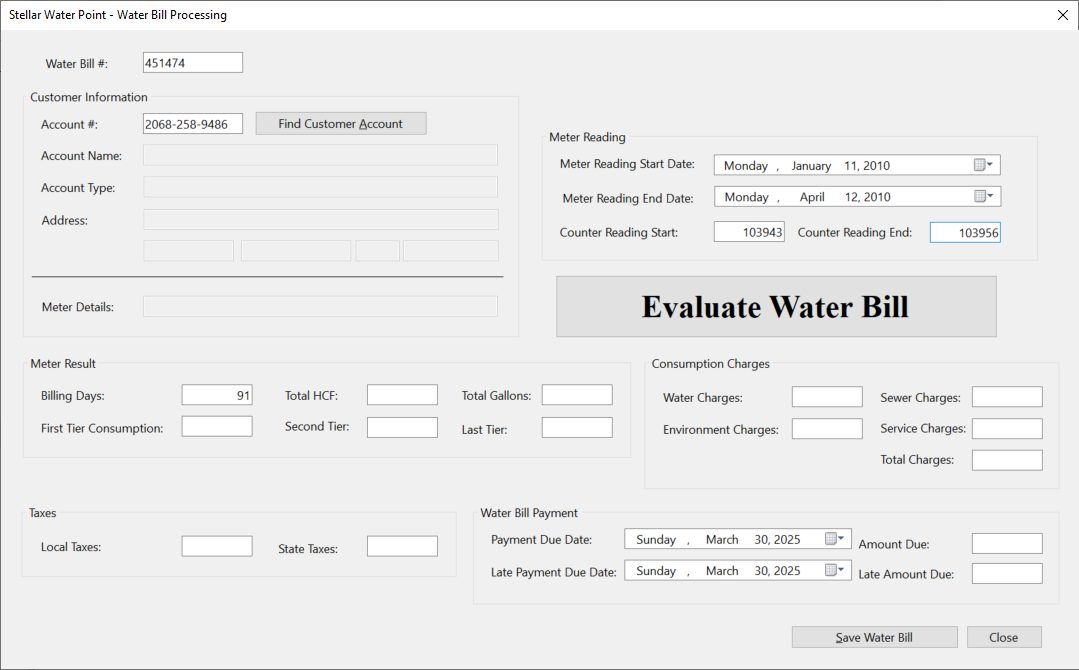
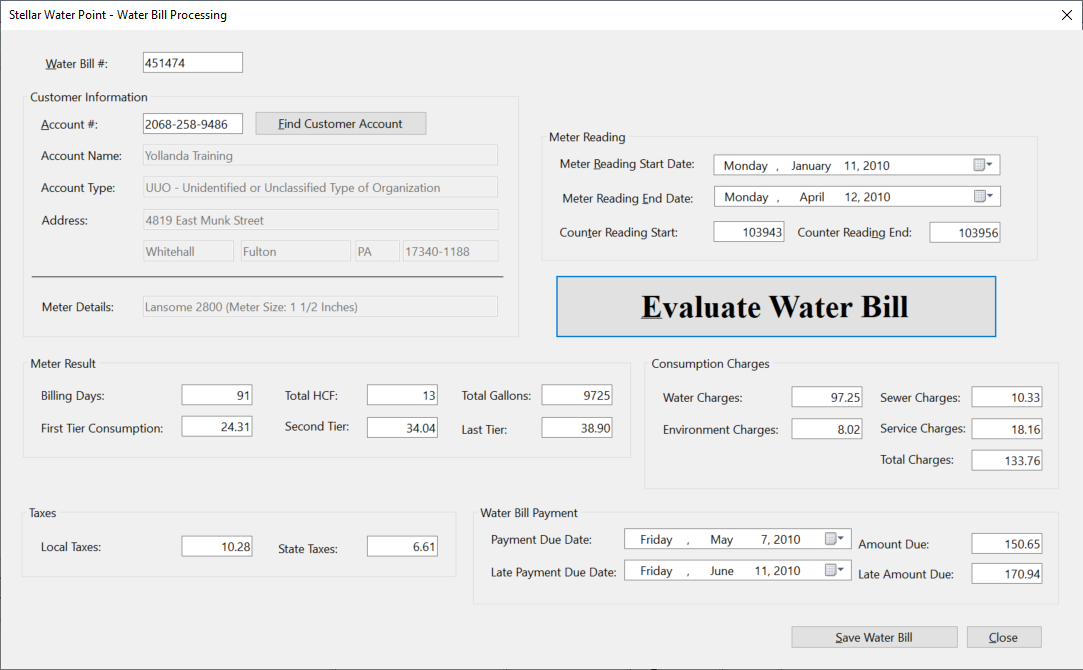
| Water Bill # | Account # | Reading Start Date | Reading End Date | Counter Reading Start | Counter Reading End |
| 451474 | 2068-258-9486 | 01/11/2010 | 04/12/2010 | 103943 | 103956 |
| 923633 | 5293-957-3395 | 01/17/2010 | 08/18/2010 | 256945 | 256972 |
| 917829 | 9279-570-8394 | 02/15/2010 | 05/14/2010 | 5205 | 5222 |
| 202666 | 6986-829-3741 | 03/08/2010 | 06/06/2010 | 5679 | 5690 |
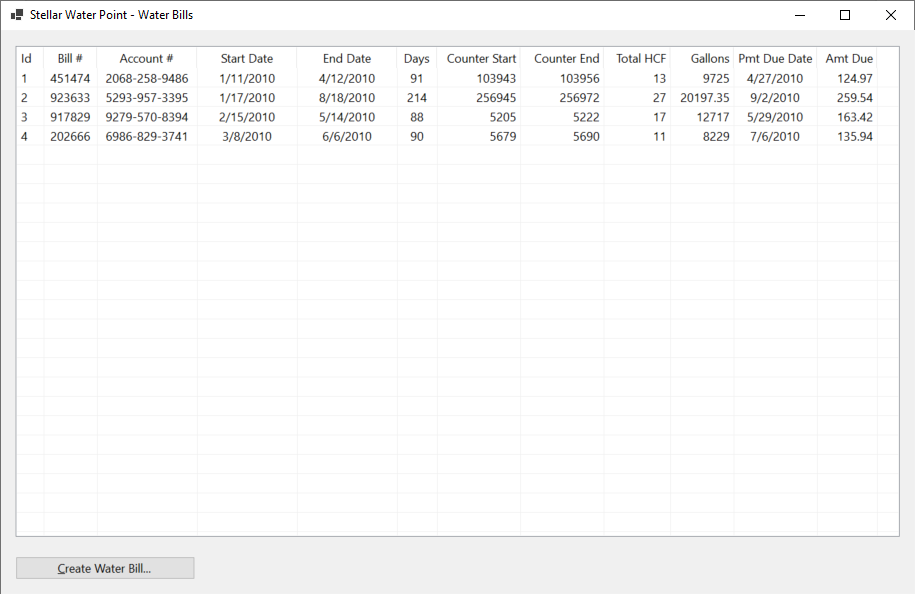
Water Bill Details
Probably the simplest operation that a user can perform on a water bill to only view its details. To make this happen, we will create and provide a form.
Practical Learning: Creating a Water Meter Record

| Control | (Name) | Text | TextAlign | Enabled | |
| Label | |
Water Bill #: | |||
| TextBox | |
TxtBillNumber | |||
| Button | |
BtnFindWaterBill | Find Water Bill | ||
| GroupBox | |
Customer Information | |||
| Label | |
Account #: | |||
| TextBox | |
TxtAccountNumber | False | ||
| Label | |
Customer Name: | |||
| TextBox | |
TxtCustomerName | False | ||
| Label | |
Meter Details: | |||
| TextBox | |
TxtMeterDetails | False | ||
| Label | |
Address: | |||
| TextBox | |
TxtAddress | False | ||
| TextBox | |
TxtCity | False | ||
| TextBox | |
TxtCounty | False | ||
| TextBox | |
TxtState | False | ||
| TextBox | |
TxtZIPCode | False | ||
| GroupBox | |
Meter Reading | |||
| Label | |
Meter Reading Start Date: | |||
| TextBox | |
TxtMeterReadingStartDate | False | ||
| Label | |
Meter Reading End Date: | |||
| TextBox | |
TxtMeterReadingEndDate | False | ||
| Label | |
Counter Reading Start: | |||
| TextBox | |
TxtCounterReadingStart | False | ||
| Label | |
Counter Reading End: | |||
| TextBox | |
TxtCounterReadingEnd | False | ||
| GroupBox | |
Meter Result | |||
| Label | |
Billing Days: | |||
| TextBox | |
TxtBillingDays | Right | False | |
| Label | |
Total Gallons: | |||
| TextBox | |
TxtTotalGallons | Right | False | |
| Label | |
Total HCF: | |||
| TextBox | |
TxtTotalHCF | Right | False | |
| Label | |
First Tier Consumption: | |||
| TextBox | |
TxtFirstTierConsumption | Right | False | |
| Label | |
Second Tier: | |||
| TextBox | |
TxtSecondTierConsumption | Right | False | |
| Label | |
Last Tier: | |||
| TextBox | |
TxtLastTierConsumption | Right | False | |
| GroupBox | |
Consumption Charges | |||
| Label | |
Water Charges: | |||
| TextBox | |
TxtWaterCharges | TextAlign: Right | Enabled: False | |
| Label | |
Sewer Charges: | |||
| TextBox | |
TxtSewerCharges | TextAlign: Right | Enabled: False | |
| Label | |
Environment Charges: | |||
| TextBox | |
TxtEnvironmentCharges | Right | False | |
| Label | |
Total Charges: | |||
| TextBox | |
TxtTotalCharges | Right | False | |
| GroupBox | |
Taxes | |||
| Label | |
Local Taxes: | |||
| TextBox | |
TxtLocalTaxes | TextAlign: Right | Enabled: False | |
| Label | |
State Taxes: | |||
| TextBox | |
TxtStateTaxes | Right | False | |
| GroupBox | |
Water Bill Payment | |||
| Label | |
Payment Due Date: | |||
| TextBox | |
TxtPaymentDueDate | False | ||
| Label | |
Amount Due: | |||
| TextBox | |
TxtAmountDue | Right | False | |
| Label | |
Late Payment Due Date: | |||
| TextBox | |
TxtLatePaymentDueDate | False | ||
| Label | |
Late Amount Due: | |||
| TextBox | |
TxtLateAmountDue | Right | False | |
| Button | |
BtnClose | Close | ||
FormBorderStyle: FixedDialog
Text:            Stellar Water Point - Water Bill Details
StartPosition:   CenterScreen
MinimizeBox:     False
MaximizeBox:     False
Imports System.IO
Imports System.Xml

Public Class BillDetails
    Private Sub BtnFindWaterBill_Click(sender As Object, e As EventArgs) Handles BtnFindWaterBill.Click
        ' If the user clicks the Find Water Meter button,
        ' make sure there Is an invoice number in the top text box.
        If String.IsNullOrEmpty(TxtWaterBillNumber.Text) Then
            MsgBox("You must provide a water bill number and then click the Find Water Bill button.",
                   MsgBoxStyle.OkOnly Or MsgBoxStyle.Information,
                   "Stellar Water Point")
            ' If the user didn't type a bill number but clicked Find Water Bill, don't do anything
            Exit Sub
        End If

        Dim xdWaterBills = New XmlDocument()
        Dim strWaterBills = "C:\Stellar Water Point12\WaterBills.xml"

        Dim fiWaterBills = New FileInfo(strWaterBills)

        If fiWaterBills.Exists Then
            Using fsWaterBills = New FileStream(fiWaterBills.FullName, FileMode.Open, FileAccess.Read, FileShare.Read)
                xdWaterBills.Load(fsWaterBills)

                ' Use XPath to locate the water bill that has
                ' the same invoice number as the one in the Water Bill Number text box.
                ' Store the water bill in an XmlNodeList variable.
                Dim xnlWaterBills = xdWaterBills.DocumentElement.SelectNodes("//bill-number[.='" + TxtWaterBillNumber.Text + "']")

                For Each xnWaterBill As XmlNode In xnlWaterBills
                    TxtWaterBillNumber.Text = xnWaterBill.FirstChild.InnerText
                    TxtAccountNumber.Text = xnWaterBill.NextSibling.InnerText
                    TxtMeterReadingStartDate.Text = CDate(xnWaterBill.NextSibling.NextSibling.InnerText).ToLongDateString()
                    TxtMeterReadingEndDate.Text = CDate(xnWaterBill.NextSibling.NextSibling.NextSibling.InnerText).ToLongDateString()
                    TxtBillingDays.Text = xnWaterBill.NextSibling.NextSibling.NextSibling.NextSibling.InnerText
                    TxtCounterReadingStart.Text = xnWaterBill.NextSibling.NextSibling.NextSibling.NextSibling.NextSibling.InnerText
                    TxtCounterReadingEnd.Text = xnWaterBill.NextSibling.NextSibling.NextSibling.NextSibling.NextSibling.NextSibling.InnerText
                    TxtTotalHCF.Text = xnWaterBill.NextSibling.NextSibling.NextSibling.NextSibling.NextSibling.NextSibling.NextSibling.InnerText
                    TxtTotalGallons.Text = xnWaterBill.NextSibling.NextSibling.NextSibling.NextSibling.NextSibling.NextSibling.NextSibling.NextSibling.InnerText
                    TxtFirstTierConsumption.Text = xnWaterBill.NextSibling.NextSibling.NextSibling.NextSibling.NextSibling.NextSibling.NextSibling.NextSibling.NextSibling.InnerText
                    TxtSecondTierConsumption.Text = xnWaterBill.NextSibling.NextSibling.NextSibling.NextSibling.NextSibling.NextSibling.NextSibling.NextSibling.NextSibling.NextSibling.InnerText
                    TxtLastTierConsumption.Text = xnWaterBill.NextSibling.NextSibling.NextSibling.NextSibling.NextSibling.NextSibling.NextSibling.NextSibling.NextSibling.NextSibling.NextSibling.InnerText
                    TxtWaterCharges.Text = xnWaterBill.NextSibling.NextSibling.NextSibling.NextSibling.NextSibling.NextSibling.NextSibling.NextSibling.NextSibling.NextSibling.NextSibling.NextSibling.InnerText
                    TxtSewerCharges.Text = xnWaterBill.NextSibling.NextSibling.NextSibling.NextSibling.NextSibling.NextSibling.NextSibling.NextSibling.NextSibling.NextSibling.NextSibling.NextSibling.NextSibling.InnerText
                    TxtEnvironmentCharges.Text = xnWaterBill.NextSibling.NextSibling.NextSibling.NextSibling.NextSibling.NextSibling.NextSibling.NextSibling.NextSibling.NextSibling.NextSibling.NextSibling.NextSibling.NextSibling.InnerText
                    TxtServiceCharges.Text = xnWaterBill.NextSibling.NextSibling.NextSibling.NextSibling.NextSibling.NextSibling.NextSibling.NextSibling.NextSibling.NextSibling.NextSibling.NextSibling.NextSibling.NextSibling.NextSibling.InnerText
                    TxtTotalCharges.Text = xnWaterBill.NextSibling.NextSibling.NextSibling.NextSibling.NextSibling.NextSibling.NextSibling.NextSibling.NextSibling.NextSibling.NextSibling.NextSibling.NextSibling.NextSibling.NextSibling.NextSibling.InnerText
                    TxtStateTaxes.Text = xnWaterBill.NextSibling.NextSibling.NextSibling.NextSibling.NextSibling.NextSibling.NextSibling.NextSibling.NextSibling.NextSibling.NextSibling.NextSibling.NextSibling.NextSibling.NextSibling.NextSibling.NextSibling.InnerText
                    TxtLocalTaxes.Text = xnWaterBill.NextSibling.NextSibling.NextSibling.NextSibling.NextSibling.NextSibling.NextSibling.NextSibling.NextSibling.NextSibling.NextSibling.NextSibling.NextSibling.NextSibling.NextSibling.NextSibling.NextSibling.NextSibling.InnerText
                    TxtPaymentDueDate.Text = CDate(xnWaterBill.NextSibling.NextSibling.NextSibling.NextSibling.NextSibling.NextSibling.NextSibling.NextSibling.NextSibling.NextSibling.NextSibling.NextSibling.NextSibling.NextSibling.NextSibling.NextSibling.NextSibling.NextSibling.NextSibling.InnerText).ToLongDateString()
                    TxtAmountDue.Text = xnWaterBill.NextSibling.NextSibling.NextSibling.NextSibling.NextSibling.NextSibling.NextSibling.NextSibling.NextSibling.NextSibling.NextSibling.NextSibling.NextSibling.NextSibling.NextSibling.NextSibling.NextSibling.NextSibling.NextSibling.NextSibling.InnerText
                    TxtLatePaymentDueDate.Text = CDate(xnWaterBill.NextSibling.NextSibling.NextSibling.NextSibling.NextSibling.NextSibling.NextSibling.NextSibling.NextSibling.NextSibling.NextSibling.NextSibling.NextSibling.NextSibling.NextSibling.NextSibling.NextSibling.NextSibling.NextSibling.NextSibling.NextSibling.InnerText).ToLongDateString()
                    TxtLateAmountDue.Text = xnWaterBill.NextSibling.NextSibling.NextSibling.NextSibling.NextSibling.NextSibling.NextSibling.NextSibling.NextSibling.NextSibling.NextSibling.NextSibling.NextSibling.NextSibling.NextSibling.NextSibling.NextSibling.NextSibling.NextSibling.NextSibling.NextSibling.NextSibling.InnerText
                Next
            End Using
        End If

        Dim xdCustomers As XmlDocument = New XmlDocument()
        ' Declare a variable for a file that holds the list of customers
        Dim strCustomers = "C:\Stellar Water Point12\Customers.xml"

        ' Create a FileInfo object for the customers
        Dim fiCustomers As FileInfo = New FileInfo(strCustomers)

        ' We will need to know the water meter associated with this customer account
        Dim strMeterNumber = Nothing

        ' Check whether the file that holds a list of customers exists
        If fiCustomers.Exists Then
            ' If that exists, open it and pass it to a FileStream object
            Using fsCustomers As FileStream = New FileStream(fiCustomers.FullName, FileMode.Open, FileAccess.Read, FileShare.Read)
                ' Get the list of customers and pass the records to the XML DOM object created earlier
                xdCustomers.Load(fsCustomers)
                REM Create an XmlNodeList list of customers using XPath
                Dim xnlCustomers As XmlNodeList = xdCustomers.DocumentElement.SelectNodes("//account-number[.='" + TxtAccountNumber.Text + "']")

                REM Check each node of the XML record and display its values in each Windows control on the form
                For Each xnCustomer As XmlNode In xnlCustomers
                    ' MtbAccountNumber.Text = xnCustomer.NextSibling.InnerText   rem Meter #
                    TxtAccountName.Text = xnCustomer.NextSibling.InnerText REM Account Name

                    strMeterNumber = xnCustomer.NextSibling.NextSibling.InnerText   REM Meter Number
                    TxtAccountType.Text = xnCustomer.NextSibling.NextSibling.NextSibling.InnerText   REM Account Type
                    TxtAddress.Text = xnCustomer.NextSibling.NextSibling.NextSibling.NextSibling.InnerText   REM Address
                    TxtCity.Text = xnCustomer.NextSibling.NextSibling.NextSibling.NextSibling.NextSibling.InnerText   REM City
                    TxtCounty.Text = xnCustomer.NextSibling.NextSibling.NextSibling.NextSibling.NextSibling.NextSibling.InnerText   REM County
                    TxtState.Text = xnCustomer.NextSibling.NextSibling.NextSibling.NextSibling.NextSibling.NextSibling.NextSibling.InnerText   REM State
                    TxtZIPCode.Text = xnCustomer.NextSibling.NextSibling.NextSibling.NextSibling.NextSibling.NextSibling.NextSibling.NextSibling.InnerText REM ZIP-Code
                Next
            End Using
        End If

        ' Create an XML DOM object for the water meters records
        Dim xdWaterMeters As XmlDocument = New XmlDocument()
        ' Declare a variable for a file that holds the list of water meters
        Dim strWaterMeters As String = "C:\Stellar Water Point12\WaterMeters.xml"

        ' Create a FileInfo object for the customers
        Dim fiWaterMeters As FileInfo = New FileInfo(strWaterMeters)

        ' Check whether the file that holds a list of water meters exists
        If fiWaterMeters.Exists Then
            ' Get the list of water meters and pass the records to the XML DOM object
            Using fsWaterMeters As FileStream = New FileStream(fiWaterMeters.FullName, FileMode.Open, FileAccess.Read, FileShare.Read)
                ' Get the list of water meters and pass the records to the XML DOM object
                xdWaterMeters.Load(fsWaterMeters)
                ' Create an XmlNodeList list of water meters using XPath
                Dim xnlWaterMeters As XmlNodeList = xdWaterMeters.DocumentElement.SelectNodes("//meter-number[.='" + strMeterNumber + "']")

                ' Check each node of the XML record
                For Each xnWaterMeter As XmlNode In xnlWaterMeters
                    ' Get the values for the water meter.
                    ' Create a sentence And display it in the Meter Details text box.
                    TxtMeterDetails.Text = xnWaterMeter.NextSibling.InnerText + " " +
                                           xnWaterMeter.NextSibling.NextSibling.InnerText + " (Meter Size: " +
                                           xnWaterMeter.NextSibling.NextSibling.NextSibling.InnerText + ")"
                Next
            End Using
        End If
    End Sub

    Private Sub BtnClose_Click(sender As Object, e As EventArgs) Handles BtnClose.Click
        Close()
    End Sub
End Class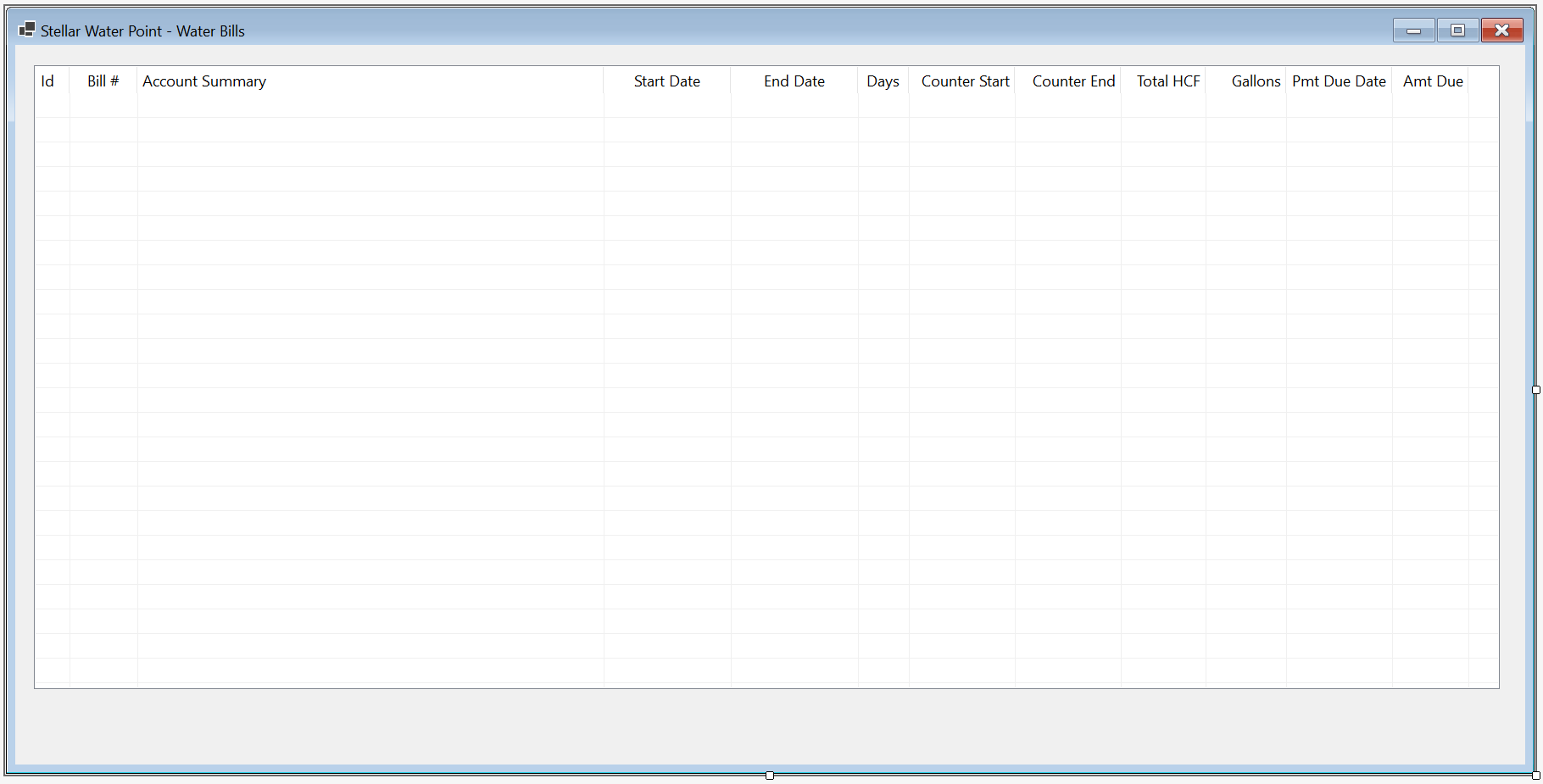
| Control | (Name) | Text | |
| Button | |
BtnViewWaterBill | &View Water Bill... |
Private Sub BtnViewWaterBill_Click(sender As Object, e As EventArgs) Handles BtnViewCustomerDetails.Click
    Dim Details As New BillDetails

    Details.Show()
End Sub
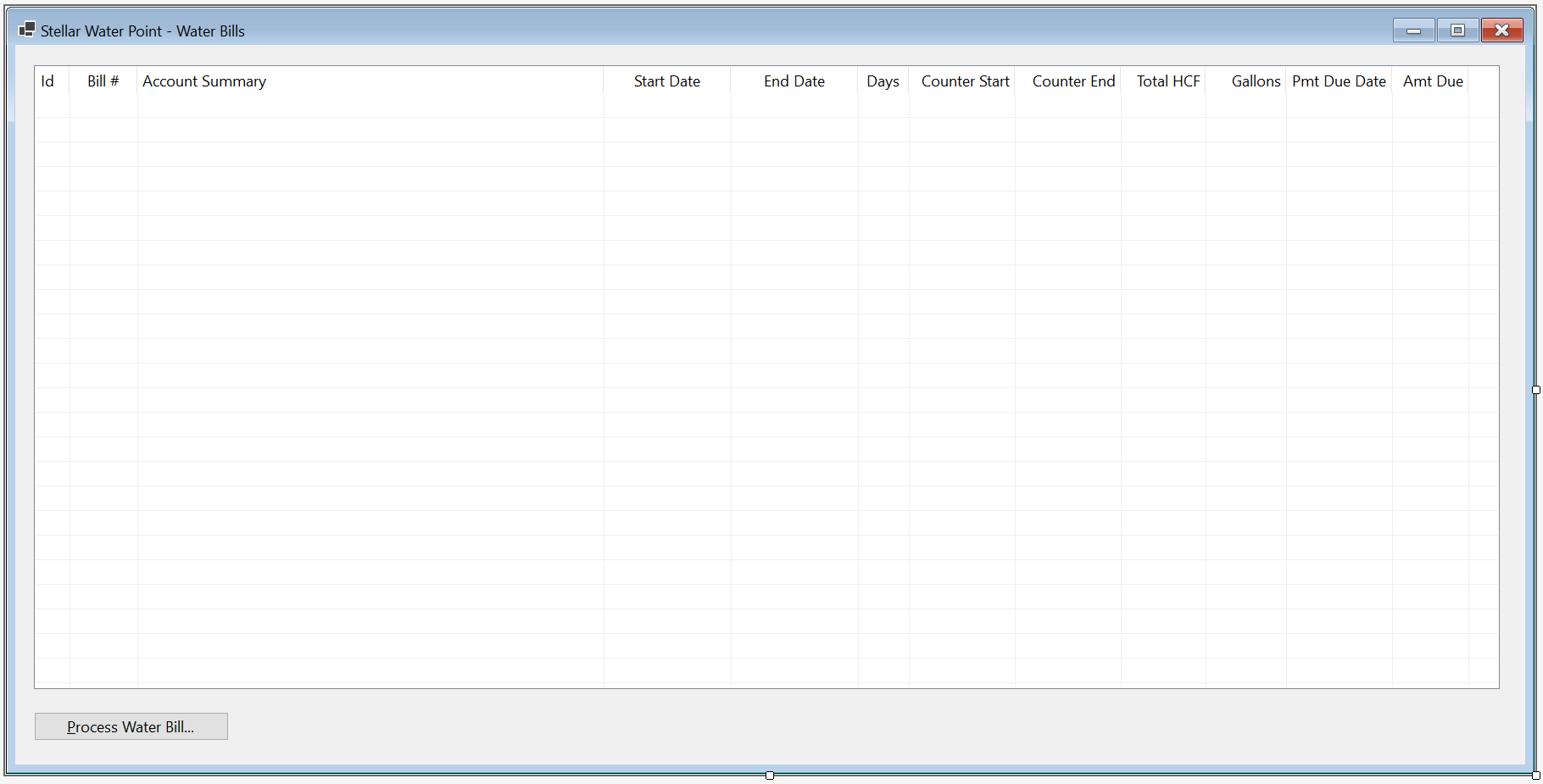


Water Bill Edition
Although it doesn't happen regularly, some information can change about an existing water bill. If that happens, the user must be able to update the water bill. For this reason, we will create and provide a form that supports that operation.
Practical Learning: Editing a Water Bill

| Control | (Name) | Text | TextAlign | Modifiers | Other Properties | |
| Label | |
Water Bill #: | ||||
| TextBox | |
TxtBillNumber | Public | |||
| Button | |
BtnFindWaterBill | &Find Water Bill | |||
| GroupBox | |
Customer Information | ||||
| Label | |
Account #: | ||||
| MaskedTextBox | |
MtbAccountNumber | Public | Masked: 0000-000-0000 | ||
| Button | |
BtnFindCustomerAccount | Find Customer Account | |||
| Label | |
Account Name: | ||||
| TextBox | |
TxtAccountName | Enabled: False | |||
| Label | |
Address: | ||||
| TextBox | |
TxtAddress | Enabled: False | |||
| TextBox | |
TxtCity | Enabled: False | |||
| TextBox | |
TxtCounty | Enabled: False | |||
| TextBox | |
TxtState | Enabled: False | |||
| TextBox | |
MtbZIPCode | Enabled: False | |||
| Label | |
Meter Details: | ||||
| TextBox | |
TxtMeterDetails | Public | |||
| GroupBox | |
Meter Reading | ||||
| Label | |
Meter Reading Start Date: | ||||
| DateTimePicker | |
DtpMeterReadingStartDate | Public | |||
| Label | |
Meter Reading End Date: | ||||
| DateTimePicker | |
DtpMeterReadingEndDate | Public | |||
| Label | |
Counter Reading Start: | ||||
| TextBox | |
TxtCounterReadingStart | Public | |||
| Label | |
Counter Reading End: | ||||
| TextBox | |
TxtCounterReadingEnd | Public | |||
| Button | |
BtnEvaluateWaterBill | Evaluate Water Bill | |||
| GroupBox | |
Meter Result | ||||
| Label | |
Billing Days: | ||||
| TextBox | |
TxtBillingDays | Right | |||
| Label | |
Total Gallons: | ||||
| TextBox | |
TxtTotalGallons | Right | |||
| Label | |
Total CCF: | ||||
| TextBox | |
TxtTotalCCF | Right | |||
| Label | |
First Tier Consumption: | ||||
| TextBox | |
TxtFirstTierConsumption | Right | Public | ||
| Label | |
Second Tier: | ||||
| TextBox | |
TxtSecondTierConsumption | Right | Public | ||
| Label | |
Last Tier: | ||||
| TextBox | |
TxtLastTierConsumption | Right | Public | ||
| GroupBox | |
Consumption Charges | ||||
| Label | |
Water Charges: | ||||
| TextBox | |
TxtWaterCharges | Right | Public | ||
| Label | |
Sewer Charges: | ||||
| TextBox | |
TxtSewerCharges | Right | Public | ||
| Label | |
Environment Charges: | ||||
| TextBox | |
TxtEnvironmentCharges | Right | Public | ||
| Label | |
Total Charges: | ||||
| TextBox | |
TxtTotalCharges | Right | Public | ||
| GroupBox | |
Taxes | ||||
| Label | |
Local Taxes: | ||||
| TextBox | |
TxtLocalTaxes | Right | Public | ||
| Label | |
State Taxes: | ||||
| TextBox | |
TxtStateTaxes | Right | Public | ||
| GroupBox | |
Water Bill Payment | ||||
| Label | |
Payment Due Date: | ||||
| DateTimePicker | |
DtpPaymentDueDate | Public | |||
| Label | |
Amount Due: | ||||
| TextBox | |
TxtAmountDue | Right | Public | ||
| Label | |
Late Payment Due Date: | ||||
| DateTimePicker | |
DtpLatePaymentDueDate | Public | |||
| Label | |
Late Amount Due: | ||||
| TextBox | |
TxtLateAmountDue | Right | Public | ||
| Button | |
BtnUpdateWaterBill | Update Water Bill | DialogResult: OK | ||
| Button | |
BtnClose | Close | DialogResult: Cancel | ||
FormBorderStyle: FixedDialog
Text:            Stellar Water Point - Water Bill Editor
StartPosition:   CenterScreen
MinimizeBox:     False
MaximizeBox:     False
AcceptButton:    BtnUpdateWaterBill
CancelButton:    BtnClose
Imports System.IO
Imports System.Xml

Public Class BillEditor
    Private Sub BtnFindWaterBill_Click(sender As Object, e As EventArgs) Handles BtnFindWaterBill.Click
        If String.IsNullOrEmpty(TxtWaterBillNumber.Text) Then
            MsgBox("You must provide a water bill number and then click the Find Water Bill button.",
                   MsgBoxStyle.OkOnly Or MsgBoxStyle.Information,
                   "Stellar Water Point")
            Exit Sub
        End If

        Dim xdWaterBills As New XmlDocument()
        Dim strWaterBills = "C:\Stellar Water Point12\WaterBills.xml"

        Dim fiWaterBills As New FileInfo(strWaterBills)

        If fiWaterBills.Exists Then
            Using fsWaterBills As New FileStream(fiWaterBills.FullName, FileMode.Open, FileAccess.Read, FileShare.Read)
                xdWaterBills.Load(fsWaterBills)

                Dim xnlWaterBills = xdWaterBills.DocumentElement.SelectNodes("//bill-number[.='" + TxtWaterBillNumber.Text + "']")

                For Each xnWaterBill As XmlNode In xnlWaterBills
                    TxtWaterBillNumber.Text = xnWaterBill.FirstChild.InnerText
                    MtbAccountNumber.Text = xnWaterBill.NextSibling.InnerText
                    DtpMeterReadingStartDate.Text = CDate(xnWaterBill.NextSibling.NextSibling.InnerText).ToLongDateString()
                    DtpMeterReadingEndDate.Text = CDate(xnWaterBill.NextSibling.NextSibling.NextSibling.InnerText).ToLongDateString()
                    TxtBillingDays.Text = xnWaterBill.NextSibling.NextSibling.NextSibling.NextSibling.InnerText
                    TxtCounterReadingStart.Text = xnWaterBill.NextSibling.NextSibling.NextSibling.NextSibling.NextSibling.InnerText
                    TxtCounterReadingEnd.Text = xnWaterBill.NextSibling.NextSibling.NextSibling.NextSibling.NextSibling.NextSibling.InnerText
                    TxtTotalHCF.Text = xnWaterBill.NextSibling.NextSibling.NextSibling.NextSibling.NextSibling.NextSibling.NextSibling.InnerText
                    TxtTotalGallons.Text = xnWaterBill.NextSibling.NextSibling.NextSibling.NextSibling.NextSibling.NextSibling.NextSibling.NextSibling.InnerText
                    TxtFirstTierConsumption.Text = xnWaterBill.NextSibling.NextSibling.NextSibling.NextSibling.NextSibling.NextSibling.NextSibling.NextSibling.NextSibling.InnerText
                    TxtSecondTierConsumption.Text = xnWaterBill.NextSibling.NextSibling.NextSibling.NextSibling.NextSibling.NextSibling.NextSibling.NextSibling.NextSibling.NextSibling.InnerText
                    TxtLastTierConsumption.Text = xnWaterBill.NextSibling.NextSibling.NextSibling.NextSibling.NextSibling.NextSibling.NextSibling.NextSibling.NextSibling.NextSibling.NextSibling.InnerText
                    TxtWaterCharges.Text = xnWaterBill.NextSibling.NextSibling.NextSibling.NextSibling.NextSibling.NextSibling.NextSibling.NextSibling.NextSibling.NextSibling.NextSibling.NextSibling.InnerText
                    TxtSewerCharges.Text = xnWaterBill.NextSibling.NextSibling.NextSibling.NextSibling.NextSibling.NextSibling.NextSibling.NextSibling.NextSibling.NextSibling.NextSibling.NextSibling.NextSibling.InnerText
                    TxtEnvironmentCharges.Text = xnWaterBill.NextSibling.NextSibling.NextSibling.NextSibling.NextSibling.NextSibling.NextSibling.NextSibling.NextSibling.NextSibling.NextSibling.NextSibling.NextSibling.NextSibling.InnerText
                    TxtServiceCharges.Text = xnWaterBill.NextSibling.NextSibling.NextSibling.NextSibling.NextSibling.NextSibling.NextSibling.NextSibling.NextSibling.NextSibling.NextSibling.NextSibling.NextSibling.NextSibling.NextSibling.InnerText
                    TxtTotalCharges.Text = xnWaterBill.NextSibling.NextSibling.NextSibling.NextSibling.NextSibling.NextSibling.NextSibling.NextSibling.NextSibling.NextSibling.NextSibling.NextSibling.NextSibling.NextSibling.NextSibling.NextSibling.InnerText
                    TxtStateTaxes.Text = xnWaterBill.NextSibling.NextSibling.NextSibling.NextSibling.NextSibling.NextSibling.NextSibling.NextSibling.NextSibling.NextSibling.NextSibling.NextSibling.NextSibling.NextSibling.NextSibling.NextSibling.NextSibling.InnerText
                    TxtLocalTaxes.Text = xnWaterBill.NextSibling.NextSibling.NextSibling.NextSibling.NextSibling.NextSibling.NextSibling.NextSibling.NextSibling.NextSibling.NextSibling.NextSibling.NextSibling.NextSibling.NextSibling.NextSibling.NextSibling.NextSibling.InnerText
                    DtpPaymentDueDate.Text = DateTime.Parse(xnWaterBill.NextSibling.NextSibling.NextSibling.NextSibling.NextSibling.NextSibling.NextSibling.NextSibling.NextSibling.NextSibling.NextSibling.NextSibling.NextSibling.NextSibling.NextSibling.NextSibling.NextSibling.NextSibling.NextSibling.InnerText).ToLongDateString()
                    TxtAmountDue.Text = xnWaterBill.NextSibling.NextSibling.NextSibling.NextSibling.NextSibling.NextSibling.NextSibling.NextSibling.NextSibling.NextSibling.NextSibling.NextSibling.NextSibling.NextSibling.NextSibling.NextSibling.NextSibling.NextSibling.NextSibling.NextSibling.InnerText
                    DtpLatePaymentDueDate.Text = DateTime.Parse(xnWaterBill.NextSibling.NextSibling.NextSibling.NextSibling.NextSibling.NextSibling.NextSibling.NextSibling.NextSibling.NextSibling.NextSibling.NextSibling.NextSibling.NextSibling.NextSibling.NextSibling.NextSibling.NextSibling.NextSibling.NextSibling.NextSibling.InnerText).ToLongDateString()
                    TxtLateAmountDue.Text = xnWaterBill.NextSibling.NextSibling.NextSibling.NextSibling.NextSibling.NextSibling.NextSibling.NextSibling.NextSibling.NextSibling.NextSibling.NextSibling.NextSibling.NextSibling.NextSibling.NextSibling.NextSibling.NextSibling.NextSibling.NextSibling.NextSibling.NextSibling.InnerText
                Next
            End Using
        End If

        Dim xdCustomers As XmlDocument = New XmlDocument()
                Dim strCustomers = "C:\Stellar Water Point12\Customers.xml"

                Dim fiCustomers As FileInfo = New FileInfo(strCustomers)

        Dim strMeterNumber = Nothing

        If fiCustomers.Exists Then
            Using fsCustomers As FileStream = New FileStream(fiCustomers.FullName, FileMode.Open, FileAccess.Read, FileShare.Read)
                xdCustomers.Load(fsCustomers)
                Dim xnlCustomers As XmlNodeList = xdCustomers.DocumentElement.SelectNodes("//account-number[.='" + MtbAccountNumber.Text + "']")

                For Each xnCustomer As XmlNode In xnlCustomers
                    TxtAccountName.Text = xnCustomer.NextSibling.InnerText ' Account Name

                    strMeterNumber = xnCustomer.NextSibling.NextSibling.InnerText ' Meter Number
                    TxtAccountType.Text = xnCustomer.NextSibling.NextSibling.NextSibling.InnerText ' Account Type
                    TxtAddress.Text = xnCustomer.NextSibling.NextSibling.NextSibling.NextSibling.InnerText ' Address
                    TxtCity.Text = xnCustomer.NextSibling.NextSibling.NextSibling.NextSibling.NextSibling.InnerText ' City
                    TxtCounty.Text = xnCustomer.NextSibling.NextSibling.NextSibling.NextSibling.NextSibling.NextSibling.InnerText ' County
                    TxtState.Text = xnCustomer.NextSibling.NextSibling.NextSibling.NextSibling.NextSibling.NextSibling.NextSibling.InnerText   ' State
                    TxtZIPCode.Text = xnCustomer.NextSibling.NextSibling.NextSibling.NextSibling.NextSibling.NextSibling.NextSibling.NextSibling.InnerText ' ZIP-Code
                Next
            End Using
        End If

        Dim xdWaterMeters As XmlDocument = New XmlDocument()
        Dim strWaterMeters As String = "C:\Stellar Water Point12\WaterMeters.xml"

        Dim fiWaterMeters As FileInfo = New FileInfo(strWaterMeters)

        If fiWaterMeters.Exists Then
            Using fsWaterMeters As FileStream = New FileStream(fiWaterMeters.FullName, FileMode.Open, FileAccess.Read, FileShare.Read)
                xdWaterMeters.Load(fsWaterMeters)
                Dim xnlWaterMeters As XmlNodeList = xdWaterMeters.DocumentElement.SelectNodes("//meter-number[.='" + strMeterNumber + "']")

                ' Check each node of the XML record
                For Each xnWaterMeter As XmlNode In xnlWaterMeters
                    TxtMeterDetails.Text = xnWaterMeter.NextSibling.InnerText + " " +
                                           xnWaterMeter.NextSibling.NextSibling.InnerText + " (Meter Size: " +
                                           xnWaterMeter.NextSibling.NextSibling.NextSibling.InnerText + ")"
                Next
            End Using
        End If
    End Sub
End ClassPrivate Sub BtnFindCustomerAccount_Click(sender As Object, e As EventArgs) Handles BtnFindCustomerAccount.Click
Dim xdCustomers As XmlDocument = New XmlDocument()
Dim strCustomers = "C:\Stellar Water Point12\Customers.xml"
Dim fiCustomers As FileInfo = New FileInfo(strCustomers)
Dim strMeterNumber = Nothing
If fiCustomers.Exists Then
Using fsCustomers As FileStream = New FileStream(fiCustomers.FullName, FileMode.Open, FileAccess.Read, FileShare.Read)
xdCustomers.Load(fsCustomers)
Dim xnlCustomers As XmlNodeList = xdCustomers.DocumentElement.SelectNodes("//account-number[.='" + MtbAccountNumber.Text + "']")
For Each xnCustomer As XmlNode In xnlCustomers
TxtAccountName.Text = xnCustomer.NextSibling.InnerText
strMeterNumber = xnCustomer.NextSibling.NextSibling.InnerText
TxtAccountType.Text = xnCustomer.NextSibling.NextSibling.NextSibling.InnerText
TxtAddress.Text = xnCustomer.NextSibling.NextSibling.NextSibling.NextSibling.InnerText
TxtCity.Text = xnCustomer.NextSibling.NextSibling.NextSibling.NextSibling.NextSibling.InnerText
TxtCounty.Text = xnCustomer.NextSibling.NextSibling.NextSibling.NextSibling.NextSibling.NextSibling.InnerText
TxtState.Text = xnCustomer.NextSibling.NextSibling.NextSibling.NextSibling.NextSibling.NextSibling.NextSibling.InnerText
TxtZIPCode.Text = xnCustomer.NextSibling.NextSibling.NextSibling.NextSibling.NextSibling.NextSibling.NextSibling.NextSibling.InnerText
Next
End Using
End If
Dim xdWaterMeters As XmlDocument = New XmlDocument()
Dim strWaterMeters As String = "C:\Stellar Water Point12\WaterMeters.xml"
Dim fiWaterMeters As FileInfo = New FileInfo(strWaterMeters)
If fiWaterMeters.Exists Then
Using fsWaterMeters As FileStream = New FileStream(fiWaterMeters.FullName, FileMode.Open, FileAccess.Read, FileShare.Read)
xdWaterMeters.Load(fsWaterMeters)
Dim xnlWaterMeters As XmlNodeList = xdWaterMeters.DocumentElement.SelectNodes("//meter-number[.='" + strMeterNumber + "']")
For Each xnWaterMeter As XmlNode In xnlWaterMeters
TxtMeterDetails.Text = xnWaterMeter.NextSibling.InnerText + " " +
xnWaterMeter.NextSibling.NextSibling.InnerText + " (Meter Size: " +
xnWaterMeter.NextSibling.NextSibling.NextSibling.InnerText + ")"
Next
End Using
End If
End SubPrivate Sub DtpMeterReadingEndDate_ValueChanged(sender As Object, e As EventArgs) Handles DtpMeterReadingEndDate.ValueChanged
TxtBillingDays.Text = DateDiff("d", DtpMeterReadingStartDate.Value, DtpMeterReadingEndDate.Value) + 1
End SubPrivate Function CalculateTiers(acnt As String, total As Double) As (a As Double, b As Double, c As Double)
Dim Results = (0.00, 0.00, 0.00)
Select Case acnt
Case "RES"
Results.Item1 = total * 38.35 / 10000.0
Results.Item2 = total * 18.25 / 10000.0
Results.Item3 = total * 11.65 / 10000.0
Case "SGO"
Results.Item1 = total * 41.38 / 10000.0
Results.Item2 = total * 15.26 / 10000.0
Results.Item3 = total * 8.13 / 10000.0
Case "BUS"
Results.Item1 = total * 51.25 / 10000.0
Results.Item2 = total * 34.65 / 10000.0
Results.Item3 = total * 14.1 / 10000.0
Case "UUO"
Results.Item1 = total * 25 / 10000.0
Results.Item2 = total * 35 / 10000.0
Results.Item3 = total * 40 / 10000.0
Case "WAT"
Results.Item1 = total * 48 / 10000.0
Results.Item2 = total * 32 / 10000.0
Results.Item3 = total * 20 / 10000.0
Case Else
Results.Item1 = total * 25.0 / 10000.0
Results.Item2 = total * 35.0 / 10000.0
Results.Item3 = total * 40.0 / 10000.0
End Select
Return Results
End Function
Private Function CalculateSewerCharges(acnt As String, total As Double) As Double
Dim Result As Double
If acnt = "RES" Then
Result = total * 1.028641 / 100.0
ElseIf acnt = "SGO" Then
Result = total * 8.162522 / 100.0
ElseIf acnt = "BUS" Then
Result = total * 22.446369 / 100.0
ElseIf acnt = "UUO" Then
Result = total * 10.262475 / 100.0
ElseIf acnt = "WAT" Then
Result = total * 22.628522 / 100.0
Else REM if acnt="OTH)"
Result = total * 10.626147 / 100.0
End If
Return Result
End Function
Private Function CalculateEnvironmentCharges(acnt As String, total As Double) As Double
Dim result As Double
Select Case acnt
Case "RES"
result = total * 0.004524
Case "SGO"
result = total * 0.118524
Case "BUS"
result = total * 0.086369
Case "UUO"
result = total * 0.166369
Case "WAT"
result = total * 0.115368
Case Else
result = total * 0.115248
End Select
Return result
End Function
Private Function CalculateServiceCharges(acnt As String, total As Double) As Double
Select Case acnt
Case "RES"
Return total * 0.006248
Case "SGO"
Return total * 0.102246
Case "BUS"
Return total * 0.155227
Case "UUO"
Return total * 0.186692
Case "WAT"
Return total * 0.128724
Case Else
Return total * 0.210248
End Select
End Function
Private Function CalculateLocalTaxes(acnt As String, total As Double) As Double
Select Case acnt
Case "RES"
Return total * 0.035749
Case "SGO"
Return total * 0.044026
Case "BUS"
Return total * 0.162479
Case "UUO"
Return total * 0.105737
Case "WAT"
Return total * 0.063648
Case Else
Return total * 0.125148
End Select
End Function
Private Function CalculateStateTaxes(acnt As String, total As Double) As Double
Select Case acnt
Case "RES"
Return total * 0.007124
Case "SGO"
Return total * 0.008779
Case "BUS"
Return total * 0.035759
Case "UUO"
Return total * 0.067958
Case "WAT"
Return total * 0.026857
Case Else
Return total * 0.013746
End Select
End Function
Private Function SetPaymentDueDate(acnt As String, Datum As Date) As Date
Dim Days As Integer
If acnt = "RES" Then
Days = 15
ElseIf acnt = "SGO" Then
Days = 40
ElseIf acnt = "BUS" Then
Days = 30
ElseIf acnt = "UUO" Then
Days = 25
ElseIf acnt = "WAT" Then
Days = 45
Else
Days = 35
End If
Return DateAdd(DateInterval.Day, Days, Datum)
End Function
Private Function SetLatePaymentDueDate(acnt As String, Datum As Date) As Date
Select Case acnt
Case "RES"
Return DateAdd(DateInterval.Day, 25, Datum)
Case "SGO"
Return DateAdd(DateInterval.Day, 40, Datum)
Case "BUS"
Return DateAdd(DateInterval.Day, 45, Datum)
Case "UUO"
Return DateAdd(DateInterval.Day, 30, Datum)
Case "WAT"
Return DateAdd(DateInterval.Day, 65, Datum)
Case Else
Return DateAdd(DateInterval.Day, 45, Datum)
End Select
End Function
Private Function CalculateLateAmountDue(acnt As String, amt As Double) As Double
Select Case acnt
Case "RES"
Return amt + 8.95
Case "SGO"
Return amt + (amt / 4.125)
Case "BUS"
Return amt + (amt / 12.315)
Case "UUO"
Return amt + (amt / 7.425)
Case "WAT"
Return amt + (amt / 12.225)
Case Else
Return amt + (amt / 6.735)
End Select
End Function
Private Sub BtnEvaluateWaterBill_Click(sender As Object, e As EventArgs) Handles BtnEvaluateWaterBill.Click
Dim CounterStart = 0
Dim CounterEnd = 0
Try
CounterStart = CDbl(TxtCounterReadingStart.Text)
Catch feCRStart As FormatException
MsgBox("There was a problem with the value of the " +
"Counter Reading Start. The error produced is: " + feCRStart.Message,
MsgBoxStyle.OkOnly Or MsgBoxStyle.Information,
"Stellar Water Point")
End Try
Try
CounterEnd = CDbl(TxtCounterReadingEnd.Text)
Catch feCREnd As FormatException
MsgBox("There was a problem with the value of the " +
"Counter Reading End. The error produced is: " + feCREnd.Message,
MsgBoxStyle.OkOnly Or MsgBoxStyle.Information,
"Stellar Water Point")
End Try
Dim Consumption = CounterEnd - CounterStart
Dim Gallons = Consumption * 748.05
Dim StrAccountType = Microsoft.VisualBasic.Left(TxtAccountType.Text, 3)
Dim Tiers As (first As Double, second As Double, last As Double) = CalculateTiers(StrAccountType, Gallons)
Dim waterCharges = Tiers.first + Tiers.second + Tiers.last
Dim sewerCharges = CalculateSewerCharges(StrAccountType, waterCharges)
Dim envCharges = CalculateEnvironmentCharges(StrAccountType, waterCharges)
Dim srvCharges = CalculateServiceCharges(StrAccountType, waterCharges)
Dim totalCharges = waterCharges + sewerCharges + envCharges + srvCharges
Dim localTaxes = CalculateLocalTaxes(StrAccountType, totalCharges)
Dim stateTaxes = CalculateStateTaxes(StrAccountType, totalCharges)
Dim amtDue = totalCharges + localTaxes + stateTaxes
TxtTotalHCF.Text = CStr(Consumption)
TxtTotalGallons.Text = CInt(Gallons)
TxtFirstTierConsumption.Text = FormatNumber(Tiers.first)
TxtSecondTierConsumption.Text = FormatNumber(Tiers.second)
TxtLastTierConsumption.Text = FormatNumber(Tiers.last)
TxtWaterCharges.Text = FormatNumber(waterCharges)
TxtSewerCharges.Text = FormatNumber(sewerCharges)
TxtEnvironmentCharges.Text = FormatNumber(envCharges)
TxtServiceCharges.Text = FormatNumber(srvCharges)
TxtTotalCharges.Text = FormatNumber(totalCharges)
TxtLocalTaxes.Text = FormatNumber(localTaxes)
TxtStateTaxes.Text = FormatNumber(stateTaxes)
DtpPaymentDueDate.Value = SetPaymentDueDate(StrAccountType, DtpMeterReadingEndDate.Value)
TxtAmountDue.Text = amtDue.ToString("F")
DtpLatePaymentDueDate.Value = SetLatePaymentDueDate(StrAccountType, DtpMeterReadingEndDate.Value)
TxtLateAmountDue.Text = CalculateLateAmountDue(StrAccountType, amtDue).ToString("F")
End Sub
| Control | (Name) | Text | |
| ListView | |
LvwWaterBills | |
| Button | |
BtnNewWaterBill | |
| Button | |
BtnViewWaterBill | |
| Button | |
BtnEditWaterBill | &Edit Water Bill... |
Private Sub BtnEditWaterBill_Click(sender As Object, e As EventArgs) Handles BtnEditWaterBill.Click
    Dim Editor As New BillEditor

    If Editor.ShowDialog() = DialogResult.OK Then
        If String.IsNullOrEmpty(Editor.TxtWaterBillNumber.Text) Then
            MsgBox("You must first type a bill number and then click the Find Water Bill button. " +
                   "You can then optionally change some values on the water bill and save it.",
                   MsgBoxStyle.OkOnly Or MsgBoxStyle.Information,
                   "Stellar Water Point")
            Exit Sub
        End If

        Dim xdWaterBills = New XmlDocument()
        Dim strWaterBills = "C:\Stellar Water Point12\WaterBills.xml"

        xdWaterBills.Load(strWaterBills)

        Dim xnlWaterBills As XmlNodeList = xdWaterBills.DocumentElement.GetElementsByTagName("bill-number")

        For Each xnWaterBill As XmlNode In xnlWaterBills
            If xnWaterBill.InnerText.Contains(Editor.TxtWaterBillNumber.Text) Then
                xnWaterBill.ParentNode.InnerXml =
                        "<bill-number>" + Editor.TxtWaterBillNumber.Text + "</bill-number>" +
                        "<account-number>" + Editor.MtbAccountNumber.Text + "</account-number>" +
                        "<meter-reading-start-date>" + Editor.DtpMeterReadingStartDate.Value.ToShortDateString() + "</meter-reading-start-date>" +
                        "<meter-reading-end-date>" + Editor.DtpMeterReadingEndDate.Value.ToShortDateString() + "</meter-reading-end-date>" +
                        "<billing-days>" + Editor.TxtBillingDays.Text + "</billing-days>" +
                        "<counter-reading-start>" + Editor.TxtCounterReadingStart.Text + "</counter-reading-start>" +
                        "<counter-reading-end>" + Editor.TxtCounterReadingEnd.Text + "</counter-reading-end>" +
                        "<total-hcf>" + Editor.TxtTotalHCF.Text + "</total-hcf>" +
                        "<total-gallons>" + Editor.TxtTotalGallons.Text + "</total-gallons>" +
                        "<first-tier-consumption>" + Editor.TxtFirstTierConsumption.Text + "</first-tier-consumption>" +
                        "<second-tier-consumption>" + Editor.TxtSecondTierConsumption.Text + "</second-tier-consumption>" +
                        "<last-tier-consumption>" + Editor.TxtLastTierConsumption.Text + "</last-tier-consumption>" +
                        "<water-charges>" + Editor.TxtWaterCharges.Text + "</water-charges>" +
                        "<sewer-charges>" + Editor.TxtSewerCharges.Text + "</sewer-charges>" +
                        "<environment-charges>" + Editor.TxtEnvironmentCharges.Text + "</environment-charges>" +
                        "<service-charges>" + Editor.TxtEnvironmentCharges.Text + "</service-charges>" +
                        "<total-charges>" + Editor.TxtTotalCharges.Text + "</total-charges>" +
                        "<state-taxes>" + Editor.TxtStateTaxes.Text + "</state-taxes>" +
                        "<local-taxes>" + Editor.TxtLocalTaxes.Text + "</local-taxes>" +
                        "<payment-due-date>" + Editor.DtpPaymentDueDate.Value.ToShortDateString() + "</payment-due-date>" +
                        "<amount-due>" + Editor.TxtAmountDue.Text + "</amount-due>" +
                        "<late-payment-due-date>" + Editor.DtpLatePaymentDueDate.Value.ToShortDateString() + "</late-payment-due-date>" +
                        "<late-amount-due>" + Editor.TxtLateAmountDue.Text + "</late-amount-due>"

                xdWaterBills.Save(strWaterBills)
                Exit For
            End If
        Next
    End If

    ShowWaterBills()
End Sub


Account #:                9249-379-6848 and click Find Customer Account
Meter Reading Start Date: 1/19/2010
Meter Reading End Date:   4/17/2010
Counter Reading Start:    256953
Counter Reading End:      256966


Deleting a Water Bill
If something is completely wrong about a water bill so much that such a water bill must be removed from the application, the water bill must be deleted. To assist the user with such an operation, we will create the necessary form.
Practical Learning: Deleting a Customer Account

| Control | (Name) | Text | |
| Button | |
BtnDeleteWaterBill | &Delete Water Bill |
FormBorderStyle: FixedDialog
Text:            Stellar Water Point - Water Bill Deletion
StartPosition:   CenterScreen
MinimizeBox:     False
MaximizeBox:     False
ShowInTaskbar:   False
Imports System.IO
Imports System.Xml

Public Class BillDelete
    Private Sub BtnFindWaterBill_Click(sender As Object, e As EventArgs) Handles BtnFindWaterBill.Click

        ' If the user clicks the Find Water Meter button,
        ' make sure there is an invoice number in the top text box.
        If String.IsNullOrEmpty(TxtWaterBillNumber.Text) Then
            MsgBox("You must provide a water bill number and then click the Find Water Bill button.",
                   MsgBoxStyle.OkOnly Or MsgBoxStyle.Information,
                   "Stellar Water Point")
            ' If the user didn't type a bill number but clicked Find Water Bill, don't do anything
            Exit Sub
        End If

        Dim xdWaterBills As New XmlDocument()
        Dim strWaterBills = "C:\Stellar Water Point12\WaterBills.xml"

        Dim fiWaterBills As New FileInfo(strWaterBills)

        If fiWaterBills.Exists Then
            Using fsWaterBills As New FileStream(fiWaterBills.FullName, FileMode.Open, FileAccess.Read, FileShare.Read)
                xdWaterBills.Load(fsWaterBills)

                ' Use XPath to locate the water bill that has
                ' the same invoice number as the one in the Water Bill Number text box.
                ' Store the water bill in an XmlNodeList variable.
                Dim xnlWaterBills As XmlNodeList = xdWaterBills.DocumentElement.SelectNodes("//bill-number[.='" + TxtWaterBillNumber.Text + "']")

                For Each xnWaterBill As XmlNode In xnlWaterBills
                    TxtWaterBillNumber.Text = xnWaterBill.FirstChild.InnerText
                    TxtAccountNumber.Text = xnWaterBill.NextSibling.InnerText
                    TxtMeterReadingStartDate.Text = CDate(xnWaterBill.NextSibling.NextSibling.InnerText).ToLongDateString()
                    TxtMeterReadingEndDate.Text = CDate(xnWaterBill.NextSibling.NextSibling.NextSibling.InnerText).ToLongDateString()
                    TxtBillingDays.Text = xnWaterBill.NextSibling.NextSibling.NextSibling.NextSibling.InnerText
                    TxtCounterReadingStart.Text = xnWaterBill.NextSibling.NextSibling.NextSibling.NextSibling.NextSibling.InnerText
                    TxtCounterReadingEnd.Text = xnWaterBill.NextSibling.NextSibling.NextSibling.NextSibling.NextSibling.NextSibling.InnerText
                    TxtTotalHCF.Text = xnWaterBill.NextSibling.NextSibling.NextSibling.NextSibling.NextSibling.NextSibling.NextSibling.InnerText
                    TxtTotalGallons.Text = xnWaterBill.NextSibling.NextSibling.NextSibling.NextSibling.NextSibling.NextSibling.NextSibling.NextSibling.InnerText
                    TxtFirstTierConsumption.Text = xnWaterBill.NextSibling.NextSibling.NextSibling.NextSibling.NextSibling.NextSibling.NextSibling.NextSibling.NextSibling.InnerText
                    TxtSecondTierConsumption.Text = xnWaterBill.NextSibling.NextSibling.NextSibling.NextSibling.NextSibling.NextSibling.NextSibling.NextSibling.NextSibling.NextSibling.InnerText
                    TxtLastTierConsumption.Text = xnWaterBill.NextSibling.NextSibling.NextSibling.NextSibling.NextSibling.NextSibling.NextSibling.NextSibling.NextSibling.NextSibling.NextSibling.InnerText
                    TxtWaterCharges.Text = xnWaterBill.NextSibling.NextSibling.NextSibling.NextSibling.NextSibling.NextSibling.NextSibling.NextSibling.NextSibling.NextSibling.NextSibling.NextSibling.InnerText
                    TxtSewerCharges.Text = xnWaterBill.NextSibling.NextSibling.NextSibling.NextSibling.NextSibling.NextSibling.NextSibling.NextSibling.NextSibling.NextSibling.NextSibling.NextSibling.NextSibling.InnerText
                    TxtEnvironmentCharges.Text = xnWaterBill.NextSibling.NextSibling.NextSibling.NextSibling.NextSibling.NextSibling.NextSibling.NextSibling.NextSibling.NextSibling.NextSibling.NextSibling.NextSibling.NextSibling.InnerText
                    TxtServiceCharges.Text = xnWaterBill.NextSibling.NextSibling.NextSibling.NextSibling.NextSibling.NextSibling.NextSibling.NextSibling.NextSibling.NextSibling.NextSibling.NextSibling.NextSibling.NextSibling.NextSibling.InnerText
                    TxtTotalCharges.Text = xnWaterBill.NextSibling.NextSibling.NextSibling.NextSibling.NextSibling.NextSibling.NextSibling.NextSibling.NextSibling.NextSibling.NextSibling.NextSibling.NextSibling.NextSibling.NextSibling.NextSibling.InnerText
                    TxtStateTaxes.Text = xnWaterBill.NextSibling.NextSibling.NextSibling.NextSibling.NextSibling.NextSibling.NextSibling.NextSibling.NextSibling.NextSibling.NextSibling.NextSibling.NextSibling.NextSibling.NextSibling.NextSibling.NextSibling.InnerText
                    TxtLocalTaxes.Text = xnWaterBill.NextSibling.NextSibling.NextSibling.NextSibling.NextSibling.NextSibling.NextSibling.NextSibling.NextSibling.NextSibling.NextSibling.NextSibling.NextSibling.NextSibling.NextSibling.NextSibling.NextSibling.NextSibling.InnerText
                    TxtPaymentDueDate.Text = CDate(xnWaterBill.NextSibling.NextSibling.NextSibling.NextSibling.NextSibling.NextSibling.NextSibling.NextSibling.NextSibling.NextSibling.NextSibling.NextSibling.NextSibling.NextSibling.NextSibling.NextSibling.NextSibling.NextSibling.NextSibling.InnerText).ToLongDateString()
                    TxtAmountDue.Text = xnWaterBill.NextSibling.NextSibling.NextSibling.NextSibling.NextSibling.NextSibling.NextSibling.NextSibling.NextSibling.NextSibling.NextSibling.NextSibling.NextSibling.NextSibling.NextSibling.NextSibling.NextSibling.NextSibling.NextSibling.NextSibling.InnerText
                    TxtLatePaymentDueDate.Text = CDate(xnWaterBill.NextSibling.NextSibling.NextSibling.NextSibling.NextSibling.NextSibling.NextSibling.NextSibling.NextSibling.NextSibling.NextSibling.NextSibling.NextSibling.NextSibling.NextSibling.NextSibling.NextSibling.NextSibling.NextSibling.NextSibling.NextSibling.InnerText).ToLongDateString()
                    TxtLateAmountDue.Text = xnWaterBill.NextSibling.NextSibling.NextSibling.NextSibling.NextSibling.NextSibling.NextSibling.NextSibling.NextSibling.NextSibling.NextSibling.NextSibling.NextSibling.NextSibling.NextSibling.NextSibling.NextSibling.NextSibling.NextSibling.NextSibling.NextSibling.NextSibling.InnerText
                Next
            End Using
        End If

        Dim xdCustomers As XmlDocument = New XmlDocument()
        ' Declare a variable for a file that holds the list of customers
        Dim strCustomers = "C:\Stellar Water Point12\Customers.xml"

        ' Create a FileInfo object for the customers
        Dim fiCustomers As FileInfo = New FileInfo(strCustomers)

        ' We will need to know the water meter associated with this customer account
        Dim strMeterNumber = Nothing

        ' Check whether the file that holds a list of customers exists
        If fiCustomers.Exists Then
            ' If that exists, open it and pass it to a FileStream object
            Using fsCustomers As FileStream = New FileStream(fiCustomers.FullName, FileMode.Open, FileAccess.Read, FileShare.Read)
                ' Get the list of customers and pass the records to the XML DOM object created earlier
                xdCustomers.Load(fsCustomers)
                ' Create an XmlNodeList list of customers using XPath
                Dim xnlCustomers As XmlNodeList = xdCustomers.DocumentElement.SelectNodes("//account-number[.='" + TxtAccountNumber.Text + "']")

                ' Check each node of the XML record and display its values in each Windows control on the form
                For Each xnCustomer As XmlNode In xnlCustomers
                    ' MtbAccountNumber.Text = xnCustomer.NextSibling.InnerText ' Meter #
                    TxtAccountName.Text = xnCustomer.NextSibling.InnerText REM Account Name

                    strMeterNumber = xnCustomer.NextSibling.NextSibling.InnerText ' Meter Number
                    TxtAccountType.Text = xnCustomer.NextSibling.NextSibling.NextSibling.InnerText ' Account Type
                    TxtAddress.Text = xnCustomer.NextSibling.NextSibling.NextSibling.NextSibling.InnerText ' Address
                    TxtCity.Text = xnCustomer.NextSibling.NextSibling.NextSibling.NextSibling.NextSibling.InnerText ' City
                    TxtCounty.Text = xnCustomer.NextSibling.NextSibling.NextSibling.NextSibling.NextSibling.NextSibling.InnerText ' County
                    TxtState.Text = xnCustomer.NextSibling.NextSibling.NextSibling.NextSibling.NextSibling.NextSibling.NextSibling.InnerText ' State
                    TxtZIPCode.Text = xnCustomer.NextSibling.NextSibling.NextSibling.NextSibling.NextSibling.NextSibling.NextSibling.NextSibling.InnerText ' ZIP-Code
                Next
            End Using
        End If

        ' Create an XML DOM object for the water meters records
        Dim xdWaterMeters As XmlDocument = New XmlDocument()
        ' Declare a variable for a file that holds the list of water meters
        Dim strWaterMeters As String = "C:\Stellar Water Point12\WaterMeters.xml"

        ' Create a FileInfo object for the customers
        Dim fiWaterMeters As FileInfo = New FileInfo(strWaterMeters)

        ' Check whether the file that holds a list of water meters exists
        If fiWaterMeters.Exists Then
            ' Get the list of water meters and pass the records to the XML DOM object
            Using fsWaterMeters As FileStream = New FileStream(fiWaterMeters.FullName, FileMode.Open, FileAccess.Read, FileShare.Read)

                ' Get the list of water meters and pass the records to the XML DOM object
                xdWaterMeters.Load(fsWaterMeters)
                ' Create an XmlNodeList list of water meters using XPath
                Dim xnlWaterMeters As XmlNodeList = xdWaterMeters.DocumentElement.SelectNodes("//meter-number[.='" + strMeterNumber + "']")

                ' Check each node of the XML record
                For Each xnWaterMeter As XmlNode In xnlWaterMeters
                    ' Get the values for the water meter.
                    ' Create a sentence and display it in the Meter Details text box.
                    TxtMeterDetails.Text = xnWaterMeter.NextSibling.InnerText + " " +
                                           xnWaterMeter.NextSibling.NextSibling.InnerText + " (Meter Size: " +
                                           xnWaterMeter.NextSibling.NextSibling.NextSibling.InnerText + ")"
                Next
            End Using
        End If
    End Sub
End ClassImports System.IO
Imports System.Xml
Public Class BillDelete
Private Sub BtnFindWaterBill_Click(sender As Object, e As EventArgs) Handles BtnFindWaterBill.Click
' If the user clicks the Find Water Meter button,
' make sure there is an invoice number in the top text box.
If String.IsNullOrEmpty(TxtWaterBillNumber.Text) Then
MsgBox("You must provide a water bill number and then click the Find Water Bill button.",
MsgBoxStyle.OkOnly Or MsgBoxStyle.Information,
"Stellar Water Point")
' If the user didn't type a bill number but clicked Find Water Bill, don't do anything
Exit Sub
End If
Dim xdWaterBills As New XmlDocument()
Dim strWaterBills = "C:\Stellar Water Point12\WaterBills.xml"
Dim fiWaterBills As New FileInfo(strWaterBills)
If fiWaterBills.Exists Then
Using fsWaterBills As New FileStream(fiWaterBills.FullName, FileMode.Open, FileAccess.Read, FileShare.Read)
xdWaterBills.Load(fsWaterBills)
' Use XPath to locate the water bill that has
' the same invoice number as the one in the Water Bill Number text box.
' Store the water bill in an XmlNodeList variable.
Dim xnlWaterBills As XmlNodeList = xdWaterBills.DocumentElement.SelectNodes("//bill-number[.='" + TxtWaterBillNumber.Text + "']")
For Each xnWaterBill As XmlNode In xnlWaterBills
TxtWaterBillNumber.Text = xnWaterBill.FirstChild.InnerText
TxtAccountNumber.Text = xnWaterBill.NextSibling.InnerText
TxtMeterReadingStartDate.Text = CDate(xnWaterBill.NextSibling.NextSibling.InnerText).ToLongDateString()
TxtMeterReadingEndDate.Text = CDate(xnWaterBill.NextSibling.NextSibling.NextSibling.InnerText).ToLongDateString()
TxtBillingDays.Text = xnWaterBill.NextSibling.NextSibling.NextSibling.NextSibling.InnerText
TxtCounterReadingStart.Text = xnWaterBill.NextSibling.NextSibling.NextSibling.NextSibling.NextSibling.InnerText
TxtCounterReadingEnd.Text = xnWaterBill.NextSibling.NextSibling.NextSibling.NextSibling.NextSibling.NextSibling.InnerText
TxtTotalHCF.Text = xnWaterBill.NextSibling.NextSibling.NextSibling.NextSibling.NextSibling.NextSibling.NextSibling.InnerText
TxtTotalGallons.Text = xnWaterBill.NextSibling.NextSibling.NextSibling.NextSibling.NextSibling.NextSibling.NextSibling.NextSibling.InnerText
TxtFirstTierConsumption.Text = xnWaterBill.NextSibling.NextSibling.NextSibling.NextSibling.NextSibling.NextSibling.NextSibling.NextSibling.NextSibling.InnerText
TxtSecondTierConsumption.Text = xnWaterBill.NextSibling.NextSibling.NextSibling.NextSibling.NextSibling.NextSibling.NextSibling.NextSibling.NextSibling.NextSibling.InnerText
TxtLastTierConsumption.Text = xnWaterBill.NextSibling.NextSibling.NextSibling.NextSibling.NextSibling.NextSibling.NextSibling.NextSibling.NextSibling.NextSibling.NextSibling.InnerText
TxtWaterCharges.Text = xnWaterBill.NextSibling.NextSibling.NextSibling.NextSibling.NextSibling.NextSibling.NextSibling.NextSibling.NextSibling.NextSibling.NextSibling.NextSibling.InnerText
TxtSewerCharges.Text = xnWaterBill.NextSibling.NextSibling.NextSibling.NextSibling.NextSibling.NextSibling.NextSibling.NextSibling.NextSibling.NextSibling.NextSibling.NextSibling.NextSibling.InnerText
TxtEnvironmentCharges.Text = xnWaterBill.NextSibling.NextSibling.NextSibling.NextSibling.NextSibling.NextSibling.NextSibling.NextSibling.NextSibling.NextSibling.NextSibling.NextSibling.NextSibling.NextSibling.InnerText
TxtServiceCharges.Text = xnWaterBill.NextSibling.NextSibling.NextSibling.NextSibling.NextSibling.NextSibling.NextSibling.NextSibling.NextSibling.NextSibling.NextSibling.NextSibling.NextSibling.NextSibling.NextSibling.InnerText
TxtTotalCharges.Text = xnWaterBill.NextSibling.NextSibling.NextSibling.NextSibling.NextSibling.NextSibling.NextSibling.NextSibling.NextSibling.NextSibling.NextSibling.NextSibling.NextSibling.NextSibling.NextSibling.NextSibling.InnerText
TxtStateTaxes.Text = xnWaterBill.NextSibling.NextSibling.NextSibling.NextSibling.NextSibling.NextSibling.NextSibling.NextSibling.NextSibling.NextSibling.NextSibling.NextSibling.NextSibling.NextSibling.NextSibling.NextSibling.NextSibling.InnerText
TxtLocalTaxes.Text = xnWaterBill.NextSibling.NextSibling.NextSibling.NextSibling.NextSibling.NextSibling.NextSibling.NextSibling.NextSibling.NextSibling.NextSibling.NextSibling.NextSibling.NextSibling.NextSibling.NextSibling.NextSibling.NextSibling.InnerText
TxtPaymentDueDate.Text = CDate(xnWaterBill.NextSibling.NextSibling.NextSibling.NextSibling.NextSibling.NextSibling.NextSibling.NextSibling.NextSibling.NextSibling.NextSibling.NextSibling.NextSibling.NextSibling.NextSibling.NextSibling.NextSibling.NextSibling.NextSibling.InnerText).ToLongDateString()
TxtAmountDue.Text = xnWaterBill.NextSibling.NextSibling.NextSibling.NextSibling.NextSibling.NextSibling.NextSibling.NextSibling.NextSibling.NextSibling.NextSibling.NextSibling.NextSibling.NextSibling.NextSibling.NextSibling.NextSibling.NextSibling.NextSibling.NextSibling.InnerText
TxtLatePaymentDueDate.Text = CDate(xnWaterBill.NextSibling.NextSibling.NextSibling.NextSibling.NextSibling.NextSibling.NextSibling.NextSibling.NextSibling.NextSibling.NextSibling.NextSibling.NextSibling.NextSibling.NextSibling.NextSibling.NextSibling.NextSibling.NextSibling.NextSibling.NextSibling.InnerText).ToLongDateString()
TxtLateAmountDue.Text = xnWaterBill.NextSibling.NextSibling.NextSibling.NextSibling.NextSibling.NextSibling.NextSibling.NextSibling.NextSibling.NextSibling.NextSibling.NextSibling.NextSibling.NextSibling.NextSibling.NextSibling.NextSibling.NextSibling.NextSibling.NextSibling.NextSibling.NextSibling.InnerText
Next
End Using
End If
Dim xdCustomers As XmlDocument = New XmlDocument()
' Declare a variable for a file that holds the list of customers
Dim strCustomers = "C:\Stellar Water Point12\Customers.xml"
' Create a FileInfo object for the customers
Dim fiCustomers As FileInfo = New FileInfo(strCustomers)
' We will need to know the water meter associated with this customer account
Dim strMeterNumber = Nothing
' Check whether the file that holds a list of customers exists
If fiCustomers.Exists Then
' If that exists, open it and pass it to a FileStream object
Using fsCustomers As FileStream = New FileStream(fiCustomers.FullName, FileMode.Open, FileAccess.Read, FileShare.Read)
' Get the list of customers and pass the records to the XML DOM object created earlier
xdCustomers.Load(fsCustomers)
' Create an XmlNodeList list of customers using XPath
Dim xnlCustomers As XmlNodeList = xdCustomers.DocumentElement.SelectNodes("//account-number[.='" + TxtAccountNumber.Text + "']")
' Check each node of the XML record and display its values in each Windows control on the form
For Each xnCustomer As XmlNode In xnlCustomers
' MtbAccountNumber.Text = xnCustomer.NextSibling.InnerText ' Meter #
TxtAccountName.Text = xnCustomer.NextSibling.InnerText REM Account Name
strMeterNumber = xnCustomer.NextSibling.NextSibling.InnerText ' Meter Number
TxtAccountType.Text = xnCustomer.NextSibling.NextSibling.NextSibling.InnerText ' Account Type
TxtAddress.Text = xnCustomer.NextSibling.NextSibling.NextSibling.NextSibling.InnerText ' Address
TxtCity.Text = xnCustomer.NextSibling.NextSibling.NextSibling.NextSibling.NextSibling.InnerText ' City
TxtCounty.Text = xnCustomer.NextSibling.NextSibling.NextSibling.NextSibling.NextSibling.NextSibling.InnerText ' County
TxtState.Text = xnCustomer.NextSibling.NextSibling.NextSibling.NextSibling.NextSibling.NextSibling.NextSibling.InnerText ' State
TxtZIPCode.Text = xnCustomer.NextSibling.NextSibling.NextSibling.NextSibling.NextSibling.NextSibling.NextSibling.NextSibling.InnerText ' ZIP-Code
Next
End Using
End If
' Create an XML DOM object for the water meters records
Dim xdWaterMeters As XmlDocument = New XmlDocument()
' Declare a variable for a file that holds the list of water meters
Dim strWaterMeters As String = "C:\Stellar Water Point12\WaterMeters.xml"
' Create a FileInfo object for the customers
Dim fiWaterMeters As FileInfo = New FileInfo(strWaterMeters)
' Check whether the file that holds a list of water meters exists
If fiWaterMeters.Exists Then
' Get the list of water meters and pass the records to the XML DOM object
Using fsWaterMeters As FileStream = New FileStream(fiWaterMeters.FullName, FileMode.Open, FileAccess.Read, FileShare.Read)
' Get the list of water meters and pass the records to the XML DOM object
xdWaterMeters.Load(fsWaterMeters)
' Create an XmlNodeList list of water meters using XPath
Dim xnlWaterMeters As XmlNodeList = xdWaterMeters.DocumentElement.SelectNodes("//meter-number[.='" + strMeterNumber + "']")
' Check each node of the XML record
For Each xnWaterMeter As XmlNode In xnlWaterMeters
' Get the values for the water meter.
' Create a sentence and display it in the Meter Details text box.
TxtMeterDetails.Text = xnWaterMeter.NextSibling.InnerText + " " +
xnWaterMeter.NextSibling.NextSibling.InnerText + " (Meter Size: " +
xnWaterMeter.NextSibling.NextSibling.NextSibling.InnerText + ")"
Next
End Using
End If
End Sub
Private Sub BtnDeleteWaterBill_Click(sender As Object, e As EventArgs) Handles BtnDeleteWaterBill.Click
Dim xdWaterMeters As XmlDocument = New XmlDocument()
Dim strWaterMeters As String = "C:\Stellar Water Point12\WaterBills.xml"
If String.IsNullOrEmpty(TxtWaterBillNumber.Text) Then
MsgBox("You must provide a bill number for the water bill you want to delete.",
MsgBoxStyle.OkOnly Or MsgBoxStyle.Information,
"Stellar Water Point")
Exit Sub
End If
If Not File.Exists(strWaterMeters) Then
MsgBox("There is no file for the water bills in the system.",
MsgBoxStyle.OkOnly Or MsgBoxStyle.Information,
"Stellar Water Point")
Exit Sub
End If
xdWaterMeters.Load(strWaterMeters)
Dim xnlWaterMeters As XmlNodeList = xdWaterMeters.DocumentElement.GetElementsByTagName("bill-number")
For Each xnWaterMeter As XmlNode In xnlWaterMeters
If xnWaterMeter.InnerText = TxtWaterBillNumber.Text Then
If MsgBox("Are you sure you want to delete this water bill from the system?",
MsgBoxStyle.OkOnly Or MsgBoxStyle.Information,
"Stellar Water Point") = MsgBoxResult.Yes Then
xdWaterMeters.DocumentElement.RemoveChild(xnWaterMeter.ParentNode)
Exit For
End If
End If
Next
xdWaterMeters.Save(strWaterMeters)
Close()
End Sub
Private Sub BtnClose_Click(sender As Object, e As EventArgs) Handles BtnClose.Click
Close()
End Sub
End Class
| Control | (Name) | Text | Other Properties | |
| ListView | |
LvwWaterBills | Anchor: Bottom, Top, Bottom, Left, Right | |
| Button | |
BtnCreateWaterBill | &Create Water Bill... | Anchor: Bottom, Right |
| Button | |
BtnViewWaterBill | &View Water Bill... | Anchor: Bottom, Right |
| Button | |
BtnEditWaterBill | &Edit Water Bill... | Anchor: Bottom, Right |
| Button | |
BtnDeleteWaterBill | &Delete Water Bill... | Anchor: Bottom, Right |
| Button | |
BtnClose | &Close | Anchor: Bottom, Right |
Imports System.IO
Imports System.Xml

Public Class BillsCentral

    Private Sub ShowWaterBills()
        LvwWaterBills.Items.Clear()

        Dim xdWaterBills As XmlDocument = New XmlDocument()
        Dim strWaterBills = "C:\Stellar Water Point12\WaterBills.xml"

        Dim fiWaterBills As FileInfo = New FileInfo(strWaterBills)

        If fiWaterBills.Exists Then
            Using fsWaterBills As New FileStream(fiWaterBills.FullName, FileMode.Open, FileAccess.Read, FileShare.Read)
                xdWaterBills.Load(fsWaterBills)

                Dim xnlWaterBills As XmlNodeList = xdWaterBills.DocumentElement.ChildNodes

                Dim i As Integer = 1

                For Each xnWaterBill As XmlNode In xnlWaterBills
                    Dim lviWaterBill As ListViewItem = New ListViewItem(CStr(i))

                    lviWaterBill.SubItems.Add(xnWaterBill.FirstChild.InnerText)
                    lviWaterBill.SubItems.Add(xnWaterBill.FirstChild.NextSibling.InnerText)
                    lviWaterBill.SubItems.Add(xnWaterBill.FirstChild.NextSibling.NextSibling.InnerText)
                    lviWaterBill.SubItems.Add(xnWaterBill.FirstChild.NextSibling.NextSibling.NextSibling.InnerText)
                    lviWaterBill.SubItems.Add(xnWaterBill.FirstChild.NextSibling.NextSibling.NextSibling.NextSibling.InnerText)
                    lviWaterBill.SubItems.Add(xnWaterBill.FirstChild.NextSibling.NextSibling.NextSibling.NextSibling.NextSibling.InnerText)
                    lviWaterBill.SubItems.Add(xnWaterBill.FirstChild.NextSibling.NextSibling.NextSibling.NextSibling.NextSibling.NextSibling.InnerText)
                    lviWaterBill.SubItems.Add(xnWaterBill.FirstChild.NextSibling.NextSibling.NextSibling.NextSibling.NextSibling.NextSibling.NextSibling.InnerText)
                    lviWaterBill.SubItems.Add(xnWaterBill.FirstChild.NextSibling.NextSibling.NextSibling.NextSibling.NextSibling.NextSibling.NextSibling.NextSibling.InnerText.ToString())
                    lviWaterBill.SubItems.Add(xnWaterBill.FirstChild.NextSibling.NextSibling.NextSibling.NextSibling.NextSibling.NextSibling.NextSibling.NextSibling.NextSibling.NextSibling.NextSibling.NextSibling.NextSibling.NextSibling.NextSibling.NextSibling.NextSibling.NextSibling.NextSibling.InnerText)
                    lviWaterBill.SubItems.Add(xnWaterBill.FirstChild.NextSibling.NextSibling.NextSibling.NextSibling.NextSibling.NextSibling.NextSibling.NextSibling.NextSibling.NextSibling.NextSibling.NextSibling.NextSibling.NextSibling.NextSibling.NextSibling.NextSibling.NextSibling.NextSibling.NextSibling.InnerText)

                    LvwWaterBills.Items.Add(lviWaterBill)

                    i = i + 1
                Next
            End Using
        End If
    End Sub

    Private Sub BillsCentral_Load(sender As Object, e As EventArgs) Handles MyBase.Load
        ShowWaterBills()
    End Sub

    Private Sub BtnCreateWaterBill_Click(sender As Object, e As EventArgs) Handles BtnCreateWaterBill.Click
        Dim Create As New BillCreate

        Create.ShowDialog()

        ShowWaterBills()
    End Sub

    Private Sub BtnViewWaterBill_Click(sender As Object, e As EventArgs) Handles BtnViewWaterBill.Click
        Dim Details As New BillDetails

        Details.Show()
    End Sub

    Private Sub BtnEditWaterBill_Click(sender As Object, e As EventArgs) Handles BtnEditWaterBill.Click
        Dim Editor As New BillEditor

        If Editor.ShowDialog() = DialogResult.OK Then
            If String.IsNullOrEmpty(Editor.TxtWaterBillNumber.Text) Then
                MsgBox("You must first type a bill number and then click the Find Water Bill button. " +
                       "You can then optionally change some values on the water bill and save it.",
                       MsgBoxStyle.OkOnly Or MsgBoxStyle.Information,
                       "Stellar Water Point")
                Exit Sub
            End If

            Dim xdWaterBills = New XmlDocument()
            Dim strWaterBills = "C:\Stellar Water Point12\WaterBills.xml"

            xdWaterBills.Load(strWaterBills)

            Dim xnlWaterBills As XmlNodeList = xdWaterBills.DocumentElement.GetElementsByTagName("bill-number")

            For Each xnWaterBill As XmlNode In xnlWaterBills
                If xnWaterBill.InnerText.Contains(Editor.TxtWaterBillNumber.Text) Then
                    xnWaterBill.ParentNode.InnerXml =
                            "<bill-number>" + Editor.TxtWaterBillNumber.Text + "</bill-number>" +
                            "<account-number>" + Editor.MtbAccountNumber.Text + "</account-number>" +
                            "<meter-reading-start-date>" + Editor.DtpMeterReadingStartDate.Value.ToShortDateString() + "</meter-reading-start-date>" +
                            "<meter-reading-end-date>" + Editor.DtpMeterReadingEndDate.Value.ToShortDateString() + "</meter-reading-end-date>" +
                            "<billing-days>" + Editor.TxtBillingDays.Text + "</billing-days>" +
                            "<counter-reading-start>" + Editor.TxtCounterReadingStart.Text + "</counter-reading-start>" +
                            "<counter-reading-end>" + Editor.TxtCounterReadingEnd.Text + "</counter-reading-end>" +
                            "<total-hcf>" + Editor.TxtTotalHCF.Text + "</total-hcf>" +
                            "<total-gallons>" + Editor.TxtTotalGallons.Text + "</total-gallons>" +
                            "<first-tier-consumption>" + Editor.TxtFirstTierConsumption.Text + "</first-tier-consumption>" +
                            "<second-tier-consumption>" + Editor.TxtSecondTierConsumption.Text + "</second-tier-consumption>" +
                            "<last-tier-consumption>" + Editor.TxtLastTierConsumption.Text + "</last-tier-consumption>" +
                            "<water-charges>" + Editor.TxtWaterCharges.Text + "</water-charges>" +
                            "<sewer-charges>" + Editor.TxtSewerCharges.Text + "</sewer-charges>" +
                            "<environment-charges>" + Editor.TxtEnvironmentCharges.Text + "</environment-charges>" +
                            "<service-charges>" + Editor.TxtEnvironmentCharges.Text + "</service-charges>" +
                            "<total-charges>" + Editor.TxtTotalCharges.Text + "</total-charges>" +
                            "<state-taxes>" + Editor.TxtStateTaxes.Text + "</state-taxes>" +
                            "<local-taxes>" + Editor.TxtLocalTaxes.Text + "</local-taxes>" +
                            "<payment-due-date>" + Editor.DtpPaymentDueDate.Value.ToShortDateString() + "</payment-due-date>" +
                            "<amount-due>" + Editor.TxtAmountDue.Text + "</amount-due>" +
                            "<late-payment-due-date>" + Editor.DtpLatePaymentDueDate.Value.ToShortDateString() + "</late-payment-due-date>" +
                            "<late-amount-due>" + Editor.TxtLateAmountDue.Text + "</late-amount-due>"

                    xdWaterBills.Save(strWaterBills)
                    Exit For
                End If
            Next
        End If

        ShowWaterBills()
    End Sub

    Private Sub BtnDeleteWaterBill_Click(sender As Object, e As EventArgs) Handles BtnDeleteWaterBill.Click
        Dim Deletion = New BillDelete

        Deletion.ShowDialog()

        ShowWaterBills()
    End Sub

    Private Sub BtnClose_Click(sender As Object, e As EventArgs) Handles BtnClose.Click
        Close()
    End Sub
End Class


|
|
|||
| Home | Copyright © 2010-2026, FunctionX | Friday 17 April 2026, 08:09 | Home |
|
|
|||