MS Visual F# WinForms App: Payroll Evaluation - 1 Week

MS Visual F# WinForms App: Payroll Evaluation - 1 Week
Introduction
We are learning to program in the F# programming language. In this exercise, we will create a small graphical application to perform simple calculations from a time sheet.
 Practical Learning: Creating the Application
// Indicate the libraries that will be used for this project
open System
open System.Drawing
open System.Windows.Forms

// Create a form by declaring a Form variable
let exercise : Form = new Form()

// Start creating a GroupBox object for the top section of the form
let gpxEmployeeIdentification = new GroupBox()
gpxEmployeeIdentification.SuspendLayout()

// Start creating a GroupBox object for the middle section of the form
let gbxTimeValues : GroupBox = new GroupBox()
gbxTimeValues.SuspendLayout()

// Start creating a GroupBox object for the bottom section of the form
let gbxCalculation = new GroupBox()
gbxCalculation.SuspendLayout()

exercise.SuspendLayout()

// Specify the primary characteristics of the Employee Identification group box
gpxEmployeeIdentification.TabIndex <- 3
gpxEmployeeIdentification.TabStop <- false
gpxEmployeeIdentification.Size <- new Size(985, 110)
gpxEmployeeIdentification.Location <- new Point(24, 27)
gpxEmployeeIdentification.Text <- "Employee Identification"

// Create a Label object to indicate that we will request an employee name
let lblEmployeeName = new Label()
lblEmployeeName.TabIndex <- 0
lblEmployeeName.AutoSize <- true
lblEmployeeName.Text <- "&Employee Name:"
lblEmployeeName.Size <- new Size(146, 25)
lblEmployeeName.Location <- new Point(27, 50)
gpxEmployeeIdentification.Controls.Add(lblEmployeeName)

// Create a text box that will request an employee name
let txtEmployeeName = new TextBox()
txtEmployeeName.TabIndex <- 1
txtEmployeeName.Size <- new Size(272, 31)
txtEmployeeName.Location <- new Point(179, 44)
gpxEmployeeIdentification.Controls.Add(txtEmployeeName)

// Create a Label object to indicate that we will request an hourly salary
let lblHourlySalary = new Label()
lblHourlySalary.TabIndex <- 2
lblHourlySalary.AutoSize <- true
lblHourlySalary.Size <- new Size(121, 25)
lblHourlySalary.Location <- new Point(490, 50)
lblHourlySalary.Text <- "Hourly &Salary:"
gpxEmployeeIdentification.Controls.Add(lblHourlySalary)

// Create a text box that will request the employee's hourly salary
let txtHourlySalary = new TextBox()
txtHourlySalary.TabIndex <- 3
txtHourlySalary.Text <- "0.00"
txtHourlySalary.Size <- new Size(95, 31)
txtHourlySalary.Location <- new Point(627, 47)
txtHourlySalary.TextAlign <- HorizontalAlignment.Right
gpxEmployeeIdentification.Controls.Add(txtHourlySalary)

(* Specify the primary characteristics of the group box
 * that will contain the daily values of the time worked for a week. *)
gbxTimeValues.TabIndex <- 4
gbxTimeValues.TabStop <- false
gbxTimeValues.Text <- "Time Values"
gbxTimeValues.Size <- new Size(985, 142)
gbxTimeValues.Location <- new Point(24, 161)

// Create a Label object that will request the time worked on Monday
let lblMonday = new Label()
lblMonday.TabIndex <- 0
lblMonday.Text <- "Monday"
lblMonday.AutoSize <- true
lblMonday.Size <- new Size(78, 25)
lblMonday.Location <- new Point(179, 29)
gbxTimeValues.Controls.Add(lblMonday)

// Create a Label object that will request the time worked on Tuesday
let lblTuesday = new Label()
lblTuesday.TabIndex <- 1
lblTuesday.AutoSize <- true
lblTuesday.Text <- "Tuesday"
lblTuesday.Size <- new Size(77, 25)
lblTuesday.Location <- new Point(291, 29)
gbxTimeValues.Controls.Add(lblTuesday)

// Create a Label object that will request the time worked on Wednesday
let lblWednesday = new Label()
lblWednesday.TabIndex <- 2
lblWednesday.AutoSize <- true
lblWednesday.Text <- "Wednesday"
lblWednesday.Size <- new Size(104, 25)
lblWednesday.Location <- new Point(405, 29)
gbxTimeValues.Controls.Add(lblWednesday)

// Create a Label object that will request the time worked on Thursday
let lblThursday = new Label()
lblThursday.TabIndex <- 3
lblThursday.AutoSize <- true
lblThursday.Text <- "Thursday"
lblThursday.Size <- new Size(84, 25)
lblThursday.Location <- new Point(515, 29)
gbxTimeValues.Controls.Add(lblThursday)

// Create a Label object that will request the time worked on Friday
let lblFriday = new Label()
lblFriday.TabIndex <- 4
lblFriday.Text <- "Friday"
lblFriday.AutoSize <- true
lblFriday.Size <- new Size(60, 25)
lblFriday.Location <- new Point(627, 29)
gbxTimeValues.Controls.Add(lblFriday)

// Create a Label object that will request the time worked on Saturday
let lblSaturday = new Label()
lblSaturday.TabIndex <- 5
lblSaturday.AutoSize <- true
lblSaturday.Text <- "Saturday"
lblSaturday.Size <- new Size(82, 25)
lblSaturday.Location <- new Point(739, 29)
gbxTimeValues.Controls.Add(lblSaturday)

// Create a Label object that will request the time worked on Sunday
let lblSunday = new Label()
lblSunday.TabIndex <- 6
lblSunday.Text <- "Sunday"
lblSunday.AutoSize <- true
lblSunday.Size <- new Size(71, 25)
lblSunday.Location <- new Point(851, 29)
gbxTimeValues.Controls.Add(lblSunday)

// Create a Label object to announce the daily times worked
let lblWorkWeek = new Label()
lblWorkWeek.TabIndex <- 7
lblWorkWeek.AutoSize <- true
lblWorkWeek.Text <- "Work Week:"
lblWorkWeek.Size <- new Size(106, 25)
lblWorkWeek.Location <- new Point(27, 74)
gbxTimeValues.Controls.Add(lblWorkWeek)

// Create a text box in which the user will type the time worked on Monday
let txtMonday = new TextBox()
txtMonday.TabIndex <- 8
txtMonday.Text <- "0.00"
txtMonday.Size <- new Size(106, 31)
txtMonday.Location <- new Point(179, 71)
txtMonday.TextAlign <- HorizontalAlignment.Right
gbxTimeValues.Controls.Add(txtMonday)

// Create a text box in which the user will type the time worked on Tuesday
let txtTuesday = new TextBox()
txtTuesday.TabIndex <- 9
txtTuesday.Text <- "0.00"
txtTuesday.Size <- new Size(106, 31)
txtTuesday.Location <- new Point(291, 71)
txtTuesday.TextAlign <- HorizontalAlignment.Right
gbxTimeValues.Controls.Add(txtTuesday)

// Create a text box in which the user will type the time worked on Wednesday
let txtWednesday = new TextBox()
txtWednesday.TabIndex <- 10
txtWednesday.Text <- "0.00"
txtWednesday.Size <- new Size(106, 31)
txtWednesday.Location <- new Point(403, 71)
txtWednesday.TextAlign <- HorizontalAlignment.Right
gbxTimeValues.Controls.Add(txtWednesday)

// Create a text box in which the user will type the time worked on Thursday
let txtThursday = new TextBox()
txtThursday.TabIndex <- 11
txtThursday.Text <- "0.00"
txtThursday.Size <- new Size(106, 31)
txtThursday.Location <- new Point(515, 71)
txtThursday.TextAlign <- HorizontalAlignment.Right
gbxTimeValues.Controls.Add(txtThursday)

// Create a text box in which the user will type the time worked on Friday
let txtFriday = new TextBox()
txtFriday.TabIndex <- 12
txtFriday.Text <- "0.00"
txtFriday.Size <- new Size(106, 31)
txtFriday.Location <- new Point(627, 71)
txtFriday.TextAlign <- HorizontalAlignment.Right
gbxTimeValues.Controls.Add(txtFriday)

// Create a text box in which the user will type the time worked on Saturday
let txtSaturday = new TextBox()
txtSaturday.TabIndex <- 13
txtSaturday.Text <- "0.00"
txtSaturday.Size <- new Size(106, 31)
txtSaturday.Location <- new Point(739, 71)
txtSaturday.TextAlign <- HorizontalAlignment.Right
gbxTimeValues.Controls.Add(txtSaturday)

// Create a text box in which the user will type the time worked on Sunday
let txtSunday = new TextBox()
txtSunday.TabIndex <- 14
txtSunday.Text <- "0.00"
txtSunday.Size <- new Size(106, 31)
txtSunday.Location <- new Point(851, 71)
txtSunday.TextAlign <- HorizontalAlignment.Right
gbxTimeValues.Controls.Add(txtSunday)

(* Specify the primary characteristics of the group box
 * that will contain the calculated values. *)
gbxCalculation.TabIndex <- 5
gbxCalculation.TabStop <- false
gbxCalculation.Text <- "Calculation"
gbxCalculation.Size <- new Size(985, 192)
gbxCalculation.Location <- new Point(24, 327)

// Create a label to announce the time worked section
let lblTime = new Label()
lblTime.TabIndex <- 2
lblTime.Text <- "Time"
lblTime.AutoSize <- true
lblTime.Size <- new Size(50, 25)
lblTime.Location <- new Point(414, 35)
gbxCalculation.Controls.Add(lblTime)

// Create a label to announce the payment amount section
let lblPayAmount = new Label()
lblPayAmount.TabIndex <- 4
lblPayAmount.AutoSize <- true
lblPayAmount.Text <- "Pay Amt"
lblPayAmount.Size <- new Size(78, 25)
lblPayAmount.Location <- new Point(525, 35)
gbxCalculation.Controls.Add(lblPayAmount)

// Create a button that will initiate the calculations
let btnCalculate = new Button()
btnCalculate.Location <- new Point(27, 70)
btnCalculate.Size <- new Size(258, 73)
btnCalculate.TabIndex <- 0
btnCalculate.Text <- "Calculate"
btnCalculate.UseVisualStyleBackColor <- true
//btnCalculate.Click += btnCalculate_Click
gbxCalculation.Controls.Add(btnCalculate)

// Create a label to announce the regular calculated values
let lblRegular = new Label()
lblRegular.AutoSize <- true
lblRegular.Location <- new Point(324, 76)
lblRegular.Size <- new Size(71, 25)
lblRegular.TabIndex <- 1
lblRegular.Text <- "Regular"
gbxCalculation.Controls.Add(lblRegular)

// Create a text box that will display the calculated regular time
let txtRegularTime = new TextBox()
txtRegularTime.Enabled <- false
txtRegularTime.Location <- new Point(414, 73)
txtRegularTime.Size <- new Size(95, 31)
txtRegularTime.TabIndex <- 3
txtRegularTime.Text <- "0.00"
txtRegularTime.TextAlign <- HorizontalAlignment.Right
gbxCalculation.Controls.Add(txtRegularTime)

// Create a text box that will display the calculated regular pay
let txtRegularPay = new TextBox()
txtRegularPay.Enabled <- false
txtRegularPay.Location <- new Point(525, 73)
txtRegularPay.Size <- new Size(95, 31)
txtRegularPay.TabIndex <- 5
txtRegularPay.Text <- "0.00"
txtRegularPay.TextAlign <- HorizontalAlignment.Right
gbxCalculation.Controls.Add(txtRegularPay)

// Create a label to announce the calculated overtime values
let lblOvertime = new Label()
lblOvertime.AutoSize <- true
lblOvertime.Location <- new Point(324, 122)
lblOvertime.Size <- new Size(85, 25)
lblOvertime.TabIndex <- 6
lblOvertime.Text <- "Overtime"
gbxCalculation.Controls.Add(lblOvertime)

// Create a text box that will display the calculated overtime
let txtOverTime = new TextBox()
txtOverTime.Enabled <- false
txtOverTime.Location <- new Point(414, 119)
txtOverTime.Size <- new Size(95, 31)
txtOverTime.TabIndex <- 7
txtOverTime.Text <- "0.00"
txtOverTime.TextAlign <- HorizontalAlignment.Right
gbxCalculation.Controls.Add(txtOverTime)

// Create a text box that will display the calculated overtime pay
let txtOvertimePay = new TextBox();
txtOvertimePay.Enabled <- false
txtOvertimePay.Location <- new Point(525, 119)
txtOvertimePay.Size <- new Size(95, 31)
txtOvertimePay.TabIndex <- 8
txtOvertimePay.Text <- "0.00"
txtOvertimePay.TextAlign <- HorizontalAlignment.Right
gbxCalculation.Controls.Add(txtOvertimePay)

// Create a label to announce the calculated net pay
let lblNetPay = new Label()
lblNetPay.AutoSize <- true
lblNetPay.Location <- new Point(772, 73)
lblNetPay.Size <- new Size(71, 25)
lblNetPay.TabIndex <- 9
lblNetPay.Text <- "Net Pay:"
gbxCalculation.Controls.Add(lblNetPay)

// Create a text box that will display the calculated net pay
let txtNetPay = new TextBox()
txtNetPay.Text <- "0.00"
txtNetPay.TabIndex <- 10
txtNetPay.Enabled <- false
txtNetPay.Size <- new Size(95, 31)
txtNetPay.Location <- new Point(862, 70)
txtNetPay.TextAlign <- HorizontalAlignment.Right
gbxCalculation.Controls.Add(txtNetPay)

// Create a button that will be used to close the form
let btnClose = new Button()
btnClose.TabIndex <- 11
btnClose.Text <- "Close"
btnClose.Size <- new Size(185, 34)
btnClose.Location <- new Point(772, 119)
btnClose.UseVisualStyleBackColor <- true
let btnCloseClick(e) =
    exercise.Close()
btnClose.Click.Add(btnCloseClick)
gbxCalculation.Controls.Add(btnClose)

// Start a function that will perform the calculations for this exercise
let btnCalculateClick(e) =
    // Declare the primary variables that will be involved in the calculation
    let mutable monday = 0.00
    let mutable tuesday = 0.00
    let mutable wednesday = 0.00
    let mutable thursday = 0.00
    let mutable friday = 0.00
    let mutable saturday = 0.00
    let mutable sunday = 0.00
    let mutable regularTime = 0.00
    let mutable overTime = 0.00
    let mutable regularPay = 0.00
    let mutable overtimePay = 0.00
    let mutable hourlySalary = 0.00

    // Get the hourly salary. Use exception handling in case the user types a bad value.
    try
        hourlySalary <- float txtHourlySalary.Text
    with
        | :? FormatException -> MessageBox.Show("The value you typed for the salary is invalid. " +
                                                "Please try again.", "Payroll Evaluation",
                                                MessageBoxButtons.OK, MessageBoxIcon.Information) |> ignore

    (* Get the value of the time worked on Monday.
     * Use exception handling for each text box in case the user types a bad value. *)
    try
        monday <- float txtMonday.Text
    with
        | :? FormatException -> MessageBox.Show("You typed an invalid value for Monday. " +
                                                "Please try again.", "Payroll Evaluation",
                                                MessageBoxButtons.OK, MessageBoxIcon.Information) |> ignore

    // Get the value of the time worked on Tuesday
    try
       tuesday <- float txtTuesday.Text
    with
        | :? FormatException -> MessageBox.Show("You typed an invalid value for Tuesday. " +
                                                "Please try again.", "Payroll Evaluation",
                                                MessageBoxButtons.OK, MessageBoxIcon.Information) |> ignore

    // Get the value of the time worked on Wednesday
    try
        wednesday <- float txtWednesday.Text
    with
        | :? FormatException -> MessageBox.Show("You typed an invalid value for Wednesday. " +
                                                "Please try again.", "Payroll Evaluation",
                                                MessageBoxButtons.OK, MessageBoxIcon.Information) |> ignore

    // Get the value of the time worked on Thursday
    try
        thursday <- float txtThursday.Text
    with
        | :? FormatException -> MessageBox.Show("You typed an invalid value for Thursday. " +
                                                "Please try again.", "Payroll Evaluation",
                                                MessageBoxButtons.OK, MessageBoxIcon.Information) |> ignore

    // Get the value of the time worked on Friday
    try
        friday <- float txtFriday.Text
    with
        | :? FormatException -> MessageBox.Show("You typed an invalid value for Firday. " +
                                                "Please try again.", "Payroll Evaluation",
                                                MessageBoxButtons.OK, MessageBoxIcon.Information) |> ignore

    // Get the value of the time worked on Saturday
    try
        saturday <- float txtSaturday.Text
    with
        | :? FormatException -> MessageBox.Show("You typed an invalid value for Saturday. " +
                                                "Please try again.", "Payroll Evaluation",
                                                MessageBoxButtons.OK, MessageBoxIcon.Information) |> ignore

    // Get the value of the time worked on Sunday
    try
        sunday <- float txtSunday.Text
    with
        | :? FormatException -> MessageBox.Show("You typed an invalid value for Sunday. " +
                                                "Please try again.", "Payroll Evaluation",
                                                MessageBoxButtons.OK, MessageBoxIcon.Information) |> ignore

    // Calculate the total amount of time the employee worked
    let totalTime = monday + tuesday + wednesday + thursday + friday + saturday + sunday

    // The overtime is paid time and half
    let ovtSalary = float hourlySalary * 1.50

    // If the employee worked below 40 hours, there is no overtime
    if totalTime < 40 then
        regularTime <- totalTime
        regularPay  <- hourlySalary * regularTime
        overTime    <- 0.00
        overtimePay <- 0.00
    elif totalTime >= 40 then // If the employee worked over 40 hours, calculate the overtime
        regularTime <- 40
        regularPay  <- hourlySalary * 40.00
        overTime    <- totalTime - 40.00
        overtimePay <- overTime * ovtSalary

    // To calcular the total pay, add the regular pay to the overtime pay
    let netPay = regularPay + overtimePay

    // Display the calculated values
    txtRegularTime.Text <- regularTime.ToString("F")
    txtOverTime.Text    <- overTime.ToString("F")
    txtRegularPay.Text  <- regularPay.ToString("F")
    txtOvertimePay.Text <- overtimePay.ToString("F")

    txtNetPay.Text      <- netPay.ToString("F")

// Indicate the function that performed the calculations and pass it to the Calculation button
btnCalculate.Click.Add(btnCalculateClick)
exercise.AutoScaleDimensions <- new SizeF(10F, 25F)
exercise.AutoScaleMode <- AutoScaleMode.Font
exercise.ClientSize <- new Size(1033, 549)
exercise.StartPosition <- FormStartPosition.CenterScreen
exercise.Text <- "Payroll Evaluation"

// Add the group boxes to the form
exercise.Controls.Add(gpxEmployeeIdentification)
exercise.Controls.Add(gbxTimeValues)
exercise.Controls.Add(gbxCalculation)

gbxCalculation.ResumeLayout(false)
gbxCalculation.PerformLayout()
gbxTimeValues.ResumeLayout(false)
gbxTimeValues.PerformLayout()
gpxEmployeeIdentification.ResumeLayout(false)
gpxEmployeeIdentification.PerformLayout()
exercise.ResumeLayout(false)

// Ask the compiler to display the form
Application.Run(exercise)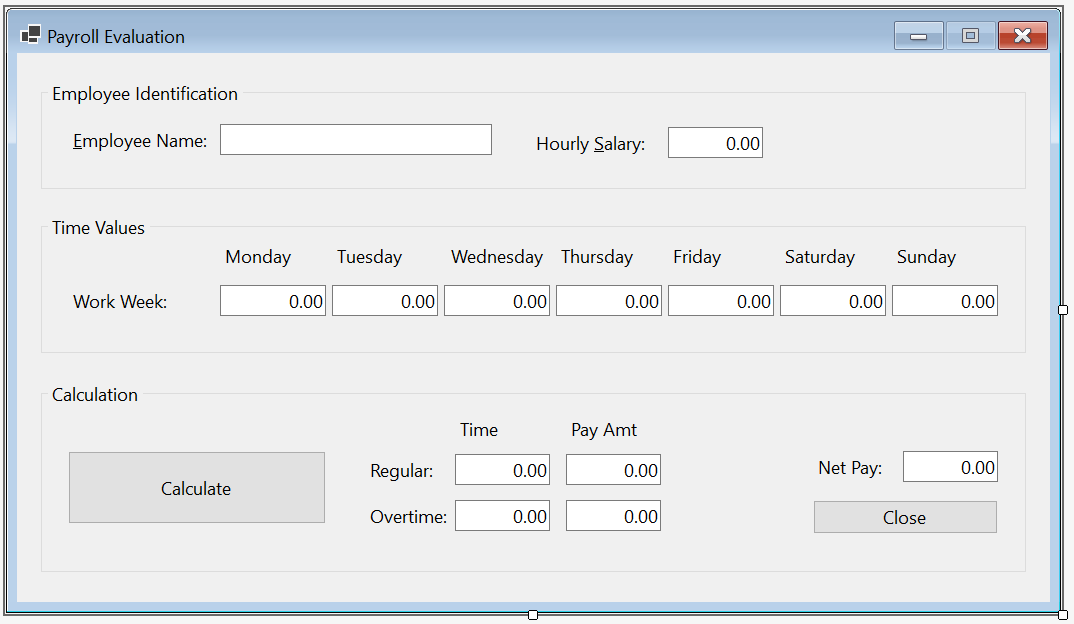
Employee Name: Gertrude Monay
Hourly Salary: 28.46
Work Week
    Monday:    8
    Tuesday:   7.5
    Wednesday: 6
    Thursday:  7.5
    Friday:    6.5
    Saturday:  0
    Sunday:    0


Employee Name: Micheline Hammond
Hourly Salary: 28.46
Time Worked
    Monday:    8
    Tuesday:   10.5
    Wednesday: 9
    Thursday:  8.5
    Friday:    9.5
    Saturday:  0
    Sunday:    0
|
|
|||
| Home | Copyright © 2010-2026, FunctionX | Thursday 12 December 2024, 09:34 | Home |
|
|
|||