Application Setup

Introduction

A Windows Forms application is a graphical program that uses one or more forms with Windows controls that make an application very user-friendly. One of the options offered by a Windows Forms application is to support a database where values or records can be created and managed.

In this exercise, we will create a Microsoft SQL Server database used in a Windows Forms application. To create and manage records, we will use ADO.NET abd the C# language.

Practical LearningPractical Learning: Introducing the Application

  1. Start Microsoft Visual Studio
  2. In the Visual Studio 2026 dialog box, click Create a New Project
  3. In the Create a New Project dialog box, in the Languages combo box, select C#
  4. In the list of projects templates, click Windows Forms App
  5. Click Next
  6. Change the Project Name to StellarWaterPoint
  7. Click Next
  8. In the Framework combo box, select the highest version: .NET 10.0 (Long Term Suppot)
  9. Click Create

A Database for an Application

As mentioned above, our water distribution application will use a database. You can create the database using Microsoft SQL Server or in the Visual Studio application as a local database. When setting up the database, we will create tables for water meters, customers, and water bills.

Practical LearningPractical Learning: Preparing a Database

  1. To create a database:
    • If you want to create the database in Microsoft Visual Studio as a local database:
      1. On the main menu of Microsoft Visual Studio, click View and click Server Explorer
      2. In the Server Explorer, right-click Data Connections and click Create New SQL Server Database...
      3. In the Server Name combo box, select your server or type (local)
      4. Set the database name as StellarWaterPoint1
      5. Click OK
      6. In the Server Explorer, right-click the StellarWaterPoint connection and click New Query
    • If you want to create the database in Microsoft SQL Server:
      1. Start SQL Server Management Studio
      2. In the Object Explorer, right-click the name of the server and click New Query
      3. In the empty document, type the following code:
        USE master;
        GO
        IF DB_ID (N'StellarWaterPoint1') IS NOT NULL
        	DROP DATABASE StellarWaterPoint1;
        GO
        CREATE DATABASE StellarWaterPoint1;
        GO
        USE StellarWaterPoint1;
        GO
      4. On the Standard toolbar, click the Execute button
      5. Delete everything in the Query Editor
  2. In the Query Editor, type the following code to create the tables:
    USE master;
    GO
    IF DB_ID (N'StellarWaterPoint01') IS NOT NULL
    	DROP DATABASE StellarWaterPoint01;
    GO
    CREATE DATABASE StellarWaterPoint01;
    GO
    USE StellarWaterPoint01;
    GO
    CREATE TABLE WaterMeters
    (
    	WaterMeterId int identity(1, 1),
    	MeterNumber  nvarchar(15) not null,
    	Make         nvarchar(25) null,
    	Model        nvarchar(15) not null,
    	MeterSize    nvarchar(15),
    	CONSTRAINT   PK_WaterMeters PRIMARY KEY(WaterMeterId)
    );
    GO
    
    CREATE TABLE AccountsTypes
    (
    	AccountTypeId  int identity(1, 1),
    	AccountType    nvarchar(5) not null,
    	TypeDefinition nvarchar(250) null,
    	CONSTRAINT   PK_AccountsTypes PRIMARY KEY(AccountTypeId)
    );
    GO
    
    CREATE TABLE Customers
    (
    	CustomerId    int identity(1, 1),
    	AccountNumber nvarchar(15)  not null,
    	AccountName   nvarchar(200) not null,
    	MeterNumber   nvarchar(15),
    	AccountType   nvarchar(5),
    	[Address]     nvarchar(150),
    	City          nvarchar(25),
    	County        nvarchar(35),
    	[State]       nvarchar(35),
    	ZIPCode       nvarchar(12),
    	CONSTRAINT    PK_Customers PRIMARY KEY(CustomerId)
    );
    GO
    
    CREATE TABLE WaterBills
    (
    	WaterBillId           int identity(1, 1),
    	WaterBillNumber       int          not null,
    	AccountNumber         nvarchar(15) not null,
    	MeterReadingStartDate nvarchar(50) not null,
    	MeterReadingEndDate   nvarchar(50) not null,
    	CounterReadingStart   nvarchar(15),
    	CounterReadingEnd     nvarchar(15),
    	BillingDays           int          not null,
    	TotalHCF              nvarchar(15),
    	TotalGallons          nvarchar(15),
    	FirstTierConsumption  nvarchar(15),
    	SecondTierConsumption nvarchar(15),
    	LastTierConsumption   nvarchar(15),
    	WaterCharges          nvarchar(15),
    	SewerCharges          nvarchar(15),
    	EnvironmentCharges    nvarchar(15),
    	ServiceCharges        nvarchar(15),
    	TotalCharges          nvarchar(15),
    	LocalTaxes            nvarchar(15),
    	StateTaxes            nvarchar(15),
    	PaymentDueDate        nvarchar(50),
    	AmountDue             nvarchar(15),
    	LatePaymentDueDate    nvarchar(50),
    	LateAmountDue         nvarchar(15),
    	CONSTRAINT            PK_WaterBills PRIMARY KEY(WaterBillId)
    );
    GO
    ---------------------------------------------------------------------
    INSERT INTO AccountsTypes(AccountType, TypeDefinition)
    VALUES(N'OTH', N'Other'),
          (N'BUS', N'General Business'),
          (N'RES', N'Residential Household'),
          (N'SGO', N'Social/Government/Non-Profit Organization'),
          (N'UUO', N'Unidentified or Unclassified Type of Organization'),
          (N'WAT', N'Water Intensive Business (Laudromat, Hair Salon, Restaurant, etc');
    GO
    
    CREATE VIEW CustomersAccounts
    AS
    	SELECT client.CustomerId    CustId,
               client.AccountNumber AcntNbr,
    		   client.AccountName   AcntName,
    		   client.MeterNumber   Meter,
    		   acntTypes.AccountType + N' - ' + acntTypes.TypeDefinition AcntType,
    		   client.[Address]     [Address],
    		   client.City		    City,
    		   client.County        County,
    		   client.[State]       [State],
    		   client.ZIPCode	    PostalCode
    	FROM   Customers client INNER JOIN AccountsTypes acntTypes
    	       ON client.AccountType = acntTypes.AccountType;
    GO
    
    CREATE VIEW WaterBillSummary
    AS
    	SELECT bills.WaterBillId,
               bills.WaterBillNumber,
               clients.AccountNumber + N' - ' + clients.AccountName +
    		                           N' in ' + City +
    								   N', ' + [State] +
    								   N'. Mtr #: ' + clients.MeterNumber +
    								   N', Acnt Type: ' + acntTypes.AccountType + 
    								   N' - ' + acntTypes.TypeDefinition AccountDetails,
               bills.MeterReadingStartDate,
               bills.MeterReadingEndDate,
               bills.BillingDays,
               bills.CounterReadingStart,
               bills.CounterReadingEnd,
               bills.TotalHCF,
               bills.TotalGallons,
               bills.PaymentDueDate,
               bills.AmountDue
    	FROM   WaterBills bills
    	       INNER JOIN Customers clients
               ON bills.AccountNumber = clients.AccountNumber
    		   INNER JOIN AccountsTypes acntTypes
    	       ON clients.AccountType = acntTypes.AccountType;
    GO
    
    CREATE PROCEDURE GetWaterMeter @MtrNbr nvarchar(15)
    AS
        BEGIN
            SELECT Make + 
    			   N' '   + Model + 
    			   N' (Mtr Size: ' + MeterSize + N')'
            FROM   WaterMeters
            WHERE  MeterNumber = @MtrNbr
        END;
    GO
    
    CREATE PROCEDURE IdentifyClient @AcntNbr nvarchar(15)
    AS
        BEGIN
            SELECT client.CustomerId    CustId,
                   client.AccountNumber AcntNbr,
                   client.AccountName   AcntName,
                   meters.MeterNumber MtrNbr,
    			   meters.Make + N' ' + meters.Model + N' (Meter Size: ' + meters.MeterSize + N')' WaterMeter,
                   acntTypes.AccountType + N' - ' + acntTypes.TypeDefinition TypeDef,
                   client.[Address]     [Address],
                   client.City          City,
                   client.County        County,
                   client.[State]       [State],
                   client.ZIPCode       ZIPCode
    	    FROM   Customers client
                   INNER JOIN WaterMeters meters
    	           ON client.MeterNumber = meters.MeterNumber
    	           INNER JOIN AccountsTypes acntTypes
    	           ON client.AccountType = acntTypes.AccountType
            WHERE client.AccountNumber = @AcntNbr
        END;
    GO
    
    CREATE PROCEDURE GetWaterBillDetails @BillNbr int
    AS
        BEGIN
            SELECT bills.WaterBillId,
                   clients.AccountNumber,
                   clients.AccountName,
            	   clients.MeterNumber + N' - ' + meters.Make + N' ' + meters.Model + N' (Mtr Size: ' + meters.MeterSize + N')' WaterMeter,
          		   acntTypes.AccountType + N' - ' + acntTypes.TypeDefinition AccountType,
                   clients.[Address],
                   clients.City,
                   clients.County,
                   clients.[State],
                   clients.ZIPCode,
                   bills.MeterReadingStartDate,
    	           bills.MeterReadingEndDate,
                   bills.CounterReadingStart,
    	           bills.CounterReadingEnd,
        	       bills.BillingDays,
    	           bills.TotalHCF,
    	           bills.TotalGallons,
        	       bills.FirstTierConsumption,
    	           bills.SecondTierConsumption,
    	           bills.LastTierConsumption,
        	       bills.WaterCharges,
    	           bills.SewerCharges,
    	           bills.EnvironmentCharges,
        	       bills.ServiceCharges,
    	           bills.TotalCharges,
    	           bills.LocalTaxes,
        	       bills.StateTaxes,
    	           bills.PaymentDueDate,
        	       bills.AmountDue,
    	           bills.LatePaymentDueDate,
    	           bills.LateAmountDue 
        	FROM   WaterBills bills
    	           INNER JOIN Customers clients
                   ON bills.AccountNumber = clients.AccountNumber
        		   INNER JOIN AccountsTypes acntTypes
    	           ON clients.AccountType = acntTypes.AccountType
                   INNER JOIN WaterMeters meters
    	           ON clients.MeterNumber = meters.MeterNumber
            WHERE  bills.WaterBillNumber  = @BillNbr
    	END;
    GO
  3. Right-click inside the document and click Execute

Supporting ADO.NET

To perform the database operations of our application, we will use ADO.NET.

Practical LearningPractical Learning: Supporting ADO.NET

  1. In the Solution Explorer, right-click the name of the project and click Manage NuGet Packages...
  2. In the NuGet tab, click Browse
  3. In the combo box, type Data.SqlClient
  4. In the list, click Microsoft.Data.SqlClient
  5. In the right list, click Install
  6. In the Preview Changes dialog box, click Apply
  7. In the License Acceptance dialog box, click I Accept

Water Meters

Introduction

Our application will use forms to create water meter records, to view a record of a water meter, to edit or to delete the record of a water meter.

Practical LearningPractical Learning: Introducing Water Meters

  1. To create a folder, in the Solution Explorer, right-click the StellarWaterPoint1 project -> Add -> New Folder
  2. Type WaterMeters as the name of the folder

Displaying Water Meters

To let the user see a list of the water meters in the database, we will use a form equipped with a list view.

Practical LearningPractical Learning: Displaying Water Meters

  1. To create a form, in the Solution Explorer, right-click WaterMeters -> Add -> Form (Windows Forms)...
  2. TFor the Name of the form, type Central
  3. Click Add
  4. In the Toolbox, click the ListView button and click the form
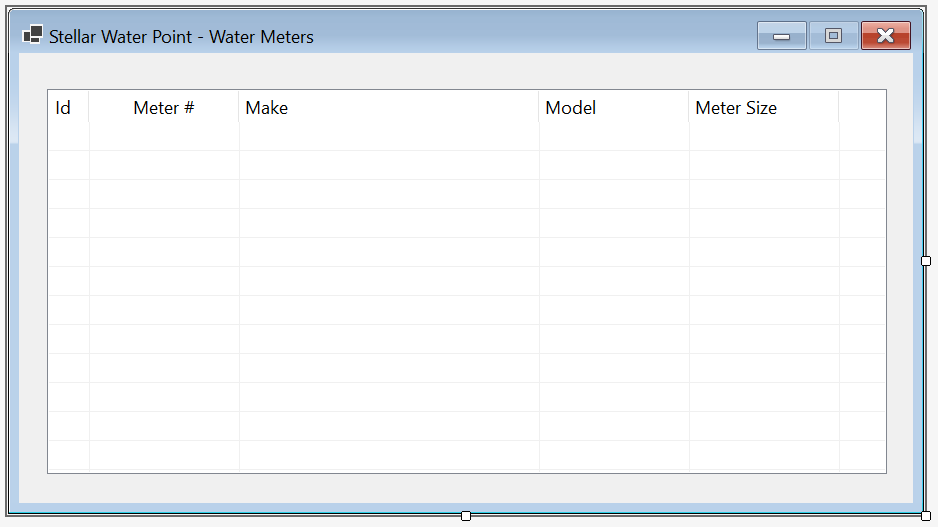
  5. On the form, right-click the list view and click Edit Columns...
  6. Create the columns as follows:
    (Name) Text Width
    colWaterMeterId Id 40
    colMeterNumber Meter # 150
    colMake Make 300
    colModel Model 150
    colMeterSize Meter Size 150
  7. Click OK
  8. Position and resize the list view on the form as follows:

    Stellar Water Point - Water Meters

    Control (Name) Other Properties
    ListView List View lvwWaterMeters FullRowSelect: True
    GridLines: True
    View: Details
  9. Doubte-click an unoccupied area of the form to generate its Load event
  10. Change the document as follows:
    using System.Data;
    using Microsoft.Data.SqlClient;
    
    namespace StellarWaterPoint.WaterMeters
    {
        public partial class Central : Form
        {
            public Central()
            {
                InitializeComponent();
            }
    
            private void ShowWaterMeters()
            {
                lvwWaterMeters.Items.Clear();
    
                using (SqlConnection scStellarWaterPoint =
                                new SqlConnection("Data Source=(local);" +
                                                  "Database=StellarWaterPoint101;" +
                                                  "Integrated Security=SSPI;" +
                                                  "TrustServerCertificate=True;"))
                {
                    SqlCommand cmdWaterMeters = new SqlCommand("SELECT ALL * FROM WaterMeters;", scStellarWaterPoint);
    
                    scStellarWaterPoint.Open();
                    cmdWaterMeters.ExecuteNonQuery();
    
                    SqlDataAdapter sdaWaterMeters = new SqlDataAdapter(cmdWaterMeters);
    
                    DataSet dsWaterMeters = new DataSet("WaterMetersSet");
    
                    sdaWaterMeters.Fill(dsWaterMeters);
    
                    foreach (DataRow drWaterMeter in dsWaterMeters.Tables[0].Rows)
                    {
                        ListViewItem lviWaterMeter = new ListViewItem(drWaterMeter[0].ToString());
                        lviWaterMeter.SubItems.Add(drWaterMeter[1].ToString());
                        lviWaterMeter.SubItems.Add(drWaterMeter[2].ToString());
                        lviWaterMeter.SubItems.Add(drWaterMeter[3].ToString());
                        lviWaterMeter.SubItems.Add(drWaterMeter[4].ToString());
                        lvwWaterMeters.Items.Add(lviWaterMeter);
                    }
                }
            }
    
            private void Central_Load(object sender, EventArgs e)
            {
                ShowWaterMeters();
            }
        }
    }
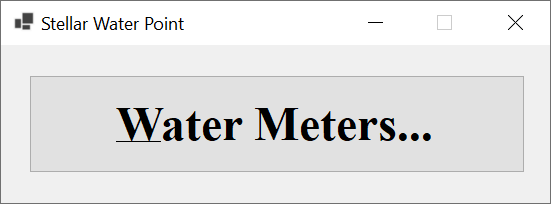
  11. In the Solution Explorer, double-click WaterDistribution.cs to display the main form of the application
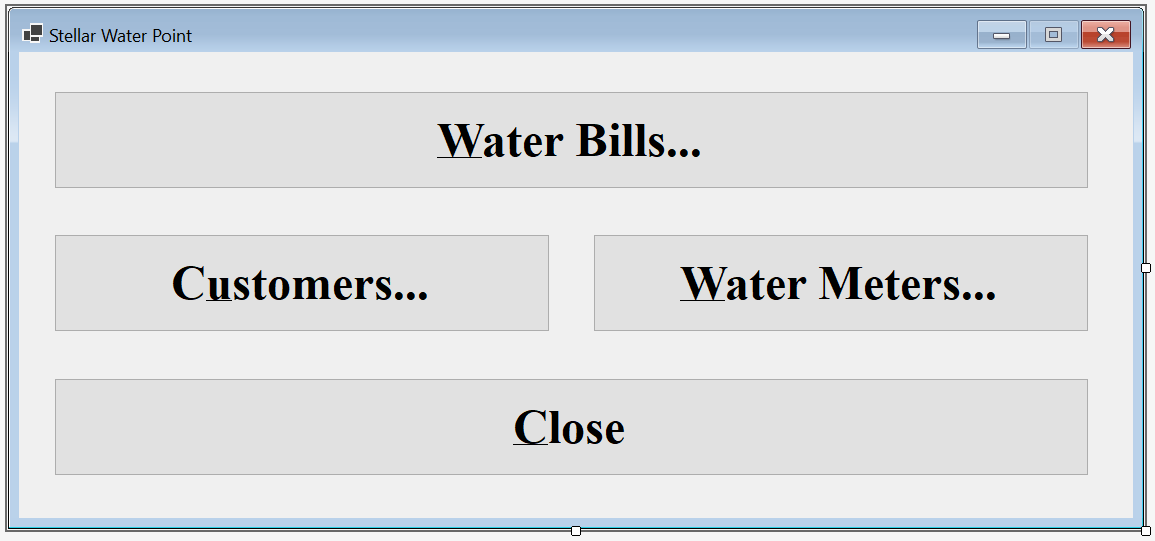
  12. From the Toolbox, add a button to the form
  13. From the Properties window, change the characteristics of the button as follows:

    Stellar Water Point

    Control (Name) Text Font
    Button Button btnWaterMeters Water &Meters... Times New Roman, 24pt, style=Bold
  14. Double-click the &Water Meters button
  15. Impliment the event as follows:
    namespace StellarWaterPoint1
    {
        public partial class WaterDistribution : Form
        {
            public WaterDistribution()
            {
                InitializeComponent();
            }
    
            private void btnWaterMeters_Click(object sender, EventArgs e)
            {
                WaterMeters.Central central = new WaterMeters.Central();
    
                central.Show();
            }
        }
    }

A Water Meter Record

Our application will have a list of water meters. A record for each water meter must be created. To make this happen, we will equip the application with an appropriate form.

Practical LearningPractical Learning: Creating a Water Meter Record

  1. To create a form, in the Solution Explorer, right-click the WaterMeters folder -> Add -> Form (Windows Forms)...
  2. For the Name of the file, type Create as the name of the form
  3. Click Add
  4. Design the form as follows:

    Stellar Water Point - New Water Meter

    Control (Name) Text Other Properties
    Label Label   &Meter #:  
    MaskedTextBox Masked Text Box mtbMeterNumber   Masked: 000-000-000
    Label Label   M&ake:  
    TextBox Text Box txtMake   Modifiers: Public
    Label Label   M&odel:  
    TextBox Text Box txtModel   Modifiers: Public
    Label Label   Me&ter Size:  
    TextBox Text Box txtMeterSize   Modifiers: Public
    Button Button btnOK &OK DialogResult: OK
    Button Button btnCancel &Cancel DialogResult: Cancel
  5. Using the Properties window, change some characteristics of the form as follows:
    FormBorderStyle: FixedDialog
    Text:            Stellar Water Point - Water Meter Setup
    StartPosition:   CenterScreen
    AcceptButton:    btnOK
    CancelButton:    btnCancel
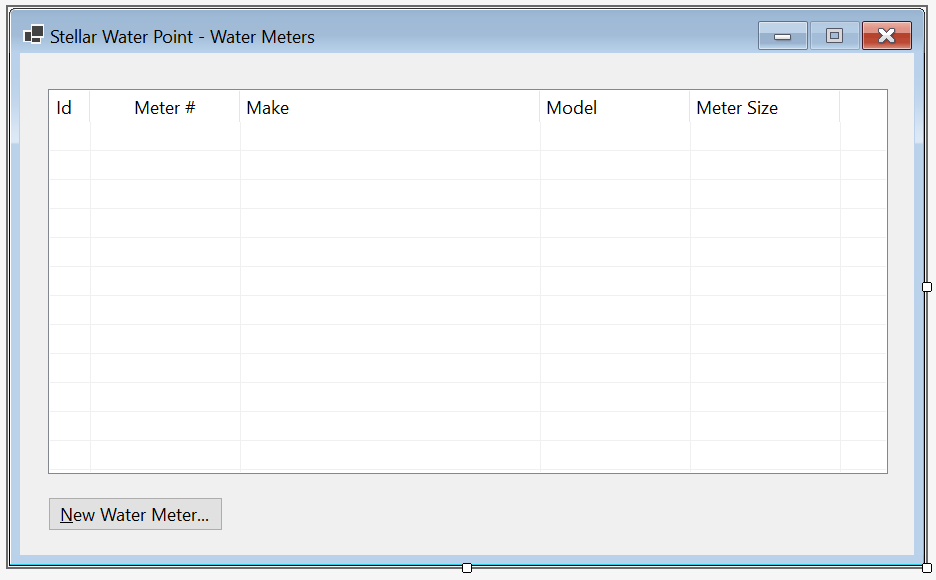
  6. In the Solution Explorer, below the WaterMeters folder, double-click Central.cs
  7. From the Toolbox, add a button to the form below the list view
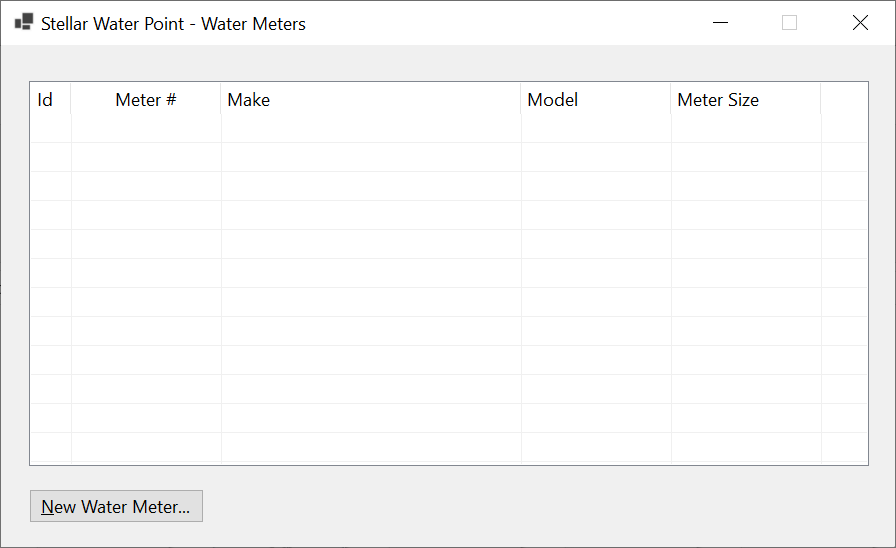
  8. Change the characteristics of the button as follows:

    Stellar Water Point - Water Meters

    Control (Name) Other Properties
    ListView List View lvwWaterMeters
    Button Button btnNewWaterMeter &New Water Meter...
  9. On the Central form, double-click the New Water Meter button
  10. Implement the event as follows:
    private void btnNewWaterMeter_Click(object sender, EventArgs e)
    {
        Create editor = new Create();
    
        if (editor.ShowDialog() == DialogResult.OK)
        {
            if(string.IsNullOrEmpty(editor.mtbMeterNumber.Text))
            {
                MessageBox.Show("You must specify a meter number for the water meter; " +
                                "otherwise the record cannot be created.",
                                "Stellar Water Point",
                                MessageBoxButtons.OK, MessageBoxIcon.Information);
                return;
            }
    
            using (SqlConnection scStellarWaterPoint =
                        new SqlConnection("Data Source=(local);" +
                                          "Database=StellarWaterPoint101;" +
                                          "Integrated Security=SSPI;" +
                                          "TrustServerCertificate=True;"))
            {
                SqlCommand cmdWaterMeters = new SqlCommand("INSERT INTO WaterMeters(MeterNumber, Make, Model, MeterSize)" +
                                                           "VALUES(N'" + editor.mtbMeterNumber.Text + "', " +
                                                           "       N'" + editor.txtMake.Text        + "', " +
                                                           "       N'" + editor.txtModel.Text       + "', " +
                                                           "       N'" + editor.txtMeterSize.Text   + "');",
                                                           scStellarWaterPoint);
                        
                scStellarWaterPoint.Open();
                cmdWaterMeters.ExecuteNonQuery();
    
                MessageBox.Show("The water meter record has been created.",
                                "Stellar Water Point",
                                MessageBoxButtons.OK, MessageBoxIcon.Information);
            }
        }
    
        ShowWaterMeters();
    }
  11. To execute the application, on the main menu, click Debug -> Start Without Debugging

    Stellar Water Point

  12. On the Central form, click the Water Meters button:

    Stellar Water Point - Water Meters

  13. Click the New Water Meter button:

    Stellar Water Point - New Water Meter

  14. Enter the value for each of the following records and click OK (or press Enter) for each:

    Meter # Make Model Meter Size
    392-494-572 Constance Technologies TG-4822 5/8 Inches
    938-705-869 Stan Wood 66-G 1 Inch
    588-279-663 Estellano NCF-226 3/4 Inches

    Stellar Water Point - Water Meters

  15. Close the forms and return to your programming environment

Water Meter Details

Sometimes, a user may want to check the values of a water meter record. To support this, we will add an appropriate form to our application.

Practical LearningPractical Learning: Creating a Water Meter Record
  1. To create a form, in the Solution Explorer, right-click WaterMeters -> Add -> Form (Windows Forms)...
  2. For the Name of the form, type Details
  3. Press Enter
  4. Resize the Editor form to have the same size as the Create form
  5. Copy everything from the Create form and paste it in the Editor form
  6. Delete the bottom two buttons and add a new button
  7. Change the design of the form as follows:

    Stellar Water Point - New Water Meter

    Control (Name) Text
    Button Button btnFindWateMeter &Find Water Meter
    Button Button btnClose &Close
  8. On the form, double-click the Find button
  9. Return to the form and double-click the Close button
  10. Change the document as follows:
    using System.Data;
    using Microsoft.Data.SqlClient;
    
    namespace StellarWaterPoint.WaterMeters
    {
        public partial class Details : Form
        {
            public Details()
            {
                InitializeComponent();
            }
    
            private void btnFindWateMeter_Click(object sender, EventArgs e)
            {
                if(mtbMeterNumber.Text.Replace("-", "").Replace(" ", "") == "")
                {
                    MessageBox.Show("You must specify a valid meter number for an existing water meter.",
                                    "Stellar Water Point",
                                    MessageBoxButtons.OK, MessageBoxIcon.Information);
                    txtMake.Text      = string.Empty;
                    txtModel.Text     = string.Empty;
                    txtMeterSize.Text = string.Empty;
                    return;
                }
    
                using (SqlConnection scStellarWaterPoint =
                                new SqlConnection("Data Source=(local);" +
                                                  "Database=StellarWaterPoint101;" +
                                                  "Integrated Security=SSPI;" +
                                                  "TrustServerCertificate=True;"))
                {
                    SqlCommand cmdWaterMeters = new SqlCommand("SELECT ALL * FROM WaterMeters " +
                                                               "WHERE MeterNumber = N'" + mtbMeterNumber.Text + "';",
                                                               scStellarWaterPoint);
    
                    scStellarWaterPoint.Open();
                    cmdWaterMeters.ExecuteNonQuery();
    
                    SqlDataAdapter sdaWaterMeters = new SqlDataAdapter(cmdWaterMeters);
    
                    DataSet        dsWaterMeters  = new DataSet("WaterMetersSet");
    
                    sdaWaterMeters.Fill(dsWaterMeters);
    
                    foreach (DataRow drWaterMeter in dsWaterMeters.Tables[0].Rows)
                    {
                        txtMake.Text      = drWaterMeter[2].ToString();
                        txtModel.Text     = drWaterMeter[3].ToString();
                        txtMeterSize.Text = drWaterMeter[4].ToString();
                    }
                }
            }
        }
    }
  11. In the Solution Explorer, below the WaterMeters folder, double-click Central.cs to open its form
  12. From the Toolbox, add a button to the form below the list view and to the right of the New Water Meter button
  13. Change the characteristics of the button as follows:

    Stellar Water Point - Water Meters

    Control (Name) Other Properties
    ListView List View lvwWaterMeters No Change
    Button Button btnNewWaterMeter &New Water Meter...
    Button Button btnViewWaterMeter &View Water Meter...
  14. Double-click the View Water Meter button
  15. Change the document as follows:
    private void btnViewWaterMeter_Click(object sender, EventArgs e)
    {
        Details details = new Details();
    
        details.Show();
    }
  16. To execute the application, on the main menu, click Debug -> Start Without Debugging

    Stellar Water Point

  17. On the Water Distribution form, click the Water Meters button:

    Stellar Water Point - View Water Meter

  18. On the Central form of water meters, click the View Water Meter button:

    Stellar Water Point - View Water Meter

  19. In the Meter # text, type 392-494-572
  20. Click the Find button:

    Stellar Water Point - View Water Meter

  21. Close the Details form
  22. On the Water Meters form, double-click the third record
  23. Close the forms and return to your programming environment

Updating a Water Meter Details

One of the routine operations performed on a database is to change the details of a record. To support this operation for a water meter, we will create a form that can be used to update the information of a water meter.

Practical LearningPractical Learning: Updating a Water Meter

  1. To create a form, in the Solution Explorer, right-click WaterMeters -> Add -> Form (Windows Forms)...
  2. For the Name of the file, type Editor as the name of the form
  3. Click Add
  4. Resize the Editor form to have the same size as the Details form
  5. Copy everything from the Details form and paste it in the Editor form
  6. Change the design of the form as follows:

    Stellar Water Point - New Water Meter

    Control (Name) Text
    Button Button btnUpdateWateMeter &Update Water Meter
  7. On the form, double-click the Find button
  8. Change the document as follows:
    using System.Data;
    using Microsoft.Data.SqlClient;
    
    namespace StellarWaterPoint.WaterMeters
    {
        public partial class Editor : Form
        {
            public Editor()
            {
                InitializeComponent();
            }
    
            private void btnFindWateMeter_Click(object sender, EventArgs e)
            {
                if (mtbMeterNumber.Text.Replace("-", "").Replace(" ", "") == "")
                {
                    MessageBox.Show("You must specify a valid meter number for an existing water meter.",
                                    "Stellar Water Point",
                                    MessageBoxButtons.OK, MessageBoxIcon.Information);
                    txtMake.Text      = string.Empty;
                    txtModel.Text     = string.Empty;
                    txtMeterSize.Text = string.Empty;
                    return;
                }
    
                using (SqlConnection scStellarWaterPoint =
                                new SqlConnection("Data Source=(local);" +
                                                  "Database=StellarWaterPoint101;" +
                                                  "Integrated Security=SSPI;" +
                                                  "TrustServerCertificate=True;"))
                {
                    SqlCommand cmdWaterMeters = new SqlCommand("SELECT ALL * FROM WaterMeters " +
                                                               "WHERE MeterNumber = N'" + mtbMeterNumber.Text + "';",
                                                               scStellarWaterPoint);
    
                    scStellarWaterPoint.Open();
                    cmdWaterMeters.ExecuteNonQuery();
    
                    SqlDataAdapter sdaWaterMeters = new SqlDataAdapter(cmdWaterMeters);
                    DataSet        dsWaterMeters  = new DataSet("WaterMetersSet");
    
                    sdaWaterMeters.Fill(dsWaterMeters);
    
                    foreach (DataRow drWaterMeter in dsWaterMeters.Tables[0].Rows)
                    {
                        txtMake.Text      = drWaterMeter[2].ToString();
                        txtModel.Text     = drWaterMeter[3].ToString();
                        txtMeterSize.Text = drWaterMeter[4].ToString();
                    }
                }
            }
        }
    }
  9. Return to the form and double-click the Update Water Meter button
  10. Change the document as follows:
    private void btnUpdateWaterMeter_Click(object sender, EventArgs e)
    {
        if (mtbMeterNumber.Text.Replace("-", "").Replace(" ", "") == "")
        {
            MessageBox.Show("You must specify a meter number for the water meter; " +
                            "otherwise the record cannot be created.",
                            "Stellar Water Point",
                            MessageBoxButtons.OK, MessageBoxIcon.Information);
            return;
        }
                
        using (SqlConnection scStellarWaterPoint =
                        new SqlConnection("Data Source=(local);" +
                                          "Database=StellarWaterPoint101;" +
                                          "Integrated Security=SSPI;" +
                                          "TrustServerCertificate=True;"))
        {
            SqlCommand cmdWaterMeters = new SqlCommand("UPDATE WaterMeters SET Make      = N'" + txtMake.Text      + "' WHERE MeterNumber = N'" + mtbMeterNumber.Text + "';" +
                                                       "UPDATE WaterMeters SET Model     = N'" + txtModel.Text     + "' WHERE MeterNumber = N'" + mtbMeterNumber.Text + "';" +
                                                       "UPDATE WaterMeters SET MeterSize = N'" + txtMeterSize.Text + "' WHERE MeterNumber = N'" + mtbMeterNumber.Text + "';",
                                                       scStellarWaterPoint);
    
            scStellarWaterPoint.Open();
            cmdWaterMeters.ExecuteNonQuery();
    
            MessageBox.Show("The water meter record has been updated.",
                            "Stellar Water Point",
                            MessageBoxButtons.OK, MessageBoxIcon.Information);
        }
    
        Close();
    }
  11. Return to the form and double-click the Close button
  12. Implement the event as follows:
    private void btnClose_Click(object sender, EventArgs e)
    {
        Close();
    }
  13. In the Solution Explorer, below the WaterMeters folder, double-click Central.cs
  14. From the Toolbox, add a button to the form below the list view and on the right side of the View Water Meter button
  15. Change the characteristics of the button as follows:

    Stellar Water Point - Water Meters

    Control (Name) Other Properties
    ListView List View lvwWaterMeters
    Button Button btnNewWaterMeter &New Water Meter...
    Button Button btnViewWaterMeter &View Water Meter...
    Button Button btnEditWaterMeter &Edit Water Meter...
  16. Display the Central form of the WaterMeters folder
  17. Double-click the Update Water Meter button
  18. Change the document as follows:
    private void btnEditWaterMeter_Click(object sender, EventArgs e)
    {
        Editor editor = new();
        
        editor.ShowDialog();
    
        ShowWaterMeters();
    }
  19. To execute the application, on the main menu, click Debug -> Start Without Debugging:

    Stellar Water Point

  20. On the Central form, click the Water Meters button:

    Stellar Water Point - View Water Meter

  21. Click the Edit Water Meter button:

    Stellar Water Point - Water Meter Editor

  22. In the Meter # text, type 938-705-869
  23. Click the Find button

    Stellar Water Point - Water Meter Editor

  24. Change the values as follows:
    Make: Stanford Trend
    Model: 266G
    Meter Size: 1 1/2 Inches

    Stellar Water Point - New Water Meter

  25. Click the Update button:

    Stellar Water Point - Water Meters

  26. Close the forms and return to your programming environment

Removing a Water Meter from the Database

If a water meter has become useless and you want to make sure it is no more available for customer use, you can delete its record. To assist the user, we will create a form for that operation.

Practical LearningPractical Learning: Deleting a Water Meter Record

  1. To create a form, in the Solution Explorer, right-click WaterMeters -> Add -> Form(Windows Forms)...
  2. In the Name text box, replace the string with Delete as the name of the form
  3. Press Enter
  4. Resize the Delete form to have the same size as the Details form
  5. Copy everything from the Details form and paste it in the Delete form
  6. Change the bottom button as follows:

    Stellar Water Point - New Water Meter

    Control (Name) Text
    Button Button btnDeleteWateMeter &Delete Water Meter
  7. On the form, double-click the Find Water Meter button
  8. Change the document as tollows:
    using System.Data;
    using Microsoft.Data.SqlClient;
    
    namespace StellarWaterPoint.WaterMeters
    {
        public partial class Delete : Form
        {
            public Delete()
            {
                InitializeComponent();
            }
    
            private void btnFindWateMeter_Click(object sender, EventArgs e)
            {
                if (mtbMeterNumber.Text.Replace("-", "").Replace(" ", "") == "")
                {
                    MessageBox.Show("You must specify a valid meter number for an existing water meter.",
                                    "Stellar Water Point",
                                    MessageBoxButtons.OK, MessageBoxIcon.Information);
                    txtMake.Text = string.Empty;
                    txtModel.Text = string.Empty;
                    txtMeterSize.Text = string.Empty;
                    return;
                }
    
                using (SqlConnection scStellarWaterPoint =
                                new SqlConnection("Data Source=(local);" +
                                                  "Database=StellarWaterPoint101;" +
                                                  "Integrated Security=SSPI;" +
                                                  "TrustServerCertificate=True;"))
                {
                    SqlCommand cmdWaterMeters = new SqlCommand("SELECT ALL * FROM WaterMeters " +
                                                               "WHERE MeterNumber = N'" + mtbMeterNumber.Text + "';",
                                                               scStellarWaterPoint);
    
                    scStellarWaterPoint.Open();
                    cmdWaterMeters.ExecuteNonQuery();
    
                    SqlDataAdapter sdaWaterMeters = new SqlDataAdapter(cmdWaterMeters);
                    DataSet        dsWaterMeters  = new DataSet("WaterMetersSet");
    
                    sdaWaterMeters.Fill(dsWaterMeters);
    
                    foreach (DataRow drWaterMeter in dsWaterMeters.Tables[0].Rows)
                    {
                        txtMake.Text      = drWaterMeter[2].ToString();
                        txtModel.Text     = drWaterMeter[3].ToString();
                        txtMeterSize.Text = drWaterMeter[4].ToString();
                    }
                }
            }
        }
    }
  9. Return to the form and double-click the Delete Water Meter button
  10. Change the document as tollows:
    private void btnDeleteWaterMeter_Click(object sender, EventArgs e)
    {
        if (mtbMeterNumber.Text.Replace("-", "").Replace(" ", "") == "")
        {
            MessageBox.Show("You must specify a meter number for the water meter; " +
                            "otherwise the record cannot be created.",
                            "Stellar Water Point",
                            MessageBoxButtons.OK, MessageBoxIcon.Information);
            return;
        }
    
        using (SqlConnection scStellarWaterPoint =
                        new SqlConnection("Data Source=(local);" +
                                          "Database=StellarWaterPoint101;" +
                                          "Integrated Security=SSPI;" +
                                          "TrustServerCertificate=True;"))
        {
            SqlCommand cmdWaterMeters = new SqlCommand("DELETE WaterMeters WHERE MeterNumber = N'" + mtbMeterNumber.Text + "';",
                                                       scStellarWaterPoint);
    
            scStellarWaterPoint.Open();
            cmdWaterMeters.ExecuteNonQuery();
    
            MessageBox.Show("The water meter record has been deleted.",
                            "Stellar Water Point",
                            MessageBoxButtons.OK, MessageBoxIcon.Information);
        }
    
        Close();
    }
  11. Return to the form and double-click the Close button
  12. Change the document as tollows:
    private void btnClose_Click(object sender, EventArgs e)
    {
        Close();
    }
  13. In the Solution Explorer, below the WaterMeters folder, double-click Central.cs
  14. From the Toolbox, add two buttons to the form below the list view and on the right side of the Edit Water Meter button
  15. Change the characteristics of the new buttons as follows:

    Stellar Water Point - Water Meters

    Control (Name) Text Anchor Other Properties
    ListView List View LvwWaterMeters   Top, Bottom, Left, Right FullRowSelect: True
    GridLines: True
    View: Details
    Button Button BtnNewWaterMeter &New Water Meter... Bottom, Right  
    Button Button BtnViewWaterMeter &View Water Meter... Bottom, Right  
    Button Button BtnEditWaterMeter &Edit Water Meter... Bottom, Right  
    Button Button BtnDeleteWaterMeter &Delete Water Meter... Bottom, Right  
  16. In the Solution Explorer, below WaterMeters, double-click Central.cs to open its form
  17. Double-click the Delete Water Meter button
  18. Return to the Central form of the water meters and double-click the Close button
  19. Change the document as follows:
    using System.Data;
    using Microsoft.Data.SqlClient;
    
    namespace StellarWaterPoint.WaterMeters
    {
        public partial class Central : Form
        {
            public Central()
            {
                InitializeComponent();
            }
    
            private void ShowWaterMeters()
            {
                lvwWaterMeters.Items.Clear();
    
                using (SqlConnection scStellarWaterPoint =
                                new SqlConnection("Data Source=(local);" +
                                                  "Database=StellarWaterPoint101;" +
                                                  "Integrated Security=SSPI;" +
                                                  "TrustServerCertificate=True;"))
                {
                    SqlCommand cmdWaterMeters = new SqlCommand("SELECT ALL * FROM WaterMeters;",
                                                               scStellarWaterPoint);
    
                    scStellarWaterPoint.Open();
                    cmdWaterMeters.ExecuteNonQuery();
    
                    SqlDataAdapter sdaWaterMeters = new SqlDataAdapter(cmdWaterMeters);
    
                    DataSet        dsWaterMeters  = new DataSet("WaterMetersSet");
    
                    sdaWaterMeters.Fill(dsWaterMeters);
    
                    foreach (DataRow drWaterMeter in dsWaterMeters.Tables[0].Rows)
                    {
                        ListViewItem lviWaterMeter = new ListViewItem(drWaterMeter[0].ToString());
                        lviWaterMeter.SubItems.Add(drWaterMeter[1].ToString());
                        lviWaterMeter.SubItems.Add(drWaterMeter[2].ToString());
                        lviWaterMeter.SubItems.Add(drWaterMeter[3].ToString());
                        lviWaterMeter.SubItems.Add(drWaterMeter[4].ToString());
                        lvwWaterMeters.Items.Add(lviWaterMeter);
                    }
                }
            }
    
            private void Central_Load(object sender, EventArgs e)
            {
                ShowWaterMeters();
            }
    
            private void btnNewWaterMeter_Click(object sender, EventArgs e)
            {
                Create editor = new Create();
    
                if (editor.ShowDialog() == DialogResult.OK)
                {
                    if (editor.mtbMeterNumber.Text.Replace("-", "").Replace(" ", "") == "")
                    {
                        MessageBox.Show("You must specify a meter number for the water meter; " +
                                        "otherwise the record cannot be created.",
                                        "Stellar Water Point",
                                        MessageBoxButtons.OK, MessageBoxIcon.Information);
                        return;
                    }
    
                    using (SqlConnection scStellarWaterPoint =
                                new SqlConnection("Data Source=(local);" +
                                                  "Database=StellarWaterPoint101;" +
                                                  "Integrated Security=SSPI;" +
                                                  "TrustServerCertificate=True;"))
                    {
                        SqlCommand cmdWaterMeters = new SqlCommand("INSERT INTO WaterMeters(MeterNumber, Make, Model, MeterSize)" +
                                                                   "VALUES(N'" + editor.mtbMeterNumber.Text + "', " +
                                                                   "       N'" + editor.txtMake.Text        + "', " +
                                                                   "       N'" + editor.txtModel.Text       + "', " +
                                                                   "       N'" + editor.txtMeterSize.Text   + "');",
                                                                   scStellarWaterPoint);
    
                        scStellarWaterPoint.Open();
                        cmdWaterMeters.ExecuteNonQuery();
    
                        MessageBox.Show("The water meter record has been created.",
                                        "Stellar Water Point",
                                        MessageBoxButtons.OK, MessageBoxIcon.Information);
                    }
                }
    
                ShowWaterMeters();
            }
    
            private void btnViewWaterMeter_Click(object sender, EventArgs e)
            {
                Details details = new Details();
    
                details.Show();
            }
    
            private void btnEditWaterMeter_Click(object sender, EventArgs e)
            {
                Editor editor = new Editor();
    
                editor.ShowDialog();
    
                ShowWaterMeters();
            }
    
            private void btnDeleteWaterMeter_Click(object sender, EventArgs e)
            {
                Delete delete = new Delete();
    
                delete.ShowDialog();
    
                ShowWaterMeters();
            }
    
            private void btnClose_Click(object sender, EventArgs e)
            {
                Close();
            }
        }
    }
  20. To execute the application, on the main menu, click Debug -> Start Without Debugging:

    Stellar Water Point - Water Meters

  21. On the Central form, click the Water Meters button:

    Stellar Water Point - Water Meters

  22. On the Central form of the water meters, click the Delete Water Meter button:

    Stellar Water Point - Water Meter Deletion

  23. In the Meter # text, type 588-279-663
  24. Click the Find button:

    Stellar Water Point - Water Meter Deletion

  25. Click the Delete button
  26. Read the text on the message box:

    Stellar Water Point - Water Meter Deletion

    On the message box, click Yes

    Stellar Water Point - Water Meters

  27. Close the forms and return to your programming environment.
    Here is the SQL code to delete the table of water meters and its records:
    USE StellarWaterPoint1;
    GO
    DROP TABLE WaterMeters;
    GO
    CREATE TABLE WaterMeters
    (
    	WaterMeterId int identity(1, 1),
    	MeterNumber  nvarchar(15) not null,
    	Make         nvarchar(25) null,
    	Model        nvarchar(15) not null,
    	MeterSize    nvarchar(15),
    	CONSTRAINT   PK_WaterMeters PRIMARY KEY(WaterMeterId)
    );
    GO
    INSERT INTO WaterMeters(MeterNumber, Make, Model, MeterSize)
    VALUES(N'392-494-572', N'Constance Technologies', N'TG-4822',  N'5/8 Inches'  ),
          (N'938-725-869', N'Stanford Trend',         N'266G',     N'1 1/2 Inches'),
          (N'588-279-663', N'Estellano',              N'NCF-226',  N'4 Inches'    ),
          (N'186-962-805', N'Lansome',                N'2800',     N'1 1/2 Inches'),
          (N'379-386-979', N'Planetra',               N'P-2020',   N'4 Inches'    ),
          (N'580-742-825', N'Kensa Sons',             N'KS2000A',  N'1 3/4 Inches'),
          (N'849-351-444', N'Raynes Energica',        N'a1088',    N'2 Inches'    ),
          (N'208-428-308', N'Constance Technologies', N'808D',     N'3/4 Inches'  ),
          (N'738-588-249', N'Warrington',             N'W4242',    N'5/8 Inches'  ),
          (N'496-813-794', N'Estellano',              N'NCF-226',  N'3/4 Inches'  ),
          (N'862-715-006', N'Warrington',             N'W-4040',   N'1/2 Inch'    ),
          (N'649-358-184', N'Raynes Energica',        N'b1700',    N'1 1/2 Inches'),
          (N'928-317-924', N'Gongola',                N'GN1000',   N'2 Inch'      ),
          (N'595-753-147', N'Grass Grill',            N'CRC-1000', N'1 Inch'      ),
          (N'799-528-461', N'Kensa Sons',             N'K-584-L',  N'3/4 Inches'  ),
          (N'386-468-057', N'Estellano',              N'NCF-226',  N'3/4 Inches'  ),
          (N'938-275-294', N'Constance Technologies', N'TT-8822',  N'4 Inches'    ),
          (N'288-427-585', N'Planetra',               N'P-2020',   N'1/2 Inch'    ),
          (N'394-835-297', N'Raynes Energica',        N'i2022',    N'3/4 Inches'  ),
          (N'847-252-246', N'Master Stream',          N'2000-MS',  N'1 1/2 Inches'),
          (N'349-725-848', N'Planetra',               N'P-8000',   N'4 Inches'    ),
          (N'713-942-058', N'Master Stream',          N'3366-MS',  N'3/4 Inches'  ),
          (N'747-581-379', N'Warrington',             N'W4242',    N'5/8 Inches'  ),
          (N'582-755-263', N'Kensa Sons',             N'KS2000A',  N'1 Inch'      ),
          (N'827-260-758', N'Raynes Energica',        N'a1088',    N'1-1/4 Inch'  ),
          (N'837-806-836', N'Lansome',                N'7400',     N'5/8 Inches'  ),
          (N'207-964-835', N'Constance Technologies', N'TG-6220',  N'5/8 Inches'  ),
          (N'296-837-495', N'Raynes Energica',        N'QG505',    N'4 Inches'    ),
          (N'468-359-486', N'Grass Grill',            N'KLP-8822', N'1-1/4 Inch'  ),
          (N'931-486-003', N'Planetra',               N'P-2020',   N'1/2 Inch'    ),
          (N'483-770-648', N'Warren',                 N'WWW',      N'0.1 Inches'  ),
          (N'592-824-957', N'Kensa Sons',             N'D-497-H',  N'3/4 Inches'  ),
          (N'293-835-704', N'Gongola',                N'GOL1000',  N'1/2 Inch'    ),
          (N'739-777-749', N'Warrington',             N'W2200W',   N'3/4 Inches'  ),
          (N'374-886-284', N'Raynes Energica',        N'i2022',    N'3/4 Inches'  ),
          (N'186-959-757', N'Kensa Sons',             N'M-686-G',  N'1 1/2 Inches'),
          (N'594-827-359', N'Planetra',               N'P-8000',   N'1 Inch'      ),
          (N'394-739-242', N'Master Stream',          N'9393-TT',  N'5/8 Inches'  ),
          (N'529-283-752', N'Constance Technologies', N'404T',     N'3/4 Inches'  ),
          (N'295-770-695', N'Warrington',             N'W-2286',   N'1-1/4 Inch'  ),
          (N'739-749-737', N'Kensa Sons',             N'KS2000A',  N'1 Inch'      ),
          (N'947-528-317', N'Gondola',                N'GDL-5000', N'1 Inch'      ),
          (N'630-207-055', N'Lansome',                N'2800',     N'3/4 Inches'  ),
          (N'827-508-248', N'Standard Trend',         N'428T',     N'3/4 Inches'  ),
          (N'293-924-869', N'Grass Grill',            N'CRC-2020', N'1/2 Inch'    ),
          (N'928-247-580', N'Gondola',                N'GOL2000',  N'0.34 Inch'   ),
          (N'682-537-380', N'Planetra',               N'P-2020',   N'1-1/4 Inch'  ),
          (N'470-628-850', N'Estellano',              N'WRT-482',  N'3/4 Inches'  ),
          (N'649-373-505', N'Constance Technologies', N'BD-7000',  N'5/8 Inches'  ),
          (N'306-842-497', N'Lansome',                N'9000',     N'3/4 Inches'  );
    GO

Customers

Introduction

Customers are the entities that use the services of the bussiness whose application we are building. In this seciton, we will createthe forms that can assist a user with customers-based operations.

Practical LearningPractical Learning: Introducing Customers

  1. To create a folder, in the Solution Explorer, right-click the StellarWaterPoint1 project -> Add -> New Folder
  2. Type Customers as the name of the folder

Customers Accounts

Our application will use a database that contains a list of customers. As seen with water meter records, some time to time, a user will want to view the customers records. To display a list of customers, we will create a form equipped with a list view.

Practical LearningPractical Learning: Displaying Customers Accounts

  1. To create a form, in the Solution Explorer, right-click Customers -> Add -> Form (Windows Forms)...
  2. Type Central
  3. Click Add
  4. In the Toolbox, click the ListView button and click the form
  5. In the Properties window, change the characteristics of the list view as follows:

    Control (Name) Other Properties
    ListView List View lvwCustomers FullRowSelect: True
    GridLines: True
    View: Details
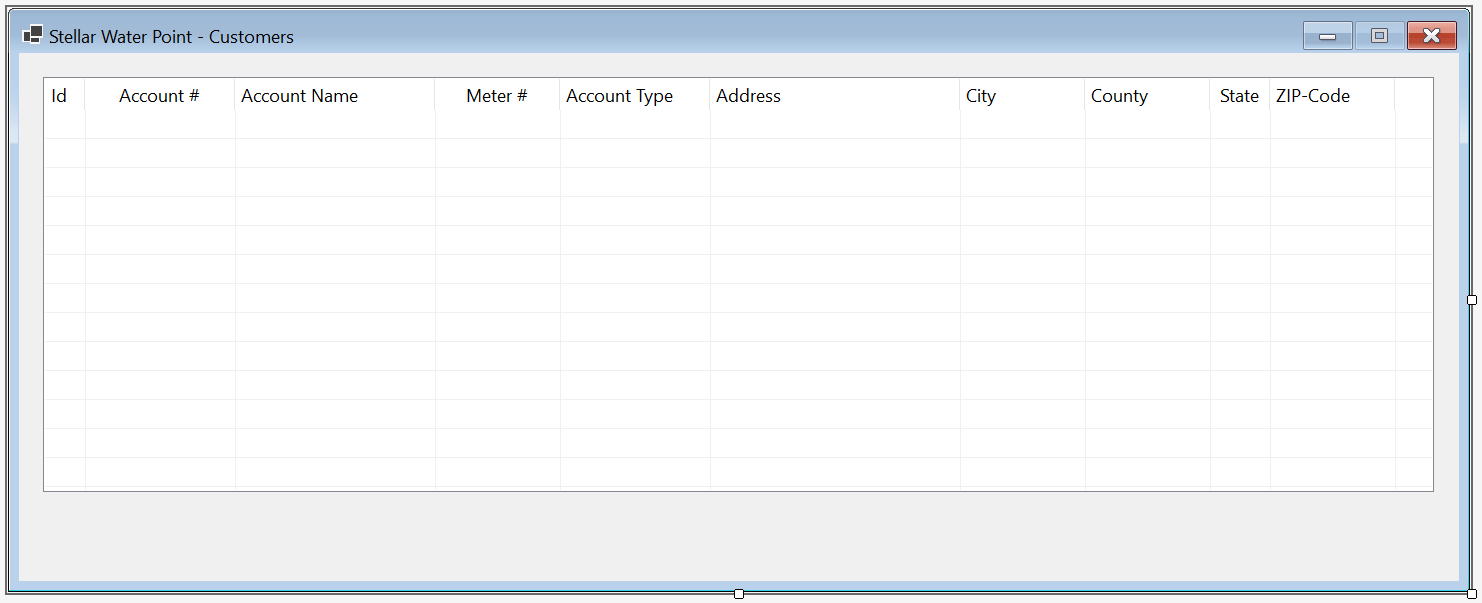
  6. On the form, right-click the list view and click Edit Columns...
  7. Create the columns as follows:

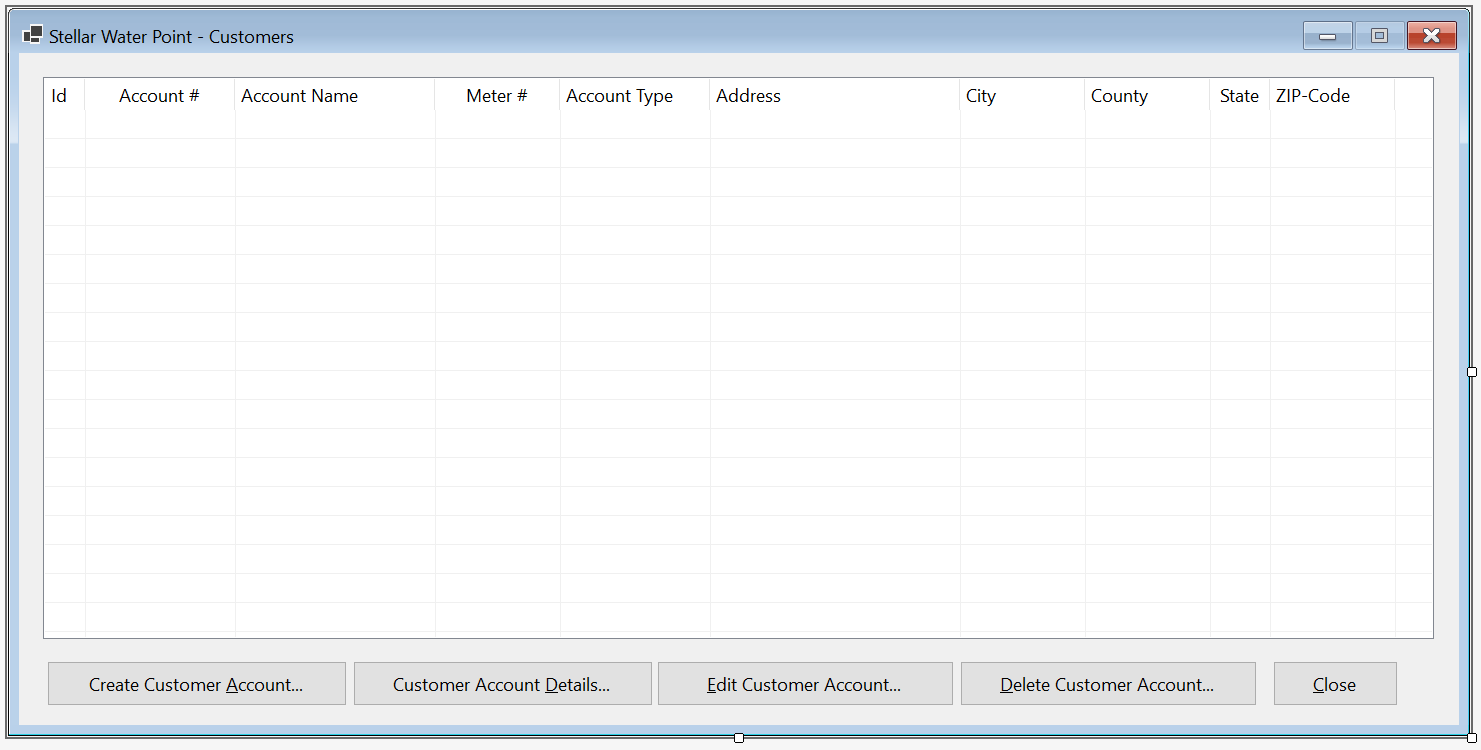
    Stellar Water Point - Customers

    (Name) Text TextAlign Width
    colCustomerId Id   40
    colAccountNumber Account # Center 150
    colAccountName Account Name   200
    colMeterNumber Meter # Center 150
    colAccountType Account Type   475
    colAddress Address   250
    colCity City   125
    colCounty County   125
    colState State Center  
    colZIPCode ZIP-Code Center 125
  8. Click OK
  9. Doubte-click an unoccupied area of the form to generate its Load event
  10. Change the document as follows:
    using System.Data;
    using Microsoft.Data.SqlClient;
    
    namespace StellarWaterPoint.Customers
    {
        public partial class Central : Form
        {
            public Central()
            {
                InitializeComponent();
            }
    
            private void ShowCustomers()
            {
                using (SqlConnection scStellarWaterPoint =
                                new SqlConnection("Data Source=(local);" +
                                                  "Database=StellarWaterPoint101;" +
                                                  "Integrated Security=SSPI;" +
                                                  "TrustServerCertificate=True;"))
                {
                    SqlCommand cmdCustomers = new SqlCommand("SELECT ALL * FROM CustomersAccounts ORDER BY CustId;",
                                                                scStellarWaterPoint);
    
                    scStellarWaterPoint.Open();
                    cmdCustomers.ExecuteNonQuery();
    
                    SqlDataAdapter sdaCustomers = new SqlDataAdapter(cmdCustomers);
    
                    DataSet dsCustomers = new DataSet("CustomersSet");
    
                    sdaCustomers.Fill(dsCustomers);
    
                    lvwCustomers.Items.Clear();
    
                    foreach (DataRow drCustomer in dsCustomers.Tables[0].Rows)
                    {
                        ListViewItem lviCustomer = new ListViewItem(drCustomer[0].ToString());
                        lviCustomer.SubItems.Add(drCustomer[1].ToString());
                        lviCustomer.SubItems.Add(drCustomer[2].ToString());
                        lviCustomer.SubItems.Add(drCustomer[3].ToString());
                        lviCustomer.SubItems.Add(drCustomer[4].ToString());
                        lviCustomer.SubItems.Add(drCustomer[5].ToString());
                        lviCustomer.SubItems.Add(drCustomer[6].ToString());
                        lviCustomer.SubItems.Add(drCustomer[7].ToString());
                        lviCustomer.SubItems.Add(drCustomer[8].ToString());
                        lviCustomer.SubItems.Add(drCustomer[9].ToString());
                        lvwCustomers.Items.Add(lviCustomer);
                    }
                }
            }
    
            private void Central_Load(object sender, EventArgs e)
            {
                ShowCustomers();
            }
        }
    }
    
  11. In the Solution Explorer, double-click WaterDistribution.cs to display the primary form of the application
  12. From the Toolbox, add a button to the form
  13. From the Properties window, change the characteristics of the button as follows:

    Stellar Water Point

    Control (Name) Text Font
    Button Button btnCustomers &Customers... Times New Roman, 24pt, style=Bold
  14. On the form, double-click the Customers button
  15. Implement the event as follows:
    namespace StellarWaterPoint1
    {
        public partial class WaterDistribution : Form
        {
            public WaterDistribution()
            {
                InitializeComponent();
            }
    
            private void btnCustomers_Click(object sender, EventArgs e)
            {
                Customers.Central central = new Customers.Central();
    
                central.Show();
            }
    
            private void btnWaterMeters_Click(object sender, EventArgs e)
            {
                WaterMeters.Central central = new WaterMeters.Central();
    
                central.Show();
            }
        }
    }

A Customer's Account

As mentioned already, our application will use a database that contains a list of customers. This means that a customer must have an account. We will create a form to let the user create an account. Each customer account must have an associated water meter.

Practical LearningPractical Learning: Creating a Customer Account

  1. In the Solution Explorer, right-click the Customers folder -> Add -> Form (Windows Forms)...
  2. Type Create as the name of the file
  3. Click Add
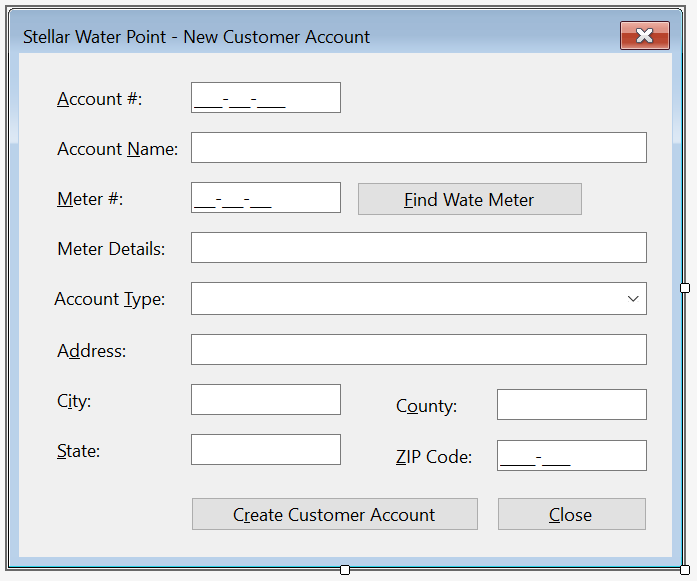
  4. Design the form as follows:

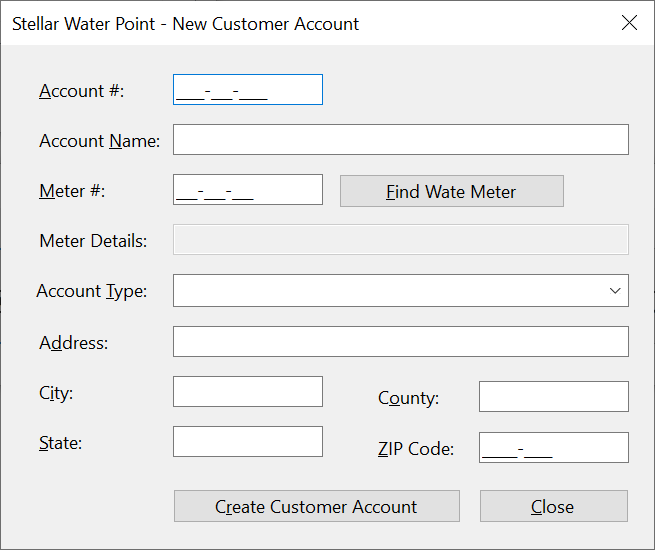
    Stellar Water Point - New Customer Account

    Control (Name) Text Modifiers Other Properties
    Label Label   &Account #:    
    MaskedTextBox Masked Text Box mtbAccountNumber   Public Masked: 0000-000-0000
    Label Label   &Account Name:    
    TextBox Text Box txtAccountName   Public  
    Label Label   &Meter #:    
    MaskedTextBox Masked Text Box mtbMeterNumber   Public Masked: 000-000-000
    Button Button btnFindWaterMeter &Find Water Meter    
    Label Label   Meter &Details:    
    TextBox Text Box txtMeterDetails     Enabled: False
    Label Label   &Account Type:    
    ComboBox Combo Box cbxAccountsTypes   Public
    Label Label   &Address:    
    TextBox Text Box txtAddress   Public  
    Label Label   C&ity:    
    TextBox Text Box txtCity   Public  
    Label Label   C&ounty:    
    TextBox Text Box txtCounty   Public  
    Label Label   &State:    
    TextBox Text Box txtState   Public  
    Label Label   &ZIP-Code:    
    MaskedTextBox Masked Text Box mtbZIPCode   Public Masked: Zip-Code
    Button Button btnSaveCustomerAccount S&ave Customer Account   DialogResult: OK
    Button Button btnClose &Close   DialogResult: Cancel
  5. Using the Properties window, change some characteristics of the form as follows:
    FormBorderStyle: FixedDialog
    Text:            Stellar Water Point - Customer Account Setup
    StartPosition:   CenterScreen
    AcceptButton:    btnSaveCustomerAccount
    CancelButton:    btnClose
    MinimizeBox:     False
    MaximizeBox:     False
  6. Double-click an unoccupied area of the form to generate its Load evern
  7. Change the document as follows:
    using System.Data;
    using Microsoft.Data.SqlClient;
    
    namespace StellarWaterPoint.Customers
    {
        public partial class Create : Form
        {
            public Create()
            {
                InitializeComponent();
            }
    
            private void Create_Load(object sender, EventArgs e)
            {
                using (SqlConnection scStellarWaterPoint =
                                new SqlConnection("Data Source=(local);" +
                                                  "Database=StellarWaterPoint101;" +
                                                  "Integrated Security=SSPI;" +
                                                  "TrustServerCertificate=True;"))
                {
                    SqlCommand cmdAccountTypes = new SqlCommand("SELECT AccountType,   " +
                                                                "       TypeDefinition " +
                                                                "FROM   AccountsTypes;  ",
                                                                scStellarWaterPoint);


                    scStellarWaterPoint.Open();
                    cmdAccountTypes.ExecuteNonQuery();
    
                    SqlDataAdapter sdaAccountTypes = new SqlDataAdapter(cmdAccountTypes);
    
                    DataSet dsAccountTypes = new DataSet("AccountTypesSet");
    
                    sdaAccountTypes.Fill(dsAccountTypes);
    
                    foreach (DataRow drAccountType in dsAccountTypes.Tables[0].Rows)
                    {
                        cbxAccountsTypes.Items.Add(drAccountType[0].ToString() + " - " + drAccountType[1].ToString());
                    }
                }
            }
        }
    }
  8. Return to the form and double-click the Find Water Meter button
  9. Implement the event as follows:
    private void btnFindWateMeter_Click(object sender, EventArgs e)
    {
        if (mtbMeterNumber.Text.Replace("-", "").Replace(" ", "") == "")
        {
            MessageBox.Show("You must specify a valid meter number for an existing water meter.",
                            "Stellar Water Point",
                            MessageBoxButtons.OK, MessageBoxIcon.Information);
            txtMeterDetails.Text = string.Empty;
            return;
        }
    
        using (SqlConnection scStellarWaterPoint =
                        new SqlConnection("Data Source=(local);" +
                                          "Database=StellarWaterPoint101;" +
                                          "Integrated Security=SSPI;" +
                                          "TrustServerCertificate=True;"))
        {
            SqlCommand cmdWaterMeters = new SqlCommand("GetWaterMeter",
                                                       scStellarWaterPoint);
     
            cmdWaterMeters.CommandType = CommandType.StoredProcedure;
    
            SqlParameter spWaterMeter = new SqlParameter();
            spWaterMeter.ParameterName = "@MtrNbr";
            spWaterMeter.DbType = DbType.String;
            spWaterMeter.Value = mtbMeterNumber.Text;
            spWaterMeter.Direction = ParameterDirection.Input;
            cmdWaterMeters.Parameters.Add(spWaterMeter);
                    
            scStellarWaterPoint.Open();
            cmdWaterMeters.ExecuteNonQuery();
    
            SqlDataAdapter sdaWaterMeters = new SqlDataAdapter(cmdWaterMeters);
    
            DataSet dsWaterMeters = new DataSet("WaterMetersSet");
    
            sdaWaterMeters.Fill(dsWaterMeters);
    
            if (dsWaterMeters.Tables[0].Rows.Count == 0)
            {
                MessageBox.Show("There is no water meter with that meter number.",
                                "Stellar Water Point",
                                MessageBoxButtons.OK, MessageBoxIcon.Information);
                txtMeterDetails.Text = string.Empty;
                return;
            }
    
            foreach (DataRow drWaterMeter in dsWaterMeters.Tables[0].Rows)
            {
                txtMeterDetails.Text = drWaterMeter[0].ToString();
            }
        }
  10. In the Solution Explorer, below the Customers folder, double-click Central.cs
  11. From the Toolbox, add a button to the form below the list view
  12. Change the characteristics of the button as follows:

    Stellar Water Point - Water Meters

    Control (Name) Other Properties
    ListView List View lvwCustomers  
    Button Button btnCreateCustomerAccount &Create Customer Account...
  13. Double-click the Create Customer Account button
  14. Change the document as follows:
    private void btnNewCustomerAccount_Click(object sender, EventArgs e)
    {
        Create editor = new Create();
    
        if (editor.ShowDialog() == DialogResult.OK)
        {
            if (editor.mtbAccountNumber.Text.Replace("-", "").Replace(" ", "") == "")
            {
                MessageBox.Show("You must create a new, valid, and unique account number for the new customer; " +
                                "otherwise the Customer accountrecord cannot be created.",
                                "Stellar Water Point",
                                MessageBoxButtons.OK, MessageBoxIcon.Information);
                return;
            }
    
            if (editor.mtbMeterNumber.Text.Replace("-", "").Replace(" ", "") == "")
            {
                MessageBox.Show("You must specify a meter number for the water meter; " +
                                "otherwise the record cannot be created.",
                                "Stellar Water Point",
                                MessageBoxButtons.OK, MessageBoxIcon.Information);
                return;
            }
    
            string? strAccountType = string.Empty;
    
            if (string.IsNullOrEmpty(editor.cbxAccountsTypes.Text))
            {
                strAccountType = "OTH";
            }
            else
            {
                strAccountType = editor.cbxAccountsTypes.Text[..3];
            }
    
            using (SqlConnection scStellarWaterPoint =
                            new SqlConnection("Data Source=(local);" +
                                              "Database=StellarWaterPoint101;" +
                                              "Integrated Security=SSPI;" +
                                              "TrustServerCertificate=True;"))
            {
                SqlCommand cmdCustomers = new SqlCommand("INSERT INTO Customers(AccountNumber,            " +
                                                         "                      AccountName,              " +
                                                         "                      MeterNumber,              " +
                                                         "                      AccountType,              " +
                                                         "                      [Address],                " +
                                                         "                      City,                     " +
                                                         "                      County,                   " +
                                                         "                      [State],                  " +
                                                         "                      ZIPCode)                  " +
                                                         "VALUES(N'" + editor.mtbAccountNumber.Text + "', " +
                                                         "       N'" + editor.txtAccountName.Text   + "', " +
                                                         "       N'" + editor.mtbMeterNumber.Text   + "', " +
                                                         "       N'" + strAccountType               + "', " +
                                                         "       N'" + editor.txtAddress.Text       + "', " +
                                                         "       N'" + editor.txtCity.Text          + "', " +
                                                         "       N'" + editor.txtCounty.Text        + "', " +
                                                         "       N'" + editor.txtState.Text         + "', " +
                                                         "       N'" + editor.mtbZIPCode.Text       + "');",
                                                         scStellarWaterPoint);
    
                    scStellarWaterPoint.Open();
                    cmdCustomers.ExecuteNonQuery();
    
                    MessageBox.Show("The customer account has been created.",
                                    "Stellar Water Point",
                                    MessageBoxButtons.OK, MessageBoxIcon.Information);
            }
        }
    
        ShowCustomers();
    }
  15. To execute the application, on the main menu, click Debug -> Start Without Debugging:

    Stellar Water Point - New Customer Account

  16. On the Water Distribution form, click the Customers button:

    Stellar Water Point - Customers Accounts

  17. On the Central form of the customers, click the Create Customer Account button:

    Stellar Water Point - Customers Accounts

  18. In the account # text box, type 9279-570-8394
  19. In the meter # text box, type 799-528-461
  20. Click the Find water meter button
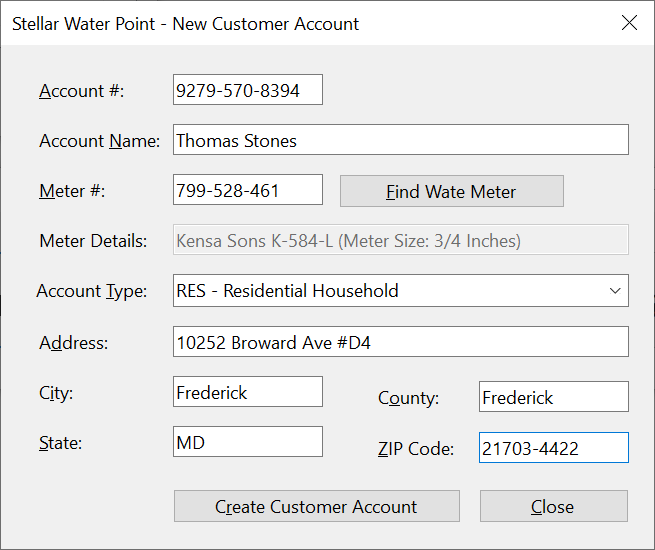
  21. Enter the other values as follows:
    Account #:    9279-570-8394
    Account Name: Thomas Stones
    Meter #:      799-528-461
    Account Type: RES - Residential Household
    Address:      10252 Broward Ave #D4
    City:         Frederick
    County:       Frederick
    State:        MD
    ZIP-Code:     21703-4422

    Stellar Water Point - New Customer Account

  22. Click Save Customer Account
  23. In the same way, create the following two records:

    Account # Account Name Meter # Account Type Address City County State ZIP-Code
    4086-938-4783 Hernola Dough 594-827-359 UUO - Unidentified or Unclassified Type of Organization 10 10 Hexagonal Drv Winston Yoke Penn 11402-4411
    7080-583-5947 Sunny Yard 827-508-248 WAT - Water Intensive Business(Laudromat, Hair Salon, Restaurant, etc 663 Sherry Wood East Street Shimpstown Franklin PA 17236-2626

    Stellar Water Point - Customers

  24. Close the forms and return to your programming environment

A Review of a Customer's Account

Some time to time, a user will want to review the details of a customer's account. We will create a form to assist the user with this.

Practical LearningPractical Learning: Creating a Water Meter Record

  1. To create a form, in the Solution Explorer, right-click Customers -> Add -> Form (Windows Forms)...
  2. For the Name of the form, type Details
  3. Press Enter
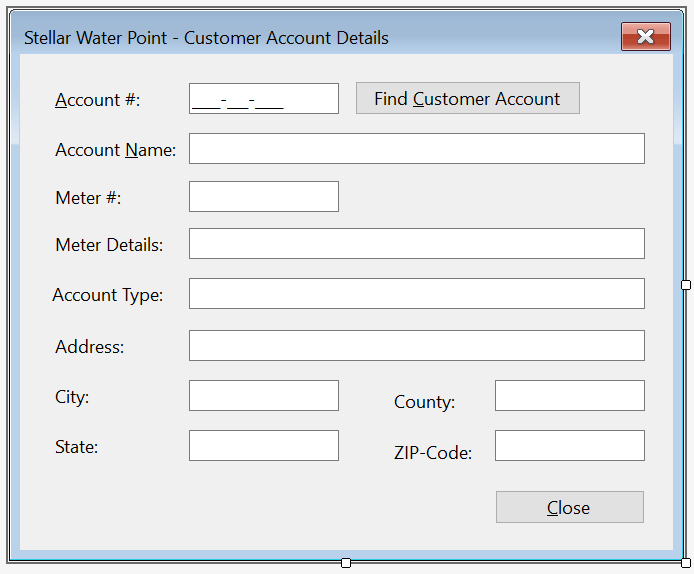
  4. Design the form as follows:

    Stellar Water Point - New Customer Account

    Control (Name) Text Enabled Other Properties
    Label Label   &Account #:    
    MaskedTextBox Masked Text Box mtbAccountNumber     Masked: 0000-000-0000
    Button Button btnFindCustomerAccount &Find Customer Account    
    Label Label   Account Name:    
    TextBox Text Box txtAccountName   False  
    Label Label   Meter #:    
    TextBox Masked Text Box txtMeterNumber   False  
    Label Label   Meter Details:    
    TextBox Text Box txtMeterDetails   False  
    Label Label   Account Type:    
    TextBox Text Box txtAccountType   False  
    Label Label   Address:    
    TextBox Text Box txtAddress   False  
    Label Label   City:    
    TextBox Text Box txtCity   False  
    Label Label   County:    
    TextBox Text Box txtCounty   False  
    Label Label   State:    
    TextBox Text Box txtState   False  
    Label Label   ZIP-Code: False  
    TextBox Masked Text Box txtZIPCode   False  
    Button Button btnClose &Close    
  5. Using the Properties window, change some characteristics of the form as follows:
    FormBorderStyle: FixedDialog
    Text:            Stellar Water Point - Customer Account Setup
    StartPosition:   CenterScreen
    MinimizeBox:     False
    MaximizeBox:     False
  6. On the form, double-click the Find Cust&omer Account button
  7. Implement the event as follows:
    using System.Data;
    using Microsoft.Data.SqlClient;
    
    namespace StellarWaterPoint.Customers
    {
        public partial class Details : Form
        {
            public Details()
            {
                InitializeComponent();
            }
    
            private void btnFindCustomerAccount_Click(object sender, EventArgs e)
            {
                if(mtbAccountNumber.Text.Replace("-", "").Replace(" ", "") == "")
                {
                    MessageBox.Show("You must first type a valid account number of an existing customer, " +
                                    "then click the Find Customer Account button.",
                                    "Stellar Water Point",
                                    MessageBoxButtons.OK, MessageBoxIcon.Information);
                    return;
                }
                
                using (SqlConnection scStellarWaterPoint =
                                new SqlConnection("Data Source=(local);" +
                                                  "Database=StellarWaterPoint101;" +
                                                  "Integrated Security=SSPI;" +
                                                  "TrustServerCertificate=True;"))
                {
                    SqlCommand cmdCustomers = new SqlCommand("IdentifyClient", scStellarWaterPoint);
    
                    cmdCustomers.CommandType = CommandType.StoredProcedure;
    
                    SqlParameter spCustomer  = new SqlParameter();
                    spCustomer.ParameterName = "@AcntNbr";
                    spCustomer.DbType        = DbType.String;
                    spCustomer.Value         = mtbAccountNumber.Text;
                    spCustomer.Direction     = ParameterDirection.Input;
                    cmdCustomers.Parameters.Add(spCustomer);
    
                    scStellarWaterPoint.Open();
                    cmdCustomers.ExecuteNonQuery();
    
                    SqlDataAdapter sdaCustomers = new SqlDataAdapter(cmdCustomers);
                    DataSet        dsCustomers  = new DataSet("CustomersSet");
    
                    sdaCustomers.Fill(dsCustomers);
    
                    if (dsCustomers.Tables[0].Rows.Count > 0)
                    {
                        foreach (DataRow drClient in dsCustomers.Tables[0].Rows)
                        {
                            txtCustomerId.Text   = drClient[0].ToString();
                            txtAccountName.Text  = drClient[2].ToString();
                            txtMeterDetails.Text = drClient[3].ToString();
                            txtAccountType.Text  = drClient[4].ToString();
                            txtAddress.Text      = drClient[5].ToString();
                            txtCity.Text         = drClient[6].ToString();
                            txtCounty.Text       = drClient[7].ToString();
                            txtState.Text        = drClient[8].ToString();
                            txtZIPCode.Text      = drClient[9].ToString();
                        }
                    }
                    else
                    {
                        MessageBox.Show("The account number you typed is not in our system.",
                                        "Stellar Water Point",
                                        MessageBoxButtons.OK, MessageBoxIcon.Information);
                        txtCustomerId.Text   = string.Empty;
                        txtAccountName.Text  = string.Empty;
                        txtMeterDetails.Text = string.Empty;
                        txtAccountType.Text  = string.Empty; 
                        txtAddress.Text      = string.Empty;
                        txtCity.Text         = string.Empty;
                        txtCounty.Text       = string.Empty;
                        txtState.Text        = string.Empty;
                        txtZIPCode.Text      = string.Empty;
                    }
                }
            }
        }
    }
  8. Return to the form and double-click the Close button
  9. Implement the event as follows:
    private void btnClose_Click(object sender, EventArgs e)
    {
        Close();
    }
  10. In the Solution Explorer, below the Customers folder, double-click Central.cs to open its form
  11. From the Toolbox, add a button to the form below the list view and to the right of the Create Customer Account button
  12. Change the characteristics of the button as follows:

    Stellar Water Point - Water Meters

    Control (Name) Other Properties
    Button Button btnViewCustomerAccount &View Customer Account...
  13. Double-click the View Customer Account button
  14. Change the document as follows:
    private void btnViewCustomerAccount_Click(object sender, EventArgs e)
    {
        Details details = new Details();
    
        details.Show();
    }
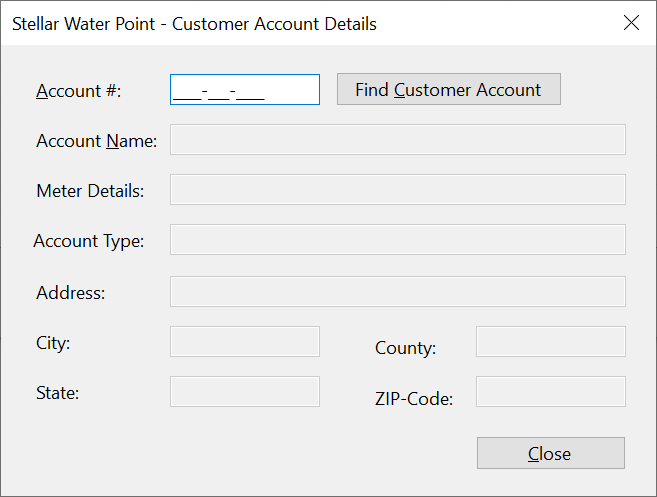
  15. To execute the application, on the main menu, click Debug -> Start Without Debugging

    Stellar Water Point

  16. On the Water Distribution form, click the Customers button:

    Stellar Water Point - Customers

  17. On the Central form of customers, click the View Customer Account button:

    Stellar Water Point - View Water Meter

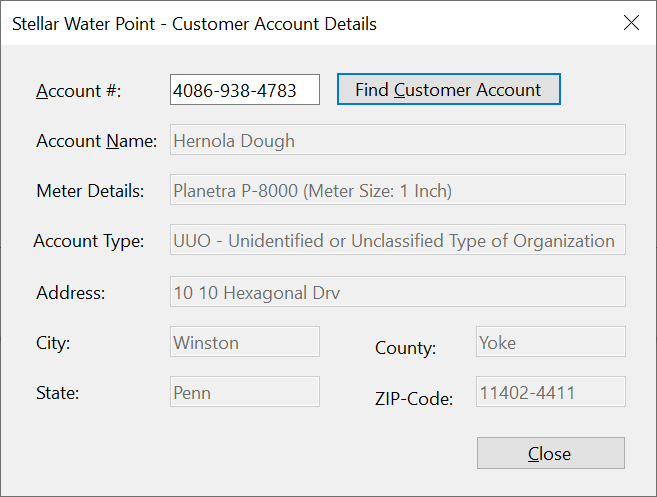
  18. In the Account # text box, type 4086-938-4783
  19. Click the Find Customer Account button:

    Stellar Water Point - View Water Meter

  20. Close the Details form
  21. Close the forms and return to your programming environment

Updating a Customer's Account

Some time to time, a piece of information changes about a customer's account. When that happens, a user must update such an account. To assist the users in performing such an operation, we will create a form.

Practical LearningPractical Learning: Updating a Water Meter

  1. To create a form, in the Solution Explorer, right-click WaterMeters -> Add -> Form (Windows Forms)...
  2. For the Name of the file, type Editor as the name of the form
  3. Click Add
  4. Resize the Editor form to have the same size as the Create form of the Customers section
  5. Copy everything from the Create form of the Customers section and paste it in the Editor form of the Customers section
  6. Delete the bottom two buttons on the form
  7. Change the design of the form as follows:

    Stellar Water Point - New Customer Account

    Control (Name) Text Other Properties
    Button Button btnFindCustomerAccount &Find Customer Account  
    Button Button btnUpdateWateMeter &Update Water Meter DialogResult: OK
    Button Button btnClose &Close DialogResult: Cancel
  8. Using the Properties window, change some characteristics of the form as follows:
    FormBorderStyle: FixedDialog
    Text:            Stellar Water Point - Customer Account Editor
    StartPosition:   CenterScreen
    AcceptButton:    btnUpdateWateMeter
    CancelButton:    btnClose
    MinimizeBox:     False
    MaximizeBox:     False
  9. Double-click an unoccupied area of the form to generate its Load evern
  10. Change the document as follows:
    using System.Data;
    using Microsoft.Data.SqlClient;
    
    namespace StellarWaterPoint.Customers
    {
        public partial class Editor : Form
        {
            public Create()
            {
                InitializeComponent();
            }
    
            private void Create_Load(object sender, EventArgs e)
            {
                using (SqlConnection scStellarWaterPoint =
                                new SqlConnection("Data Source=(local);" +
                                                  "Database=StellarWaterPoint101;" +
                                                  "Integrated Security=SSPI;" +
                                                  "TrustServerCertificate=True;"))
                {
                    SqlCommand cmdAccountTypes = new SqlCommand("SELECT AccountType,   " +
                                                                "       TypeDefinition " +
                                                                "FROM   AccountsTypes;  ",
                                                                scStellarWaterPoint);


                    scStellarWaterPoint.Open();
                    cmdAccountTypes.ExecuteNonQuery();
    
                    SqlDataAdapter sdaAccountTypes = new SqlDataAdapter(cmdAccountTypes);
    
                    DataSet dsAccountTypes = new DataSet("AccountTypesSet");
    
                    sdaAccountTypes.Fill(dsAccountTypes);
    
                    foreach (DataRow drAccountType in dsAccountTypes.Tables[0].Rows)
                    {
                        cbxAccountsTypes.Items.Add(drAccountType[0].ToString() + " - " + drAccountType[1].ToString());
                    }
                }
            }
        }
    }
  11. Return to the form and double-click the Find Customer Account button
  12. Implment the event as follows:
    private void btnFindCustomerAccount_Click(object sender, EventArgs e)
    {
        if (mtbAccountNumber.Text.Replace("-", "").Replace(" ", "") == "")
        {
            MessageBox.Show("You must first type a valid account number of an existing customer, " +
                            "then click the Find Customer Account button.",
                            "Stellar Water Point",
                            MessageBoxButtons.OK, MessageBoxIcon.Information);
            return;
        }
    
        using (SqlConnection scStellarWaterPoint =
                        new SqlConnection("Data Source=(local);" +
                                          "Database=StellarWaterPoint101;" +
                                          "Integrated Security=SSPI;" +
                                          "TrustServerCertificate=True;"))
        {
            SqlCommand cmdCustomers  = new SqlCommand("IdentifyClient", scStellarWaterPoint);
    
            cmdCustomers.CommandType = CommandType.StoredProcedure;
    
            SqlParameter spCustomer  = new SqlParameter();
            spCustomer.ParameterName = "@AcntNbr";
            spCustomer.DbType        = DbType.String;
            spCustomer.Value         = mtbAccountNumber.Text;
            spCustomer.Direction     = ParameterDirection.Input;
            cmdCustomers.Parameters.Add(spCustomer);
    
            scStellarWaterPoint.Open();
            cmdCustomers.ExecuteNonQuery();
    
            SqlDataAdapter sdaCustomers = new SqlDataAdapter(cmdCustomers);
            DataSet        dsCustomers  = new DataSet("CustomersSet");
    
            sdaCustomers.Fill(dsCustomers);
    
            if (dsCustomers.Tables[0].Rows.Count > 0)
            {
                foreach (DataRow drClient in dsCustomers.Tables[0].Rows)
                {
                    txtCustomerId.Text    = drClient[0].ToString();
                    txtAccountName.Text   = drClient[2].ToString();
                    mtbMeterNumber.Text   = drClient[3].ToString();
                    txtMeterDetails.Text  = drClient[4].ToString();
                    cbxAccountsTypes.Text = drClient[5].ToString();
                    txtAddress.Text       = drClient[6].ToString();
                    txtCity.Text          = drClient[7].ToString();
                    txtCounty.Text        = drClient[8].ToString();
                    txtState.Text         = drClient[9].ToString();
                    mtbZIPCode.Text       = drClient[10].ToString();
                }
            }
            else
            {
                MessageBox.Show("The account number you typed is not in our system.",
                                "Stellar Water Point",
                                MessageBoxButtons.OK, MessageBoxIcon.Information);
                txtCity.Text          = string.Empty;
                txtState.Text         = string.Empty;
                txtCounty.Text        = string.Empty;
                mtbZIPCode.Text       = string.Empty;
                txtAddress.Text       = string.Empty;
                txtCustomerId.Text    = string.Empty;
                txtAccountName.Text   = string.Empty;
                txtMeterDetails.Text  = string.Empty;
                cbxAccountsTypes.Text = string.Empty;
            }
        }
    }
  13. Return to the form and double-click the Find Water Meter button
  14. Implement the event as follows:
    private void btnFindWateMeter_Click(object sender, EventArgs e)
    {
        if (mtbMeterNumber.Text.Replace("-", "").Replace(" ", "") == "")
        {
            MessageBox.Show("You must specify a valid meter number for an existing water meter.",
                            "Stellar Water Point",
                            MessageBoxButtons.OK, MessageBoxIcon.Information);
            txtMeterDetails.Text = string.Empty;
            return;
        }
    
        using (SqlConnection scStellarWaterPoint =
                        new SqlConnection("Data Source=(local);" +
                                          "Database=StellarWaterPoint101;" +
                                          "Integrated Security=SSPI;" +
                                          "TrustServerCertificate=True;"))
        {
            SqlCommand cmdWaterMeters = new SqlCommand("GetWaterMeter",
                                                       scStellarWaterPoint);
    
            cmdWaterMeters.CommandType = CommandType.StoredProcedure;
    
            SqlParameter spWaterMeter = new SqlParameter();
            spWaterMeter.ParameterName = "@MtrNbr";
            spWaterMeter.DbType = DbType.String;
            spWaterMeter.Value = mtbMeterNumber.Text;
            spWaterMeter.Direction = ParameterDirection.Input;
            cmdWaterMeters.Parameters.Add(spWaterMeter);
    
            scStellarWaterPoint.Open();
            cmdWaterMeters.ExecuteNonQuery();
    
            SqlDataAdapter sdaWaterMeters = new SqlDataAdapter(cmdWaterMeters);
    
            DataSet dsWaterMeters = new DataSet("WaterMetersSet");
    
            sdaWaterMeters.Fill(dsWaterMeters);
    
            if (dsWaterMeters.Tables[0].Rows.Count == 0)
            {
                MessageBox.Show("There is no water meter with that meter number.",
                                "Stellar Water Point",
                                MessageBoxButtons.OK, MessageBoxIcon.Information);
                txtMeterDetails.Text = string.Empty;
                return;
            }
    
            foreach (DataRow drWaterMeter in dsWaterMeters.Tables[0].Rows)
            {
                txtMeterDetails.Text = drWaterMeter[0].ToString();
            }
        }
    }
  15. Return to the Editor form an double-click the Update Water Meter button
  16. Implement the event as follows:
    private void btnUpdateCustomerAccount_Click(object sender, EventArgs e)
    {
        if (mtbAccountNumber.Text.Replace("-", "").Replace(" ", "") == "")
        {
            MessageBox.Show("You must provide a valid existing account number for the customer whose record you want to update; " +
                            "otherwise the Customer account cannot be updated.",
                            "Stellar Water Point",
                            MessageBoxButtons.OK, MessageBoxIcon.Information);
            return;
        }
    
        if (mtbMeterNumber.Text.Replace("-", "").Replace(" ", "") == "")
        {
            MessageBox.Show("You provide a valid meter number for an existing water meter; " +
                            "otherwise the customer account cannot be updated.",
                            "Stellar Water Point",
                            MessageBoxButtons.OK, MessageBoxIcon.Information);
            return;
        }
    
        string? strAccountType = string.Empty;
    
        if (string.IsNullOrEmpty(cbxAccountsTypes.Text))
        {
            strAccountType = "OTH";
        }
        else
        {
            strAccountType = cbxAccountsTypes.Text[..3];
        }
    
        using (SqlConnection scStellarWaterPoint =
                        new SqlConnection("Data Source=(local);" +
                                          "Database=StellarWaterPoint101;" +
                                          "Integrated Security=SSPI;" +
                                          "TrustServerCertificate=True;"))
        {
            SqlCommand cmdCustomers = new SqlCommand("UPDATE Customers SET AccountName = N'" + txtAccountName.Text + "' WHERE AccountNumber = N'" + mtbAccountNumber.Text + "';" +
                                                     "UPDATE Customers SET MeterNumber = N'" + mtbMeterNumber.Text + "' WHERE AccountNumber = N'" + mtbAccountNumber.Text + "';" +
                                                     "UPDATE Customers SET AccountType = N'" + strAccountType      + "' WHERE AccountNumber = N'" + mtbAccountNumber.Text + "';" +
                                                     "UPDATE Customers SET [Address]   = N'" + txtAddress.Text     + "' WHERE AccountNumber = N'" + mtbAccountNumber.Text + "';" +
                                                     "UPDATE Customers SET City        = N'" + txtCity.Text        + "' WHERE AccountNumber = N'" + mtbAccountNumber.Text + "';" +
                                                     "UPDATE Customers SET County      = N'" + txtCounty.Text      + "' WHERE AccountNumber = N'" + mtbAccountNumber.Text + "';" +
                                                     "UPDATE Customers SET [State]     = N'" + txtState.Text       + "' WHERE AccountNumber = N'" + mtbAccountNumber.Text + "';" +
                                                     "UPDATE Customers SET ZIPCode     = N'" + mtbZIPCode.Text     + "' WHERE AccountNumber = N'" + mtbAccountNumber.Text + "';",
                                                     scStellarWaterPoint);
    
            scStellarWaterPoint.Open();
            cmdCustomers.ExecuteNonQuery();
    
            MessageBox.Show("The customer account has been updated.",
                            "Stellar Water Point",
                            MessageBoxButtons.OK, MessageBoxIcon.Information);
        }
    
        Close();
    }
  17. Return to the form and double-click the Close button
  18. Implement the event as follows:
    private void btnClose_Click(object sender, EventArgs e)
    {
        Close();
    }
  19. In the Solution Explorer, below the Customers folder, double-click Central.cs
  20. From the Toolbox, add a button to the form below the list view and on the right side of the View Customer Account button
  21. Change the characteristics of the button as follows:

    Stellar Water Point - Water Meters

    Control (Name) Text Other Properties
    ListView List View lvwCustomers   No Change
    Button Button btnNewCustomerAccount   No Change
    Button Button btnViewCustomerAccount   No Change
    Button Button btnEditCustomerAccount &Edit Customer Account...
  22. On the form, double-click the Edit Customer Account button
  23. Implement the event as follows:
    private void btnUpdateCustomerAccount_Click(object sender, EventArgs e)
    {
        Editor editor = new Editor();
    
        editor.ShowDialog();
    
        ShowCustomers();
    }
  24. Display the Central form of the Customers folder
  25. To execute the application, on the main menu, click Debug -> Start Without Debugging

    Stellar Water Point

  26. On the main form of the application, click the Customers button:

    Stellar Water Point - Customers

  27. Click the Edit Customer Account button:

    Stellar Water Point - Water Meter Editor

  28. In the Account # text, type 4086-938-4783
  29. Click the Find Customer Account button

    Stellar Water Point - Water Meter Editor

  30. Change the values as follows:
    Account Name: Bernotte Doughnuts
    Meter #:      580-742-825 and click Find Water Meter
    Account Type: BUS	- General Business
    Address:      10103 Hexagon Drive
    City:         Winterstown
    County:       York
    State:        PA
    ZIP-Code:     17402-8828

    Stellar Water Point - New Water Meter

  31. Click the Update Customer Account button:

    Stellar Water Point - Water Meters

  32. Close the forms and return to your programming environment

Deleting a Customer's Account

If a customer's account is not necessary anymore, the user can remove that account. To assist the user with this operation, we will create a form with necessary buttons.

Practical LearningPractical Learning: Deleting a Customer Account

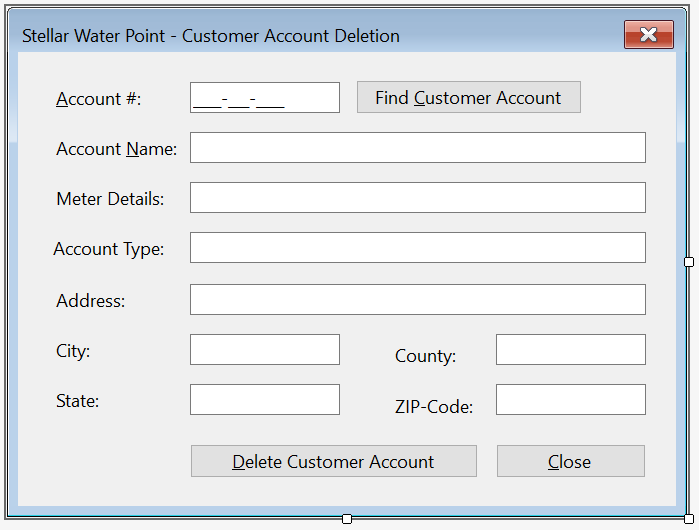
  1. To create a form, in the Solution Explorer, right-click WaterMeters -> Add -> Form(Windows Forms)...
  2. In the Name text box, replace the string with Delete as the name of the form
  3. Press Enter
  4. Resize the Delete form to have the same size as the Details form
  5. Copy everything from the Details form and paste it in the Delete form
  6. Change the bottom button as follows:

    Stellar Water Point - New Water Meter

    Control (Name) Text Othe Properties
    Button Button btnDeleteCustomerAccount &Delete Water Meter DialogResult: OK
    Button Button btnClose &Close DialogResult: Cancel
  7. Using the Properties window, change some characteristics of the form as follows:
    FormBorderStyle: FixedDialog
    Text:            Stellar Water Point - Customer Account Deletion
    StartPosition:   CenterScreen
    AcceptButton:    btnDeleteCustomerAccount
    CancelButton:    btnClose
    MinimizeBox:     False
    MaximizeBox:     False
  8. On the form, double-click the Find Customer Account button
  9. Change the document as tollows:
    using System.Data;
    using Microsoft.Data.SqlClient;
    
    namespace StellarWaterPoint.Customers
    {
        public partial class Delete : Form
        {
            public Delete()
            {
                InitializeComponent();
            }
    
            private void btnFindCustomerAccount_Click(object sender, EventArgs e)
            {
                if (mtbAccountNumber.Text.Replace("-", "").Replace(" ", "") == "")
                {
                    MessageBox.Show("You must first type a valid account number of an existing customer, " +
                                    "then click the Find Customer Account button.",
                                    "Stellar Water Point",
                                    MessageBoxButtons.OK, MessageBoxIcon.Information);
                    return;
                }
    
                using (SqlConnection scStellarWaterPoint =
                                new SqlConnection("Data Source=(local);" +
                                                  "Database=StellarWaterPoint101;" +
                                                  "Integrated Security=SSPI;" +
                                                  "TrustServerCertificate=True;"))
                {
                    SqlCommand cmdCustomers  = new SqlCommand("IdentifyClient", scStellarWaterPoint);
    
                    cmdCustomers.CommandType = CommandType.StoredProcedure;
    
                    SqlParameter spCustomer  = new SqlParameter();
                    spCustomer.ParameterName = "@AcntNbr";
                    spCustomer.DbType        = DbType.String;
                    spCustomer.Value         = mtbAccountNumber.Text;
                    spCustomer.Direction     = ParameterDirection.Input;
                    cmdCustomers.Parameters.Add(spCustomer);
    
                    scStellarWaterPoint.Open();
                    cmdCustomers.ExecuteNonQuery();
    
                    SqlDataAdapter sdaCustomers = new SqlDataAdapter(cmdCustomers);
                    DataSet        dsCustomers  = new DataSet("CustomersSet");
    
                    sdaCustomers.Fill(dsCustomers);
    
                    if (dsCustomers.Tables[0].Rows.Count > 0)
                    {
                        foreach (DataRow drClient in dsCustomers.Tables[0].Rows)
                        {
                            txtCustomerId.Text   = drClient[0].ToString();
                            txtAccountName.Text  = drClient[2].ToString();
                            txtMeterDetails.Text = drClient[3].ToString() + " - " + drClient[4].ToString();
                            txtAccountType.Text  = drClient[5].ToString();
                            txtAddress.Text      = drClient[6].ToString();
                            txtCity.Text         = drClient[7].ToString();
                            txtCounty.Text       = drClient[8].ToString();
                            txtState.Text        = drClient[9].ToString();
                            txtZIPCode.Text      = drClient[10].ToString();
                        }
                    }
                    else
                    {
                        MessageBox.Show("The account number you typed is not in our system.",
                                        "Stellar Water Point",
                                        MessageBoxButtons.OK, MessageBoxIcon.Information);
                        txtCustomerId.Text   = string.Empty;
                        txtAccountName.Text  = string.Empty;
                        txtMeterDetails.Text = string.Empty;
                        txtAccountType.Text  = string.Empty;
                        txtAddress.Text      = string.Empty;
                        txtCity.Text         = string.Empty;
                        txtCounty.Text       = string.Empty;
                        txtState.Text        = string.Empty;
                        txtZIPCode.Text      = string.Empty;
                    }
                }
            }
        }
    }
  10. Return to the Editor form an double-click the Delete Customer Account button
  11. Implement the event as follows:
    private void btnDeleteCustomerAccount_Click(object sender, EventArgs e)
    {
        if (mtbAccountNumber.Text.Replace("-", "").Replace(" ", "") == "")
        {
            MessageBox.Show("You must provide a valid existing account number for the customer whose record you want to update; " +
                            "otherwise the Customer account cannot be updated.",
                            "Stellar Water Point",
                            MessageBoxButtons.OK, MessageBoxIcon.Information);
            txtCustomerId.Text = string.Empty;
            txtAccountName.Text = string.Empty;
            txtMeterDetails.Text = string.Empty;
            txtAccountType.Text = string.Empty;
            txtAddress.Text = string.Empty;
            txtCity.Text = string.Empty;
            txtCounty.Text = string.Empty;
            txtState.Text = string.Empty;
            txtZIPCode.Text = string.Empty;
            return;
        }
    
        using (SqlConnection scStellarWaterPoint =
                        new SqlConnection("Data Source=(local);" +
                                          "Database=StellarWaterPoint101;" +
                                          "Integrated Security=SSPI;" +
                                          "TrustServerCertificate=True;"))
        {
            SqlCommand cmdCustomers = new SqlCommand("DELETE Customers WHERE AccountNumber = N'" + mtbAccountNumber.Text + "';",
                                                     scStellarWaterPoint);
    
            scStellarWaterPoint.Open();
            cmdCustomers.ExecuteNonQuery();
    
            MessageBox.Show("The customer account has been deleted.",
                            "Stellar Water Point",
                            MessageBoxButtons.OK, MessageBoxIcon.Information);
        }
    
        Close();
    }
  12. Return to the form and double-click the Close button
  13. Implement the event as follows:
    private void btnClose_Click(object sender, EventArgs e)
    {
        Close();
    }
  14. In the Solution Explorer, below the Customers folder, double-click Central.cs
  15. From the Toolbox, add two buttons to the form below the list view and on the right side of the Edit Customer Acount button
  16. Change the characteristics of the new buttons as follows:

    Stellar Water Point - Water Meters

    Control (Name) Text Anchor Other Properties
    ListView List View lvwCustomers   Top, Bottom, Left, Right FullRowSelect: True
    GridLines: True
    View: Details
    Button Button btnCreateCustomerAcount C&reate Customer Acount... Bottom, Right  
    Button Button btnViewCustomerAcount &View CustomerAcount... Bottom, Right  
    Button Button btnEditCustomerAcount &Edit CustomerAcount... Bottom, Right  
    Button Button btnDeleteCustomerAcount &Delete Customer Acount... Bottom, Right  
    Button Button btnClose &Close Bottom, Right  
  17. Double-click the Delete Customer Account button
  18. Return to the Central form of the water meters and double-click the Close button
  19. Change the document as follows:
    private void btnClose_Click(object sender, EventArgs e)
    {
        Close();
    }
  20. To execute the application, on the main menu, click Debug -> Start Without Debugging:

    Stellar Water Point - Water Meters

  21. On the Central form, click the Customers button:

    Stellar Water Point - Customers

  22. On the Central form of the customers, click the Delete Customer Account button:

    Stellar Water Point - Customer Account Deletion

  23. In the Account # text box, type 7080-583-5947
  24. Click the Find Customer Account button:

    Stellar Water Point - Customer Account Deletion

  25. Click the Delete Customer Account button
  26. Read the text on the message box.
    On the message box, click Yes

    Stellar Water Point - Customers

  27. Close the forms and return to your programming environment
  28. From the Windows Explorer, open the Customers.xml file
  29. Replace the content of the file with the provided file
  30. Save the file
  31. Return to your programming environment

Water Bills

Introduction

A water bill is a summary that indicates how much water a customer consumed and the value of that consumption. Our application will include the forms necessary to process water bills operations.

Practical LearningPractical Learning: Preparing Bills

  1. In the Solution Explorer, right-click StellarWaterPoint1 -> Add -> New Folder
  2. Type WaterBills as the name of the folder

A List of Water Bills

A water bill must contain as much information as possible. In our application, when displaying a list of water bills, we will show only select pieces of information.

Practical LearningPractical Learning: Viewing Water Bills

  1. To create a form, in the Solution Explorer, right-click WaterBills -> Add -> Form (Windows Forms)...
  2. Type Central
  3. Click Add
  4. In the Toolbox, click the ListView button and click the form
  5. In the Properties window, change the characteristics of the list view as follows:

    Control (Name) Text Other Properties
    ListView List View lvwWaterBills   FullRowSelect: True
    GridLines: True
    View: Details
    Button Button btnCreateWaterBill Close &Create Water Bill...
  6. On the form, right-click the list view and click Edit Columns...
  7. Create the columns as follows:

    Stellar Water Point - Water Bills

    (Name) Text TextAlign Width
    colWaterBillId Id   40
    colBillNumber Bill # Center 80
    colAccountSummary Account Summary   1125
    colStartDate Start Date Center 120
    colEndDate End Date Center 120
    colBillingDays Days Center  
    colCounterStart Counter Start Right 125
    colCounterEnd Counter End Right 125
    colTotalHCF Total HCF Right 100
    colGallons Gallons Right 80
    colPaymentDueDate Pmt Due Date Center 125
    colAmountDue Amt Due Right 90
  8. Click OK
  9. Doubte-click an unoccupied area of the form to generate its Load event
  10. Change the document as follows:
    using System.Data;
    using Microsoft.Data.SqlClient;
    
    namespace StellarWaterPoint.WaterBills
    {
        public partial class Central : Form
        {
            public Central()
            {
                InitializeComponent();
            }
    
            private void ShowWaterBills()
            {
                lvwWaterBills.Items.Clear();
    
                using (SqlConnection scStellarWaterPoint =
                                new SqlConnection("Data Source=(local);" +
                                                  "Database=StellarWaterPoint101;" +
                                                  "Integrated Security=SSPI;" +
                                                  "TrustServerCertificate=True;"))
                {
                    SqlCommand cmdWaterBills = new SqlCommand("SELECT ALL * FROM WaterBillSummary;",
                                                               scStellarWaterPoint);
    
                    scStellarWaterPoint.Open();
                    cmdWaterBills.ExecuteNonQuery();
    
                    SqlDataAdapter sdaWaterBills = new SqlDataAdapter(cmdWaterBills);
    
                    DataSet dsWaterBills = new DataSet("WaterBillsSet");
    
                    sdaWaterBills.Fill(dsWaterBills);
    
                    foreach (DataRow drWaterBill in dsWaterBills.Tables[0].Rows)
                    {
                        ListViewItem lviWaterBill = new ListViewItem(drWaterBill[0].ToString()); // Water Bill Id
                        lviWaterBill.SubItems.Add(drWaterBill[1].ToString()); // Water Bill Number
                        lviWaterBill.SubItems.Add(drWaterBill[2].ToString()); // Account Summary
                        lviWaterBill.SubItems.Add(drWaterBill[3].ToString()); // Meter Reading Start Date
                        lviWaterBill.SubItems.Add(drWaterBill[4].ToString()); // Meter Reading End Date
                        lviWaterBill.SubItems.Add(drWaterBill[5].ToString()); // Billing Days
                        lviWaterBill.SubItems.Add(drWaterBill[6].ToString()); // Counter Reading Start
                        lviWaterBill.SubItems.Add(drWaterBill[7].ToString()); // Counter Reading End
                        lviWaterBill.SubItems.Add(drWaterBill[8].ToString()); // Total HCF
                        lviWaterBill.SubItems.Add(drWaterBill[9].ToString()); // Gallons
                        lviWaterBill.SubItems.Add(drWaterBill[10].ToString()); // Payment Due Date
                        lviWaterBill.SubItems.Add(drWaterBill[11].ToString()); // Amount Due
                        lvwWaterBills.Items.Add(lviWaterBill);
                    }
                }
            }
    
            private void Central_Load(object sender, EventArgs e)
            {
                ShowWaterBills();
            }
        }
    }
  11. In the Solution Explorer, double-click WaterDistribution.cs to open the main form of the application
  12. From the Toolbox, add a button to the form
  13. Using the the Properties window, change the characteristics of the button as follows:

    Stellar Water Point

    Control (Name) Text Font
    Button Button btnWaterBills Water &Bills... Times New Roman, 24pt, style=Bold
    Button Button btnClose &Close Times New Roman, 24pt, style=Bold
  14. Double-click the Water &Bills button
  15. Return to the Water Distribution form and double-click the Close button
  16. Change the document as follows:
    namespace StellarWaterPoint
    {
        public partial class WaterDistribution : Form
        {
            public WaterDistribution()
            {
                InitializeComponent();
            }
    
            private void btnWaterBills_Click(object sender, EventArgs e)
            {
                WaterBills.Central central = new();
    
                central.Show();
            }
        }
    }
  17. Return to the Water Bills form and double-click the Create Water Bill button
  18. Implement the event as follows:
    private void btnCreateWaterBill_Click(object sender, EventArgs e)
    {
        Create create = new();
    
        create.ShowDialog();
    
        ShowWaterBills();
    }

A Water Bill

A water bill is a collection of information that includes the identification of the customer who consumed the water, the period during which water was consumed, how much water was consumed, how much that consumption is worth, etc. We will create a form hat a user can use to create and process a water bill.

Practical LearningPractical Learning: Processing a Water Bill

  1. To create a form, in the Solution Explorer, right-click WaterBills -> Add -> Form (Windows Forms)...
  2. Type Create as the name of the file
  3. Click Add
  4. Design the form as follows:

    Stellar Water Point - New Water Bill

    Control (Name) Text TextAlign Other Properties
    Label Label   &Water Bill #:    
    TextBox Text Box txtWaterBillNumber      
    GroupBox Label   Customer Information    
    Label Label   Account #:    
    MaskedTextBox Masked Text Box mtbAccountNumber     Masked: 0000-000-0000
    Button Button btnFindCustomerAccount Find Customer Account    
    Label Label   Customer Name:    
    TextBox Text Box txtCustomerName      
    Label Label   Meter Details:    
    TextBox Text Box txtMeterDetails Modifiers: Public    
    Label Label   Address:    
    TextBox Text Box txtAddress      
    TextBox Text Box txtCity      
    TextBox Text Box txtCounty      
    TextBox Text Box txtState      
    TextBox Masked Text Box txtZIPCode      
    GroupBox Label   Meter Reading    
    Label Label   Meter Reading Start Date:    
    DateTimePicker Date Time Picker dtpMeterReadingStartDate      
    Label Label   Meter Reading End Date:    
    DateTimePicker Date Time Picker dtpMeterReadingEndDate      
    Label Label   Counter Reading Start:    
    TextBox Text Box txtCounterReadingStart   Right  
    Label Label   Counter Reading End:    
    TextBox Text Box txtCounterReadingEnd   Right  
    Button Button btnEvaluateWaterBill &Evaluate Water Bill    
    GroupBox Label   Meter Result    
    Label Label   Billing Days:    
    TextBox Text Box txtBillingDays   Right  
    Label Label   Total HCF:    
    TextBox Text Box txtTotalHCF   Right  
    Label Label   Total Gallons:    
    TextBox Text Box txtTotalGallons   Right  
    Label Label   First Tier Consumption:    
    TextBox Text Box txtFirstTierConsumption   Right  
    Label Label   Second Tier:    
    TextBox Text Box txtSecondTierConsumption   Right  
    Label Label   Last Tier:    
    TextBox Text Box txtLastTierConsumption   Right  
    GroupBox Label   Consumption Charges    
    Label Label   Water Charges:    
    TextBox Text Box txtWaterCharges   Right  
    Label Label   Sewer Charges:    
    TextBox Text Box txtSewerCharges   Right  
    Label Label   Environment Charges:    
    TextBox Text Box txtEnvironmentCharges   Right  
    Label Label   Total Charges:    
    TextBox Text Box txtTotalCharges   Right  
    GroupBox Label   Taxes    
    Label Label   Local Taxes:    
    TextBox Text Box txtLocalTaxes   Right  
    Label Label   State Taxes:    
    TextBox Text Box txtStateTaxes   Right  
    GroupBox Label   Water Bill Payment    
    Label Label   Payment Due Date:    
    DateTimePicker Date Time Picker dtpPaymentDueDate   Right  
    Label Label   Amount Due:    
    TextBox Text Box txtAmountDue   Right  
    Label Label   Late Payment Due Date:    
    DateTimePicker Date Time Picker dtpLatePaymentDueDate      
    Label Label   Late Amount Due:    
    TextBox Text Box txtLateAmountDue   Right  
    Button Button btnSaveWaterBill Save Water Bill    
    Button Button btnClose Close    
  5. On the form, double-click the Find Customer Account button
  6. Change the document as follows:
    using System.Data;
    using Microsoft.Data.SqlClient;
    
    namespace StellarWaterPoint.WaterBills
    {
        public partial class Create : Form
        {
            public Create()
            {
                InitializeComponent();
            }
    
            private void btnFindCustomerAccount_Click(object sender, EventArgs e)
            {
                if (mtbAccountNumber.Text.Replace("-", "").Replace(" ", "") == "")
                {
                    MessageBox.Show("You must first type a valid account number of an existing customer, " +
                                    "then click the Find Customer Account button.",
                                    "Stellar Water Point",
                                    MessageBoxButtons.OK, MessageBoxIcon.Information);
                    return;
                }
    
                using (SqlConnection scStellarWaterPoint =
                                new SqlConnection("Data Source=(local);" +
                                                  "Database=StellarWaterPoint101;" +
                                                  "Integrated Security=SSPI;" +
                                                  "TrustServerCertificate=True;"))
                {
                    SqlCommand cmdCustomers  = new SqlCommand("IdentifyClient", scStellarWaterPoint);
    
                    cmdCustomers.CommandType = CommandType.StoredProcedure;
    
                    SqlParameter spCustomer  = new SqlParameter();
                    spCustomer.ParameterName = "@AcntNbr";
                    spCustomer.DbType        = DbType.String;
                    spCustomer.Value         = mtbAccountNumber.Text;
                    spCustomer.Direction     = ParameterDirection.Input;
                    cmdCustomers.Parameters.Add(spCustomer);
    
                    scStellarWaterPoint.Open();
                    cmdCustomers.ExecuteNonQuery();
    
                    SqlDataAdapter sdaCustomers = new SqlDataAdapter(cmdCustomers);
                    DataSet        dsCustomers  = new DataSet("CustomersSet");
    
                    sdaCustomers.Fill(dsCustomers);
    
                    if (dsCustomers.Tables[0].Rows.Count > 0)
                    {
                        foreach (DataRow drClient in dsCustomers.Tables[0].Rows)
                        {
                            txtCustomerId.Text   = drClient[0].ToString();
                            txtAccountName.Text  = drClient[2].ToString();
                            txtMeterDetails.Text = drClient[3].ToString() + " - " + drClient[4].ToString();
                            txtAccountType.Text  = drClient[5].ToString();
                            txtAddress.Text      = drClient[6].ToString();
                            txtCity.Text         = drClient[7].ToString();
                            txtCounty.Text       = drClient[8].ToString();
                            txtState.Text        = drClient[9].ToString();
                            txtZIPCode.Text      = drClient[10].ToString();
                        }
                    }
                    else
                    {
                        MessageBox.Show("The account number you typed is not in our system.",
                                        "Stellar Water Point",
                                        MessageBoxButtons.OK, MessageBoxIcon.Information);
                        txtCustomerId.Text   = string.Empty;
                        txtAccountName.Text  = string.Empty;
                        txtMeterDetails.Text = string.Empty;
                        txtAccountType.Text  = string.Empty;
                        txtAddress.Text      = string.Empty;
                        txtCity.Text         = string.Empty;
                        txtCounty.Text       = string.Empty;
                        txtState.Text        = string.Empty;
                        txtZIPCode.Text      = string.Empty;
                    }
                }
            }
        }
    }
  7. Return to the Water Bills - Create form and double-click the Meter Reading End Date date time picker
  8. Implement the event as follows:
    private void dtpMeterReadingEndDate_ValueChanged(object sender, EventArgs e)
    {
        TimeSpan tsDays = dtpMeterReadingEndDate.Value - dtpMeterReadingStartDate.Value;
    
        txtBillingDays.Text = (tsDays.Days + 1).ToString();
    }
  9. Return to the Water Bills - Create form and double-click the Evaluate Water Bill button
  10. Implement the event as follows:
    (double a, double b, double c) CalculateTiers(string acnt, double total)
    {
        (double tier1, double tier2, double tier3) results = (0.00, 0.00, 0.00);
    
        switch (acnt)
        {
            case "RES":
                results.tier1 = total * 39.35 / 10000.00;
                results.tier2 = total * 18.25 / 10000.00;
                results.tier3 = total * 11.65 / 10000.00;
                break;
            case "SGO":
                results.tier1 = total * 41.38 / 10000.00;
                results.tier2 = total * 15.26 / 10000.00;
                results.tier3 = total *  8.13 / 10000.00;
                break;
            case "BUS":
                results.tier1 = total * 51.25 / 10000.00;
                results.tier2 = total * 34.65 / 10000.00;
                results.tier3 = total * 15.10 / 10000.00;
                break;
            case "UUO":
                results.tier1 = total * 25.00 / 10000.00;
                results.tier2 = total * 35.00 / 10000.00;
                results.tier3 = total * 40.00 / 10000.00;
                break;
            case "WAT":
                results.tier1 = (total / 6) * 3 * 50.00 / 10000.00;
                results.tier2 = (total / 6) * 2 * 35.00 / 10000.00;
                results.tier3 =  total          * 15.00 / 10000.00;
                break;
            default:
                results.tier1 = total * (48.00 / 10000.00);
                results.tier2 = total * (32.00 / 10000.00);
                results.tier3 = total * (20.00 / 10000.00);
                break;
        }
    
        return results;
    }
    
    private double CalculateSewerCharges(string acnt, double total)
    {
        double result;
    
        if      (acnt == "RES")
        {
            result = total * 1.028641 / 100.00;
        }
        else if (acnt == "SGO")
        {
            result = total * 4.162522 / 100.00;
        }
        else if (acnt == "BUS")
        {
            result = total * 8.446369 / 100.00;
        }
        else if (acnt == "UUO")
        {
            result = total * 10.622471 / 100.00;
        }
        else if (acnt == "WAT")
        {
            result = total * 12.053152 / 100.00;
        }
        else // if (acnt == "OTH)"
        {
            result = total * 9.206252 / 100.00;
        }
    
        return result;
    }
    
    private double CalculateEnvironmentCharges(string acnt, double total)
    {
        double result;
    
        switch (acnt)
        {
            case "RES":
                result = total * 0.004524;
                break;
            case "SGO":
                result = total * 0.118242;
                break;
            case "BUS":
                result = total * 0.161369;
                break;
            case "UUO":
                result = total * 0.082477;
                break;
            case "WAT":
                result = total * 0.413574;
                break;
            default:
                result = total * 0.221842;
                break;
        }
    
        return result;
    }
    
    private double CalculateServiceCharges(string acnt, double total)
    {
        switch (acnt)
        {
            case "RES":
                return total * 0.006248;
            case "SGO":
                return total * 0.102246;
            case "BUS":
                return total * 0.155227;
            case "UUO":
                return total * 0.186692;
            case "WAT":
                return total * 0.412628;
            default:
                return total * 0.210248;
        }
    }
    
    private double CalculateLocalTaxes(string acnt, double total) => acnt switch
    {
        "RES" => total * 0.035749,
        "SGO" => total * 0.044026,
        "BUS" => total * 0.122517,
        "UUO" => total * 0.105737,
        "WAT" => total * 0.153248,
        _     => total * 0.125148
    };
    
    private double CalculateStateTaxes(string acnt, double total) => acnt switch
    {
        "RES" => total * 0.007124,
        "SGO" => total * 0.008779,
        "BUS" => total * 0.042448,
        "UUO" => total * 0.067958,
        "WAT" => total * 0.081622,
        _     => total * 0.013746
    };
    
    private DateTime SetPaymentDueDate(string acnt, DateTime date)
    {
        TimeSpan tsPaymentDueDate = new TimeSpan(1, 0, 0, 0);
    
        if      (acnt == "RES")
        {
            tsPaymentDueDate = new TimeSpan(15, 0, 0, 0);
        }
        else if (acnt == "SGO")
        {
            tsPaymentDueDate = new TimeSpan(20, 0, 0, 0);
        }
        else if (acnt == "BUS")
        {
            tsPaymentDueDate = new TimeSpan(30, 0, 0, 0);
        }
        else if (acnt == "UUO")
        {
            tsPaymentDueDate = new TimeSpan(15, 0, 0, 0);
        }
        else if (acnt == "WAT")
        {
            tsPaymentDueDate = new TimeSpan(40, 0, 0, 0);
        }
        else
        {
            tsPaymentDueDate = new TimeSpan(35, 0, 0, 0);
        }
    
        return date + tsPaymentDueDate;
    }
    
    private DateTime SetLatePaymentDueDate(string acnt, DateTime date)
    {
        switch (acnt)
        {
            case "RES":
                return date + new TimeSpan(30, 0, 0, 0);
            case "SGO":
                return date + new TimeSpan(40, 0, 0, 0);
            case "BUS":
                return date + new TimeSpan(50, 0, 0, 0);
            case "UUO":
                return date + new TimeSpan(60, 0, 0, 0);
            case "WAT":
                return date + new TimeSpan(65, 0, 0, 0);
            default:
                return date + new TimeSpan(45, 0, 0, 0);
        }
    }
    
    private double CalculateLateAmountDue(string acnt, double amt) => acnt switch
    {
        "RES" => amt + 8.95,
        "SGO" => amt + (amt / 4.575),
        "BUS" => amt + (amt / 12.315),
        "UUO" => amt + (amt / 7.425),
        "WAT" => amt + (amt / 15.225),
        _     => amt + (amt / 6.735)
    };
    
    private void btnEvaluateWaterBill_Click(object sender, EventArgs e)
    {
        double counterStart = 0, counterEnd = 0;
    
        try
        {
            counterStart = double.Parse(txtCounterReadingStart.Text);
        }
        catch (FormatException feCRStart)
        {
            MessageBox.Show("There was a problem with the value of the " +
                            "Counter Reading Start. The error produced is: " + feCRStart.Message,
                            "Stellar Water Point", MessageBoxButtons.OK, MessageBoxIcon.Information);
        }
    
        try
        {
            counterEnd = double.Parse(txtCounterReadingEnd.Text);
        }
        catch (FormatException feCREnd)
        {
            MessageBox.Show("There was a problem with the value of the " +
                            "Counter Reading End. The error produced is: " + feCREnd.Message,
                            "Stellar Water Point", MessageBoxButtons.OK, MessageBoxIcon.Information);
        }
    
        double consumption = counterEnd - counterStart;
        double gallons = consumption * 748.05;
    
        string strAccountType = txtAccountType.Text[..3];
    
        (double first, double second, double last) tiers = CalculateTiers(strAccountType, gallons);
    
        double waterCharges = tiers.first + tiers.second + tiers.last;
        double sewerCharges = CalculateSewerCharges(strAccountType, waterCharges);
        double envCharges   = CalculateEnvironmentCharges(strAccountType, waterCharges);
        double srvCharges   = CalculateServiceCharges(strAccountType, waterCharges);
        double totalCharges = waterCharges + sewerCharges + envCharges + srvCharges;
        double localTaxes   = CalculateLocalTaxes(strAccountType, waterCharges);
        double stateTaxes   = CalculateStateTaxes(strAccountType, waterCharges);
        double amtDue       = totalCharges + localTaxes + stateTaxes;
    
        txtTotalHCF.Text              = consumption.ToString();
        txtTotalGallons.Text          = ((int)(Math.Ceiling(gallons))).ToString();
        txtFirstTierConsumption.Text  = tiers.first.ToString("F");
        txtSecondTierConsumption.Text = tiers.second.ToString("F");
        txtLastTierConsumption.Text   = tiers.last.ToString("F");
        txtWaterCharges.Text          = waterCharges.ToString("F");
        txtSewerCharges.Text          = sewerCharges.ToString("F");
        txtEnvironmentCharges.Text    = envCharges.ToString("F");
        txtServiceCharges.Text        = srvCharges.ToString("F");
        txtTotalCharges.Text          = totalCharges.ToString("F");
        txtLocalTaxes.Text            = localTaxes.ToString("F");
        txtStateTaxes.Text            = stateTaxes.ToString("F");
        dtpPaymentDueDate.Value       = SetPaymentDueDate(strAccountType, dtpMeterReadingEndDate.Value);
        txtAmountDue.Text             = amtDue.ToString("F");
        dtpLatePaymentDueDate.Value   = SetLatePaymentDueDate(strAccountType, dtpMeterReadingEndDate.Value);
        txtLateAmountDue.Text         = CalculateLateAmountDue(strAccountType, amtDue).ToString("F");
    }
  11. Return to the Water Bills - Create form and double-click the Save Water Bill button
  12. Return to the form and double-click the Close button
  13. Finalize the document as follows:
    private void btnSaveWaterBill_Click(object sender, EventArgs e)
    {
        if (string.IsNullOrEmpty(txtWaterBillNumber.Text))
        {
            MessageBox.Show("You must specify a bil number for the water bill; " +
                            "otherwise the record cannot be created.",
                            "Stellar Water Point",
                            MessageBoxButtons.OK, MessageBoxIcon.Information);
            return;
        }
    
        if (mtbAccountNumber.Text.Replace("-", "").Replace(" ", "") == "")
        {
            MessageBox.Show("You must enter a valid account number for the customer whose bill you are preparing. " +
                            "You must also provide the other required values such as the meter reading start date and value, " +
                            "and the meter reading end date and value. Then click the Evaluate Water Bill button.",
                            "Stellar Water Point",
                            MessageBoxButtons.OK, MessageBoxIcon.Information);
            return;
        }
    
        using (SqlConnection scStellarWaterPoint =
                            new SqlConnection("Data Source=(local);" +
                                              "Database=StellarWaterPoint101;" +
                                              "Integrated Security=SSPI;" +
                                              "TrustServerCertificate=True;"))
        {
            SqlCommand cmdWaterBills = new SqlCommand("INSERT INTO WaterBills(WaterBillNumber,       " +
                                                      "                       AccountNumber,         " +
                                                      "                       MeterReadingStartDate, " +
                                                      "                       MeterReadingEndDate,   " +
                                                      "                       CounterReadingStart,   " +
                                                      "                       CounterReadingEnd,     " +
                                                      "                       BillingDays,           " +
                                                      "                       TotalHCF,              " +
                                                      "                       TotalGallons,          " +
                                                      "                       FirstTierConsumption,  " +
                                                      "                       SecondTierConsumption, " +
                                                      "                       LastTierConsumption,   " +
                                                      "                       WaterCharges,          " +
                                                      "                       SewerCharges,          " +
                                                      "                       EnvironmentCharges,    " +
                                                      "                       ServiceCharges,        " +
                                                      "                       TotalCharges,          " +
                                                      "                       LocalTaxes,            " +
                                                      "                       StateTaxes,            " +
                                                      "                       PaymentDueDate,        " +
                                                      "                       AmountDue,             " +
                                                      "                       LatePaymentDueDate,    " +
                                                      "                       LateAmountDue)         " +
                                                      "VALUES(" + txtWaterBillNumber.Text + ", " +
                                                      "     N'" + mtbAccountNumber.Text + "', " +
                                                      "     N'" + dtpMeterReadingStartDate.Value.ToShortDateString() + "', " +
                                                      "     N'" + dtpMeterReadingEndDate.Value.ToShortDateString() + "', " +
                                                      "       " + txtCounterReadingStart.Text + ", " +
                                                      "       " + txtCounterReadingEnd.Text + ", " +
                                                      "       " + txtBillingDays.Text + ", " +
                                                      "       " + txtTotalHCF.Text + ", " +
                                                      "       " + txtTotalGallons.Text + ", " +
                                                      "       " + txtFirstTierConsumption.Text + ", " +
                                                      "       " + txtSecondTierConsumption.Text + ", " +
                                                      "       " + txtLastTierConsumption.Text + ", " +
                                                      "       " + txtWaterCharges.Text + ", " +
                                                      "       " + txtSewerCharges.Text + ", " +
                                                      "       " + txtEnvironmentCharges.Text + ", " +
                                                      "       " + txtServiceCharges.Text + ", " +
                                                      "       " + txtTotalCharges.Text + ", " +
                                                      "       " + txtLocalTaxes.Text + ", " +
                                                      "       " + txtStateTaxes.Text + ", " +
                                                      "     N'" + dtpPaymentDueDate.Value.ToShortDateString() + "', " +
                                                      "       " + txtAmountDue.Text + ", " +
                                                      "     N'" + dtpLatePaymentDueDate.Value.ToShortDateString() + "', " +
                                                      "       " + txtLateAmountDue.Text + ");",
                                                      scStellarWaterPoint);
    
            scStellarWaterPoint.Open();
            cmdWaterBills.ExecuteNonQuery();
    
            MessageBox.Show("The Water bill has been processed.",
                            "Stellar Water Point",
                            MessageBoxButtons.OK, MessageBoxIcon.Information);
            Close();
        }
    }
  14. Return to the form and double-click the Close button
  15. Change the document as follows:
    private void btnClose_Click(object sender, EventArgs e)
    {
        Close();
    }
  16. In the Solution Explorer, in the WaterBills folder, double-click Central.cs
  17. From the Toolbox, add a Button to the form
  18. In the Properties window, change the characteristics of the button as follows:

    Stellar Water Point - Water Bills


    Control (Name) Text Other Properties
    ListView List View lvwWaterBills   No Change
    Button Button btnCreateWaterBill Close &Create Water Bill...
  19. Double-click the Create Water Bill button
  20. Implement the event as follows:
    private void btnProcessWaterBill_Click(object sender, EventArgs e)
    {
        Create create = new();
    
        create.ShowDialog();
    
        ShowWaterBills();
    }
  21. To execute the application, on the main menu, click Debug -> Start Without Debugging:

    Stellar Water Point - New Customer Account

  22. On the Water Distribution form, click the Water Bills button:

    Stellar Water Point - Water Bills

  23. On the Water Bills form, click the Create Water Bill button:

    Stellar Water Point - Create Water Bill

  24. Enter the following values in the indicated text boxes or select the date values. Then click Find Customer Account, followed by Evaluate Water Bill, followed by Save Water Bill:

    Stellar Water Point - Create Water Bill

    Stellar Water Point - Create Water Bill

    Water Bill # Account # Reading Start Date Reading End Date Counter Reading Start Counter Reading End
    451474 2068-258-9486 01/11/2010 04/12/2010 103943 103956
    923633 5293-957-3395 01/17/2010 08/18/2010 256945 256972
    917829 9279-570-8394 02/15/2010 05/14/2010 5205 5222
    202666 6986-829-3741 03/08/2010 06/06/2010 5679 5690

    Stellar Water Point - Customers

  25. Close the forms and return to your programming environment

Details on a Water Bill

Probably the simplest operation that a user can perform on a water bill to only view its details. To make this happen, we will create and provide a form.

Practical LearningPractical Learning: Creating a Water Meter Record

  1. To create a form, in the Solution Explorer, right-click WaterBills -> Add -> Form (Windows Forms)...
  2. For the Name of the form, type Details
  3. Press Enter
  4. Design the form as follows:

    Stellar Water Point - New Customer Account

    Control (Name) Text TextAlign Enabled
    Label Label   Water Bill #:    
    TextBox Text Box txtWaterBillNumber      
    Button Button btnFindWaterBill Find Water Bill    
    GroupBox Label   Customer Information    
    Label Label   Account #:    
    TextBox Text Box txtAccountNumber     False
    Label Label   Customer Name:    
    TextBox Text Box txtCustomerName     False
    Label Label   Meter Details:    
    TextBox Text Box txtMeterDetails     False
    Label Label   Address:    
    TextBox Text Box txtAddress     False
    TextBox Text Box txtCity     False
    TextBox Text Box txtCounty     False
    TextBox Text Box txtState     False
    TextBox Text Box txtZIPCode     False
    GroupBox Label   Meter Reading    
    Label Label   Meter Reading Start Date:    
    TextBox Text Box txtMeterReadingStartDate     False
    Label Label   Meter Reading End Date:    
    TextBox Text Box txtMeterReadingEndDate     False
    Label Label   Counter Reading Start:    
    TextBox Text Box txtCounterReadingStart     False
    Label Label   Counter Reading End:    
    TextBox Text Box txtCounterReadingEnd     False
    GroupBox Label   Meter Result    
    Label Label   Billing Days:    
    TextBox Text Box txtBillingDays   Right False
    Label Label   Total Gallons:    
    TextBox Text Box txtTotalGallons   Right False
    Label Label   Total CCF:    
    TextBox Text Box txtTotalHCF   Right False
    Label Label   First Tier Consumption:    
    TextBox Text Box txtFirstTierConsumption   Right False
    Label Label   Second Tier:    
    TextBox Text Box txtSecondTierConsumption   Right False
    Label Label   Last Tier:    
    TextBox Text Box txtLastTierConsumption   Right False
    GroupBox Label   Consumption Charges    
    Label Label   Water Charges:    
    TextBox Text Box txtWaterCharges   Right False
    Label Label   Sewer Charges:    
    TextBox Text Box txtSewerCharges   Right False
    Label Label   Environment Charges:    
    TextBox Text Box txtEnvironmentCharges   Right False
    Label Label   Total Charges:    
    TextBox Text Box txtTotalCharges   Right False
    GroupBox Label   Taxes    
    Label Label   Local Taxes:    
    TextBox Text Box txtLocalTaxes   Right False
    Label Label   State Taxes:    
    TextBox Text Box txtStateTaxes   Right False
    GroupBox Label   Water Bill Payment    
    Label Label   Payment Due Date:    
    TextBox Text Box txtPaymentDueDate     False
    Label Label   Amount Due:    
    TextBox Text Box txtAmountDue   Right False
    Label Label   Late Payment Due Date:    
    TextBox Text Box txtLatePaymentDueDate     False
    Label Label   Late Amount Due:    
    TextBox Text Box txtLateAmountDue   Right False
    Button Button btnClose Close    
  5. Using the Properties window, change some characteristics of the form as follows:
    FormBorderStyle: FixedDialog
    Text:            Stellar Water Point - Water Bill Details
    StartPosition:   CenterScreen
    MinimizeBox:     False
    MaximizeBox:     False
  6. On the form, double-click the Find Water Bill button
  7. Return to the form and double-click the Close button
  8. Change the document as follows:
    using System.Data;
    using Microsoft.Data.SqlClient;
    
    namespace StellarWaterPoint.WaterBills
    {
        public partial class Details : Form
        {
            public Details()
            {
                InitializeComponent();
            }
    
            private void ResetForm()
            {
                txtWaterBillId.Text           = string.Empty;
                txtAccountNumber.Text         = string.Empty;
                txtAccountName.Text           = string.Empty;
                txtMeterDetails.Text          = string.Empty;
                txtAccountType.Text           = string.Empty;
                txtAddress.Text               = string.Empty;
                txtCity.Text                  = string.Empty;
                txtCounty.Text                = string.Empty;
                txtState.Text                 = string.Empty;
                txtZIPCode.Text               = string.Empty;
                txtMeterReadingStartDate.Text = string.Empty;
                txtMeterReadingEndDate.Text   = string.Empty;
                txtCounterReadingStart.Text   = string.Empty;
                txtCounterReadingEnd.Text     = string.Empty;
                txtBillingDays.Text           = string.Empty;
                txtTotalHCF.Text              = string.Empty;
                txtTotalGallons.Text          = string.Empty;
                txtFirstTierConsumption.Text  = string.Empty;
                txtSecondTierConsumption.Text = string.Empty;
                txtLastTierConsumption.Text   = string.Empty;
                txtWaterCharges.Text          = string.Empty;
                txtSewerCharges.Text          = string.Empty;
                txtEnvironmentCharges.Text    = string.Empty;
                txtServiceCharges.Text        = string.Empty;
                txtTotalCharges.Text          = string.Empty;
                txtLocalTaxes.Text            = string.Empty;
                txtStateTaxes.Text            = string.Empty;
                txtPaymentDueDate.Text        = string.Empty;
                txtAmountDue.Text             = string.Empty;
                txtLatePaymentDueDate.Text    = string.Empty;
                txtLateAmountDue.Text         = string.Empty;
            }
            private void btnFindWaterBill_Click(object sender, EventArgs e)
            {
                if (string.IsNullOrEmpty(txtWaterBillNumber.Text))
                {
                    MessageBox.Show("You must first type an existing water bill number, " +
                                    "then click the Find Water Bill button.",
                                    "Stellar Water Point",
                                    MessageBoxButtons.OK, MessageBoxIcon.Information);
                    ResetForm();
                    return;
                }
    
                using (SqlConnection scStellarWaterPoint =
                                new SqlConnection("Data Source=(local);" +
                                                  "Database=StellarWaterPoint101;" +
                                                  "Integrated Security=SSPI;" +
                                                  "TrustServerCertificate=True;"))
                {
                    SqlCommand cmdWaterBills = new SqlCommand("GetWaterBillDetails", scStellarWaterPoint);
    
                    cmdWaterBills.CommandType = CommandType.StoredProcedure;
    
                    SqlParameter spWaterBill = new SqlParameter();
                    spWaterBill.ParameterName = "@BillNbr";
                    spWaterBill.DbType = DbType.Int32;
                    spWaterBill.Value = txtWaterBillNumber.Text;
                    spWaterBill.Direction = ParameterDirection.Input;
                    cmdWaterBills.Parameters.Add(spWaterBill);
    
                    scStellarWaterPoint.Open();
                    cmdWaterBills.ExecuteNonQuery();
    
                    SqlDataAdapter sdaWaterBills = new SqlDataAdapter(cmdWaterBills);
                    DataSet dsWaterBills = new DataSet("WaterBillsSet");
    
                    sdaWaterBills.Fill(dsWaterBills);
    
                    if (dsWaterBills.Tables[0].Rows.Count > 0)
                    {
                        foreach (DataRow drWaterBill in dsWaterBills.Tables[0].Rows)
                        {
                            txtWaterBillId.Text            =                drWaterBill[0].ToString();
                            txtAccountNumber.Text          =                drWaterBill[1].ToString();
                            txtAccountName.Text            =                drWaterBill[2].ToString();
                            txtMeterDetails.Text           =                drWaterBill[3].ToString();
                            txtAccountType.Text            =                drWaterBill[4].ToString();
                            txtAddress.Text                =                drWaterBill[5].ToString();
                            txtCity.Text                   =                drWaterBill[6].ToString();
                            txtCounty.Text                 =                drWaterBill[7].ToString();
                            txtState.Text                  =                drWaterBill[8].ToString();
                            txtZIPCode.Text                =                drWaterBill[9].ToString();
                            txtMeterReadingStartDate.Text  = DateTime.Parse(drWaterBill[10].ToString()!).ToLongDateString();
                            txtMeterReadingEndDate.Text    = DateTime.Parse(drWaterBill[11].ToString()!).ToLongDateString();
                            txtCounterReadingStart.Text    =                drWaterBill[12].ToString();
                            txtCounterReadingEnd.Text      =                drWaterBill[13].ToString();
                            txtBillingDays.Text            =                drWaterBill[14].ToString();
                            txtTotalHCF.Text               =                drWaterBill[15].ToString();
                            txtTotalGallons.Text           =                drWaterBill[16].ToString();
                            txtFirstTierConsumption.Text   =                drWaterBill[17].ToString();
                            txtSecondTierConsumption.Text  =                drWaterBill[18].ToString();
                            txtLastTierConsumption.Text    =                drWaterBill[19].ToString();
                            txtWaterCharges.Text           =                drWaterBill[20].ToString();
                            txtSewerCharges.Text           =                drWaterBill[21].ToString();
                            txtEnvironmentCharges.Text     =                drWaterBill[22].ToString();
                            txtServiceCharges.Text         =                drWaterBill[23].ToString();
                            txtTotalCharges.Text           =                drWaterBill[24].ToString();
                            txtLocalTaxes.Text             =                drWaterBill[25].ToString();
                            txtStateTaxes.Text             =                drWaterBill[26].ToString();
                            txtPaymentDueDate.Text         = DateTime.Parse(drWaterBill[27].ToString()!).ToLongDateString();
                            txtAmountDue.Text              =                drWaterBill[28].ToString();
                            txtLatePaymentDueDate.Text     = DateTime.Parse(drWaterBill[29].ToString()!).ToLongDateString();
                            txtLateAmountDue.Text          =                drWaterBill[30].ToString();
                        }
                    }
                    else
                    {
                        MessageBox.Show("The water bill number you typed is not in our system.",
                                        "Stellar Water Point",
                                        MessageBoxButtons.OK, MessageBoxIcon.Information);
                        ResetForm();
                    }
                }
            }
    
            private void btnClose_Click(object sender, EventArgs e)
            {
                Close();
            }
        }
    }
  9. In the Solution Explorer, below the WaterBills folder, double-click Details.cs to open its form
  10. From the Toolbox, add a button to the form below the list view and to the right of the Create Water Bill button
  11. Change the characteristics of the button as follows:

    Stellar Water Point - Water Bills

    Control (Name) Other Properties
    Button Button btnViewWaterBill &View Water Bill...
    Anchor: Bottom, Right
  12. Double-click the View Water Bill button
  13. Change the document as follows:
    using System.Xml;
    
    namespace StellarWaterPoint1.WaterBills
    {
        public partial class Central : Form
        {
            public Central()
            {
                InitializeComponent();
            }
    
            private void ShowWaterBills()
            {
                . . .
            }
    
            private void Central_Load(object sender, EventArgs e)
            {
                ShowWaterBills();
            }
    
            private void btnCreateWaterBill_Click(object sender, EventArgs e)
            {
                Create create = new();
    
                create.ShowDialog();
    
                ShowWaterBills();
            }
    
            private void btnViewWaterBill_Click(object sender, EventArgs e)
            {
                Details details = new();
    
                details.ShowDialog();
            }
        }
    }
  14. To execute the application, on the main menu, click Debug -> Start Without Debugging

    Stellar Water Point

  15. On the Water Distribution form, click the Water Bills button:

    Stellar Water Point - Water Bills

  16. On the Water Bills form, click the View Water Bill button:

    Stellar Water Point - View Water Bill

  17. In the Water Bill # text box, type 917829
  18. Click the Find Water Bill button:

    Stellar Water Point - View Water Bill

  19. Close the Details form
  20. Close the forms and return to your programming environment

Water Bill Edition

Although it doesn't happen regularly, some information can change about an existing water bill. If that happens, the user must be able to update the water bill. For this reason, we will create and provide a form that supports that operation.

Practical LearningPractical Learning: Editing a Water Bill

  1. To create a new form, in the Solution Explorer, right-click Water Bills -> New -> Form (Windows Forms)...
  2. Type Editor as the name of the form
  3. Click Add
  4. Make that form the same size as the Create Water Bill form
  5. Select everything on the Create Water Bill form. Copy that selection and paste it in the new Water Bill Editor form
  6. Copy the Find Water Bill button from the Water Bill Details form and paste it on the Water Bill Editor form
  7. Complete the design of the form as follows:

    Stellar Water Point - Water Bill Editor

    Control (Name) Text TextAlign Enabled Modifiers Other Properties
    Label Label   Water Bill #:        
    TextBox Text Box txtWaterBillNumber       Public  
    Button Button btnFindWaterBill &Find Water Bill        
    GroupBox Label   Customer Information        
    Label Label   Account #:        
    MaskedTextBox Masked Text Box mtbAccountNumber       Public Masked: 0000-000-0000
    Button Button btnFindCustomerAccount Find Customer Account        
    Label Label   Account Name:        
    TextBox Text Box txtAccountName     False    
    Label Label   Meter Details:        
    TextBox Text Box txtMeterDetails       Public  
    Label Label   Address:        
    TextBox Text Box txtAddress     False    
    TextBox Text Box txtCity     False    
    TextBox Text Box txtCounty     False    
    TextBox Text Box txtState     False    
    TextBox Text Box mtbZIPCode     False    
    GroupBox Label   Meter Reading        
    Label Label   Meter Reading Start Date:        
    DateTimePicker Date Time Picker dtpMeterReadingStartDate       Public  
    Label Label   Meter Reading End Date:        
    DateTimePicker Date Time Picker dtpMeterReadingEndDate       Public  
    Label Label   Counter Reading Start:        
    TextBox Text Box txtCounterReadingStart       Public  
    Label Label   Counter Reading End:        
    TextBox Text Box txtCounterReadingEnd       Public  
    Button Button btnEvaluateWaterBill Evaluate Water Bill        
    GroupBox Label   Meter Result        
    Label Label   Billing Days:        
    TextBox Text Box txtBillingDays     Right Public  
    Label Label   Total Gallons:        
    TextBox Text Box txtTotalGallons     Right Public  
    Label Label   Total HCF:        
    TextBox Text Box txtTotalHCF   Right Public    
    Label Label   First Tier Consumption:        
    TextBox Text Box txtFirstTierConsumption     Right Public  
    Label Label   Second Tier:        
    TextBox Text Box txtSecondTierConsumption     Right Public  
    Label Label   Last Tier:        
    TextBox Text Box txtLastTierConsumption     Right Public  
    GroupBox Label   Consumption Charges        
    Label Label   Water Charges:        
    TextBox Text Box txtWaterCharges     Right Public  
    Label Label   Sewer Charges:        
    TextBox Text Box txtSewerCharges     Right Public  
    Label Label   Environment Charges:        
    TextBox Text Box txtEnvironmentCharges     Right Public  
    Label Label   Total Charges:        
    TextBox Text Box txtTotalCharges     Right Public  
    GroupBox Label   Taxes        
    Label Label   Local Taxes:        
    TextBox Text Box txtLocalTaxes     Right Public  
    Label Label   State Taxes:        
    TextBox Text Box txtStateTaxes     Right Public  
    GroupBox Label   Water Bill Payment        
    Label Label   Payment Due Date:        
    DateTimePicker Date Time Picker dtpPaymentDueDate       Public  
    Label Label   Amount Due:        
    TextBox Text Box txtAmountDue     Right Public  
    Label Label   Late Payment Due Date:        
    DateTimePicker Date Time Picker dtpLatePaymentDueDate       Public  
    Label Label   Late Amount Due:        
    TextBox Text Box txtLateAmountDue     Right Public  
    Button Button btnUpdateWaterBill Update Water Bill       DialogResult: OK
    Button Button btnClose Close       DialogResult: Cancel
  8. Using the Properties window, change some characteristics of the form as follows:
    FormBorderStyle: FixedDialog
    Text:            Stellar Water Point - Water Bill Edition
    StartPosition:   CenterScreen
    MinimizeBox:     False
    MaximizeBox:     False
    AcceptButton:    btnUpdateWaterBill
    CancelButton:    btnClose
  9. On the form, double-click the Find Water Bill button
  10. Change the document as follows:
    using System.Data;
    using Microsoft.Data.SqlClient;
    
    namespace StellarWaterPoint.WaterBills
    {
        public partial class Editor : Form
        {
            public Editor()
            {
                InitializeComponent();
            }
    
            private void ResetForm()
            {
                txtWaterBillId.Text           = string.Empty;
                mtbAccountNumber.Text         = string.Empty;
                txtAccountName.Text           = string.Empty;
                txtMeterDetails.Text          = string.Empty;
                txtAccountType.Text           = string.Empty;
                txtAddress.Text               = string.Empty;
                txtCity.Text                  = string.Empty;
                txtCounty.Text                = string.Empty;
                txtState.Text                 = string.Empty;
                txtZIPCode.Text               = string.Empty;
                txtCounterReadingStart.Text   = string.Empty;
                txtCounterReadingEnd.Text     = string.Empty;
                txtBillingDays.Text           = string.Empty;
                txtTotalHCF.Text              = string.Empty;
                txtTotalGallons.Text          = string.Empty;
                txtFirstTierConsumption.Text  = string.Empty;
                txtSecondTierConsumption.Text = string.Empty;
                txtLastTierConsumption.Text   = string.Empty;
                txtWaterCharges.Text          = string.Empty;
                txtSewerCharges.Text          = string.Empty;
                txtEnvironmentCharges.Text    = string.Empty;
                txtServiceCharges.Text        = string.Empty;
                txtTotalCharges.Text          = string.Empty;
                txtLocalTaxes.Text            = string.Empty;
                txtStateTaxes.Text            = string.Empty;
                txtAmountDue.Text             = string.Empty;
                txtLateAmountDue.Text         = string.Empty;
            }
    
            private void btnFindWaterBill_Click(object sender, EventArgs e)
            {
                if (string.IsNullOrEmpty(txtWaterBillNumber.Text))
                {
                    MessageBox.Show("You must first type an existing water bill number, " +
                                    "then click the Find Water Bill button.",
                                    "Stellar Water Point",
                                    MessageBoxButtons.OK, MessageBoxIcon.Information);
                    ResetForm();
                    return;
                }
    
                using (SqlConnection scStellarWaterPoint =
                                new SqlConnection("Data Source=(local);" +
                                                  "Database=StellarWaterPoint101;" +
                                                  "Integrated Security=SSPI;" +
                                                  "TrustServerCertificate=True;"))
                {
                    SqlCommand cmdWaterBills = new SqlCommand("GetWaterBillDetails", scStellarWaterPoint);
    
                    cmdWaterBills.CommandType = CommandType.StoredProcedure;
    
                    SqlParameter spWaterBill  = new SqlParameter();
                    spWaterBill.ParameterName = "@BillNbr";
                    spWaterBill.DbType        = DbType.Int32;
                    spWaterBill.Value         = txtWaterBillNumber.Text;
                    spWaterBill.Direction     = ParameterDirection.Input;
                    cmdWaterBills.Parameters.Add(spWaterBill);
    
                    scStellarWaterPoint.Open();
                    cmdWaterBills.ExecuteNonQuery();
    
                    SqlDataAdapter sdaWaterBills = new SqlDataAdapter(cmdWaterBills);
                    DataSet        dsWaterBills  = new DataSet("WaterBillsSet");
    
                    sdaWaterBills.Fill(dsWaterBills);
    
                    if (dsWaterBills.Tables[0].Rows.Count > 0)
                    {
                        foreach (DataRow drWaterBill in dsWaterBills.Tables[0].Rows)
                        {
                            txtWaterBillId.Text            =                drWaterBill[0].ToString();
                            mtbAccountNumber.Text          =                drWaterBill[1].ToString();
                            txtAccountName.Text            =                drWaterBill[2].ToString();
                            txtMeterDetails.Text           =                drWaterBill[3].ToString();
                            txtAccountType.Text            =                drWaterBill[4].ToString();
                            txtAddress.Text                =                drWaterBill[5].ToString();
                            txtCity.Text                   =                drWaterBill[6].ToString();
                            txtCounty.Text                 =                drWaterBill[7].ToString();
                            txtState.Text                  =                drWaterBill[8].ToString();
                            txtZIPCode.Text                =                drWaterBill[9].ToString();
                            dtpMeterReadingStartDate.Value = DateTime.Parse(drWaterBill[10].ToString()!);
                            dtpMeterReadingEndDate.Value   = DateTime.Parse(drWaterBill[11].ToString()!);
                            txtCounterReadingStart.Text    =                drWaterBill[12].ToString();
                            txtCounterReadingEnd.Text      =                drWaterBill[13].ToString();
                            txtBillingDays.Text            =                drWaterBill[14].ToString();
                            txtTotalHCF.Text               =                drWaterBill[15].ToString();
                            txtTotalGallons.Text           =                drWaterBill[16].ToString();
                            txtFirstTierConsumption.Text   =                drWaterBill[17].ToString();
                            txtSecondTierConsumption.Text  =                drWaterBill[18].ToString();
                            txtLastTierConsumption.Text    =                drWaterBill[19].ToString();
                            txtWaterCharges.Text           =                drWaterBill[20].ToString();
                            txtSewerCharges.Text           =                drWaterBill[21].ToString();
                            txtEnvironmentCharges.Text     =                drWaterBill[22].ToString();
                            txtServiceCharges.Text         =                drWaterBill[23].ToString();
                            txtTotalCharges.Text           =                drWaterBill[24].ToString();
                            txtLocalTaxes.Text             =                drWaterBill[25].ToString();
                            txtStateTaxes.Text             =                drWaterBill[26].ToString();
                            dtpPaymentDueDate.Value        = DateTime.Parse(drWaterBill[27].ToString()!);
                            txtAmountDue.Text              =                drWaterBill[28].ToString();
                            dtpLatePaymentDueDate.Value    = DateTime.Parse(drWaterBill[29].ToString()!);
                            txtLateAmountDue.Text          =                drWaterBill[30].ToString();
                        }
                    }
                    else
                    {
                        MessageBox.Show("The water bill number you typed is not in our system.",
                                        "Stellar Water Point",
                                        MessageBoxButtons.OK, MessageBoxIcon.Information);
                        ResetForm();
                    }
                }
            }
        }
    }
  11. Return to the Water Bill - Editor form and double-click the Find Customer Account button
  12. Implement the event as follows:
    private void btnFindCustomerAccount_Click(object sender, EventArgs e)
    {
        if (mtbAccountNumber.Text.Replace("-", "").Replace(" ", "") == "")
        {
            MessageBox.Show("You must first type a valid account number of an existing customer, " +
                            "then click the Find Customer Account button.",
                            "Stellar Water Point",
                            MessageBoxButtons.OK, MessageBoxIcon.Information);
            return;
        }
    
        using (SqlConnection scStellarWaterPoint =
                        new SqlConnection("Data Source=(local);" +
                                          "Database=StellarWaterPoint101;" +
                                          "Integrated Security=SSPI;" +
                                          "TrustServerCertificate=True;"))
        {
            SqlCommand cmdCustomers = new SqlCommand("IdentifyClient", scStellarWaterPoint);
    
            cmdCustomers.CommandType = CommandType.StoredProcedure;
    
            SqlParameter spCustomer = new SqlParameter();
            spCustomer.ParameterName = "@AcntNbr";
            spCustomer.DbType = DbType.String;
            spCustomer.Value = mtbAccountNumber.Text;
            spCustomer.Direction = ParameterDirection.Input;
            cmdCustomers.Parameters.Add(spCustomer);
    
            scStellarWaterPoint.Open();
            cmdCustomers.ExecuteNonQuery();
    
            SqlDataAdapter sdaCustomers = new SqlDataAdapter(cmdCustomers);
            DataSet dsCustomers = new DataSet("CustomersSet");
    
            sdaCustomers.Fill(dsCustomers);
    
            if (dsCustomers.Tables[0].Rows.Count > 0)
            {
                foreach (DataRow drClient in dsCustomers.Tables[0].Rows)
                {
                    txtCustomerId.Text = drClient[1].ToString();
                    txtAccountName.Text = drClient[2].ToString();
                    txtMeterDetails.Text = drClient[3].ToString() + " - " + drClient[4].ToString();
                    txtAccountType.Text = drClient[5].ToString();
                    txtAddress.Text = drClient[6].ToString();
                    txtCity.Text = drClient[7].ToString();
                    txtCounty.Text = drClient[8].ToString();
                    txtState.Text = drClient[9].ToString();
                    txtZIPCode.Text = drClient[10].ToString();
                }
            }
            else
            {
                MessageBox.Show("The account number you typed is not in our system.",
                                "Stellar Water Point",
                                MessageBoxButtons.OK, MessageBoxIcon.Information);
                txtCustomerId.Text = string.Empty;
                txtAccountName.Text = string.Empty;
                txtMeterDetails.Text = string.Empty;
                txtAccountType.Text = string.Empty;
                txtAddress.Text = string.Empty;
                txtCity.Text = string.Empty;
                txtCounty.Text = string.Empty;
                txtState.Text = string.Empty;
                txtZIPCode.Text = string.Empty;
            }
        }
    }
  13. Return to the Water Bill - Editor form and double-click the Meter Reading End Date date time picker
  14. Implement the event as follows:
    private void dtpMeterReadingEndDate_ValueChanged(object sender, EventArgs e)
    {
        TimeSpan tsDays = dtpMeterReadingEndDate.Value - dtpMeterReadingStartDate.Value;
    
        txtBillingDays.Text = (tsDays.Days + 1).ToString();
    }
  15. Return to the Water Bill - Editor form and double-click the Re-Evaluate Water Bill button
  16. Implement the event as follows:
    (double a, double b, double c) CalculateTiers(string acnt, double total)
    {
        (double tier1, double tier2, double tier3) results = (0.00, 0.00, 0.00);
    
        switch (acnt)
        {
            case "RES":
                results.tier1 = total * 39.35 / 10000.00;
                results.tier2 = total * 18.25 / 10000.00;
                results.tier3 = total * 11.65 / 10000.00;
                break;
            case "SGO":
                results.tier1 = total * 41.38 / 10000.00;
                results.tier2 = total * 15.26 / 10000.00;
                results.tier3 = total * 8.13 / 10000.00;
                break;
            case "BUS":
                results.tier1 = total * 51.25 / 10000.00;
                results.tier2 = total * 34.65 / 10000.00;
                results.tier3 = total * 15.10 / 10000.00;
                break;
            case "UUO":
                results.tier1 = total * 25.00 / 10000.00;
                results.tier2 = total * 35.00 / 10000.00;
                results.tier3 = total * 40.00 / 10000.00;
                break;
            case "WAT":
                results.tier1 = (total / 6) * 3 * 50.00 / 10000.00;
                results.tier2 = (total / 6) * 2 * 35.00 / 10000.00;
                results.tier3 = total * 15.00 / 10000.00;
                break;
            default:
                results.tier1 = total * (48.00 / 10000.00);
                results.tier2 = total * (32.00 / 10000.00);
                results.tier3 = total * (20.00 / 10000.00);
                break;
        }
    
        return results;
    }
    
    private double CalculateSewerCharges(string acnt, double total)
    {
        double result;
    
        if (acnt == "RES")
        {
            result = total * 1.028641 / 100.00;
        }
        else if (acnt == "SGO")
        {
            result = total * 4.162522 / 100.00;
        }
        else if (acnt == "BUS")
        {
            result = total * 8.446369 / 100.00;
        }
        else if (acnt == "UUO")
        {
            result = total * 10.622471 / 100.00;
        }
        else if (acnt == "WAT")
        {
            result = total * 12.053152 / 100.00;
        }
        else // if (acnt == "OTH)"
        {
            result = total * 9.206252 / 100.00;
        }
    
        return result;
    }
    
    private double CalculateEnvironmentCharges(string acnt, double total)
    {
        double result;
    
        switch (acnt)
        {
            case "RES":
                result = total * 0.004524;
                break;
            case "SGO":
                result = total * 0.118242;
                break;
            case "BUS":
                result = total * 0.161369;
                break;
            case "UUO":
                result = total * 0.082477;
                break;
            case "WAT":
                result = total * 0.413574;
                break;
            default:
                result = total * 0.221842;
                break;
        }
    
        return result;
    }
    
    private double CalculateServiceCharges(string acnt, double total)
    {
        switch (acnt)
        {
            case "RES":
                return total * 0.006248;
            case "SGO":
                return total * 0.102246;
            case "BUS":
                return total * 0.155227;
            case "UUO":
                return total * 0.186692;
            case "WAT":
                return total * 0.412628;
            default:
                return total * 0.210248;
        }
    }
    
    private double CalculateLocalTaxes(string acnt, double total) => acnt switch
    {
        "RES" => total * 0.035749,
        "SGO" => total * 0.044026,
        "BUS" => total * 0.122517,
        "UUO" => total * 0.105737,
        "WAT" => total * 0.153248,
        _ => total * 0.125148
    };
    
    private double CalculateStateTaxes(string acnt, double total) => acnt switch
    {
        "RES" => total * 0.007124,
        "SGO" => total * 0.008779,
        "BUS" => total * 0.042448,
        "UUO" => total * 0.067958,
        "WAT" => total * 0.081622,
        _ => total * 0.013746
    };
    
    private DateTime SetPaymentDueDate(string acnt, DateTime date)
    {
        TimeSpan tsPaymentDueDate = new TimeSpan(1, 0, 0, 0);
    
        if (acnt == "RES")
        {
            tsPaymentDueDate = new TimeSpan(15, 0, 0, 0);
        }
        else if (acnt == "SGO")
        {
            tsPaymentDueDate = new TimeSpan(20, 0, 0, 0);
        }
        else if (acnt == "BUS")
        {
            tsPaymentDueDate = new TimeSpan(30, 0, 0, 0);
        }
        else if (acnt == "UUO")
        {
            tsPaymentDueDate = new TimeSpan(15, 0, 0, 0);
        }
        else if (acnt == "WAT")
        {
            tsPaymentDueDate = new TimeSpan(40, 0, 0, 0);
        }
        else
        {
            tsPaymentDueDate = new TimeSpan(35, 0, 0, 0);
        }
    
        return date + tsPaymentDueDate;
    }
    
    private DateTime SetLatePaymentDueDate(string acnt, DateTime date)
    {
        switch (acnt)
        {
            case "RES":
                return date + new TimeSpan(30, 0, 0, 0);
            case "SGO":
                return date + new TimeSpan(40, 0, 0, 0);
            case "BUS":
                return date + new TimeSpan(50, 0, 0, 0);
            case "UUO":
                return date + new TimeSpan(60, 0, 0, 0);
            case "WAT":
                return date + new TimeSpan(65, 0, 0, 0);
            default:
                return date + new TimeSpan(45, 0, 0, 0);
        }
    }
    
    private double CalculateLateAmountDue(string acnt, double amt) => acnt switch
    {
        "RES" => amt + 8.95,
        "SGO" => amt + (amt / 4.575),
        "BUS" => amt + (amt / 12.315),
        "UUO" => amt + (amt / 7.425),
        "WAT" => amt + (amt / 15.225),
        _ => amt + (amt / 6.735)
    };
    
    private void btnEvaluateWaterBill_Click(object sender, EventArgs e)
    {
        double counterStart = 0, counterEnd = 0;
    
        try
        {
            counterStart = double.Parse(txtCounterReadingStart.Text);
        }
        catch (FormatException feCRStart)
        {
            MessageBox.Show("There was a problem with the value of the " +
                            "Counter Reading Start. The error produced is: " + feCRStart.Message,
                            "Stellar Water Point", MessageBoxButtons.OK, MessageBoxIcon.Information);
        }
    
        try
        {
            counterEnd = double.Parse(txtCounterReadingEnd.Text);
        }
        catch (FormatException feCREnd)
        {
            MessageBox.Show("There was a problem with the value of the " +
                            "Counter Reading End. The error produced is: " + feCREnd.Message,
                            "Stellar Water Point", MessageBoxButtons.OK, MessageBoxIcon.Information);
        }
    
        double consumption = counterEnd - counterStart;
        double gallons = consumption * 748.05;
    
        string strAccountType = txtAccountType.Text[..3];
    
        (double first, double second, double last) tiers = CalculateTiers(strAccountType, gallons);
    
        double waterCharges = tiers.first + tiers.second + tiers.last;
        double sewerCharges = CalculateSewerCharges(strAccountType, waterCharges);
        double envCharges = CalculateEnvironmentCharges(strAccountType, waterCharges);
        double srvCharges = CalculateServiceCharges(strAccountType, waterCharges);
        double totalCharges = waterCharges + sewerCharges + envCharges + srvCharges;
        double localTaxes = CalculateLocalTaxes(strAccountType, waterCharges);
        double stateTaxes = CalculateStateTaxes(strAccountType, waterCharges);
        double amtDue = totalCharges + localTaxes + stateTaxes;
    
        txtTotalHCF.Text = consumption.ToString();
        txtTotalGallons.Text = ((int)(Math.Ceiling(gallons))).ToString();
        txtFirstTierConsumption.Text = tiers.first.ToString("F");
        txtSecondTierConsumption.Text = tiers.second.ToString("F");
        txtLastTierConsumption.Text = tiers.last.ToString("F");
        txtWaterCharges.Text = waterCharges.ToString("F");
        txtSewerCharges.Text = sewerCharges.ToString("F");
        txtEnvironmentCharges.Text = envCharges.ToString("F");
        txtServiceCharges.Text = srvCharges.ToString("F");
        txtTotalCharges.Text = totalCharges.ToString("F");
        txtLocalTaxes.Text = localTaxes.ToString("F");
        txtStateTaxes.Text = stateTaxes.ToString("F");
        dtpPaymentDueDate.Value = SetPaymentDueDate(strAccountType, dtpMeterReadingEndDate.Value);
        txtAmountDue.Text = amtDue.ToString("F");
        dtpLatePaymentDueDate.Value = SetLatePaymentDueDate(strAccountType, dtpMeterReadingEndDate.Value);
        txtLateAmountDue.Text = CalculateLateAmountDue(strAccountType, amtDue).ToString("F");
    }
  17. Return to the form and double-click the Update Water Bill button
  18. Implement the event as follows:
    private void btnUpdateWaterBill_Click(object sender, EventArgs e)
    {
        if (string.IsNullOrEmpty(txtWaterBillNumber.Text))
        {
            MessageBox.Show("You must specify a bil number for the water bill; " +
                            "otherwise the record cannot be created.",
                            "Stellar Water Point",
                            MessageBoxButtons.OK, MessageBoxIcon.Information);
            return;
        }
    
        if (mtbAccountNumber.Text.Replace("-", "").Replace(" ", "") == "")
        {
            MessageBox.Show("You must enter a valid account number for the customer whose bill you are preparing. " +
                            "You must also provide the other required values. You can then change the necessary values.",
                            "Stellar Water Point",
                            MessageBoxButtons.OK, MessageBoxIcon.Information);
            return;
        }
    
        using (SqlConnection scStellarWaterPoint =
                            new SqlConnection("Data Source=(local);" +
                                              "Database=StellarWaterPoint101;" +
                                              "Integrated Security=SSPI;" +
                                              "TrustServerCertificate=True;"))
        {
            SqlCommand cmdWaterBills = new SqlCommand("UPDATE WaterBills SET AccountNumber         = N'" + mtbAccountNumber.Text         + "' WHERE WaterBillNumber = " + txtWaterBillNumber.Text + ";" +
                                                      "UPDATE WaterBills SET MeterReadingStartDate = N'" + dtpMeterReadingStartDate.Value.ToShortDateString() + "' WHERE WaterBillNumber = " + txtWaterBillNumber.Text + ";" +
                                                      "UPDATE WaterBills SET MeterReadingEndDate   = N'" + dtpMeterReadingEndDate.Value.ToShortDateString()   + "' WHERE WaterBillNumber = " + txtWaterBillNumber.Text + ";" +
                                                      "UPDATE WaterBills SET CounterReadingStart   =   " + txtCounterReadingStart.Text   + " WHERE WaterBillNumber = " + txtWaterBillNumber.Text + ";" +
                                                      "UPDATE WaterBills SET CounterReadingEnd     =   " + txtCounterReadingEnd.Text     + " WHERE WaterBillNumber = " + txtWaterBillNumber.Text + ";" +
                                                      "UPDATE WaterBills SET BillingDays           =   " + txtBillingDays.Text           + " WHERE WaterBillNumber = " + txtWaterBillNumber.Text + ";" +
                                                      "UPDATE WaterBills SET TotalHCF              =   " + txtTotalHCF.Text              + " WHERE WaterBillNumber = " + txtWaterBillNumber.Text + ";" +
                                                      "UPDATE WaterBills SET TotalGallons          =   " + txtTotalGallons.Text          + " WHERE WaterBillNumber = " + txtWaterBillNumber.Text + ";" +
                                                      "UPDATE WaterBills SET FirstTierConsumption  =   " + txtFirstTierConsumption.Text  + " WHERE WaterBillNumber = " + txtWaterBillNumber.Text + ";" +
                                                      "UPDATE WaterBills SET SecondTierConsumption =   " + txtSecondTierConsumption.Text + " WHERE WaterBillNumber = " + txtWaterBillNumber.Text + ";" +
                                                      "UPDATE WaterBills SET LastTierConsumption   =   " + txtLastTierConsumption.Text   + " WHERE WaterBillNumber = " + txtWaterBillNumber.Text + ";" +
                                                      "UPDATE WaterBills SET WaterCharges          =   " + txtWaterCharges.Text          + " WHERE WaterBillNumber = " + txtWaterBillNumber.Text + ";" +
                                                      "UPDATE WaterBills SET SewerCharges          =   " + txtSewerCharges.Text          + " WHERE WaterBillNumber = " + txtWaterBillNumber.Text + ";" +
                                                      "UPDATE WaterBills SET EnvironmentCharges    =   " + txtEnvironmentCharges.Text    + " WHERE WaterBillNumber = " + txtWaterBillNumber.Text + ";" +
                                                      "UPDATE WaterBills SET ServiceCharges        =   " + txtServiceCharges.Text        + " WHERE WaterBillNumber = " + txtWaterBillNumber.Text + ";" +
                                                      "UPDATE WaterBills SET TotalCharges          =   " + txtTotalCharges.Text          + " WHERE WaterBillNumber = " + txtWaterBillNumber.Text + ";" +
                                                      "UPDATE WaterBills SET LocalTaxes            =   " + txtLocalTaxes.Text            + " WHERE WaterBillNumber = " + txtWaterBillNumber.Text + ";" +
                                                      "UPDATE WaterBills SET StateTaxes            =   " + txtStateTaxes.Text            + " WHERE WaterBillNumber = " + txtWaterBillNumber.Text + ";" +
                                                      "UPDATE WaterBills SET PaymentDueDate        = N'" + dtpPaymentDueDate.Value.ToShortDateString()        + "' WHERE WaterBillNumber = " + txtWaterBillNumber.Text + ";" +
                                                      "UPDATE WaterBills SET AmountDue             =   " + txtAmountDue.Text             + " WHERE WaterBillNumber = " + txtWaterBillNumber.Text + ";" +
                                                      "UPDATE WaterBills SET LatePaymentDueDate    = N'" + dtpLatePaymentDueDate.Value.ToShortDateString()    + "' WHERE WaterBillNumber = " + txtWaterBillNumber.Text + ";" +
                                                      "UPDATE WaterBills SET LateAmountDue         =   " + txtLateAmountDue.Text         + " WHERE WaterBillNumber = " + txtWaterBillNumber.Text + ";",
                                                      scStellarWaterPoint);
    
            scStellarWaterPoint.Open();
            cmdWaterBills.ExecuteNonQuery();
    
            MessageBox.Show("The Water bill has been processed.",
                            "Stellar Water Point",
                            MessageBoxButtons.OK, MessageBoxIcon.Information);
            Close();
        }
    }
  19. In the Solution Explorer, below the WaterBills folder, double-click Central.cs
  20. From the Toolbox, add a button to the form below the list view and on the right side of the View Water Bill button
  21. Change the characteristics of the button as follows:

    Stellar Water Point - Water Bills

    Control (Name) Text
    ListView List View lvwWaterBills  
    Button Button btnNewWaterBill  
    Button Button btnViewWaterBill  
    Button Button btnEditWaterBill &Edit Water Bill...
  22. To execute the application, on the main menu, click Debug -> Start Without Debugging

    Stellar Water Point

  23. On the main form of the application, click the Water Bills button:

    Stellar Water Point - Water Bills

  24. Click the Edit Water Bill button:

    Stellar Water Point - Water Bill Editor

  25. In the Water Bill # text, type 923633
  26. Click the Find Water Bill button

    Stellar Water Point - Water Bill Editor

  27. Change the following values:
    Account #:                9249-379-6848 and click Find Customer Account
    Meter Reading Start Date: 1/19/2010
    Meter Reading End Date:   4/17/2010
    Counter Reading Start:    256953
    Counter Reading End:      256966
  28. Click the Re-Evaluate Water Bill button:

    Stellar Water Point - New Water Bill

  29. Click the Update Water Bill button:

    Stellar Water Point - Water Bills

  30. Close the forms and return to your programming environment

Deleting a Water Bill

If something is completely wrong about a water bill so much that such a water bill must be removed from the application, the water bill must be deleted. To assist the user with such an operation, we will create the necessary form.

Practical LearningPractical Learning: Deleting a Customer Account

  1. To create a new form, in the Solution Explorer, right-click Water Bills -> New -> Form (Windows Forms)...
  2. Set the name of the file and form to Delete
  3. Click Add
  4. Make that form the same size as the Water Bill - Details form
  5. Select everything on the Water Bill - Details form and copy that selection
  6. Paste that selection in the Water Bill - Delete form
  7. Complete the design of the form as follows:

    Stellar Water Point - Water Bill Deletion

    Control (Name) Text
    Button Button btnDeleteWaterBill &Delete Water Bill
  8. Using the Properties window, change some characteristics of the form as follows:
    FormBorderStyle: FixedDialog
    Text:            Stellar Water Point - Water Bill Deletion
    StartPosition:   CenterScreen
    MinimizeBox:     False
    MaximizeBox:     False
    ShowInTaskbar:   False
  9. On the form, double-click the Find Water Bill button
  10. Change the document as follows:
  11. Return to the Water Bills - Delete form and double-click the Delete Water Bill button
  12. Return to the form and double-click the Close button
  13. Change the document as follows:
    private void btnDeleteWaterBill_Click(object sender, EventArgs e)
    {
        if (string.IsNullOrEmpty(txtWaterBillNumber.Text))
        {
            MessageBox.Show("You must first type a bill number for the water bill you want to delete, " +
                            "then click the Find Water Bill button.",
                            "Stellar Water Point",
                            MessageBoxButtons.OK, MessageBoxIcon.Information);
            return;
        }
    
        using (SqlConnection scStellarWaterPoint =
                            new SqlConnection("Data Source=(local);" +
                                              "Database=StellarWaterPoint101;" +
                                              "Integrated Security=SSPI;" +
                                              "TrustServerCertificate=True;"))
        {
            SqlCommand cmdWaterBills = new SqlCommand("DELETE FROM WaterBills WHERE WaterBillNumber = " + txtWaterBillNumber.Text,
                                                      scStellarWaterPoint);
    
            scStellarWaterPoint.Open();
            cmdWaterBills.ExecuteNonQuery();
    
            MessageBox.Show("The Water bill numbered " + txtWaterBillNumber.Text + " has been removed from our system.",
                            "Stellar Water Point",
                            MessageBoxButtons.OK, MessageBoxIcon.Information);
            Close();
        }
    }
  14. In the Solution Explorer, below the WaterBills folder, double-click Central.cs to open its form
  15. From the Toolbox, add two buttons to the form below the list view and to the right of the Edit Water Bill button
  16. Change the form design as follows:

    Stellar Water Point - Water Bills

    Control (Name) Text Other Properties
    ListView List View lvwWaterBills   Anchor: Bottom, Top, Bottom, Left, Right
    Button Button btnCreateWaterBill &Create Water Bill... Anchor: Bottom, Right
    Button Button btnViewWaterBill &View Water Bill... Anchor: Bottom, Right
    Button Button btnEditWaterBill &Edit Water Bill... Anchor: Bottom, Right
    Button Button btnDeleteWaterBill &Delete Water Bill... Anchor: Bottom, Right
    Button Button btnClose &Close Anchor: Bottom, Right
  17. On the form, double-click the Delete Water Bill button
  18. Return to the Water Bills - Central form and double-click the Close button
  19. Implement the events as follows:
  20. To execute, on the main menu, click Debug -> Start Without Debugging:

  21. On the Stellar Water Point form, click the Water Bills button

    Stellar Water Point - Water Bill Processing

  22. On the Water Bills form, click the Delete Water Bill button

    Stellar Water Point - Water Bill Deletion

  23. In the Water Bill # text box, type 917829

    Stellar Water Point - Water Bill Deletion

  24. Click Find Water Bill

    Stellar Water Point - Water Bill Deletion

  25. Click Delete Water Bill
  26. Read the message in the message box and click Yes:

    Stellar Water Point - Water Bills

  27. Close the forms and return to your programming environment
  28. From the Windows Explorer, open the WaterBills.xml file
  29. Replace the content of the file with the provided file
  30. Save the file
  31. Return to your programming environment
  32. Close Microsoft Visual Studio

Application

Water Meters

Setting Up a Water Meter

Before consuming water, a customer must have a water meter installed at his/her residence or in the business location. To represent such a water meter, we had created a table for water meters. We would have created forms to let the user create records.

Practical LearningPractical Learning: Setting Up a Water Meter

  1. In the Solution Explorer, right-click StellarWaterPoint2 -> New -> Folder
  2. TypeWaterMeters and press Enter
  3. To create a form, in the Solution Explorer, right-click WaterMeters -> Add -> Form (Windows Forms)...
  4. Set the name to Create
  5. Click Add
  6. Design the form as follows:

    Stellar Water Point - New Water Meter

    Control (Name) Text Other Properties
    Label Label   &Meter #:  
    MaskedTextBox Masked Text Box mtbMeterNumber   Masked: 000-00-000
    Label Label   M&ake:  
    TextBox Text Box txtMake  
    Label Label   M&odel:  
    TextBox Text Box txtModel   Modifiers: Public
    Label Label   Me&ter Size:  
    TextBox Text Box txtMeterSize  
    Button Button btnSaveWateMeter S&ave Water Meter  

Practical LearningPractical Learning: Presenting Water Meters

  1. To create a form, in the Solution Explorer, right-click WaterMeters -> Add -> Form (Windows Forms)...
  2. Set the name to WaterMeters
  3. Click Add
  4. Design the form as follows:

    Water Meters

    Control Text Name Other Properties
    ListView List View   lvwWaterMeters FullRowSelect:True
    GridLines: True
    View: Details
    Button Button Close btnClose

    List View Columns

    (Name) Text TextAlign Width
    colWaterMeterId Id   40
    colMeterNumber Meter # 120
    colMake Make   225
    colModel Model   105
    colMeterSize Meter Size   105

Customers

Customers are entities that use a product. For a water distribution company, customers use water provided by the company. We had already created a table for customers, and we added some sample records. To show a list of customers, we will create a form equiped with a list view to display a list of customers.

Practical LearningPractical Learning: Introducing Customers

  1. To create a form, on the main menu, click Project -> Add Form (Windows Forms)...
  2. Set the name to Customers
  3. Click Add
  4. Design the form as follows:

    Stellar Water Point - Customers

    Control Text Name Other Properties
    ListView List View   lvwCustomers FullRowSelect:True
    GridLines: True
    View: Details
    Button Button Close btnClose

    List View Columns

    (Name) Text TextAlign Width
    colCustomerId Id   40
    colAccountNumber Account # Center 175
    colMeterNumber Meter #   120
    colFirstName First Name   105
    colLastName Last Name   105
    colAddress Address   250
    colCity City   120
    colCounty County   150
    colState State    
    colZIPCode ZIP Code   100

New Water Bill

The main subject of a business-customer relationship is a money transaction. Customers receive bills and have to pay. In our database, we created a table for water bills. Now we need a tool, a form, to help an employee create a water bill.

Practical LearningPractical Learning: Introducing Water Bills

  1. To create a form, in the Solution Explorer, right-click StellarWaterPoint1 -> Add -> Form (Windows Forms)...
  2. Set the name to WaterBillNew
  3. Click Add
  4. Design the form as follows:

    Stellar Water Point - New Water Bill

    Control Text Name Other Properties
    Label Label &Invoice #:    
    TextBox Text Box   txtInvoiceNumber  
    GroupBox Group Box Customer Information    
    Label Label &Account #:    
    TextBox Text Box   txtAccountNumber  
    Label Label C&ustomer Name:    
    TextBox Text Box   txtCustomerName  
    Label Label Address:    
    TextBox Text Box   txtAddress  
    TextBox Text Box   txtCity  
    TextBox Text Box   txtCounty  
    TextBox Text Box   txtState  
    TextBox Text Box   txtZIPCode  
    Label Label _________________________________________________    
    Label Label Meter Details:    
    TextBox Text Box   txtMeterDetails  
    GroupBox Group Box Meter Reading    
    Label Label Meter &Reading Start Date:    
    Date Time Picker Text Box   dtpMeterReadingStartDate  
    Label Label Meter Reading &End Date:    
    Date Time Picker Text Box   dtpMeterReadingEndDate  
    Label Label Coun&ter Reading Start:    
    TextBox Text Box   txtCounterReadingStart  
    Label Label Counter Read&ing End:    
    TextBox Text Box   txtCounterReadingStart  
    GroupBox Group Box Meter Result    
    Label Label &Billing Days:    
    TextBox Text Box   txtBillingDays  
    Label Label Consu&mption:    
    TextBox Text Box   txtConsumption  
    Label Label Total &Gallons:    
    TextBox Text Box   txtTotalGallons  
    Label Label &First Tier Consumption:    
    TextBox Text Box   txtFirstTierConsumption  
    Label Label Sec&ond Tier:    
    TextBox Text Box   txtSecondTierConsumption  
    Label Label &Last Tier:    
    TextBox Text Box   txtLastTierConsumption  
    GroupBox Group Box Consumption Charges    
    Label Label &Water Charges:    
    TextBox Text Box   txtWaterCharges  
    Label Label &Sewer Charges:    
    TextBox Text Box   txtSewerCharges  
    Label Label &Environment Charges:    
    TextBox Text Box   txtEnvironmentCharges  
    Label Label &Total Charges:    
    TextBox Text Box   txtTotalCharges  
    GroupBox Group Box Taxes    
    Label Label Local &Taxes:    
    TextBox Text Box   txtLocalTaxes  
    Label Label &State Taxes:    
    TextBox Text Box   txtStateTaxes  
    GroupBox Group Box Water Bill Payment    
    Label Label Payment Due Date:    
    Date Time Picker Text Box   dtpPaymentDueDate  
    Label Label &Amount Due:    
    TextBox Text Box   txtAmountDue  
    Label Label Late Payment Due Date:    
    Date Time Picker Text Box   dtpLatePaymentDueDate  
    Label Label &Late Amount Due:    
    TextBox Text Box   txtLateAmountDue  
    Button Button Save Water Bill btnSaveWaterBill  
    Button Button Close btnClose  

    Form Properties

    Form Property Value
    FormBorderStyle FixedDialog
    Text Stellar Water Point - New Water Bill
    StartPosition CenterScreen
    MaximizeBox False
  5. Double-click an unoccupied area of the form to create its Load event
  6. Return to the form and click the Account # text box
  7. In the Properties window, click the Events button Events
  8. In the Events section of the Properties window, double-click Leave
  9. Return to the form and double-click the Meter Reading End Date date time picker to generate its Value Changed event
  10. Return to the form and click the Counter Reading End text box
  11. In the Events section of the Properties window, double-click Leave
  12. Return to the form and double-click the Save Water Bill button to generate its Click event
  13. Return to the form and double-click the Close button to generate its Click event
  14. Change the document as follows:
    using System.Data;
    using System.Data.SqlClient;
    
    namespace StellarWaterPoint1
    {
        public partial class WaterBillNew : Form
        {
            public WaterBillNew()
            {
                InitializeComponent();
            }
    
            private void InitializeWaterBill()
            {
                Random rndNumber = new Random();
    
                txtInvoiceNumber.Text = rndNumber.Next(100000, 999999).ToString();
                txtAccountNumber.Text = string.Empty;
                txtCustomerName.Text = string.Empty;
                txtAddress.Text = string.Empty;
                txtCity.Text = string.Empty;
                txtCounty.Text = string.Empty;
                txtState.Text = string.Empty;
                txtZIPCode.Text = string.Empty;
                txtMeterDetails.Text = string.Empty;
                dtpMeterReadingStartDate.Value = DateTime.Now;
                dtpMeterReadingEndDate.Value = DateTime.Now;
                txtBillingDays.Text = string.Empty;
                txtCounterReadingStart.Text = string.Empty;
                txtCounterReadingEnd.Text = string.Empty;
                txtConsumption.Text = string.Empty;
                txtTotalGallons.Text = string.Empty;
                txtFirstTierConsumption.Text = string.Empty;
                txtSecondTierConsumption.Text = string.Empty;
                txtLastTierConsumption.Text = string.Empty;
                txtWaterCharges.Text = string.Empty;
                txtSewerCharges.Text = string.Empty;
                txtEnvironmentCharges.Text = string.Empty;
                txtTotalCharges.Text = string.Empty;
                txtLocalTaxes.Text = string.Empty;
                txtStateTaxes.Text = string.Empty;
                dtpPaymentDueDate.Value = DateTime.Now;
                txtAmountDue.Text = string.Empty;
                dtpLatePaymentDueDate.Value = DateTime.Now;
                txtLateAmountDue.Text = string.Empty;
            }
    
            private void WaterBillNew_Load(object sender, EventArgs e)
            {
                InitializeWaterBill();
            }
    
            private void txtAccountNumber_Leave(object sender, EventArgs e)
            {
                string meterNumber = string.Empty;
    
                using (SqlConnection scStellarWaterPoint =
                    new SqlConnection("Data Source=(local);" +
                                      "Database=StellarWaterPoint;" +
                                      "Integrated Security=SSPI;" +
                                                  "TrustServerCertificate=True;"))
                {
                    SqlCommand cmdCustomers = new SqlCommand("IdentifyClient", scStellarWaterPoint);
    
                    cmdCustomers.CommandType = CommandType.StoredProcedure;
    
                    SqlParameter spCustomer = new SqlParameter();
                    spCustomer.ParameterName = "@AcntNbr";
                    spCustomer.DbType = DbType.String;
                    spCustomer.Value = txtAccountNumber.Text;
                    spCustomer.Direction = ParameterDirection.Input;
                    cmdCustomers.Parameters.Add(spCustomer);
    
                    scStellarWaterPoint.Open();
                    cmdCustomers.ExecuteNonQuery();
    
                    SqlDataAdapter sdaCustomers = new SqlDataAdapter(cmdCustomers);
    
                    DataSet dsCustomers = new DataSet("CustomersSet");
    
                    sdaCustomers.Fill(dsCustomers);
    
                    if (dsCustomers.Tables[0].Rows.Count > 0)
                    {
                        foreach (DataRow drClient in dsCustomers.Tables[0].Rows)
                        {
                            meterNumber = drClient[1].ToString()!;
                            txtCustomerName.Text = string.Format("{0} {1}", drClient[2].ToString(), drClient[3].ToString());
                            txtAddress.Text = drClient[4].ToString();
                            txtCity.Text = drClient[5].ToString();
                            txtCounty.Text = drClient[6].ToString();
                            txtState.Text = drClient[7].ToString();
                            txtZIPCode.Text = drClient[8].ToString();
                        }
                    }
                    else
                    {
                        txtCustomerName.Text = string.Empty;
                        txtAddress.Text = string.Empty;
                        txtCity.Text = string.Empty;
                        txtCounty.Text = string.Empty;
                        txtState.Text = string.Empty;
                        txtZIPCode.Text = string.Empty;
                        txtMeterDetails.Text = string.Empty;
                    }
                }
    
                if (!string.IsNullOrEmpty(meterNumber))
                {
                    using (SqlConnection scStellarWaterPoint =
                                new SqlConnection("Data Source=(local);" +
                                                  "Database=StellarWaterPoint;" +
                                                  "Integrated Security=SSPI;" +
                                                  "TrustServerCertificate=True;"))
                    {
                        SqlCommand cmdWaterMeters = new SqlCommand("GetWaterMeter", scStellarWaterPoint);
    
                        cmdWaterMeters.CommandType = CommandType.StoredProcedure;
    
                        SqlParameter spWaterMeter = new SqlParameter();
                        spWaterMeter.ParameterName = "@MtrNbr";
                        spWaterMeter.DbType = DbType.String;
                        spWaterMeter.Value = meterNumber;
                        spWaterMeter.Direction = ParameterDirection.Input;
                        cmdWaterMeters.Parameters.Add(spWaterMeter);
    
                        scStellarWaterPoint.Open();
                        cmdWaterMeters.ExecuteNonQuery();
    
                        SqlDataAdapter sdaWaterMeters = new SqlDataAdapter(cmdWaterMeters);
    
                        DataSet dsWaterMeters = new DataSet("WaterMetersSet");
    
                        sdaWaterMeters.Fill(dsWaterMeters);
    
                        foreach (DataRow drWaterMeter in dsWaterMeters.Tables[0].Rows)
                        {
                            txtMeterDetails.Text = drWaterMeter[0].ToString() + " - " +
                                                   drWaterMeter[1].ToString() + " " +
                                                   drWaterMeter[2].ToString() + " (Size: " +
                                                   drWaterMeter[3].ToString() + ")";
                        }
                    }
                }
            }
    
            private void dtpMeterReadingEndDate_ValueChanged(object sender, EventArgs e)
            {
                TimeSpan tsDays = dtpMeterReadingEndDate.Value - dtpMeterReadingStartDate.Value;
    
                txtBillingDays.Text = tsDays.Days.ToString();
            }
    
            private void txtCounterReadingEnd_Leave(object sender, EventArgs e)
            {
                double counterStart = 0, counterEnd = 0;
    
                try
                {
                    counterStart = double.Parse(txtCounterReadingStart.Text);
                }
                catch (FormatException feCRStart)
                {
                    MessageBox.Show("There was a problem with the value of the " +
                                    "Counter Reading Start. The error produced is: " + feCRStart.Message,
                                    "Stellar Water Point", MessageBoxButtons.OK, MessageBoxIcon.Information);
                }
    
                try
                {
                    counterEnd = double.Parse(txtCounterReadingEnd.Text);
                }
                catch (FormatException feCREnd)
                {
                    MessageBox.Show("There was a problem with the value of the " +
                                    "Counter Reading End. The error produced is: " + feCREnd.Message,
                                    "Stellar Water Point", MessageBoxButtons.OK, MessageBoxIcon.Information);
                }
    
                double consumption = counterEnd - counterStart;
                double gallons = consumption * 748.05;
                double firstTier = gallons * (48.00 / 10000.00);
                double secondTier = gallons * (32.00 / 10000.00);
                double lastTier = gallons * (20.00 / 10000.00);
                double waterCharges = firstTier + secondTier + lastTier;
                double sewerCharges = waterCharges * 28.65 / 100;
                double envCharges = waterCharges * 0.22184;
                double totalCharges = waterCharges + sewerCharges + envCharges;
                double localTaxes = totalCharges * 0.06148;
                double stateTaxes = totalCharges * 0.01374;
                double amtDue = totalCharges + localTaxes + stateTaxes;
    
                TimeSpan tsPaymentDueDate = new TimeSpan(15, 0, 0, 0);
    
                txtConsumption.Text = consumption.ToString();
                txtTotalGallons.Text = gallons.ToString("F");
                txtFirstTierConsumption.Text = firstTier.ToString("F");
                txtSecondTierConsumption.Text = secondTier.ToString("F");
                txtLastTierConsumption.Text = lastTier.ToString("F");
                txtWaterCharges.Text = waterCharges.ToString("F");
                txtSewerCharges.Text = sewerCharges.ToString("F");
                txtEnvironmentCharges.Text = envCharges.ToString("F");
                txtTotalCharges.Text = totalCharges.ToString("F");
                txtLocalTaxes.Text = localTaxes.ToString("F");
                txtStateTaxes.Text = stateTaxes.ToString("F");
                dtpPaymentDueDate.Value = dtpMeterReadingEndDate.Value + tsPaymentDueDate;
                txtAmountDue.Text = amtDue.ToString("F");
                dtpLatePaymentDueDate.Value = dtpMeterReadingEndDate.Value + new TimeSpan(30, 0, 0, 0);
                txtLateAmountDue.Text = (amtDue + 8.95).ToString("F");
            }
    
            private void btnSaveWaterBill_Click(object sender, EventArgs e)
            {
                if (string.IsNullOrEmpty(txtInvoiceNumber.Text))
                {
                    MessageBox.Show("You must enter an invoice number. Otherwise, the record cannot be saved.",
                                    "Stellar Water Point", MessageBoxButtons.OK, MessageBoxIcon.Information);
                    return;
                }
    
                if (string.IsNullOrEmpty(txtAccountNumber.Text))
                {
                    MessageBox.Show("You must enter the account number of the customer whose bill is being prepare. " +
                                    "Otherwise, the record cannot be saved.",
                                    "Stellar Water Point", MessageBoxButtons.OK, MessageBoxIcon.Information);
                    return;
                }
    
                if (string.IsNullOrEmpty(txtCounterReadingStart.Text))
                {
                    MessageBox.Show("You must type the starting value of the water meter for this customer bill.",
                                    "Stellar Water Point", MessageBoxButtons.OK, MessageBoxIcon.Information);
                    return;
                }
    
                if (string.IsNullOrEmpty(txtCounterReadingEnd.Text))
                {
                    MessageBox.Show("You must type the ending value of the water meter for this bill.",
                                    "Stellar Water Point", MessageBoxButtons.OK, MessageBoxIcon.Information);
                    return;
                }
    
                using (SqlConnection scStellarWaterPoint =
                                new SqlConnection("Data Source=(local);" +
                                                  "Database=StellarWaterPoint;" +
                                                  "Integrated Security=SSPI;" +
                                                  "TrustServerCertificate=True;"))
                {
                    SqlCommand cmdWaterBills = new SqlCommand("INSERT INTO WaterBills(AccountNumber,         " +
                                                              "                       InvoiceNumber,         " +
                                                              "                       MeterReadingStartDate, " +
                                                              "                       MeterReadingEndDate,   " +
                                                              "                       BillingDays,           " +
                                                              "                       CounterReadingStart,   " +
                                                              "                       CounterReadingEnd,     " +
                                                              "                       Consumption,           " +
                                                              "                       TotalGallons,          " +
                                                              "                       FirstTierConsumption,  " +
                                                              "                       SecondTierConsumption, " +
                                                              "                       LastTierConsumption,   " +
                                                              "                       WaterCharges,          " +
                                                              "                       SewerCharges,          " +
                                                              "                       EnvironmentCharges,    " +
                                                              "                       TotalCharges,          " +
                                                              "                       LocalTaxes,            " +
                                                              "                       StateTaxes,            " +
                                                              "                       PaymentDueDate,        " +
                                                              "                       AmountDue,             " +
                                                              "                       LatePaymentDueDate,    " +
                                                              "                       LateAmountDue) " +
                                                              "VALUES(N'" + txtAccountNumber.Text + "',   " +
                                                                            txtInvoiceNumber.Text + ",  N'" +
                                                                            dtpMeterReadingStartDate.Value.ToShortDateString() + "', N'" +
                                                                            dtpMeterReadingEndDate.Value.ToShortDateString() + "',   " +
                                                                            txtBillingDays.Text + " , N'" +
                                                                            txtCounterReadingStart.Text + "', N'" +
                                                                            txtCounterReadingEnd.Text + "', N'" +
                                                                            txtConsumption.Text + "', N'" +
                                                                            txtTotalGallons.Text + "', N'" +
                                                                            txtFirstTierConsumption.Text + "', N'" +
                                                                            txtSecondTierConsumption.Text + "', N'" +
                                                                            txtLastTierConsumption.Text + "', N'" +
                                                                            txtWaterCharges.Text + "', N'" +
                                                                            txtSewerCharges.Text + "', N'" +
                                                                            txtEnvironmentCharges.Text + "', N'" +
                                                                            txtTotalCharges.Text + "', N'" +
                                                                            txtLocalTaxes.Text + "', N'" +
                                                                            txtStateTaxes.Text + "', N'" +
                                                                            dtpPaymentDueDate.Value.ToShortDateString() + "', N'" +
                                                                            txtAmountDue.Text + "', N'" +
                                                                            dtpLatePaymentDueDate.Value.ToShortDateString() + "', N'" +
                                                                            txtLateAmountDue.Text + "')",
                                                              scStellarWaterPoint);
    
                    scStellarWaterPoint.Open();
                    cmdWaterBills.ExecuteNonQuery();
    
                    MessageBox.Show("The customer's water bill has been saved.",
                                    "Stellar Water Point", MessageBoxButtons.OK, MessageBoxIcon.Information);
    
                    InitializeWaterBill();
                }
            }
    
            private void btnClose_Click(object sender, EventArgs e)
            {
                Close();
            }
        }
    }
  15. Return to the form and, in the Properties window, click the Properties button

Water Bill Edition

Records of a database have to be managed. While the primary operation of managing a record is to locate it, the next operation is to change it, or edit or update it. We will provide a form that can allow a user to take care of that.

Practical LearningPractical Learning: Creating a Water Bill Editor

  1. In the Solution Explorer, right-click the name of the project -> Add -> Form (Windows Forms...)
  2. Set the name of the form to WaterBillEditor
  3. Click Add
  4. Using the Properties window, change the size of the new form to match the size of the New Water Bill form
  5. Select everything in the New Water Bill form and copy it
  6. Paste it in Water Bill Editor form
  7. Change the design of the Water Bill Editor form as follows (you will add only the controls that are not found in the New Water Bill form):

    Stellar Water Point - Water Bill Editor

    Control (Name) Text Additional Properties
    Button Button btnFindWaterBill &Find  
    Button Button btnUpdateWaterBill &Update Water Bill  
  8. Double-click Find button on the form to generate its Click event
  9. Return to the form and click the Counter Reading End text box
  10. In the Properties window, click the Events button Events
  11. In the Events section of the Properties window, double-click the Leave field
  12. Return to the form and double-click the Update Water Bill button to launch its Click event
  13. Return to the form and double-click the Close button
  14. Change the document as follows:
    using System.Data;
    using System.Data.SqlClient;
    
    namespace StellarWaterPoint1
    {
        public partial class WaterBillEditor : Form
        {
            public WaterBillEditor()
            {
                InitializeComponent();
            }
    
            private void btnFindWaterBill_Click(object sender, EventArgs e)
            {
                if(string.IsNullOrEmpty(txtInvoiceNumber.Text))
                {
                    MessageBox.Show("Please type an invoice number so the system can attempt to find it.",
                                    "Stellar Water Point", MessageBoxButtons.OK, MessageBoxIcon.Information);
                    return;
                }
    
                string meterNumber   = string.Empty;
    
                using (SqlConnection scStellarWaterPoint =
                                new SqlConnection("Data Source=(local);" +
                                                  "Database=StellarWaterPoint;" +
                                                  "Integrated Security=SSPI;" +
                                                  "TrustServerCertificate=True;"))
                {
                    SqlCommand cmdWaterBills = new SqlCommand("LocateBill", scStellarWaterPoint);
    
                    cmdWaterBills.CommandType = CommandType.StoredProcedure;
    
                    SqlParameter spWaterBill = new SqlParameter();
                    spWaterBill.ParameterName = "@invNbr";
                    spWaterBill.DbType = DbType.String;
                    spWaterBill.Value = txtInvoiceNumber.Text;
                    spWaterBill.Direction = ParameterDirection.Input;
                    cmdWaterBills.Parameters.Add(spWaterBill);
    
                    scStellarWaterPoint.Open();
                    cmdWaterBills.ExecuteNonQuery();
    
                    SqlDataAdapter sdaWaterMeters = new SqlDataAdapter(cmdWaterBills);
    
                    DataSet dsWaterBills = new DataSet("WaterBillsSet");
    
                    sdaWaterMeters.Fill(dsWaterBills);
    
                    if (dsWaterBills.Tables[0].Rows.Count > 0)
                    {
                        foreach (DataRow drBill in dsWaterBills.Tables[0].Rows)
                        {
                            txtAccountNumber.Text = drBill[1].ToString()!;
                            dtpMeterReadingStartDate.Value = DateTime.Parse(drBill[2].ToString()!);
                            dtpMeterReadingEndDate.Value = DateTime.Parse(drBill[3].ToString()!);
                            txtBillingDays.Text = drBill[4].ToString();
                            txtCounterReadingStart.Text = drBill[5].ToString();
                            txtCounterReadingEnd.Text = drBill[6].ToString();
                            txtConsumption.Text = drBill[7].ToString();
                            txtTotalGallons.Text = drBill[8].ToString();
                            txtFirstTierConsumption.Text = drBill[9].ToString()!;
                            txtSecondTierConsumption.Text = drBill[10].ToString()!;
                            txtLastTierConsumption.Text = drBill[11].ToString()!;
                            txtWaterCharges.Text = drBill[12].ToString()!;
                            txtSewerCharges.Text = drBill[13].ToString()!;
                            txtEnvironmentCharges.Text = drBill[14].ToString()!;
                            txtTotalCharges.Text = drBill[15].ToString()!;
                            txtLocalTaxes.Text = drBill[16].ToString()!;
                            txtStateTaxes.Text = drBill[17].ToString()!;
                            dtpPaymentDueDate.Value = DateTime.Parse(drBill[18].ToString()!);
                            txtAmountDue.Text = drBill[19].ToString()!;
                            dtpLatePaymentDueDate.Value = DateTime.Parse(drBill[20].ToString()!);
                            txtLateAmountDue.Text = drBill[21].ToString()!;
                        }
                    }
                    else
                    {
                        MessageBox.Show("There is no water bill with that number.",
                                        "Stellar Water Point",
                                        MessageBoxButtons.OK, MessageBoxIcon.Information);
    
                        txtAccountNumber.Text = string.Empty;
                        txtCustomerName.Text = string.Empty;
                        txtAddress.Text = string.Empty;
                        txtCity.Text = string.Empty;
                        txtCounty.Text = string.Empty;
                        txtState.Text = string.Empty;
                        txtZIPCode.Text = string.Empty;
                        txtMeterDetails.Text = string.Empty;
    
                        dtpMeterReadingStartDate.Value = DateTime.Now;
                        dtpMeterReadingEndDate.Value = DateTime.Now;
                        txtBillingDays.Text = string.Empty;
                        txtCounterReadingStart.Text = string.Empty;
                        txtCounterReadingEnd.Text = string.Empty;
                        txtConsumption.Text = string.Empty;
                        txtTotalGallons.Text = string.Empty;
                        txtFirstTierConsumption.Text = string.Empty;
                        txtSecondTierConsumption.Text = string.Empty;
                        txtLastTierConsumption.Text = string.Empty;
                        txtWaterCharges.Text = string.Empty;
                        txtSewerCharges.Text = string.Empty;
                        txtEnvironmentCharges.Text = string.Empty;
                        txtTotalCharges.Text = string.Empty;
                        txtLocalTaxes.Text = string.Empty;
                        txtStateTaxes.Text = string.Empty;
                        dtpPaymentDueDate.Value = DateTime.Now;
                        txtAmountDue.Text = string.Empty;
                        dtpLatePaymentDueDate.Value = DateTime.Now;
                        txtLateAmountDue.Text = string.Empty;
    
                        return;
                    }
                }
    
                using (SqlConnection scStellarWaterPoint =
                    new SqlConnection("Data Source=(local);" +
                                      "Database=StellarWaterPoint;" +
                                      "Integrated Security=SSPI;" +
                                                  "TrustServerCertificate=True;"))
                {
                    SqlCommand cmdCustomers = new SqlCommand("IdentifyClient", scStellarWaterPoint);
    
                    cmdCustomers.CommandType = CommandType.StoredProcedure;
    
                    SqlParameter spCustomer = new SqlParameter();
                    spCustomer.ParameterName = "@AcntNbr";
                    spCustomer.DbType = DbType.String;
                    spCustomer.Value = txtAccountNumber.Text;
                    spCustomer.Direction = ParameterDirection.Input;
                    cmdCustomers.Parameters.Add(spCustomer);
    
                    scStellarWaterPoint.Open();
                    cmdCustomers.ExecuteNonQuery();
    
                    SqlDataAdapter sdaCustomers = new SqlDataAdapter(cmdCustomers);
    
                    DataSet dsCustomers = new DataSet("CustomersSet");
    
                    sdaCustomers.Fill(dsCustomers);
    
                    if (dsCustomers.Tables[0].Rows.Count > 0)
                    {
                        foreach (DataRow drClient in dsCustomers.Tables[0].Rows)
                        {
                            meterNumber = drClient[1].ToString()!;
                            txtCustomerName.Text = string.Format("{0} {1}", drClient[2].ToString(), drClient[3].ToString());
                            txtAddress.Text = drClient[4].ToString();
                            txtCity.Text = drClient[5].ToString();
                            txtCounty.Text = drClient[6].ToString();
                            txtState.Text = drClient[7].ToString();
                            txtZIPCode.Text = drClient[8].ToString();
                        }
                    }
                }
    
                if (!string.IsNullOrEmpty(meterNumber))
                {
                    using (SqlConnection scStellarWaterPoint =
                                new SqlConnection("Data Source=(local);" +
                                                  "Database=StellarWaterPoint;" +
                                                  "Integrated Security=SSPI;" +
                                                  "TrustServerCertificate=True;"))
                    {
                        SqlCommand cmdWaterMeters = new SqlCommand("GetWaterMonitor", scStellarWaterPoint);
    
                        cmdWaterMeters.CommandType = CommandType.StoredProcedure;
    
                        SqlParameter spWaterMeter = new SqlParameter();
                        spWaterMeter.ParameterName = "@MtrNbr";
                        spWaterMeter.DbType = DbType.String;
                        spWaterMeter.Value = meterNumber;
                        spWaterMeter.Direction = ParameterDirection.Input;
                        cmdWaterMeters.Parameters.Add(spWaterMeter);
    
                        scStellarWaterPoint.Open();
                        cmdWaterMeters.ExecuteNonQuery();
    
                        SqlDataAdapter sdaWaterMeters = new SqlDataAdapter(cmdWaterMeters);
    
                        DataSet dsWaterMeters = new DataSet("WaterMetersSet");
    
                        sdaWaterMeters.Fill(dsWaterMeters);
    
                        foreach (DataRow drWaterMeter in dsWaterMeters.Tables[0].Rows)
                        {
                            txtMeterDetails.Text = drWaterMeter[0].ToString() + " - " +
                                                   drWaterMeter[1].ToString() + " " +
                                                   drWaterMeter[2].ToString() + " (Size: " +
                                                   drWaterMeter[3].ToString() + ")";
                        }
                    }
                }
            }
    
            private void txtCounterReadingEnd_Leave(object sender, EventArgs e)
            {
                double counterStart = 0, counterEnd = 0;
    
                try
                {
                    counterStart = double.Parse(txtCounterReadingStart.Text);
                }
                catch (FormatException feCRStart)
                {
                    MessageBox.Show("There was a problem with the value of the " +
                                    "Counter Reading Start. The error produced is: " + feCRStart.Message,
                                    "Stellar Water Point", MessageBoxButtons.OK, MessageBoxIcon.Information);
                }
    
                try
                {
                    counterEnd = double.Parse(txtCounterReadingEnd.Text);
                }
                catch (FormatException feCREnd)
                {
                    MessageBox.Show("There was a problem with the value of the " +
                                    "Counter Reading End. The error produced is: " + feCREnd.Message,
                                    "Stellar Water Point", MessageBoxButtons.OK, MessageBoxIcon.Information);
                }
    
                double consumption = counterEnd - counterStart;
                double gallons = consumption * 748.05;
                double firstTier = gallons * (48.00 / 10000.00);
                double secondTier = gallons * (32.00 / 10000.00);
                double lastTier = gallons * (20.00 / 10000.00);
                double waterCharges = firstTier + secondTier + lastTier;
                double sewerCharges = waterCharges * 28.65 / 100;
                double envCharges = waterCharges * 0.22184;
                double totalCharges = waterCharges + sewerCharges + envCharges;
                double localTaxes = totalCharges * 0.06148;
                double stateTaxes = totalCharges * 0.01374;
                double amtDue = totalCharges + localTaxes + stateTaxes;
    
                txtConsumption.Text           = consumption.ToString();
                txtTotalGallons.Text          = gallons.ToString("F");
                txtFirstTierConsumption.Text  = firstTier.ToString("F");
                txtSecondTierConsumption.Text = secondTier.ToString("F");
                txtLastTierConsumption.Text   = lastTier.ToString("F");
                txtWaterCharges.Text          = waterCharges.ToString("F");
                txtSewerCharges.Text          = sewerCharges.ToString("F");
                txtEnvironmentCharges.Text    = envCharges.ToString("F");
                txtTotalCharges.Text          = totalCharges.ToString("F");
                txtLocalTaxes.Text            = localTaxes.ToString("F");
                txtStateTaxes.Text            = stateTaxes.ToString("F");
                dtpPaymentDueDate.Value       = dtpMeterReadingEndDate.Value + new TimeSpan(15, 0, 0, 0);
                txtAmountDue.Text             = amtDue.ToString("F");
                dtpLatePaymentDueDate.Value   = dtpMeterReadingEndDate.Value + new TimeSpan(30, 0, 0, 0);
                txtLateAmountDue.Text         = (amtDue + 8.95).ToString("F");
            }
    
            private void btnUpdateWaterBill_Click(object sender, EventArgs e)
            {
                if (string.IsNullOrEmpty(txtInvoiceNumber.Text))
                {
                    MessageBox.Show("You must enter an invoice number. Otherwise, the record cannot be saved.",
                                    "Stellar Water Point", MessageBoxButtons.OK, MessageBoxIcon.Information);
                    return;
                }
    
                if (string.IsNullOrEmpty(txtAccountNumber.Text))
                {
                    MessageBox.Show("You must enter the account number of the customer whose bill is being prepared. " +
                                    "Otherwise, the record cannot be saved.",
                                    "Stellar Water Point", MessageBoxButtons.OK, MessageBoxIcon.Information);
                    return;
                }
    
                using (SqlConnection scStellarWaterPoint =
                                new SqlConnection("Data Source=(local);" +
                                                  "Database=StellarWaterPoint;" +
                                                  "Integrated Security=SSPI;" +
                                                  "TrustServerCertificate=True;"))
                {
                    SqlCommand cmdWaterBills = new SqlCommand("UPDATE WaterBills SET AccountNumber         = N'" + txtAccountNumber.Text         + "' WHERE InvoiceNumber = " + txtInvoiceNumber.Text + ";" +
                                                              "UPDATE WaterBills SET BillingDays           =   " + txtBillingDays.Text           + "  WHERE InvoiceNumber = " + txtInvoiceNumber.Text + ";" +
                                                              "UPDATE WaterBills SET CounterReadingStart   = N'" + txtCounterReadingStart.Text   + "' WHERE InvoiceNumber = " + txtInvoiceNumber.Text + ";" +
                                                              "UPDATE WaterBills SET CounterReadingEnd     = N'" + txtCounterReadingEnd.Text     + "' WHERE InvoiceNumber = " + txtInvoiceNumber.Text + ";" +
                                                              "UPDATE WaterBills SET Consumption           = N'" + txtConsumption.Text           + "' WHERE InvoiceNumber = " + txtInvoiceNumber.Text + ";" +
                                                              "UPDATE WaterBills SET TotalGallons          = N'" + txtTotalGallons.Text          + "' WHERE InvoiceNumber = " + txtInvoiceNumber.Text + ";" +
                                                              "UPDATE WaterBills SET FirstTierConsumption  = N'" + txtFirstTierConsumption.Text  + "' WHERE InvoiceNumber = " + txtInvoiceNumber.Text + ";" +
                                                              "UPDATE WaterBills SET SecondTierConsumption = N'" + txtSecondTierConsumption.Text + "' WHERE InvoiceNumber = " + txtInvoiceNumber.Text + ";" +
                                                              "UPDATE WaterBills SET LastTierConsumption   = N'" + txtLastTierConsumption.Text   + "' WHERE InvoiceNumber = " + txtInvoiceNumber.Text + ";" +
                                                              "UPDATE WaterBills SET WaterCharges          = N'" + txtWaterCharges.Text          + "' WHERE InvoiceNumber = " + txtInvoiceNumber.Text + ";" +
                                                              "UPDATE WaterBills SET SewerCharges          = N'" + txtSewerCharges.Text          + "' WHERE InvoiceNumber = " + txtInvoiceNumber.Text + ";" +
                                                              "UPDATE WaterBills SET EnvironmentCharges    = N'" + txtEnvironmentCharges.Text    + "' WHERE InvoiceNumber = " + txtInvoiceNumber.Text + ";" +
                                                              "UPDATE WaterBills SET TotalCharges          = N'" + txtTotalCharges.Text          + "' WHERE InvoiceNumber = " + txtInvoiceNumber.Text + ";" +
                                                              "UPDATE WaterBills SET LocalTaxes            = N'" + txtLocalTaxes.Text            + "' WHERE InvoiceNumber = " + txtInvoiceNumber.Text + ";" +
                                                              "UPDATE WaterBills SET StateTaxes            = N'" + txtStateTaxes.Text            + "' WHERE InvoiceNumber = " + txtInvoiceNumber.Text + ";" +
                                                              "UPDATE WaterBills SET AmountDue             = N'" + txtAmountDue.Text             + "' WHERE InvoiceNumber = " + txtInvoiceNumber.Text + ";" +
                                                              "UPDATE WaterBills SET LateAmountDue         = N'" + txtLateAmountDue.Text         + "' WHERE InvoiceNumber = " + txtInvoiceNumber.Text + ";" +
                                                              "UPDATE WaterBills SET MeterReadingStartDate = N'" + dtpMeterReadingStartDate.Value.ToShortDateString() + "' WHERE InvoiceNumber = " + txtInvoiceNumber.Text + ";" +
                                                              "UPDATE WaterBills SET MeterReadingEndDate   = N'" + dtpMeterReadingEndDate.Value.ToShortDateString()   + "' WHERE InvoiceNumber = " + txtInvoiceNumber.Text + ";" +
                                                              "UPDATE WaterBills SET PaymentDueDate        = N'" + dtpPaymentDueDate.Value.ToShortDateString()        + "' WHERE InvoiceNumber = " + txtInvoiceNumber.Text + ";" +
                                                              "UPDATE WaterBills SET LatePaymentDueDate    = N'" + dtpLatePaymentDueDate.Value.ToShortDateString()    + "' WHERE InvoiceNumber = " + txtInvoiceNumber.Text + ";",
                                                              scStellarWaterPoint);
    
                    scStellarWaterPoint.Open();
                    cmdWaterBills.ExecuteNonQuery();
    
                    MessageBox.Show("The customer's water bill has been updated.",
                                    "Stellar Water Point", MessageBoxButtons.OK, MessageBoxIcon.Information);
    
                    Close();
                }
            }
    
            private void btnClose_Click(object sender, EventArgs e)
            {
                Close();
            }
        }
    }

Water Bill Deletion

Sometimes, a table may have a useless record, in which case it must be deleted. We will create a form that can let an employee locate and delete a record.

Practical LearningPractical Learning: Editing/Updating a Record

  1. To create a form, on the main menu of Microsoft Visual Studio, click Project and click Add Form (Windows Forms...)
  2. Change the file Name to WaterBillDelete
  3. Click Add Resize the form to have the same size as the Water Bill Editor form
  4. Select and copy everything in the Water Bill Editor form
  5. Paste it in the new Water Bill Delete form
  6. Change the design of the form as follows (you will change only one button):

    Stellar Water Point - Water Bill Deletion

    Control (Name) Text
    Button Button btnDeleteWaterBill &Delete Water Bill
  7. Double-click an unoccupied area of the form to generate its Load event
  8. Return to the form and double-click the Find button
  9. Return to the form and double-click the &Select Picture... button
  10. Return to the form and double-click the Up&date Auto-Part button
  11. Return to the form and double-click the Close button
  12. Change the document as follows:
    using System.Data;
    using System.Data.SqlClient;
    
    namespace StellarWaterPoint1
    {
        public partial class WaterBillDelete : Form
        {
            public WaterBillDelete()
            {
                InitializeComponent();
            }
    
            private void btnFindWaterBill_Click(object sender, EventArgs e)
            {
                if (string.IsNullOrEmpty(txtInvoiceNumber.Text))
                {
                    MessageBox.Show("Please type an invoice number so the system can attempt to find it.",
                                    "Stellar Water Point", MessageBoxButtons.OK, MessageBoxIcon.Information);
                    return;
                }
    
                string meterNumber = string.Empty;
    
                using (SqlConnection scStellarWaterPoint =
                                new SqlConnection("Data Source=(local);" +
                                                  "Database=StellarWaterPoint;" +
                                                  "Integrated Security=SSPI;" +
                                                  "TrustServerCertificate=True;"))
                {
                    SqlCommand cmdWaterBills = new SqlCommand("LocateBill", scStellarWaterPoint);
    
                    cmdWaterBills.CommandType = CommandType.StoredProcedure;
    
                    SqlParameter spWaterBill = new SqlParameter();
                    spWaterBill.ParameterName = "@invNbr";
                    spWaterBill.DbType = DbType.String;
                    spWaterBill.Value = txtInvoiceNumber.Text;
                    spWaterBill.Direction = ParameterDirection.Input;
                    cmdWaterBills.Parameters.Add(spWaterBill);
    
                    scStellarWaterPoint.Open();
                    cmdWaterBills.ExecuteNonQuery();
    
                    SqlDataAdapter sdaWaterMeters = new SqlDataAdapter(cmdWaterBills);
    
                    DataSet dsWaterBills = new DataSet("WaterBillsSet");
    
                    sdaWaterMeters.Fill(dsWaterBills);
    
                    if (dsWaterBills.Tables[0].Rows.Count > 0)
                    {
                        foreach (DataRow drBill in dsWaterBills.Tables[0].Rows)
                        {
                            txtAccountNumber.Text = drBill[1].ToString()!;
                            dtpMeterReadingStartDate.Value = DateTime.Parse(drBill[2].ToString()!);
                            dtpMeterReadingEndDate.Value = DateTime.Parse(drBill[3].ToString()!);
                            txtBillingDays.Text = drBill[4].ToString();
                            txtCounterReadingStart.Text = drBill[5].ToString();
                            txtCounterReadingEnd.Text = drBill[6].ToString();
                            txtConsumption.Text = drBill[7].ToString();
                            txtTotalGallons.Text = drBill[8].ToString();
                            txtFirstTierConsumption.Text = drBill[9].ToString()!;
                            txtSecondTierConsumption.Text = drBill[10].ToString()!;
                            txtLastTierConsumption.Text = drBill[11].ToString()!;
                            txtWaterCharges.Text = drBill[12].ToString()!;
                            txtSewerCharges.Text = drBill[13].ToString()!;
                            txtEnvironmentCharges.Text = drBill[14].ToString()!;
                            txtTotalCharges.Text = drBill[15].ToString()!;
                            txtLocalTaxes.Text = drBill[16].ToString()!;
                            txtStateTaxes.Text = drBill[17].ToString()!;
                            dtpPaymentDueDate.Value = DateTime.Parse(drBill[18].ToString()!);
                            txtAmountDue.Text = drBill[19].ToString()!;
                            dtpLatePaymentDueDate.Value = DateTime.Parse(drBill[20].ToString()!);
                            txtLateAmountDue.Text = drBill[21].ToString()!;
                        }
                    }
                    else
                    {
                        MessageBox.Show("There is no water bill with that number.",
                                        "Stellar Water Point",
                                        MessageBoxButtons.OK, MessageBoxIcon.Information);
    
                        txtAccountNumber.Text = string.Empty;
                        txtCustomerName.Text = string.Empty;
                        txtAddress.Text = string.Empty;
                        txtCity.Text = string.Empty;
                        txtCounty.Text = string.Empty;
                        txtState.Text = string.Empty;
                        txtZIPCode.Text = string.Empty;
                        txtMeterDetails.Text = string.Empty;
    
                        dtpMeterReadingStartDate.Value = DateTime.Now;
                        dtpMeterReadingEndDate.Value = DateTime.Now;
                        txtBillingDays.Text = string.Empty;
                        txtCounterReadingStart.Text = string.Empty;
                        txtCounterReadingEnd.Text = string.Empty;
                        txtConsumption.Text = string.Empty;
                        txtTotalGallons.Text = string.Empty;
                        txtFirstTierConsumption.Text = string.Empty;
                        txtSecondTierConsumption.Text = string.Empty;
                        txtLastTierConsumption.Text = string.Empty;
                        txtWaterCharges.Text = string.Empty;
                        txtSewerCharges.Text = string.Empty;
                        txtEnvironmentCharges.Text = string.Empty;
                        txtTotalCharges.Text = string.Empty;
                        txtLocalTaxes.Text = string.Empty;
                        txtStateTaxes.Text = string.Empty;
                        dtpPaymentDueDate.Value = DateTime.Now;
                        txtAmountDue.Text = string.Empty;
                        dtpLatePaymentDueDate.Value = DateTime.Now;
                        txtLateAmountDue.Text = string.Empty;
    
                        return;
                    }
                }
    
                using (SqlConnection scStellarWaterPoint =
                    new SqlConnection("Data Source=(local);" +
                                      "Database=StellarWaterPoint;" +
                                      "Integrated Security=SSPI;" +
                                                  "TrustServerCertificate=True;"))
                {
                    SqlCommand cmdCustomers = new SqlCommand("IdentifyClient", scStellarWaterPoint);
    
                    cmdCustomers.CommandType = CommandType.StoredProcedure;
    
                    SqlParameter spCustomer = new SqlParameter();
                    spCustomer.ParameterName = "@AcntNbr";
                    spCustomer.DbType = DbType.String;
                    spCustomer.Value = txtAccountNumber.Text;
                    spCustomer.Direction = ParameterDirection.Input;
                    cmdCustomers.Parameters.Add(spCustomer);
    
                    scStellarWaterPoint.Open();
                    cmdCustomers.ExecuteNonQuery();
    
                    SqlDataAdapter sdaCustomers = new SqlDataAdapter(cmdCustomers);
    
                    DataSet dsCustomers = new DataSet("CustomersSet");
    
                    sdaCustomers.Fill(dsCustomers);
    
                    if (dsCustomers.Tables[0].Rows.Count > 0)
                    {
                        foreach (DataRow drClient in dsCustomers.Tables[0].Rows)
                        {
                            meterNumber = drClient[1].ToString()!;
                            txtCustomerName.Text = string.Format("{0} {1}", drClient[2].ToString(), drClient[3].ToString());
                            txtAddress.Text = drClient[4].ToString();
                            txtCity.Text = drClient[5].ToString();
                            txtCounty.Text = drClient[6].ToString();
                            txtState.Text = drClient[7].ToString();
                            txtZIPCode.Text = drClient[8].ToString();
                        }
                    }
                }
    
                if (!string.IsNullOrEmpty(meterNumber))
                {
                    using (SqlConnection scStellarWaterPoint =
                                new SqlConnection("Data Source=(local);" +
                                                  "Database=StellarWaterPoint;" +
                                                  "Integrated Security=SSPI;" +
                                                  "TrustServerCertificate=True;"))
                    {
                        SqlCommand cmdWaterMeters = new SqlCommand("GetWaterMonitor", scStellarWaterPoint);
    
                        cmdWaterMeters.CommandType = CommandType.StoredProcedure;
    
                        SqlParameter spWaterMeter = new SqlParameter();
                        spWaterMeter.ParameterName = "@MtrNbr";
                        spWaterMeter.DbType = DbType.String;
                        spWaterMeter.Value = meterNumber;
                        spWaterMeter.Direction = ParameterDirection.Input;
                        cmdWaterMeters.Parameters.Add(spWaterMeter);
    
                        scStellarWaterPoint.Open();
                        cmdWaterMeters.ExecuteNonQuery();
    
                        SqlDataAdapter sdaWaterMeters = new SqlDataAdapter(cmdWaterMeters);
    
                        DataSet dsWaterMeters = new DataSet("WaterMetersSet");
    
                        sdaWaterMeters.Fill(dsWaterMeters);
    
                        foreach (DataRow drWaterMeter in dsWaterMeters.Tables[0].Rows)
                        {
                            txtMeterDetails.Text = drWaterMeter[0].ToString() + " - " +
                                                   drWaterMeter[1].ToString() + " " +
                                                   drWaterMeter[2].ToString() + " (Size: " +
                                                   drWaterMeter[3].ToString() + ")";
                        }
                    }
                }
            }
    
            private void btnDeleteWaterBill_Click(object sender, EventArgs e)
            {
                if (string.IsNullOrEmpty(txtInvoiceNumber.Text))
                {
                    MessageBox.Show("You must enter an invoice number. Otherwise, the record cannot be saved.",
                                    "Stellar Water Point", MessageBoxButtons.OK, MessageBoxIcon.Information);
                    return;
                }
    
                using (SqlConnection scStellarWaterPoint =
                                new SqlConnection("Data Source=(local);" +
                                                  "Database=StellarWaterPoint;" +
                                                  "Integrated Security=SSPI;" +
                                                  "TrustServerCertificate=True;"))
                {
                    SqlCommand cmdWaterBills = new SqlCommand("DELETE WaterBills WHERE InvoiceNumber = " + txtInvoiceNumber.Text + ";",
                                                              scStellarWaterPoint);
    
                    scStellarWaterPoint.Open();
                    cmdWaterBills.ExecuteNonQuery();
    
                    MessageBox.Show("The water bill has been deleted.",
                                    "Stellar Water Point", MessageBoxButtons.OK, MessageBoxIcon.Information);
    
                    Close();
                }
            }
    
            private void btnClose_Click(object sender, EventArgs e)
            {
                Close();
            }
        }
    }

A Starting Form

An application should have a point that leads to the other objects. Fortunately, when you create a Windows Forms application, it creates a default starting form. We will simply change the design of that form to suit our needs.

Practical LearningPractical Learning: Finalizing the Application

  1. In the Solution Explorer, right-click Form1.cs and click Rename
  2. Type StellarWaterPoint (to have StellarWaterPoint.cs) and press Enter three times to accept the name and display the form
  3. Design the form as follows:

    Stellar Water Point - Central Form

    Control (Name) Text
    Button Button btnCreateWaterBill Create Water Bill...
    Button Button btnUpdateWaterBill Update Water Bill...
    Button Button btnDeleteWaterBill Delete Water Bill...
    Button Button btnCustomers Customers Accounts...
    Button Button btnWaterMeters Water Meters...
    Button Button btnClose Close
  4. On the form, double-click the Create Water Bill button to generate its Click event
  5. Return to the form and double-click the Update Water Bill button to generate its Click event
  6. Return to the form and double-click the Delete Water Bill button to generate its Click event
  7. Return to the form and double-click the Customers Account button to generate its Click event
  8. Return to the form and double-click the Water Meters button to generate its Click event
  9. Return to the form and double-click the Close button
  10. Change the document as follows:
    namespace StellarWaterPoint1
    {
        public partial class StellarWaterPoint : Form
        {
            public StellarWaterPoint()
            {
                InitializeComponent();
            }
    
            private void btnCreateWaterBill_Click(object sender, EventArgs e)
            {
                WaterBillNew wbn = new WaterBillNew();
    
                wbn.ShowDialog(this);
            }
    
            private void btnUpdateWaterBill_Click(object sender, EventArgs e)
            {
                WaterBillEditor wbe = new();
    
                wbe.ShowDialog(this);
            }
    
            private void btnDeleteWaterBill_Click(object sender, EventArgs e)
            {
                WaterBillDelete wbd = new WaterBillDelete();
                wbd.ShowDialog(this);
            }
    
            private void btnCustomers_Click(object sender, EventArgs e)
            {
                Customers clients = new Customers();
                
                clients.ShowDialog();
            }
    
            private void btnWaterMeters_Click(object sender, EventArgs e)
            {
                WaterMeters wms = new WaterMeters();
    
                wms.ShowDialog();
            }
    
            private void btnSaveWaterBill_Click(object sender, EventArgs e)
            {
                
            }
    
            private void btnClose_Click(object sender, EventArgs e)
            {
                Close();
            }
        }
    }

Executing and Testing the Application

After creating and application, you can execute it. You can then test it with sample values.

Practical LearningPractical Learning: Executing and Testing the Application

  1. To execute the application, on the main menu, click Debug -> Start Without Debugging:

  2. Click the Water Meters button

    Stellar Water Point - Water Meters

  3. Close the Water Meterrs form
  4. Click the New Make button
  5. Click the Customers button:

    Stellar Water Point - Customers

  6. Close the Customers form
  7. Click the Create Water Bill button:

    Stellar Water Point - New Water Bill

  8. Enter the following values:
    Invoice #:	           468550   
    Account #:	              7518-302-6895
    Meter Reading Start Date: 10/5/2022
    Meter Reading End Date:   1/9/2023
    Counter Reading Start:    96
    Counter Reading End:      114
  9. Click Save Water Bill
  10. Click other water bills with the following values:
    Invoice # Account # Meter Reading Start Date Meter Reading End Date Counter Reading Start Counter Reading End
    682416 4820-375-2842 10/18/2022 1/20/2023 109992 109998
    306646 2038-413-9680 10/24/2022 1/27/2023 137926 137975
    614081 9279-570-8394 11/14/2022 2/15/2023 6268 6275
    468206 7518-302-6895 1/9/2023 4/8/2023 114 118
    242974 2038-413-9680 1/27/2023 4/27/2023 137975 138012
    656117 4820-375-2842 1/20/2023 4/24/2023 109998 110052
    764183 9279-570-8394 2/15/2023 5/13/2023 6275 6295
    252018 7518-302-6895 4/8/2023 7/11/2023 118 126
    503888 4820-375-2842 4/24/2023 7/18/2023 110052 110102
    548358 2038-413-9680 4/27/2023 7/28/2023 138012 138054
    834278 5938-074-5293 5/5/2023 8/5/2023 49 52
    567507 9279-570-8394 5/13/2023 8/12/2023 6295 6312
  11. Close the forms and return to your programming environment
  12. Close your programming environment
CREATE PROCEDURE LocateBill @InvNbr nvarchar(15)
AS
    BEGIN
        SELECT InvoiceNumber,
               AccountNumber,
               MeterReadingStartDate,
               MeterReadingEndDate,
               BillingDays,
               CounterReadingStart,
               CounterReadingEnd,
               Consumption,
               TotalGallons,
               FirstTierConsumption,
               SecondTierConsumption,
               LastTierConsumption,
               WaterCharges,
               SewerCharges,
               EnvironmentCharges,
               TotalCharges,
               LocalTaxes,
               StateTaxes,
               PaymentDueDate,
               AmountDue,
               LatePaymentDueDate,
               LateAmountDue
        FROM   WaterBills
        WHERE  InvoiceNumber = @InvNbr
    END;
GO

CREATE PROCEDURE GetWaterMonitor @MtrNbr nvarchar(15)
AS
    BEGIN
        SELECT MeterNumber,
               Make,
               Model,
               MeterSize
        FROM   WaterMeters
        WHERE  MeterNumber = @MtrNbr
    END;
GO

CREATE PROCEDURE IdentifyClient @AcntNbr nvarchar(15)
AS
    BEGIN
        SELECT AccountNumber,
               MeterNumber,
               FirstName,
               LastName,
               [Address],
               City,
               County,
               [State],
               ZIPCode
        FROM Customers
        WHERE AccountNumber = @AcntNbr
    END;
GO
-------------------------------------------------------------------------------
INSERT INTO WaterMeters(MeterNumber, Make, Model, MeterSize)
VALUES(N'392-44-572', N'Constance Technologies', N'TG-4822', N'5/8 Inches'),
      (N'938-75-869', N'Stanford Trend',         N'266G',    N'1 1/2 Inches'),
      (N'799-28-461', N'Constance Technologies', N'BD-7000', N'3/4 Inches'),
      (N'207-94-835', N'Constance Technologies', N'TG-6220', N'5/8 Inches'),
      (N'592-84-957', N'Standard Trend',         N'428T',    N'3/4 Inches'),
      (N'374-06-284', N'Raynes Energica',        N'i2022',   N'3/4 Inches');
GO

INSERT INTO Customers(AccountNumber, MeterNumber, FirstName, LastName, [Address], City, County, [State], ZIPCode)
VALUES(N'9279-570-8394', N'799-28-461', N'Thomas', N'Stones',  N'10252 Broward Ave #D4', N'Frederick', N'Frederick', N'MD', N'21703');
GO

INSERT INTO Customers(AccountNumber, MeterNumber, FirstName, LastName, [Address], City, [State], ZIPCode)
VALUES(N'4820-375-2842', N'392-44-572', N'Akhil', N'Koumari', N'748 Red Hills Rd', N'Roanoke', N'VA', N'24012');
GO

INSERT INTO Customers(AccountNumber, MeterNumber, FirstName, LastName, [Address], City, County, [State], ZIPCode)
VALUES(N'7518-302-6895', N'207-94-835', N'Grace', N'Brenner', N'4299 Peachtree Court', N'Rockville', N'Montgomery', N'MD', N'20853');
GO

INSERT INTO Customers(AccountNumber, MeterNumber, FirstName, LastName, [Address], City, [State], ZIPCode)
VALUES(N'2038-413-9680', N'938-75-869', N'Amidou', N'Gomah', N'2075 Rose Hills Ave', N'Washington', N'DC', N'20004');
GO

INSERT INTO Customers(AccountNumber, MeterNumber, FirstName, LastName, [Address], City, County, [State], ZIPCode)
VALUES(N'5938-074-5293', N'592-84-957', N'Marie', N'Rath', N'582G Dunhill Ave', N'Lanham', N'Prince Georges', N'MD', N'20706');
GO
  • Close the Query window
  • When asked whether you want to save, click Don't Save

  • Home Copyright © 2003-2023, FunctionX Saturday 01 April 2023