ASP.NET and jQuery: Bethesda Car Rental

ASP.NET and jQuery: Bethesda Car Rental
Introduction
ASP.NET MVC provides a good way to create a website and to add a database to the site. Where ASP.NET lacks some features, especially in the front-end, you can use a library, such as those available in JavaScript, to perform the necessary operations. In this exercise, we will use jQuery in an ASP.NET MVC website.
 Practical Learning: Introducing the Entity Framework
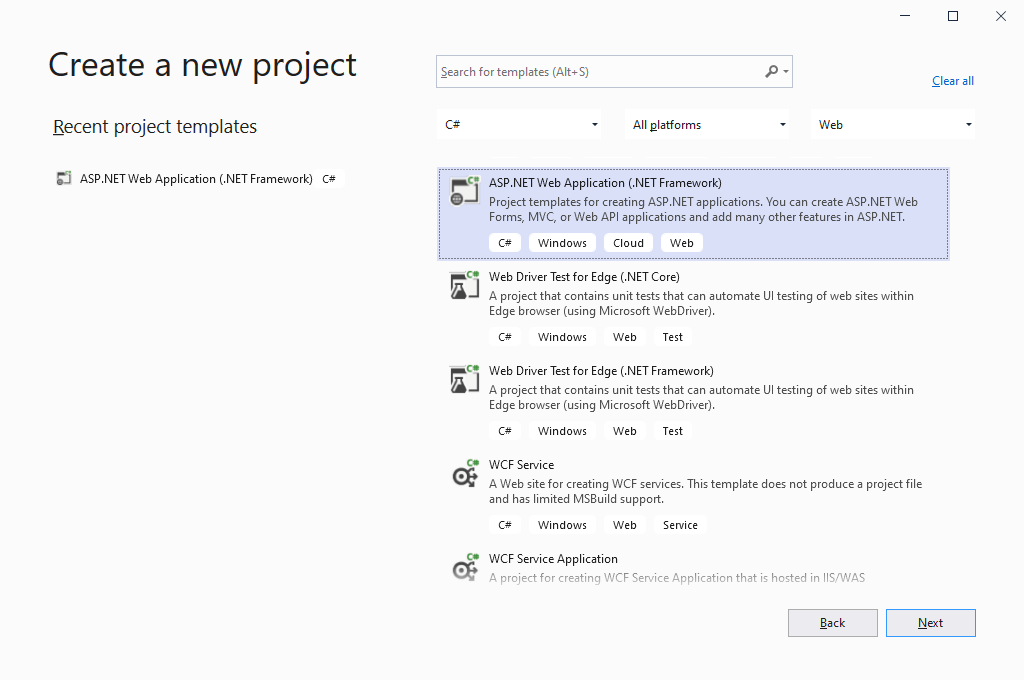
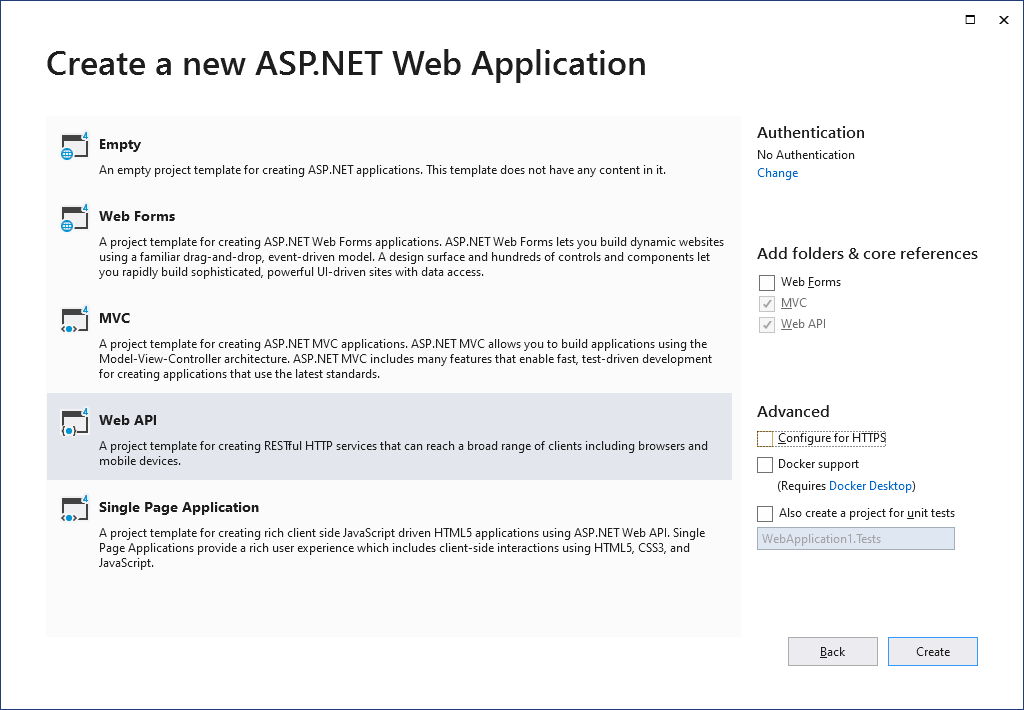
 |
|||
 |
 |
 |
 |
body {
    background-color: white;
}

.bold             { font-weight:      600;       }
.blue             { color:            #286090;   }
.top-padding      { padding-top:      0.50em;    }
.containment      { margin:           auto;
                    width:            500px;     }
.centralized      { margin:           auto;
                    width:            780px;     }
.heading          { color:            white;
                    background-color: steelblue; }
#top-banner       { top:              0;
                    left:             0;
                    right:            0;
                    z-index:          1120;
                    width:            100%;
                    bottom:           auto;
                    position:         fixed;
                    height:           6.25em;
                    background-color: #202460;   }
.push-down        { margin-top:       8em;       }
.bordered         { border:           1px solid black;  }
.parajust         { text-align:       justify;
                    font-family:     'Times New Roman', Garamond, Georgia, serif; }
.navbar-fixed-top { top:              6.25em;            }
.sect-title       { font-weight:      600;
                    font-size:        16px;
                    color:            maroon;
                    padding-bottom:   5px;
                    border-bottom:    2px dotted #0832a4; }
.navbar-brand     { height:           28px;
                    font-size:        12px;
                    line-height:      16px;               }

.navbar-inverse   { background-color: #263b95;
                    border-top:       3px solid #000; }
.common-font      { font-family:      Georgia, Garamond, 'Times New Roman', serif; }

.navbar-inverse .navbar-nav > li > a,
.navbar-inverse .navbar-nav > li > a:link {
                    font-size:        12px;
                    line-height:      16px;
                    color:            #faf76f; }
.navbar-inverse .navbar-nav > li > a:hover,
.navbar-inverse .navbar-nav > li > a:focus {
                    font-size:        12px;
                    line-height:      16px;
                    background-color: #202460;
color: lavender; }using System.Web.Optimization;
namespace BethesdaCarRental1
{
public class BundleConfig
{
// For more information on bundling, visit https://go.microsoft.com/fwlink/?LinkId=301862
public static void RegisterBundles(BundleCollection bundles)
{
bundles.Add(new ScriptBundle("~/bundles/jquery").Include(
"~/Scripts/jquery-{version}.js"));
bundles.Add(new ScriptBundle("~/bundles/jqueryval").Include(
"~/Scripts/jquery.validate*"));
// Use the development version of Modernizr to develop with and learn from. Then, when you're
// ready for production, use the build tool at https://modernizr.com to pick only the tests you need.
bundles.Add(new ScriptBundle("~/bundles/modernizr").Include(
"~/Scripts/modernizr-*"));
bundles.Add(new ScriptBundle("~/bundles/bootstrap").Include(
"~/Scripts/bootstrap.js"));
bundles.Add(new StyleBundle("~/Content/css").Include(
"~/Content/bootstrap.css",
"~/Content/site.css",
"~/Content/BethesdaCarRental.css"));
}
}
}The Database
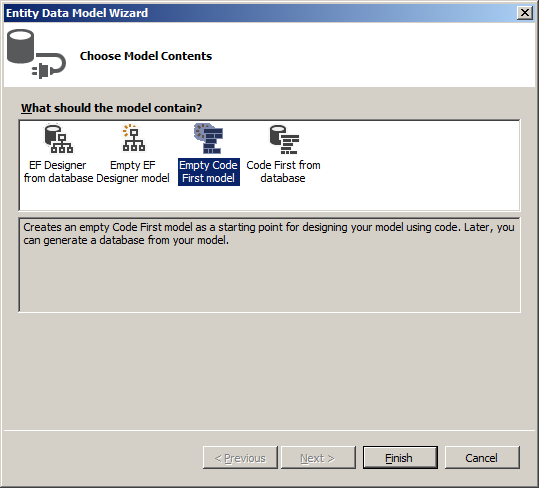
Our application will use a database. To create it, we will use the Entity Framework (EF). The EF provides many options to create or start a database. Microsoft Visual Studio makes it to choose the option that better suits you. You can then use a wizard to start, create, or setup your database.
Practical Learning: Creating a Database Controller
namespace BethesdaCarRental1.Models
{
    using System;
    using System.Data.Entity;
    using System.ComponentModel.DataAnnotations;

    public class RentalManagementModel : DbContext
    {
        // Your context has been configured to use a 'RentalManagementModel' connection string from your application's
        // configuration file (App.config or Web.config). By default, this connection string targets the
        // 'BethesdaCarRental1.Models.RentalManagementModel' database on your LocalDb instance.
        //
        // If you wish to target a different database and/or database provider, modify the 'RentalManagementModel'
        // connection string in the application configuration file.
        public RentalManagementModel()
            : base("name=RentalManagementModel")
        {
        }

        // Add a DbSet for each entity type that you want to include in your model. For more information
        // on configuring and using a Code First model, see http://go.microsoft.com/fwlink/?LinkId=390109.

        public virtual DbSet<Employee> Employees { get; set; }
        public virtual DbSet<Car> Cars { get; set; }
        public virtual DbSet<RentalOrder> RentalOrders { get; set; }
    }

    public class Employee
    {
        [Display(Name = "Employee Id")]
        public int EmployeeId { get; set; }
        [Display(Name = "Employee #")]
        public string EmployeeNumber { get; set; }
        [Display(Name = "First Name")]
        public string FirstName { get; set; }
        [Display(Name = "Last Name")]
        public string LastName { get; set; }
        [Display(Name = "Employment Title")]
        public string EmploymentTitle { get; set; }
    }

    public class Car
    {
        [Display(Name = "Car Id")]
        public int CarId { get; set; }
        [Display(Name = "Tag #")]
        public string TagNumber { get; set; }
        public string Category { get; set; }
        public string Make { get; set; }
        public string Model { get; set; }
        public int Passengers { get; set; }
        public string Condition { get; set; }
        [Display(Name = "Availability Status")]
        public string AvailabilityStatus { get; set; }
    }

    public class RentalOrder
    {
        [Display(Name = "Rental Order Id")]
        public int RentalOrderId { get; set; }
        [Display(Name = "Processed By")]
        public string RentStartProcessedBy { get; set; } // EmployeeNumber
        [Display(Name = "Employee #")]
        public string RentReturnProcessedBy { get; set; } // EmployeeNumber
        [Display(Name = "Drv. Lic. #")]
        public string DriversLicenseNumber { get; set; }
        [Display(Name = "First Name")]
        public string FirstName { get; set; }
        [Display(Name = "Last Name")]
        public string LastName { get; set; }
        public string Address { get; set; }
        public string City { get; set; }
        public string County { get; set; }
        public string State { get; set; }
        [Display(Name = "ZIP Code")]
        public string ZIPCode { get; set; }
        [Display(Name = "Car Rented")]
        public string TagNumber { get; set; }
        [Display(Name = "Car Condition")]
        public string CarCondition { get; set; }
        [Display(Name = "Tank Level")]
        public string TankLevel { get; set; }
        [Display(Name = "Mileage Start")]
        public int MileageStart { get; set; }
        [Display(Name = "Mileage End")]
        public int MileageEnd { get; set; }
        [Display(Name = "Total Mileage")]
        public int MileageTotal { get; set; }
        [Display(Name = "Start Date")]
        public string StartDate { get; set; }
        [Display(Name = "End Date")]
        public string EndDate { get; set; }
        [Display(Name = "Total Days")]
        public int TotalDays { get; set; }
        [Display(Name = "Rate Applied")]
        public decimal RateApplied { get; set; }
        [Display(Name = "Sub-Total")]
        public decimal SubTotal { get; set; }
        [Display(Name = "Tax Rate")]
        public decimal TaxRate { get; set; }
        [Display(Name = "Tax Amount")]
        public decimal TaxAmount { get; set; }
        [Display(Name = "Order Total")]
        public decimal OrderTotal { get; set; }
        [Display(Name = "Payment Date")]
        public string PaymentDate { get; set; }
        [Display(Name = "Order Status")]
        public string OrderStatus { get; set; }
    }
}A Controller to Create and Manage Records
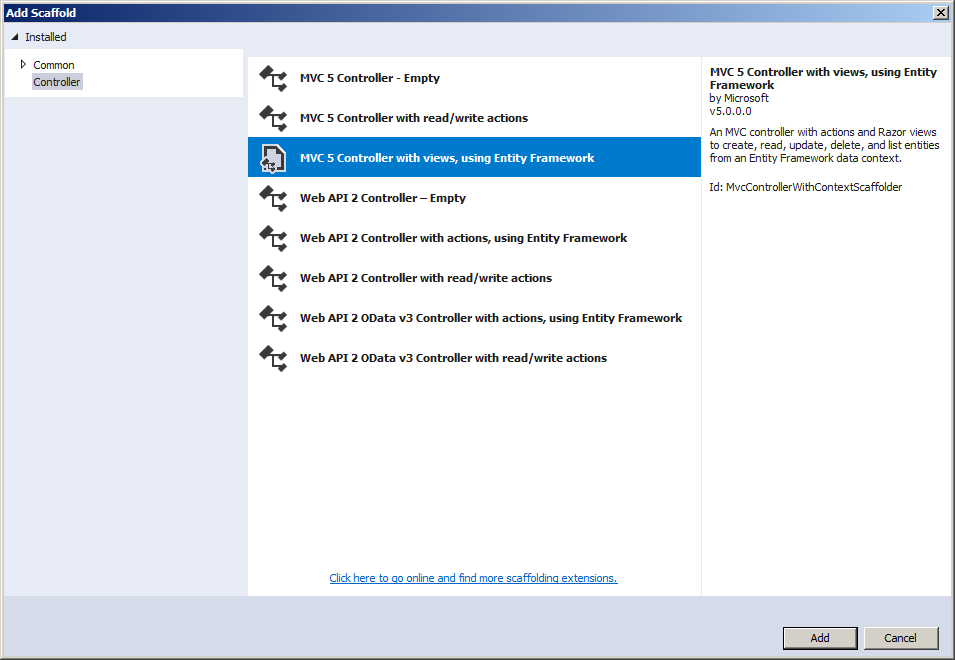
The entity framework makes it particularly easy to create views that are connected to the appropriate tables of a database. This is done by creating or generating a controller for each class that was created for the tables.
Employees
Our application will need employees in charge of all the manual operations of the program.
Practical Learning: Adding a Controller
@model BethesdaCarRental1.Models.Employee

@{
    ViewBag.Title = "Create Employee";
}

<h2 class="common-font text-center bold blue">Employment Application</h2>

<hr />

@using (Html.BeginForm())
{
    @Html.AntiForgeryToken()

    <div class="containment">
        <div class="form-horizontal common-font">
            @Html.ValidationSummary(true, "", new { @class = "text-danger" })
            <div class="form-group">
                @Html.LabelFor(model => model.EmployeeNumber, htmlAttributes: new { @class = "control-label col-md-5" })
                <div class="col-md-7">
                    @Html.EditorFor(model => model.EmployeeNumber, new { htmlAttributes = new { @class = "form-control" } })
                    @Html.ValidationMessageFor(model => model.EmployeeNumber, "", new { @class = "text-danger" })
                </div>
            </div>

            <div class="form-group">
                @Html.LabelFor(model => model.FirstName, htmlAttributes: new { @class = "control-label col-md-5" })
                <div class="col-md-7">
                    @Html.EditorFor(model => model.FirstName, new { htmlAttributes = new { @class = "form-control" } })
                    @Html.ValidationMessageFor(model => model.FirstName, "", new { @class = "text-danger" })
                </div>
            </div>

            <div class="form-group">
                @Html.LabelFor(model => model.LastName, htmlAttributes: new { @class = "control-label col-md-5" })
                <div class="col-md-7">
                    @Html.EditorFor(model => model.LastName, new { htmlAttributes = new { @class = "form-control" } })
                    @Html.ValidationMessageFor(model => model.LastName, "", new { @class = "text-danger" })
                </div>
            </div>

            <div class="form-group">
                @Html.LabelFor(model => model.EmploymentTitle, htmlAttributes: new { @class = "control-label col-md-5" })
                <div class="col-md-7">
                    @Html.EditorFor(model => model.EmploymentTitle, new { htmlAttributes = new { @class = "form-control" } })
                    @Html.ValidationMessageFor(model => model.EmploymentTitle, "", new { @class = "text-danger" })
                </div>
            </div>

            <div class="form-group">
                <label class="col-md-6 control-label">
                    @Html.ActionLink("Employees - Staff Members", "Index")
                </label>
                <div class="col-md-6">
                    <input type="submit" value="Hire this Employee" class="btn btn-primary" />
                </div>
            </div>
        </div>
    </div>
}

@section Scripts {
    @Scripts.Render("~/bundles/jqueryval")
}@model BethesdaCarRental1.Models.Employee
@{
ViewBag.Title = "Delete Employee";
}
<h2 class="common-font text-center bold blue">Delete Employee</h2>
<h3 class="common-font text-center bold blue">Are you sure you want to delete this employee's record?</h3>
<hr />
<div class="containment">
<dl class="dl-horizontal common-font">
<dt>@Html.DisplayNameFor(model => model.EmployeeId)</dt>
<dd>@Html.DisplayFor(model => model.EmployeeId)</dd>
<dt>@Html.DisplayNameFor(model => model.EmployeeNumber)</dt>
<dd>@Html.DisplayFor(model => model.EmployeeNumber)</dd>
<dt>@Html.DisplayNameFor(model => model.FirstName)</dt>
<dd>@Html.DisplayFor(model => model.FirstName)</dd>
<dt>@Html.DisplayNameFor(model => model.LastName)</dt>
<dd>@Html.DisplayFor(model => model.LastName)</dd>
<dt>@Html.DisplayNameFor(model => model.EmploymentTitle)</dt>
<dd>@Html.DisplayFor(model => model.EmploymentTitle)</dd>
</dl>
@using (Html.BeginForm())
{
@Html.AntiForgeryToken()
<div class="form-actions no-color">
<input type="submit" value="Delete Employee Record" class="btn btn-primary" /> ::
@Html.ActionLink("Employees - Staff Members", "Index")
</div>
}
</div>@model BethesdaCarRental1.Models.Employee
@{
ViewBag.Title = "Employee Details";
}
<h2 class="common-font text-center bold blue">Employee Details</h2>
<hr />
<div class="containment">
<dl class="dl-horizontal common-font">
<dt>@Html.DisplayNameFor(model => model.EmployeeId)</dt>
<dd>@Html.DisplayFor(model => model.EmployeeId)</dd>
<dt>@Html.DisplayNameFor(model => model.EmployeeNumber)</dt>
<dd>@Html.DisplayFor(model => model.EmployeeNumber)</dd>
<dt>@Html.DisplayNameFor(model => model.FirstName)</dt>
<dd>@Html.DisplayFor(model => model.FirstName)</dd>
<dt>@Html.DisplayNameFor(model => model.LastName)</dt>
<dd>@Html.DisplayFor(model => model.LastName)</dd>
<dt>@Html.DisplayNameFor(model => model.EmploymentTitle)</dt>
<dd>@Html.DisplayFor(model => model.EmploymentTitle)</dd>
</dl>
</div>
<p class="text-center">
@Html.ActionLink("Edit", "Edit", new { id = Model.EmployeeId }) ::
@Html.ActionLink("Employees - Staff Members", "Index")
</p>@model BethesdaCarRental1.Models.Employee
@{
ViewBag.Title = "Edit Employee";
}
<h2 class="common-font text-center bold blue">Edit/Update Employee Details</h2>
<hr />
@using (Html.BeginForm())
{
@Html.AntiForgeryToken()
<div class="containment">
<div class="form-horizontal">
@Html.ValidationSummary(true, "", new { @class = "text-danger" })
@Html.HiddenFor(model => model.EmployeeId)
<div class="form-group">
@Html.LabelFor(model => model.EmployeeNumber, htmlAttributes: new { @class = "control-label col-md-5" })
<div class="col-md-7">
@Html.EditorFor(model => model.EmployeeNumber, new { htmlAttributes = new { @class = "form-control" } })
@Html.ValidationMessageFor(model => model.EmployeeNumber, "", new { @class = "text-danger" })
</div>
</div>
<div class="form-group">
@Html.LabelFor(model => model.FirstName, htmlAttributes: new { @class = "control-label col-md-5" })
<div class="col-md-7">
@Html.EditorFor(model => model.FirstName, new { htmlAttributes = new { @class = "form-control" } })
@Html.ValidationMessageFor(model => model.FirstName, "", new { @class = "text-danger" })
</div>
</div>
<div class="form-group">
@Html.LabelFor(model => model.LastName, htmlAttributes: new { @class = "control-label col-md-5" })
<div class="col-md-7">
@Html.EditorFor(model => model.LastName, new { htmlAttributes = new { @class = "form-control" } })
@Html.ValidationMessageFor(model => model.LastName, "", new { @class = "text-danger" })
</div>
</div>
<div class="form-group">
@Html.LabelFor(model => model.EmploymentTitle, htmlAttributes: new { @class = "control-label col-md-5" })
<div class="col-md-7">
@Html.EditorFor(model => model.EmploymentTitle, new { htmlAttributes = new { @class = "form-control" } })
@Html.ValidationMessageFor(model => model.EmploymentTitle, "", new { @class = "text-danger" })
</div>
</div>
<div class="form-group">
<label class="col-md-6 control-label">
@Html.ActionLink("Employees - Staff Members", "Index")
</label>
<div class="col-md-6">
<input type="submit" value="Update Employee Record" class="btn btn-primary" />
</div>
</div>
</div>
</div>
}
@section Scripts {
@Scripts.Render("~/bundles/jqueryval")
}@model IEnumerable<BethesdaCarRental1.Models.Employee>
@{
ViewBag.Title = "Employees";
}
<h2 class="bold blue common-font text-center">Employees - Staff Members</h2>
<table class="table table-striped common-font">
<tr>
<th class="text-center">@Html.DisplayNameFor(model => model.EmployeeId)</th>
<th class="text-center">@Html.DisplayNameFor(model => model.EmployeeNumber)</th>
<th>@Html.DisplayNameFor(model => model.FirstName)</th>
<th>@Html.DisplayNameFor(model => model.LastName)</th>
<th>@Html.DisplayNameFor(model => model.EmploymentTitle)</th>
<th>@Html.ActionLink("Hire New Employee", "Create")</th>
</tr>
@foreach (var item in Model)
{
<tr>
<td class="text-center">@Html.DisplayFor(modelItem => item.EmployeeId)</td>
<td class="text-center">@Html.DisplayFor(modelItem => item.EmployeeNumber)</td>
<td>@Html.DisplayFor(modelItem => item.FirstName)</td>
<td>@Html.DisplayFor(modelItem => item.LastName)</td>
<td>@Html.DisplayFor(modelItem => item.EmploymentTitle)</td>
<td>
@Html.ActionLink("Edit", "Edit", new { id = item.EmployeeId }) ::
@Html.ActionLink("Details", "Details", new { id = item.EmployeeId }) ::
@Html.ActionLink("Delete", "Delete", new { id = item.EmployeeId })
</td>
</tr>
}
</table>Cars/Vehicles
Since the company must use cars to rent to customers, our application will need a table to track the vehicles and their status.
Practical Learning: Creating Cars
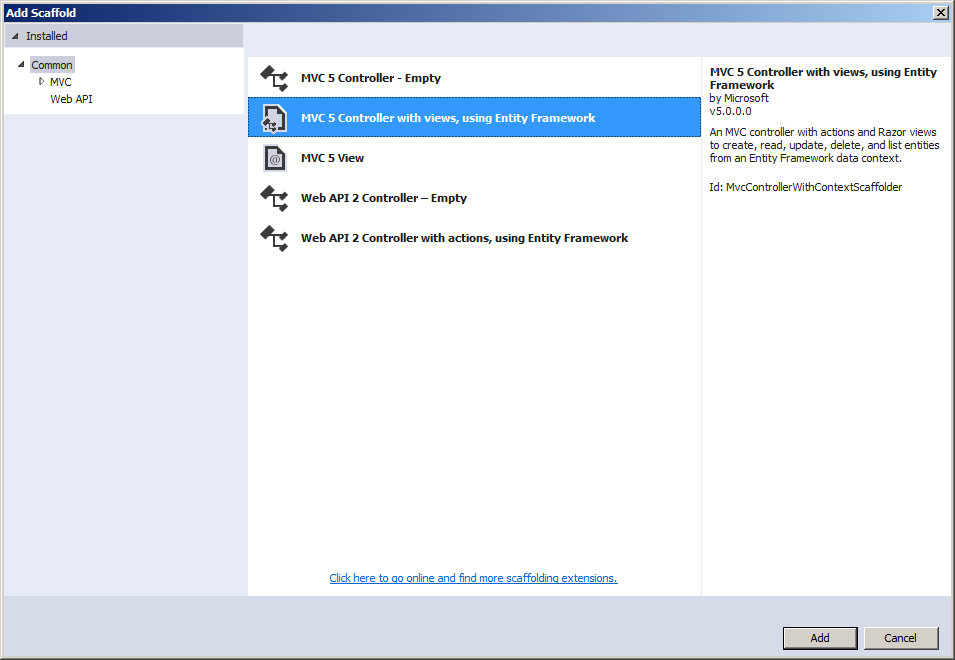
using BethesdaCarRental1.Models;
using System.Collections.Generic;
using System.Data.Entity;
using System.Linq;
using System.Net;
using System.Web.Mvc;

namespace BethesdaCarRental1.Controllers
{
    public class CarsController : Controller
    {
        private RentalManagementModel db = new RentalManagementModel();

        // GET: Cars
        public ActionResult Index()
        {
            return View(db.Cars.ToList());
        }

        // GET: Cars/Details/5
        public ActionResult Details(int? id)
        {
            if (id == null)
            {
                return new HttpStatusCodeResult(HttpStatusCode.BadRequest);
            }
            Car car = db.Cars.Find(id);
            if (car == null)
            {
                return HttpNotFound();
            }
            return View(car);
        }

        // GET: Cars/Create
        public ActionResult Create()
        {
            List<SelectListItem> types = new List<SelectListItem>();
            List<SelectListItem> conditions = new List<SelectListItem>();
            List<SelectListItem> availabilities = new List<SelectListItem>();

            types.Add(new SelectListItem() { Text = "SUV",           Value = "SUV"           });
            types.Add(new SelectListItem() { Text = "Compact",       Value = "Compact"       });
            types.Add(new SelectListItem() { Text = "Economy",       Value = "Economy"       });
            types.Add(new SelectListItem() { Text = "Mini Van",      Value = "Mini Van"      });
            types.Add(new SelectListItem() { Text = "Standard",      Value = "Standard"      });
            types.Add(new SelectListItem() { Text = "Full Size",     Value = "Full Size"     });
            types.Add(new SelectListItem() { Text = "Pickup Truck",  Value = "Pickup Truck"  });
            types.Add(new SelectListItem() { Text = "Passenger Van", Value = "Passenger Van" });

            availabilities.Add(new SelectListItem() { Text = "Other",          Value = "Other"          });
            availabilities.Add(new SelectListItem() { Text = "Rented",         Value = "Rented"         });
            availabilities.Add(new SelectListItem() { Text = "Unknown",        Value = "Unknown"        });
            availabilities.Add(new SelectListItem() { Text = "Available",      Value = "Available"      });
            availabilities.Add(new SelectListItem() { Text = "Being Serviced", Value = "Being Serviced" });

            conditions.Add(new SelectListItem() { Text = "Good",          Value = "Good"          });
            conditions.Add(new SelectListItem() { Text = "Other",         Value = "Other"         });
            conditions.Add(new SelectListItem() { Text = "Excellent",     Value = "Excellent"     });
            conditions.Add(new SelectListItem() { Text = "Driveable",     Value = "Driveable"     });
            conditions.Add(new SelectListItem() { Text = "Needs Service", Value = "Needs Service" });

            ViewBag.Category           = types;
            ViewBag.Condition          = conditions;
            ViewBag.AvailabilityStatus = availabilities;

            return View();
        }

        // POST: Cars/Create
        // To protect from overposting attacks, please enable the specific properties you want to bind to, for
        // more details see https://go.microsoft.com/fwlink/?LinkId=317598.
        [HttpPost]
        [ValidateAntiForgeryToken]
        public ActionResult Create([Bind(Include = "CarId,TagNumber,Category,Make,Model,Passengers,Condition,AvailabilityStatus")] Car car)
        {
            if (ModelState.IsValid)
            {
                db.Cars.Add(car);
                db.SaveChanges();
                return RedirectToAction("Index");
            }

            return View(car);
        }

        // GET: Cars/Edit/5
        public ActionResult Edit(int? id)
        {
            if (id == null)
            {
                return new HttpStatusCodeResult(HttpStatusCode.BadRequest);
            }
            Car car = db.Cars.Find(id);
            if (car == null)
            {
                return HttpNotFound();
            }

            List<SelectListItem> types          = new List<SelectListItem>();
            List<SelectListItem> conditions     = new List<SelectListItem>();
            List<SelectListItem> availabilities = new List<SelectListItem>();

            types.Add(new SelectListItem() { Text = "SUV",           Value = "SUV",           Selected = (car.Category == "SUV")           });
            types.Add(new SelectListItem() { Text = "Compact",       Value = "Compact",       Selected = (car.Category == "Compact")       });
            types.Add(new SelectListItem() { Text = "Economy",       Value = "Economy",       Selected = (car.Category == "Economy")       });
            types.Add(new SelectListItem() { Text = "Mini Van",      Value = "Mini Van",      Selected = (car.Category == "Mini Van")      });
            types.Add(new SelectListItem() { Text = "Category",      Value = "Category",      Selected = (car.Category == "Category")      });
            types.Add(new SelectListItem() { Text = "Standard",      Value = "Standard",      Selected = (car.Category == "Standard")      });
            types.Add(new SelectListItem() { Text = "Full Size",     Value = "Full Size",     Selected = (car.Category == "Full Size")     });
            types.Add(new SelectListItem() { Text = "Pickup Truck",  Value = "Pickup Truck",  Selected = (car.Category == "Pickup Truck")  });
            types.Add(new SelectListItem() { Text = "Passenger Van", Value = "Passenger Van", Selected = (car.Category == "Passenger Van") });

            availabilities.Add(new SelectListItem() { Text = "Other",          Value = "Other",          Selected = (car.AvailabilityStatus == "Other")          });
            availabilities.Add(new SelectListItem() { Text = "Rented",         Value = "Rented",         Selected = (car.AvailabilityStatus == "Rented")         });
            availabilities.Add(new SelectListItem() { Text = "Unknown",        Value = "Unknown",        Selected = (car.AvailabilityStatus == "Unknown")        });
            availabilities.Add(new SelectListItem() { Text = "Available",      Value = "Available",      Selected = (car.AvailabilityStatus == "Available")      });
            availabilities.Add(new SelectListItem() { Text = "Being Serviced", Value = "Being Serviced", Selected = (car.AvailabilityStatus == "Being Serviced") });

            conditions.Add(new SelectListItem() { Text = "Good",          Value = "Good",          Selected = (car.Condition == "Good")          });
            conditions.Add(new SelectListItem() { Text = "Other",         Value = "Other",         Selected = (car.Condition == "Other")         });
            conditions.Add(new SelectListItem() { Text = "Excellent",     Value = "Excellent",     Selected = (car.Condition == "Excellent")     });
            conditions.Add(new SelectListItem() { Text = "Driveable",     Value = "Driveable",     Selected = (car.Condition == "Driveable")     });
            conditions.Add(new SelectListItem() { Text = "Needs Service", Value = "Needs Service", Selected = (car.Condition == "Needs Service") });

            ViewBag.Category = types;
            ViewBag.Condition = conditions;
            ViewBag.AvailabilityStatus = availabilities;

            return View(car);
        }

        // POST: Cars/Edit/5
        // To protect from overposting attacks, please enable the specific properties you want to bind to, for
        // more details see https://go.microsoft.com/fwlink/?LinkId=317598.
        [HttpPost]
        [ValidateAntiForgeryToken]
        public ActionResult Edit([Bind(Include = "CarId,TagNumber,Category,Make,Model,Passengers,Condition,AvailabilityStatus")] Car car)
        {
            if (ModelState.IsValid)
            {
                db.Entry(car).State = EntityState.Modified;
                db.SaveChanges();
                return RedirectToAction("Index");
            }
            return View(car);
        }

        // GET: Cars/Delete/5
        public ActionResult Delete(int? id)
        {
            if (id == null)
            {
                return new HttpStatusCodeResult(HttpStatusCode.BadRequest);
            }
            Car car = db.Cars.Find(id);
            if (car == null)
            {
                return HttpNotFound();
            }
            return View(car);
        }

        // POST: Cars/Delete/5
        [HttpPost, ActionName("Delete")]
        [ValidateAntiForgeryToken]
        public ActionResult DeleteConfirmed(int id)
        {
            Car car = db.Cars.Find(id);
            db.Cars.Remove(car);
            db.SaveChanges();
            return RedirectToAction("Index");
        }

        protected override void Dispose(bool disposing)
        {
            if (disposing)
            {
                db.Dispose();
            }
            base.Dispose(disposing);
        }
    }
}@model BethesdaCarRental1.Models.Car
@{
ViewBag.Title = "Create Car";
}
<h2 class="common-font text-center bold blue">Register a Car</h2>
<hr />
@using (Html.BeginForm())
{
@Html.AntiForgeryToken()
<div class="containment">
<div class="form-horizontal common-font">
@Html.ValidationSummary(true, "", new { @class = "text-danger" })
<div class="form-group">
@Html.LabelFor(model => model.TagNumber, htmlAttributes: new { @class = "control-label col-md-5" })
<div class="col-md-7">
@Html.EditorFor(model => model.TagNumber, new { htmlAttributes = new { @class = "form-control" } })
@Html.ValidationMessageFor(model => model.TagNumber, "", new { @class = "text-danger" })
</div>
</div>
<div class="form-group">
@Html.LabelFor(model => model.Make, htmlAttributes: new { @class = "control-label col-md-5" })
<div class="col-md-7">
@Html.EditorFor(model => model.Make, new { htmlAttributes = new { @class = "form-control" } })
@Html.ValidationMessageFor(model => model.Make, "", new { @class = "text-danger" })
</div>
</div>
<div class="form-group">
@Html.LabelFor(model => model.Model, htmlAttributes: new { @class = "control-label col-md-5" })
<div class="col-md-7">
@Html.EditorFor(model => model.Model, new { htmlAttributes = new { @class = "form-control" } })
@Html.ValidationMessageFor(model => model.Model, "", new { @class = "text-danger" })
</div>
</div>
<div class="form-group">
@Html.LabelFor(model => model.Passengers, htmlAttributes: new { @class = "control-label col-md-5" })
<div class="col-md-7">
@Html.EditorFor(model => model.Passengers, new { htmlAttributes = new { @class = "form-control" } })
@Html.ValidationMessageFor(model => model.Passengers, "", new { @class = "text-danger" })
</div>
</div>
<div class="form-group">
@Html.LabelFor(model => model.Category, htmlAttributes: new { @class = "control-label col-md-5" })
<div class="col-md-7">
@Html.DropDownList("Category", ViewBag.Category as SelectList, htmlAttributes: new { @class = "form-control" })
@Html.ValidationMessageFor(model => model.Category, "", new { @class = "text-danger" })
</div>
</div>
<div class="form-group">
@Html.LabelFor(model => model.Condition, htmlAttributes: new { @class = "control-label col-md-5" })
<div class="col-md-7">
@Html.DropDownList("Condition", ViewBag.Condition as SelectList, htmlAttributes: new { @class = "form-control" })
@Html.ValidationMessageFor(model => model.Condition, "", new { @class = "text-danger" })
</div>
</div>
<div class="form-group">
@Html.LabelFor(model => model.AvailabilityStatus, htmlAttributes: new { @class = "control-label col-md-5" })
<div class="col-md-7">
@Html.DropDownList("AvailabilityStatus", ViewBag.AvailabilityStatus as SelectList, htmlAttributes: new { @class = "form-control" })
@Html.ValidationMessageFor(model => model.AvailabilityStatus, "", new { @class = "text-danger" })
</div>
</div>
<div class="form-group">
<label class="col-md-6 control-label">
@Html.ActionLink("Cars/Vehicles", "Index")
</label>
<div class="col-md-6">
<input type="submit" value="Save Car Record" class="btn btn-primary" />
</div>
</div>
</div>
</div>
}
@section Scripts {
@Scripts.Render("~/bundles/jqueryval")
}@model BethesdaCarRental1.Models.Car
@{
ViewBag.Title = "Delete Car";
}
<h2 class="common-font text-center bold blue">Delete Car/Vehicle</h2>
<h3 class="common-font text-center bold blue">Are you sure you want to delete this car's registration?</h3>
<hr />
<div class="containment">
<dl class="dl-horizontal common-font">
<dt>@Html.DisplayNameFor(model => model.CarId)</dt>
<dd>@Html.DisplayFor(model => model.CarId)</dd>
<dt>@Html.DisplayNameFor(model => model.TagNumber)</dt>
<dd>@Html.DisplayFor(model => model.TagNumber)</dd>
<dt>@Html.DisplayNameFor(model => model.Category)</dt>
<dd>@Html.DisplayFor(model => model.Category)</dd>
<dt>@Html.DisplayNameFor(model => model.Make)</dt>
<dd>@Html.DisplayFor(model => model.Make)</dd>
<dt>@Html.DisplayNameFor(model => model.Model)</dt>
<dd>@Html.DisplayFor(model => model.Model)</dd>
<dt>@Html.DisplayNameFor(model => model.Passengers)</dt>
<dd>@Html.DisplayFor(model => model.Passengers)</dd>
<dt>@Html.DisplayNameFor(model => model.Condition)</dt>
<dd>@Html.DisplayFor(model => model.Condition)</dd>
<dt>@Html.DisplayNameFor(model => model.AvailabilityStatus)</dt>
<dd>@Html.DisplayFor(model => model.AvailabilityStatus)</dd>
</dl>
@using (Html.BeginForm())
{
@Html.AntiForgeryToken()
<div class="form-actions no-color">
<input type="submit" value="Delete" class="btn btn-primary" /> ::
@Html.ActionLink("Cars/Vehicles", "Index")
</div>
}
</div>@model BethesdaCarRental1.Models.Car
@{
ViewBag.Title = "Car Details";
}
<h2 class="common-font text-center bold blue">Car/Vehicle Details</h2>
<hr />
<div class="containment">
<dl class="dl-horizontal common-font">
<dt>@Html.DisplayNameFor(model => model.CarId)</dt>
<dd>@Html.DisplayFor(model => model.CarId)</dd>
<dt>@Html.DisplayNameFor(model => model.TagNumber)</dt>
<dd>@Html.DisplayFor(model => model.TagNumber)</dd>
<dt>@Html.DisplayNameFor(model => model.Category)</dt>
<dd>@Html.DisplayFor(model => model.Category)</dd>
<dt>@Html.DisplayNameFor(model => model.Make)</dt>
<dd>@Html.DisplayFor(model => model.Make)</dd>
<dt>@Html.DisplayNameFor(model => model.Model)</dt>
<dd>@Html.DisplayFor(model => model.Model)</dd>
<dt>@Html.DisplayNameFor(model => model.Passengers)</dt>
<dd>@Html.DisplayFor(model => model.Passengers)</dd>
<dt>@Html.DisplayNameFor(model => model.Condition)</dt>
<dd>@Html.DisplayFor(model => model.Condition)</dd>
<dt>@Html.DisplayNameFor(model => model.AvailabilityStatus)</dt>
<dd>@Html.DisplayFor(model => model.AvailabilityStatus)</dd>
</dl>
</div>
<p class="text-center">
@Html.ActionLink("Edit", "Edit", new { id = Model.CarId }) ::
@Html.ActionLink("Cars/Vehicles", "Index")
</p>@model BethesdaCarRental1.Models.Car
@{
ViewBag.Title = "Edit Car";
}
<h2 class="common-font text-center bold blue">Edit/Update Car Information</h2>
<hr />
@using (Html.BeginForm())
{
@Html.AntiForgeryToken()
<div class="containment"></div>
<div class="form-horizontal">
@Html.ValidationSummary(true, "", new { @class = "text-danger" })
@Html.HiddenFor(model => model.CarId)
<div class="form-group">
@Html.LabelFor(model => model.TagNumber, htmlAttributes: new { @class = "control-label col-md-5" })
<div class="col-md-7">
@Html.EditorFor(model => model.TagNumber, new { htmlAttributes = new { @class = "form-control" } })
@Html.ValidationMessageFor(model => model.TagNumber, "", new { @class = "text-danger" })
</div>
</div>
<div class="form-group">
@Html.LabelFor(model => model.Category, htmlAttributes: new { @class = "control-label col-md-5" })
<div class="col-md-7">
@Html.DropDownList("Category", ViewBag.Category as SelectList, htmlAttributes: new { @class = "form-control" })
@Html.ValidationMessageFor(model => model.Category, "", new { @class = "text-danger" })
</div>
</div>
<div class="form-group">
@Html.LabelFor(model => model.Make, htmlAttributes: new { @class = "control-label col-md-5" })
<div class="col-md-7">
@Html.EditorFor(model => model.Make, new { htmlAttributes = new { @class = "form-control" } })
@Html.ValidationMessageFor(model => model.Make, "", new { @class = "text-danger" })
</div>
</div>
<div class="form-group">
@Html.LabelFor(model => model.Model, htmlAttributes: new { @class = "control-label col-md-5" })
<div class="col-md-7">
@Html.EditorFor(model => model.Model, new { htmlAttributes = new { @class = "form-control" } })
@Html.ValidationMessageFor(model => model.Model, "", new { @class = "text-danger" })
</div>
</div>
<div class="form-group">
@Html.LabelFor(model => model.Passengers, htmlAttributes: new { @class = "control-label col-md-5" })
<div class="col-md-7">
@Html.EditorFor(model => model.Passengers, new { htmlAttributes = new { @class = "form-control" } })
@Html.ValidationMessageFor(model => model.Passengers, "", new { @class = "text-danger" })
</div>
</div>
<div class="form-group">
@Html.LabelFor(model => model.Condition, htmlAttributes: new { @class = "control-label col-md-5" })
<div class="col-md-7">
@Html.DropDownList("Condition", ViewBag.Condition as SelectList, htmlAttributes: new { @class = "form-control" })
@Html.ValidationMessageFor(model => model.Condition, "", new { @class = "text-danger" })
</div>
</div>
<div class="form-group">
@Html.LabelFor(model => model.AvailabilityStatus, htmlAttributes: new { @class = "control-label col-md-5" })
<div class="col-md-7">
@Html.DropDownList("AvailabilityStatus", ViewBag.AvailabilityStatus as SelectList, htmlAttributes: new { @class = "form-control" })
@Html.ValidationMessageFor(model => model.AvailabilityStatus, "", new { @class = "text-danger" })
</div>
</div>
<div class="form-group">
<label class="col-md-6 control-label">
@Html.ActionLink("Cars/Vehicles", "Index")
</label>
<div class="col-md-6">
<input type="submit" value="Save" class="btn btn-primary" />
</div>
</div>
</div>
}
@section Scripts {
@Scripts.Render("~/bundles/jqueryval")
}@model IEnumerable<BethesdaCarRental1.Models.Car>
@{
ViewBag.Title = "Cars/Vehicles";
}
<h2 class="bold blue common-font text-center">Cars/Vehicles</h2>
<table class="table table-striped common-font">
<tr>
<th class="text-center">@Html.DisplayNameFor(model => model.CarId)</th>
<th class="text-center">@Html.DisplayNameFor(model => model.TagNumber)</th>
<th>@Html.DisplayNameFor(model => model.Category)</th>
<th>@Html.DisplayNameFor(model => model.Make)</th>
<th>@Html.DisplayNameFor(model => model.Model)</th>
<th class="text-center">@Html.DisplayNameFor(model => model.Passengers)</th>
<th>@Html.DisplayNameFor(model => model.Condition)</th>
<th>@Html.DisplayNameFor(model => model.AvailabilityStatus)</th>
<th>@Html.ActionLink("New Car Setup", "Create")</th>
</tr>
@foreach (var item in Model)
{
<tr>
<td class="text-center">@Html.DisplayFor(modelItem => item.CarId)</td>
<td class="text-center">@Html.DisplayFor(modelItem => item.TagNumber)</td>
<td>@Html.DisplayFor(modelItem => item.Category)</td>
<td>@Html.DisplayFor(modelItem => item.Make)</td>
<td>@Html.DisplayFor(modelItem => item.Model)</td>
<td class="text-center">@Html.DisplayFor(modelItem => item.Passengers)</td>
<td>@Html.DisplayFor(modelItem => item.Condition)</td>
<td>@Html.DisplayFor(modelItem => item.AvailabilityStatus)</td>
<td>
@Html.ActionLink("Edit", "Edit", new { id = item.CarId }) ::
@Html.ActionLink("Details", "Details", new { id = item.CarId }) ::
@Html.ActionLink("Delete", "Delete", new { id = item.CarId })
</td>
</tr>
}
</table>A Web API Controller
Probably the most common way to use jQuery in an ASP.NET MVC application is to involve Web API. You don't have to create a Web API application in Microsoft Visual Studio. In most cases, at any time, you can create a class that supports Web API. Such a class is derived from ApiController.
Practical Learning: Using a Web API Controller
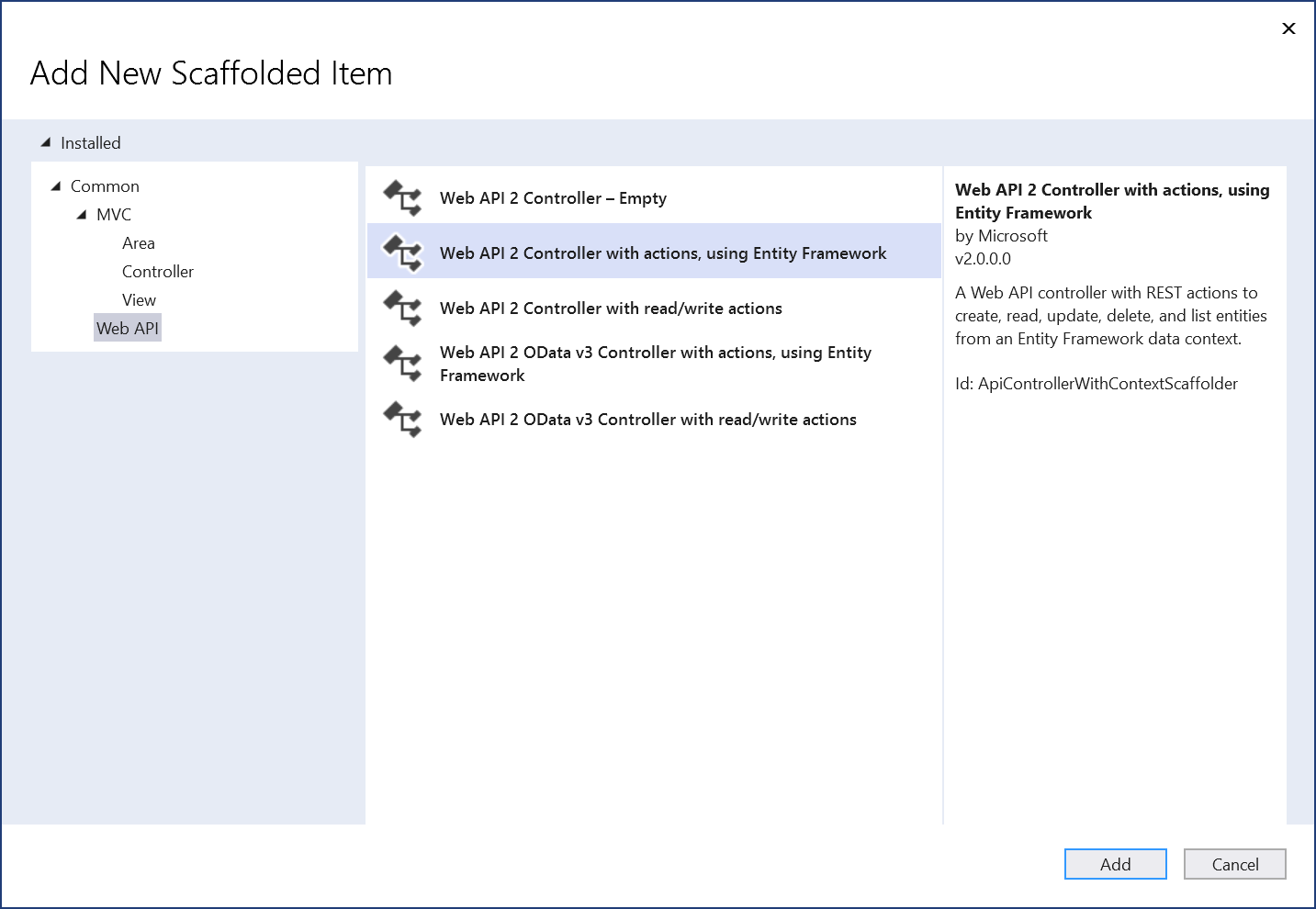
Rental Orders
When a company rentas a car to a customer, it must create a rental order or contract.
Practical Learning: Creating Rental Orders
using System;
using System.Collections.Generic;
using System.Data;
using System.Data.Entity;
using System.Linq;
using System.Net;
using System.Web;
using System.Web.Mvc;
using BethesdaCarRental1.Models;

namespace BethesdaCarRental1.Controllers
{
    public class RentalOrdersController : Controller
    {
        private RentalManagementModel db = new RentalManagementModel();

        // GET: RentalOrders
        public ActionResult Index()
        {
            return View(db.RentalOrders.ToList());
        }

        // GET: RentalOrders/Details/5
        public ActionResult Details(int? id)
        {
            if (id == null)
            {
                return new HttpStatusCodeResult(HttpStatusCode.BadRequest);
            }
            RentalOrder rentalOrder = db.RentalOrders.Find(id);
            if (rentalOrder == null)
            {
                return HttpNotFound();
            }
            return View(rentalOrder);
        }

        // GET: RentalOrders/Create
        public ActionResult Create()
        {
            List<SelectListItem> tanks      = new List<SelectListItem>();
            List<SelectListItem> status     = new List<SelectListItem>();
            List<SelectListItem> conditions = new List<SelectListItem>();

            conditions.Add(new SelectListItem() { Text = "Other",         Value = "Other"         });
            conditions.Add(new SelectListItem() { Text = "Excellent",     Value = "Excellent"     });
            conditions.Add(new SelectListItem() { Text = "Driveable",     Value = "Driveable"     });
            conditions.Add(new SelectListItem() { Text = "Needs Service", Value = "Needs Service" });

            tanks.Add(new SelectListItem() { Text = "Empty",     Value = "Empty"     });
            tanks.Add(new SelectListItem() { Text = "1/4 Empty", Value = "1/4 Empty" });
            tanks.Add(new SelectListItem() { Text = "Half",      Value = "Half"      });
            tanks.Add(new SelectListItem() { Text = "3/4 Full",  Value = "3/4 Full"  });
            tanks.Add(new SelectListItem() { Text = "Full",      Value = "Full"      });

            status.Add(new SelectListItem() { Text = "Other",           Value = "Other"           });
            status.Add(new SelectListItem() { Text = "Ongoing",         Value = "Ongoing"         });
            status.Add(new SelectListItem() { Text = "Order Reserved",  Value = "Order Reserved"  });
            status.Add(new SelectListItem() { Text = "Order Completed", Value = "Order Completed" });

            ViewData["TankLevel"]    = tanks;
            ViewData["OrderStatus"]  = status;
            ViewData["CarCondition"] = conditions;

            return View();
        }

        // POST: RentalOrders/Create
        // To protect from overposting attacks, please enable the specific properties you want to bind to, for
        // more details see https://go.microsoft.com/fwlink/?LinkId=317598.
        [HttpPost]
        [ValidateAntiForgeryToken]
        public ActionResult Create([Bind(Include = "RentalOrderId,RentStartProcessedBy,RentReturnProcessedBy,DriversLicenseNumber,FirstName,LastName,Address,City,County,State,ZIPCode,TagNumber,CarCondition,TankLevel,MileageStart,MileageEnd,MileageTotal,StartDate,EndDate,TotalDays,RateApplied,SubTotal,TaxRate,TaxAmount,OrderTotal,PaymentDate,OrderStatus")] RentalOrder rentalOrder)
        {
            if (ModelState.IsValid)
            {
                db.RentalOrders.Add(rentalOrder);
                db.SaveChanges();
                return RedirectToAction("Index");
            }

            return View(rentalOrder);
        }

        // GET: RentalOrders/Edit/5
        public ActionResult Edit(int? id)
        {
            if (id == null)
            {
                return new HttpStatusCodeResult(HttpStatusCode.BadRequest);
            }
            RentalOrder rentalOrder = db.RentalOrders.Find(id);
            if (rentalOrder == null)
            {
                return HttpNotFound();
            }

            List<SelectListItem> tanks      = new List<SelectListItem>();
            List<SelectListItem> status     = new List<SelectListItem>();
            List<SelectListItem> conditions = new List<SelectListItem>();

            conditions.Add(new SelectListItem() { Text = "Other",         Value = "Other",         Selected = (rentalOrder.CarCondition == "Other")         });
            conditions.Add(new SelectListItem() { Text = "Excellent",     Value = "Excellent",     Selected = (rentalOrder.CarCondition == "Excellent")     });
            conditions.Add(new SelectListItem() { Text = "Driveable",     Value = "Driveable",     Selected = (rentalOrder.CarCondition == "Driveable")     });
            conditions.Add(new SelectListItem() { Text = "Needs Service", Value = "Needs Service", Selected = (rentalOrder.CarCondition == "Needs Service") });

            tanks.Add(new SelectListItem() { Text = "Empty",     Value = "Empty",     Selected = (rentalOrder.TankLevel == "Empty")     });
            tanks.Add(new SelectListItem() { Text = "1/4 Empty", Value = "1/4 Empty", Selected = (rentalOrder.TankLevel == "1/4 Empty") });
            tanks.Add(new SelectListItem() { Text = "Half",      Value = "Half",      Selected = (rentalOrder.TankLevel == "Half")      });
            tanks.Add(new SelectListItem() { Text = "3/4 Full",  Value = "3/4 Full",  Selected = (rentalOrder.TankLevel == "3/4 Full")  });
            tanks.Add(new SelectListItem() { Text = "Full",      Value = "Full",      Selected = (rentalOrder.TankLevel == "Full")      });

            status.Add(new SelectListItem() { Text = "Other",           Value = "Other",           Selected = (rentalOrder.OrderStatus == "Other")           });
            status.Add(new SelectListItem() { Text = "Ongoing",         Value = "Ongoing",         Selected = (rentalOrder.OrderStatus == "Ongoing")         });
            status.Add(new SelectListItem() { Text = "Order Reserved",  Value = "Order Reserved",  Selected = (rentalOrder.OrderStatus == "Order Reserved")  });
            status.Add(new SelectListItem() { Text = "Order Completed", Value = "Order Completed", Selected = (rentalOrder.OrderStatus == "Order Completed") });

            ViewData["TankLevel"]    = tanks;
            ViewData["OrderStatus"]  = status;
            ViewData["CarCondition"] = conditions;

            return View(rentalOrder);
        }

        // POST: RentalOrders/Edit/5
        // To protect from overposting attacks, please enable the specific properties you want to bind to, for
        // more details see https://go.microsoft.com/fwlink/?LinkId=317598.
        [HttpPost]
        [ValidateAntiForgeryToken]
        public ActionResult Edit([Bind(Include = "RentalOrderId,RentStartProcessedBy,RentReturnProcessedBy,DriversLicenseNumber,FirstName,LastName,Address,City,County,State,ZIPCode,TagNumber,CarCondition,TankLevel,MileageStart,MileageEnd,MileageTotal,StartDate,EndDate,TotalDays,RateApplied,SubTotal,TaxRate,TaxAmount,OrderTotal,PaymentDate,OrderStatus")] RentalOrder rentalOrder)
        {
            if (ModelState.IsValid)
            {
                db.Entry(rentalOrder).State = EntityState.Modified;
                db.SaveChanges();
                return RedirectToAction("Index");
            }
            return View(rentalOrder);
        }

        // GET: RentalOrders/Delete/5
        public ActionResult Delete(int? id)
        {
            if (id == null)
            {
                return new HttpStatusCodeResult(HttpStatusCode.BadRequest);
            }
            RentalOrder rentalOrder = db.RentalOrders.Find(id);
            if (rentalOrder == null)
            {
                return HttpNotFound();
            }
            return View(rentalOrder);
        }

        // POST: RentalOrders/Delete/5
        [HttpPost, ActionName("Delete")]
        [ValidateAntiForgeryToken]
        public ActionResult DeleteConfirmed(int id)
        {
            RentalOrder rentalOrder = db.RentalOrders.Find(id);
            db.RentalOrders.Remove(rentalOrder);
            db.SaveChanges();
            return RedirectToAction("Index");
        }

        protected override void Dispose(bool disposing)
        {
            if (disposing)
            {
                db.Dispose();
            }
            base.Dispose(disposing);
        }
    }
}@model BethesdaCarRental1.Models.RentalOrder
@{
ViewBag.Title = "Rental Order Start-Up";
}
<h2 class="common-font text-center bold blue">Rental Order Start-Up</h2>
<hr />
@using (Html.BeginForm())
{
@Html.AntiForgeryToken()
<div class="containment">
<div class="form-horizontal common-font">
@Html.ValidationSummary(true, "", new { @class = "text-danger" })
<div class="heading"><p class="common-font text-center something">Rental Order Processed By</p></div>
<div class="form-group">
<label for="rsProcessedBy" class="common-font control-label col-md-3">Employee #</label>
<div class="col-md-3">
@Html.EditorFor(model => model.RentStartProcessedBy,
new { htmlAttributes = new { @class = "form-control", id = "rsProcessedBy" } })
@Html.ValidationMessageFor(model => model.RentStartProcessedBy, "", new { @class = "text-danger" })
</div>
<div class="common-font col-md-6">
<span id="employeeDetails"></span>
</div>
</div>
<div class="heading"><p class="common-font text-center">Customer Information</p></div>
<div class="form-group">
@Html.LabelFor(model => model.DriversLicenseNumber, htmlAttributes: new { @class = "common-font control-label col-md-3" })
<div class="col-md-7">
@Html.EditorFor(model => model.DriversLicenseNumber, new { htmlAttributes = new { @class = "form-control" } })
@Html.ValidationMessageFor(model => model.DriversLicenseNumber, "", new { @class = "text-danger" })
</div>
</div>
<div class="form-group">
@Html.LabelFor(model => model.FirstName, htmlAttributes: new { @class = "control-label common-font col-md-3" })
<div class="col-md-7">
@Html.EditorFor(model => model.FirstName, new { htmlAttributes = new { @class = "form-control" } })
@Html.ValidationMessageFor(model => model.FirstName, "", new { @class = "text-danger" })
</div>
</div>
<div class="form-group">
@Html.LabelFor(model => model.LastName, htmlAttributes: new { @class = "common-font control-label col-md-3" })
<div class="col-md-7">
@Html.EditorFor(model => model.LastName, new { htmlAttributes = new { @class = "form-control" } })
@Html.ValidationMessageFor(model => model.LastName, "", new { @class = "text-danger" })
</div>
</div>
<div class="form-group">
@Html.LabelFor(model => model.Address, htmlAttributes: new { @class = "control-label common-font col-md-3" })
<div class="col-md-7">
@Html.EditorFor(model => model.Address, new { htmlAttributes = new { @class = "form-control" } })
@Html.ValidationMessageFor(model => model.Address, "", new { @class = "text-danger" })
</div>
</div>
<div class="form-group">
@Html.LabelFor(model => model.City, htmlAttributes: new { @class = "common-font control-label col-md-3" })
<div class="col-md-7">
@Html.EditorFor(model => model.City, new { htmlAttributes = new { @class = "form-control" } })
@Html.ValidationMessageFor(model => model.City, "", new { @class = "text-danger" })
</div>
</div>
<div class="form-group">
@Html.LabelFor(model => model.County, htmlAttributes: new { @class = "control-label common-font col-md-3" })
<div class="col-md-7">
@Html.EditorFor(model => model.County, new { htmlAttributes = new { @class = "form-control" } })
@Html.ValidationMessageFor(model => model.County, "", new { @class = "text-danger" })
</div>
</div>
<div class="form-group">
@Html.LabelFor(model => model.State, htmlAttributes: new { @class = "common-font control-label col-md-3" })
<div class="col-md-7">
@Html.EditorFor(model => model.State, new { htmlAttributes = new { @class = "form-control" } })
@Html.ValidationMessageFor(model => model.State, "", new { @class = "text-danger" })
</div>
</div>
<div class="form-group">
@Html.LabelFor(model => model.ZIPCode, htmlAttributes: new { @class = "common-font control-label col-md-3" })
<div class="col-md-7">
@Html.EditorFor(model => model.ZIPCode, new { htmlAttributes = new { @class = "form-control" } })
@Html.ValidationMessageFor(model => model.ZIPCode, "", new { @class = "text-danger" })
</div>
</div>
<div class="heading"><p class="common-font text-center">Car Selected</p></div>
<div class="form-group">
@Html.LabelFor(model => model.TagNumber, htmlAttributes: new { @class = "control-label common-font col-md-3" })
<div class="col-md-3">
@Html.EditorFor(model => model.TagNumber, new { htmlAttributes = new { @class = "form-control", id = "tagNbr" } })
@Html.ValidationMessageFor(model => model.TagNumber, "", new { @class = "text-danger" })
</div>
<div class="common-font col-md-6">
<span id="carDetails"></span>
</div>
</div>
<div class="form-group">
@Html.LabelFor(model => model.CarCondition, htmlAttributes: new { @class = "common-font control-label col-md-3" })
<div class="col-md-7">
@Html.DropDownList("CarCondition", ViewData["CarCondition"] as SelectList, htmlAttributes: new { @class = "form-control" })
@Html.ValidationMessageFor(model => model.CarCondition, "", new { @class = "text-danger" })
</div>
</div>
<div class="form-group">
@Html.LabelFor(model => model.TankLevel, htmlAttributes: new { @class = "common-font control-label col-md-3" })
<div class="col-md-7">
@Html.DropDownList("TankLevel", ViewData["TankLevel"] as SelectList, htmlAttributes: new { @class = "form-control" })
@Html.ValidationMessageFor(model => model.TankLevel, "", new { @class = "text-danger" })
</div>
</div>
<div class="form-group">
@Html.LabelFor(model => model.MileageStart, htmlAttributes: new { @class = "control-label common-font col-md-3" })
<div class="col-md-7">
@Html.EditorFor(model => model.MileageStart, new { htmlAttributes = new { @class = "form-control" } })
@Html.ValidationMessageFor(model => model.MileageStart, "", new { @class = "text-danger" })
</div>
</div>
<div class="form-group">
@Html.LabelFor(model => model.StartDate, htmlAttributes: new { @class = "control-label col-md-3 common-font" })
<div class="col-md-7">
@Html.EditorFor(model => model.StartDate, new { htmlAttributes = new { @class = "form-control" } })
@Html.ValidationMessageFor(model => model.StartDate, "", new { @class = "text-danger" })
</div>
</div>
<div class="form-group">
@Html.LabelFor(model => model.RateApplied, htmlAttributes: new { @class = "control-label col-md-3" })
<div class="col-md-7">
@Html.EditorFor(model => model.RateApplied, new { htmlAttributes = new { @class = "form-control" } })
@Html.ValidationMessageFor(model => model.RateApplied, "", new { @class = "text-danger" })
</div>
</div>
<div class="form-group">
@Html.LabelFor(model => model.TaxRate, htmlAttributes: new { @class = "control-label col-md-3" })
<div class="col-md-7">
@Html.EditorFor(model => model.TaxRate, new { htmlAttributes = new { @class = "form-control" } })
@Html.ValidationMessageFor(model => model.TaxRate, "", new { @class = "text-danger" })
</div>
</div>
<div class="form-group">
@Html.LabelFor(model => model.OrderStatus, htmlAttributes: new { @class = "control-label col-md-3" })
<div class="col-md-7">
@Html.DropDownList("OrderStatus", ViewData["OrderStatus"] as SelectList, htmlAttributes: new { @class = "form-control" })
@Html.ValidationMessageFor(model => model.OrderStatus, "", new { @class = "text-danger" })
</div>
</div>
<div class="form-group">
<label class="col-md-6 control-label">
@Html.ActionLink("Rental Orders", "Index")
</label>
<div class="col-md-6">
<input type="submit" value="Save Rental Order" class="btn btn-primary" />
</div>
</div>
</div>
</div>
}
@section Scripts {
@Scripts.Render("~/bundles/jqueryval")
<script type="text/javascript">
$(document).ready(function () {
$("#rsProcessedBy").blur(function () {
$.ajax({
method: "GET",
dataType: "json",
url: "/api/Employees",
success: function (data) {
$.each(data, function (index, person) {
if (person["EmployeeNumber"] === $("#rsProcessedBy").val()) {
$("#employeeDetails").text(person["FirstName"] + " " + person["LastName"] + " (" + person["EmploymentTitle"] + ")");
}
});
}
});
});
$("#tagNbr").blur(function () {
$.ajax({
method: "GET",
dataType: "json",
url: "/api/Cars",
success: function (data) {
$.each(data, function (index, car) {
if (car["TagNumber"] === $("#tagNbr").val()) {
$("#carDetails").text(car["Make"] + " " + car["Model"] + " (" + car["Passengers"] + " passengers)");
}
});
}
});
});
});
</script>
}@model BethesdaCarRental1.Models.RentalOrder
@{
ViewBag.Title = "Delete Rental Order";
}
<h2 class="common-font text-center bold blue">Delete Rental Order</h2>
<h3 class="common-font text-center bold blue">Are you sure you want to delete or cancel this rental order?</h3>
<hr />
<div class="containment">
<dl class="dl-horizontal common-font">
<dt>@Html.DisplayNameFor(model => model.RentalOrderId)</dt>
<dd>@Html.DisplayFor(model => model.RentalOrderId)</dd>
<dt>@Html.DisplayNameFor(model => model.RentStartProcessedBy)</dt>
<dd>@Html.DisplayFor(model => model.RentStartProcessedBy)</dd>
<dt>@Html.DisplayNameFor(model => model.RentReturnProcessedBy)</dt>
<dd>@Html.DisplayFor(model => model.RentReturnProcessedBy)</dd>
<dt>@Html.DisplayNameFor(model => model.DriversLicenseNumber)</dt>
<dd>@Html.DisplayFor(model => model.DriversLicenseNumber)</dd>
<dt>@Html.DisplayNameFor(model => model.FirstName)</dt>
<dd>@Html.DisplayFor(model => model.FirstName)</dd>
<dt>@Html.DisplayNameFor(model => model.LastName)</dt>
<dd>@Html.DisplayFor(model => model.LastName)</dd>
<dt>@Html.DisplayNameFor(model => model.Address)</dt>
<dd>@Html.DisplayFor(model => model.Address)</dd>
<dt>@Html.DisplayNameFor(model => model.City)</dt>
<dd>@Html.DisplayFor(model => model.City)</dd>
<dt>@Html.DisplayNameFor(model => model.County)</dt>
<dd>@Html.DisplayFor(model => model.County)</dd>
<dt>@Html.DisplayNameFor(model => model.State)</dt>
<dd>@Html.DisplayFor(model => model.State)</dd>
<dt>@Html.DisplayNameFor(model => model.ZIPCode)</dt>
<dd>@Html.DisplayFor(model => model.ZIPCode)</dd>
<dt>@Html.DisplayNameFor(model => model.TagNumber)</dt>
<dd>@Html.DisplayFor(model => model.TagNumber)</dd>
<dt>@Html.DisplayNameFor(model => model.CarCondition)</dt>
<dd>@Html.DisplayFor(model => model.CarCondition)</dd>
<dt>@Html.DisplayNameFor(model => model.TankLevel)</dt>
<dd>@Html.DisplayFor(model => model.TankLevel)</dd>
<dt>@Html.DisplayNameFor(model => model.MileageStart)</dt>
<dd>@Html.DisplayFor(model => model.MileageStart)</dd>
<dt>@Html.DisplayNameFor(model => model.MileageEnd)</dt>
<dd>@Html.DisplayFor(model => model.MileageEnd)</dd>
<dt>@Html.DisplayNameFor(model => model.MileageTotal)</dt>
<dd>@Html.DisplayFor(model => model.MileageTotal)</dd>
<dt>@Html.DisplayNameFor(model => model.StartDate)</dt>
<dd>@Html.DisplayFor(model => model.StartDate)</dd>
<dt>@Html.DisplayNameFor(model => model.EndDate)</dt>
<dd>@Html.DisplayFor(model => model.EndDate)</dd>
<dt>@Html.DisplayNameFor(model => model.TotalDays)</dt>
<dd>@Html.DisplayFor(model => model.TotalDays)</dd>
<dt>@Html.DisplayNameFor(model => model.RateApplied)</dt>
<dd>@Html.DisplayFor(model => model.RateApplied)</dd>
<dt>@Html.DisplayNameFor(model => model.SubTotal)</dt>
<dd>@Html.DisplayFor(model => model.SubTotal)</dd>
<dt>@Html.DisplayNameFor(model => model.TaxRate)</dt>
<dd>@Html.DisplayFor(model => model.TaxRate)</dd>
<dt>@Html.DisplayNameFor(model => model.TaxAmount)</dt>
<dd>@Html.DisplayFor(model => model.TaxAmount)</dd>
<dt>@Html.DisplayNameFor(model => model.OrderTotal)</dt>
<dd>@Html.DisplayFor(model => model.OrderTotal)</dd>
<dt>@Html.DisplayNameFor(model => model.PaymentDate)</dt>
<dd>@Html.DisplayFor(model => model.PaymentDate)</dd>
<dt>@Html.DisplayNameFor(model => model.OrderStatus)</dt>
<dd>@Html.DisplayFor(model => model.OrderStatus)</dd>
</dl>
@using (Html.BeginForm())
{
@Html.AntiForgeryToken()
<div class="form-actions no-color">
<input type="submit" value="Delete this Rental Order" class="btn btn-primary" /> ::
@Html.ActionLink("Rental Orders", "Index")
</div>
}
</div>@model BethesdaCarRental1.Models.RentalOrder
@{
ViewBag.Title = "Rental Order Details";
}
<h2 class="common-font text-center bold blue">Rental Order Details</h2>
<hr />
<div class="containment">
<dl class="dl-horizontal common-font">
<dt>@Html.DisplayNameFor(model => model.RentalOrderId)</dt>
<dt>@Html.DisplayNameFor(model => model.RentStartProcessedBy)</dt>
<dd>@Html.DisplayFor(model => model.RentStartProcessedBy)</dd>
<dt>@Html.DisplayNameFor(model => model.RentReturnProcessedBy)</dt>
<dd>@Html.DisplayFor(model => model.RentReturnProcessedBy)</dd>
<dt>@Html.DisplayNameFor(model => model.DriversLicenseNumber)</dt>
<dd>@Html.DisplayFor(model => model.DriversLicenseNumber)</dd>
<dt>@Html.DisplayNameFor(model => model.FirstName)</dt>
<dd>@Html.DisplayFor(model => model.FirstName)</dd>
<dt>@Html.DisplayNameFor(model => model.LastName)</dt>
<dd>@Html.DisplayFor(model => model.LastName)</dd>
<dt>@Html.DisplayNameFor(model => model.Address)</dt>
<dd>@Html.DisplayFor(model => model.Address)</dd>
<dt>@Html.DisplayNameFor(model => model.City)</dt>
<dd>@Html.DisplayFor(model => model.City)</dd>
<dt>@Html.DisplayNameFor(model => model.County)</dt>
<dd>@Html.DisplayFor(model => model.County)</dd>
<dt>@Html.DisplayNameFor(model => model.State)</dt>
<dd>@Html.DisplayFor(model => model.State)</dd>
<dt>@Html.DisplayNameFor(model => model.ZIPCode)</dt>
<dd>@Html.DisplayFor(model => model.ZIPCode)</dd>
<dt>@Html.DisplayNameFor(model => model.TagNumber)</dt>
<dd>@Html.DisplayFor(model => model.TagNumber)</dd>
<dt>@Html.DisplayNameFor(model => model.CarCondition)</dt>
<dd>@Html.DisplayFor(model => model.CarCondition)</dd>
<dt>@Html.DisplayNameFor(model => model.TankLevel)</dt>
<dd>@Html.DisplayFor(model => model.TankLevel)</dd>
<dt>@Html.DisplayNameFor(model => model.MileageStart)</dt>
<dd>@Html.DisplayFor(model => model.MileageStart)</dd>
<dt>@Html.DisplayNameFor(model => model.MileageEnd)</dt>
<dd>@Html.DisplayFor(model => model.MileageEnd)</dd>
<dt>@Html.DisplayNameFor(model => model.MileageTotal)</dt>
<dd>@Html.DisplayFor(model => model.MileageTotal)</dd>
<dt>@Html.DisplayNameFor(model => model.StartDate)</dt>
<dd>@Html.DisplayFor(model => model.StartDate)</dd>
<dt>@Html.DisplayNameFor(model => model.EndDate)</dt>
<dd>@Html.DisplayFor(model => model.EndDate)</dd>
<dt>@Html.DisplayNameFor(model => model.TotalDays)</dt>
<dd>@Html.DisplayFor(model => model.TotalDays)</dd>
<dt>@Html.DisplayNameFor(model => model.RateApplied)</dt>
<dd>@Html.DisplayFor(model => model.RateApplied)</dd>
<dt>@Html.DisplayNameFor(model => model.SubTotal)</dt>
<dd>@Html.DisplayFor(model => model.SubTotal)</dd>
<dt>@Html.DisplayNameFor(model => model.TaxRate)</dt>
<dd>@Html.DisplayFor(model => model.TaxRate)</dd>
<dt>@Html.DisplayNameFor(model => model.TaxAmount)</dt>
<dd>@Html.DisplayFor(model => model.TaxAmount)</dd>
<dt>@Html.DisplayNameFor(model => model.OrderTotal)</dt>
<dd>@Html.DisplayFor(model => model.OrderTotal)</dd>
<dt>@Html.DisplayNameFor(model => model.PaymentDate)</dt>
<dd>@Html.DisplayFor(model => model.PaymentDate)</dd>
<dt>@Html.DisplayNameFor(model => model.OrderStatus)</dt>
<dd>@Html.DisplayFor(model => model.OrderStatus)</dd>
</dl>
</div>
<p class="text-center">
@Html.ActionLink("Edit", "Edit", new { id = Model.RentalOrderId }) ::
@Html.ActionLink("Rental Orders", "Index")
</p>@model BethesdaCarRental1.Models.RentalOrder
@{
ViewBag.Title = "Edit Rental Order";
}
<h2 class="common-font text-center bold blue">Rental Order Vehicle Return</h2>
<hr />
@using (Html.BeginForm())
{
@Html.AntiForgeryToken()
<div class="containment">
<div class="form-horizontal common-font">
@Html.ValidationSummary(true, "", new { @class = "text-danger" })
@Html.HiddenFor(model => model.RentalOrderId)
<div class="heading"><p class="common-font text-center something">Rental Order Startup Processed By</p></div>
<div class="form-group">
<label for="rsProcessedBy" class="common-font control-label col-md-3">Employee #</label>
<div class="col-md-3">
@Html.EditorFor(model => model.RentStartProcessedBy,
new { htmlAttributes = new { @class = "form-control", id = "rsProcessedBy" } })
@Html.ValidationMessageFor(model => model.RentStartProcessedBy, "", new { @class = "text-danger" })
</div>
<div class="common-font col-md-6">
<span id="rsEmployeeDetails"></span>
</div>
</div>
<div class="heading"><p class="common-font text-center something">Rental Order Return Processed By</p></div>
<div class="form-group">
@Html.LabelFor(model => model.RentReturnProcessedBy, htmlAttributes: new { @class = "control-label col-md-3" })
<div class="col-md-3">
@Html.EditorFor(model => model.RentReturnProcessedBy, new { htmlAttributes = new { @class = "form-control", id = "rrProcessedBy" } })
@Html.ValidationMessageFor(model => model.RentReturnProcessedBy, "", new { @class = "text-danger" })
</div>
<div class="common-font col-md-6">
<span id="rrEmployeeDetails"></span>
</div>
</div>
<div class="form-group">
@Html.LabelFor(model => model.DriversLicenseNumber, htmlAttributes: new { @class = "control-label col-md-3" })
<div class="col-md-7">
@Html.EditorFor(model => model.DriversLicenseNumber, new { htmlAttributes = new { @class = "form-control" } })
@Html.ValidationMessageFor(model => model.DriversLicenseNumber, "", new { @class = "text-danger" })
</div>
</div>
<div class="form-group">
@Html.LabelFor(model => model.FirstName, htmlAttributes: new { @class = "control-label col-md-3" })
<div class="col-md-7">
@Html.EditorFor(model => model.FirstName, new { htmlAttributes = new { @class = "form-control" } })
@Html.ValidationMessageFor(model => model.FirstName, "", new { @class = "text-danger" })
</div>
</div>
<div class="form-group">
@Html.LabelFor(model => model.LastName, htmlAttributes: new { @class = "control-label col-md-3" })
<div class="col-md-7">
@Html.EditorFor(model => model.LastName, new { htmlAttributes = new { @class = "form-control" } })
@Html.ValidationMessageFor(model => model.LastName, "", new { @class = "text-danger" })
</div>
</div>
<div class="form-group">
@Html.LabelFor(model => model.Address, htmlAttributes: new { @class = "control-label col-md-3" })
<div class="col-md-7">
@Html.EditorFor(model => model.Address, new { htmlAttributes = new { @class = "form-control" } })
@Html.ValidationMessageFor(model => model.Address, "", new { @class = "text-danger" })
</div>
</div>
<div class="form-group">
@Html.LabelFor(model => model.City, htmlAttributes: new { @class = "control-label col-md-3" })
<div class="col-md-7">
@Html.EditorFor(model => model.City, new { htmlAttributes = new { @class = "form-control" } })
@Html.ValidationMessageFor(model => model.City, "", new { @class = "text-danger" })
</div>
</div>
<div class="form-group">
@Html.LabelFor(model => model.County, htmlAttributes: new { @class = "control-label col-md-3" })
<div class="col-md-7">
@Html.EditorFor(model => model.County, new { htmlAttributes = new { @class = "form-control" } })
@Html.ValidationMessageFor(model => model.County, "", new { @class = "text-danger" })
</div>
</div>
<div class="form-group">
@Html.LabelFor(model => model.State, htmlAttributes: new { @class = "control-label col-md-3" })
<div class="col-md-7">
@Html.EditorFor(model => model.State, new { htmlAttributes = new { @class = "form-control" } })
@Html.ValidationMessageFor(model => model.State, "", new { @class = "text-danger" })
</div>
</div>
<div class="form-group">
@Html.LabelFor(model => model.ZIPCode, htmlAttributes: new { @class = "control-label col-md-3" })
<div class="col-md-7">
@Html.EditorFor(model => model.ZIPCode, new { htmlAttributes = new { @class = "form-control" } })
@Html.ValidationMessageFor(model => model.ZIPCode, "", new { @class = "text-danger" })
</div>
</div>
<div class="form-group">
@Html.LabelFor(model => model.TagNumber, htmlAttributes: new { @class = "control-label common-font col-md-3" })
<div class="col-md-3">
@Html.EditorFor(model => model.TagNumber, new { htmlAttributes = new { @class = "form-control", id = "tagNbr" } })
@Html.ValidationMessageFor(model => model.TagNumber, "", new { @class = "text-danger" })
</div>
<div class="common-font col-md-6">
<span id="carDetails"></span>
</div>
</div>
<div class="form-group">
@Html.LabelFor(model => model.CarCondition, htmlAttributes: new { @class = "common-font control-label col-md-3" })
<div class="col-md-7">
@Html.DropDownList("CarCondition", ViewData["CarCondition"] as SelectList, htmlAttributes: new { @class = "form-control" })
@Html.ValidationMessageFor(model => model.CarCondition, "", new { @class = "text-danger" })
</div>
</div>
<div class="form-group">
@Html.LabelFor(model => model.TankLevel, htmlAttributes: new { @class = "common-font control-label col-md-3" })
<div class="col-md-7">
@Html.DropDownList("TankLevel", ViewData["TankLevel"] as SelectList, htmlAttributes: new { @class = "form-control" })
@Html.ValidationMessageFor(model => model.TankLevel, "", new { @class = "text-danger" })
</div>
</div>
<div class="form-group">
@Html.LabelFor(model => model.MileageStart, htmlAttributes: new { @class = "control-label col-md-3" })
<div class="col-md-7">
@Html.EditorFor(model => model.MileageStart, new { htmlAttributes = new { @class = "form-control" } })
@Html.ValidationMessageFor(model => model.MileageStart, "", new { @class = "text-danger" })
</div>
</div>
<div class="form-group">
@Html.LabelFor(model => model.MileageEnd, htmlAttributes: new { @class = "control-label col-md-3" })
<div class="col-md-7">
@Html.EditorFor(model => model.MileageEnd, new { htmlAttributes = new { @class = "form-control" } })
@Html.ValidationMessageFor(model => model.MileageEnd, "", new { @class = "text-danger" })
</div>
</div>
<div class="form-group">
@Html.LabelFor(model => model.MileageTotal, htmlAttributes: new { @class = "control-label col-md-3" })
<div class="col-md-7">
@Html.EditorFor(model => model.MileageTotal, new { htmlAttributes = new { @class = "form-control" } })
@Html.ValidationMessageFor(model => model.MileageTotal, "", new { @class = "text-danger" })
</div>
</div>
<div class="form-group">
@Html.LabelFor(model => model.StartDate, htmlAttributes: new { @class = "control-label col-md-3" })
<div class="col-md-7">
@Html.EditorFor(model => model.StartDate, new { htmlAttributes = new { @class = "form-control" } })
@Html.ValidationMessageFor(model => model.StartDate, "", new { @class = "text-danger" })
</div>
</div>
<div class="form-group">
@Html.LabelFor(model => model.EndDate, htmlAttributes: new { @class = "control-label col-md-3" })
<div class="col-md-7">
@Html.EditorFor(model => model.EndDate, new { htmlAttributes = new { @class = "form-control" } })
@Html.ValidationMessageFor(model => model.EndDate, "", new { @class = "text-danger" })
</div>
</div>
<div class="form-group">
@Html.LabelFor(model => model.TotalDays, htmlAttributes: new { @class = "control-label col-md-3" })
<div class="col-md-7">
@Html.EditorFor(model => model.TotalDays, new { htmlAttributes = new { @class = "form-control" } })
@Html.ValidationMessageFor(model => model.TotalDays, "", new { @class = "text-danger" })
</div>
</div>
<div class="form-group">
@Html.LabelFor(model => model.RateApplied, htmlAttributes: new { @class = "control-label col-md-3" })
<div class="col-md-7">
@Html.EditorFor(model => model.RateApplied, new { htmlAttributes = new { @class = "form-control" } })
@Html.ValidationMessageFor(model => model.RateApplied, "", new { @class = "text-danger" })
</div>
</div>
<div class="form-group">
@Html.LabelFor(model => model.SubTotal, htmlAttributes: new { @class = "control-label col-md-3" })
<div class="col-md-7">
@Html.EditorFor(model => model.SubTotal, new { htmlAttributes = new { @class = "form-control" } })
@Html.ValidationMessageFor(model => model.SubTotal, "", new { @class = "text-danger" })
</div>
</div>
<div class="form-group">
@Html.LabelFor(model => model.TaxRate, htmlAttributes: new { @class = "control-label col-md-3" })
<div class="col-md-7">
@Html.EditorFor(model => model.TaxRate, new { htmlAttributes = new { @class = "form-control" } })
@Html.ValidationMessageFor(model => model.TaxRate, "", new { @class = "text-danger" })
</div>
</div>
<div class="form-group">
@Html.LabelFor(model => model.TaxAmount, htmlAttributes: new { @class = "control-label col-md-3" })
<div class="col-md-7">
@Html.EditorFor(model => model.TaxAmount, new { htmlAttributes = new { @class = "form-control" } })
@Html.ValidationMessageFor(model => model.TaxAmount, "", new { @class = "text-danger" })
</div>
</div>
<div class="form-group">
@Html.LabelFor(model => model.OrderTotal, htmlAttributes: new { @class = "control-label col-md-3" })
<div class="col-md-7">
@Html.EditorFor(model => model.OrderTotal, new { htmlAttributes = new { @class = "form-control" } })
@Html.ValidationMessageFor(model => model.OrderTotal, "", new { @class = "text-danger" })
</div>
</div>
<div class="form-group">
@Html.LabelFor(model => model.PaymentDate, htmlAttributes: new { @class = "control-label col-md-3" })
<div class="col-md-7">
@Html.EditorFor(model => model.PaymentDate, new { htmlAttributes = new { @class = "form-control" } })
@Html.ValidationMessageFor(model => model.PaymentDate, "", new { @class = "text-danger" })
</div>
</div>
<div class="form-group">
@Html.LabelFor(model => model.OrderStatus, htmlAttributes: new { @class = "control-label col-md-3" })
<div class="col-md-7">
@Html.DropDownList("OrderStatus", ViewData["OrderStatus"] as SelectList, htmlAttributes: new { @class = "form-control" })
@Html.ValidationMessageFor(model => model.OrderStatus, "", new { @class = "text-danger" })
</div>
</div>
<div class="form-group">
<label class="col-md-6 control-label">
@Html.ActionLink("Rental Orders", "Index")
</label>
<div class="col-md-6">
<input type="submit" value="Save/Update Rental Order" class="btn btn-primary" />
</div>
</div>
</div>
</div>
}
@section Scripts {
@Scripts.Render("~/bundles/jqueryval")
<script type="text/javascript">
$(document).ready(function () {
$.ajax({
method: "GET",
dataType: "json",
url: "/api/Employees",
success: function (data) {
$.each(data, function (index, person) {
if (person["EmployeeNumber"] === $("#rsProcessedBy").val()) {
$("#rsEmployeeDetails").text(person["FirstName"] + " " + person["LastName"] + " (" + person["EmploymentTitle"] + ")");
}
});
}
});
$.ajax({
method: "GET",
dataType: "json",
url: "/api/Cars",
success: function (data) {
$.each(data, function (index, car) {
if (car["TagNumber"] === $("#tagNbr").val()) {
$("#carDetails").text(car["Make"] + " " + car["Model"] + " (" + car["Passengers"] + " passengers)");
}
});
}
});
$("#rsProcessedBy").blur(function () {
$.ajax({
method: "GET",
dataType: "json",
url: "/api/Employees",
success: function (data) {
$.each(data, function (index, person) {
if (person["EmployeeNumber"] === $("#rsProcessedBy").val()) {
$("#rsEmployeeDetails").text(person["FirstName"] + " " + person["LastName"] + " (" + person["EmploymentTitle"] + ")");
}
});
}
});
});
$("#rrProcessedBy").blur(function () {
$.ajax({
method: "GET",
dataType: "json",
url: "/api/Employees",
success: function (data) {
$.each(data, function (index, person) {
if (person["EmployeeNumber"] === $("#rrProcessedBy").val()) {
$("#rrEmployeeDetails").text(person["FirstName"] + " " + person["LastName"] + " (" + person["EmploymentTitle"] + ")");
}
});
}
});
});
$("#tagNbr").blur(function () {
$.ajax({
method: "GET",
dataType: "json",
url: "/api/Cars",
success: function (data) {
$.each(data, function (index, car) {
if (car["TagNumber"] === $("#tagNbr").val()) {
$("#carDetails").text(car["Make"] + " " + car["Model"] + " (" + car["Passengers"] + " passengers)");
}
});
}
});
});
});
</script>
}@model IEnumerable<BethesdaCarRental1.Models.RentalOrder>
@{
ViewBag.Title = "Rental Orders";
}
<h2 class="bold blue common-font text-center">Rental Orders</h2>
<table class="table table-striped common-font">
<tr>
<th class="text-center">@Html.DisplayNameFor(model => model.RentalOrderId)</th>
<th>@Html.DisplayNameFor(model => model.RentStartProcessedBy)</th>
<th>@Html.DisplayNameFor(model => model.RentReturnProcessedBy)</th>
<th>@Html.DisplayNameFor(model => model.DriversLicenseNumber)</th>
<th>@Html.DisplayNameFor(model => model.FirstName)</th>
<th>@Html.DisplayNameFor(model => model.LastName)</th>
<th>@Html.DisplayNameFor(model => model.Address)</th>
<th>@Html.DisplayNameFor(model => model.City)</th>
<th>@Html.DisplayNameFor(model => model.County)</th>
<th>@Html.DisplayNameFor(model => model.State)</th>
<th>@Html.DisplayNameFor(model => model.ZIPCode)</th>
<th>@Html.DisplayNameFor(model => model.TagNumber)</th>
<th>@Html.DisplayNameFor(model => model.CarCondition)</th>
<th>@Html.DisplayNameFor(model => model.TankLevel)</th>
<th>@Html.DisplayNameFor(model => model.MileageStart)</th>
<th>@Html.DisplayNameFor(model => model.MileageEnd)</th>
<th>@Html.DisplayNameFor(model => model.MileageTotal)</th>
<th>@Html.DisplayNameFor(model => model.StartDate)</th>
<th>@Html.DisplayNameFor(model => model.EndDate)</th>
<th>@Html.DisplayNameFor(model => model.TotalDays)</th>
<th>@Html.DisplayNameFor(model => model.RateApplied)</th>
<th>@Html.DisplayNameFor(model => model.SubTotal)</th>
<th>@Html.DisplayNameFor(model => model.TaxRate)</th>
<th>@Html.DisplayNameFor(model => model.TaxAmount)</th>
<th>@Html.DisplayNameFor(model => model.OrderTotal)</th>
<th>@Html.DisplayNameFor(model => model.PaymentDate)</th>
<th>@Html.DisplayNameFor(model => model.OrderStatus)</th>
<th>Rental Orders</th>
</tr>
@foreach (var item in Model)
{
<tr>
<td class="text-center">@Html.DisplayFor(modelItem => item.RentalOrderId)</td>
<td>@Html.DisplayFor(modelItem => item.RentStartProcessedBy)</td>
<td>@Html.DisplayFor(modelItem => item.RentReturnProcessedBy)</td>
<td>@Html.DisplayFor(modelItem => item.DriversLicenseNumber)</td>
<td>@Html.DisplayFor(modelItem => item.FirstName)</td>
<td>@Html.DisplayFor(modelItem => item.LastName)</td>
<td>@Html.DisplayFor(modelItem => item.Address)</td>
<td>@Html.DisplayFor(modelItem => item.City)</td>
<td>@Html.DisplayFor(modelItem => item.County)</td>
<td>@Html.DisplayFor(modelItem => item.State)</td>
<td>@Html.DisplayFor(modelItem => item.ZIPCode)</td>
<td>@Html.DisplayFor(modelItem => item.TagNumber)</td>
<td>@Html.DisplayFor(modelItem => item.CarCondition)</td>
<td>@Html.DisplayFor(modelItem => item.TankLevel)</td>
<td>@Html.DisplayFor(modelItem => item.MileageStart)</td>
<td>@Html.DisplayFor(modelItem => item.MileageEnd)</td>
<td>@Html.DisplayFor(modelItem => item.MileageTotal)</td>
<td>@Html.DisplayFor(modelItem => item.StartDate)</td>
<td>@Html.DisplayFor(modelItem => item.EndDate)</td>
<td>@Html.DisplayFor(modelItem => item.TotalDays)</td>
<td>@Html.DisplayFor(modelItem => item.RateApplied)</td>
<td>@Html.DisplayFor(modelItem => item.SubTotal)</td>
<td>@Html.DisplayFor(modelItem => item.TaxRate)</td>
<td>@Html.DisplayFor(modelItem => item.TaxAmount)</td>
<td>@Html.DisplayFor(modelItem => item.OrderTotal)</td>
<td>@Html.DisplayFor(modelItem => item.PaymentDate)</td>
<td>@Html.DisplayFor(modelItem => item.OrderStatus)</td>
<td>
@Html.ActionLink("Return", "Edit", new { id = item.RentalOrderId }) ::
@Html.ActionLink("Details", "Details", new { id = item.RentalOrderId }) ::
@Html.ActionLink("Delete", "Delete", new { id = item.RentalOrderId })
</td>
</tr>
}
</table>
<p class="text-center">
@Html.ActionLink("Start New Rental Order", "Create")
</p>Finalizing the Application
After creating the objects necessary for the application, we can visit the layout page and the Index document of the Home controoller.
Practical Learning: Finalizing the Application
<!DOCTYPE html>
<html>
<head>
<meta charset="utf-8" />
<meta name="viewport" content="width=device-width, initial-scale=1.0">
<title>Bethesda Car Rental :: @ViewBag.Title</title>
@Styles.Render("~/Content/css")
@Scripts.Render("~/bundles/modernizr")
</head>
<body>
<div id="top-banner">
<p class="text-center"><img src="~/Images/bcr1.png" alt="Bethesda Car Rental" width="638" height="85" /></p>
</div>
<div class="navbar navbar-inverse navbar-fixed-top">
<div class="container centralized">
<div class="navbar-header">
<button type="button" class="navbar-toggle" data-toggle="collapse" data-target=".navbar-collapse">
<span class="icon-bar"></span>
<span class="icon-bar"></span>
<span class="icon-bar"></span>
</button>
@Html.ActionLink("BETHESDA CAR RENTAL", "Index", "Home", new { area = "" }, new { @class = "navbar-brand" })
</div>
<div class="navbar-collapse collapse">
<ul class="nav navbar-nav">
<li>@Html.ActionLink("EMPLOYEES", "Index", "Employees")</li>
<li>@Html.ActionLink("CARS", "Index", "Cars")</li>
<li>@Html.ActionLink("RENTAL ORDERS", "Index", "RentalOrders")</li>
<li>@Html.ActionLink("ABOUT BCR", "About", "Home")</li>
<li>@Html.ActionLink("CONTACT US", "Contact", "Home")</li>
<li>@Html.ActionLink("API", "Index", "Help", new { area = "" }, null)</li>
</ul>
</div>
</div>
</div>
<div class="container body-content push-down">
@RenderBody()
<hr />
<footer>
<p class="text-center common-font blue">© @DateTime.Now.Year - Bethesda Car Rental</p>
</footer>
</div>
@Scripts.Render("~/bundles/jquery")
@Scripts.Render("~/bundles/bootstrap")
@RenderSection("scripts", required: false)
</body>
</html><div class="row">
<div class="col-md-6">
<div class="row">
<div class="col-md-4">
<p><img src="~/Images/bcr2.png" alt="Bethesda Car Rental - Chief Executive Officer Message" width="150" height="150" class="bordered" /></p>
</div>
<div class="col-md-8">
<p class="sect-title">CEO'S MESSAGE</p>
<p class="parajust">Bethesda Car Rental is a medium-size business that provides cars in many category to address various needs for car rent or short-term lease. We provide small/compact/economic cars, convertibles, sport utilities, pick-up trucks, and passenger vans.</p>
</div>
</div>
</div>
<div class="col-md-6">
<div class="row">
<div class="col-md-4">
<p><img src="~/Images/bcr3.png" alt="Bethesda Car Rental - Chief Executive Officer Message" width="150" height="150" class="bordered" /></p>
</div>
<div class="col-md-8">
<p class="sect-title">CAREER/EMPLOYMENT</p>
<p class="parajust">We are currently hiring in various categories in management, driving, maintenance, community service, public relations, research, and professional/technical writing, etc. You can apply to one or as many positions as you need.</p>
</div>
</div>
</div>
</div>
<hr />
<div class="row">
<div class="col-md-6">
<div class="row">
<div class="col-md-4">
<p><img src="~/Images/bcr4.png" alt="Bethesda Car Rental - Chief Executive Officer Message" width="150" height="150" class="bordered" /></p>
</div>
<div class="col-md-8">
<p class="sect-title">OUR FLEET</p>
<p class="parajust">Bethesda Car Rental has a large collection of cars to meet any need. Whether you need a simple ride for the weekend, a convenient solution to attend a conference, a means to visit the area, or a comfortable vehicle for a trip to the countryside, BCR will come to the rescue.</p>
</div>
</div>
</div>
<div class="col-md-6">
<div class="row">
<div class="col-md-4">
<p><img src="~/Images/bcr5.png" alt="Bethesda Car Rental - Chief Executive Officer Message" width="150" height="150" class="bordered" /></p>
</div>
<div class="col-md-8">
<p class="sect-title">RESERVATIONS</p>
<ul>
<li>@Html.ActionLink("Make a reservation", "Index", "Home")</li>
<li>@Html.ActionLink("Check your reservation", "Index", "Home")</li>
<li>@Html.ActionLink("Change your reservation", "Index", "Home")</li>
<li>@Html.ActionLink("Cancel a reservation", "Index", "Home")</li>
<li>@Html.ActionLink("Contact our Office", "Index", "Home")</li>
</ul>
</div>
</div>
</div>
</div>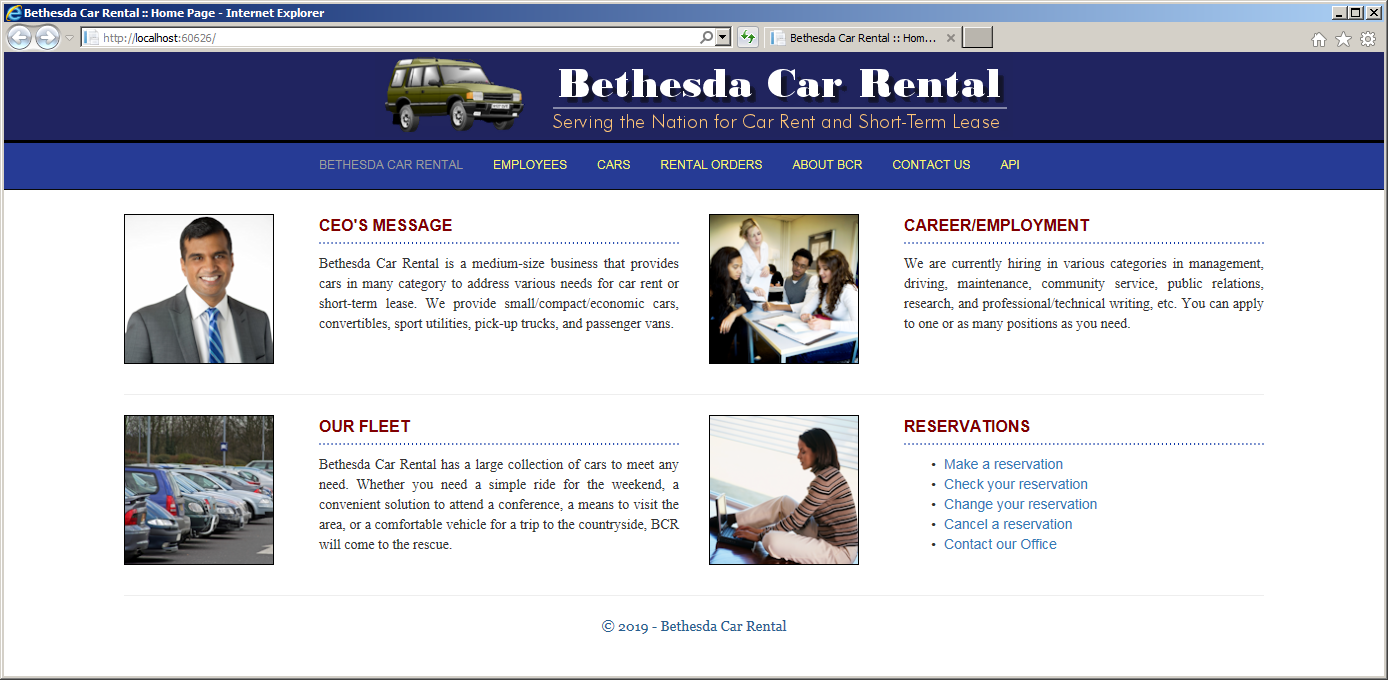
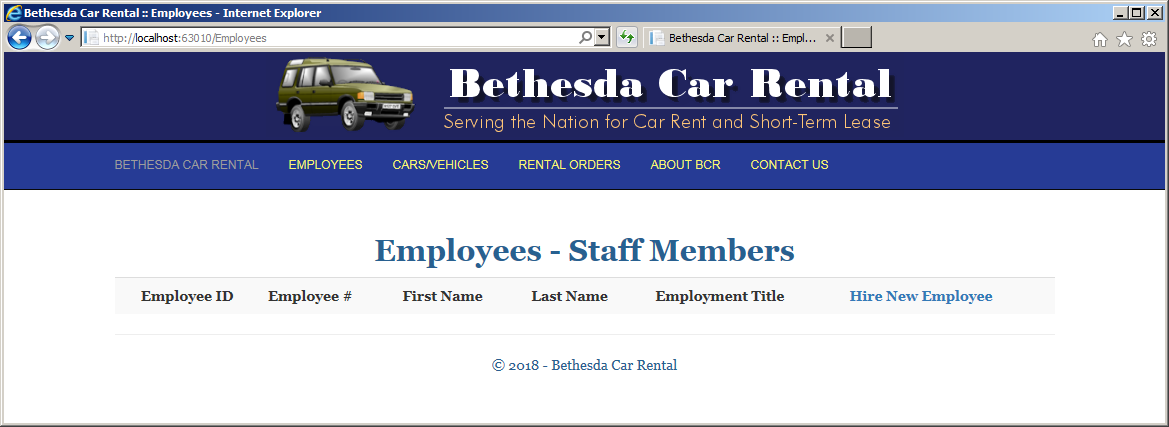
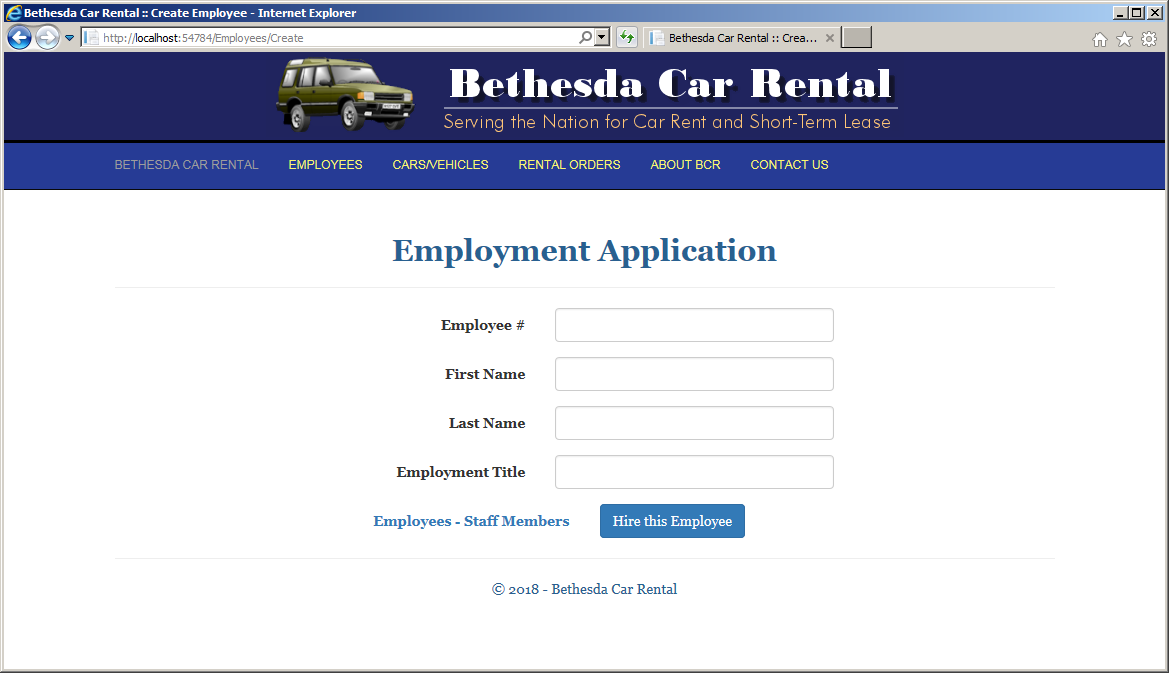
| Employee # | First Name | Last Name | Employment Title |
| 92735 | Jeffrey | Leucart | General Manager |
| 29268 | Kathleen | Rawley | Technician |
| 73948 | Allison | Garlow | Accounts Associate |
| 40508 | David | Stillson | Accounts Manager |
| 24793 | Michelle | Taylor | Accounts Associate |
| 20480 | Peter | Futterman | Accounts Associate |
| 72084 | Georgia | Rosen | Customer Service Representative |
| 38408 | Karen | Blackney | Accounts Associate |
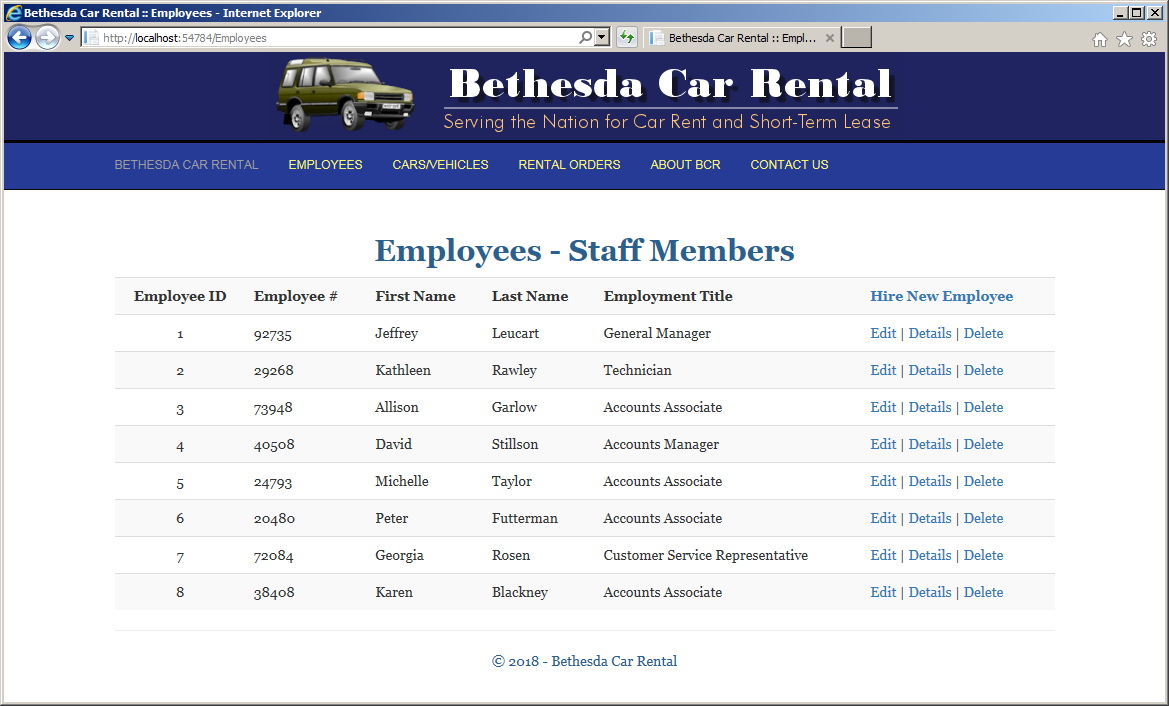
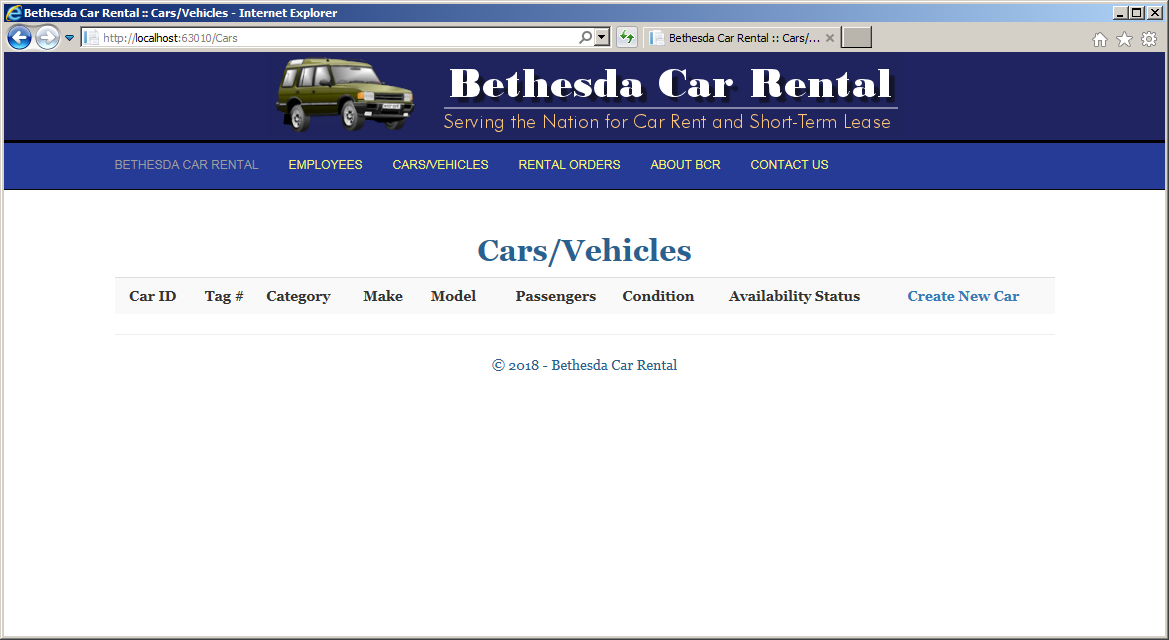
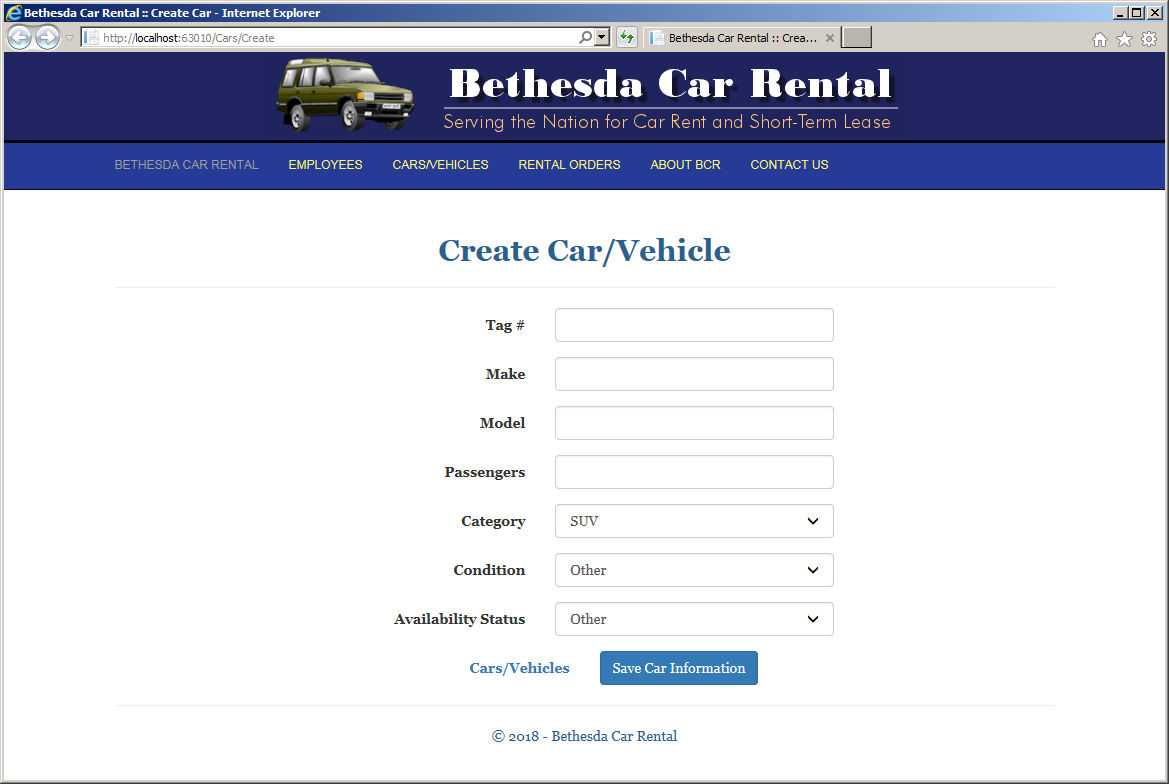
| Tag # | Make | Model | Passengers | Category | Condition | Availability Status |
| M297304 | Jeep | Wrangler Sahara | 4 | SUV | Excellent | Available |
| 1AD8049 | Dodge | Charger SXT | 4 | Standard | Driveable | Available |
| DFP924 | Toyota | Sienna LE FWD | 8 | Passenger Van | Driveable | Available |
| GTH295 | Kia | Rio LX | 4 | Economy | Excellent | Available |
| 2AL9485 | Chrysler | 200 | 2 | Compact | Needs Repair | Being Serviced |
| BND927 | Ford | Fiesta SE | 4 | Economy | Excellent | Available |
| 9KM8206 | Honda | Accord EX | 4 | Standard | Good | Unknown |
| 8AE9294 | Lincoln | MKT 3.5L | 4 | Full Size | Excellent | Available |
| M280360 | Toyota | Rav4 LE | 4 | SUV | Excellent | Being Serviced |
| 5MD2084 | Buick | Enclave | 4 | Mini Van | Driveable | Unknown |
| 2AT9274 | Ford | Focus SF | 4 | Compact | Excellent | Available |
| 6AD8274 | Mazda | CX-9 | 7 | Mini Van | Driveable | Available |
| 4AF9284 | Ford | F-150 Reg Cap 4X4 | 2 | Pickup Truck | Driveable | Available |
| ADG279 | GMC | Acadia SLE | 5 | SUV | Excellent | Available |
| 8DN8604 | Toyota | Camry XSE | 4 | Standard | Excellent | Available |
| 4DP2731 | Buick | Lacrosse Avenir | 4 | Full Size | Other | Being Serviced |
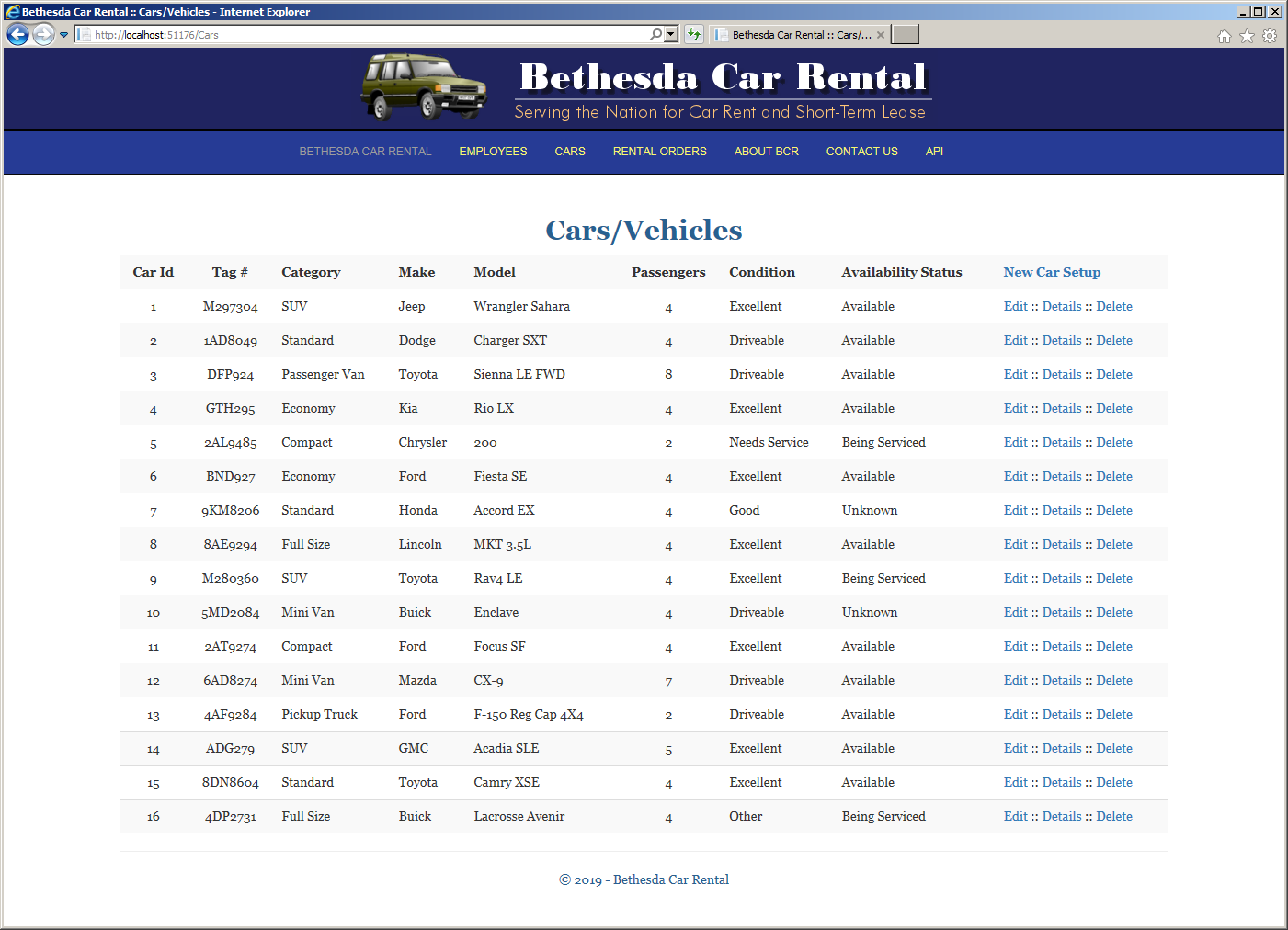
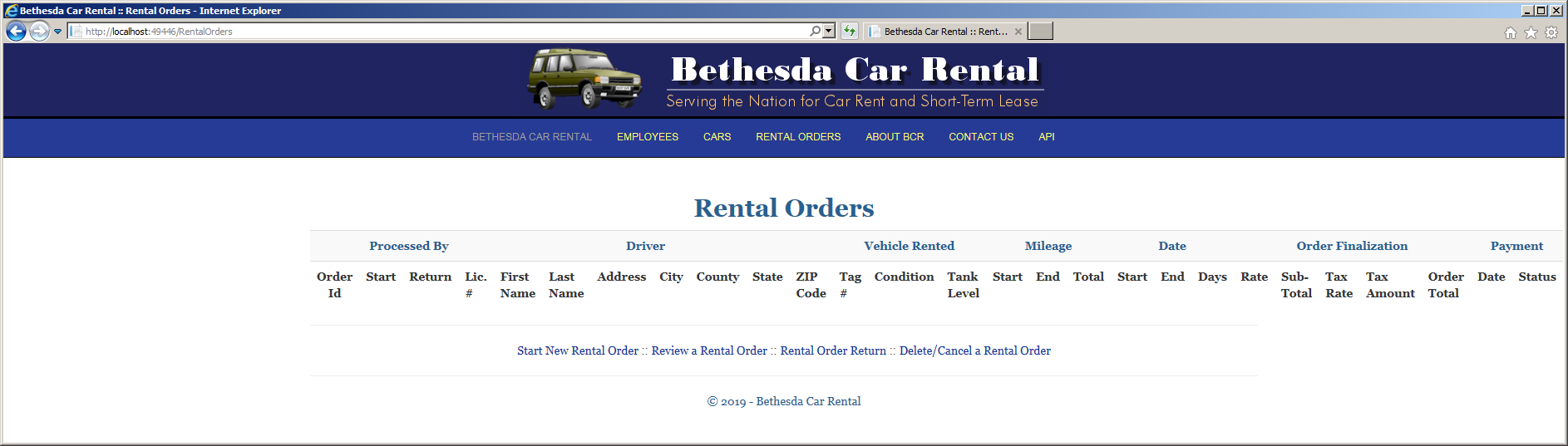
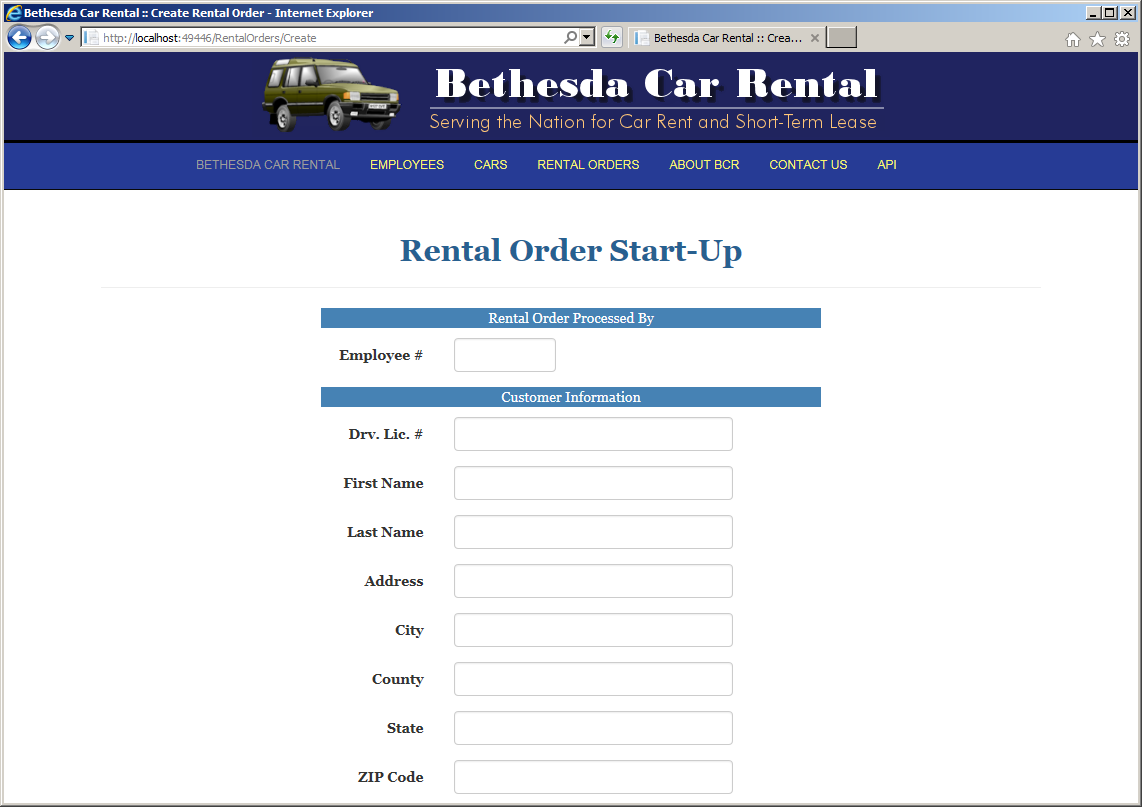
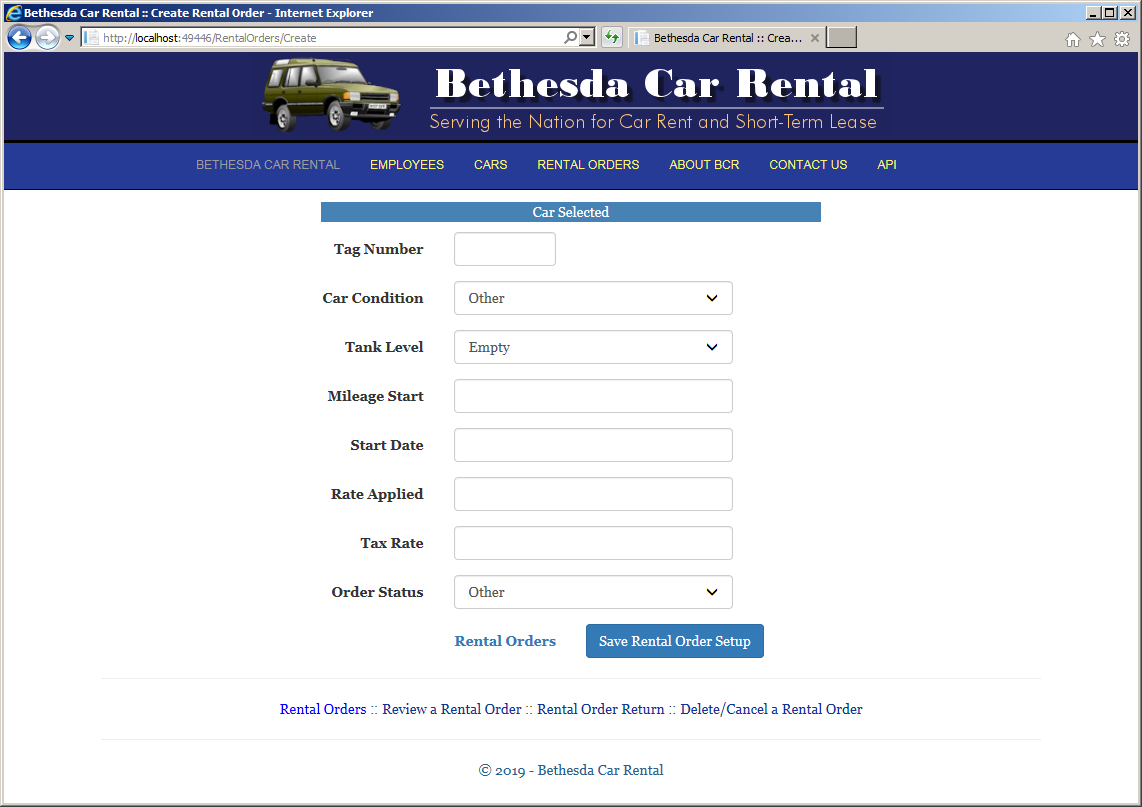
Employee #:    20480
Drv. Lic. #:   293-84-9374
First Name:    Marcel
Last Name:     Buhler
Address:       6800 Haxell Crt
City:          Alexandria
State:         VA
ZIP Code:      22314
Tag Number:    DFP924
Car Condition: Excellent
Tank Level:    Half
Mileage Start: 12728
Start Date:    12/10/2022
Rate Applied:  69.95
Tax Rate:      7.75
Order Status:  Ongoing
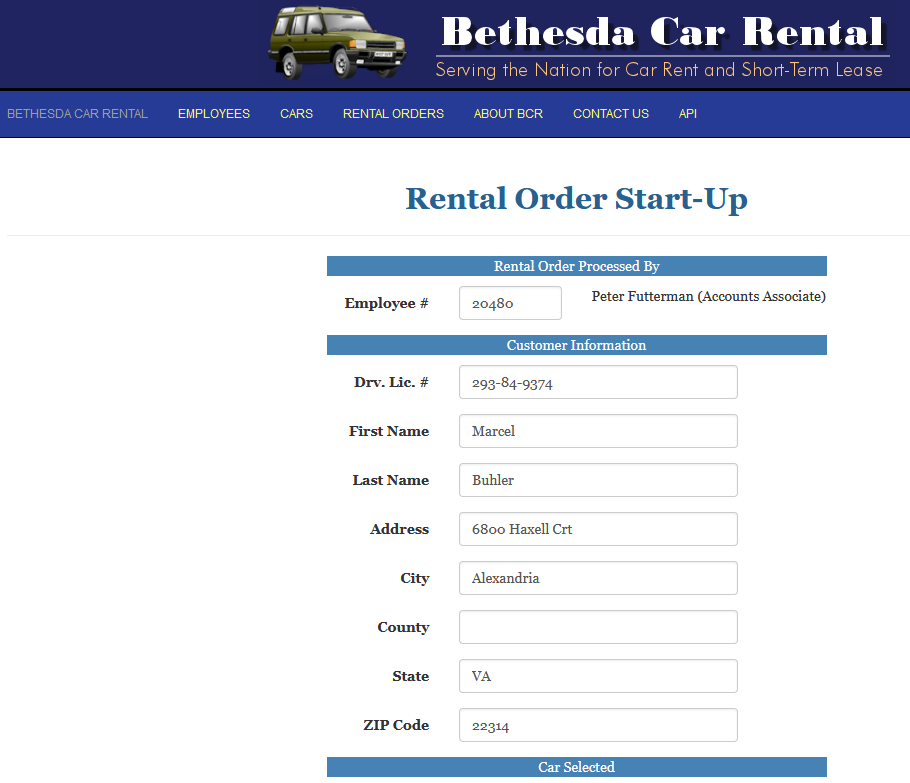
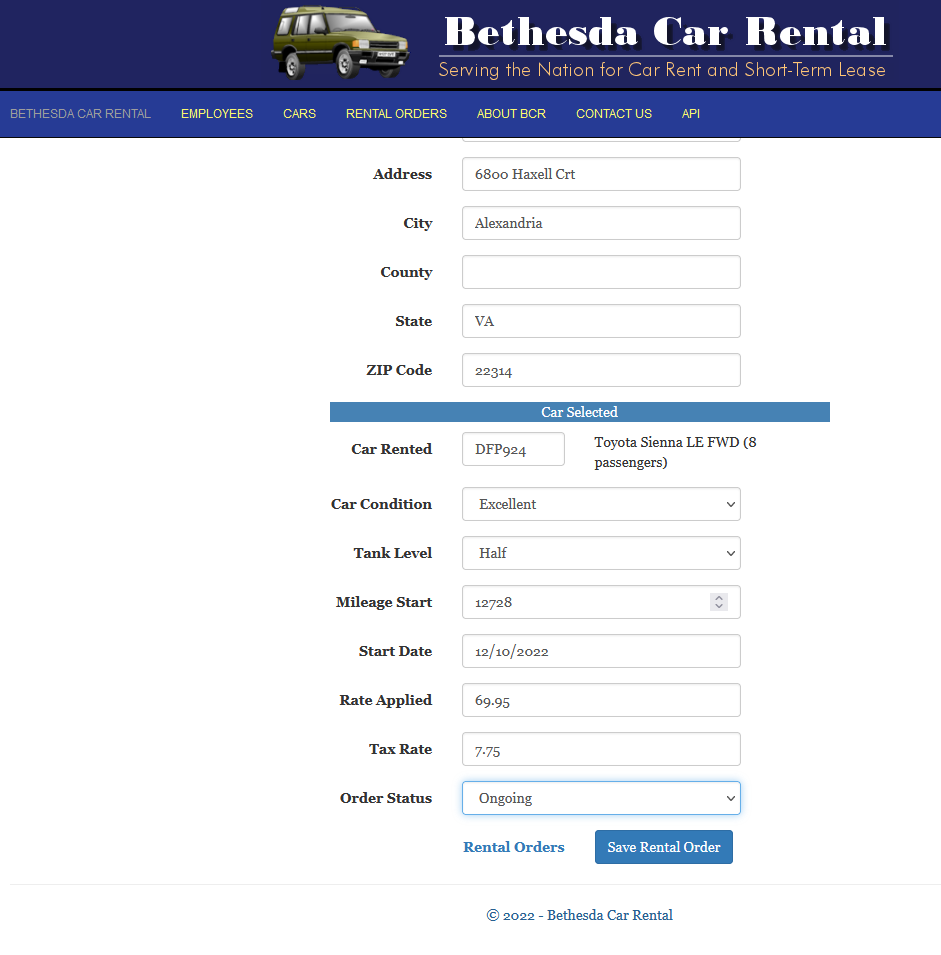
| Employee # | Drv. Lic. # | First Name | Last Name | Address | City | State | ZIP Code | Tag Number | Car Condition | Tank Level | Mileage Start | Start Date | Rate Applied | Tax Rate | Order Status |
| 24793 | 826-83-0479 | Joan | Altman | 3725 South Dakota Ave NW | Washington | DC | 20012 | 4AF9284 | Driveable | 1/4 Empty | 24715 | 12/10/2022 | 62.95 | 6.85 | Ongoing |
| 38408 | 958-27-4050 | Thomas | Filder | 4905 Herrenden St | Arlington | VA | 22204 | BND927 | Excellent | Full | 6064 | 12/12/2022 | 34.95 | 8.35 | Ongoing |
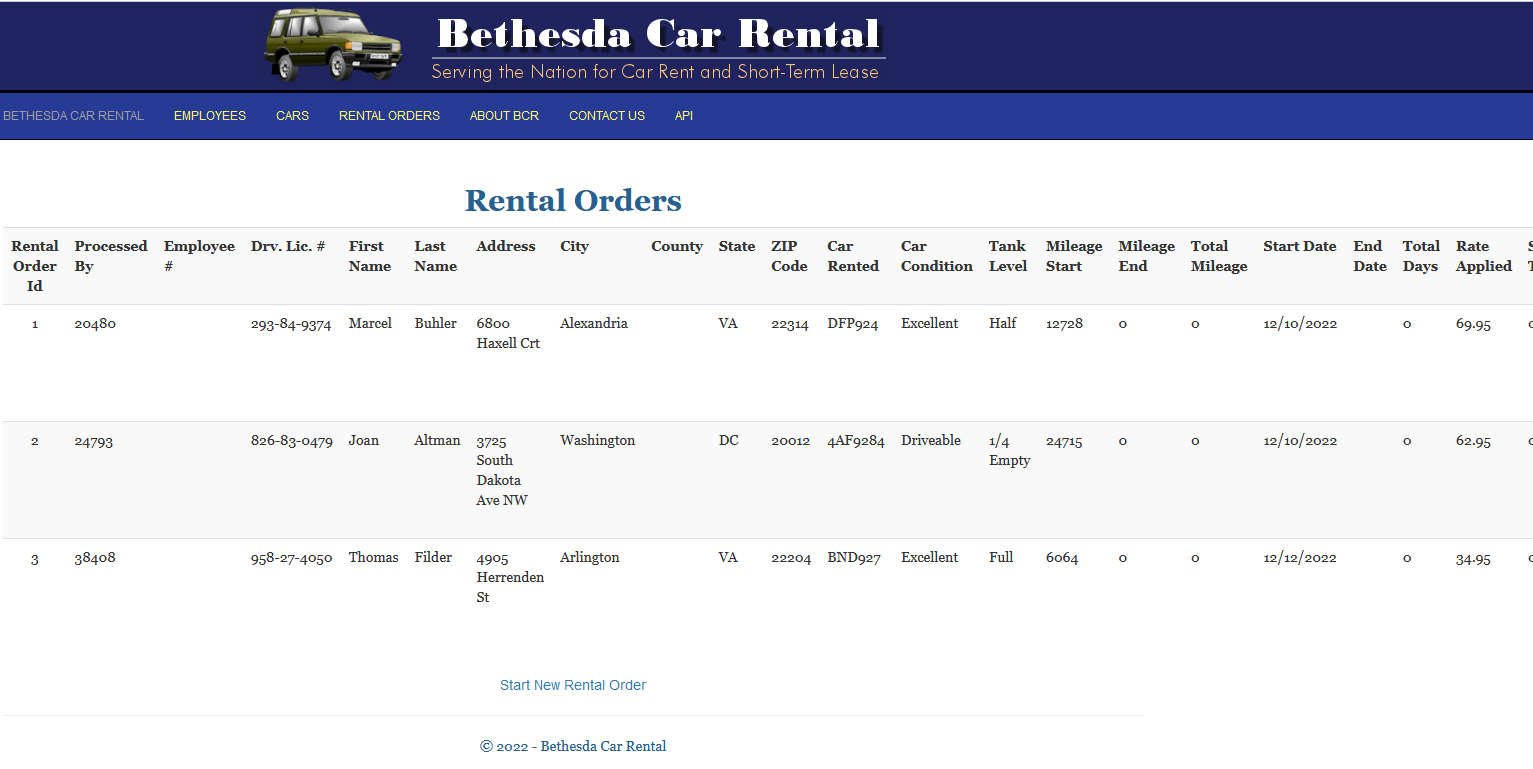
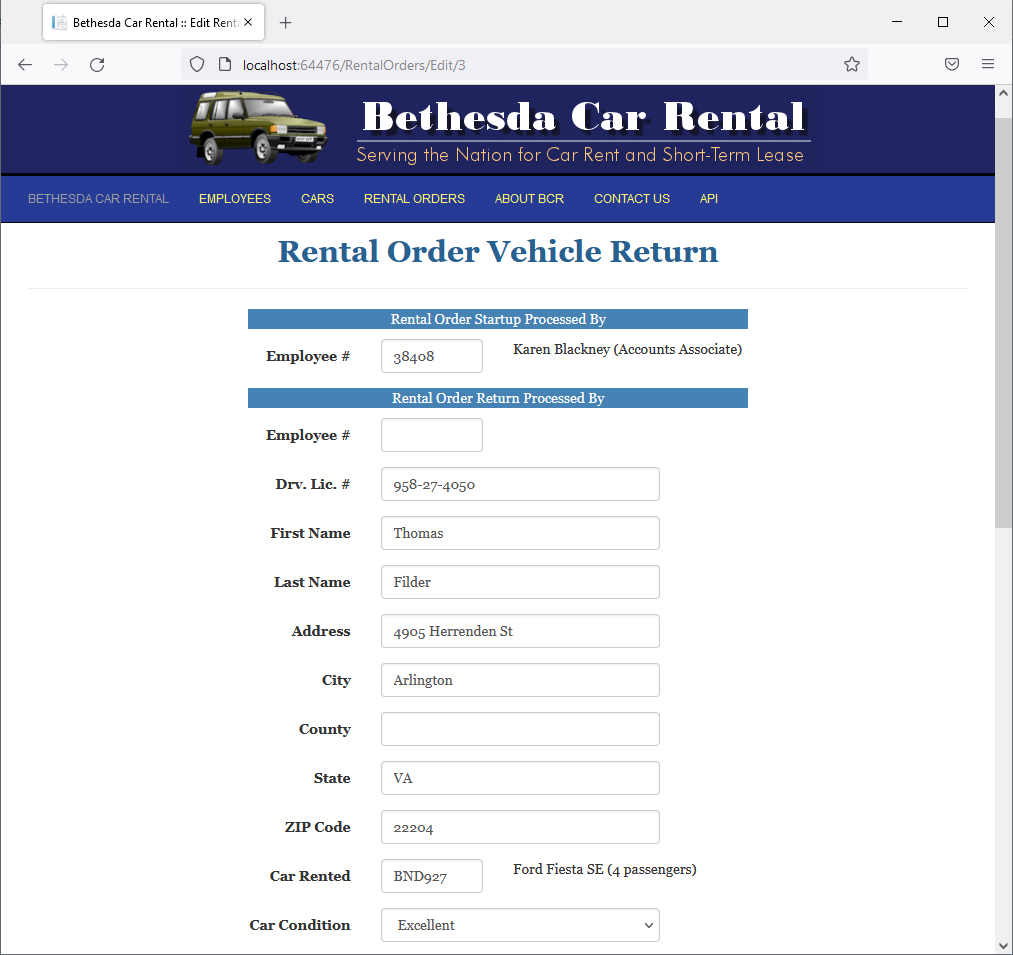
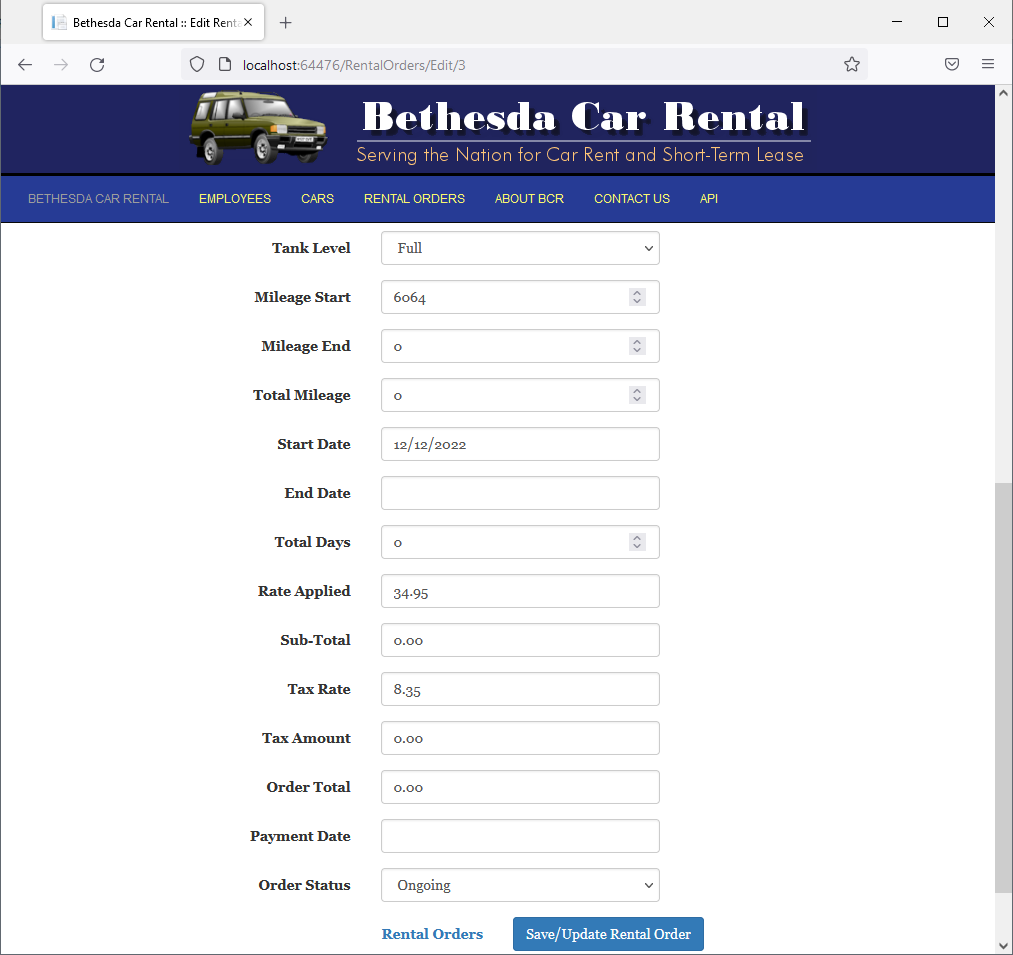
Rental Order Return Processed By: 40508
Mileage End:   6229
Total Mileage: 165
End Date:      12/16/2022
Total Days:    4
Sub-Total:     139.80
Tax Amount:    11.67
Order Total:   151.47
Payment Date:  12/16/2022
Order Status: Order Completed
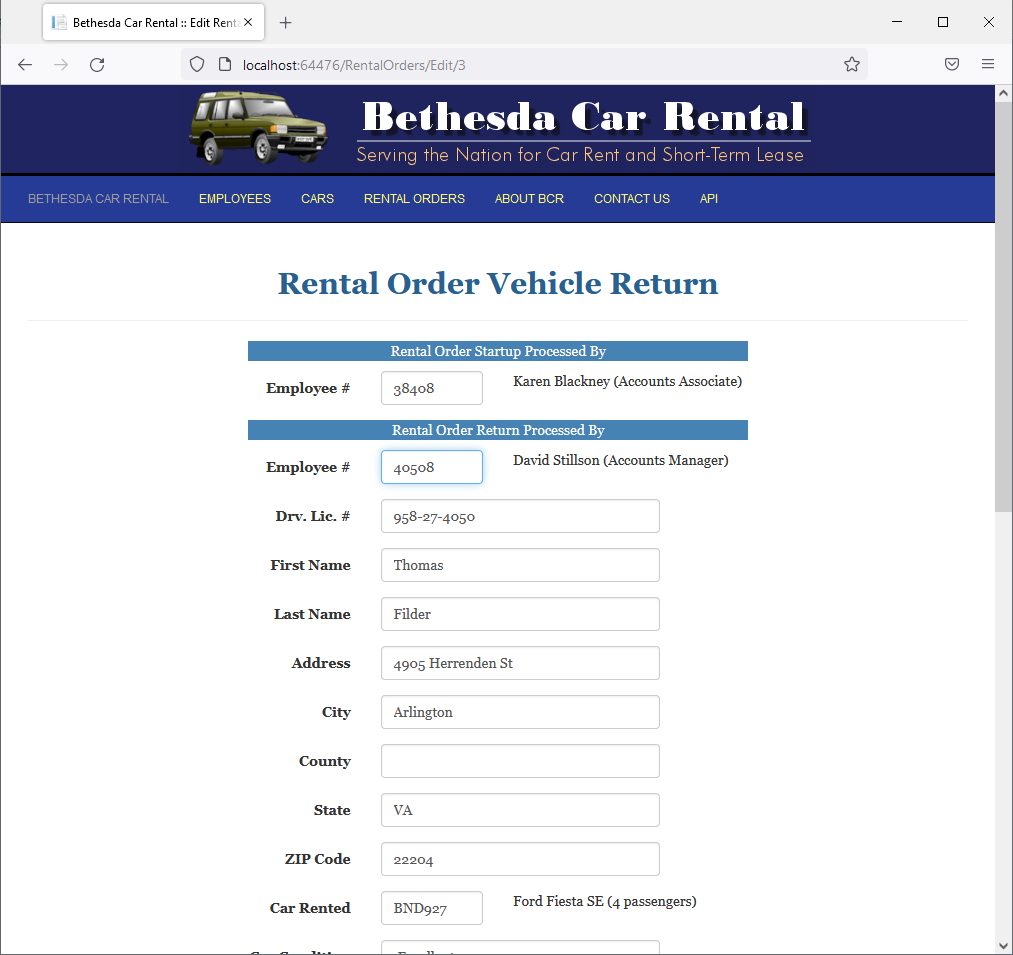
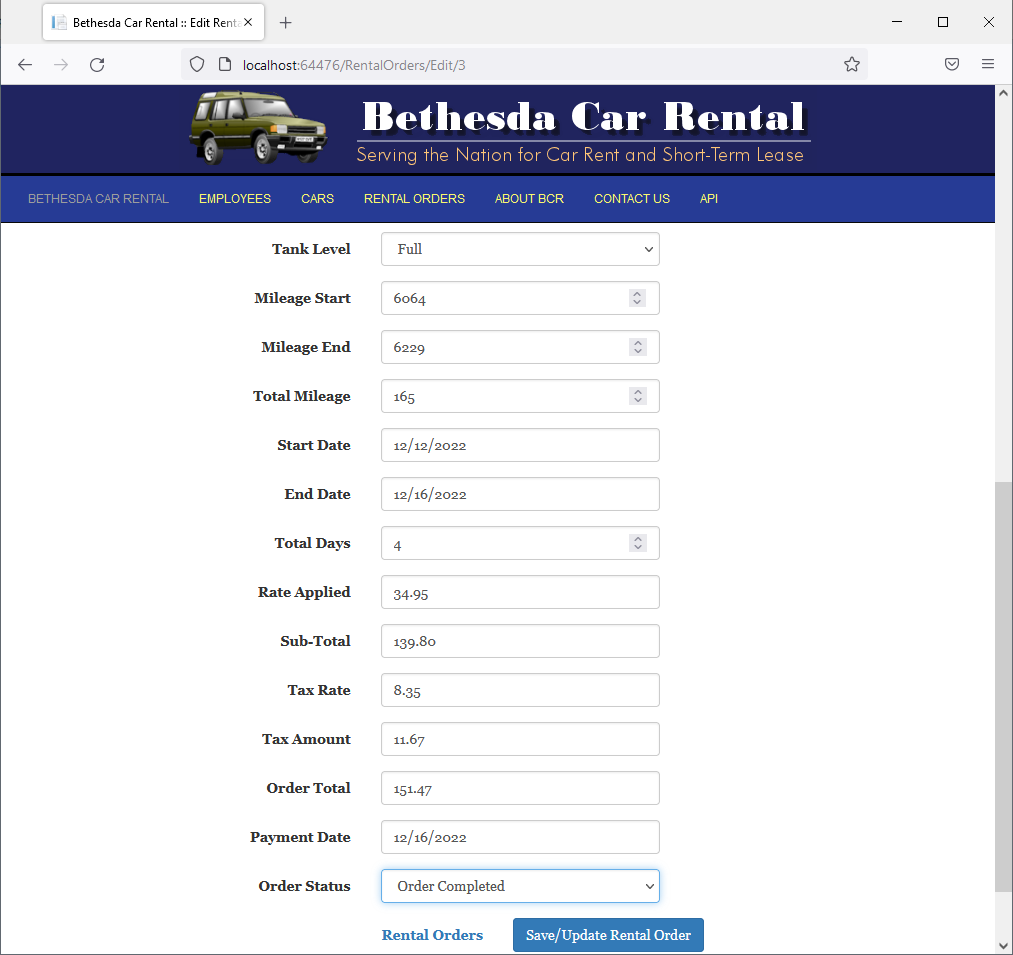
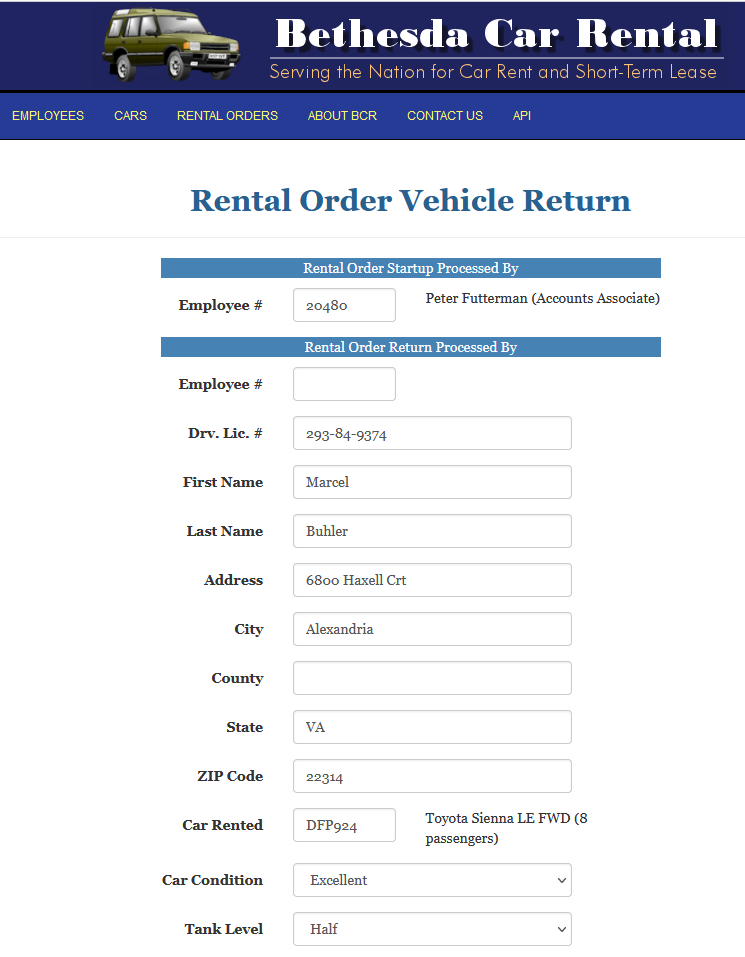
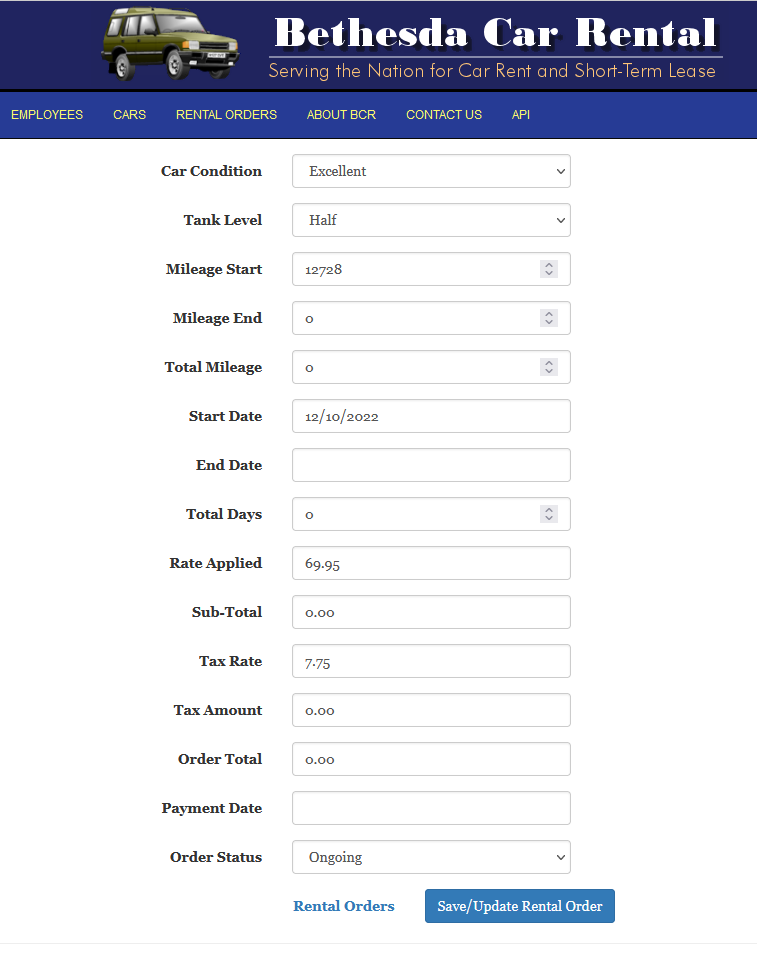
Rental Order Return Processed By: 24793
Mileage End:   13022
Total Mileage: 302
End Date:      12/16/2022
Total Days:    5
Sub-Total:     349.75
Tax Amount:    27.11
Order Total:   376.86
Payment Date:  12/16/2022
Order Status: Order Completed
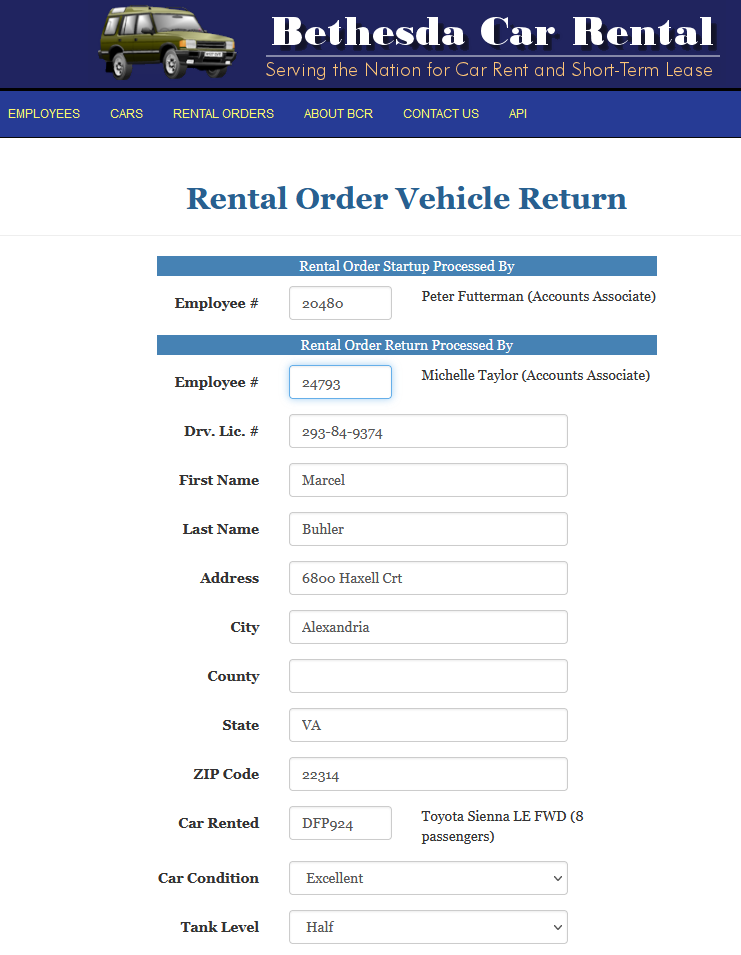
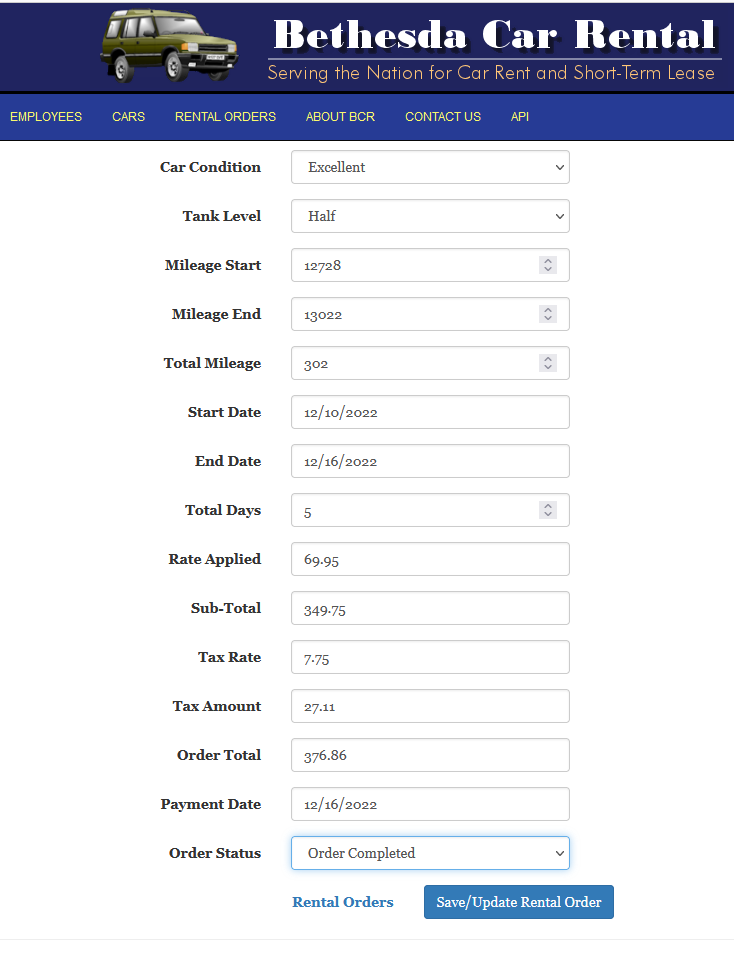
|
|
|||
| Home | Copyright © 2017-2022, FunctionX | Wednesday 04 May 2022 | Home |
|
|
|||