VBA Example Application: FunDS (Fun Department Store)

VBA Example Application: FunDS (Fun Department Store)
Introduction
FunDS is an example of a fictitious company that sells clothes from its store in a mall. The clothes are stacked on shelves and tables from where customers can view and select them. When interested and after making a selection, a customer can bring one or more items to a cashier who would process a purchase order.
We will create a database that can assist the company to manage its business.
 Practical Learning: Introducing Data Entry
Employees and Cashiers
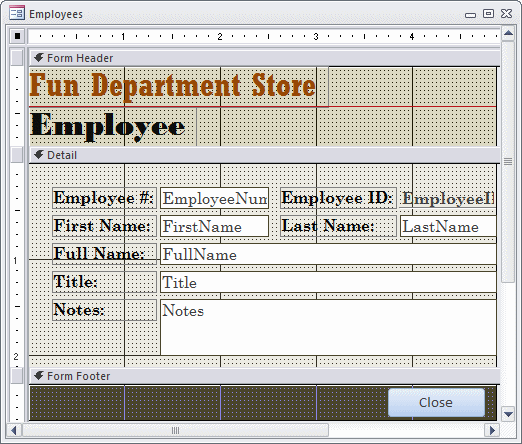
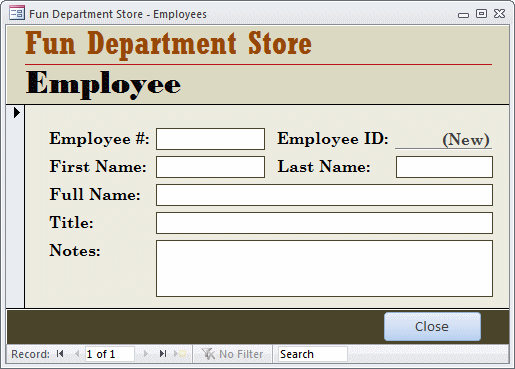
Employees and cashiers are staff members who create the inventory, process customers purchase orders, and perform other management tasks. We will create a simple table that holds employees information. To keep the database simple, we will use as little information as possible.
Practical Learning: Creating the Categories of Items
CREATE TABLE Employees
(
    EmployeeID Counter(1, 1) Not Null,
    EmployeeNumber Text(20),
    FirstName Text(25),
    LastName Text(25),
    FullName Text(50),
    Title Text(50),
    Notes Note,
    Constraint PK_Employees Primary Key(EmployeeID)
);
| Empl # | First Name | Last Name | Full Name | Title |
| 60958 | Simon | Sielaff | Sielaff, Simon | General Manager |
| 20858 | Becky | Crone | Crone, Becky | Head Cashier |
| 40295 | Catherine | Rosenstock | Rosenstock, Catherine | Cashier |
| 80284 | Bernadette | Wrights | Wrights, Bernadette | Cashier |
| 27046 | Betty | Lorre | Lorre, Betty | Intern |
| 60960 | Lisa | Chicone | Chicone, Lisa | Cashier |
| 39486 | Daniel | Drewise | Drewise, Daniel | Shift Manager |
| 93842 | Steve | Goetsch | Goetsch, Steve | Cashier |
The Categories of Items
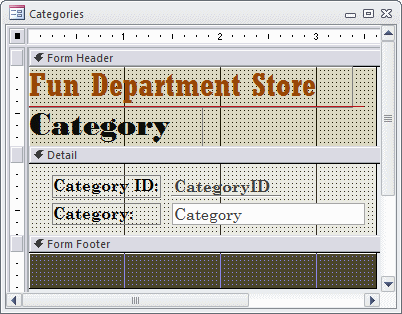
The clothes that FunDS sells are divided in some categories for easy inventory. The most common categories include women, men, girls, and boys. Of course, we will make it possible to add new categories.
Practical Learning: Creating the Categories of Items
CREATE TABLE Categories
(
    Category Text(40) Not Null,
    Constraint PK_Categories Primary Key(Category)
);
| Category |
| Women |
| Men |
| Girls |
| Boys |
| Babies |
The Sub-Categories of Items
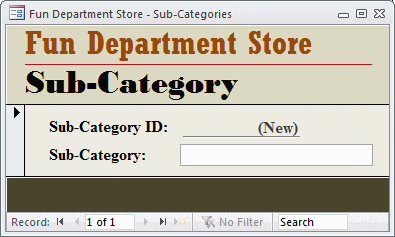
To further enhance the inventory, and to better assist customers, most commercial stores use categories under main categories. These are referred to as sub-categories. For a department store, sub-categories would include the types of clothes, such as shirts, dresses, or shoes.
Practical Learning: Creating the Categories of Items
CREATE TABLE SubCategories
(
    SubCategory Text(40) Not Null,
    Constraint PK_SubCategories Primary Key(SubCategory)
);
| Sub-Category |
| Shirts |
| Pants |
| Shoes |
| Dresses |
| Skirts |
| Jackets |
| Coats |
| Suits |
| Sweaters |
| Belts |
| Ties |
| Hats |
| Handbags |
| Watches |
| Jewelry |
| Accessories |
| Beauty & Grooming |
The Items' Manufacturers
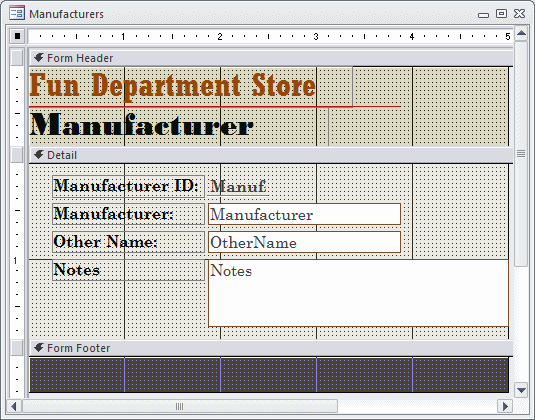
Manufacturers and people and companies that make clothes that the Fun Department Store company sells. Normally, a department store keeps as much information as possible about the manufacturers. Companies also keep track of their suppliers. To keep our database simple, we will need just the name of the manufacturer. Many manufacturers use different names to categorize the items they make. We will create two fields for names for each manufacturer.
Practical Learning: Creating the Categories of Items
CREATE TABLE Manufacturers
(
    Manufacturer Text(40) Not Null,
    OtherName Text(40),
    Notes Note,
    Constraint PK_Manufacturers Primary Key(Manufacturer)
);
| Manufacturer | Other Name | Notes |
| Ralph Lauren | Polo Ralph Lauren | Names include Ralph Lauren, Lauren by Ralph Lauren, Polo Ralph Lauren |
| Polo Ralph Lauren | Ralph Lauren | Names include Ralph Lauren, Lauren by Ralph Lauren, Polo Ralph Lauren |
| Lauren by Ralph Lauren | Ralph Lauren | Names include Ralph Lauren, Lauren by Ralph Lauren, Polo Ralph Lauren |
| Kenneth Cole | Kenneth Cole New York | Names include Kenneth Cole, Kenneth Cole Reaction, Kenneth Cole New York |
| Kenneth Cole New York | Kenneth Cole | Names include Kenneth Cole, Kenneth Cole Reaction, Kenneth Cole New York |
| Kenneth Cole Reaction | Kenneth Cole | Names include Kenneth Cole, Kenneth Cole Reaction, Kenneth Cole New York |
| Calvin Klein | CK Calvin Klein | Names include Calvin Klein, CK Calvin Klein |
| CK Calvin Klein | Calvin Klein | Names include Calvin Klein, CK Calvin Klein |
| Anne Klein | AK Anne Klein | Names include Anne Klein, AK Anne Klein |
| AK Anne Klein | Anne Klein | Names include Anne Klein, AK Anne Klein |
| Nautica | ||
| Tommy Hilfiger | ||
| Cole Haan | ||
| Giorgio Armani | ||
| Timex | ||
| Johnston & Murphy | ||
| Citizen | ||
| Coach | ||
| Guess | ||
| Seiko | ||
| Clarks |
The Store Inventory
Probably the most important part of a department store is the list of items it sells. To keep an inventory, we will use the following information for each item sold in the store:
Practical Learning: Creating the Store Inventory
 .
.
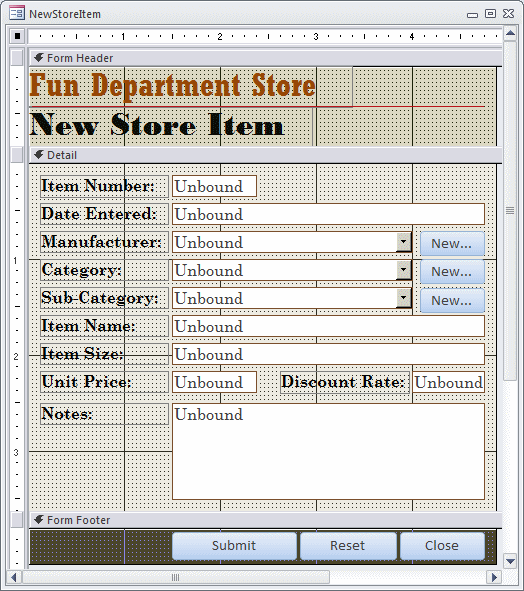 |
||||||||||||||||||||||||||||||||||||||||||||||||||||||||||||||||||||
|
||||||||||||||||||||||||||||||||||||||||||||||||||||||||||||||||||||
Private Function SetDateEntered(ByVal Days As Integer) As Date
    SetDateEntered = DateAdd("d", Days, Date)
End Function

Private Sub cmdReset_Click()
    ItemNumber = CStr(Int((999999 - 100000 + 1) * Rnd + 100000))
    DateEntered = SetDateEntered(-Int(180 * Rnd + 1))
    ManufacturerID = ""
    CategoryID = ""
    SubCategoryID = ""
    ItemName = ""
    ItemSize = ""
    UnitPrice = ""
    DiscountRate = "0.00"
End SubPrivate Sub Form_Load()
cmdReset_Click
End SubPrivate Sub cmdNewManufacturer_Click()
On Error GoTo cmdNewManufacturer_Error
' Display the Manufacturers form as a dialog box
DoCmd.OpenForm "Manufacturers", , , , acFormAdd, AcWindowMode.acDialog
' After using the Manufacturers form, when the user closes it,
' refresh the Manufacturer combo box
Manufacturer.Requery
cmdNewManufacturer_Exit:
Exit Sub
cmdNewManufacturer_Error:
MsgBox "An error occured when trying to update the list." & vbCrLf & _
"=- Report the error as follows -=" & vbCrLf & _
"Error #: " & Err.Number & vbCrLf & _
"Error Message: " & Err.Description
Resume cmdNewManufacturer_Exit
End SubPrivate Sub cmdNewCategory_Click()
On Error GoTo cmdNewCategory_Error
DoCmd.OpenForm "Categories", , , , acFormAdd, AcWindowMode.acDialog
Category.Requery
cmdNewCategory_Exit:
Exit Sub
cmdNewCategory_Error:
MsgBox "An error occured when trying to update the list." & vbCrLf & _
"=- Please report the error as follows -=" & vbCrLf & _
"Error #: " & Err.Number & vbCrLf & _
"Error Message: " & Err.Description
Resume cmdNewCategory_Exit
End Sub
Private Sub cmdNewSubCategory_Click()
On Error GoTo cmdNewSubCategory_Error

    DoCmd.OpenForm "SubCategories", , , , acFormAdd, AcWindowMode.acDialog

    SubCategory.Requery

cmdNewSubCategory_Exit:
    Exit Sub

cmdNewSubCategory_Error:
    MsgBox "An error occured when trying to update the list of sub-categories." & vbCrLf & _
           "=- Please report the error as follows -=" & vbCrLf & _
           "Error #: " & Err.Number & vbCrLf & _
           "Error Message: " & Err.Description
           Resume cmdNewCategory_Exit
End SubPrivate Sub ManufacturerID_NotInList(NewData As String, Response As Integer)
On Error GoTo ManufacturerIDNotInList_Error
Dim NewManufacturerID As Long
If IsNull(ManufacturerID) Then
' Set the value of the combo box empty
ManufacturerID = ""
Else
' If the foreign key currently has a value,
' assign that value to the declared value
NewManufacturerID = ManufacturerID
' Set the foreign key to null
ManufacturerID = Null
End If
' The combo box is ready to receive a new value.
' To make it happen, display the Manufacturers form
' as a dialog box so the user would not use
' the Store Items form while the Manufacturers form is opened
' When opening the Manufacturers form, create a new record
' and display the new manufacturer in it
If MsgBox("The '" & NewData & "' manufacturer does not exist in the database. " & _
"Do you want to add it?", _
vbYesNo, "Fun Department Store - FunDS") = vbYes Then
DoCmd.OpenForm "Manufacturers", , , , acFormAdd, AcWindowMode.acDialog, NewData
' After using the Manufacturers dialog box, let the user close it.
' When the user closes the Manufacturers form, refresh the ManufacturerID combo box
Manufacturer.Requery
' If the user had created a new manufacturer,
' assign its ManufacturerID to the variable we had declared
If ManufacturerID <> 0 Then
ManufacturerID = NewManufacturerID
End If
' Assuming that the manufacturer was created, ignore the error
Response = acDataErrAdded
Else
' If the manufacturer was not created, indicate an error
Response = acDataErrContinue
End If
ManufacturerIDNotInList_Exit:
Exit Sub
ManufacturerIDNotInList_Error:
MsgBox "An error occured when trying to update the list." & vbCrLf & _
"=- Report the error as follows -=" & vbCrLf & _
"Error #: " & Err.Number & vbCrLf & _
"Error Message: " & Err.Description
Resume ManufacturerIDNotInList_Exit
End SubPrivate Sub CategoryID_NotInList(NewData As String, Response As Integer)
On Error GoTo CategoryIDNotInList_Error
Dim NewCategoryID As Long
If IsNull(CategoryID) Then
CategoryID = ""
Else
NewCategoryID = CategoryID
CategoryID = Null
End If
If MsgBox(NewData & " is not a valid category of this database. " & _
"Do you want to add it?", _
vbYesNo, "Fun Department Store - FunDS") = vbYes Then
DoCmd.OpenForm "Categories", , , , acFormAdd, AcWindowMode.acDialog, NewData
Category.Requery
If CategoryID <> 0 Then
CategoryID = NewCategoryID
End If
Response = acDataErrAdded
Else
Response = acDataErrContinue
End If
CategoryIDNotInList_Exit:
Exit Sub
CategoryIDNotInList_Error:
MsgBox "An error occured when trying to update the list." & vbCrLf & _
"=- Report the error as follows -=" & vbCrLf & _
"Error #: " & Err.Number & vbCrLf & _
"Error Message: " & Err.Description
Resume CategoryIDNotInList_Exit
End SubPrivate Sub SubCategoryID_NotInList(NewData As String, Response As Integer)
On Error GoTo SubCategoryIDNotInList_Error
Dim NewSubCategoryID As Long
If IsNull(SubCategoryID) Then
SubCategoryID = ""
Else
NewSubCategoryID = SubCategoryID
SubCategoryID = Null
End If
If MsgBox(NewData & " is not a valid sub-category of this database. " & _
"Do you want to add it?", _
vbYesNo, "Fun Department Store - FunDS") = vbYes Then
DoCmd.OpenForm "SubCategories", , , , acFormAdd, AcWindowMode.acDialog, NewData
SubCategory.Requery
If SubCategoryID <> 0 Then
SubCategoryID = NewSubCategoryID
End If
Response = acDataErrAdded
Else
Response = acDataErrContinue
End If
Exit Sub
SubCategoryIDNotInList_Error:
MsgBox "An error occured when trying to update the sub-categories." & vbCrLf & _
"=- Report the error as follows -=" & vbCrLf & _
"Error #: " & Err.Number & vbCrLf & _
"Error Message: " & Err.Description
Resume Next
End SubPrivate Sub Form_Load()
' When this form opens, find out if it received an external
' value from another object (such as the StoreItemEditor form).
If Not IsNull(Me.OpenArgs) Then
' If it did, put that value in the Manufacturer text box
Me.Manufacturer = Me.OpenArgs
' Since our database allows up to three different names for
' a manufacturer, the user will optionnally fill the other two text boxes
End If
End SubPrivate Sub Form_Load()
If Not IsNull(Me.OpenArgs) Then
Me.Category = Me.OpenArgs
End If
End SubPrivate Sub Form_Load()
If Not IsNull(Me.OpenArgs) Then
Me.SubCategory = Me.OpenArgs
End If
End SubCREATE TABLE StoreItems
(
StoreItemID COUNTER(100001, 1) NOT NULL,
Constraint PK_StoreItems Primary Key(ItemID)
);| Field Name | Data Type | Field Size | Format | Caption |
| StoreItemID | Store Item ID | |||
| ItemNumber | Number | Item Number | ||
| DateEntered | Date/Time | Long Date | Date Entered | |
| Manufacturer | Short Text | 40 | ||
| Category | Short Text | 40 | ||
| SubCategory | Short Text | 40 | Sub-Category | |
| ItemName | Short Text | 80 | Item Name | |
| ItemSize | Short Text | 40 | Item Size | |
| UnitPrice | Number | Double | Fixed | |
| DiscountRate | Number | Double | Percent | Discount Rate |
| Pictures | Attachment | |||
| Notes | Long Text |
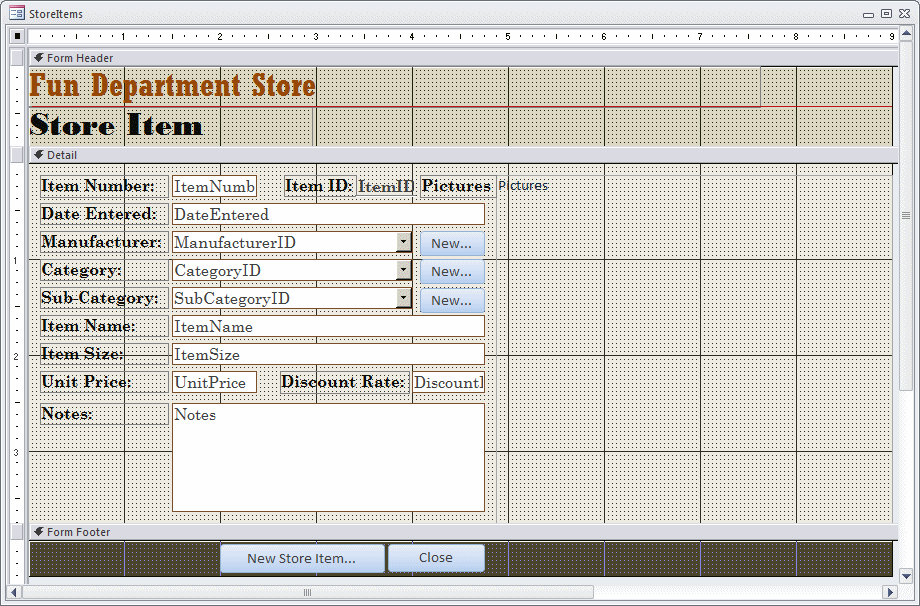
Private Sub cmdNewStoreItem_Click()
    DoCmd.OpenForm "NewStoreItem"
End SubPrivate Sub cmdSubmit_Click()
Dim curFunDS As Database
Dim rstStoreItems As Recordset
Set curFunDS = CurrentDb
Set rstStoreItems = curFunDS.OpenRecordset("StoreItems")
rstStoreItems.AddNew
rstStoreItems("ItemNumber").Value = ItemNumber
rstStoreItems("DateEntered").Value = CDate(DateEntered)
rstStoreItems("ManufacturerID").Value = ManufacturerID
rstStoreItems("CategoryID").Value = CategoryID
rstStoreItems("SubCategoryID").Value = SubCategoryID
rstStoreItems("ItemName").Value = ItemName
rstStoreItems("ItemSize").Value = ItemSize
rstStoreItems("UnitPrice").Value = CDbl(UnitPrice)
rstStoreItems("DiscountRate").Value = CDbl(DiscountRate)
rstStoreItems("Notes").Value = Notes
rstStoreItems.Update
cmdReset_Click
Set rstStoreItems = Nothing
Set curFunDS = Nothing
End Sub
Private Sub cmdClose_Click()
DoCmd.Close
End SubShopping Sessions
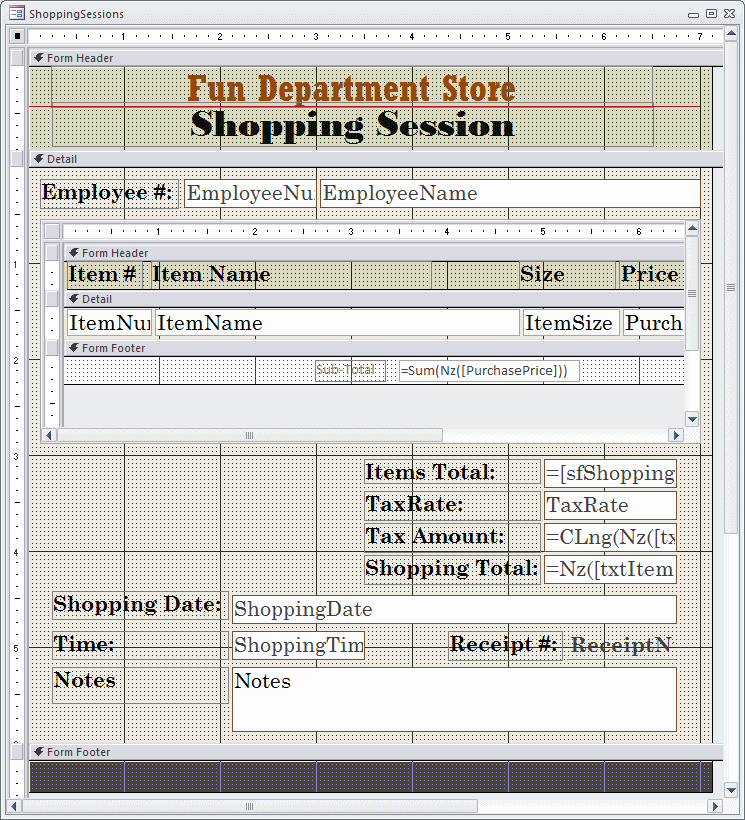
We will consider a shopping session one more items that a customer purchases. Normally, a customers selects items in the store and brings them to the cashier who will vallidate the purchase. For our database, we will create a unique receipt number. For our inventory, we will need to keep track of who (the employee) processed the purchase, the date and time the purchase occured, and the total the customer paid.
Shopping Items
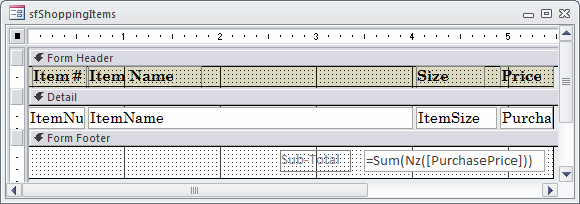
One of the most important pieces of information on a receiptis what the customer bought. For our application, each purchased item is represented by an item number, the name of the item that was purchased, and how much the customer paid for it. To process a shopping session, we will need only the item number. All the information related to that item number can be found on the table of store items.
On the shopping session form, we will represent the customer's selected items using a sub-form.
Practical Learning: Creating a Shopping Session
CREATE TABLE ShoppingSessions
(
    ReceiptNumber Counter(100001, 1) Not Null,
    Constraint PK_ShoppingSessions Primary Key(ReceiptNumber)
);| Field Name | Data Type | Field Size | Format | Caption | Default Value |
| ReceiptNumber | Receipt # | ||||
| EmployeeNumber | Short Text | 20 | Employee # | ||
| ShoppingDate | Date/Time | Long Date | Shopping Date | =Date() | |
| ShoppingTime | Date/Time | Medium Time | Shopping Time | =Time() | |
| TaxRate | Number | Double | Percent | Tax Rate | 0.075 |
| Notes | Long Text |
| Field Name | Data Type | Field Size | Format | Caption |
| ShoppingItemID | AutoNumber | Shopping Item ID | ||
| ReceiptNumber | Number | Receipt # | ||
| ItemNumber | Number | Item Number | ||
| ItemName | Short Text | 80 | Item Name | |
| ItemSize | Short Text | 40 | Size | |
| PurchasePrice | Number | Double | Fixed | Purchase Price |
|
|||||||||||||||||||||||||||||||||||||||||||||||||||||||
|
|||||||||||||||||||||||||||||||||||||||||||||||||||||||
Private Sub ItemNumber_LostFocus()
On Error GoTo ItemNumber_LostFocus_Error

    Dim dbFunDS As Database
    Dim rsStoreItems As Recordset

    If IsNull(ItemNumber) Then
        Exit Sub
    End If

    Set dbFunDS = CurrentDb
    Set rsStoreItems = dbFunDS.OpenRecordset("SELECT * FROM StoreItems WHERE ItemNumber = " & CLng(ItemNumber))

    If IsNull(rsStoreItems) Then
        MsgBox "There is no item with that number.", _
               vbOKOnly Or vbInformation, _
               "FunDS: Fun Department Store"
        Exit Sub
    Else
        With rsStoreItems
            ItemName = .Fields("ItemName")
            ItemSize = .Fields("ItemSize")
            PurchasePrice = .Fields("UnitPrice")
        End With
    End If

    rsStoreItems.Close
    dbFunDS.Close
    Set rsStoreItems = Nothing
    Set dbFunDS = Nothing

    Exit Sub

ItemNumber_LostFocus_Error:
    Rem Error #3021 means the record set is empty.
    Rem In this form, Error #3021 means the user probably entered an invalid item number
    If Err.Number = 3021 Then
        MsgBox "The item number you entered was not found in our inventory.", _
               vbOKOnly Or vbInformation, _
               "FunDS: Fun Department Store"
    Else
        MsgBox "There was a problem when processing this shopping order. " & vbCrLf & _
               "Please report the error as follows." & vbCrLf & _
               "Error      #" & Err.Number & vbCrLf & _
               "Description: " & Err.Description, _
               vbOKOnly Or vbInformation, _
               "FunDS: Fun Department Store"
    End If

    Resume cmdAdd_ClickExit
End Sub
|
|
|||||||||||||||||||||||||||||||||||||||||||||||||||||||||||||||||||||||||||||||||||||||||||||||||||||||||||||||||||
|
|||||||||||||||||||||||||||||||||||||||||||||||||||||||||||||||||||||||||||||||||||||||||||||||||||||||||||||||||||
Data Analysis
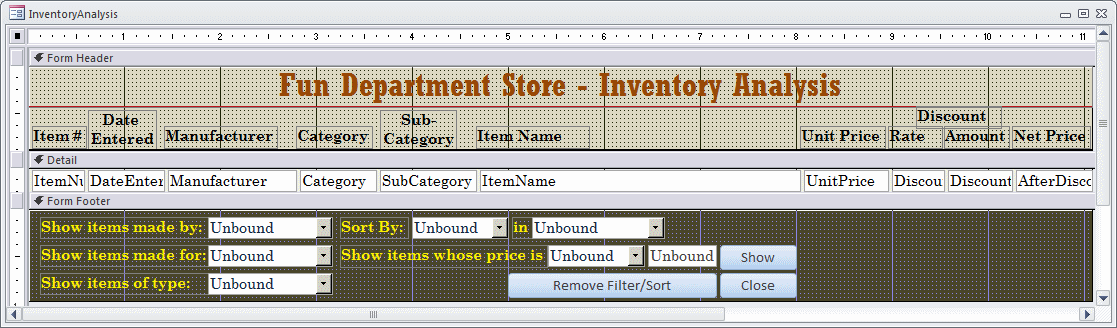
Some time to time, the employees will want to analyze some records in the inventory. Microsoft Access provides all types of tools for visual data analysis. The only significant thing you need to do is to create one or more user-friendly forms (and/or queries that your users can use.
Practical Learning: Creating a Query

 and click under the Form Footer bar
 and
click under the Form Footer bar
and
click under the Form Footer bar and
click under the Form Footer bar. If the wizard starts, click Cancel
and
click under the Form Footer bar. If the wizard starts, click Cancel|
|
||||||||||||||||||||||||||||||||||||||||||||
|
||||||||||||||||||||||||||||||||||||||||||||
Option Compare Database
Option Explicit

Private strColumnName As String
Private strSortOrder As String

Private Sub cbxManufacturers_AfterUpdate()
    Filter = "Manufacturer = '" & cbxManufacturers & "'"
    FilterOn = True
End Sub
Private Sub cbxColumnNames_AfterUpdate()
On Error GoTo cbxColumnNames_AfterUpdate_Error

    ' Get the string selected in the Sort By combo box
    ' and find its equivalent column name
    If cbxColumnNames = "Item Number" Then
        strColumnName = "ItemNumber"
    ElseIf cbxColumnNames = "Date Entered" Then
        strColumnName = "DateEntered"
    ElseIf cbxColumnNames = "Manufacturer" Then
        strColumnName = "Manufacturer"
    ElseIf cbxColumnNames = "Category" Then
        strColumnName = "Category"
    ElseIf cbxColumnNames = "Sub-Category" Then
        strColumnName = "SubCategory"
    ElseIf cbxColumnNames = "Item Name" Then
        strColumnName = "ItemName"
    ElseIf cbxColumnNames = "Unit Price" Then
        strColumnName = "UnitPrice"
    ElseIf cbxColumnNames = "Price After Discount" Then
        strColumnName = "AfterDiscount"
    Else
        strColumnName = ""
    End If

    ' Sort the records based on the column name from the combo box
    Me.OrderBy = strColumnName
    Me.OrderByOn = True

    ' Set the In combo box to ascending order by default
    cbxSortOrder = "Ascending Order"

    Exit Sub

cbxColumnNames_AfterUpdate_Error:
    MsgBox "There was an error when trying to sort the records. " & _
           "Please report the error as follows." & vbCrLf & _
           "Error #: " & Err.Number & vbCrLf & _
           "Description: " & Err.Description & vbCrLf & _
           "Please contact the program vendor if " & _
       "he is not sleeping at this time."
    Resume Next
End Sub
Private Sub cbxSortOrder_AfterUpdate()
On Error GoTo cbxSortOrder_AfterUpdate_Error

    ' Unless the user selects Descending Order...
    If cbxSortOrder = "Descending Order" Then
        strSortOrder = "DESC"
    Else ' We will consider that it should be sorted in ascending order
        strSortOrder = "ASC"
    End If

    Me.OrderBy = strColumnName & " " & strSortOrder
    Me.OrderByOn = True
    Exit Sub

cbxSortOrder_AfterUpdate_Error:
    MsgBox "There was an error when trying to sort the records. " & _
           "Please report the error as follows." & vbCrLf & _
           "Error #: " & Err.Number & vbCrLf & _
           "Description: " & Err.Description & vbCrLf & _
           "Please contact the program vendor if " & _
       "he is not sleeping at this time."
    Resume Next
End Sub
Private Sub cbxCategories_AfterUpdate()
    Filter = "Category = '" & cbxCategories & "'"
    FilterOn = True
End SubPrivate Sub cmdShowPrices_Click()
On Error GoTo cmdShowPrices_Click_Error
Dim strFilter As String
Dim dUnitPrice As Double
If cbxOperators = "lower than" Then
strFilter = "UnitPrice < "
ElseIf cbxOperators = "lower than or equal to" Then
strFilter = "UnitPrice <= "
ElseIf cbxOperators = "equal to" Then
strFilter = "UnitPrice = "
ElseIf cbxOperators = "higher than or equal to" Then
strFilter = "UnitPrice >= "
ElseIf cbxOperators = "higher than" Then
strFilter = "UnitPrice > "
ElseIf cbxOperators = "different from" Then
strFilter = "UnitPrice <> "
Else
MsgBox "You must select an operation to perform.", _
vbOKOnly Or vbInformation, "Fun Department Store"
Exit Sub
End If
If IsNull(txtUnitPrice) Then
MsgBox "You must specify a unit price.", _
vbOKOnly Or vbInformation, "Fun Department Store"
Exit Sub
End If
Filter = strFilter & CDbl(txtUnitPrice)
FilterOn = True
Exit Sub
cmdShowPrices_Click_Error:
MsgBox "There was an error when trying to sort the records. " & _
"Please report the error as follows." & vbCrLf & _
"Error #: " & Err.Number & vbCrLf & _
"Description: " & Err.Description & vbCrLf & _
"Please contact the program vendor if " & _
"he is not sleeping at this time."
Resume Next
End SubPrivate Sub cbxSubCategories_AfterUpdate()
Filter = "SubCategory = '" & cbxSubCategories & "'"
FilterOn = True
End SubPrivate Sub cmdRemoveFilterSort_Click()
OrderBy = ""
Filter = ""
OrderByOn = False
FilterOn = False
cbxOperators = ""
cbxSortOrder = ""
cbxCategories = ""
cbxColumnNames = ""
txtUnitPrice = "0.00"
cbxManufacturers = ""
cbxSubCategories = ""
End SubPrivate Sub cmdClose_Click()
DoCmd.Close
End Sub|
|
|||
| Home | Copyright © 2012-2022, FunctionX | Friday 06 May 2022 | Home |
|
|
|||