Trigonometric Functions:
The Cosine of a Value
|
|
Trigonometric Functions: |
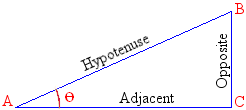 double cos(double x); long double cosl(long double x); The cos() function calculates the cosine of a number. Consider AB the length of A to B, also referred to as the hypotenuse. Also consider AC the length of A to C which is the side adjacent to point A. The cosine of the angle at point A is the ratio AC/AB. That is, the ratio of the adjacent length, AC, over the length of the hypotenuse, AB: 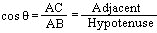 The returned value, the ratio, is a double-precision number between –1 and 1. |
|
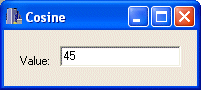
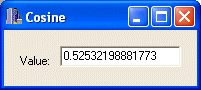
Example: A form contains an Edit control named edtValue. After the user has typed a value and presses Enter, the OnKeyPress event retrieves the number typed in the edit box, calculates its cosine and displays it in the same Edit control: //---------------------------------------------------------------------------
void __fastcall TForm1::edtValueKeyPress(TObject *Sender, char &Key)
{
if( Key == VK_RETURN )
{
double Value = edtValue->Text.ToDouble();
double Cosinus = cos(Value);
edtValue->Text = Cosinus;
}
}
//---------------------------------------------------------------------------
double sin(double x);
long double sinl(long double x);
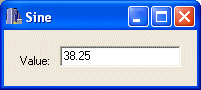
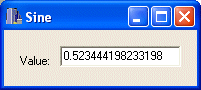
The sin() function calculates the sine of a number. Consider AB the length of A to B, also called the hypotenuse to point A. Also consider CB the length of C to B, which is the opposite side to point A. The sine represents the ratio of CB/AB; that is, the ratio of the opposite side, CB over the hypotenuse AB. The sin() function takes a double-precision number and returns one between –1 and 1. The sinl() function is used for 10-byte values. Example: A form contains an Edit control named edtValue. After the user has typed a value and presses Enter, the OnKeyPress event retrieves the number typed in the edit box, calculates its sine and displays the result in the same Edit control: //---------------------------------------------------------------------------
void __fastcall TForm1::edtValueKeyPress(TObject *Sender, char &Key)
{
if( Key == VK_RETURN )
{
double Value = edtValue->Text.ToDouble();
double Sinus = sin(Value);
edtValue->Text = Sinus;
}
}
//---------------------------------------------------------------------------
double tan(double x);
long double tanl(long double x);
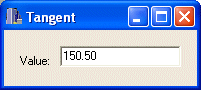
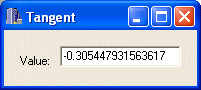
The tan() function calculates the tangent of a number. Example: A form contains an Edit control named edtValue. After the user has typed a value and presses Enter, the OnKeyPress event retrieves the number typed in the edit box, calculates its tangent and displays the result in the same Edit control: //---------------------------------------------------------------------------
void __fastcall TForm1::edtValueKeyPress(TObject *Sender, char &Key)
{
if( Key == VK_RETURN )
{
double Value = edtValue->Text.ToDouble();
double Tangent = tan(Value);
edtValue->Text = Tangent;
}
}
//---------------------------------------------------------------------------
double atan(double x); The atan() function is used to calculate the arc tangent of a number.
The atan() function takes one argument, x, that represents the angle BA AC. After the evaluation, the function returns a double-precision number between –PI/2 and PI/2. If the number to be evaluated is larger than a double, use the atanl() function: long double atanl(long double x); This function takes a long double argument and returns a long double. |
| Home | Copyright © 2004-2016, FunctionX, Inc. | |