Math Functions
|
|
Math Functions |
|
Number Formatting to Display Decimals |
|
The AnsiString class is equipped with a method used to format a floating-point number and specify the number of decimal places. Actually, the AnsiString::sprintf() function imitates the C’s printf() string system of displaying strings, integers, and floating variables. In mathematical operations, you can use it to control how to display a decimal number. The syntax of the method is: AnsiString& __cdecl sprintf(const char* format, ...); Following the C system of passing arguments, this member function can at least display a string. Here is an example: //---------------------------------------------------------------------------
void __fastcall TForm1::Button2Click(TObject *Sender)
{
Edit2->Text = Edit2->Text.sprintf("The best movie of the year");
}
//---------------------------------------------------------------------------
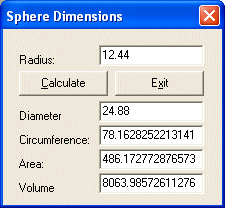
On the other hand, you can use this function to format a floating-point number. In the following example, the values of the dimensions of a sphere are calculated and display in appropriate edit boxes: //---------------------------------------------------------------------------
void __fastcall TForm1::btnCalculateClick(TObject *Sender)
{
double Radius, Diameter, Circumference, Area, Volume;
Radius = edtRadius->Text.ToDouble();
Diameter = Radius * 2;
Circumference = Radius * 2 * M_PI;
Area = Radius * Radius * M_PI;
Volume = Radius * Radius * Radius * 4.00 * M_PI / 3;
edtDiameter->Text = Diameter;
edtCircumference->Text = Circumference;
edtArea->Text = Area;
edtVolume->Text = Volume;
}
//---------------------------------------------------------------------------
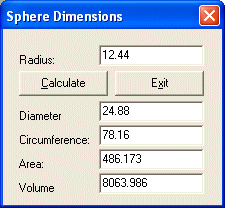
When the same values are configured using the AnsiString::sprintf() method, the diameter and the circumference can be set to display two decimal values while the area and the volume display three, as follows: //---------------------------------------------------------------------------
void __fastcall TForm1::btnCalculateClick(TObject *Sender)
{
double Radius, Diameter, Circumference, Area, Volume;
Radius = edtRadius->Text.ToDouble();
Diameter = Radius * 2;
Circumference = Radius * 2 * M_PI;
Area = Radius * Radius * M_PI;
Volume = Radius * Radius * Radius * 4.00 * M_PI / 3;
edtDiameter->Text = edtDiameter->Text.sprintf("%.2f", Diameter);
edtCircumference->Text = edtCircumference->Text.sprintf("%.2f",
Circumference);
edtArea->Text = edtArea->Text.sprintf("%.3f", Area);
edtVolume->Text = edtVolume->Text.sprintf("%.3f", Volume);
}
//---------------------------------------------------------------------------
|
| Home | Copyright © 2004-2010 FunctionX, Inc. | |