Not only does this function copy a file, it can actually be used to perform many types of operations:
If you copy a file from one directory to another, you would have two copies of the same file or the same contents in two files. Instead of copying, if you want, you can simply move a file from one directory to another. This operation can be performed by calling the MoveFile() function. Its syntax is: BOOL WINAPI MoveFile( __in LPCTSTR lpExistingFileName, __in LPCTSTR lpNewFileName ); The arguments of this function are the same as those of the CopyFile() function. The CopyFile() function supports at least two operations:
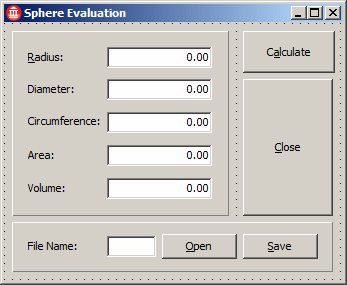
Before creating a file, you may first want to find out whether that file exists already so you would not overwrite it. In the same way, in order to open a file, its must exist. In some or most cases, if you try opening a file that cannot be found, you would recive an error. To assist you getting this information, the VCL provides the FileExists function. Its C++ equivalent from the Object Pascal syntax is: bool FileExists(const String FileName); Here are exampes:
//---------------------------------------------------------------------------

#include <vcl.h>
#include <math.h>
#pragma hdrstop

#include "Evaluation.h"
//---------------------------------------------------------------------------
#pragma package(smart_init)
#pragma resource "*.dfm"
TfrmEvaluation *frmEvaluation;
//---------------------------------------------------------------------------
__fastcall TfrmEvaluation::TfrmEvaluation(TComponent* Owner)
	: TForm(Owner)
{
}
//---------------------------------------------------------------------------
void __fastcall TfrmEvaluation::btnCalculateClick(TObject *Sender)
{
    double dRadius = 0.00;

    try {
	dRadius = StrToFloat(edtRadius->Text);
	edtDiameter->Text = FloatToStrF(dRadius * 2, ffFixed, 12, 5);
	edtCircumference->Text = FloatToStrF(dRadius * 2 * M_PI,
					     ffFixed, 12, 5);
	edtArea->Text = FloatToStrF(dRadius * dRadius * 4.0 * M_PI,
				    ffFixed, 12, 5);
	edtVolume->Text = FloatToStrF(dRadius * dRadius *
				      dRadius * 4.0 * M_PI / 3.00,
				      ffFixed, 12, 5);
    }
    catch (EConvertError *)
    {
	ShowMessage(L"The value you provided for the radius is not acceptable");
    }
    catch(...)
    {
    }
}
//---------------------------------------------------------------------------
void __fastcall TfrmEvaluation::btnSaveClick(TObject *Sender)
{
    int iFileHandle;
    double dRadius;
    TFileName FileName = edtFileName->Text;

    if( FileExists(FileName) )
    {
	// It looks like a file with that name exists already.
	// Ask the user if the file should be replaced
	if( Application->MessageBox(
			L"A file with that name exists already.\n"
			L"Do you want to replace it?",
			L"Sphere Calculation",
			MB_YESNO | MB_ICONQUESTION) == IDYES )
	{
		// If the user decides to replace the file, do it
		// Get the value of the radius
		dRadius = StrToFloat(edtRadius->Text);

		// Create the file
		iFileHandle = FileCreate(edtFileName->Text);

		// Write the value of the radius to the file
		FileWrite(iFileHandle, &dRadius, sizeof(double));

		// Reset the form
		edtRadius->Text        = L"";
		edtDiameter->Text      = L"";
		edtCircumference->Text = L"";
		edtArea->Text          = L"";
		edtVolume->Text        = L"";

		// Close the file
		FileClose(iFileHandle);
		}
		else
		{
			// Since the user clicked No, display a message.
		ShowMessage(L"You should then provide another name for the file.");
			// Don't do anything else
			return;
		}
	}
	else // It appears that this is a new file
	{
         // Get the value of the radius
		dRadius = StrToFloat(edtRadius->Text);

		// Create the file
		iFileHandle = FileCreate(edtFileName->Text);

		// Write the value of the radius to the file
		FileWrite(iFileHandle, &dRadius, sizeof(double));

		// Reset the form
		edtRadius->Text        = L"";
		edtDiameter->Text      = L"";
		edtCircumference->Text = L"";
		edtArea->Text          = L"";
		edtVolume->Text        = L"";

		// Close the file
		FileClose(iFileHandle);
        }
}
//---------------------------------------------------------------------------
void __fastcall TfrmEvaluation::btnOpenClick(TObject *Sender)
{
    int iFileHandle;
    double dRadius = 0.00;
    TFileName FileName = edtFileName->Text;

    if( FileExists(FileName) )
    {
	iFileHandle = FileOpen(FileName, fmOpenRead);

	FileRead(iFileHandle, &dRadius, sizeof(double));

	edtRadius->Text = FloatToStrF(dRadius, ffFixed, 12, 5);
	btnCalculateClick(Sender);

	FileClose(iFileHandle);
    }
    else
	ShowMessage(L"There is no such a file.");
}
//---------------------------------------------------------------------------
|
|
|||||||||||||
|
|
||||||||||||||