Message Boxes: The Message Box Position
|
|
Message Boxes: The Message Box Position |
|
Introduction |
|
The MessageDlgPos() function provides extra possibilities to the programmer. It behaves exactly like the MessageDlg() function. To create a message box based on this function, use the syntax: |
int __fastcall MessageDlgPos(const AnsiString Msg, TMsgDlgType DlgType, TMsgDlgButtons Buttons, int HelpCtx, int X, int Y); |
|
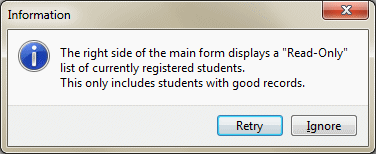
Besides the same arguments as the MessageDlg() function, the MessageDlgPos() function allows you to specify the coordinates used to display the dialog box. The X argument is an integer value that specifies the distance between the left border of the screen and the left border of the dialog box. The Y argument represents the height from the top border of the screen to the top border of the dialog box. Here is an example: //---------------------------------------------------------------------------
WINAPI _tWinMain(HINSTANCE hInstance,
HINSTANCE hPrevInstance,
LPSTR lpCmdLine,
int nCmdShow)
{
MessageDlgPos(L"The right side of the main form displays "
L"a \"Read-Only\" list of currently registered students.\n"
L"This only includes students with good records.",
mtInformation,
TMsgDlgButtons() << mbRetry << mbIgnore,
0, 20, 120);
return 0;
}
//---------------------------------------------------------------------------
This would produce:
|
|
|
||
| Home | Copyright © 2010-2016, FunctionX | |
|
|
||