Fundamentals of Fonts Introduction Probably the most fundamental aesthetic aspect consists of changing the way text looks. This is primarily the role of the font applied to that text. A font is primarily known by its name. This is represented by a style named font-family. The names of most fonts are provided in one word. An example is Algerian. You can just apply it to the font-family style. Here is an example: <html>
<head>
<title>F# Programming</title>
<style>
.intro {
font-family: Liberation Serif;
color: Blue;
}
.main {
font-family: Abyssinica SIL;
color: Red;
}
.emphasis, .common { font-family: Droid Sans Mono; }
</style>
</head>
<body>
<p class="main">Introduction to F#</p>
<p class="common"><abbr title="Pronounced F sharp">F#</abbr> is a computer
programming language researched, developed, and published by
<a href="https://msdn.microsoft.com/en-us/library/dd233154.aspx" target="_new"</a>
Microsoft</a>. The language takes its foundation on <quote class="emphasis">
functional programming</quote> but also adheres to all traditional rules of
<abbr title="Object-Oriented Programming">OOP</abbr> and <quote class="emphasis">
procedural</quote> programming.</p>
</body>
</html>
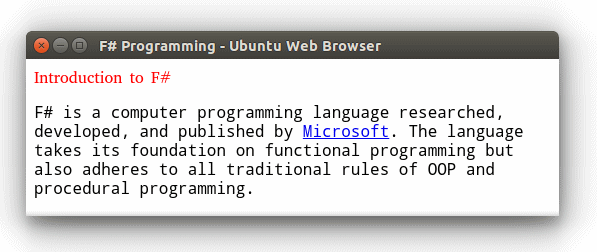
This would produce:
The Family of a Font For a browser to display text on a monitor, the browser must be given the name of the font to use. The browser would then try to find that font. This means that, for the browser to correctly display text using the right font, and that right font must be installed on the visitor's computer. One of the problems with this situation is that not all fonts are installed on all computers. This means that the name of the font you provide may not be available on the visitor's computer. The first option is to provide one or more alternative fonts. Fonts are available in categories: serif, sans-serif, and graphical fonts. A font qualifies as serif if its characters have fancy corners, called serifs:
Probably the most popular fonts that fit this category are Times New Roman, Garamond, Georgia. Of course, there are others. A font is referred to as sans-serif (without serifs) if the endings of its characters are straight:
Probably the most popular sans-serif fonts are Arial, Tahoma, and Verdana. Suggesting a Font to the Browser To assist a browser to rightly display text, you can assign many names of fonts to the font-family style. The names of fonts are separated by commas. Here is an example: <html>
<head>
<title>Exercise</title>
</head>
<body>
<p style="font-family: Times New Roman, Garamond">We are ready to do some
things.</p>
</body>
</html>
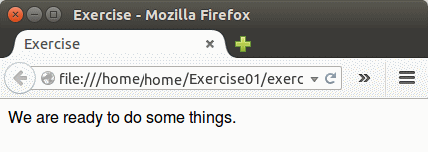
This would produce:
When the browser gets to such an element, in the visitor's computer, it would look for the first font in the list. If it finds it, it uses it. If that font is not found, it looks for the second font. It would continue until the end of the list. If none of the fonts in the list is found in the visitor's computer ... In reality, there is no guaranty that the visitor's computer will have the fonts you listed. The alternative is to ask the browser to find a font in the category and use the closest font in that category. The categories are serif and sans-serif. You can provide that option at the end of the list of fonts of a style. Here is an example: <html>
<head>
<title>Exercise</title>
</head>
<body>
<p style="font-family: Tahoma, Helvetica, Arial, sans-serif">We are ready
to do
some things.</p>
</body>
</html>
This would produce:
As a good practice, you should avoid mixing serifs and sans-serifs categories in the list of fonts of an element. Here are examples: <html>
<head>
<title>Anthropology</title>
<style>
.main-title {
color: red;
font-size: 24pt;
font-family: Bodoni MT Black, serif; }
li.presentation {
font-size: 12pt;
color: black;
font-family: Times New Roman, Garamond, serif; }
p.presentation {
font-size: 1.15em;
font-family: Garamond, Georgia, Garamond, serif; }
a:link {
font-size: 1.15em;
color: DarkMagenta;
font-family: Cambria, Georgia, Times, serif; }
a:active {
color: Green;
font-size: 1.15em;
font-family: Cambria, Georgia, Times, serif; }
a:visited {
color: Teal;
font-size: 1.15em;
font-family: Cambria, Georgia, Times, serif; }
a:hover {
font-size: 1.15em;
color: DarkOrange;
font-family: Cambria, Georgia, Times, serif; }
#copyright {
font-size: 1.15em;
font-family: Georgia, Times New Roman, Times, serif; }
a:link#copyright { color: DeepPink; }
a:active#copyright { color: Gold; }
a:visited#copyright { color: SeaGreen; }
a:hover#copyright { color: Peru; }
a.title:link {
color: Gray;
font-size: 1.15em;
font-family: Comic Sans MS, Verdana, sans-serif; }
a.title:active {
color: Brown;
font-size: 1.15em;
font-family: Comic Sans MS, Verdana, sans-serif; }
a.title:visited {
color: Blue;
font-size: 1.15em;
font-family: Comic Sans MS, Verdana, sans-serif; }
a.title:hover {
color: Red;
font-size: 1.15em;
font-family: Comic Sans MS, Verdana, sans-serif; }
</style>
<head>
<body>
<p class="main-title">Anthropology</p>
<p class="presentation">Anthropology is the study of the origins as well as the
contemporary aspects of humans. The study includes:</p>
<ul>
<li class="presentation">Human Body: The study of anthropology includes the
physical traits of the <a href="body.htm">human body</a>. This includes such
information as what might have created the shapes on the human body and how that
body currently appears</li>
<li class="presentation">Environment: Anthropology must establish the culture in
which the human lives, how the <a href="environment.htm">environment</a>
influences the human over time, and how the human influences the environment as
time passes by</li>
<li class="presentation">Age: This is the part of anthropology that studies the
origins of the human body and its evolution over the years</li>
</ul>
<p><a href="index.htm" class="title">Social Sciences</a> | <a href="resources.htm"
class="title">Resources</a> | <a href="services.htm" class="title">Services</a></p>
<p><a href="scopy.htm" id="copyright">Copyright © 2015</a></p>
</body>
</html>
This would produce:
The Style of a Font The style of a font specifies whether it should display in bold, in italic, or not. This style is specified using the font-style style. The three options and values of this style are:
Here are examples: <html>
<head>
<title>Anthropology</title>
<style>
.main-title {
font-style: normal;
color: red;
font-size: 24pt;
font-family: Bodoni MT Black; }
.emphasis {
font-style: italic;
font-size: 13pt;
color: Chocolate;
}
.culture {
font-style: oblique;
color: Blue;
font-size: 0.62cm;
font-family: Times New Roman, Garamond, Georgia, serif;
}
p.presentation {
font-style: normal;
font-size: 1.15em;
font-family: Garamond; }
li.presentation {
color: black;
font-size: 12pt;
font-family: Times New Roman; }
a:link {
font-size: 1.15em;
color: DarkMagenta;
font-family: Cambria; }
a:active {
font-size: 1.15em;
color: Green;
font-family: Cambria; }
a:visited {
font-size: 1.15em;
color: Teal;
font-family: Cambria; }
a:hover {
font-size: 1.15em;
color: DarkOrange;
font-family: Cambria; }
#copyright {
font-size: 1.15em;
font-family: Georgia; }
a:link#copyright { color: DeepPink; }
a:active#copyright { color: Gold; }
a:visited#copyright { color: SeaGreen; }
a:hover#copyright { color: Peru; }
a.title:link {
color: Gray;
font-size: 1.15em;
font-family: Comic Sans MS; }
a.title:active {
color: Brown;
font-size: 1.15em;
font-family: Comic Sans MS; }
a.title:visited {
color: Blue;
font-size: 1.15em;
font-family: Comic Sans MS; }
a.title:hover {
color: Red;
font-size: 1.15em;
font-family: Comic Sans MS; }
</style>
<head>
<body>
<p class="main-title">Anthropology</p>
<p class="presentation">Anthropology is the study of the origins as well as the
contemporary aspects of humans. The study includes:</p>
<ul>
<li class="presentation">Human Body: The study of anthropology includes the
<cite class="emphasis">physical traits</cite> of the <a href="body.htm">human
body</a>. This includes such
information as what might have created the shapes on the human body and how that
body currently appears</li>
<li class="presentation">Environment: Anthropology must establish the <cite
class="culture">culture</cite> in
which the human lives, how the <a href="environment.htm">environment</a>
influences the human over time, and how the human influences the environment as
time passes by</li>
<li class="presentation">Age: This is the part of anthropology that studies the
origins of the human body and its evolution over the years</li>
</ul>
<p><a href="index.htm" class="title">Social Sciences</a> | <a href="resources.htm"
class="title">Resources</a> | <a href="services.htm" class="title">Services</a></p>
<p><a href="scopy.htm" id="copyright">Copyright © 2015</a></p>
</body>
</html>
This would produce:
Text Size We were introduced to text sizes in Lesson 2. We saw how to specify the size using a constant value in inches, centimeters, points, etc. Another option we saw was to specify the size in an absolute value as xx- small, x-small, small, medium, large, x-large, or xx-large. We also saw that the size can be relative with a value of smaller or larger. Instead of using a constant value, you can ask the browser to apply a size relative to the text size of the parent element. This is specified as a percentage. Here are examples: <html>
<head>
<title>Chemistry</title>
<style>
#hydrogen {
font-family: Times New Roman, Garamond, serif;
font-size: 0.42cm; }
#carbon {
font-family: Times New Roman, Garamond, serif;
font-size: 150%; }
.description {
font-family: Times New Roman, Garamond, serif;
font-size: 200%; }
</style>
</head>
<body>
<p id="hydrogen">Hydrogen is the most widely available substance on earth.</p>
<p id="carbon">Carbon is the main component of most minerals such as diamond
and graphite.</p>
<p class="description compound">Combining hydrogen and carbon results in many
types of organic
compounds.</p>
</body>
</html>
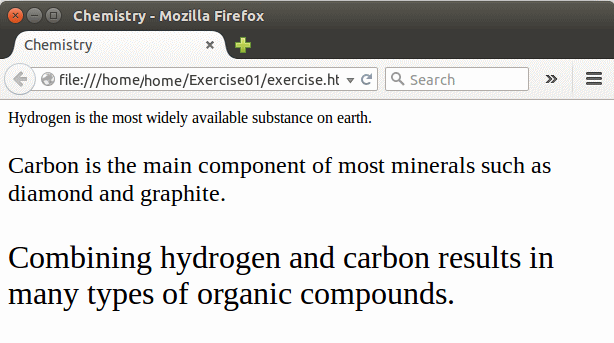
This would produce:
Font Weight As seen in the previous section, if you want to display text in bold characters, apply the font-style style with the bold value. To support more bold options, CSS provides a style named font-weight. Its values are bold, bolder, lighter, 100, 200, 300, 400, 500, 600, 700, 800, and 900. While the first three values are self-explanatory, the others are not regular numbers. They are rates that accentuate the level of boldness to apply. Here is an example: <html>
<head>
<title>Risk Management</title>
<style>
#project {
font-weight: bold;
font-family: Times New Roman, Garamond, Georgia, serif;
font-size: 0.82cm; }
#risk {
font-weight: normal;
font-family: Times New Roman, Garamond, Georgia, serif;
font-size: 0.82cm; }
#intro {
font-weight: bold;
font-family: Times New Roman, Garamond, serif;
font-size: 0.42cm; }
#present {
font-weight: lighter;
font-family: Times New Roman, Garamond, serif;
font-size: 0.42cm; }
</style>
</head>
<body>
<p id="project">Project</p>
<p id="risk">Risk Management</p>
<p id="intro">A good project starts with a good plan, followed by a detailed
designing.</p>
<p id="present">Risk management is the ability to identify problems, to assess their
hazards, and to create a plan to address them.</p>
</body>
</html>
This would produce:
Applying Small Capitals to Text Small capitalizing is the ability to display text in uppercase with the first letter of each slightly bigger than the other letters. To let you apply this characteristic on text, CSS provides a style named font-variant. It can have a value as either normal or small-caps. Here are two examples: <html>
<head>
<title>Binary Classification</title>
<style>
p.title {
color: Red;
font-size: xx-large;
font-family: Rockwell;
font-variant: small-caps;
}
#introduction {
color: Black;
font-size: 0.58cm;
font-family: Garamond;
}
li.classification {
font-family: Comic Sans MS;
color: Green;
}
p.classification {
font-family: Garamond;
color: Navy;
}
td.title {
color: Navy;
font-family: Forte;
font-size: 1.45pc;
}
td .classification {
color: Teal;
font-family: Antique;
font-size: 1.45pc;
}
li > p.title {
color: Magenta;
font-family: Georgia;
font-size: large;
font-variant: normal;
}
li p.classification {
font-family: Garamond;
color: Blue;
}
p.classification .reduction {
color: Navy;
font-family: Agency FB;
font-size: Medium;
}
p.classification b, cite {
color: Maroon;
font-family: Bodoni MT Black;
font-size: 1.25pc;
}
</style>
<head>
<body>
<p class="title">Binary Classification</p>
<p id="introduction">Binary classification consists of classifying the outcomes
of two sets of measures. The classification is made to find out whether something
that was supposed to happen happened as it was predicted, or to made a conclusion
about the resultant of something that was, or was not, supposed to happen.
Binary classification is widely used in various disciplines:</p>
<ul>
<li class="classification">Medicine: Used to evaluate pregnancies, to study
diseases, to monitor cancer evolution on patients, etc</li>
<li class="classification">Statistics: Used to evaluate the outcomes of an
experiment</li>
<li class="classification">Sociology: Used to study people's
(a person in society, a crowd in a riot, the employees of a company, etc)
behavior</li>
<li class="classification">Etc: Binary classification is applied to many
types of studies and sometimes the results gotten in one discipline can
directly be used in another discipline</li>
</ul>
<p>The classification uses four expressions as:</p>
<ul>
<li><p class="title">True Positive</p>
<p class="classification">Also used as TP, this <quote class="reduction">
condition indicates</quote> that <b>something was supposed to happen</b>
and actually <cite>happened</cite></p>
</li>
<li><p class="title">True Negative</p>
<p class="classification">Also used as TN, this <quote class="reduction">
condition indicates</quote> that <b>something was supposed to happen</b>
but <cite>did not happen</cite></p>
</li>
<li><p class="title">False Positive</p>
<p class="classification">Also used as FP, this <quote class="reduction">
condition indicates</quote> that <b>something was not supposed to happen</b>
but actually <cite>happened</cite></p>
</li>
<li><p class="title">False Negative</p>
<p class="classification">Also used as FN, this <quote class="reduction">
condition indicates</quote> that <b>something was not supposed to happen</b>
and effectively <cite>did not happened</cite></p>
</li>
</ul>
<p class="classification">These expressions can be classified in a table as
follows:</p>
<div align=center>
<table border=6>
<tr>
<td> </td>
<td class="title">True</td>
<td class="title">False</td>
</tr>
<tr>
<td class="title">Positive</td>
<td><b class="classification">True Positive</b></td>
<td><b class="classification">False Positive</b></td>
</tr>
<tr>
<td class="title">Negative</td>
<td><b class="classification">False Negative</b></td>
<td><b class="classification">True Negative</b></td>
</tr>
</table>
</div>
</body>
</html>
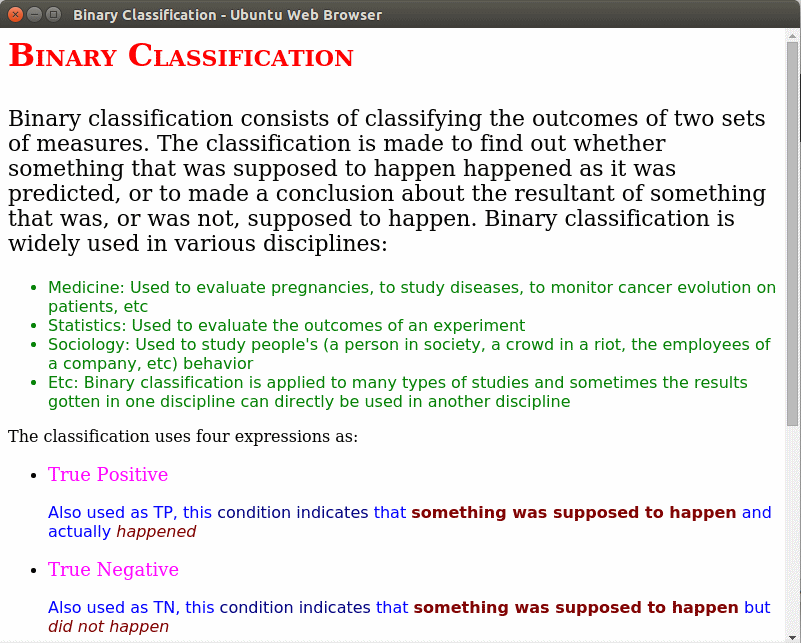
This would produce:
Applying a Font to an Element As opposed to specifying the characteristics of a font one at at time, CSS provides a style named font from which you can specify many fonts in one block. To use it, create a font style and its colon. Specify the values of the font style, the font variant, and the text weight. They are separated by empty spaces. You can also specify the text size and/or the font name(s) to apply. If you decide to specify only the font style, the font variant, and the text weight, they can appear in any order of your choice. If you want to add either or both the text size and/or the font name, you can omit any of the first three characteristics but if you to use them, they must be in the order of font style, font variant, and text weight before the text size and/or the font name (s). Here is an example: <html>
<head>
<title>Binary Classification</title>
<style>
p.title {
color: Red;
font: normal small-caps bold xx-large Georgia, serif; }
#introduction {
color: Black;
font: normal normal normal 0.58cm Garamond, serif; }
li.classification {
font-family: Comic Sans MS, sans-serif;
color: Green;
}
p.classification {
font-family: Garamond, sans-serif;
color: Navy;
}
td.title {
color: Navy;
font: 1.45pc, Century Schoolbook, serif;
}
td .classification {
color: Teal;
font: 1.45pc, Antique, sans-serif;
}
li > p.title {
color: Magenta;
font: normal normal large Georgia, serif;
}
li p.classification {
font-family: Garamond, sans-serif;
color: Blue;
}
p.classification .reduction {
color: Navy;
font: Medium, Agency FB, sans-serif;
}
p.classification b, cite {
color: Maroon;
font: 1.25pc, Bodoni MT Black, serif;
}
</style>
<head>
<body>
<p class="title">Binary Classification</p>
<p id="introduction">Binary classification consists of classifying the outcomes
of two sets of measures. The classification is made to find out whether something
that was supposed to happen happened as it was predicted, or to made a conclusion
about the resultant of something that was, or was not, supposed to happen.
Binary classification is widely used in various disciplines:</p>
<ul>
<li class="classification">Medicine: Used to evaluate pregnancies, to study
diseases, to monitor cancer evolution on patients, etc</li>
<li class="classification">Statistics: Used to evaluate the outcomes of an
experiment</li>
<li class="classification">Sociology: Used to study people's
(a person in society, a crowd in a riot, the employees of a company, etc)
behavior</li>
<li class="classification">Etc: Binary classification is applied to many
types of studies and sometimes the results gotten in one discipline can
directly be used in another discipline</li>
</ul>
<p>The classification uses four expressions as:</p>
<ul>
<li><p class="title">True Positive</p>
<p class="classification">Also used as TP, this <quote class="reduction">
condition indicates</quote> that <b>something was supposed to happen</b>
and actually <cite>happened</cite></p>
</li>
<li><p class="title">True Negative</p>
<p class="classification">Also used as TN, this <quote class="reduction">
condition indicates</quote> that <b>something was supposed to happen</b>
but <cite>did not happen</cite></p>
</li>
<li><p class="title">False Positive</p>
<p class="classification">Also used as FP, this <quote class="reduction">
condition indicates</quote> that <b>something was not supposed to happen</b>
but actually <cite>happened</cite></p>
</li>
<li><p class="title">False Negative</p>
<p class="classification">Also used as FN, this <quote class="reduction">
condition indicates</quote> that <b>something was not supposed to happen</b>
and effectively <cite>did not happened</cite></p>
</li>
</ul>
<p class="classification">These expressions can be classified in a table as
follows:</p>
<div align=center>
<table border=6>
<tr>
<td> </td>
<td class="title">True</td>
<td class="title">False</td>
</tr>
<tr>
<td class="title">Positive</td>
<td><b class="classification">True Positive</b></td>
<td><b class="classification">False Positive</b></td>
</tr>
<tr>
<td class="title">Negative</td>
<td><b class="classification">False Negative</b></td>
<td><b class="classification">True Negative</b></td>
</tr>
</table>
</div>
</body>
</html>
This would produce:
| ||||