Fundamental HTML Sections Spanning a Section HTML provides text-based elements that can be used in a paragraph element to simply change how a character, a word, or a section appears. Examples of such elements are b, u, em, strong, etc. Sometimes you want to do more than simply underlining or italicizing text. An HTML tag named span allows you to apply a style to anything inside an element. Here is an example of creating a span element: <html> <head> <title>Chemistry</title> </head> <body> <p>Hydrogen is the most widely available <span>substance</span> on earth.</p> </body> </html> By itself, the span element does nothing. CSS must be added to it. At the same time, span is used where you don't want to, or cannot formally, use an HTML tag. One of the roles and advantages of the span element is that it can be used anywhere, such as inside a paragraph. As a result, span is one of the favorite elements to quickly apply a style. Once you have created an HTML span section, you can add a style to it. Here are two examples: <html>
<head>
<title>Chemistry</title>
<style>
.carbon {
font-family: Tahoma;
font-size: 0.22in; }
</style>
</head>
<body>
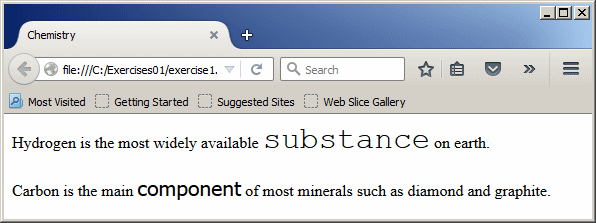
<p>Hydrogen is the most widely available <span style="font-family: Courier; font-size: 0.82cm;">substance</span> on earth.</p>
<p id="carbon">Carbon is the main <span class="carbon">component</span> of most minerals such as diamond and graphite.</p>
</body>
</html>
This would produce:
A Division You may already know that the p element is used to create a portion on a webpage, such as a group of characters to get a paragraph of text. Instead of designating the group as a paragraph, HTML provides an alternate element named div. It can be used to create a section. Here is an example of a div section: <!DOCTYPE html> <html> <head> <title>Biology</title> </head> <body> <div> Biology is the study of the existence of living organisms. Biologiy studies how the organisms come to existense, such as how an organism is born or is created, how they grow (or how they change from one state or phase to another), how they live, how they function, where they dwell, and how their existence ends (such as how they die). </div> </body> </html> A div element creates a section. This means that between the start and the end tags of the div element, you can create any HTML element you want. Here are examples: <!DOCTYPE html> <html> <head> <title>Biology</title> </head> <body> <div> <p>Biology</p> </div> <div> <p>Biology is the study of the existence of living organisms. Biologiy studies how the organisms come to existense, such as how an organism is born or is created, how they grow (or how they change from one state or phase to another), how they live, how they function, where they dwell, and how their existence ends (such as how they die). Biology also studies the environment in which an organism lives, how it interacts with other organisms, how it influences its environment, and how other organisms affect its beginning, its existence, its environment, and its end.</p> </div> </body> </html> This would produce:
In fact, you can nest a section inside another section, and then each section can have its own elements. Here is an example: <html> <head> <title>Geometry: Polygons</title> <head> <body> <div> <h3>Geometry: Polygons</h3> </div> <div> <p>A polygon is a geometric plane figure made of straight lines also called segments. Polygons are categorized based on their number of sides. Examples of categories of polygons are:</p> <ul> <li>Triangle: A geometric figure made of <span>three</span> sides (called edges) and three angles (called vertices). Triangles are categorized by the relationships among the edges: <ul> <li>Equalateral: All sides have the same length <li>Isosceles: Two of the sides have the same length <li>Scalene: All sides have different lengths </ul> </li> <li>Quadrilateral: A geometric figure made of <span>four</span> sides (called edges) and four angles (called corners). Quadrilaterals are categorized by the relationships among the sides, namely whether the opposite sides are equal, whether the opposite sides are parallel or not, etc</li> <li>Others: This is for polygons made of five or more sides. Examples are: <div> <ul> <li>Pentagon: Made of 5 sides <li>Hexagon: Made of 6 sides <li>Octagon: Made of 8 sides <li>Decagon: Made of 10 sides <li>Dodegagon: Made of 12 sides </ul> </div> </li> </ul> </div> </body> </html> You can also nest many div elements inside an existing one. You can create a style that applies to a section without creating styles for the elements nested in the section. Here are examples:<!DOCTYPE html> <html> <head> <title>Biology</title> <style type="text/css"> #top-portion { color: #F00; font-size: 16pt; font-family: Arial, sans-serif; } #contents { font-size: 16pt; color: #336699; font-family: Script, Arial, sans-serif; } #bottom-portion { color: #090; font-family: Consolas, Arial, sans-serif; } </style> </head> <body> <div id="top-portion"> <p>Biology</p> </div> <div id="contents"> <p>Biology is the study of the existence of living organisms. Biologiy studies how the organisms come to existense, such as how an organism is born or is created, how they grow (or how they change from one state or phase to another), how they live, how they function, where they dwell, and how their existence ends (such as how they die). Biology also studies the environment in which an organism lives, how it interacts with other organisms, how it influences its environment, and how other organisms affect its beginning, its existence, its environment, and its end.</p> </div> <div id="bottom-portion"> <p class="description">Biology helps to understand other scientific areas of studies and other study fields influence biology. These include agriculture, botany, ecology, etc.</p> </div> </body> </html> This would produce:
Of course, a nested section can have its own styles. In this case, the style of the nested section would override the style of the nesting section. Here is an example: <!DOCTYPE html>
<html>
<head>
<title>Biology</title>
<style type="text/css">
#top-portion {
color: #F00;
font-size: 16pt;
font-family: Arial, sans-serif;
}
#contents {
font-size: 16pt;
color: #336699;
font-family: Script, Arial, sans-serif;
}
#bottom-portion {
color: #090;
font-family: Consolas, Arial, sans-serif;
}
.fields-of-study {
font-size: 1.05em;
color: MediumVioletRed;
font-family: Bodoni MT, Times New Roman, Garamond, serif;
}
</style>
</head>
<body>
<div id="top-portion">
<p>Biology</p>
</div>
<div id="contents">
<p>Biology is the study of the existence of living
organisms. Biologiy studies how the organisms come to existense and their
existence.</p>
<div class="fields-of-study">
<p class="description">Biology can be divided in various fields of sudies such
as biochemistry, biophysics, and biotechnology. Some of the college
majors related to biology are:</p>
<ul>
<li>Biology</li>
<li>Biological Physics</li>
<li>Biological Sciences with concentration in Cell Biology and Genetics</li>
<li>Biological Sciences with concentration Microbiology</li>
</ul>
</div>
<p>Many schools offer bachelor degres in art and bachelor degrees in sciences
in various biology-related fields.</p>
</div>
<div id="bottom-portion">
<p>Biology helps to understand
other scientific areas of studies and other study fields influence biology.
These include agriculture, botany, ecology, etc.</p>
</div>
</body>
</html>
This would produce:
Of course, an element nested in a section can have its own style. In this case, the style of the element would override that of the section if any. Here are examples: <!DOCTYPE html>
<html>
<head>
<title>Biology</title>
<style type="text/css">
#top-portion {
color: #F00;
font-size: 16pt;
font-family: Arial, sans-serif;
}
#contents {
font-size: 16pt;
color: #336699;
font-family: Script, Arial, sans-serif;
}
#bottom-portion {
color: #090;
font-family: Consolas, Arial, sans-serif;
}
.fields-of-study {
font-size: 1.05em;
color: MediumVioletRed;
font-family: Bodoni MT, Times New Roman, Garamond, serif;
}
li {
color: #F30;
font-size: 0.82em;
font-weight: 200;
font-family: AvanGarde Md Bt, Tahoma, sans-serif;
}
#top-title {
color: #03C;
font-size: 28pt;
font-weight: Bold;
text-align: center;
font-family: Bodoni MT Black, Georgia, serif;
}
.biology {
color: #960;
font-size: 1.00em;
font-weight: 100;
text-align: justify;
font-family: Linux Libertine G, Garamond, serif;
}
.studies {
font-size: 0.5cm;
color: MediumVioletRed;
font-family: Californian FB, Times New Roman, Garamond, serif;
}
</style>
</head>
<body>
<div id="top-portion">
<p id="top-title">Biology</p>
</div>
<div id="contents">
<p class="biology">Biology is the study of the existence of living organisms.
Biologiy studies how the organisms come to existense and their existence.</p>
<div class="fields-of-study">
<p class="studies">Biology can be divided in various fields of sudies such
as biochemistry, biophysics, and biotechnology. Some of the college
majors related to biology are:</p>
<ul>
<li>Biology</li>
<li>Biological Physics</li>
<li>Biological Sciences with concentration in Cell Biology and Genetics</li>
<li>Biological Sciences with concentration Microbiology</li>
</ul>
</div>
<p class="biology">Many schools offer bachelor degres in art and bachelor degrees
in sciences in various biology-related fields.</p>
</div>
<div id="bottom-portion">
<p>Biology helps to understand
other scientific areas of studies and other study fields influence biology.
These include agriculture, botany, ecology, etc.</p>
</div>
</body>
</html>
This would produce:
| ||||||