|
Introduction to Data Selecting |
|
Fundamentals of Data Selection
Introduction
|
|
Consider a table as follows:
CREATE TABLE Students
(
    StudentNumber VARCHAR(10),
    LastName VARCHAR(20)
);
INSERT Students VALUES('279227', 'Henry'),
                      ('502494', 'Robert');
|
One of the most regular operations performed on a database is to look for data or to isolate records that respond to a particular criterion. Looking for data that is conform to a criterion is referred to as querying. The result of retrieving data based on a criterion is called a query.
|
In this and other lessons, we will use
a database named LambdaSquare1. The name itself means
nothing.
The database represents a fictitious
apartment complex. The building has three levels: First,
second, and third.

|
|
The apartments are referred to as
units. These are what customers, named tenants, come to
rent.
Each unit is represented with:
- A unit number: Normally, this is the number on the
door of the apartment. One of the characteristics of
this number is the first digit that specifies the
floor or level. For example, if a unit has number 104,
this means the apartment is on the first level
- Bedrooms: This is an integer from 0 to 3. The
number 0 means the unit is an efficiency: A one-room
apartment (the kitchen and the living room share a
unique room; there is a separate bathroom)
- Bathroom: This is a nnumber that indicates the
number of bathrooms in the unit
- Price: This is how much a tenant would pay every
month
- Deposit: When a customer starts renting a room, he
is usually asked to put some money down, to be
optionnally reimbursed when the customer leaves
- Available: This is a Boolean value that indicates
whether the unit can be rented
|
|
|
 Practical
Learning: Introducing Data Selection Practical
Learning: Introducing Data Selection
|
|
- Start the computer and log in
- Launch Microsoft SQL Server and click Connect
- On the main menu, click File -> New -> Query With Current
Connection
- In the Query Editor, type the following code:
-- ===============================================================
-- Database:	 LambdaSquare1
-- Author:	 FunctionX
-- Date Created: Sunday, January 16, 2011
-- Description:	 This database represents an apartment building.
--		 This part of the dat2base is used to present the
--		 apartments to a customer and select the right one
-- ===============================================================
USE master
GO

CREATE DATABASE LambdaSquare1;
GO

USE LambdaSquare1;
GO
CREATE SCHEMA Presentation;
GO
CREATE TABLE Presentation.Units
(
	UnitNumber nchar(10),
	Bedrooms int,
	Bathrooms real,
	Price money,
	Deposit money,
	Available bit
);

INSERT Presentation.Units
VALUES('101', 0, 1.00, 845.00,  200.00, 0),
      ('102', 1, 1.00, 895.00,  250.00, 0),
      ('103', 1, 1.00, 925.00,  275.00, 1),
      ('104', 2, 1.00, 1050.00, 300.00, 0),
      ('105', 1, 1.00, 885.00,  250.00, 1),
      ('106', 3, 2.00, 1350.00, 425.00, 1),
      ('107', 2, 2.00, 1185.00, 400.00, 0),
      ('108', 0, 1.00, 865.00,  225.00, 1),
      ('109', 2, 1.00, 1050.00, 350.00, 1),
      ('110', 1, 1.00, 895.00,  250.00, 0),
      ('111', 1, 1.00, 895.00,  250.00, 0),
      ('112', 0, 1.00, 805.00,  200.00, 1),
      ('201', 0, 1.00, 825.00,  200.00, 1),
      ('202', 1, 1.00, 950.00,  325.00, 0),
      ('203', 1, 1.00, 885.00,  250.00, 1),
      ('204', 2, 2.00, 1125.00, 425.00, 1),
      ('205', 1, 1.00, 1055.00, 350.00, 0),
      ('206', 2, 1.00, 1165.00, 400.00, 1),
      ('207', 1, 1.00, 895.00,  250.00, 0),
      ('208', 0, 1.00, 815.00,  200.00, 1),
      ('210', 1, 1.00, 895.00,  350.00, 1),
      ('211', 2, 2.00, 925.00,  400.00, 1),
      ('212', 3, 2.00, 1280.00, 500.00, 0),
      ('301', 0, 1.00, 845.00,  200.00, 0),
      ('302', 1, 1.00, 925.00,  250.00, 0),
      ('303', 2, 1.00, 985.00,  275.00, 1),
      ('304', 2, 2.00, 1250.00, 300.00, 0),
      ('305', 1, 1.00, 945.00,  250.00, 1),
      ('306', 3, 2.00, 1350.00, 425.00, 1),
      ('307', 2, 2.00, 1285.00, 400.00, 0),
      ('308', 0, 1.00, 875.00,  225.00, 1),
      ('309', 2, 1.00, 1150.00, 350.00, 1),
      ('310', 1, 1.00, 955.00,  250.00, 0),
      ('311', 3, 2.00, 1325.00, 500.00, 0),
      ('312', 0, 1.00, 825.00,  200.00, 1);
GO
- To execute, on the main menu, click Query -> Execute
- In the Object Explorer, right-click the Databases node and click
Refresh
- Expand the Databases node
- Expand LambdaSquare1 and expand its Tables node
|
Practical
Learning: Introducing the Diagram pane
|
|
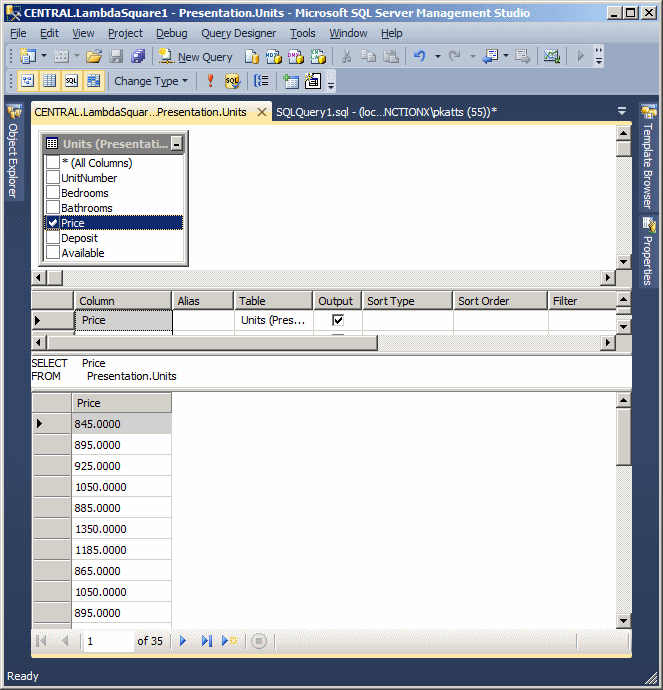
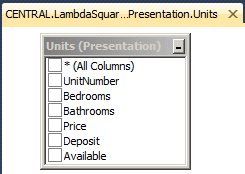
- On the main menu, click Query Designer, position the mouse on
Pane, and click Diagram
- Click the check boxes of all fields to remove the check marks
|
Practical
Learning: Introducing the Criteria Pane
|
|
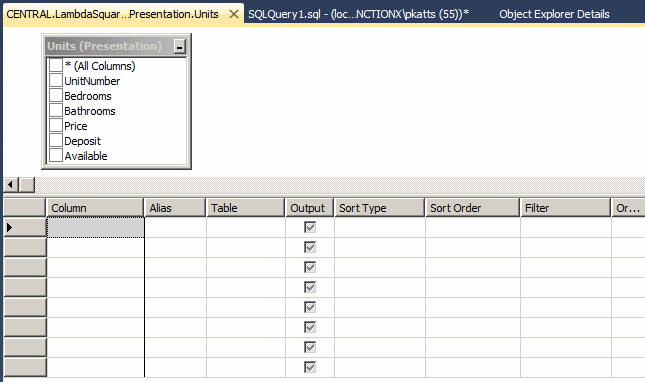
- On the Query Designer toolbar, click the Show Criteria Pane button

|
Practical
Learning: Introducing the SQL Section
|
|
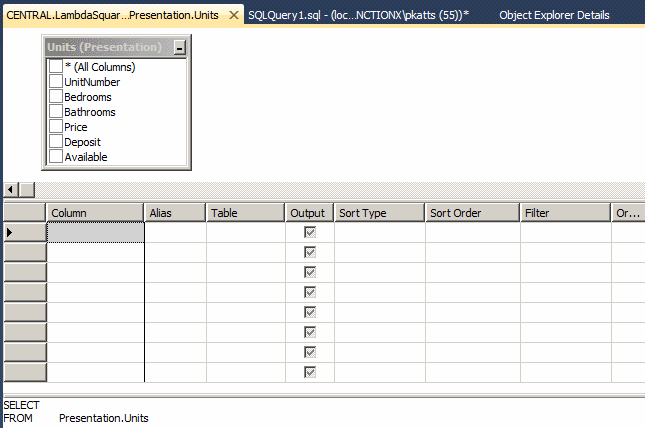
- Right-click an empty area in the Diagram pane, position the mouse
on Pane, click SQL
- In the SQL section, delete TOP (200)
|
Practical
Learning: Starting PowerShell
|
|
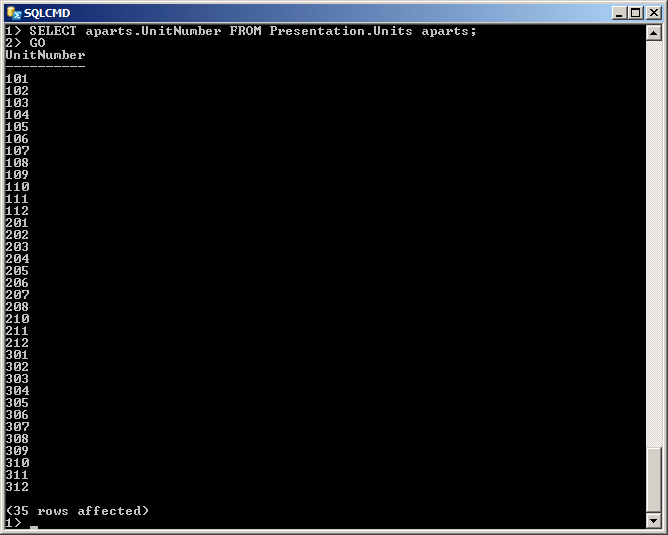
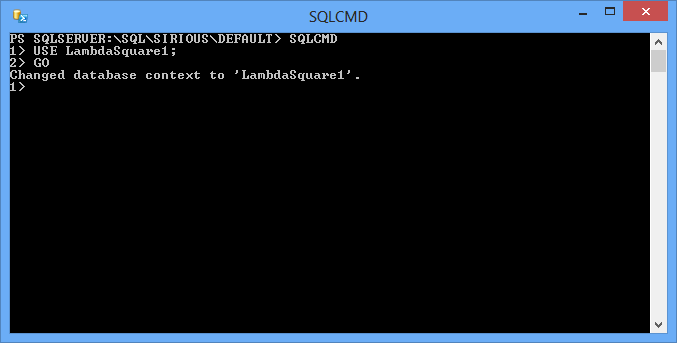
- In the Object Explorer, right-click the name of the server and
click Start PowerShell (if you receive an error, skip this step)
- Type SQLCMD (or sqlcmd) and press Enter
- Type USE LambdaSquare1; and press Enter
- Type GO and press Enter
The Formula to SELECT
The most fundamental keyword used by SQL is SELECT. It is used to select one or more columns from a table in order to get one or more records. You must specify what to select. The primary formula to follow is:
SELECT column(s) FROM table-name;
 |
As stated already, SQL is not case-sensitive.
This means that SELECT, Select, and select
represent the same word.
|
The SELECT and the FROM
keywords are required. The column(s) represents one or more columns from a table. The table-name represents the name of the
table that has the column(s).
SELECTing ALL Columns from a Table
To select everything from a table, you can use the asterisk in the column(s) placeholder of our formula. For example, to select all records from a table named Students, you can type:
SELECT * FROM Students;
Alternatively, you can precede the asterisk with the ALL keyword.
|
Practical
Learning: Selecting All Fields
|
|
- In the PowerShell window, type:
SELECT ALL * FROM Presentation.Units;
- Press Enter and type:
GO
- Press Enter
PS SQLSERVER:\SQL\SIRIOUS\DEFAULT> SQLCMD
1> USE LambdaSquare1;
2> GO
Changed database context to 'LambdaSquare1'.
1> SELECT ALL * FROM Presentation.Units;
2> GO
UnitNumber   Bedrooms    Bathrooms        Price         Deposit      Available
---------- ----------- -------------- ----------------- ------------ ---------
101             0          1.0          845.0000        200.0000         0
102             1          1.0          895.0000        250.0000         0
103             1          1.0          925.0000        275.0000         1
104             2          1.0         1050.0000        300.0000         0
105             1          1.0          885.0000        250.0000         1
106             3          2.0         1350.0000        425.0000         1
107             2          2.0         1185.0000        400.0000         0
108             0          1.0          865.0000        225.0000         1
109             2          1.0         1050.0000        350.0000         1
110             1          1.0          895.0000        250.0000         0
111             1          1.0          895.0000        250.0000         0
112             0          1.0          805.0000        200.0000         1
201             0          1.0          825.0000        200.0000         1
202             1          1.0          950.0000        325.0000         0
203             1          1.0          885.0000        250.0000         1
204             2          2.0         1125.0000        425.0000         1
205             1          1.0         1055.0000        350.0000         0
206             2          1.0         1165.0000        400.0000         1
207             1          1.0          895.0000        250.0000         0
208             0          1.0          815.0000        200.0000         1
210             1          1.0          895.0000        350.0000         1
211             2          2.0          925.0000        400.0000         1
212             3          2.0         1280.0000        500.0000         0
301             0          1.0          845.0000        200.0000         0
302             1          1.0          925.0000        250.0000         0
303             2          1.0          985.0000        275.0000         1
304             2          2.0         1250.0000        300.0000         0
305             1          1.0          945.0000        250.0000         1
306             3          2.0         1350.0000        425.0000         1
307             2          2.0         1285.0000        400.0000         0
308             0          1.0          875.0000        225.0000         1
309             2          1.0         1150.0000        350.0000         1
310             1          1.0          955.0000        250.0000         0
311             3          2.0         1325.0000        500.0000         0
312             0          1.0          825.0000        200.0000         1

(35 rows affected)
1>
(If PowerShell is not working, in SQL Server Management Studio,
click the SQLQuery1.sql tab
Press Ctrl + A to select everything
Type the following:
SELECT ALL * FROM Presentation.Units;
GO
To execute, press F5)
Selecting Records in PHP
Introduction
To get records using PHP, create a SELECT statement and pass it either the mysqli_query() function or the mysqli::query() method. Here is an example:
$link->query("SELECT * FROM StaffMembers")
The Number of Records Selected
To let you get the number of records of a SELECT statement, PHP provides a function named mysqli_num_rows.
Fetching the Results of a Query
To let you explore the records produced by a SELECT statement, PHP provides a function named mysqli_fetch_array. Its syntax is:
mixed mysqli_fetch_array(mysqli_result $result [, int $resulttype = MYSQLI_BOTH ])
To support the records of a table, PHP is equipped with a class named mysqli_result. The alternative to the mysqli_fetch_array function is a method named fetch_array from the mysqli_result class. Its syntax is:
mixed mysqli_result::fetch_array ([int $resulttype = MYSQLI_BOTH ] )
Both the the mysqli_fetch_array function and the mysqli_result::fetch_array method produce a collection, as an array, of records from a SELECT statement. As a result, each column can be accessed using the square brackets applied to the returned value. The mysqli_fetch_array() function or the mysqli_result::fetch_array() method takes a constant value as argument. The argument can be:
- MYSQLI_NUM: Each column will be accessed by its ordinal number. The first column can be accessed using 0. The second column can be accessed with 1, and so on
- MYSQLI_ASSOC: Each column will be accessed by its name provided as a string
- MYSQLI_BOTH: A column can be accessed either by its ordinal number or its name
Here is an example:
<!DOCTYPE html>
<html>
<head>
<title>Students Grades - Scales</title>
</head>
<body>
<h2>Students Grades - Scales</h2>

<?php
$link = mysqli_connect("localhost", "username", "P@s$w0rd1", "DBExercise");

mysqli_connect_errno();

$link->query("CREATE TABLE GradesScales
              (
                  LetterGrade CHAR,
                  Descriptor VARCHAR(25)
              );");

$link->query("INSERT INTO GradesScales(LetterGrade, Descriptor)
              VALUES('A', 'Excellent'),
                    ('B', 'Good'),
                    ('C', 'Satisfactory'),
                    ('D', 'Acceptable'),
                    ('F', 'Failed'),
                    ('W', 'Withdrawn');");

$grades = $link->query("SELECT * FROM GradesScales");

$number_of_records = mysqli_num_rows($grades);

echo "<table border=2><tr>";
echo "<td><b>Letter Grade</b></td>";
echo "<td><b>Descriptor</b></td></tr>";

while ($grade = $grades->fetch_array(MYSQLI_ASSOC))
{
    echo "<tr><td>" . $grade["LetterGrade"] . "</td>";
    echo "<td>" . $grade["Descriptor"] . "</td></tr>";
}

echo "</table>";

$grades->close();
$link->close();
?>

</body>
</html>
This would produce:

Qualifying the Names of Columns
Qualifying the name(s) of (a) column(s) consists of indicating what table to which it (they) belongs. The primary way to qualify the name of a column is to precede it with the name of the table followed by a period.
If you are using the asterisk * to select all records, precede it with the name of the table followed by a period. You must not qualify the columns in the square brackets of the array that accesses each column. Here is an example:
<!DOCTYPE html>
<html>
<head>
<title>Students Grades - Scales</title>
</head>
<body>
<h2>Students Grades - Scales</h2>
<?php
$link = mysqli_connect("localhost", "username", "P@s$w0rd1", "DBExercise");
mysqli_connect_errno();
$grades = $link->query("SELECT GradesScales.*
FROM GradesScales");
echo "<table border=3><tr>";
echo " <td> </td><td colspan='2' align='center'><b>Range</b></td>";
echo " <td colspan='2' align='center'><b>Grade Percentage</b></td>";
echo " <td> </td>";
echo " </tr><tr><td><b>Letter Grade</b></td>";
echo " <td><b>Minimum</b></td><td><b>Maximum</b></td>";
echo " <td><b>Minimum</b></td><td><b>Maximum</b></td>";
echo " <td><b>Descriptor</b></td></tr>";
while($grade = $grades->fetch_array(MYSQLI_ASSOC))
{
echo "<tr><td>" . $grade["LetterGrade"] . "</td>";
echo "<td>" . $grade["MinRange"] . "</td>";
echo "<td>" . $grade["MaxRange"] . "</td>";
echo "<td>" . $grade["MinPercent"] . "</td>";
echo "<td>" . $grade["MaxPercent"] . "</td>";
echo "<td>" . $grade["Descriptor"] . "</td></tr>";
}
echo "</table>";
$grades->close();
$link->close();
?>
</body>
</html>
|
Practical
Learning: Qualifying the Names of Columns
|
|
- In the PowerShell window, type
SELECT ALL Presentation.Units.*
- Press Enter and type
FROM Presentation.Units;
- Press Enter and type:
GO
Press Enter
(If PowerShell is not working, in the SQL
Server Management Studio, change the statement as follows:
SELECT ALL Presentation.Units.*
FROM Presentation.Units;
GO
To execute, press F5)
|
 |
The Alias Name of a Table
An alias is another name for an object. You can create an alias name for a table to use in an expression that involves a column. To create an alias of a table, first type the name of the table, followed by space, and followed by a letter or a word. An example would be GradesScales gs. Here is an example:
SELECT * FROM GradesScales gs;
You can qualify the column using the alias. This can be done as follows:
<!DOCTYPE html>
<html>
<head>
<title>Students Grades - Scales</title>
</head>
<body>
<h2>Students Grades - Scales</h2>
<?php
$link = mysqli_connect("localhost", "username", "P@s$w0rd1", "DBExercise");
mysqli_connect_errno();
$grades = $link->query("SELECT gs.*
FROM GradesScales gs");
echo "<table border=3><tr>";
echo " <td> </td><td colspan='2' align='center'><b>Range</b></td>";
echo " <td colspan='2' align='center'><b>Grade Percentage</b></td>";
echo " <td> </td>";
echo " </tr><tr><td><b>Letter Grade</b></td>";
echo " <td><b>Minimum</b></td><td><b>Maximum</b></td>";
echo " <td><b>Minimum</b></td><td><b>Maximum</b></td>";
echo " <td><b>Descriptor</b></td></tr>";
while($grade = $grades->fetch_array(MYSQLI_ASSOC))
{
echo "<tr><td>" . $grade["LetterGrade"] . "</td>";
echo "<td>" . $grade["MinRange"] . "</td>";
echo "<td>" . $grade["MaxRange"] . "</td>";
echo "<td>" . $grade["MinPercent"] . "</td>";
echo "<td>" . $grade["MaxPercent"] . "</td>";
echo "<td>" . $grade["Descriptor"] . "</td></tr>";
}
echo "</table>";
$grades->close();
$link->close();
?>
</body>
</html>
|
Practical
Learning: Using the Alias Name of a Table
|
|
- In the PowerShell window, type:
SELECT ALL aparts.*
- Press Enter and type:
FROM Presentation.Units aparts;
- Press Enter and type:
GO
Press Enter
(If PowerShell is not working, in the SQL Server
Management Studio, change the statement as follows:
SELECT ALL aparts.*
FROM Presentation.Units aparts;
GO
To execute, press F5)
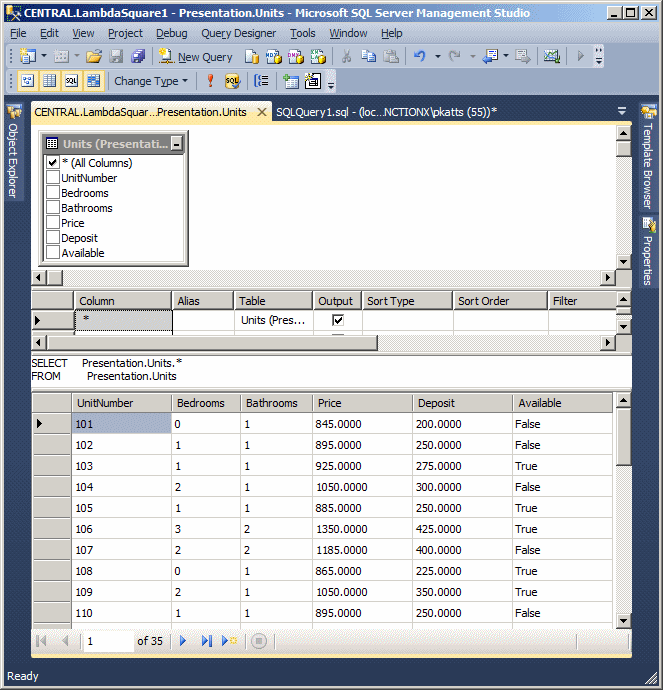
- In the SQL Server Management Studio, click the Presentation.Units
tab
- Click the check box of * (All Columns). If a message box comes up,
read it
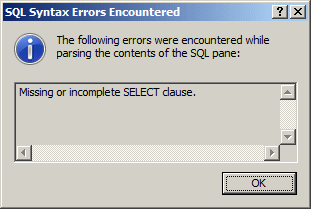
Then click OK and click the * check box again
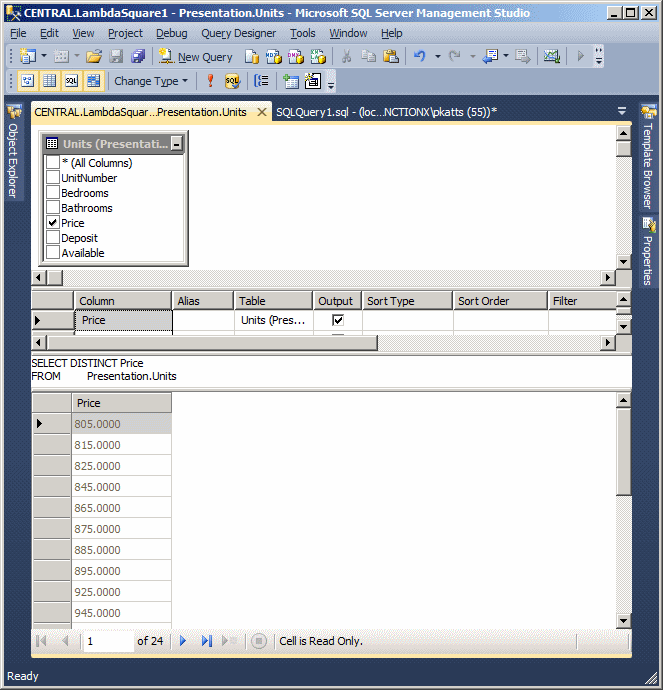
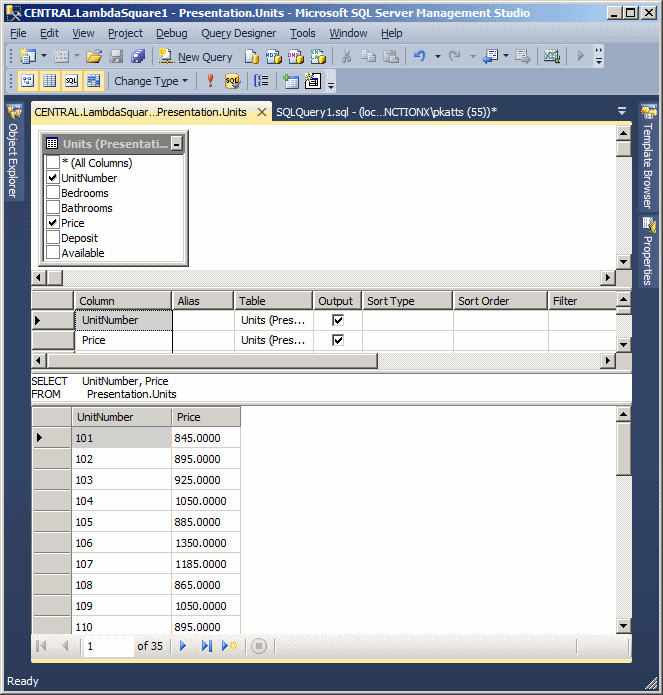
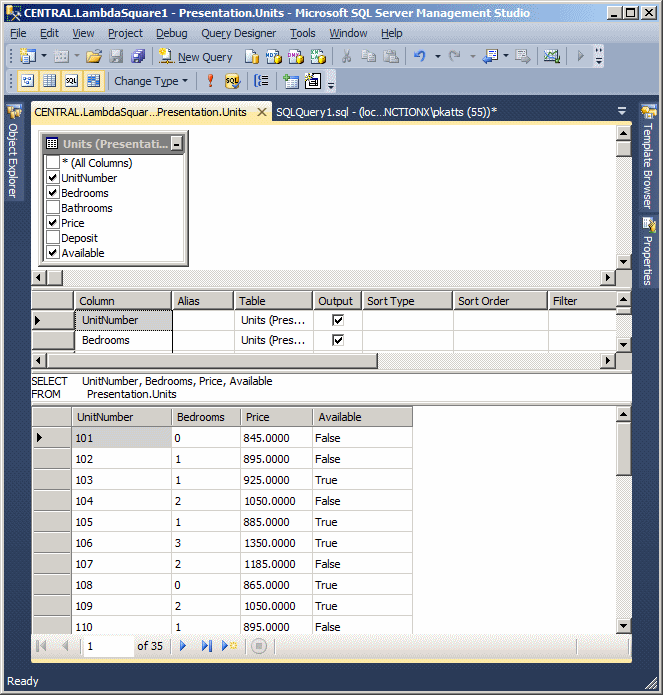
- On the main menu, click Query Designer -> Execute SQL to see the
result:
- In the Diagram pane, click the check box of * (All Columns) to
remove it
|
Practical
Learning: Using a Synonym
|
|
- In the PowerShell window, type:
CREATE SYNONYM Apartments
- Press Enter and type:
FOR Presentation.Units;
- Press Enter
- Type GO and press Enter
- To use the synonym, type
SELECT * FROM Apartments;
- Press Enter
- Type GO and press Enter
- To use an alias of a synonym, type
SELECT apts.* FROM Apartments apts;
- Type GO and press Enter
- Return to SQL Server Managerment Studio
|
|
 to see the result: