Boolean Operations

Boolean Operations
Common Boolean Operators
Equality
As mentioned in our introduction to comparisons, to find out if two values are the same, you can use the === operator. If the comparison you are performed is to find out whether a condition is true, you can omit === true. For example, to find out whether a radio button or a check box is checked, you can simply use if() and enter the value to compare in the parentheses. Here is an example:
. . .

function calculate() {
    . . .

    if (married) {
        witholdingTax = 64.11;
    }

    . . .
}
 Practical Learning: Introducing Conditional Statements
body {
    background-color: white;
}

.bold        { font-weight: 600;   }
.small       { width:       100px; }
.large-text  { width:       120px; }
.delimiter   { margin:      auto;
               width:       700px; }
.common-font { font-family: Georgia, Garamond, 'Times New Roman', serif; }using System.Web.Optimization;
namespace PayrollPreparation6
{
public class BundleConfig
{
// For more information on bundling, visit https://go.microsoft.com/fwlink/?LinkId=301862
public static void RegisterBundles(BundleCollection bundles)
{
bundles.Add(new ScriptBundle("~/bundles/jquery").Include(
"~/Scripts/jquery-{version}.js"));
bundles.Add(new ScriptBundle("~/bundles/jqueryval").Include(
"~/Scripts/jquery.validate*"));
// Use the development version of Modernizr to develop with and learn from. Then, when you're
// ready for production, use the build tool at https://modernizr.com to pick only the tests you need.
bundles.Add(new ScriptBundle("~/bundles/modernizr").Include(
"~/Scripts/modernizr-*"));
bundles.Add(new ScriptBundle("~/bundles/bootstrap").Include(
"~/Scripts/bootstrap.js"));
bundles.Add(new StyleBundle("~/Content/css").Include(
"~/Content/bootstrap.css",
"~/Content/site.css",
"~/Content/PayrollPreparation.css"));
}
}
}function evaluateDailySalary(day: string, salary: number, time: number) {
let pay = function (x, y) { return x * y; }
document.getElementById(day).innerHTML = pay(salary, time).toFixed(2);
}
function calculate() {
const hSalary: number = Number((document.querySelector("#hourlySalary") as HTMLInputElement).value || 0);
const mon: number = Number((document.querySelector("#monday") as HTMLInputElement).value || 0);
const tue: number = Number((document.querySelector("#tuesday") as HTMLInputElement).value || 0);
const wed: number = Number((document.querySelector("#wednesday") as HTMLInputElement).value || 0);
const thu: number = Number((document.querySelector("#thursday") as HTMLInputElement).value || 0);
const fri: number = Number((document.querySelector("#friday") as HTMLInputElement).value || 0);
const mStatus: string = (document.querySelector("#maritalStatus") as HTMLInputElement).value;
let multiplication: (x: number, y: number) => number = function (x: number, y: number) { return x * y; }
let addition: (a: number, b: number, c: number, d: number, e: number) => number =
function (a: number, b: number, c: number, d: number, e: number) { return a + b + c + d + e; }
const weeklySalary: number = multiplication(addition(mon, tue, wed, thu, fri), hSalary);
evaluateDailySalary("salaryMonday", hSalary, mon);
evaluateDailySalary("salaryTuesday", hSalary, tue);
evaluateDailySalary("salaryWednesday", hSalary, wed);
evaluateDailySalary("salaryThursday", hSalary, thu);
evaluateDailySalary("salaryFriday", hSalary, fri);
let netPay: number;
let witholdingTax = 88.72;
if (mStatus === "Single") {
witholdingTax = 64.11;
}
netPay = weeklySalary - witholdingTax;
document.getElementById("weeklySalary").innerHTML = netPay.toFixed(2);
}{
"compilerOptions": {
"noImplicitAny": false,
"noEmitOnError": true,
"removeComments": false,
"sourceMap": true,
"target": "es5"
},
"files": [
"TimeSheetEvaluation.ts"
],
"compileOnSave": true
}using System.Web.Mvc;
namespace PayrollPreparation5.Controllers
{
public class HomeController : Controller
{
. . .
public ActionResult PayrollEvaluation() => View();
}
}@{
ViewBag.Title = "Payroll Evaluation";
}
<h2 class="common-font text-center bold">Payroll Evaluation</h2>
<hr />
<div class="delimiter common-font">
<form name="PayrollEvaluation" method="post">
<table class="table table-striped">
<tr>
<td class="large-text bold">Hourly Salary:</td>
<td><input class="form-control small" id="hourlySalary" /></td>
<td> </td>
<td class="bold">Marital Status:</td>
<td>
<select class="form-control small" id="maritalStatus">
<option value="Single">Single</option>
<option value="Married">Married</option>
</select>
</td>
<td> </td>
</tr>
<tr>
<td class="large-text bold">Days</td>
<td class="bold text-center">Monday</td>
<td class="bold text-center">Tuesday</td>
<td class="bold text-center">Wednesday</td>
<td class="bold text-center">Thursday</td>
<td class="bold text-center">Friday</td>
</tr>
<tr>
<td class="bold">Time Worked:</td>
<td><input type="number" class="form-control small" id="monday" /></td>
<td><input type="number" class="form-control small" id="tuesday" /></td>
<td><input type="number" class="form-control small" id="wednesday" /></td>
<td><input type="number" class="form-control small" id="thursday" /></td>
<td><input type="number" class="form-control small" id="friday" /></td>
</tr>
<tr>
<td> </td>
<td class="text-center" colspan="5">
<input type="button" id="btnCalculate" class="btn btn-primary"
style="width: 500px" value="Calculate" onclick="calculate()" />
</td>
</tr>
<tr>
<td class="bold">Daily Salary:</td>
<td><span id="salaryMonday"></span></td>
<td><span id="salaryTuesday"></span></td>
<td><span id="salaryWednesday"></span></td>
<td><span id="salaryThursday"></span></td>
<td><span id="salaryFriday"></span></td>
</tr>
<tr>
<td colspan="4"> </td>
<td class="bold">Weekly Salary:</td>
<td><span id="weeklySalary"></span></td>
</tr>
</table>
</form>
</div>
<script src="~/Scripts/TimeSheetEvaluation.js"></script>
Hourly Salary: 16.83
Monday:        5.00
Tuesday:       6.00
Wednesday:     4.50
Thursday:      6.50
Friday:        7.00

Non-Equality
To let you find out if one value is different from another, JavaScript provides the !== operator. It is used as in value1 !== value2. If value1 and value2 are different, the condition is true. Here is an example of using this operator:
function evaluateDailySalary(day: string, salary: number, time: number) {
    let pay = function (x, y) { return x * y; }

    document.getElementById(day).innerHTML = pay(salary, time).toFixed(2);
}

function calculate() {
    const hSalary: number = Number((document.querySelector("#hourlySalary") as HTMLInputElement).value || 0);
    const mon: number = Number((document.querySelector("#monday") as HTMLInputElement).value || 0);
    const tue: number = Number((document.querySelector("#tuesday") as HTMLInputElement).value || 0);
    const wed: number = Number((document.querySelector("#wednesday") as HTMLInputElement).value || 0);
    const thu: number = Number((document.querySelector("#thursday") as HTMLInputElement).value || 0);
    const fri: number = Number((document.querySelector("#friday") as HTMLInputElement).value || 0);

    const married: boolean = (document.querySelector("#isMarried") as HTMLInputElement).checked;

    let multiplication: (x: number, y: number) => number = function (x: number, y: number) { return x * y; }
    let addition: (a: number, b: number, c: number, d: number, e: number) => number =
        function (a: number, b: number, c: number, d: number, e: number) { return a + b + c + d + e; }

    const weeklySalary: number = multiplication(addition(mon, tue, wed, thu, fri), hSalary);

    evaluateDailySalary("salaryMonday", hSalary, mon);
    evaluateDailySalary("salaryTuesday", hSalary, tue);
    evaluateDailySalary("salaryWednesday", hSalary, wed);
    evaluateDailySalary("salaryThursday", hSalary, thu);
    evaluateDailySalary("salaryFriday", hSalary, fri);

    let netPay: number;

    let witholdingTax = 88.72;

    if (married !== true) {
        witholdingTax = 64.11;
    }

    netPay = weeklySalary - witholdingTax;

    document.getElementById("weeklySalary").innerHTML = netPay.toFixed(2);
}
A Higher Value
To find out if a value is greater than another, use the > operator as in value1 > value2. Here is an example:
let speedLimit: number = 30;
let drivingSpeed: number = 62;
let excuseSpeed: number = speedLimit + 10;
let msg: string = document.querySelector('.message');

function composeMessage() {
    if (drivingSpeed > excuseSpeed) {
        msg.textContent = 'Hello, I stopped you because you were doing ' + drivingSpeed + ' on a ' + speedLimit + 'MPH street.';
    }
}

msg.addEventListener('click', composeMessage);
To know whether if a value is equal or higher than another, use the >= operator.
A Higher or Equal Value
To find out whether one value is the same or higher than another value, you can use the >= operator.
Practical Learning: Comparing for a Higher Value
@{
ViewBag.Title = "Payroll Evaluation";
}
<h2 class="common-font text-center bold">Payroll Evaluation</h2>
<hr />
<div class="delimiter common-font">
<form name="PayrollEvaluation" method="post">
<table class="table table-striped">
<tr>
<td class="large-text bold">Hourly Salary:</td>
<td><input class="form-control small" id="hourlySalary" /></td>
<td> </td>
<td> </td>
<td> </td>
<td> </td>
</tr>
<tr>
<td class="large-text bold">Days</td>
<td class="bold text-center">Monday</td>
<td class="bold text-center">Tuesday</td>
<td class="bold text-center">Wednesday</td>
<td class="bold text-center">Thursday</td>
<td class="bold text-center">Friday</td>
</tr>
<tr>
<td class="bold">Time Worked:</td>
<td><input type="number" class="form-control small" id="monday" /></td>
<td><input type="number" class="form-control small" id="tuesday" /></td>
<td><input type="number" class="form-control small" id="wednesday" /></td>
<td><input type="number" class="form-control small" id="thursday" /></td>
<td><input type="number" class="form-control small" id="friday" /></td>
</tr>
<tr>
<td> </td>
<td class="text-center" colspan="5">
<input type="button" id="btnCalculate" class="btn btn-primary"
style="width: 500px" value="Calculate" onclick="calculate()" />
</td>
</tr>
<tr>
<td class="bold">Regular Pay:</td>
<td><span id="regularPayMonday"></span></td>
<td><span id="regularPayTuesday"></span></td>
<td><span id="regularPayWednesday"></span></td>
<td><span id="regularPayThursday"></span></td>
<td><span id="regularPayFriday"></span></td>
</tr>
<tr>
<td class="bold">Overtime Pay:</td>
<td><span id="overtimePayMonday"></span></td>
<td><span id="overtimePayTuesday"></span></td>
<td><span id="overtimePayWednesday"></span></td>
<td><span id="overtimePayThursday"></span></td>
<td><span id="overtimePayFriday"></span></td>
</tr>
<tr>
<td colspan="4"> </td>
<td class="bold">Weekly Salary:</td>
<td><span id="weeklySalary"></span></td>
</tr>
</table>
</form>
</div>
<script src="~/Scripts/TimeSheetEvaluation.js"></script>function calculate() {
const hSalary: number = Number((document.querySelector("#hourlySalary") as HTMLInputElement).value || 0);
const monTime: number = Number((document.querySelector("#monday") as HTMLInputElement).value || 0);
const tueTime: number = Number((document.querySelector("#tuesday") as HTMLInputElement).value || 0);
const wedTime: number = Number((document.querySelector("#wednesday") as HTMLInputElement).value || 0);
const thuTime: number = Number((document.querySelector("#thursday") as HTMLInputElement).value || 0);
const friTime: number = Number((document.querySelector("#friday") as HTMLInputElement).value || 0);
let overtimeSalary: number = hSalary * 1.50;
let regPayMon: number = monTime * hSalary;
let ovrPayMon: number = 0.00;
let regPayTue: number = tueTime * hSalary;
let ovrPayTue: number = 0.00;
let regPayWed: number = wedTime * hSalary;
let ovrPayWed: number = 0.00;
let regPayThu: number = thuTime * hSalary;
let ovrPayThu: number = 0.00;
let regPayFri: number = friTime * hSalary;
let ovrPayFri: number = 0.00;
if (monTime >= 8.00) {
ovrPayMon = (monTime - 8.00) * overtimeSalary;
}
if (tueTime >= 8.00) {
ovrPayTue = (tueTime - 8.00) * overtimeSalary;
}
if (wedTime >= 8.00) {
ovrPayWed = (wedTime - 8.00) * overtimeSalary;
}
if (thuTime >= 8.00) {
ovrPayThu = (thuTime - 8.00) * overtimeSalary;
}
if (friTime >= 8.00) {
ovrPayFri = (friTime - 8.00) * overtimeSalary;
}
let netPay: number = regPayMon + regPayTue + regPayWed + regPayThu + regPayFri +
ovrPayMon + ovrPayTue + ovrPayWed + ovrPayThu + ovrPayFri;
document.getElementById("regularPayMonday").innerHTML = regPayMon.toFixed(2);
document.getElementById("regularPayTuesday").innerHTML = regPayTue.toFixed(2);
document.getElementById("regularPayWednesday").innerHTML = regPayWed.toFixed(2);
document.getElementById("regularPayThursday").innerHTML = regPayThu.toFixed(2);
document.getElementById("regularPayFriday").innerHTML = regPayFri.toFixed(2);
document.getElementById("overtimePayMonday").innerHTML = ovrPayMon.toFixed(2);
document.getElementById("overtimePayTuesday").innerHTML = ovrPayTue.toFixed(2);
document.getElementById("overtimePayWednesday").innerHTML = ovrPayWed.toFixed(2);
document.getElementById("overtimePayThursday").innerHTML = ovrPayThu.toFixed(2);
document.getElementById("overtimePayFriday").innerHTML = ovrPayFri.toFixed(2);
document.getElementById("weeklySalary").innerHTML = netPay.toFixed(2);
}
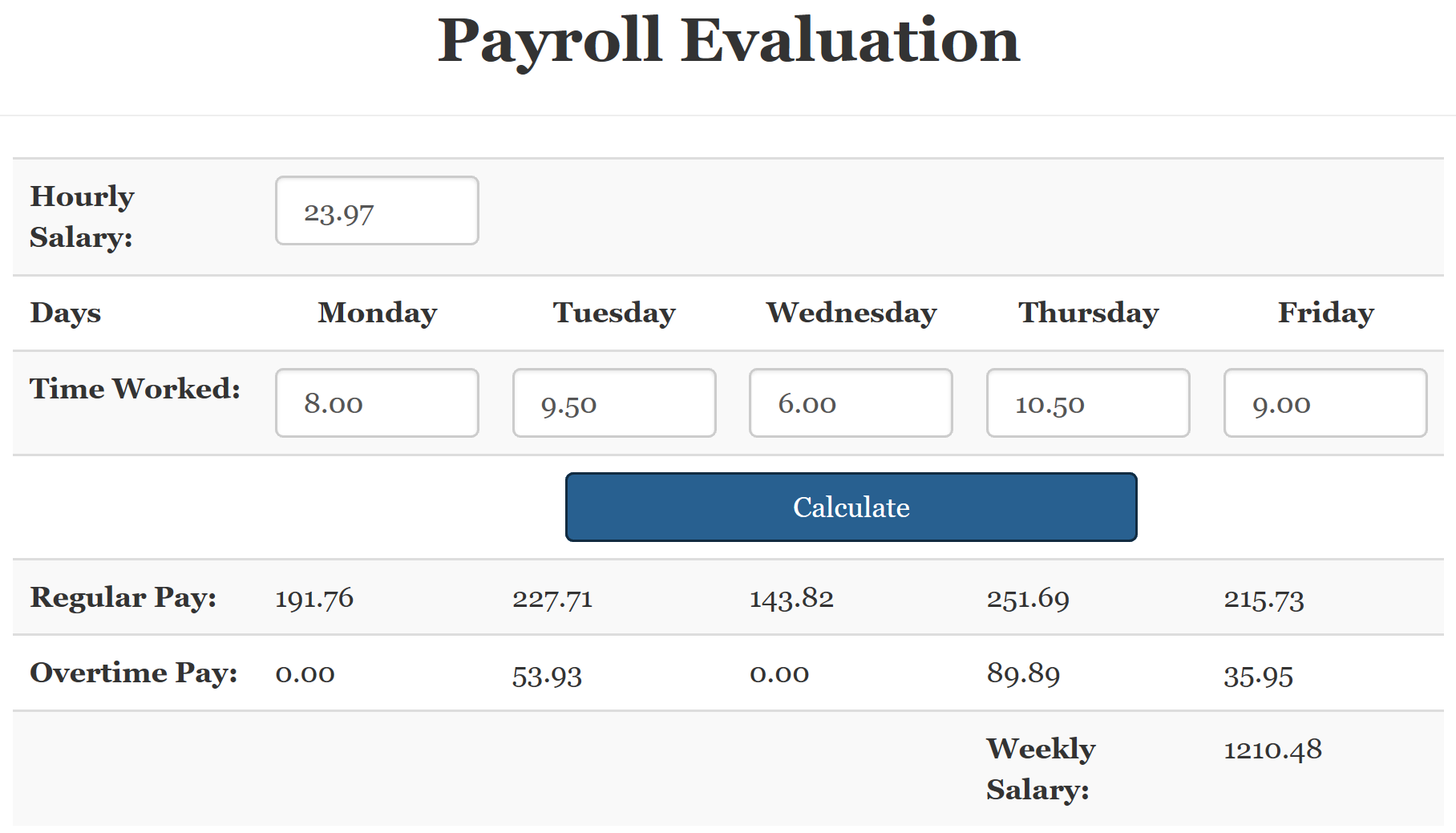
Hourly Salary: 23.97
Monday:        8.00
Tuesday:       9.50
Wednesday:     6.00
Thursday:      10.50
Friday:        9.00
A Lower Value
To find out if one value is lower than another, use the < operator as in value1 < value2. To find out if a value is equal or lower than another, use the <= operator.
A Lower or Equal Value
To find out whether one value is the same or lower than another value, you can use the <= operator.
Primary Options of Boolean Statements
Initializing or Updating a Boolean Variable
You can assign a Boolean expression to a variable. Here is an example:
let isFullTime: boolean = true;
let jobTitle: string = "Manager;"

// . . .

isFullTime = (jobTitle === "Contractor");
To make your code easier to read, you should put the Boolean expression in parentheses. Here is an example:
let isFullTime: boolean = true;
let jobTitle: string = "Manager;"

// . . .

isFullTime = (jobTitle === "Contractor");
The Logical NOT Operator
If you have a conditional statement that evaluates to true, to get its false equivalent, you can negate the conditional expression. This is done using the ! operator. The formula to follow is:
!variable-or-expression
Here is an example:
let employed: boolean = true;

let validation: boolean = !employed;
Practical Learning: Ending the Lesson
|
|
||
| Previous | Copyright © 2018-2019, FunctionX | Next |
|
|
||