Windows Control: The Group Box
|
Windows Control: The Group Box |
|
Description |
|
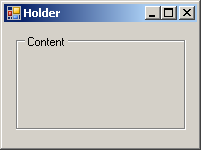
A group is a window that draws a bordered line all around. This makes it draw a limiting placeholder for other controls. To indicate what it is used for, a group box may display a title, also referred to as its caption. Here is an example of a group box on a form:
|
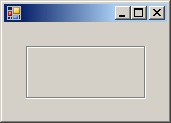
To support group box, the .NET Framework provides the GroupBox class. At design time, to add a group box to your application, from the Containers section of the Toolbox, click GroupBox and click the form (or another container). To programmatically create a group box, you can create a handle to GroupBox, allocate memory for it using the new operator, and add it to the Controls collection of its container. Here is an example: Imports System.Drawing
Imports System.Windows.Forms
Module Exercise
Public Class Starter
Inherits Form
Private GrpHolder As GroupBox
Dim components As System.ComponentModel.Container
Public Sub New()
InitializeComponent()
End Sub
Public Sub InitializeComponent()
GrpHolder = New GroupBox()
GrpHolder.Left = 22
GrpHolder.Top = 18
GrpHolder.Width = 120
GrpHolder.Height = 58
Controls.Add(GrpHolder)
End Sub
End Class
Function Main() As Integer
Dim frmStart As Starter = New Starter
Application.Run(frmStart)
Return 0
End Function
End Module
This would produce:
|
|
|
||
| Home | Copyright © 2007-2011 FunctionX | Next |
|
|
||