Windows Control: Link Label
|
Windows Control: Link Label |
In the past, to add an internet or email link to a form, there were many steps to follow. As the internet and email had become an integral part of the culture, it was also time to have an appropriate control adapted for this need. To address this issue, a control called LinkLabel is available from the .NET Framework. |
As its name indicates, the LinkLabel control allows you to create a link. If you have done web development, you would know that a link can be made fancy by varying its colors. A link typically uses three different colors (actually, if you use cascading style sheet, you can add a fourth color as hover):
After creating a link, when the user accesses it, you can define some behavior the link would exhibit to the user, such as getting underlined or not underlined when the mouse passes over the link. The behaviors of a link can be controlled through the LinkBehavior property whose values are AlwaysUnderline, HoverUnderline, NeverUnderline, or the application would refer to Internet Options dialog box of Control Panel. A link is typically meant to help the user switch to a different page or document when clicked. In some cases and at a particular time, you may not want the user to be able to click a link. In this case you can disable it. If you decide to disable a link, you can change its color using the DisabledLinkColor property. On the other hand, if the user is not able to access a link, that is, if a link is disabled, you can find out the color of that link from the DisabledLinkColor property. Here is an example: Imports System.Drawing
Imports System.Windows.Forms
Module Exercise
Public Class Starter
Inherits Form
Friend WithEvents lnkConnector As LinkLabel
Dim components As System.ComponentModel.Container
Public Sub New()
InitializeComponent()
End Sub
Public Sub InitializeComponent()
lnkConnector = New LinkLabel()
lnkConnector.Width = 150
lnkConnector.Text = "Lessons and Topics"
Controls.Add(lnkConnector)
End Sub
Private Sub ConnectorClicked(ByVal sender As Object, _
ByVal e As LinkLabelLinkClickedEventArgs) _
Handles lnkConnector.LinkClicked
System.Diagnostics.Process.Start( _
"C:\Program Files\Internet Explorer\iexplore.exe", _
"http://www.functionx.com/vccli")
End Sub
End Class
Function Main() As Integer
Dim frmStart As Starter = New Starter
Application.Run(frmStart)
Return 0
End Function
End Module
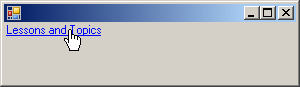
This would produce:
|
|
|
||
| Home | Copyright © 2008-2016, FunctionX, Inc. | |
|
|
||