Delegates
|
|
Delegates |
|
Introduction |
|
The C and C++ concept of function pointer was very useful when programming for the Microsoft Windows operating systems because the Win32 library relies on the concept of callback functions to process messages. For this reason and because of their functionality, callback functions were carried out in the .NET Framework but they were defined with the name of delegate. A delegate is a special type of user-defined variable that is declared globally, like a class. In fact, a delegate is created like an interface but appearing as a method. Based on this, a delegate provides a template for a method, like an interface provides a template for a class. Like an interface, a delegate is not defined. Its role is to show what a useful method would look like. To support this concept, a delegate can provide all the necessary information that would be used on a method. This includes a return type, either no argument or one or more arguments. |
To declare a delegate, you use the delegate keyword. The basic formula used to create a delegate is: [modifier] Delegate Name (parameter(s)) As ReturnType The modifier factor can be Public, Private, or Friend. The Delegate keyword is required. The Name must be a valid name for a procedure. Because a delegate is some type of a template for a procedure, you must use parentheses. If this procedure will not take any argument, you can leave the parentheses empty. The ReturnType can be any of the data types we have used so far. Here is an example of creating a delegate: Imports System.Windows.Forms
Module Exercise
Delegate Sub Simple()
Public Class Starter
Inherits Form
Dim components As System.ComponentModel.Container
Public Sub New()
End Sub
Public Sub InitializeComponent()
End Sub
End Class
End Module
After declaring a delegate, remember that it only provides a template for a procedure, not an actual function. Before using it, you must define a procedure that would carry an assignment the procedure is supposed to perform. That procedure must have the same return type and the same (number of) argument(s), if any. Here is an example: Imports System.Windows.Forms
Module Exercise
Delegate Sub Simple()
Public Class Starter
Inherits Form
Dim components As System.ComponentModel.Container
Public Sub New()
End Sub
Public Sub InitializeComponent()
End Sub
End Class
Private Sub Welcome()
End Sub
End Module
After implementing the procedure, you can associate it to the name of the delegate. To do that, where you want to use the procedure, declare a variable of the type of the delegate using the New operator. In the parentheses of the constructor, access the name of the procedure by its address, using the AddressOf operator. Here is an example that uses a delegate: Imports System.Windows.Forms
Module Exercise
Delegate Sub Simple()
Public Class Starter
Inherits Form
Dim components As System.ComponentModel.Container
Public Sub New()
End Sub
Public Sub InitializeComponent()
Dim Announce As Simple = New Simple(AddressOf Welcome)
End Sub
End Class
Private Sub Welcome()
End Sub
Function Main() As Integer
Dim frmStart As Starter
frmStart = New Starter
Application.Run(frmStart)
Return 0
End Function
End Module
You can also declare a delegate that returns a value. When defining a function that would be associated with the delegate, remember that that function must return the same type of value. Here is an example: Imports System.Drawing
Imports System.Windows.Forms
Module Exercise
Private txtOperation As TextBox
Delegate Function Addition() As Double
Public Class Starter
Inherits Form
Dim components As System.ComponentModel.Container
Public Sub New()
InitializeComponent()
End Sub
Public Sub InitializeComponent()
Dim add As Addition = New Addition(AddressOf Plus)
txtOperation = New TextBox
txtOperation.Location = New Point(100, 20)
Controls.Add(txtOperation)
txtOperation.Text = CStr(add())
End Sub
End Class
Private Function Plus() As Double
Dim a As Double = 248.66, b As Double = 50.28
Plus = a + b
End Function
Function Main() As Integer
Dim frmStart As Starter = New Starter
Application.Run(frmStart)
Return 0
End Function
End Module
This would produce: 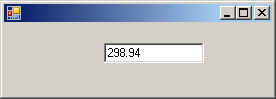
In the above introductions, we associated delegates with general procedures. Because delegates are usually declared globally, that is outside of a class, they can be associated with almost any function of the application, provided the function has the same return type and the same (number of) argument(s), if any, as the delegate. When you create a procedure that would be associated with a delegate, you can also define it as Shared. Different functions can be associated to delegates. Here is an example of two functions associated with a common delegate: Imports System.Drawing
Imports System.Windows.Forms
Module Exercise
Delegate Function Multiplication() As Double
Public Class Cube
Private _side As Double
Public Property Side() As Double
Get
Return _side
End Get
Set(ByVal value As Double)
_side = value
End Set
End Property
Public Sub New()
_side = 0
End Sub
Public Sub New(ByVal s As Double)
_side = s
End Sub
Public Function Area() As Double
Return 6 * _side * _side
End Function
Public Function Volume() As Double
Return _side * _side * _side
End Function
End Class
Public Class Starter
Inherits Form
Private lblSide As Label
Private txtSide As TextBox
Private lblArea As Label
Private txtArea As TextBox
Private lblVolume As Label
Private txtVolume As TextBox
Dim components As System.ComponentModel.Container
Public Sub New()
InitializeComponent()
End Sub
Public Sub InitializeComponent()
Dim SmallBox As Cube = New Cube(25.58)
Text = "Cube Calculation"
lblSide = New Label
lblSide.Location = New Point(21, 19)
lblSide.Text = "Side:"
lblSide.AutoSize = True
txtSide = New TextBox
txtSide.Location = New Point(87, 16)
lblArea = New Label
lblArea.Location = New Point(21, 47)
lblArea.Text = "Area:"
lblArea.AutoSize = True
txtArea = New TextBox
txtArea.Location = New Point(87, 44)
lblVolume = New Label
lblVolume.Location = New Point(21, 75)
lblVolume.Text = "Volume:"
lblVolume.AutoSize = True
txtVolume = New TextBox
txtVolume.Location = New Point(87, 72)
Controls.Add(lblSide)
Controls.Add(txtSide)
Controls.Add(lblArea)
Controls.Add(txtArea)
Controls.Add(lblVolume)
Controls.Add(txtVolume)
Dim AreaDefinition As Multiplication = _
New Multiplication(AddressOf SmallBox.Area)
Dim VolDefinition As Multiplication = _
New Multiplication(AddressOf SmallBox.Volume)
txtSide.Text = CStr(SmallBox.Side)
txtArea.Text = CStr(SmallBox.Area)
txtVolume.Text = CStr(SmallBox.Volume)
End Sub
End Class
Function Main() As Integer
Dim frmStart As Starter = New Starter
Application.Run(frmStart)
Return 0
End Function
End Module
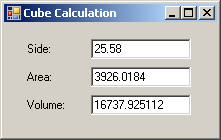
This would produce:
If you want to associate a procedure that takes arguments to a delegate, when declaring the delegate, provide the necessary argument(s) in its parentheses. Here is an example of a delegate that takes two arguments (and returns a value): Module Exercise
Delegate Function Multiplication(ByVal value As Double) As Double
End Module
When defining the associated procedure, besides returning the same type of value, make sure that the procedure takes the same number of arguments. Here is an example: Imports System.Drawing
Imports System.Windows.Forms
Module Exercise
Delegate Function Multiplication(ByVal value As Double) As Double
Public Function Area(ByVal Side As Double) As Double
Return 6 * Side * Side
End Function
End Module
To associate the procedure, declare a variable of the type of delegate and access the name of the procedure using the AddressOf operator. Here is an example: Imports System.Drawing
Imports System.Windows.Forms
Module Exercise
Delegate Function Multiplication(ByVal value As Double) As Double
Public Function Area(ByVal Side As Double) As Double
Return 6 * Side * Side
End Function
Public Class Starter
Inherits Form
Dim components As System.ComponentModel.Container
Public Sub New()
InitializeComponent()
End Sub
Public Sub InitializeComponent()
Dim AreaDefinition As Multiplication = _
New Multiplication(AddressOf Area)
End Sub
End Class
End Module
When accessing the delegate, call the Invoke() method that the delegates inherit from their parent the Delegate class. Here is an example: Imports System.Drawing
Imports System.Windows.Forms
Module Exercise
Delegate Function Multiplication(ByVal value As Double) As Double
Public Function Area(ByVal Side As Double) As Double
Return 6 * Side * Side
End Function
Public Function Volume(ByVal Side As Double) As Double
Return Side * Side * Side
End Function
Public Class Starter
Inherits Form
Private lblSide As Label
Private txtSide As TextBox
Private lblArea As Label
Private txtArea As TextBox
Private lblVolume As Label
Private txtVolume As TextBox
Dim components As System.ComponentModel.Container
Public Sub New()
InitializeComponent()
End Sub
Public Sub InitializeComponent()
Dim _side As Double = 46.95
Text = "Cube Calculation"
lblSide = New Label
lblSide.Location = New Point(21, 19)
lblSide.Text = "Side:"
lblSide.AutoSize = True
txtSide = New TextBox
txtSide.Location = New Point(87, 16)
lblArea = New Label
lblArea.Location = New Point(21, 47)
lblArea.Text = "Area:"
lblArea.AutoSize = True
txtArea = New TextBox
txtArea.Location = New Point(87, 44)
lblVolume = New Label
lblVolume.Location = New Point(21, 75)
lblVolume.Text = "Volume:"
lblVolume.AutoSize = True
txtVolume = New TextBox
txtVolume.Location = New Point(87, 72)
Controls.Add(lblSide)
Controls.Add(txtSide)
Controls.Add(lblArea)
Controls.Add(txtArea)
Controls.Add(lblVolume)
Controls.Add(txtVolume)
Dim AreaDefinition As Multiplication = _
New Multiplication(AddressOf Area)
Dim VolDefinition As Multiplication = _
New Multiplication(AddressOf Volume)
txtSide.Text = CStr(_side)
txtArea.Text = CStr(AreaDefinition.Invoke(_side))
txtVolume.Text = CStr(VolDefinition.Invoke(_side))
End Sub
End Class
Function Main() As Integer
Dim frmStart As Starter = New Starter
Application.Run(frmStart)
Return 0
End Function
End Module
Notice that only the name of the method is passed to the delegate. To actually use the delegate, when calling it, in its parentheses, provide a value for the argument(s) conform to the type specified when declaring the delegate.
Using delegates, a procedure can be indirectly passed as argument to another procedure. To proceed, first declare the necessary delegate. Here is a example of such a delegate: Module Exercise
Delegate Function Squared(ByVal value As Double) As Double
Public Class Circle
Private _radius As Double
Public Property Radius() As Double
Get
Return _radius
End Get
Set(ByVal value As Double)
_radius = value
End Set
End Property
End Class
End Module
A delegate can be passed as argument to a procedure. Such an argument would be used as if it were a procedure itself. This means that, when accessed in the body of the procedure, the name of the delegate must be accompanied by parentheses and if the delegate takes an argument or argument, the argument(s) must be provided in the parentheses of the called delegate. Here is an example: Imports System.Drawing
Imports System.Windows.Forms
Module Exercise
Delegate Function Squared(ByVal value As Double) As Double
Public Class Circle
Private _radius As Double
Public Property Radius() As Double
Get
Return _radius
End Get
Set(ByVal value As Double)
_radius = value
End Set
End Property
Public Function Area(ByVal sqd As Squared) As Double
Return sqd(_radius) * Math.PI
End Function
End Class
End Module
After declaring a delegate, remember to define a procedure that implements the needed behavior of that delegate. Here is an example: Imports System.Drawing
Imports System.Windows.Forms
Module Exercise
Delegate Function Squared(ByVal value As Double) As Double
Public Class Circle
Private _radius As Double
Public Property Radius() As Double
Get
Return _radius
End Get
Set(ByVal value As Double)
_radius = value
End Set
End Property
Public Function Area(ByVal sqd As Squared) As Double
Return sqd(_radius) * Math.PI
End Function
End Class
Public Class Exercise
Inherits Form
Public Function ValueTimesValue(ByVal value As Double) As Double
Return value * value
End Function
End Class
End Module
Once the procedure is ready, to associate it to a delegate, declare a variable of the type of the delegate using the New operator. In the parentheses of the constructor, access the name of the associated procedure using the AddressOf operator. To access the delegate, call the Invoke() method. Here is an example: Imports System.Drawing
Imports System.Windows.Forms
Module Exercise
Delegate Function Squared(ByVal value As Double) As Double
Public Class Circle
Private _radius As Double
Public Property Radius() As Double
Get
Return _radius
End Get
Set(ByVal value As Double)
_radius = value
End Set
End Property
Public Function Area(ByVal sqd As Squared) As Double
Return sqd(_radius) * Math.PI
End Function
End Class
Public Class Starter
Inherits Form
Private lblSide As Label
Private txtSide As TextBox
Private lblArea As Label
Private txtArea As TextBox
Dim components As System.ComponentModel.Container
Public Sub New()
InitializeComponent()
End Sub
Public Sub InitializeComponent()
Dim _side As Double = 46.95
Text = "Circle Calculation"
lblSide = New Label
lblSide.Location = New Point(21, 19)
lblSide.Text = "Side:"
lblSide.AutoSize = True
txtSide = New TextBox
txtSide.Location = New Point(87, 16)
lblArea = New Label
lblArea.Location = New Point(21, 47)
lblArea.Text = "Area:"
lblArea.AutoSize = True
txtArea = New TextBox
txtArea.Location = New Point(87, 44)
Controls.Add(lblSide)
Controls.Add(txtSide)
Controls.Add(lblArea)
Controls.Add(txtArea)
Dim AreaDefinition As Squared = New Squared(AddressOf ValueTimesValue)
txtSide.Text = CStr(_side)
txtArea.Text = CStr(AreaDefinition.Invoke(_side))
End Sub
Public Function ValueTimesValue(ByVal value As Double) As Double
Return value * value
End Function
End Class
Function Main() As Integer
Dim frmStart As Starter = New Starter
Application.Run(frmStart)
Return 0
End Function
End Module
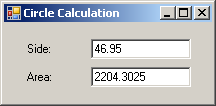
This would produce:
|
|
|
||
| Home | Copyright © 2008-2016, FunctionX, Inc. | |
|
|
||