
Drawing Shapes: Regular Shapes
|
Drawing Shapes: Regular Shapes |
|
Rectangles and Squares |
|
A rectangle is a geometric figure made of four sides that compose four right angles. To draw a rectangle, you can either specify the Rectangle value that encloses it, or you can define its location and its dimensions. To draw a rectangle that is enclosed in a Rectangle value, you can use the following version of the Graphics::DrawRectangle() method: public:
void DrawRectangle(Pen ^ pen,
Rectangle rect);
|
|
Remember that such a rectangle object can be illustrated as follows: 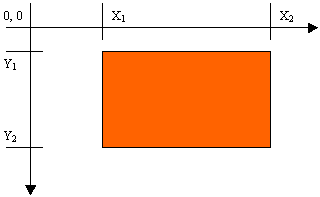 After defining a Rectangle variable, you can pass it to the method. Here is an example: System::Void Form1_Paint(System::Object ^ sender,
System::Windows::Forms::PaintEventArgs ^ e)
{
Pen ^ penCurrent = gcnew Pen(Color::Red);
Rectangle Rect(20, 20, 248, 162);
e->Graphics->DrawRectangle(penCurrent, Rect);
}
Remember that you can also define a Pen and/or a Rectangle objects in the parentheses of the method: System::Void Form1_Paint(System::Object ^ sender,
System::Windows::Forms::PaintEventArgs ^ e)
{
e->Graphics->DrawRectangle(gcnew Pen(Color::Red),
Rectangle(20, 20, 248, 162));
}
This would produce:  It is (very) important to remember that the third argument of the Rectangle represents its width (and not its right) value and the fourth argument represents its height (and not its bottom) value. This is a confusing fact for those who have programmed in GDI: GDI+ defines a Rectangle differently than GDI. In fact, to determine the location and dimensions of a rectangle to draw, the Graphics class provides the following versions of the DrawRectangle() method: public: void DrawRectangle(Pen ^ pen, int x, int y, int width, int height); void DrawRectangle(Pen ^ pen, float x, float y, float width, float height); This time, the rectangle is represented by its location with a point at (x, y) and its dimensions with the width and height argument. This can be illustrated in a Windows coordinate system as follows: 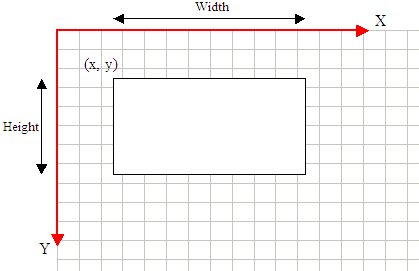 Based on this, the earlier rectangle can also be drawn with the following: System::Void Form1_Paint(System::Object ^ sender,
System::Windows::Forms::PaintEventArgs ^ e)
{
e->Graphics->DrawRectangle(gcnew Pen(Color::Red), 20, 20, 248, 162);
}
A square is a rectangle whose four sides are equal.
|
|||||||||||||||||||||||||||||||||||||||||||||||||||||||||
|
|
||
| Home | Copyright © 2007-2013, FunctionX | Next |
|
|
||
 Practical
Learning: Drawing a Rectangle
Practical
Learning: Drawing a Rectangle


