 |
Sequences |
|
|
Introduction to Sequences |
|
|
|
A sequence is a series of numbers that are continually
generated and assigned to a column of a table. This works like an identity
column. The difference is that, if you need an identity, you must create it
in a column of a table and if you need the same type of identity on a column
of another table, you must create the identity in the column of the other
table. On the other hand, a sequence is a programmatic object, like a
function, that you create at the database level and you can apply that
sequence to any table you want.
|
|
Visually Creating a Sequence
|
|
To visually create a sequence, in the Object Explorer,
expand the desired database and the Programmability nodes. Right-click
Sequences and click New Sequence... This would present the New Sequence
dialog box with some default (basic) values.
|
Programmatically Creating a Sequence
|
|
The Transact-SQL syntax to create a sequence is:
CREATE SEQUENCE [schema_name . ] sequence_name
    [ AS [ built_in_integer_type | user-defined_integer_type ] ]
    [ START WITH <constant> ]
    [ INCREMENT BY  <constant> ]
    [ { MINVALUE [  <constant> ] } | { NO MINVALUE } ]
    [ { MAXVALUE [  <constant> ] } | { NO MAXVALUE } ]
    [ CYCLE | { NO CYCLE } ]
    [ { CACHE [  <constant> ] } | { NO CACHE } ]
    [ ; ]
You start with the CREATE SEQUENCE expression.
|
Characteristics of a Sequence
|
|
A sequence shares many characteristics with an
identity column but adds some others. Therefore, the characteristics of a
sequence are:
- Name: A sequence is a database object. As such,
it must have a name
- Schema: Again, a sequence is an object created in
a database. Therefore, it must belong to a schema. If you have
(created) a schema, you can use it and precede the name of the
sequence with it. As done for all objects of a database, if you don't
specify a schema, dbo would be used as default
- Data Type: As seen for an identity, a sequence is
a series of natural numeric values. The default is a bigint
(large integer) type. Otherwise, you can make it another valid type
such as tinyint, smallint, or int. Alternatively,
you can apply a float-point type (decimal or numeric).
In this case, you should specify the precision value
- Startint Point: When creating a sequence, you should indicate
where the series should start. You have many options. You can indicate
that you want the series to start at 1 and continue up. On the other
hand:
- If you create a sequence of type tinyint, you can set
the starting value at 0. This may indicate that you want the value
to count from 0 and up. Otherwise, you can specify that you want
the starting value to be 255 (not more than that). This may
indicate that you want the series to count down. The starting
point is optional. If you don't specify it, the starting point is
0
- If you create a sequence of type smallint, you can set
the starting value between -32,768 (not less than that) and 32,767
(not more than that). You would later indicate whether you want
the series to go up or down. If you don't specify a starting
point, the default start value is -32768
- If you create a sequence of type int, you can set the
starting value between -2,147,483,648 (not less than that) and
2,147,483,647 (not more than that). If you don't specify the
starting value, the default to use is fixed at -2,147,483,648
- If you create a sequence of type bigint, you can set
the starting value between -9,223,372,036,854,775,808 (not less
than that) and 9,223,372,036,854,775,807 (not more than that). If
you don't specify the starting value, the default startup is at
-9,223,372,036,854,775,808
- Increment Value: You should also indicate by what
value the number would increment or decrement. Once again, you have
various options. If you want the increment to proceed up, the
incrementing value must be positive. If you want to decrement, apply a
negative value. The increment value is optional. If you don't specify
it, by default, the series would increment by 1
- Boundaries: Unlike an identity, a sequence can
have boundaries: one value by which the sequence cannot go under, and
one value that the sequence cannot surpass. These are the minimum and
the maximum values respectively. They follow this logic:
- Minimum Value: If you don't specify this
value, the minimum value is the starting point value. Otherwise:
- If you create a sequence of type tinyint, the
minimum value can be 0
- If you create a sequence of type smallint, the
minimum value can be -32,768
- If you create a sequence of type int, the minimum
value can be -2,147,483,648
- If you create a sequence of type bigint, the
minimum value can be -9,223,372,036,854,775,808
- Maximum Value:
- If you create a sequence of type tinyint, if you
don't specify this value, the default maximum value is 255 or
you can specify a value between the starting point and 255
- If you create a sequence of type smallint, if you
don't specify this value, the default maximum value is 32,767
or you can specify a value between the starting point and
32,767
- If you create a sequence of type int, if you don't
specify this value, the maximum value can be -2,147,483,648
- If you create a sequence of type bigint, if you
don't specify this value, the maximum value is
9,223,372,036,854,775,807 or you can specify a value between
the starting point and 9,223,372,036,854,775,807
- Cycle: This option asks the database engine to
restart the series if it reaches the maximum value. In this case, the
series would restart from the minimum value (not from the starting
value) following the previous described logic
- Cache: In some cases, generating a sequence can
utilise many resources on the computer. To assist the database engine,
you can ask it to use the cache memory to keep track of the numbers in
the sequence
After creating a sequence, it becomes an object you
can use in any new table. Because a sequence generates (unique
increment/decrement) values that a column would use, when creating the
field on a table, specify its data type as the same or compatible type
that the sequence is using. Here is an example:
CREATE TABLE Inventory.StoreItems
(
    ItemNumber int,
    ItemName nvarchar(60),
    UnitPrice money
);
GO
A sequence is used during data entry. When specifying
the value of its column, type a formula as:
NEXT VALUE FOR [schema_name . ] sequence_name
The database engine would then find the next number in
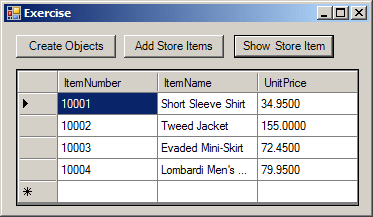
the sequence and assign it to the column. Here are examples:
using System;
using System.Data;
using System.Drawing;
using System.Windows.Forms;
using System.Data.SqlClient;

public class Exercise : System.Windows.Forms.Form
{
    Button btnCreateObjects;
    Button btnAddStoreItems;
    Button btnShowRecords;
    DataGridView dgvStoreItems;

    public Exercise()
    {
        InitializeComponent();
    }

    void InitializeComponent()
    {
        btnCreateObjects = new Button();
        btnCreateObjects.Text = "Create Objects";
        btnCreateObjects.Width = 100;
        btnCreateObjects.Location = new Point(12, 12);
        btnCreateObjects.Click += new EventHandler(btnCreateTableClick);

        btnAddStoreItems = new Button();
        btnAddStoreItems.Text = "Add Store Items";
        btnAddStoreItems.Location = new Point(120, 12);
        btnAddStoreItems.Width = 100;
        btnAddStoreItems.Click += new EventHandler(btnAddStoreItemsClick);

        btnShowRecords = new Button();
        btnShowRecords.Text = "Show Store Items";
        btnShowRecords.Width = 100;
        btnShowRecords.Location = new Point(230, 12);
        btnShowRecords.Click += new EventHandler(btnShowRecordsClick);

        dgvStoreItems = new DataGridView();
        dgvStoreItems.Location = new Point(12, 46);

        Text = "Exercise";
        Controls.Add(btnCreateObjects);
        Controls.Add(btnAddStoreItems);
        Controls.Add(btnShowRecords);
        Controls.Add(dgvStoreItems);

        StartPosition = FormStartPosition.CenterScreen;
        dgvStoreItems.Width = this.Width - 30;
        dgvStoreItems.Height = this.Height - 80;
        dgvStoreItems.Anchor = AnchorStyles.Left | AnchorStyles.Top |
                             AnchorStyles.Right | AnchorStyles.Bottom;
    }

    private void btnCreateTableClick(object sender, EventArgs e)
    {
        using (SqlConnection cntExercise =
            new SqlConnection("Data Source=(local);" +
                              "Database='Exercise1';" +
                              "Integrated Security=yes;"))
        {
            SqlCommand cmdStoreItems =
                new SqlCommand("CREATE SCHEMA Inventory;",
                               cntExercise);
            cntExercise.Open();
            cmdStoreItems.ExecuteNonQuery();
        }

        using (SqlConnection cntExercise =
            new SqlConnection("Data Source=(local);" +
                              "Database='Exercise1';" +
                              "Integrated Security=yes;"))
        {
            SqlCommand cmdStoreItems =
                new SqlCommand("CREATE TABLE Inventory.StoreItems" +
                               "(" +
                               "    ItemNumber int," +
                               "    ItemName nvarchar(60)," +
                               "    UnitPrice money" +
                               ");",
                               cntExercise);
            cntExercise.Open();
            cmdStoreItems.ExecuteNonQuery();
        }

        using (SqlConnection cntExercise =
            new SqlConnection("Data Source=(local);" +
                              "Database='Exercise1';" +
                              "Integrated Security=yes;"))
        {
            SqlCommand cmdStoreItems =
                new SqlCommand("CREATE SEQUENCE Inventory.ItemsCodes " +
                               "AS int " +
                               "START WITH 10001 " +
                               "INCREMENT BY 1;",
                               cntExercise);
            cntExercise.Open();
            cmdStoreItems.ExecuteNonQuery();
        }
    }

    private void btnAddStoreItemsClick(object sender, EventArgs e)
    {
        using (SqlConnection cntExercise =
            new SqlConnection("Data Source=(local);" +
                              "Database='Exercise1';" +
                              "Integrated Security=yes;"))
        {
            SqlCommand cmdStoreItems =
                new SqlCommand("INSERT INTO Inventory.StoreItems " +
                               "VALUES(NEXT VALUE FOR Inventory.ItemsCodes, N'Short Sleeve Shirt', 34.95)," +
                               "      (NEXT VALUE FOR Inventory.ItemsCodes, N'Tweed Jacket', 155.00)," +
                               "      (NEXT VALUE FOR Inventory.ItemsCodes, N'Evaded Mini-Skirt', 72.45)," +
                               "      (NEXT VALUE FOR Inventory.ItemsCodes, N'Lombardi Men''s Shoes', 79.95);",
                               cntExercise);
            cntExercise.Open();
            cmdStoreItems.ExecuteNonQuery();
        }
    }

    private void btnShowRecordsClick(object sender, EventArgs e)
    {
        using (SqlConnection cntExercise =
            new SqlConnection("Data Source=(local);" +
                              "Database='Exercise1';" +
                              "Integrated Security=yes;"))
        {
            SqlCommand cmdStoreItems =
                new SqlCommand("SELECT ALL * FROM Inventory.StoreItems;",
                               cntExercise);
            cntExercise.Open();
            cmdStoreItems.ExecuteNonQuery();

            SqlDataAdapter sdaStoreItems = new SqlDataAdapter(cmdStoreItems);
            BindingSource bsStoreItems = new BindingSource();

            DataSet dsStoreItems = new DataSet("StoreItemsSet");
            sdaStoreItems.Fill(dsStoreItems);

            bsStoreItems.DataSource = dsStoreItems.Tables[0];
            dgvStoreItems.DataSource = bsStoreItems;
        }
    }
}

public class Program
{
    [STAThread]
    static int Main()
    {
        System.Windows.Forms.Application.Run(new Exercise());
        return 0;
    }
}
|
|