|
Aggregate Queries |
|
|
Introduction to Aggregate Queries |
|
|
|
Microsoft SQL Server is a powerful application that can
be used in various scenarios. For example, a statistitian can use it to keep
records and analyze the meaning of numbers stored in tables. To assist you
with this, Transact-SQL provides many statistic-based functions, referred to
as aggregate functions. They allow you to create particular views named
aggregate queries.
|
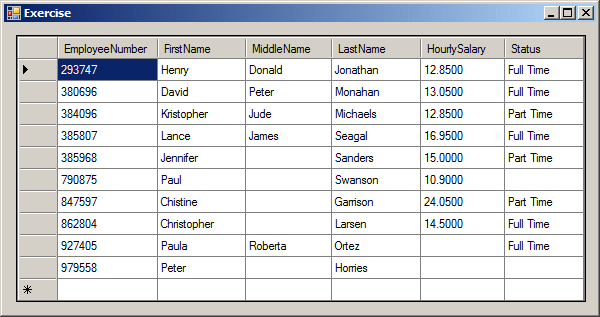
Consider the following table named Employees:
using System;
using System.Data;
using System.Drawing;
using System.Windows.Forms;
using System.Data.SqlClient;

public class Exercise : System.Windows.Forms.Form
{
    DataGridView dgvIdentifications;

    public Exercise()
    {
        InitializeComponent();
    }

    void InitializeComponent()
    {
        dgvIdentifications = new DataGridView();
        dgvIdentifications.Location = new Point(12, 12);
        dgvIdentifications.Size = new System.Drawing.Size(270, 250);

        Text = "Exercise";
        Controls.Add(dgvIdentifications);
        Load += new EventHandler(ExerciseLoad);

        dgvIdentifications.Anchor = AnchorStyles.Left | AnchorStyles.Top |
                                    AnchorStyles.Right | AnchorStyles.Bottom;
    }

    void ExerciseLoad(object sender, EventArgs e)
    {
        SqlConnectionStringBuilder csbExercise = new SqlConnectionStringBuilder();

        csbExercise.DataSource = "(local)";
        csbExercise.InitialCatalog = "Exercise1";
        csbExercise.IntegratedSecurity = true;

        using (SqlConnection cntExercise = new SqlConnection(csbExercise.ConnectionString))
        {
            SqlCommand cmdEmployees =
                new SqlCommand("CREATE SCHEMA Personnel;", cntExercise);
            cntExercise.Open();
            cmdEmployees.ExecuteNonQuery();
        }

        using (SqlConnection cntExercise =
            new SqlConnection("Data Source='(local)';" +
                              "Database='Exercise1';" +
                              "Integrated Security='SSPI';"))
        {
            SqlCommand cmdEmployees =
                new SqlCommand("CREATE TABLE Personnel.Employees(" +
                               "EmployeeNumber nchar(6) not null primary key, " +
                               "FirstName nvarchar(20), MiddleName nvarchar(20), " +
                               "LastName nvarchar(20), " +
                               "HourlySalary smallmoney, Status nvarchar(40));" +
                               "INSERT INTO Personnel.Employees " +
                               "VALUES(N'862804', N'Christopher', NULL, N'Larsen', 14.50, N'Full Time'), " +
                               "      (N'293747', N'Henry', N'Donald', N'Jonathan', 12.85, N'Full Time'), " +
                               "      (N'847597', N'Chistine', NULL, N'Garrison', 24.05, N'Part Time'), " +
                               "      (N'979558', N'Peter', NULL, N'Horries', NULL, NULL), " +
                               "      (N'385807', N'Lance', N'James', N'Seagal', 16.95, N'Full Time'), " +
                               "      (N'927405', N'Paula', N'Roberta', N'Ortez', NULL, N'Full Time'), " +
                               "      (N'790875', N'Paul', NULL, N'Swanson', 10.90, NULL), " +
                               "      (N'384096', N'Kristopher', N'Jude', N'Michaels', 12.85, N'Part Time'), " +
                               "      (N'385968', N'Jennifer', NULL, N'Sanders', 15.00, N'Part Time'), " +
                               "      (N'380696', N'David', N'Peter', N'Monahan', 13.05, N'Full Time');",
                               cntExercise);
            cntExercise.Open();
            cmdEmployees.ExecuteNonQuery();

            MessageBox.Show("A table named \"Employees\" has been created in the Personnel schema.",
                            "Exercise",
                            MessageBoxButtons.OK,
                            MessageBoxIcon.Information);
        }

        using (SqlConnection cntExercise = new SqlConnection(csbExercise.ConnectionString))
        {
            SqlCommand cmdEmployees = new SqlCommand(
                    "SELECT ALL * FROM Personnel.Employees;",
                    cntExercise);

            cntExercise.Open();
            cmdEmployees.ExecuteNonQuery();

            SqlDataAdapter sdaEmployees = new SqlDataAdapter(cmdEmployees);
            DataSet dsEmployees = new DataSet("EmployeesSet");

            sdaEmployees.Fill(dsEmployees);
            dgvIdentifications.DataSource = dsEmployees.Tables[0];
        }
    }

    public static int Main()
    {
        System.Windows.Forms.Application.Run(new Exercise());
        return 0;
    }
}
|
 Practical
Learning: Introducing Aggregate Queries Practical
Learning: Introducing Aggregate Queries
|
|
- Start Microsoft Visual Studio
- To start a new applicaiton, on the main menu, click FILE -> New
Project...
- In the middle list, click Windows Forms Application and set the
Name to AltairRealtors1
- Click OK
- In the Solution Explorer, right-click Form1.cs and click Rename
- Type AltairRealtors.cs and press Enter
- Double-click the middle of the form and change the file as
follows:
using System;
using System.Collections.Generic;
using System.ComponentModel;
using System.Data;
using System.Drawing;
using System.Linq;
using System.Text;
using System.Threading.Tasks;
using System.Windows.Forms;
using System.IO;
using System.Data.SqlClient;

namespace AltairRealtors1
{
    public partial class AltairRealtors : Form
    {
        public AltairRealtors()
        {
            InitializeComponent();
        }

        internal void CreateDatabase()
        {
            SqlConnection scAltairRealtors = null;
            SqlCommand cmdAltairRealtors = null;

            using (scAltairRealtors =
                new SqlConnection("Data Source=(local);" +
                                   "Integrated Security='SSPI';"))
            {
                cmdAltairRealtors =
                    new SqlCommand("IF EXISTS (" +
                                   "SELECT name " +
                                   "FROM sys.databases " +
                                   "WHERE name = N'AltairRealtors1')" +
                                   "DROP DATABASE AltairRealtors1; " +
                                   "CREATE DATABASE AltairRealtors1;", scAltairRealtors);
                scAltairRealtors.Open();
                cmdAltairRealtors.ExecuteNonQuery();

                MessageBox.Show("The AltairRealtors1 database has been created.",
                                "Altair Realtors",
                                MessageBoxButtons.OK, MessageBoxIcon.Information);
            }

            using (scAltairRealtors =
                new SqlConnection("Data Source=(local);" +
                                   "Database='AltairRealtors1';" +
                                   "Integrated Security='SSPI';"))
            {
                cmdAltairRealtors =
                    new SqlCommand("CREATE SCHEMA Listings;", scAltairRealtors);
                scAltairRealtors.Open();
                cmdAltairRealtors.ExecuteNonQuery();

                MessageBox.Show("A new schema named Listings has been created.",
                                "Altair Realtors",
                                MessageBoxButtons.OK, MessageBoxIcon.Information);
            }

            using (scAltairRealtors =
                new SqlConnection("Data Source=(local);" +
                                   "Database='AltairRealtors1';" +
                                   "Integrated Security='SSPI';"))
            {
                cmdAltairRealtors = new SqlCommand(
                    "CREATE TABLE Listings.Properties(" +
                    "PropertyID int identity(1, 1), PropertyNumber nvarchar(10) not null, PropertyType nvarchar(40), " +
                    "[Address] nvarchar(100), City nvarchar(50), [State] nchar(2), " +
                    "ZIPCode nvarchar(12), Bedrooms smallint, Bathrooms float, " +
                    "Stories smallint, FinishedBasement bit, IndoorGarage bit, " +
                    "YearBuilt smallint, Condition nvarchar(40), " +
                    "MarketValue money, SaleStatus nvarchar(50), " +
                    "Constraint PK_Properties Primary Key(PropertyNumber));",
                    scAltairRealtors);
                scAltairRealtors.Open();
                cmdAltairRealtors.ExecuteNonQuery();
	    }

            MessageBox.Show("The Properties table has been created.",
                            "Altair Realtors",
                            MessageBoxButtons.OK, MessageBoxIcon.Information);
	}

        private void AltairRealtors_Load(object sender, EventArgs e)
        {
            CreateDatabase();
        }
    }
}
- Press Ctrl + F5 to execute
- Click OK on each message box
- Close the form and return to your programming environment
- To create a dialog box, on the main menu, click PROJECT -> Add
Windows Form...
- Set the name to NewRealEstateProperty and click Add
- In the Dialogs section of the Toolbox, click OpenFileDialog
- Click the form
- In the Properties window, change its characteristics as follows:
(Name): dlgPicture
DefaultExt: jpg
Filter: JPEG
Files (*.jpg,*.jpeg)|*.jpg
Title: Select House Picture
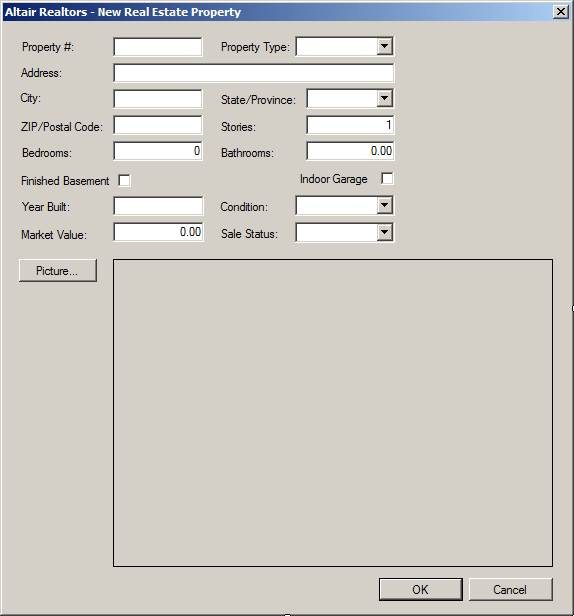
- Design the form as follows:
 |
| Control |
(Name) |
DropDownStyle |
Text |
Items |
Modifiers |
Other Properties |
| Label |
 |
|
|
Property #: |
|
|
|
| TextBox |
 |
txtPropertyNumber |
|
|
|
Public |
|
| Label |
|
|
|
Property Type: |
|
|
|
| ComboBox |
 |
cbxPropertiesTypes |
DropDownList |
|
Unknown
Townhouse
Condominium
Single
Family |
Public |
|
| Label |
|
|
|
Address: |
|
|
|
| TextBox |
|
txtAddress |
|
|
|
Public |
|
| Label |
|
|
|
City: |
|
|
|
| TextBox |
|
txtCity |
|
|
|
Public |
|
| Label |
|
|
|
State/Province: |
|
|
|
| ComboBox |
|
cbxStates |
DropDownList |
|
AB, AL, AK, AZ, AR, BC, CA, CO, CT, DE, DC, FL,
GA, HI, ID, IL, IN, IA, KS, KY, LA, ME, MD, MA, MI,
MN, MS, MO, MT, NB, NE, NV, NH, NJ, NL, NM, NS, NY,
NC, ND, OH, OK, ON, OR, PA, PE, QC, RI, SC, SD, SK,
TN, TX, UT, VT, VA, WA, WV, WI, WY |
Public |
|
| Label |
|
|
|
ZIP/Postal Code: |
|
|
|
| TextBox |
|
txtZIPCode |
|
|
|
Public |
|
| Label |
|
|
|
Stories: |
|
|
|
| TextBox |
|
txtStories |
|
|
|
Public |
|
| Label |
|
|
|
Bedrooms: |
|
|
|
| TextBox |
|
txtBedrooms |
|
0 |
|
Public |
|
| Label |
|
|
|
Bathrooms: |
|
|
|
| TextBox |
|
txtBathrooms |
|
0.00 |
|
Public |
|
| CheckBox |
 |
chkFinishedBasement |
|
Finished Basement |
|
|
|
| CheckBox |
|
chkIndoorGarage |
|
Indoor Garage |
|
|
|
| Label |
|
|
|
Year Built: |
|
|
|
| TextBox |
|
txtYearBuilt |
|
|
|
Public |
|
| Label |
|
|
|
Condition: |
|
|
|
| ComboBox |
|
cbxConditions |
DropDownList |
|
Unknown
Excellent
Good Shape
Needs Fixing |
Public |
|
| Label |
|
|
|
Market Value: |
|
|
|
| TextBox |
|
txtMarketValue |
|
0.00 |
|
Public |
|
| Label |
|
|
|
Sale Status: |
|
|
|
| ComboBox |
|
cbxSalesStatus |
DropDownList |
|
Unknown
Available
Sold |
Public |
|
| Button |
 |
btnPicture |
|
Picture... |
|
|
|
| PictureBox |
 |
pbxProperty |
|
|
|
|
BorderStyle: FixedSingle
SizeMode: Zoom |
| Button |
|
btnOK |
|
OK |
|
|
DialogResult: OK |
| Button |
|
btnCancel |
|
Cancel |
|
|
DialogResult: Cancel |
|
| Form |
| FormBorderStyle: |
FixedDialog |
| Text: |
Altair Realtors - New Real Estate Property |
| StartPosition: |
CenterScreen |
| AcceptButton: |
btnOK |
| CancelButton: |
btnCancel |
| MaximizeBox: |
False |
| MinimizeBox: |
False |
| ShowInTaskBar: |
False |
- Double-click an unoccupied area of the dialog box
- Return to the form and double-click the Picture button
- Change the document as follows:
using System;
using System.Collections.Generic;
using System.ComponentModel;
using System.Data;
using System.Drawing;
using System.Linq;
using System.Text;
using System.Threading.Tasks;
using System.Windows.Forms;
using System.IO;

namespace AltairRealtors1
{
    public partial class NewRealEstateProperty : Form
    {
        public bool bPictureChanged;
        public string strPictureFile;

        public RealEstateProperty()
        {
            InitializeComponent();
        }

        private void NewRealEstateProperty_Load(object sender, EventArgs e)
        {
            bPictureChanged = false;
            Directory.CreateDirectory("C:\\Altair Realtors");
            strPictureFile = "C:\\Altair Realtors\\default.jpg";
        }

        private void btnPicture_Click(object sender, EventArgs e)
        {
            if (dlgPicture.ShowDialog() == DialogResult.OK)
            {
                pbxProperty.Image = Image.FromFile(dlgPicture.FileName);
                strPictureFile = dlgPicture.FileName;
                bPictureChanged = true;
            }
        }
    }
}
- To create another dialog box, on the main menu, click PROJECT ->
Add Windows Form...
- Set the name to PropertyEditor and click Add
- Change the size of the form to be the same size as the New Real
Estate Property form
- Add a button to the form and change its design as follows:
 |
| Control |
(Name) |
Text |
TextAlign |
| Button |
|
btnFind |
Find |
|
|
- Double-click the Picture button
- Return to the form and double-click the Find button
- Change the file as follows:
using System;
using System.Collections.Generic;
using System.ComponentModel;
using System.Data;
using System.Drawing;
using System.Linq;
using System.Text;
using System.Threading.Tasks;
using System.Windows.Forms;
using System.IO;
using System.IO;
using System.Data.SqlClient;

namespace AltairRealtors1
{
    public partial class PropertyEditor : Form
    {
        public bool bPictureChanged;
        public string strPictureFile;

        public PropertyEditor()
        {
            InitializeComponent();
        }

        private void btnPicture_Click(object sender, EventArgs e)
        {
            if (dlgPicture.ShowDialog() == DialogResult.OK)
            {
                pbxProperty.Image = Image.FromFile(dlgPicture.FileName);
                strPictureFile = dlgPicture.FileName;
                bPictureChanged = true;
            }
        }

        private void btnFind_Click(object sender, EventArgs e)
        {
            using (SqlConnection scAltairRealtors =
                    new SqlConnection("Data Source=(local);" +
                                       "Database='AltairRealtors1';" +
                                       "Integrated Security='SSPI';"))
            {
                SqlCommand cmdProperties =
                    new SqlCommand("SELECT PropertyNumber, " +
                                   "       PropertyType, " +
                                   "       [Address], " +
                                   "       City, " +
                                   "	   [State], " +
                                   "       ZIPCode, " +
                                   "       Bedrooms, " +
                                   "       Bathrooms, " +
                                   "       Stories, " +
                                   "       FinishedBasement, " +
                                   "       IndoorGarage, " +
                                   "       YearBuilt, " +
                                   "       Condition, " +
                                   "       MarketValue, " +
                                   "       SaleStatus " +
                                   "FROM Listings.Properties " +
                                   "WHERE PropertyNumber = '" + txtPropertyNumber.Text + "';",
                                   scAltairRealtors);

                cmdProperties.CommandType = CommandType.Text;

                SqlDataAdapter sdaProperties = new SqlDataAdapter();
                scAltairRealtors.Open();

                DataSet dsProperties = new DataSet("PropertiesSet");
                sdaProperties.SelectCommand = cmdProperties;

                sdaProperties.Fill(dsProperties);
                cmdProperties.ExecuteNonQuery();

                foreach (DataRow house in dsProperties.Tables[0].Rows)
                {
                    cbxPropertiesTypes.Text = house["PropertyType"].ToString();
                    txtAddress.Text = house["Address"].ToString();
                    txtCity.Text = house["City"].ToString();
                    cbxStates.Text = house["State"].ToString();
                    txtZIPCode.Text = house["ZIPCode"].ToString();
                    txtBedrooms.Text = house["Bedrooms"].ToString();
                    txtBathrooms.Text = house["Bathrooms"].ToString();
                    chkFinishedBasement.Checked = bool.Parse(house["FinishedBasement"].ToString());
                    chkIndoorGarage.Checked = bool.Parse(house["IndoorGarage"].ToString());
                    txtStories.Text = house["Stories"].ToString();
                    txtYearBuilt.Text = house["YearBuilt"].ToString();
                    cbxConditions.Text = house["Condition"].ToString();
                    txtMarketValue.Text = house["MarketValue"].ToString();
                    cbxSalesStatus.Text = house["SaleStatus"].ToString();
                }
            }

            // We need to locate the picture associated
            string strDirectory = "C:\\Altair Realtors";
            // First locate the folder where the pictures records are located
            DirectoryInfo dirProperties = new DirectoryInfo(strDirectory);
            // Get a list of (only) the picture files
            FileInfo[] PictureFiles = dirProperties.GetFiles("*.jpg");

            // At this time, we don't know if the picture exists
            bool pictureExists = false;

            // Look for a file that holds the same name as the property number
            foreach (FileInfo fle in PictureFiles)
            {
                // Get the name of the file without its extension
                string fwe = Path.GetFileNameWithoutExtension(fle.FullName);

                // If you find a picture that has the same name as the property number
                if (fwe == txtPropertyNumber.Text)
                {
                    // Display that picture
                    pbxProperty.Image = Image.FromFile(strDirectory + "\\" + txtPropertyNumber.Text + ".jpg");
                    pictureExists = true;
                }

                // If there is no picture that has the same name as the
                // property number, display the default picture
                if (pictureExists == false)
                    pbxProperty.Image = Image.FromFile("C:\\Altair Realtors\\default.jpg");
            }
        }
    }
}
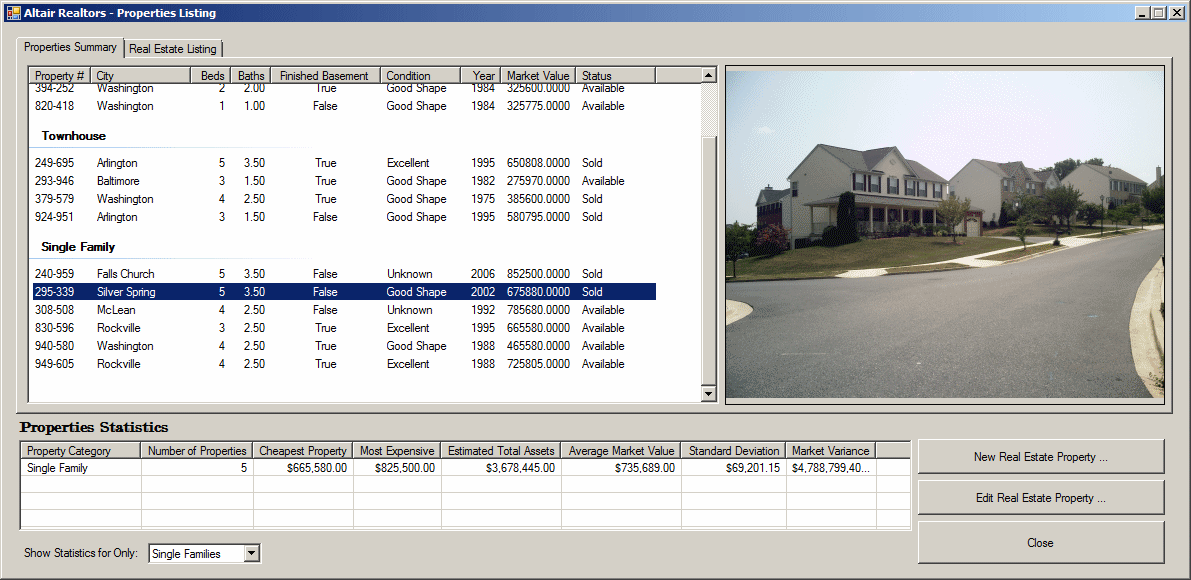
- Display the Altair Realtors form (the first form)
- Add a tab control to the form and set its Anchor property to Top,
Bottom, Left, Right
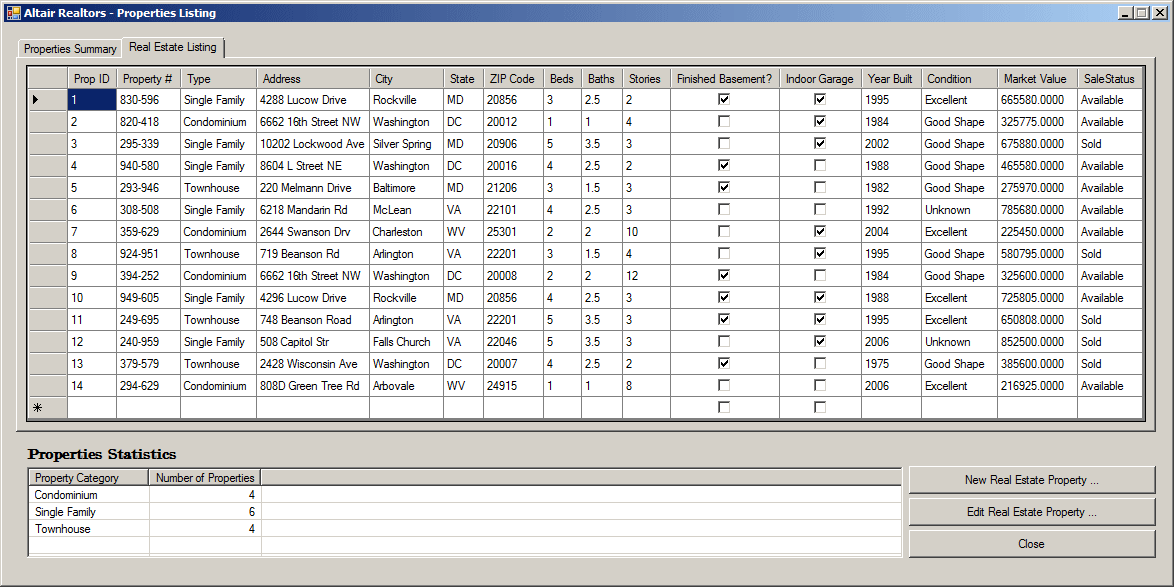
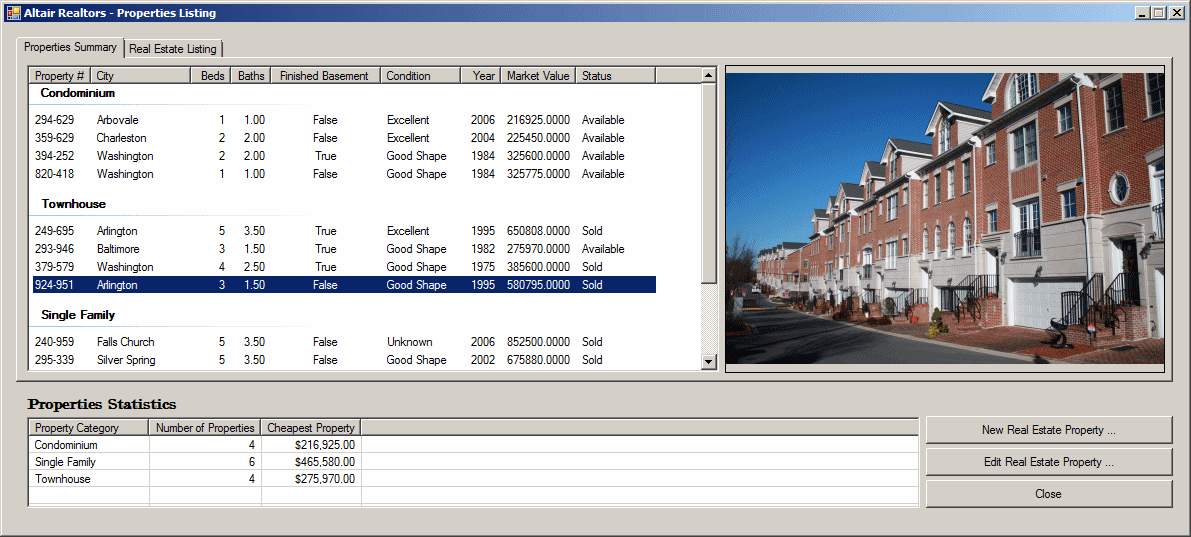
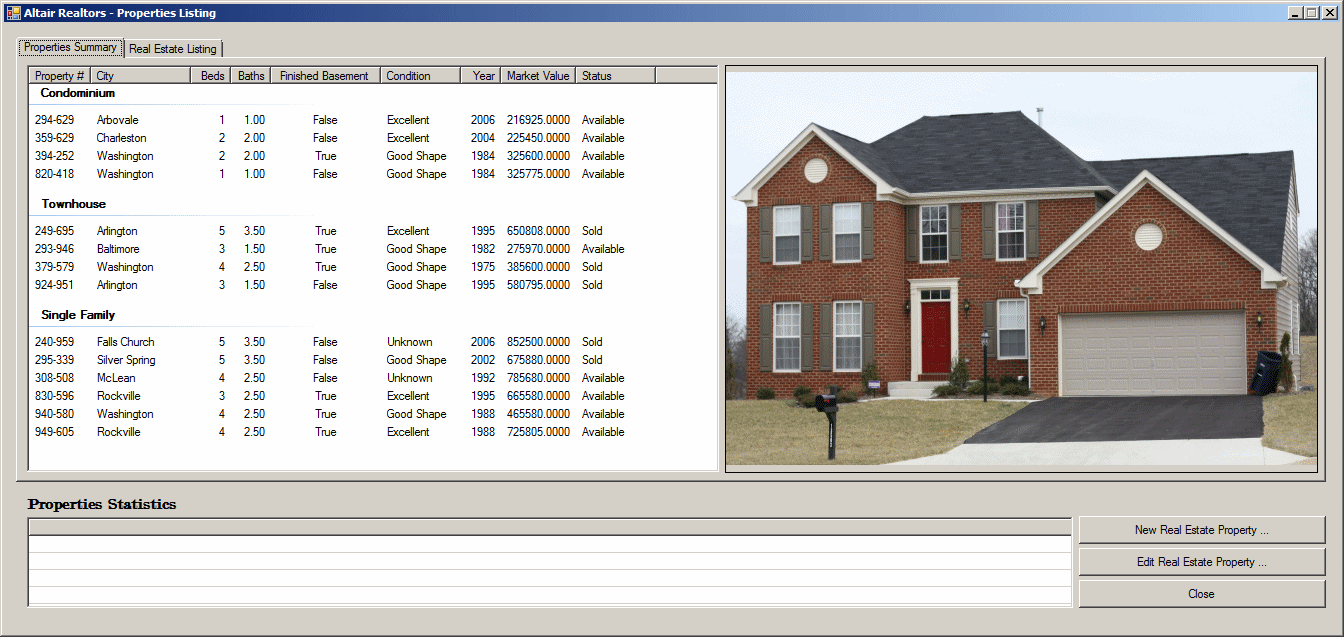
- Add a list view to the first tab page
- Right-click the list view and click Edit Groups...
- Create the groups as follows:
| Header |
Name |
| Condominium |
lvgCondominium |
| Townhouse |
lvgTownhouse |
| Single Family |
lvgSingleFamily |
- Click OK
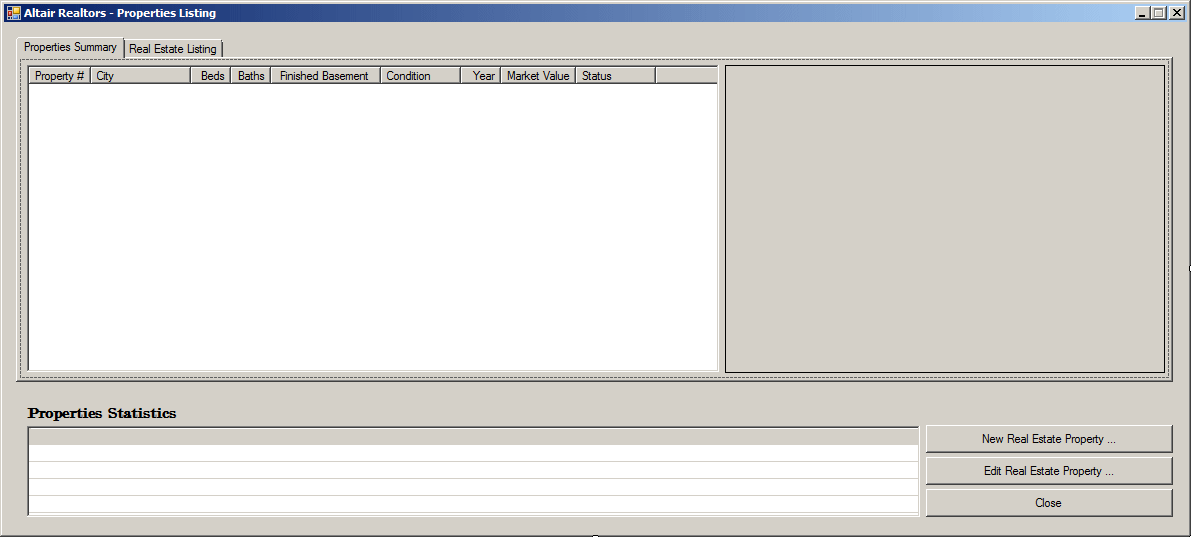
- Design the form as follows:
 |
| Control |
(Name) |
Text |
Anchor |
| Tab Page |
|
|
Properties Summary |
|
| List View |
 |
lvwProperties |
|
Top, Bottom, Left |
| |
|
| (Name) |
Text |
TextAlign |
Width |
| colPropertyNumber |
Property # |
|
62 |
| colCity |
City |
|
100 |
| colBedrooms |
Bedrooms |
Right |
40 |
| colBathrooms |
Bathrooms |
Right |
40 |
| colFinishedBasement |
FinishedBasement |
Center |
110 |
| colCondition |
Condition |
|
80 |
| colYearBuilt |
Year |
Right |
40 |
| colMarketValue |
Market Value |
Right |
75 |
| colSaleStatus |
Status |
|
80 |
|
| Picture Box |
|
pbxProperty |
|
Top, Bottom, Left, Right |
| Tab Page |
|
|
Real Estate Lising |
|
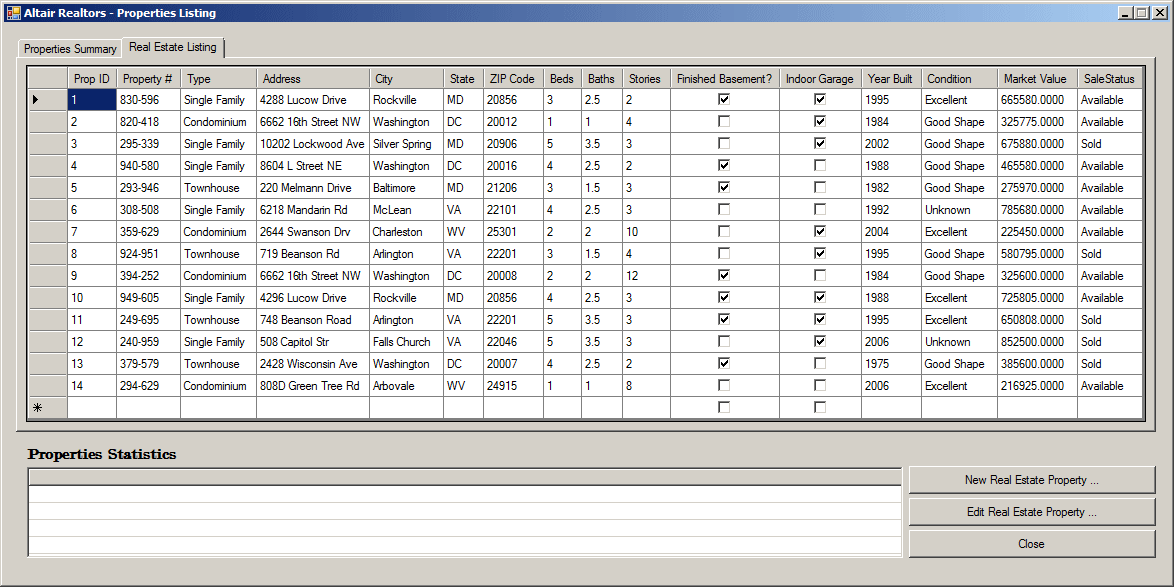
| Data Grid View |
 |
dgvProperties |
|
Top, Bottom, Left, Right |
| List View |
|
lvwPropertiesStatistics |
Properties Statistics |
Bottom, Left, Right |
| Button |
|
btnNewProperty |
New Real Estate Property ... |
Bottom, Right |
| Button |
|
btnPropertyEditor |
Edit Real Estate Property ... |
Bottom, Right |
| Button |
|
btnClose |
Close |
Bottom, Right |
|
- Right-click anywhere on the form and click View Code
- Change the document as follows:
internal void ShowProperties()
{
    using (SqlConnection scAltairRealtors =
        new SqlConnection("Data Source=(local);" +
                           "Database='AltairRealtors1';" +
                           "Integrated Security='SSPI';"))
    {
        SqlCommand cmdProperties =
            new SqlCommand("SELECT props.PropertyNumber, " +
                           "       props.PropertyType, " +
                           "       props.City, " +
                           "       props.Bedrooms, " +
                           "       props.Bathrooms, " +
                           "       props.FinishedBasement, " +
                           "       props.YearBuilt, " +
                           "       props.Condition, " +
                           "       props.MarketValue, " +
                           "       props.SaleStatus " +
                           "FROM Listings.Properties props;",
                           scAltairRealtors);
        cmdProperties.CommandType = CommandType.Text;

        SqlDataAdapter sdaProperties = new SqlDataAdapter();
        scAltairRealtors.Open();

        DataSet dsProperties = new DataSet("PropertiesSet");
        sdaProperties.SelectCommand = cmdProperties;
        sdaProperties.Fill(dsProperties);
        cmdProperties.ExecuteNonQuery();

        lvwProperties.Items.Clear();
        lvwPropertiesStatistics.Items.Clear();

        foreach (DataRow house in dsProperties.Tables[0].Rows)
        {
            ListViewItem lviProperty = null;

            if (house["PropertyType"].ToString() == "Condominium")
                lviProperty = new ListViewItem(house["PropertyNumber"].ToString(), lvwProperties.Groups[0]);
            else if (house["PropertyType"].ToString() == "Townhouse")
                lviProperty = new ListViewItem(house["PropertyNumber"].ToString(), lvwProperties.Groups[1]);
            else
                lviProperty = new ListViewItem(house["PropertyNumber"].ToString(), lvwProperties.Groups[2]);

            lviProperty.SubItems.Add(house["City"].ToString());
            lviProperty.SubItems.Add(house["Bedrooms"].ToString());
            lviProperty.SubItems.Add(double.Parse(house["Bathrooms"].ToString()).ToString("F"));
            lviProperty.SubItems.Add(house["FinishedBasement"].ToString());
            lviProperty.SubItems.Add(house["Condition"].ToString());
            lviProperty.SubItems.Add(house["YearBuilt"].ToString());
            lviProperty.SubItems.Add(house["MarketValue"].ToString());
            lviProperty.SubItems.Add(house["SaleStatus"].ToString());
            lvwProperties.Items.Add(lviProperty);
        }

        pbxProperty.Image = Image.FromFile("C:\\Altair Realtors\\default.jpg");
    }

    using (SqlConnection scAltairRealtors =
        new SqlConnection("Data Source=(local);" +
                           "Database='AltairRealtors1';" +
                           "Integrated Security='SSPI';"))
    {
        SqlCommand cmdProperties = new SqlCommand("SELECT props.PropertyID [Prop ID], " +
                                                  "       props.PropertyNumber [Property #], " +
                                                  "       props.PropertyType   [Type], " +
                                                  "       props.[Address], " +
                                                  "       props.City, " +
                                                  "       props.[State], " +
                                                  "       props.ZIPCode [ZIP Code], " +
                                                  "       props.Bedrooms Beds, " +
                                                  "       props.Bathrooms Baths, " +
                                                  "       props.Stories, " +
                                                  "       props.FinishedBasement [Finished Basement?], " +
                                                  "       props.IndoorGarage [Indoor Garage], " +
                                                  "       props.YearBuilt [Year Built], " +
                                                  "       props.Condition, " +
                                                  "       props.MarketValue [Market Value], " +
                                                  "       props.SaleStatus " +
                                                  "FROM Listings.Properties props;", scAltairRealtors);
        cmdProperties.CommandType = CommandType.Text;

        SqlDataAdapter sdaProperties = new SqlDataAdapter();
        scAltairRealtors.Open();

        DataSet dsProperties = new DataSet("PropertiesSet");
        sdaProperties.SelectCommand = cmdProperties;
        sdaProperties.Fill(dsProperties);
        dgvProperties.DataSource = dsProperties.Tables[0];
        cmdProperties.ExecuteNonQuery();
    }
}

private void AltairRealtors_Load(object sender, EventArgs e)
{
    ShowProperties();
}
- Return to the Altair Realtors form and click the Properties
Summary list view
- In the Properties window, click Events and double-click
ItemSelectionChanged
- Implement the event as follows:
private void lvwProperties_ItemSelectionChanged(object sender, ListViewItemSelectionChangedEventArgs e)
{
    // Get a list of the picture files from the Altair Realtors folder
    string strDirectory = "C:\\Altair Realtors";
    DirectoryInfo dirProperties = new DirectoryInfo(strDirectory);
    FileInfo[] PictureFiles = dirProperties.GetFiles("*.jpg");

    bool pictureExists = false;

    // Look for a file that holds the same name as the property number
    foreach (FileInfo fle in PictureFiles)
    {
        // Get the name of the file without its extension
        string fwe = Path.GetFileNameWithoutExtension(fle.FullName);

        if (fwe == e.Item.SubItems[0].Text)
        {
            pbxProperty.Image = Image.FromFile(strDirectory + "\\" + e.Item.SubItems[0].Text + ".jpg");
            pictureExists = true;
        }

        if (pictureExists == false)
            pbxProperty.Image = Image.FromFile("C:\\Altair Realtors\\default.jpg");
    }
}
- Return to the Altair Realtors form and double-click the New Real
Estate Property button
- Implement the event as follows:
private void btnNewProperty_Click(object sender, EventArgs e)
{
    int iFinishedBasement = 0;
    int iIndoorGarage = 0;
    NewRealEstateProperty rep = new NewRealEstateProperty();

    if (rep.ShowDialog() == System.Windows.Forms.DialogResult.OK)
    {
        if (rep.chkFinishedBasement.Checked == true)
            iFinishedBasement = 1;
        if (rep.chkIndoorGarage.Checked == true)
            iIndoorGarage = 1;

        using (SqlConnection scAltairRealtors =
            new SqlConnection("Data Source=(local);" +
                               "Database='AltairRealtors1';" +
                               "Integrated Security='SSPI';"))
        {
            SqlCommand cmdProperty =
                new SqlCommand("INSERT INTO Listings.Properties(PropertyNumber, " +
                               "PropertyType, [Address], City, [State], ZIPCode, " +
                               "Bedrooms, Bathrooms, Stories, FinishedBasement, " +
                               "IndoorGarage, YearBuilt, Condition, MarketValue, " +
                               "SaleStatus) VALUES(N'" + rep.txtPropertyNumber.Text + "', N'" +
                               rep.cbxPropertyTypes.Text + "', N'" + rep.txtAddress.Text + "', N'" +
                               rep.txtCity.Text + "', N'" + rep.cbxStates.Text + "', N'" +
                               rep.txtZIPCode.Text + "', " + int.Parse(rep.txtBedrooms.Text) + ", " +
                               float.Parse(rep.txtBathrooms.Text) + ", " +
                               int.Parse(rep.txtStories.Text) + ", " + iFinishedBasement + ", " +
                               iIndoorGarage + ", " + int.Parse(rep.txtYearBuilt.Text) + ", N'" +
                               rep.cbxConditions.Text + "', " + decimal.Parse(rep.txtMarketValue.Text)
                               + ", N'" + rep.cbxSaleStatus.Text + "');",
                               scAltairRealtors);

            scAltairRealtors.Open();
            cmdProperty.ExecuteNonQuery();

            if (!(string.IsNullOrEmpty(rep.strPictureFile)))
            {
                FileInfo flePicture = new FileInfo(rep.strPictureFile);
                flePicture.CopyTo("C:\\Altair Realtors\\" + rep.txtPropertyNumber.Text + flePicture.Extension);
            }
        }
    }

    ShowProperties();
}
- Return to the Altair Realtors form and double-click the Edit Real
Estate Property button
- Implement the event as follows:
private void btnPropertyEditor_Click(object sender, EventArgs e)
{
    PropertyEditor editor = new PropertyEditor();

    using (SqlConnection scAltairRealtors =
                new SqlConnection("Data Source=(local);" +
                                   "Database='AltairRealtors1';" +
                                   "Integrated Security='SSPI';"))
    {
        SqlCommand cmdProperty =
            new SqlCommand("UPDATE Listings.Properties SET PropertyType = N'" + editor.cbxPropertiesTypes.Text + "' WHERE PropertyNumber = N'" + editor.txtPropertyNumber.Text + "';" +
                           "UPDATE Listings.Properties SET [Address] = N'" + editor.txtAddress.Text + "' WHERE PropertyNumber = N'" + editor.txtPropertyNumber.Text + "';" +
                           "UPDATE Listings.Properties SET City = N'" + editor.txtCity.Text + "' WHERE PropertyNumber = N'" + editor.txtPropertyNumber.Text + "';" +
                           "UPDATE Listings.Properties SET [State] = N'" + editor.cbxStates.Text + "' WHERE PropertyNumber = N'" + editor.txtPropertyNumber.Text + "';" +
                           "UPDATE Listings.Properties SET ZIPCode = N'" + editor.txtZIPCode.Text + "' WHERE PropertyNumber = N'" + editor.txtPropertyNumber.Text + "';" +
                           "UPDATE Listings.Properties SET Bedrooms = " + int.Parse(editor.txtBedrooms.Text) + " WHERE PropertyNumber = N'" + editor.txtPropertyNumber.Text + "';" +
                           "UPDATE Listings.Properties SET Bathrooms = " + float.Parse(editor.txtBathrooms.Text) + " WHERE PropertyNumber = N'" + editor.txtPropertyNumber.Text + "';" +
                           "UPDATE Listings.Properties SET Stories = " + int.Parse(editor.txtStories.Text) + " WHERE PropertyNumber = N'" + editor.txtPropertyNumber.Text + "';" +
                           "UPDATE Listings.Properties SET FinishedBasement " + editor.chkFinishedBasement.Checked + " WHERE PropertyNumber = N'" + editor.txtPropertyNumber.Text + "';" +
                           "UPDATE Listings.Properties SET IndoorGarage = " + editor.chkIndoorGarage.Checked + " WHERE PropertyNumber = N'" + editor.txtPropertyNumber.Text + "';" +
                           "UPDATE Listings.Properties SET YearBuilt = " + int.Parse(editor.txtYearBuilt.Text) + " WHERE PropertyNumber = N'" + editor.txtPropertyNumber.Text + "';" +
                           "UPDATE Listings.Properties SET Condition = N'" + editor.cbxConditions.Text + "' WHERE PropertyNumber = N'" + editor.txtPropertyNumber.Text + "';" +
                           "UPDATE Listings.Properties SET MarketValue = " + decimal.Parse(editor.txtMarketValue.Text) + "' WHERE PropertyNumber = N'" + editor.txtPropertyNumber.Text + "';" +
                           "UPDATE Listings.Properties SET SaleStatus = N'" + editor.cbxSalesStatus.Text + "' WHERE PropertyNumber = N'" + editor.txtPropertyNumber.Text + "';",
                           scAltairRealtors);

        scAltairRealtors.Open();
        cmdProperty.ExecuteNonQuery();
    }

    editor.ShowDialog();
}
- Return to the form and click the list view
- Execute the application and
create the
properties
- Close the form and return to your programming environment
|
Creating an Aggregate
Query
|
|
Although you can create an aggregate query with all
fields or any field(s) of a table or view, the purpose of the query is to
summarize data. For a good summary query, you should select a column where
the records hold categories of data. This means that the records in the
resulting query have to be grouped by categories. To support this, the SQL
provides the GROUP BY expression. It is added after the FROM
clause. This is done as follows:
SELECT WhatField(s)
FROM WhatObject(s)
GROUP BY Column(s)
The new expression in this formula is GROUP BY.
This indicates that you want to group some values from one or more
columns. Of course, there are rules you must follow.
As stated already, the purpose of an aggregate query
is to provide some statistics. Therefore, it is normal that you be
interested only in the column(s) that hold(s) the desired statistics and
avoid the columns that are irrelevant. As a result, if you select (only)
the one column that holds the information you want, in the resulting list,
each of its categories would display only once.
|
Practical
Learning: Creating an Aggregate Query
|
|
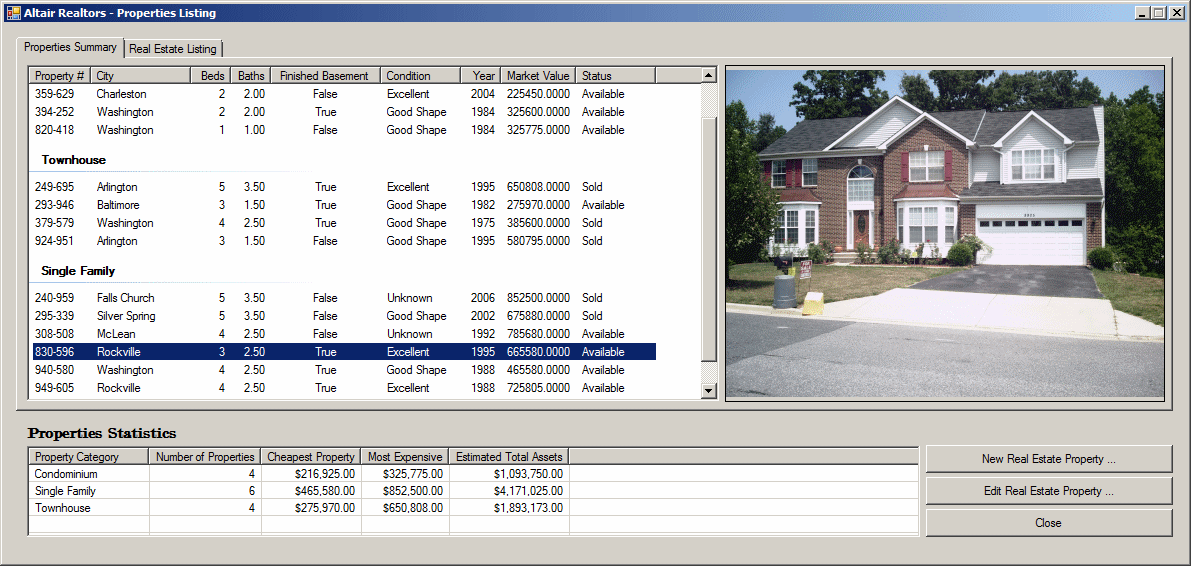
- Display the Altair Realtors form.
On the form, right-click the
bottom list view and click Edit columns
- Add a column with the following characteristics:
(Name):
colPropertyCategory
Text: Property
Category
Width: 120
|
|