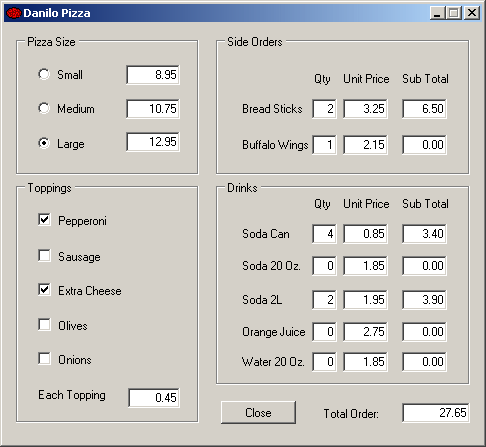
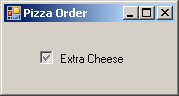
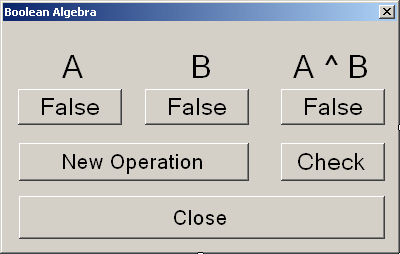
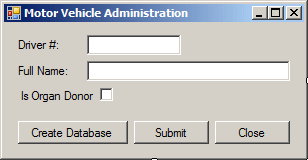
A check box is a control that makes a statement true or false. To perform this validation, the control displays a small square box that the user can click. Here are examples: 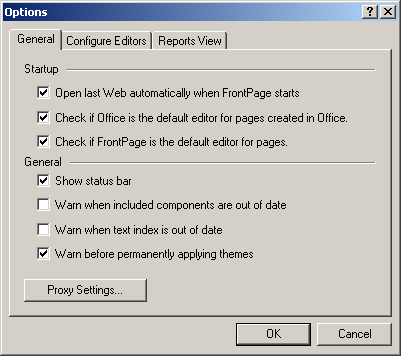 To start, the square box may be empty
To let the user know what the check box control represents, the control is accompanied by a label that displays the statement. When the square box is empty *, the statement is false. When the square box is filled with a check mark T, the statement is true.
To support check boxes, the .NET Framework provides the CheckBox class. To add a check box to your application at design time, from the Common Controls section of the Toolbox, yon can click the CheckBox control and click the form or a container on the form. Unlike the radio button but like the regular command button, a check box can safely be positioned directly on a form. To programmatically create a check box, declare a variable of type CheckBox, use the new operator to allocate memory for it, and add it to the Controls collection of its holder. Here is an example: using System;
using System.Drawing;
using System.Windows.Forms;
public class Exercise : System.Windows.Forms.Form
{
CheckBox chkValidate;
public Exercise()
{
InitializeComponent();
}
private void InitializeComponent()
{
chkValidate = new CheckBox();
Controls.Add(chkValidate);
}
}
public class Program
{
static int Main()
{
System.Windows.Forms.Application.Run(new Exercise());
return 0;
}
}
Unlike the radio button that usually comes along with other radio buttons, a check box can appear by itself. Even when it comes in a group with others, the behavior of one check box is independent of the other check boxes, even if they belong to the same group.
By default, a check box appears empty, which makes its statement false. To make the statement true, the user can click it. There are three main ways you can use this property of a check box. To select a check box, you can set its Checked property to True. You can also do it programmatically as follows: private void Form1_Load(object sender, System.EventArgs e)
{
checkBox1.Checked = true;
}
To find out if an item is selected, get the value of its Checked property. Another possibility consists of toggling the state of the check mark. For example, you can check or uncheck the check mark when the user clicks another button. To do this, you can simply negate the truthfulness of the control as follows: checkBox1.Checked = ! checkBox1.Checked; Like the radio button, when a check box is clicked, the control fires a CheckedChanged event to let you know that it has been checked. This event is of type EventArgs. If the check box can display only two states, checked or unchecked, this event is enough.
By default, the square box of a check control is positioned to the left side of its accompanying label. Instead of this default left position, you can change as you wish. The position of the round box with regards to its label is controlled by the CheckAlign property that of type ContentAlignment. To programmatically set the check alignment of a check box, you can call the ContentAlignment enumeration and select the desired value. Here is an example: private void Form1_Load(object sender, System.EventArgs e)
{
this.checkBox1.Checked = true;
this.checkBox1.CheckAlign = ContentAlignment.MiddleRight;
}
Instead of being definitely checked, you can let the user know that the decision of making the statement true or false is not complete. This means that a check box can display as "half-checked". In this case the check mark would appear as if it were disabled. This behavior is controlled through the CheckState property. To provide this functionality, assign the Indeterminate value to its CheckState property. You can do this programmatically as follows:
The CheckState property only allows setting the check box control as "undecided". If you actually want the user to control three states of the control as checked, half-checked, or unchecked, use the ThreeState property. By setting the CheckState Boolean property to true, the user can click it two to three times to get the desired value. When this ability is given to the user, you can use or check the value of the Indeterminate property to find out whether the control is checked, half-checked, or unchecked. Here is an example of specifying the check box control as being able to display one of three states: private void Form1_Load(object sender, System.EventArgs e)
{
checkBox1.Checked = true;
checkBox1.ThreeState = true;
}
If a check box is configured to assume one of three states when it's clicked, that is, if the ThreeState property of a check button is set to True, when the user clicks such a button, the button acquires one of the available three states, which are Checked, Unchecked, or Indeterminate. This causes the control to fire a CheckStateChanged event. This event also is of type EventArgs. This means that it does not let you know the current state of the button. You would have to find it out yourself, which is easily done by getting the value of the CheckState property. By default, a check box appears as a square box that gets a check mark when the user clicks it. Optionally, you can make a check box appear as a toggle button. In that case, the button would appear as a regular button. When the user clicks it, it appears down. If the user clicks it again, it becomes up. To change the appearance of a check box, assign the Button or Normal value to its Appearance property. The Appearance values are defined in the Appearance enumeration. You can also do this programmatically as follows: private void Form1_Load(object sender, System.EventArgs e)
{
checkBox1.Checked = true;
checkBox1.ThreeState = true;
checkBox1.Appearance = Appearance.Button;
}
Like the radio button, the check box control fires an AppearanceChanged event when the button's appearance changes from Normal to Button or vice-versa.
|
||||||||||||||||||||||||||||||||||||||||||||||||||||||||||||||||||||||||||||||||||||||||||||||||||||||||||||||||||||||||||||||||||||||||||||||||||||||||||||||||||||||||||||||||||||||||||||||||||||||||||||||||||||||||||||||||||||||||||||||||||||||||||||||||||||||||||||||||||||||||||||||||||||||||||||||||||||||||||||||||||||||||||||||||||||||||||||||||||||||||||||||||

 .
If the user clicks it, a check mark appears in the square box
.
If the user clicks it, a check mark appears in the square box
 .
If the user clicks a check box that has a check mark in it, the check mark
may be removed.
.
If the user clicks a check box that has a check mark in it, the check mark
may be removed.  Topic
Applied: Introducing Check Boxes
Topic
Applied: Introducing Check Boxes ,
wipe its interior to erase its content
,
wipe its interior to erase its content  and the black color to draw an oval shape
 it up with a brown color (the color on the right side of the black)


 ,
click the black color, right-click the brown color, and draw a dark
border around the shape
,
click the black color, right-click the brown color, and draw a dark
border around the shape