A spin button, also called an up-down control, is usually made to display a numeric value that can then be increased or decreased when the user clicks one of the buttons of the controls. In a Microsoft Windows typical application, if you wanted to deal with values other than numbers, there was some gymnastic code to write. Fortunately, the .NET Framework provides a special spin button that can hold and display values other numbers. The .NET Framework's domain up-down control is a text-based object created from a class named DomainUpDown. Like NumericUpDown, the DomainUpDown class is derived from the UpDownBase class where it gets its primary functionality from.
At design time, to get a domain up-down control, from the Toolbox, you can click the DomainUpDown button and click the form. To programmatically create a domain up-down control, declare a variable of type DomainUpDown, initialize it and add it to the Controls property of the container that will hold it. Here is an example: using System;
using System.Drawing;
using System.Windows.Forms;
public class Exercise : System.Windows.Forms.Form
{
DomainUpDown spnNames;
public Exercise()
{
InitializeComponent();
}
private void InitializeComponent()
{
spnNames = new DomainUpDown();
Controls.Add(spnNames);
}
}
public class Program
{
static int Main()
{
System.Windows.Forms.Application.Run(new Exercise());
return 0;
}
}
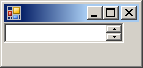
This would produce:
The spin button shares the normal characteristics of other graphical Windows controls that they inherit from their ancestor the Control class. These characteristics including the location, the size, the background color, the ability to be enabled or disabled, the ability to be hidden or shown, etc. As a text-based object, the domain up-down control uses characteristics such as the ability to display text, alignment of text, and the ability to resize itself according to the length of its text, which is based on the AutoSize property. Because the DomainUpDown class is derived from the UpDownBase class, it inherits the ability to specify on what side of the text box the spin button will align, to the left or to the right. This is controlled by the UpDownAlign property. The DomainUpDown class also inherits the ability to let the user manually change the value of the control. This is supported by the UserEdit Boolean property.
When using the spin button, the user can click one of the arrow buttons. This would bring the next or the previous string of the list and display that item in the text box part of the control. The user can also first give focus to the control, and then use the arrow keys to navigate in the list of strings. At any time, the string that is currently displaying on the spin button is represented by its Text property. To specify the string that the control should display, at design time, you can enter the string in the Text field of the Properties window. To programmatically specify what item the control should display, assign it to its Text property. Here is an example: private void InitializeComponent()
{
spnNames = new DomainUpDown();
spnNames.Location = new Point(12, 12);
spnNames.Text = "Paul Yamaguchi";
Controls.Add(spnNames);
}
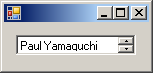
This would produce:
You can even use a string that is not in the collection. If you do, the control would display it but if the user changes the current item of the control that string would disappear and the user cannot get it back.
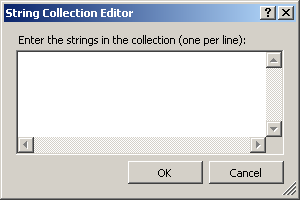
As mentioned already, instead of displaying (only) numbers, the domain up-down control can be used to display strings (and/or numbers). To make this possible, the control must hold a list the strings to display. This list is held by the Items property. At design time, to create a list of values, in the Properties window of the control, click Items and click its ellipsis button. This would open the String Collection Editor
You can then type each string on its own line (of course, you can type only numbers or a mix of numbers and strings). After creating the list, you can click OK. The DomainUpDown.Items property is based on the nested DomainUpDownItemCollection class. The DomainUpDownItemCollection class is derived from the ArrayList class which gives it the ability to create and manage its list. To programmatically add a string to the list, call its Add() method. You can do this continually until you have added all the necessary strings. Here is an example: private void InitializeComponent()
{
spnNames = new DomainUpDown();
spnNames.Location = new Point(12, 12);
spnNames.Items.Add("Patricia Katts");
spnNames.Items.Add("Paul Bertrand Yamaguchi");
spnNames.Items.Add("Marguerite Soya");
Controls.Add(spnNames);
}
Instead of adding one item at a time, the DomainUpDownItemCollection class is equipped with a method named AddRange. This allows you to add an array of items. Here is an example: private void InitializeComponent()
{
spnNames = new DomainUpDown();
spnNames.Location = new Point(12, 12);
spnNames.Items.Add("Patricia Katts");
spnNames.Items.Add("Paul Yamaguchi");
spnNames.Items.Add("Marguerite Soya");
string[] Names = new string[]
{
"Huguette Lingon", "Peter Kabba",
"Harry Almada", "Allen Dean"
};
spnNames.Items.AddRange(Names);
Controls.Add(spnNames);
}
When calling Add() (or AddRange()), the new item(s) is(are) added at the end of the existing list, unless the list is empty, in which case the item(s) would be the first. The DomainUpDownItemCollection class is also equipped with a method named Insert() that allows you to add a new item somewhere inside the list at a position of your choice.
As you create the list of strings, they are added either at the end (with Add() or AddRange()) or inserted (with Insert()) at the position of your choice. If you want the items to be arranged in alphabetical or chronological order, use the Sorted Boolean property. To find out whether the list is sorted or not, get the value of the control's Sorted property.
When the user clicks one of the buttons of the spin control or use an arrow key to change the item, the control fires a SelectedItemChanged event. You can use this event to find out what the index of the item that was selected. You have to alternatives. You can identify an item by its index. The index of the current item is represented by the SelectedIndex property, which is an integer. If you prefer to locate an item by its name (or string), you can use the SelectedItem property, which is of type object. You can also use the SelectedItem property to specify the string that the spin button should display. To do this, simply assign a string to this property. Here is an example: private void InitializeComponent()
{
spnNames = new DomainUpDown();
spnNames.Location = new Point(12, 12);
spnNames.Items.Add("Patricia Katts");
spnNames.Items.Add("Paul Yamaguchi");
spnNames.Items.Add("Marguerite Soya");
string[] Names = new string[]
{
"Huguette Lingon", "Peter Kabba",
"Harry Almada", "Allen Dean"
};
spnNames.Items.AddRange(Names);
spnNames.SelectedItem = "Peter Kabba";
Controls.Add(spnNames);
}
Unlike the Text property, if you assign a string that is not in the list, it would not show in the text box part of the control. This means that, if you assign a string (that is not in the list of control's strings) to the Text property, the compiler would simply display that string in the control. On the other hand, when you assign a string to the SelectedItem property, the compiler would check in the list if that string exists. If it finds it, then it displays it in the text box. If it does not find, it does nothing: it does not throw an exception.
As mentioned previously, when the user navigates through the list, the items are changed one after another. When the user gets to the end of the list, the navigation stops and the user cannot go further. As an alternative, when the user gets to the end of the list and click the up button, if you want, you can make the list restart from the beginning. This characteristics is controlled by the Wrap Boolean property whose default value is false. To find out whether the control is currently set to wrap, get the value of its Wrap property. |
|||||||||||||||||||||||||