public class Video
{
    public string Title        { get; set; }
    public int    YearReleased { get; set; }
}
You primarily use the class as you would any other. In your LINQ statement, you can refer to all members of the collection: var vdos = from videos
in aryVideos
select videos;
In this case, the value of the select statement represents the whole variable, that is, all members of the collection. If you want to get a property (or a member) of the class, apply the period operator to the value of select and access the desired member. Here is an example: using System;
using System.Linq;
using System.Drawing;
using System.Windows.Forms;
using System.Collections.Generic;
public class Video
{
public int ShelfNumber { get; set; }
public string Title { get; set; }
public string Rating { get; set; }
public int YearReleased { get; set; }
public bool WideScreen { get; set; }
public Video(int id, string title, string rating, int year, bool hd)
{
ShelfNumber = id;
Title = title;
Rating = rating;
YearReleased = year;
WideScreen = hd;
}
}
public class Exercise : Form
{
private ComboBox cbxVideos;
public Exercise()
{
InitializeComponent();
}
void InitializeComponent()
{
cbxVideos = new ComboBox();
cbxVideos.Location = new System.Drawing.Point(12, 12);
cbxVideos.Width = 160;
Controls.Add(cbxVideos);
Text = "Video Collection";
Load += new EventHandler(ExerciseLoad);
Size = new System.Drawing.Size(190, 80);
}
private void ExerciseLoad(object sender, EventArgs e)
{
Video[] aryVideos = new Video[]
{
new Video(792075, "Two for the Money", "R", 2008, true),
new Video(900245, "Her Alibi", "PG-13", 1998, false),
new Video(773022, "Distinguished Gentleman (The)", "R", 1992, false),
new Video(180358, "Memoirs of a Geisha", "PG-13", 2006, true),
new Video(961973, "Wall Street", "R", 2000, false)
};
var vdos = from videos
           in aryVideos
           select videos;
foreach (var item in vdos)
lbxVideos.Items.Add(item.Title);
}
[STAThread]
public static int Main()
{
System.Windows.Forms.Application.Run(new Exercise());
return 0;
}
}
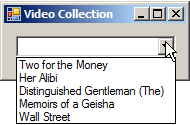
This would produce:
This technique allows you to access only one member of the class. As mentioned already, the select statement primarily produces the whole collection of the values of the variable. Since this value represents a collection, you can use it in a list-based scenario, such as displaying the result in a list view. In this case, to access a member of the class, use a for or foreach loop to get each item of the collection variable and apply the period operator on that value. Here is an example: using System;
using System.Linq;
using System.Drawing;
using System.Windows.Forms;
using System.Collections.Generic;
public class Video
{
public int ShelfNumber { get; set; }
public string Title { get; set; }
public string Rating { get; set; }
public int YearReleased { get; set; }
public bool WideScreen { get; set; }
public Video(int id = 0,
string title = "",
string rating = "",
int year = 0,
bool hd = false)
{
ShelfNumber = id;
Title = title;
Rating = rating;
YearReleased = year;
WideScreen = hd;
}
}
public class VideoCollection : Form
{
private ColumnHeader colShelfNumber;
private ColumnHeader colTitle;
private ColumnHeader colRating;
private ColumnHeader colYearReleased;
private ColumnHeader colWideScreen;
ListView lvwCollection;
public VideoCollection()
{
InitializeComponent();
}
void InitializeComponent()
{
lvwCollection = new ListView();
lvwCollection.Anchor = AnchorStyles.Left | AnchorStyles.Top |
AnchorStyles.Right | AnchorStyles.Bottom;
lvwCollection.FullRowSelect = true;
lvwCollection.GridLines = true;
lvwCollection.Location = new Point(12, 12);
lvwCollection.Size = new System.Drawing.Size(395, 102);
lvwCollection.View = View.Details;
colShelfNumber = new ColumnHeader();
colShelfNumber.Text = "Shelf #";
colShelfNumber.Width = 50;
lvwCollection.Columns.Add(colShelfNumber);
colTitle = new ColumnHeader();
colTitle.Text = "Video Title";
colTitle.Width = 160;
lvwCollection.Columns.Add(colTitle);
colRating = new ColumnHeader();
colRating.Text = "Rating";
colRating.Width = 50;
colRating.TextAlign = HorizontalAlignment.Center;
lvwCollection.Columns.Add(colRating);
colYearReleased = new ColumnHeader();
colYearReleased.Text = "(c) Year";
colYearReleased.Width = 50;
colYearReleased.TextAlign = HorizontalAlignment.Right;
lvwCollection.Columns.Add(colYearReleased);
colWideScreen = new ColumnHeader();
colWideScreen.Text = "Wide Screen?";
colWideScreen.Width = 80;
colWideScreen.TextAlign = HorizontalAlignment.Center;
lvwCollection.Columns.Add(colWideScreen);
Text = "Video Collection";
Size = new System.Drawing.Size(425, 150);
Controls.Add(lvwCollection);
Load += new EventHandler(VideoCollectionLoad);
}
private void VideoCollectionLoad(object sender, EventArgs e)
{
Video[] lstVideos = new Video[]
{
new Video(792075, "Two for the Money", "R", 2008, true),
new Video(900245, "Her Alibi", "PG-13", 1998, false),
new Video(773022, "Distinguished Gentleman (The)", "R", 1992, false),
new Video(180358, "Memoirs of a Geisha", "PG-13", 2006, true),
new Video(961973, "Wall Street", "R", 2000, false)
};
var vdos = from videos
in lstVideos
select videos;
foreach (var vdo in vdos)
{
ListViewItem lviCollection = new ListViewItem(vdo.ShelfNumber.ToString());
lviCollection.SubItems.Add(vdo.Title);
lviCollection.SubItems.Add(vdo.Rating);
lviCollection.SubItems.Add(vdo.YearReleased.ToString());
lviCollection.SubItems.Add(vdo.WideScreen.ToString());
lvwCollection.Items.Add(lviCollection);
}
}
[STAThread]
public static int Main()
{
System.Windows.Forms.Application.Run(new VideoCollection());
return 0;
}
}
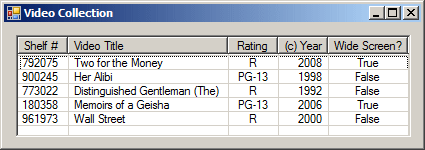
This would produce:
To perform a more particular operation on a class, you can create a method in it and then call that method in your LINQ statement. This means that, just as you can access a field or a property of a class, you can access any of its internal or public methods. You can then call the method. Here is an example of a method created in a class: using System;
using System.Linq;
using System.Drawing;
using System.Windows.Forms;
using System.Collections.Generic;
public class VideoCollection : Form
{
private ListBox lbxVideos;
public VideoCollection()
{
InitializeComponent();
}
void InitializeComponent()
{
lbxVideos = new ListBox();
lbxVideos.Location = new System.Drawing.Point(12, 12);
lbxVideos.Width = 185;
Controls.Add(lbxVideos);
Text = "Video Collection";
Size = new System.Drawing.Size(215, 145);
Controls.Add(cbxVideos);
Load += new EventHandler(VideoCollectionLoad);
}
private void VideoCollectionLoad(object sender, EventArgs e)
{
Video[] lstVideos = new Video[]
{
new Video(792075, "Two for the Money", "R", 2008, true),
new Video(900245, "Her Alibi", "PG-13", 1998, false),
new Video(773022, "Distinguished Gentleman (The)", "R", 1992, false),
new Video(180358, "Memoirs of a Geisha", "PG-13", 2006, true),
new Video(961973, "Wall Street", "R", 2000, false)
};
var vdos = from videos
in lstVideos
select videos.GetVideo();
foreach (var vdo in vdos)
lbxVideos.Items.Add(vdo);
}
[STAThread]
public static int Main()
{
System.Windows.Forms.Application.Run(new VideoCollection());
return 0;
}
}
public class Video
{
public int ShelfNumber { get; set; }
public string Title { get; set; }
public string Rating { get; set; }
public int YearReleased { get; set; }
public bool WideScreen { get; set; }
public Video(int id = 0,
string title = "",
string rating = "",
int year = 0,
bool hd = false)
{
ShelfNumber = id;
Title = title;
Rating = rating;
YearReleased = year;
WideScreen = hd;
}
internal string GetVideo()
{
return Title + ", " + YearReleased.ToString();
}
}
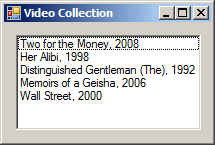
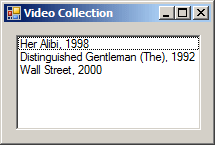
This would produce:
There are two types of built-in classes you can use in your application when it comes to LINQ. You can use any of the non-generic collection classes to create a list of values. The other category is the generic collection classes.
As a member of a class can be used in a query, you can apply a condition to a particular field of property to check something. The formula to follow is: var SubListName = from ValueHolder in List where ValueHolder.ClassMember Condition select ValueHolder; Remember that the operators are ==, <, <=, >, >=, and !=. The logical rules for the Condition are the same reviewed for primitive values. Here is an example: var vdos = from videos
in lstVideos
where videos.WideScreen == true
select videos.GetVideo();
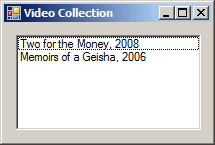
This would produce:
Remember that, to negate a condition, precede it with the ! operator. Here is an example: var vdos = from videos
in lstVideos
where !(videos.WideScreen == true)
select videos.GetVideo();
This would produce:
In the same way, you can negate a where condition that involves any appropriate value.
Sorting the members of a primitive-based list is quite easy. This is because the structure of each data type implement the IComparable interface.Since each member of a class holds a category of values, you can use a class member as a basis to arrange how a query displays its values, in alphabetical order, in chronological order, etc. Remember that the keyword to sort records is orderdy. You can apply that operator to the class member of your choice. Here is an example: var vdos = from videos
in lstVideos
orderby videos.Title
select videos;
By default, a list is sorted in alphabetical, chronological, or incrementing, etc, order. This is referred to as ascending order. In fact, to indicate it, you can follow the orderby statement with the ascending keyword. Here is an example: var vdos = from videos
in lstVideos
orderby videos.Title ascending
select videos;
On the other hand, if you want to sort records in reverse order, apply the descending keyword to your orderby statement in place of the ascending keyword. Here is an example: var vdos = from videos
in lstVideos
orderby videos.YearReleased descending
select videos;
If necessary, you can use a where condition when sorting the records. This allows you to sort only restricted list of records. Here is an example: using System;
using System.Linq;
using System.Drawing;
using System.Windows.Forms;
using System.Collections.Generic;
public class VideoCollection : Form
{
private ColumnHeader colShelfNumber;
private ColumnHeader colTitle;
private ColumnHeader colRating;
private ColumnHeader colYearReleased;
private ColumnHeader colWideScreen;
ListView lvwCollection;
public VideoCollection()
{
InitializeComponent();
}
void InitializeComponent()
{
lvwCollection = new ListView();
lvwCollection.Anchor = AnchorStyles.Left | AnchorStyles.Top |
AnchorStyles.Right | AnchorStyles.Bottom;
lvwCollection.FullRowSelect = true;
lvwCollection.GridLines = true;
lvwCollection.Location = new Point(12, 12);
lvwCollection.Size = new System.Drawing.Size(395, 102);
lvwCollection.View = View.Details;
colShelfNumber = new ColumnHeader();
colShelfNumber.Text = "Shelf #";
colShelfNumber.Width = 50;
lvwCollection.Columns.Add(colShelfNumber);
colTitle = new ColumnHeader();
colTitle.Text = "Video Title";
colTitle.Width = 160;
lvwCollection.Columns.Add(colTitle);
colRating = new ColumnHeader();
colRating.Text = "Rating";
colRating.Width = 50;
colRating.TextAlign = HorizontalAlignment.Center;
lvwCollection.Columns.Add(colRating);
colYearReleased = new ColumnHeader();
colYearReleased.Text = "(c) Year";
colYearReleased.Width = 50;
colYearReleased.TextAlign = HorizontalAlignment.Right;
lvwCollection.Columns.Add(colYearReleased);
colWideScreen = new ColumnHeader();
colWideScreen.Text = "Wide Screen?";
colWideScreen.Width = 80;
colWideScreen.TextAlign = HorizontalAlignment.Center;
lvwCollection.Columns.Add(colWideScreen);
Text = "Video Collection";
Size = new System.Drawing.Size(425, 150);
Controls.Add(lvwCollection);
Load += new EventHandler(VideoCollectionLoad);
}
private void VideoCollectionLoad(object sender, EventArgs e)
{
Video[] lstVideos = new Video[]
{
new Video(274880, "Platoon", "R", 1986, false),
new Video(792075, "Two for the Money", "R", 2008, true),
new Video(283748, "Cousin Vinny (My)", "R", 1992, false),
new Video(593940, "Natural Born Killers", "R", 1994, true),
new Video(900245, "Her Alibi", "PG-13", 1998, false),
new Video(773022, "Distinguished Gentleman (The)", "R", 1992, false),
new Video(961973, "Wall Street", "R", 2000, false),
new Video(180358, "Memoirs of a Geisha", "PG-13", 2006, true)
};
var vdos = from videos
in lstVideos
orderby videos.YearReleased
where videos.WideScreen == false
select videos;
foreach (var vdo in vdos)
{
ListViewItem lviCollection = new ListViewItem(vdo.ShelfNumber.ToString());
lviCollection.SubItems.Add(vdo.Title);
lviCollection.SubItems.Add(vdo.Rating);
lviCollection.SubItems.Add(vdo.YearReleased.ToString());
lviCollection.SubItems.Add(vdo.WideScreen.ToString());
lvwCollection.Items.Add(lviCollection);
}
}
[STAThread]
public static int Main()
{
System.Windows.Forms.Application.Run(new VideoCollection());
return 0;
}
}
public class Video
{
public int ShelfNumber { get; set; }
public string Title { get; set; }
public string Rating { get; set; }
public int YearReleased { get; set; }
public bool WideScreen { get; set; }
public Video(int id = 0,
string title = "",
string rating = "",
int year = 0,
bool hd = false)
{
ShelfNumber = id;
Title = title;
Rating = rating;
YearReleased = year;
WideScreen = hd;
}
}
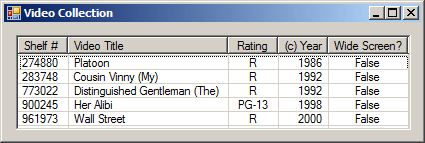
This would produce:
The orderby statement can come before or after the where condition.
A logical conjunction combine many Boolean expressions using the C#' && operator. If your query uses a collection of objects, apply each condition on a member of the class. Each condition can (and should) apply to a different class member. Here is an example: using System;
using System.Linq;
using System.Drawing;
using System.Windows.Forms;
using System.Collections.Generic;
public class Video
{
public int ShelfNumber { get; set; }
public string Title { get; set; }
public string Director { get; set; }
public string Rating { get; set; }
public int YearReleased { get; set; }
public bool WideScreen { get; set; }
public Video(int id = 0,
string title = "",
string dir = "",
string rating = "",
int year = 0,
bool hd = false)
{
ShelfNumber = id;
Title = title;
Director = dir;
Rating = rating;
YearReleased = year;
WideScreen = hd;
}
}
public class VideoCollection : Form
{
private ColumnHeader colShelfNumber;
private ColumnHeader colTitle;
private ColumnHeader colDirector;
private ColumnHeader colRating;
private ColumnHeader colYearReleased;
private ColumnHeader colWideScreen;
ListView lvwCollection;
public VideoCollection()
{
InitializeComponent();
}
void InitializeComponent()
{
lvwCollection = new ListView();
lvwCollection.Anchor = AnchorStyles.Left | AnchorStyles.Top |
AnchorStyles.Right | AnchorStyles.Bottom;
lvwCollection.FullRowSelect = true;
lvwCollection.GridLines = true;
lvwCollection.Location = new Point(12, 12);
lvwCollection.Size = new System.Drawing.Size(495, 137);
lvwCollection.View = View.Details;
colShelfNumber = new ColumnHeader();
colShelfNumber.Text = "Shelf #";
colShelfNumber.Width = 50;
lvwCollection.Columns.Add(colShelfNumber);
colTitle = new ColumnHeader();
colTitle.Text = "Video Title";
colTitle.Width = 160;
lvwCollection.Columns.Add(colTitle);
colDirector = new ColumnHeader();
colDirector.Text = "Director";
colDirector.Width = 100;
lvwCollection.Columns.Add(colDirector);
colRating = new ColumnHeader();
colRating.Text = "Rating";
colRating.Width = 50;
colRating.TextAlign = HorizontalAlignment.Center;
lvwCollection.Columns.Add(colRating);
colYearReleased = new ColumnHeader();
colYearReleased.Text = "(c) Year";
colYearReleased.Width = 50;
colYearReleased.TextAlign = HorizontalAlignment.Right;
lvwCollection.Columns.Add(colYearReleased);
colWideScreen = new ColumnHeader();
colWideScreen.Text = "Wide Screen?";
colWideScreen.Width = 80;
colWideScreen.TextAlign = HorizontalAlignment.Center;
lvwCollection.Columns.Add(colWideScreen);
Text = "Video Collection";
MaximizeBox = false;
Size = new System.Drawing.Size(525, 188);
Controls.Add(lvwCollection);
Load += new EventHandler(VideoCollectionLoad);
}
private void VideoCollectionLoad(object sender, EventArgs e)
{
Video[] lstVideos = new Video[]
{
new Video(274880, "Platoon", "Oliver Stone", "R", 1986, false),
new Video(792075, "Two for the Money", "D.J. Caruso", "R", 2008, true),
new Video(283748, "Cousin Vinny (My)", "Jonathan Lynn", "R", 1992, false),
new Video(593940, "Natural Born Killers", "Oliver Stone", "R", 1994, true),
new Video(900245, "Her Alibi", "Bruce Beresford", "PG-13", 1998, false),
new Video(773022, "Distinguished Gentleman (The)", "Jonathan Lynn", "R", 1992, false),
new Video(961973, "Wall Street", "Oliver Stone", "R", 2000, false),
new Video(180358, "Memoirs of a Geisha", "Rob Marshall", "PG-13", 2006, true)
};
var vdos = from videos
in lstVideos
where videos.Director == "Oliver Stone" && videos.WideScreen == false
select videos;
foreach (var vdo in vdos)
{
ListViewItem lviCollection = new ListViewItem(vdo.ShelfNumber.ToString());
lviCollection.SubItems.Add(vdo.Title);
lviCollection.SubItems.Add(vdo.Director);
lviCollection.SubItems.Add(vdo.Rating);
lviCollection.SubItems.Add(vdo.YearReleased.ToString());
lviCollection.SubItems.Add(vdo.WideScreen.ToString());
lvwCollection.Items.Add(lviCollection);
}
}
[STAThread]
public static int Main()
{
System.Windows.Forms.Application.Run(new VideoCollection());
return 0;
}
}
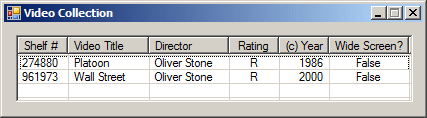
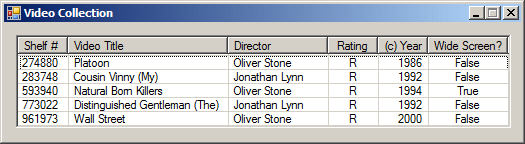
This would produce:
Remember that, to make the statement easier to read and figure out, you should include each part in its parentheses: var vdos = from videos
in lstVideos
where (videos.Director == "Oliver Stone") && (videos.WideScreen == false)
select videos;
Or better yet: var vdos = from videos
in lstVideos
where ((videos.Director == "Oliver Stone") && (videos.WideScreen == false))
select videos;
The result would be the same as above. To negate the conjunction, precede it with a ! operator. You can also arrange the list in an order based on a member of the class and using the orderby operator. Here is an example: var vdos = from videos
in lstVideos
where !(videos.Director == "Oliver Stone") && (videos.WideScreen == false)
orderby videos.YearReleased
select videos;
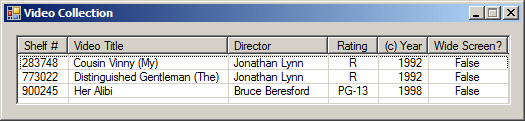
This would produce:
A logical disjunction is used to get the result of two or either conditions. This is done using the C#'s || operator that combines separater conditions that can apply to the same member of the class. Here is an example: var vdos = from videos
in lstVideos
where (videos.Director == "Oliver Stone") || (videos.Director == "Jonathan Lynn")
select videos;
This would produce:
The conditions can also each apply to a different member of the class. Here is an example: var vdos = from videos
in lstVideos
where (videos.Director == "Oliver Stone") || (videos.WideScreen == true)
select videos;
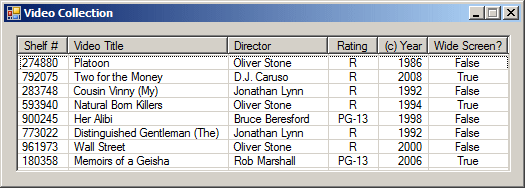
Remember that you can arrange the result using the orderby keyword applied to the class member of your choice. Here is an example: var vdos = from videos
in lstVideos
where (videos.Director == "Oliver Stone") || (videos.WideScreen == true)
orderby videos.Title
select videos;
|
|
|||||||||||||||||||||||||
|
|
||||||||||||||||||||||||||