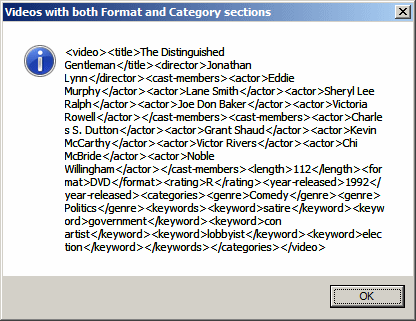
You can ask the XmlNodeList.SelectNodes() method (in fact the XML interpreter) to produce in its results only the parent nodes that have a combination of certain two nodes. To get such a result, add a first combination that includes one of the names of child nodes. Include a second pair of square brackets with the other name. Here is an example: using System;
using System.Xml;
using System.Windows.Forms;
public class Exercise
{
public static int Main()
{
XmlDocument xdVideos = new XmlDocument();
xdVideos.Load("../../Videos.xml");
XmlElement xeVideo = xdVideos.DocumentElement;
XmlNodeList xnlVideos = xeVideo.SelectNodes("/videos/video[format][categories]");
foreach(XmlNode xnVideo in xnlVideos)
MessageBox.Show(xnVideo.OuterXml,
"Videos with both Format and Category sections",
MessageBoxButtons.OK,
MessageBoxIcon.Information);
return 0;
}
}
This would produce:
The "and" operator is used to check that two child nodes are found under a parent node. To use it, create the square brackets and in them, provide the names of two child nodes separated by the and operator. Here is an example: XmlNodeList xnlVideos = xeVideo.SelectNodes("//videos/video[format and rating]");
In this case, only parent nodes that have both child nodes would be produced.
To produce the parent nodes that include one or the other child node, use the or operator. Here is an example: using System;
using System.Xml;
using System.Windows.Forms;
public class Exercise
{
public static int Main()
{
XmlDocument xdVideos = new XmlDocument();
xdVideos.Load("../../Videos.xml");
XmlElement xeVideo = xdVideos.DocumentElement;
XmlNodeList xnlVideos = xeVideo.SelectNodes("/videos/video[cast-members or categories]");
foreach(XmlNode xnVideo in xnlVideos)
MessageBox.Show(xnVideo.OuterXml,
"Videos with both Format and Category sections",
MessageBoxButtons.OK,
MessageBoxIcon.Information);
return 0;
}
}
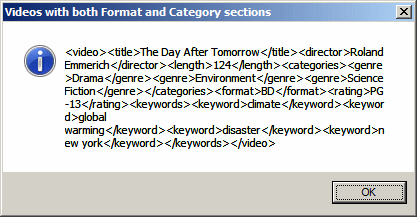
In this case, only parent nodes that have both child nodes would be produced:
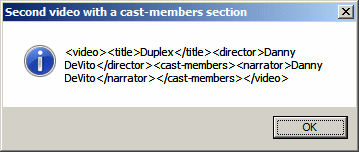
Once you have accessed the nodes, you can apply any concept we have reviewed so far to locate a specific node. Here is an example: using System;
using System.Xml;
using System.Windows.Forms;
public class Exercise
{
public static int Main()
{
XmlDocument xdVideos = new XmlDocument();
xdVideos.Load("../../Videos.xml");
XmlElement xeVideo = xdVideos.DocumentElement;
XmlNodeList xnlVideos = xeVideo.SelectNodes("/videos/video/cast-members[actor or narrator][. = 'Danny DeVito']");
foreach(XmlNode xnVideo in xnlVideos)
MessageBox.Show(xnVideo.InnerText,
"Videos with both Format and Category sections",
MessageBoxButtons.OK,
MessageBoxIcon.Information);
return 0;
}
}
To let you get only the nodes that do not have a certain child node, the XPath provides a Boolean function named not. To use it, pass the name of the node to it. Here is an example: using System;
using System.Xml;
using System.Windows.Forms;
public class Exercise
{
public static int Main()
{
XmlDocument xdVideos = new XmlDocument();
xdVideos.Load("../../Videos.xml");
XmlElement xeVideo = xdVideos.DocumentElement;
XmlNodeList xnlVideos = xeVideo.SelectNodes("/videos/video[not(cast-members)]");
foreach(XmlNode xnVideo in xnlVideos)
MessageBox.Show(xnVideo.OuterXml,
"Videos with both Format and Category sections",
MessageBoxButtons.OK,
MessageBoxIcon.Information);
return 0;
}
}
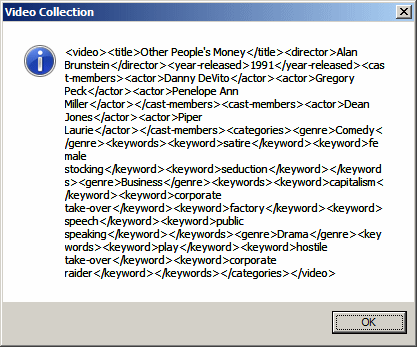
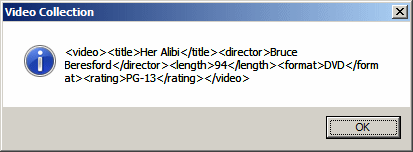
When the not() function returns, it produces only the nodes that don't have the child-node whose name was passed:
All the expressions we have seen so far produced only one result each. To let you combine two results into one, the XPath language provides the | operator. It must be applied between two expressions. Here is an example: using System;
using System.Xml;
using System.Windows.Forms;
public class Exercise
{
public static int Main()
{
XmlDocument xdVideos = new XmlDocument();
xdVideos.Load("Videos.xml");
XmlElement xeVideo = xdVideos.DocumentElement;
XmlNodeList xnlVideos = xeVideo.SelectNodes("//cast-members[actor='Danny DeVito'] | //cast-members[actor='Eddie Murphy']");
foreach(XmlNode xnVideo in xnlVideos)
MessageBox.Show(xnVideo.OuterXml,
"Videos with both Format and Category sections",
MessageBoxButtons.OK,
MessageBoxIcon.Information);
return 0;
}
}
|
|
|||||||||||||||||
|
|
||||||||||||||||||