|
The lpFileName argument is a null-terminated string that
represents the name of the file. You can explicitly specify it as a double-quoted string. If you want the user to save the current file or to open an existing file by the user specifying the name of the file, you can use an
Open file or a Save file common dialog boxes.
The dwDesiredAccess argument specifies the type of operation that will be performed on the file. It can have one or a combination of the following values:
- 0: Information about a device (floppy, CD, DVD, hard disk, etc) will be retrieved without a file being accessed
- DELETE: The file can be deleted
- READ_CONTROL: The read rights of the file can be accessed or read from
- STANDARD_RIGHTS_EXECUTE: Same as READ_CONTROL
- STANDARD_RIGHTS_READ: Same as READ_CONTROL
- STANDARD_RIGHTS_WRITE: Same as READ_CONTROL
- SYNCHRONIZE: The file can be synchronized
- WRITE_DAC: The discretionary access control list (DACL) can be modified
- WRITE_OWNER: The owner of the file can be changed
- FILE_EXECUTE: The file can be executed. For example, if the file being accessed is an application, it can be launched
- FILE_READ_DATA: The data of the file can be read from
- FILE_WRITE_DATA: Data can be written to the file
- FILE_APPEND_DATA: data can be added to end of the file
- FILE_READ_ATTRIBUTES: The attributes of the file can be accessed or viewed
- FILE_READ_EA: The extended attributes of the file can be read from
- FILE_WRITE_ATTRIBUTES: The attributes of the file can be modified
- FILE_WRITE_EA: The extended attributes of the file can be written to
- STANDARD_RIGHTS_READ: The read rights of the file can be read
- STANDARD_RIGHTS_WRITE: The write rights of the file can be modified
Omitting the 0 value, the above flags can be combined using the bitwise OR operator. Alternatively, you can pass one of the following values for a combination of flags:
- STANDARD_RIGHTS_REQUIRED: Combines DELETE, READ_CONTROL,
WRITE_DAC, and WRITE_OWNER
- STANDARD_RIGHTS_ALL: Combines DELETE, READ_CONTROL, WRITE_DAC,
WRITE_OWNER, and SYNCHRONIZE
- FILE_ALL_ACCESS: The user will be able to perform any allowed operation on the file
- GENERIC_EXECUTE: combines FILE_READ_ATRIBUTES, STANDARD_RIGHTS_EXECUTE, and
SYNCHRONIZE
- GENERIC_READ: combines FILE_READ_ATRIBUTES, FILE_READ_DATA,
FILE_READ_EA, STANDARD_RIGHTS_READ, and SYNCHRONIZE
- GENERIC_WRITE: combines FILE_APPEND_DATA, FILE_WRITE_ATRIBUTES,
FILE_WRITE_DATA, FILE_WRITE_EA, STANDARD_RIGHTS_WRITE, and
SYNCHRONIZE
The dwShareMode argument controls how the file can be shared. Its
possible values are:
- 0: The file will not be shared
- FILE_SHARE_DELETE: (Available only on Windows NT and 2000) The file can be shared and accessed by more than one user. Also, a user can request to delete it. If a user attempts to delete this file, his or her access rights will be checked
- FILE_SHARE_READ: The file can be accessed only if the user is allowed to read from it
- FILE_SHARE_WRITE: The file can be accessed only if the user is allowed to write to it
The lpSecurityAttributes argument specifies some security attributes used when creating the file. Such
attributes are defined as the SECURITY_ATTRIBUTES value. You can pass this argument as NULL, in which case the security attributes would be ignored.
The dwCreationDisposition argument specifies the behavior to adopt whether the file already exists or is just being created. It can have one of the following values:
- CREATE_ALWAYS: If the file does not exist, it will be created. If the file exists already, it will be destroyed and replaced by a new one with an attribute of Archive
- CREATE_NEW: If the file does not exist, it will be created. If the file already exists, the
CreateFile() function would fail
- OPEN_ALWAYS: If the file does not exist, it will be created. If the file already exists, it would be opened
- OPEN_EXISTING: If the file does not exist, the CreateFile() function would fail. If the file already exists, it would be opened
- TRUNCATE_EXISTING: If the file does not exist, the CreateFile() function would fail. If the file already exists, it must be opened with a
GENERIC_WRITE dwDesiredAccess flag and subsequently, its size would be reduced to 0 bytes
The dwFlagsAndAtributes argument specifies the attribute(s) to apply to the file. It can have one or a combination of the following values:
- FILE_ATTRIBUTE_ARCHIVE: The file will be marked as Archive
- FILE_ATTRIBUTE_ENCRYPTED: The file will be encrypted
- FILE_ATTRIBUTE_HIDDEN: The file will be marked as Hidden and consequently cannot display in Windows Explorer, My Computer, or any file viewing tool
- FILE_ATTRIBUTE_NORMAL: The flag must be used by itself and means that the file has ordinary attributes
- FILE_ATTRIBUTE_NOT_CONTENT_INDEXED: The file will not be indexed
- FILE_ATTRIBUTE_OFFLINE: The file will be accessed offline
- FILE_ATTRIBUTE_READONLY: The file will be marked as Read-Only. Users can open and read its contents but cannot modify or delete it
- FILE_ATTRIBUTE_SYSTEM: The file is part of the operating system
- FILE_ATTRIBUTE_TEMPORARY: The file will be marked as a temporary
object
The above attributes can also be combined with the following values:
- FILE_FLAG_BACKUP_SEMANTICS
- FILE_FLAG_DELETE_ON_CLOSE
- FILE_FLAG_NO_BUFFERING
- FILE_FLAG_OPEN_NO_RECALL
- FILE_FLAG_OPEN_REPARSE_POINT
- FILE_FLAG_OVERLAPPED
- FILE_FLAG_POSIX_SEMANTICS
- FILE_FLAG_RANDOM_ACCESS
- FILE_FLAG_SEQUENTIAL_SCAN
- FILE_FLAG_WRITE_THROUGH
The hTemplateFile argument is a handle to a template file. If you don't have or
can't use a file template (for example they are not supported on home operating systems), pass this argument as NULL.
If the CreateFile() function succeeds, it returns a handle to the file and you can use it as you see fit, to analyze it, to read its contents if allowed, or to write data to it if permitted. If this function fails, it returns
INVALID_HANDLE_VALUE.
|
 Practical
Learning: Processing Files with Win32
|
|
- Start a new MFC Application named EmplRecords
- Create it as Dialog Based
- Delete the TODO line and the OK button
- Design the dialog box as follows:
 |
| Control |
ID |
Caption |
Other Properties |
| Static Text |
 |
|
First Name: |
|
| Edit Control |
 |
IDC_FIRSTNAME |
|
|
| Button |
 |
IDC_SAVE |
Save |
|
| Static Text |
|
|
Last Name: |
|
| Edit Control |
|
IDC_LASTNAME |
|
|
| Edit Control |
|
IDC_OPEN |
Open |
|
| Static Text |
|
|
Date Hired: |
|
| Date Time Picker |
 |
IDC_DATEHIRED |
|
|
| Static Text |
|
|
Employment Status: |
|
| Combo Box |
 |
IDC_EMPLSTATUS |
|
Type: Drop List
Data: Full Time;Part Time;Contractor;
Intern;Seasonal |
| Static Text |
|
|
Hourly Salary: |
|
| Edit Control |
|
IDC_SALARY |
|
Align Text: Right |
| Button |
|
IDCANCEL |
Close |
|
|
- If you are using MSVC 6, press Ctrl + W to access the ClassWizard.
If you are using MSVC .NET, right-click each control and click Add Variable
- Add the control variables as follows:
| Identifier |
Value Variable |
| Type |
Name |
| IDC_FIRSTNAME |
CString |
m_FirstName |
| IDC_LASTNAME |
CString |
m_LastName |
| IDC_DATEHIRED |
CTime |
m_DateHired |
| IDC_EMPLSTATUS |
int |
m_EmplStatus |
| IDC_SALARY |
double |
m_HourlySalary |
- In the Class View, double-click CEmplRecordsDlg to access the
dialog's header file
- Create a class called CEmployee and declare a variable of it in the
dialog’s class:
// EmplRecordsDlg.h : header file
//

#pragma once
#include "atltime.h"

class CEmployee
{
public:
	CString FirstName;
	CString LastName;
	CTime DateHired;
	int EmplStatus;
	double HourlySalary;
};

// CEmplRecordsDlg dialog
class CEmplRecordsDlg : public CDialog
{
// Construction
public:
	CEmplRecordsDlg(CWnd* pParent = NULL);	// standard constructor

// Dialog Data
	enum { IDD = IDD_EMPLRECORDS_DIALOG };

	CEmployee empl;

	protected:
	virtual void DoDataExchange(CDataExchange* pDX);	// DDX/DDV support


// Implementation
protected:
	HICON m_hIcon;

	// Generated message map functions
	virtual BOOL OnInitDialog();
	afx_msg void OnPaint();
	afx_msg HCURSOR OnQueryDragIcon();
	DECLARE_MESSAGE_MAP()
public:
	afx_msg void OnCbnSelchangeEmplstatus();
	CString m_FirstName;
	CString m_LastName;
	CTime m_DateHired;
	int m_EmplStatus;
	double m_HourlySalary;
};
|
- Save all
As its name suggests, the CreateFile() function is used to create a stream. Actually, it initiates a file object. After
calling it, since it returns a file handle, your next action is to decide what to do with this handle and one of the actions you can take is to store a newly created file into a drive.
To save a file in Win32, you can call the WriteFile() function. Of course, in order to save a file, you must first retrieve the value to be saved. This value can be made of a single
variable or a complex class. Therefore, you must know what the value to save is made of because it must be supplied to the
WriteFile() function. The syntax of this function is:
BOOL WriteFile(HANDLE hFile,
                         LPCVOID lpBuffer,
                         DWORD nNumberOfBytesToWrite,
                         LPDWORD lpNumberOfBytesWritten,
                         LPOVERLAPPED lpOverlapped);
The hFile argument is the handle to the file. It is typically the return value of a call to the
CreateFile() function. Since in this case we are trying to save a file, the file should/must have been created with at least the
GENERIC_WRITE flag for the dwDesiredAccess argument of the CreateFile() function.
The lpBuffer argument is the object that will be saved. As you can see, it is defined as a pointer to
VOID, meaning that its type is not known in advance, which leaves it up to you to decide what type of value is being saved. It can be a C/C++ generic type (integer, character, floating-point value, or their variants). It can be
a Win32 type of object. It can also be a completely new type that you create as a simple C structure or a more elaborate
C++ class.
The nNumberOfBytesToWrite argument is the number of bytes to save. As the DWORD type indicates, it must be a positive integer.
The lpNumberOfBytesWritten argument is a positive integer returned by the function as the number of bytes that were written.
The lpOverlapped argument is necessary only if the file was created with the
FILE_FLAG_OVERLAPPED flag for the dwFlagsAndAtributes argument of the
CreateFile() function.
|
Practical
Learning: Saving a File
|
|
- On the dialog box, double-click the Save button and implement its event as
follows:
void CEmplRecordsDlg::OnBnClickedSave()
{
	// TODO: Add your control notification handler code here
	UpdateData();
	char strFilter[] = { "Employees Records (*.ers)|*.ers|All Files|*||" };
	CFileDialog dlgFile(FALSE, "ers", NULL, 0, strFilter);

	empl.FirstName    = this->m_FirstName;
	empl.LastName     = this->m_LastName;
//			empl.DateHired    = this->m_DateHired;
//			empl.EmplStatus   = this->m_EmplStatus;
//			empl.HourlySalary = this->m_HourlySalary;

	HANDLE hFile;
	DWORD dFileSize, dBytesWritten;
	BOOL bResult;

	if( dlgFile.DoModal() == IDOK )
	{
		hFile = CreateFile(dlgFile.GetFileName(),
			               GENERIC_READ | GENERIC_WRITE,
				   0,
				   NULL,
				   CREATE_ALWAYS,
				   FILE_ATTRIBUTE_NORMAL,
				   NULL);

		if( hFile == INVALID_HANDLE_VALUE )
		{
			AfxMessageBox("There was a problem saving the customer order");
			return;
		}

		dFileSize = sizeof(empl);

		if( dFileSize == 0xFFFFFFFF )
		{
			AfxMessageBox("Invalid file size");
			return;
		}

		bResult = WriteFile(hFile, &empl, dFileSize,
				&dBytesWritten, NULL );

		if( bResult == FALSE )
		{
			AfxMessageBox("The file could not be saved");
			return;
		}

		this->m_FirstName  = "";
		this->m_LastName   = "";
		this->m_DateHired  = CTime::GetCurrentTime();
		this->m_EmplStatus = 0;
		this->m_HourlySalary = 7.25;
		UpdateData(FALSE);

		if( hFile != INVALID_HANDLE_VALUE )
			CloseHandle(hFile);
	}
}
|
- Execute the application and create an employee record:
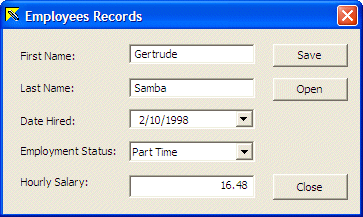
- Click the Save button to save the record and close the dialog box
- Save All
Besides saving a file, another operation you can perform on streams using the Win32 approach is to open an existing file. Reading a file is performed sing the
ReadFile() function. Its syntax is:
BOOL ReadFile(HANDLE hFile,
                        LPVOID lpBuffer,
                        DWORD nNumberOfBytesToRead,
                        LPDWORD lpNumberOfBytesRead,
                        LPOVERLAPPED lpOverlapped);
The hFile parameter is a handle to the file to be opened. It can be the return value of a previous call to the
CreateFile() function.
The lpBuffer parameter is the object or value to be
opened. As its type suggests, it can be anything and it is up to you to define what type of value is being opened.
The nNumberOfBytesToRead parameter is the number of bytes to read.
The lpNumberOfBytesRead parameter is a returned value of the function, indicating the number of bytes that were read.
The lpOverlapped parameter is used if the file is being opened as “overlapped”, in which case the
lpOverlapped argument of the CreateFile() function would have received the
FILE_FLAG_OVERLAPPED flag.
|
|
