The Size of a Value

The Size of a Value
Signed and Unsigned Values
Unary Operators: The Positive Operator +
Algebra uses a type of ruler to classify numbers. This ruler has a middle position of zero. The numbers on the left side of the 0 are referred to as negative while the numbers on the right side of the rulers are considered positive:
| -∞ | -6 | -5 | -4 | -3 | -2 | -1 | 1 | 2 | 3 | 4 | 5 | 6 | +∞ | |||
| 0 | ||||||||||||||||
| -∞ | -6 | -5 | -4 | -3 | -2 | -1 | 1 | 2 | 3 | 4 | 5 | 6 | +∞ | |||
A value on the right side of 0 is considered positive. To express that a number is positive, you can write a + sign on its left. Examples are +4, +228, +90335. In this case the + symbol is called a unary operator because it acts on only one operand.
The positive unary operator, when used, must be positioned on the left side of its operand, never on the right side.
An Unsigned Value
As a mathematical convention, when a value is positive, you don't need to express it with the + operator. Just writing the number without any symbol signifies that the number is positive. Therefore, the numbers +4, +228, and +90335 can be, and are better, expressed as 4, 228, 90335. Because the value doesn't display a sign, it is referred to as unsigned. Remember that an unsigned value is a value that doesn't need a sign because that value is considered positive.
To express a variable as positive or unsigned, you can just type it. here is an example:
#include <iostream>
using namespace std;

int main()
{
    int number = +802;

    cout << "The value of the number is: " << number << "\n";
}
A Signed Value
As you can see on the above ruler, in order to express any number on the left side of 0, it must be appended with a sign, namely the - symbol. Examples are -12, -448, -32706. A value accompanied by - is referred to as negative.
The - sign must be typed on the left side of the number it is used to negate.
Remember that if a number does not have a sign, it is considered positive. Therefore, whenever a number is negative, it MUST have a - sign. In the same way, if you want to change a value from positive to negative, you can just add a - sign to its left.
Here is an example that uses two variables. One has a positive value while the other has a negative value:
#include <iostream>
using namespace std;

int main()
{
    int number1 = 802;
    int number2 = -62;

    cout << "The value of the first number is: " << number1 << "\n";
    cout << "The value of the second number is: " << number2 << "\n";
}
Since you must apply a sign to the number, the value is referred to as signed.
Introduction to Values Sizes
Introduction to Storage
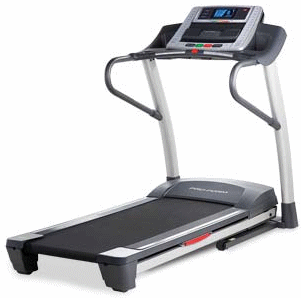
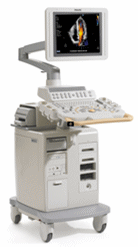
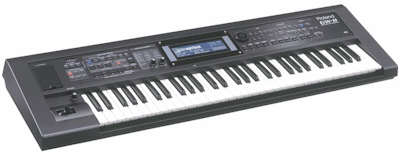
A computer is an electronic device that is used to solve one specific problem or to perform a job. There are various types of machine with different goals:
|
|
|
|
|
An electronic device can also be used to solve general types of problems.
A computer uses various values to do its jobs. The computer gets those values from a combination of sources:
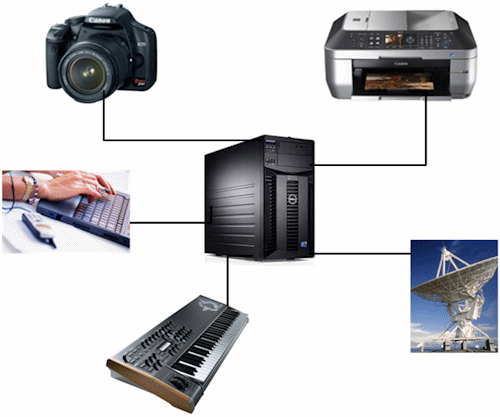
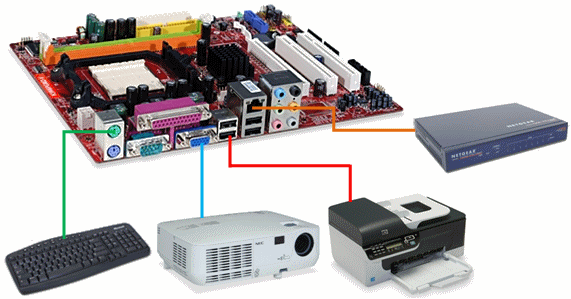
To manage these different connections, a computer uses a flat piece named a motherboard. To perform simple and complicated calculations, the computer uses an engine called a processor, and it is connected to the motherboard:
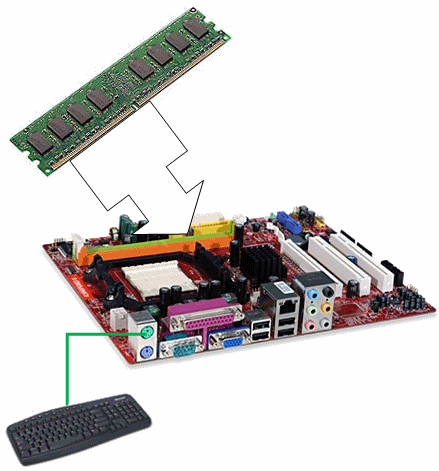
To store and manage values provided to it, a computer uses a memory, called the computer memory. The computer uses two categories of storage (memory): temporary and permanent. A temporary memory is an area used to hold information for a while and then lose it if that information is not needed anymore.
The memory area where the computer temporarily stores some values is called random access memory or RAM:
Let's illustrate memory as a small cake pan made of boxes or holes that can contain something:
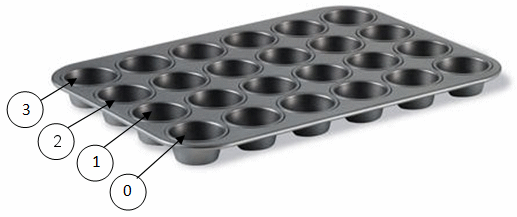
The RAM is huge, and your program is not the only one that uses the computer. For example, when the computer starts, it launches the operating system (OS). Other programs (and utilities) also occupy the RAM. When a program starts, the compiler reserves a certain area of memory:
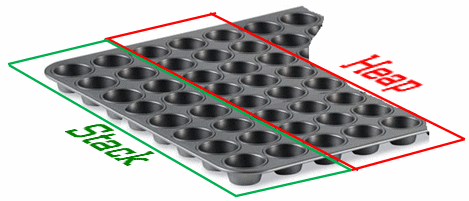
A variable is, or indicates, the amount of memory you want a value of your program to use.
Introduction to Numeric Representations
A computer program is a series of instructions that tell the computer what to do, when to do something, and how to do it. To understand the instructions it receives, the computer uses its own language (called the machine language) that uses a combination of 1s and 0s. Because that language is difficult to read (for us regular humans), the computer uses an intermediary language (or program) called an assembler that is closer to (or is in fact) English. The assembler transforms the instructions into a shorter version that uses new words but that are still in English.
The simplified language the computer understands uses a combination of 1s and 0s. This means that the assembler must bring your C++ instructions to 1s and 0s. The combinations or sequences of 1s and 0s indicate what needs to be done.
Introduction to the Decimal System
We are familiar with the system that uses 10 digits as 0, 1, 2, 3, 4, 5, 6, 7, 8, and 9. A combination of these 10 digits can produce any number. Because this system uses 10 digits. It is named the decimal system.
Introduction to the Binary System
As mentioned already, the language of the computer is made of combinations of two values: 1 and 0. This is called the binary system (because it is based on two values only). Examples of numbers in the binary system, or binary numbers, are 1, 10, 1001, or 1010110111. When you submit a value to a computer, the value must be changed into a combination of 1s and 0s.
Introduction to the Hexadecimal System
An alternative to represent a large number uses the 10 digits of the decimal system and uses the first 6 letters of the English language: A, B, C, D, E, and F or a, b, c, d, e, and f. This means that this system uses a combination of 16 characters to create any number. For this reason, it is called the hexadecimal system. To differentiate a hexadecimal number from a word, the number must start with 0x. Examples are 0x2, or 0xED8, or 0x962AAED3.
One of the characteristics of a number is to indicate whether it is lower than 0, equal to 0, or higher than 0. A number that is lower than 0 is said to be negative. Such a number must be preceded by -. If a number is higher than 0, it is said to be positive. Such a number can be preceded by + or no sign. The ability for a number to hold a sign makes it possible to say that such a number is signed. It is important to know that, when a number is said to be signed, that number can be negative or positive.
Any number that uses neither - or + is said to be positive and, because it doesn't use a sign, it is said to be unsigned. Normally, the 0 number doesn't use a sign.
Variable Declaration
Representing Memory Bits
We mentioned that, to store a value in the computer memory, you must indicate how much memory you will need and you must give it a name. The amount of memory you need is referred to as a data type. As you can imagine, different values require different amounts of memory. We also mentioned that the computer considers a value as a combination of 1s and 0s. The area of memory that holds a single piece of 1 or 0 is called a bit.
Consider a bit like a small object (like a cup of a cup cake) that can be full or can be empty:
When it is empty, a bit holds a value of 0. When it is full, it holds a value of 1:
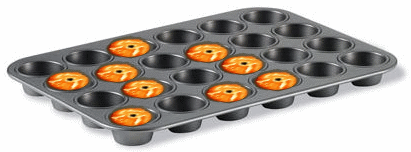
Different combinations of empty (0) and full (1) objects produce the necessary values.
Declaring a Variable
To use a combination of bits, you let the compiler know that you want a variable. This is referred to as declaring a variable. The amount of memory you need is called a data type.
We already know that, to declare a variable, you can use a data type and a name for the variable, in a formula as follows:
data-type variable-name;
Remember (from previous lessons) that, when you are declaring a variable, you are not required to initialize it. Otherwise, if you know the initial value you want the variable to hold, you can declare it using the auto keyword. In that case, you must initialize the variable.
A Value as Garbage
When you declare a variable, you ask the compiler to reserve a certain area and amount of memory to eventually hold a value for that variable. At that time, no clear value is stored in that reserved area of memory. Instead, the area gets filled with garbage (you can find out what that garbage is).
A Byte
A Combination of Four Bits
Although there are cases where you can use or access a bit, you cannot actually store a value in it. That is, you cannot ask the compiler to store the value 1 in a certain bit for you. This is because even the simplest value in the computer needs more than one bit to store itself. Still, the minimum combination of bits you can be concerned with is four (in some languages, or in some implementations of the Assembly language, a combination of four bits is called a nibble).
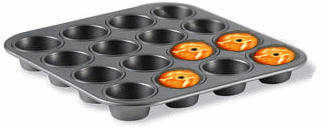
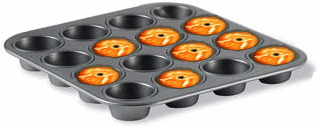
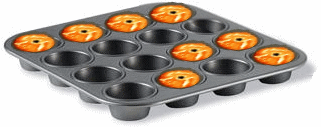
By creating different combinations of empty (0) and full (1) objects grouped in four, you can get 16 combinations:
 |
 |
 |
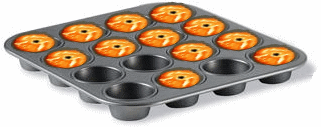 |
In a combination of four bits, the bits are counted as 0, 1, 2, and 3. The bit on the most right side is Bit 0 and it is called the low order bit (or LOBIT):
The last bit, the bit on the most left side, is Bit 3 and it is called the high order bit (or HIBIT).
If you represent the four-combination bits in binary formats, you get 0000, 0001, 0010, 0011, 0100, 0101, 0110, 0111, 1000, 1001, 1010, 1011, 1100, 1101, 1110, 1111, which produces 16 combinations. In decimal format, these combinations produce 0, 1, 2, 3, 4, 5, 6, 7, 8, 9, 10, 11, 12, 13, 14, and 15. In hexadecimal format, these combinations produce 0x0 (0x0000), 0x1 (or 0x0001), 0x2 (or 0x0002), 0x3 (or 0x0003), 0x4 (or 0x0004), 0x5 (0x0005), 0x6 (0x0006), 0x7 (or 0x0007), 0x8 (or 0x0008), 0x9 (or 0x0009), 0xA (or 0xa), 0xB (or 0xb), 0xC (or 0xc), 0xD (or 0xd), 0xE (or 0xe), and 0xF (or 0xF).
As a result, we get a table as follows:
| Decimal | Binary | Hexadecimal |
| 0 | 0000 | 0x0 |
| 1 | 0001 | 0x1 |
| 2 | 0010 | 0x2 |
| 3 | 0011 | 0x3 |
| 4 | 0100 | 0x4 |
| 5 | 0101 | 0x5 |
| 6 | 0110 | 0x6 |
| 7 | 0111 | 0x7 |
| 8 | 1000 | 0x8 |
| 9 | 1001 | 0x9 |
| 10 | 1010 | 0xA |
| 11 | 1011 | 0xB |
| 12 | 1100 | 0xC |
| 13 | 1101 | 0xD |
| 14 | 1110 | 0xE |
| 15 | 1111 | 0xF |
Table of Numeric Conversions
The minimum and maximum values in a combination of four bits are:
| Decimal | Hexadecimal | Binary | |
| Minimum | 0 | 0x0 | 0000 |
| Maximum | 15 | 0xf | 1111 |
You will never be concerned with combinations of four bits because you cannot store anything in it (these combinations are too small).
A Combination of 8 Bits
We presented them here for two reasons. First, you should be aware of such a thing as a combination of four bits so you will know where the number 16 comes from when you see it mentioned in different places. Second, it allowed us the introduce the byte.A byte is a combination of eight adjacent bits. The first bit, located on the most right side, is Bit 0. The last bit, on the most left side, is Bit 7:
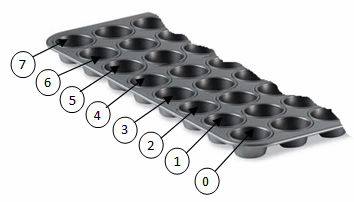
Bit 0 is called the least significant bit. It is also called the low order bit or LOBIT. Bit 7 is called the most significant bit. It is also called the high order bit or HIBIT.
If you create different combinations of empty (0) and full (1) objects grouped in eight, in binary formats, you get 00000000, 00000001, 00000010, 00000011, 00000100, 00000101, 00000110, 00000111, 00001000, 00001001, 00001010, 00001011, 00001100, 00001101, 00001110, 00001111, etc, up to 11111111. When a large number is represented in binary format, it can be difficult to read. An alternative is to create groups of four bits so that instead of writing 01001011, you would write 0100 1011.
To evaluate the number of combinations in decimal format, you use the number 2 that represents decimal, you elevate it to the power of the position of the bit (0, 1, 2, 3, 4, 5, 6, or 7), and you add the number. This can be done as follows:
27 + 26 + 25 + 24 + 23 + 22 + 21 + 20
= 128 + 64 + 32 + 16 + 8 + 4 + 2 + 1
= 255
Therefore, we get 255 possible combinations of eight bits. The combinations can also be represented in hexadecimal format as 0x1, 0x2, ..., 0xA, 0xA1, ..., 0xC8, ..., up to 0xFFFF.
In the three numeric systems, we get:
| Decimal | Hexadecimal | Binary | |
| Minimum | 0 | 0x0 | 0000 |
| Maximum | 255 | 0xff | 1111 1111 |
The minimum storage area offered by most (the majority of) processors is the byte. As you know already, a byte is a group of 8 consecutive bits. The amount of memory space offered by a byte can be used to store just a single symbol, such as those you see on your keyboard. These symbols, also called characters, have been organized by the American Standard Code for Information Exchange (ASCII) in a list; but, ASCII uses only 128 decimal numbers (based on a 7-bit format) to represent symbols counted from 0 to 127. To compensate for the remaining 1 bit, IBM used it to organize special characters, foreign language characters, mathematical symbols, small graphics, etc. Each one of these characters has a decimal, a hexadecimal, and a binary equivalent.
Introduction to Characters
To hold a character in its memory, the coputer uses 8 bits or a byte. To support the characters in most or almost all languages you can think of, the C++ language provides many data types you can choose from. As seen already, the types are divded in two categories: signed and unsigned. You will also have choices on how to specify the value of a character variable.
As the most fundamental way to support characters, one the keywords that the C++ language provides is named char. You can use it to declare a variable. Here is an example:
int main()
{
    char symbol;
}
A Value for a Character
A Symbol for a Character
A character can be any symbol you can think of. For example, it can be an alphabetical letter.
There are various ways you can specify the value of a character. The primary and simpler technique is to include the symbol between two single-quotes ' and '. Here are examples:
int main()
{
    // Classic character type
    char currency = '$';
    // Natural numeric character type
    __int8 category = 'A';
}
Displaying a Character
To display the value of a character variable, type cout << followed by either a single-quoted symbol or the name of a character variable. Here and examples:
#include <iostream>
using namespace std;

int main()
{
    char currency = '$';
    char category = 'A';

    // Displaying the value of a character variable
    cout << category;
    // Displaying the value of a character variable
    cout << currency;
}
You can also use other features, such as the endl operator. Here is an example:
#include <iostream>
using namespace std;

int main()
{
    char currency = '$';
    char category = 'A';

    cout << category;
    cout << endl;
    cout << currency;
}
This would produce:
A
$

Press any key to close this window . . .
Besides a letter, a character can be a digit. Remember that the value must be included in single-quotes.
A Number for a Character
Remember that when you ask the computer to store a symbol in its memory, the computer uses a combination of bits equivalent to a byte. The symbols are tabulated as ASCII characters and each symbol has a specific value. You use such a number to inidialize a character variable. When you do that, the compiler would find the symbol that corresponds to the number you would have provided. Consider the following character variables:
#include <iostream>
using namespace std;

int main()
{
    char a = 1;
    char b = 5;
    char c = 15;
    char d = 25;
    char e = 30;
    char f = 35;
    char g = 36;
    char h = 37;
    char i = 42;
    char j = 48;

    cout << a << endl;
    cout << b << endl;
    cout << c << endl;
    cout << d << endl;
    cout << e << endl;
    cout << f << endl;
    cout << g << endl;
    cout << h << endl;
    cout << i << endl;
    cout << j;
}
This would produce:
☺
♣
☼
↓
▲
#
$
%
*
0

Press any key to close this window . . .
Escape Sequences
When you use alphabetic characters in your program, the computer considers them as numbers but converts each to its corresponding character following the ASCII list. Counting values starting at 0, the first 32 characters don't display anything on the screen: they are called non-printing characters. They are obtained from pressing Ctrl and an alphabetic letter or a symbol. The exception is that the 8th to 12th characters are used to control some of the characters and they are called escape sequences. To use one of these escape sequences, you include it preceded by a backslash; you can include both in single-quotes. For example, the \n is used to ask the computer to stop a line and start the remaining part to the next line; this is referred to Carriage Return-Line Feed.
Here is the list of escape sequences:
| Escape Sequence | Name | ASCII value | Description |
| \a | Bell (alert) | 007 | Makes a sound from the computer |
| \b | Backspace | 008 | Takes the cursor back |
| \t | Horizontal Tab | 009 | Takes the cursor to the next tab stop |
| \n | New line | 010 | Takes the cursor to the beginning of the next line |
| \v | Vertical Tab | 011 | Performs a vertical tab |
| \f | Form feed | 012 | |
| \r | Carriage return | 013 | Causes a carriage return |
| \" | Double Quote | 034 | Displays a quotation mark (") |
| \' | Apostrophe | 039 | Displays an apostrophe (') |
| \? | Question mark | 063 | Displays a question mark |
| \\ | Backslash | 092 | Displays a backslash (\) |
| \0 | Null | 000 | Displays a null character |
You can write an escape sequence as part of a cout << operation. you have many options. As one technique, you can use an escape sequence after the << operator. In that case, after that operator, you can can write the escape sequence in single quotes. Here is an example:
#include <iostream>
using namespace std;

int main()
{
    cout << '\n';
}
You can also combine escape sequences.
Other Types for Characters
An 8-Bit Integer Type
Beside the char data type, to support character types, the C++ language provides a type named __int8. You can use it to declare a variable that would hold a character. You can then use the variable whereve you would use a char variable. Here are examples:
#include <iostream>
using namespace std;

int main()
{
    char   a = 48;
    __int8 b = 49;
    char   c = 50;
    __int8 d = 51;
    char   e = 52;
    __int8 f = 53;
    char   g = 54;
    __int8 h = 55;
    char   i = 56;
    __int8 j = 57;

    cout << a << '\n';
    cout << b << endl;
    cout << c << endl;
    cout << d << '\n';
    cout << e << endl;
    cout << f << '\n';
    cout << g << endl;
    cout << h << '\n';
    cout << i << '\n';
}
This would produce:
0
1
2
3
4
5
6
7
8
9

Press any key to close this window . . .
An Unsigned Character Type
A character is stored as a natural number. To indicate that the number that represents a character is positive, you can provide its value with a sign. Remember that such a number is referred to as unsigned. You can use that keyword to precede the character types we used above. This means that, to support unsigned characters, the C++ language provides the following date types: char, unsigned char, __int8, and unsigned __int8. You can declare a character variable using any of those types. Here are examples of variables of those types:
#include <iostream>
using namespace std;

int main()
{
    char            a = 1889;
    __int8          b = 1890;
    unsigned char   c = 1891;
    unsigned __int8 d = 1892;
    unsigned char   e = 1893;
    unsigned __int8 f = 1894;
    unsigned char   g = 1895;
    unsigned __int8 h = 1896;
    unsigned char   i = 1897;
    unsigned __int8 j = 1898;

    cout << a << endl;
    cout << b << endl;
    cout << c << endl;
    cout << d << endl;
    cout << e << endl;
    cout << f << endl;
    cout << g << endl;
    cout << h << endl;
    cout << i << endl;
    cout << j;
}
This would produce:
a
b
c
d
e
f
g
h
i
j

Press any key to close this window . . .
A Signed Character Type
Remember that a character is stored as a natural number. That number can be positive or negative. To indicate that the number that represents a character can be positive or negative, you can precede the type with the signed keyword. As a result, to support signed characters, the C++ language provides the following date types: char, signed char, __int8, and signed __int8. Therefore, you can declare a character variable using any of those types. When initializing the variable, you can assign a positive or negative number to it. Here are examples of variables of those types:
#include <iostream>
using namespace std;

int main()
{
    char          a = -191;
    __int8        b = -190;
    signed char   c = -189;
    signed __int8 d = -188;
    signed char   e = -187;
    signed __int8 f = -186;
    signed char   g = -185;
    signed __int8 h = -184;
    signed char   i = -183;
    signed __int8 j = -182;

    cout << a << endl;
    cout << b << endl;
    cout << c << endl;
    cout << d << endl;
    cout << e << endl;
    cout << f << endl;
    cout << g << endl;
    cout << h << endl;
    cout << i << endl;
    cout << j;
}
This would produce:
A
B
C
D
E
F
G
H
I
J

Press any key to close this window . . .
Other Topics on Characters
To allow you to know the amount of memory that a variable is using, the C++ language provides a unary operator named sizeof. There are two ways you can use that operator. To find out how much memory space a data type uses, type sizeof, followed by an empty space, followed by the name of a variable. Here are examples:
#include <iostream>
using namespace std;

int main()
{
    char            a = 1250;
    __int8          b = 1251;
    signed char     c = 1252;
    signed __int8   d = 1253;
    char            e = 1254;
    __int8          f = 1255;
    unsigned char   g = 1256;
    unsigned __int8 h = 1257;
    unsigned char   i = 1258;
    unsigned __int8 j = 1259;

    cout << "Symbol: " << a << ", size: " << sizeof a << " byte." << endl;
    cout << "Symbol: " << b << ", size: " << sizeof b << " byte." << endl;
    cout << "Symbol: " << c << ", size: " << sizeof c << " byte." << endl;
    cout << "Symbol: " << d << ", size: " << sizeof d << " byte." << endl;
    cout << "Symbol: " << e << ", size: " << sizeof e << " byte." << endl;
    cout << "Symbol: " << f << ", size: " << sizeof f << " byte." << endl;
    cout << "Symbol: " << g << ", size: " << sizeof g << " byte." << endl;
    cout << "Symbol: " << h << ", size: " << sizeof h << " byte." << endl;
    cout << "Symbol: " << i << ", size: " << sizeof i << " byte." << endl;
    cout << "Symbol: " << j << ", size: " << sizeof j << " byte.";
}
This would produce:
Symbol: Γ, size: 1 byte.
Symbol: π, size: 1 byte.
Symbol: Σ, size: 1 byte.
Symbol: σ, size: 1 byte.
Symbol: µ, size: 1 byte.
Symbol: τ, size: 1 byte.
Symbol: Φ, size: 1 byte.
Symbol: Θ, size: 1 byte.
Symbol: Ω, size: 1 byte.
Symbol: δ, size: 1 byte.

Press any key to close this window . . .
Another way to use the operator is to add some parentheses to it. Then, in those parentheses, type tyhe name of the character variable. Here are examples:
#include <iostream>
using namespace std;

int main()
{
    char            a = 314;
    __int8          b = 315;
    signed char     c = 316;
    signed __int8   d = 317;
    unsigned char   e = 318;
    __int8          f = 319;
    unsigned char   g = 320;
    __int8          h = 347;
    unsigned char   i = 348;
    unsigned __int8 j = 349;

    cout << "Symbol: " << a << ", size: " << sizeof(a) << " byte." << endl;
    cout << "Symbol: " << b << ", size: " << sizeof(b) << " byte." << endl;
    cout << "Symbol: " << c << ", size: " << sizeof(c) << " byte." << endl;
    cout << "Symbol: " << d << ", size: " << sizeof(d) << " byte." << endl;
    cout << "Symbol: " << e << ", size: " << sizeof(e) << " byte." << endl;
    cout << "Symbol: " << f << ", size: " << sizeof(f) << " byte." << endl;
    cout << "Symbol: " << g << ", size: " << sizeof(g) << " byte." << endl;
    cout << "Symbol: " << h << ", size: " << sizeof(h) << " byte." << endl;
    cout << "Symbol: " << i << ", size: " << sizeof(i) << " byte." << endl;
    cout << "Symbol: " << j << ", size: " << sizeof(j) << " byte." << endl;
}
This would produce:
Symbol: :, size: 1 byte.
Symbol: ;, size: 1 byte.
Symbol: <, size: 1 byte.
Symbol: =, size: 1 byte.
Symbol: >, size: 1 byte.
Symbol: ?, size: 1 byte.
Symbol: @, size: 1 byte.
Symbol: [, size: 1 byte.
Symbol: \, size: 1 byte.
Symbol: ], size: 1 byte.

Press any key to close this window . . .
Requesting a Character
So far, to use a character, we declared a variable and assigned a single-quoted value to the variable. In some cases, you will want the user to provide a symbol to your program. As seen already, to support this operation, the C++ language provides thecin operator. Therefore, to request a symbol from the user, type cin >> followed by a name of a character variable. Of course, you must first declare such a variable. Here is an example of requesting a character from the user:
#include <iostream>
using namespace std;

int main()
{
    char answer;

    cout << "Did you submit your time sheet?" << endl;
    cout << "Type y (or Y) for Yes. Type n or N for No. Type s or S for Not Sure: ";
    cin >> answer;

    cout << "-------------------------" << endl;
    cout << "Employee Record" << endl;
    cout << "Time Sheet Submitted: " << answer << endl;
    cout << "=========================";
}
Here is an example of running the programming:
Did you submit your time sheet?
Type y (or Y) for Yes. Type n or N for No. Type s or S for Not Sure: Y
-------------------------
Employee Record
Time Sheet Submitted: Y
=========================

Press any key to close this window . . .
|
|
|||
| Previous | Copyright © 1998-2026, FunctionX | Tuesday 23 September 2025, 15:10 | Next |
|
|
|||