Topics on Variables

Topics on Variables
Introduction
A group of 16 consecutive bits is called a word. The bits are counted from right to left starting at 0:
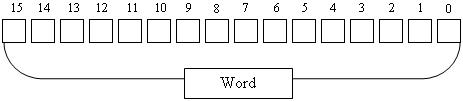
Considered as a group of 16 bits, the most right bit of a word, bit 0, is called the least significant bit or low order bit or LO bit or LOBIT. The most left bit, bit 15, is called the most significant bit or high order bit or HI bit or HIBIT. The other bits are referred to using their positions: bit 1, bit 2, bit 3, etc.
Two Bytes
A word is a group of two bytes. The group of the right 8 bits is called the least significant byte or low order byte or LO byte or LOBYTE. The other group is called the most significant byte or high order byte or HI byte or HIBYTE.
The representation of a word in binary format is 0000000000000000. To make it easier to read, you can group bits by 4, like this: 0000 0000 0000 0000. Therefore, the minimum binary value represented by a word is 0000 0000 0000 0000. The minimum decimal value of a word is 0. The minimum hexadecimal value you can store in a word is 0x0000000000000000. This is also represented as 0x00000000, or 0x0000, or 0x0. All these numbers produce the same value, which is 0x0.
The maximum binary value of a word is 1111 1111 1111 1111. To find out the maximum decimal value of a word, you can use the base 2 formula, filling out each bit with 1:
1*215+1*214+1*213 + 1*212 + 1*211 + 1*210 + 1*29 + 1*28 + 1*27 + 1*26 + 1*25 + 1*24 + 1*23 + 1*22 + 1*21 + 1*20
= 32768 + 16384 + 8192 + 4096 + 2048 + 1024 + 512 + 256 + 128 + 64 + 32 + 16 + 8 + 4 + 2 + 1
= 65535
To find out the maximum hexadecimal number you can store in a word, replace every group of 4 bits with an f or F:
| 1111 | 1111 | 1111 | 1111 | ||||
| f | f | f | f | ||||
|
|||||||
Introduction
To support natural numbers that can fit in 16 bits, or two bytes, or a word, the C++ language provides data types.
To let you store a natural number that requires two bytes, the C++ language provides a data type named short. You can declare a variable using this type.
Initializing an Integral Variable
After declaring a variable for a natural number, if you decide to initialize the variable, you must privide only digits, no space in the value, no special charact. Other than that, we saw that the maximum numeric value that can fit in a word is 65535. You can provide the value of the variable with a value between -32768 et 32767. Here is an example:
#include <iostream>
using namespace std;

int main()
{
    short schoolEffective = 1400;
}
Displaying an Integral Value in C++
To display a value of an integral value, type cout << followed by the name of an integral variable. Here is an example:
#include <iostream>
using namespace std;

int main()
{
    short schoolEffective = 1400;

    cout << "School Effective: " << schoolEffective << " students" << endl;
}
This would produce:
School Effective: 1400 students

Press any key to close this window . . .
To provide a data type with an explicit that indicates 16 bits of storage, the C++ languages provides a data type named __int16. You can use to declare and use a variable that can hold a number between -32,768 and 32,767. Here is an example:
#include <iostream>
using namespace std;

int main()
{
    __int16 age = 32;

    cout << "Age: " << age << endl;
}
This would produce:
Age: 32

Press any key to close this window . . .
Requesting a Value
So far, to use a number, we declared a variable and assigned a value to that variable. Sometimes, you will want the number to come from the user. We already know that, to support this operation, the C++ language provides the cin >> statement. Therefore, after declaring a variable for an integer, somewhere in the document, type cin >> followed by the name of the variable. Here is an example:
#include <iostream>
using namespace std;

int main()
{
    short number;

    cout << "How many lessons have you used so far? ";
    cin >> number;

    cout << "-----------------------------------------" << endl;
    cout << "C++ Programming" << endl;
    cout << "Number of reviewed lessons: " << number << endl;
    cout << "===============================";
}
When requested, the user must type only digits, not space nor special characters in the value typed. Here is an example of running the programming:
How many lessons have you used so far? 3
-----------------------------------------
C++ Programming
Number of reviewed lessons: 3
===============================

Press any key to close this window . . .
Remember that a small natural number can be positive or negative; and remember that when a number is written without a sign, that number is said to be unsigned. To support variables that use small numbers without a sign, the C++ languaged provides the unsigned keyword that can precede the short or the __int16 types. Based on this, you can declare a variable as unsigned short or the unsigned __int16. If you decide to initialize the variable, assign a small number between 0 and 65,535 to it. Here are example:
#include <iostream>
using namespace std;

int main()
{
    short schoolEffective = 1400;
    unsigned short numberOfPages = 842;
    __int16 age = 32;
    unsigned __int16 temperature = 325;

    cout << "School Effective: " << schoolEffective << " students" << endl;
    cout << "Age: " << age << endl;
    cout << "Number of Pages: " << numberOfPages << endl;
    cout << "Oven Temperature: " << temperature << endl;
}
This would produce:
School Effective: 1400 students
Age: 32
Number of Pages: 842
Oven Temperature: 325

Press any key to close this window . . .
Some time to time, you will deal with small number that must be negative or positive. To let you indicate that the value of a variable can be negative, you can precede its type with the signed keyword. As a result, the C++ language provides the signed short and the signed __int16 data types. You can use any of those types to declare a variable that can hold a small number between -32,768 and 32,767. If the number is negative, you must apply the negative sign to it. Here are examples:
#include <iostream>
using namespace std;

int main()
{
    short schoolEffective = 1400;
    signed short creditCardBalance = -8400;
    __int16 age = 28;
    signed __int16 temperature = -18;

    cout << "School Effective: " << schoolEffective << " students" << endl;
    cout << "Credit Card Balance: " << creditCardBalance << endl;
    cout << "Age: " << age << endl;
    cout << "Refrigerator Temperature: " << temperature << endl;
}
This would produce:
School Effective: 1400 students
Credit Card Balance: -8400
Age: 28
Refrigerator Temperature: -18

Press any key to close this window . . .
As an alterntivative to the unsigned short and the unsigned __int16 types, the C++ language provides a data type named wchar_t. You can use this type to declare a variable that would hold a small number between 0 and 65,535.
A Double-Word
Introduction
A double-word is a group of two consecutive words. This means that a double-word combines 4 bytes or 32 bits. The bits, counted from right to left, start at 0 and end at 31. The rightest bit, bit 0, is called the low order bit or LO bit or LOBIT. The most left bit, bit 31, is called the high order bit or HI bit or HIBIT. The other bits are called using their positions.
The group of the first 8 bits (from bit 0 to bit 7), which is the right byte, is called the low order byte, or LOBYTE. The group of the last 8 bits (from bit 24 to bit 31), which is the left byte, is called the high order byte, or HIBYTE. The other bytes are called by their positions. The group of the right 16 bits, or the right word, is called the low order word, or LOWORD. The group of the left 16 bits, or the left word, is called the high order word, or HIWORD.
The minimum binary number you can represent with a double-word is 0. The minimum decimal value of a double-word is 0. To find out the maximum decimal value of a word, you can use the base 2 formula giving a 1 value to each bit:
| 2n-1 | 230 | 229 | 228 | 227 | 226 | 225 | 224 |
| etc | 1,073,741,824 | 536,870,912 | 268,435,456 | 134,217,728 | 67,108,864 | 33,554,432 | 16,777,216 |
| 223 | 222 | 221 | 220 | 219 | 218 | 217 | 216 |
| 8,388,608 | 4,194,304 | 2,097,152 | 1,048,576 | 524,288 | 262,144 | 131,072 | 65,536 |
| 215 | 214 | 213 | 212 | 211 | 210 | 29 | 28 |
| 32,768 | 16,384 | 8,192 | 4,096 | 2,048 | 1,024 | 512 | 256 |
| 27 | 26 | 25 | 24 | 23 | 22 | 21 | 20 |
| 128 | 64 | 32 | 16 | 8 | 4 | 2 | 1 |
1*231+1*230+1*229 + 1*228 + 1*227 + 1*226 + 1*225 + 1*224 + 1*223 + 1*222 + 1*221 + 1*220 + 1*219 + 1*218 + 1*217 + 1*216 + 1*215 + 1*214 + 1*213 + 1*212 + 1*211 + 1*210 + 1*29 + 1*28 + 1*27 + 1*26 + 1*25 + 1*24 + 1*23 + 1*22 + 1*21 + 1*20
= 2,147,483,648 + 1,073,741,824 + 536,870,912 + 268,435,456 + 134,217,728 + 67,108,864 + 33,554,432 + 16,777,216 + 8,388,608 + 4,194,304 + 2,097,152 + 1,048,576 + 524,288 + 262,144 + 131,072 + 65,536 + 32,768 + 16,384 + 8,192 + 4,096 + 2,048 + 1,024 + 512 + 256 + 128 + 64 + 32 + 16 + 8 + 4 + 2 + 1
= 4,286,578,708
The minimum hexadecimal value you can store in a double-word is 0x00000000000000000000000000000000 which is the same as 0x0. To find out the maximum hexadecimal number you can represent with a word, replace every group of 4-bits with an f or F:
| 1111 | 1111 | 1111 | 1111 | 1111 | 1111 | 1111 | 1111 |
| f | f | f | f | f | f | f | f |
| = 0xffffffff = 0xFFFFFFFF | |||||||
To let you declare a variable that can hold a value for a 32-bit integer, the C++ language provides a data type named int. You can use it to declare a variable. Here is an example:
#include <iostream>
using namespace std;

int main()
{
    int ambiance;
]
If you want to initialize it assign a value between -2,147,483,648 and 2,147,483,647.
A Long Integer
As another data type that supports very large numbers, the C++ language provides a keyword named long. You can use it to declare a variable that can hold a natural number of 4,294,967,295.
A 32-Bit Integer
As another data type that supports 32 bits integers, the C++ language provides a type named __int32. You can use it to declare a variable for a natural number of 4 bytes or 32 bits.
A Signed Integer
To let you indicate that the value of a variable is for natural numbers that can be positive or negative, you can precede the integer data type with the signed keyword. As a result, to declare a variable that can hold a value that can fit in 32 bits, that is, a number between -2,147,483,648 and 2,147,484,647 negative or positive, you can specify its data type as signed int, signed long, or signed __int32.
Unsigned Integers
When dealing with numbers in your applications, sometimes you may want a certain variable to use only positive numbers. To support this, as we have seen already, the C++ language provides the unsigned keyword. Therefore, to use a variable that can hold only positive numbers, declare it with the unsigned int, the unsigned long, or the unsigned __int32 type.
Hexadecimal Numbers
When initializing an integral variable, instead of a decimal number, you can initialize it with a hexadecimal value whose decimal equivalent is less than 2,147,484,647. Here is an example:
#include <iostream>
using namespace std;

int main()
{
    int number = 0xF0488EA;
]
Introduction
To deal with a very large number that cannot fit in a double-word, you can consider a combination of 64 bits. The group can also be referred to as a quad-word. A quad-word is very large. It can store numbers in the range of -9,223,372,036,854,775,808 and 9,223,372,036,854,775,807.
To let you use a variable that can hold very large numbers, the C++ language provides a data type named long long. You can use it to declare a variable that can use very small to very large numbers.
As an alternative to long integers, to let you deal with very large numbers that may require up to 64 bits, the C++ language provides a data type named __int64.
using static System.Console;An Unsigned long Integer
As seen in previous sections, if you specify a number without a sign, the number is reffered to as unigned. If you want to indicate that a variable must hold only positive numbers, you can precede one of the above types with unsigned. Therefore, to let you declare a variable that must hold small to very large positive natural numbers, the C++ language provides data types as unsigned long long add unsigned __int64. You can use any of those types to declare a variable.
Signed long Integers
Sometimes you want a variable to be able to deal with very negative numbers or very positive positive. For such a variable, you can precede the long long or the __int64 with the signed keyword. As a result, to declare a variable for a variable that would use very low negative to very high positive numbers, you can use the signed long long or the signed __int64 data type.
Floating-Point Numbers
Introduction to Real Numbers
A real number is a number that displays a decimal part. This means that the number can be made of two sections separated by a symbol that is referred to as the Decimal Separator or Decimal Symbol. This symbol is different by language, country, group of languages, or group of countries. In US English, this symbol is the period as can be verified from the Regional (and Language) Settings of the Control Panel:

On both sides of the decimal symbol, digits are used to specify the value of the number. The number of digits on the right side of the symbol determines how much precision the number offers.
To let you use decimal numbers, the C++ language provides two data types.
Introduction to Floating-Point Numbers
Decimal numbers are categorized as single precision and high precision. A floating-point number with single precision is a number that can fit in 4 bytes. The value of such a number ranges from 3.4e-38 to 3.4e+38.
To support numbers with single precision, the C++ language provides a data type named float. You can use it to declare a variable that can hold a basic decimal number where precision is not required.
A Floating-Point Number with Double-Precision
Sometimes you want to deal with a decimal number that requires a certain level of precision. For such a scenario, you can ask the computer to store the number in 64 bits or 8 bytes or 4 words. Such a number can range from 1.79769313486232e308 to 1.79769313486232e308.
To let you declare a variable that can hold a floating-point number with double-precision, the C++ language provides two data types: double and long double. You can use any of these two types to declare a variabke.
Introduction to Source and Header Files
Introduction to Source Files
Application programming consists of giving instructions to the computer to do something. You can write such instructions in a computer document. You must save that document and give it a name with a .cpp extension. After saving it, the file is referred to as a source file. If you are creating your application using basic means, you can start a regular text file such as Notepad in Microsoft Windows, type your code, and save the file. If you are using a general purpuse programming environment such as Visual Studio Code, Ellipse, etc, when you create a C++ file, that programming environment can assist you.
If you are using Microsoft Visual Studio to create a project, if you create a C++ Console App, the studio would automatially add a source file for you. Still, at any time, you can create a new source file. To do that, in the Solution Explorer, below your project, right-click Source Files -> Add => New Item... This would display the Add New Item dialog box. In the middle list of the dialog box, click C++ File (.cpp). Accept or change the Name of the file. Click Add or press Enter. You would be presented with an empty document. You can then write the necessary code.
Introduction to Header Files
We have been introduction to techniques to declare variables and techniques to create many source files. As a result, you can declare as many variables as you need in different files and you can give them the necessary values. Sometimes, you may end up declaring a variable with the same name in different source files. Sometimes, that variable may mean to accomplish the same purpose. Consider that you have two files as follows:
StaffRecord.cpp
int dayHired = 29;
int monthHired = 9;
int yearHired = 2025;
Exercise.cpp
#include <iostream>
using namespace std;

int main()
{
    string firstName;
    string middleName;
    string lastName;

    int dHired = 29;
    int mHired = 9;
    int yrHired = 2025;

    firstName = "Paul";
    middleName = "Bertrand";
    lastName = "Yamaguchi";

    cout << "Employee Record" << endl;
    cout << "--------------------------------------" << endl;
    cout << "Employee Name: " << firstName << " " << middleName << " " << lastName << endl;
    cout << "Date Hired:    " << dHired << endl;
    cout << "======================================";
}
On one hand, one of the rules yoiu should observe in application programming is to avoid redundancy (avoid creating the same object twice, such as to avoid creatin the same fiels in two tables of a databases; therefore, avoid declaring the same variable in different files of the same project). On the other hand, if you need a certain variable in your application, if you declare it in different files of the same project, you may make a mistake, either the names (dHired, dayHired, or dateHired), in the way you are assigning values to the variables, in the way or when you are accessing a variable. As one way to address this problem, the C++ language provides the issue of header files.
A header file is a document that content items that other files, including source files, can use. For example, you can declare one or more variables in a header file, and then access that (those) variable(s) in one ore more source files. A header file is just a text file that contains code written in plain human language.
To create a header file, you can start any text editor, and type te code you want. You must then save the file. When doing that, give it a regular name. By tradition, the file should have the extension .h. Besides the .h extension, some programming enviroments or C++ implementions support additional extensions such as .hpp. If you are working in Microsoft Visual Studio, to create a header file, in the Solution Explorer, below your project, right-click Header Files -> Add => New Item... In the middle list of the Add New Item dialog box, click Header File (.h). Accept or change the Name of the file. If you provide just a name and click Add or press Enter, Microsoft Visual Studio would create the file and automatically add a .h extension to it. If you want a different extension, you must explicitly specify it.
Introduction to Directives
Introduction
A directive is a small piece of information that directs to the compiler to do something. The C++ language supports various directives for different goals. The directives don't follow the same rules and don't accomplish the same goals. You will know what directive to use or apply, when, and how to do it.
To create a directive, you write its code in a file, whether a header file or a source file. Most directives are created on one line of code. The code of a directive is made of two primary sections. The first part starts with # followed by a name. The name is provided by the C++ language. This means that you will be given the name to apply for the directive. After that, add a space, and define the rest of the directive.
Including a File
If you create a header file, you can share it with other files, whether other header files or source files. After creating a header file, to make another file use it, the C++ language provides the include word. To create the directive, somewhere in the document, usually in the top section, use the following formula:
#include "file-name"
As you can see, you type #include followed by a name of a header file inside double-quotes. The name must include its extension (.h or else). After typing that line, the contents of the header file becomes available to the document in which you wrote that directive.
|
|
|||
| Previous | Copyright © 1998-2026, FunctionX | Tuesday 23 September 2025, 15:10 | Next |
|
|
|||