Introduction to Logical Comparisons

Introduction to Logical Comparisons
Introduction to Conditions
Foundations of Comparisons
We are already familiar with numbers and strings. A value is said to be Boolean if can be evaluated as being true or being false.
A comparison consists of establishing a relationship between two values, such as to find out whether both values are equal or one of them is greated than the other, etc. To perform a comparison, you use two operands and an operator as in the following formula:
operand1 operator operand2
This is the basic formula of a Boolean expression.
 Practical Learning: Introducing Conditions
#include <iostream>
using namespace std;

int main()
{
    cout << "FUN DEPARTMENT STORE\n";
    cout << "==========================================\n";
    cout << "Item Preparation\n";
    cout << "------------------------------------------\n";
    cout << "Enter the following pieces of information\n";
    cout << "------------------------------------------\n";

    int discountRate = 75;
    double discountAmount = 0.00;
    double discountedPrice = 0.00;

    cout << "Original Price: ";
    double originalPrice;
    cin >> originalPrice;
    cout << "Days in Store:  ";
    int daysInStore;
    cin >> daysInStore;

    discountAmount = originalPrice * discountRate / 100;
    discountedPrice = originalPrice - discountAmount;

    cout << "+=+=+=+=+=+=+=+=+=+=+=+=+=+=+=+=+=+=+=+=+=\n";
    cout << "FUN DEPARTMENT STORE\n";
    cout << "==========================================\n";
    cout << "Store Inventory\n";
    cout << "------------------------------------------\n";
    cout << "Original Price:   " << originalPrice << '\n';
    cout << "Days in Store:    " << daysInStore << '\n';
    cout << "Discount Rate:    " << discountRate << "%\n";
    cout << "Discount Amount:  " << discountAmount << '\n';
    cout << "Discounted Price: " << discountedPrice << '\n';
    cout << "==========================================\n";
}
FUN DEPARTMENT STORE
==========================================
Item Preparation
------------------------------------------
Enter the following pieces of information
------------------------------------------
Original Price: 89.95
Days in Store:  28
+=+=+=+=+=+=+=+=+=+=+=+=+=+=+=+=+=+=+=+=+=
FUN DEPARTMENT STORE
==========================================
Store Inventory
------------------------------------------
Original Price:   89.95
Days in Store:    28
Discount Rate:    75%
Discount Amount:  67.4625
Discounted Price: 22.4875
==========================================

Press any key to close this window . . .
A conditional statement is a logical expression that produces a true or false result. You can then use that result as you want. To create a logical expression, you use a Boolean operator. To assist you with this, the C++ language provides an operator named if. The primary formula to use it is:
if(condition) statement;
If you are using Microsoft Visual Studio, to use a code snippet to create an if conditional statement, right-click the section where you want to add the code and click Snippet... Double-click Insert Snippet. In the list, double-click one of the if options.
The condition can have the following formula:
operand1 Boolean-operator operand2
Any of the operands can be a value or the name of a variable. The operator is a logical one. The whole expression is the condition. If the expression produces a true result, then the statement would execute.
If the if statement is short, you can write it on the same line with the condition that is being checked. This would be done as follows:
if( operand1 Boolean-operator operand2)
    statement;
If the statement is long, you can write it on a line different from that of the if condition. This would be done as follows:
if( operand1 Boolean-operator operand2) statement;
You can also write the statement on its own line even if the statement is short enough to fit on the same line with the condition.
The Body of a Conditional Statement
The statement, whether written on the same line as the if condition or on the next line, is called the body of the conditional statement.
Although the (simple) if statement is used to check one condition, it can lead to executing multiple dependent statements. If that's the case, enclose the group of statements between an opening curly bracket "{" and a closing curly bracket "}". This would be done as follows:
if( operand1 operator operand2)
{
    . . .
    . . .
    . . .
}
In this case, the section from { (included) to } (included) is also referred to as the body of the conditional statement. If you omit the brackets, only the statement or line of code that immediately follows the condition would be executed.
Fundamentals of Boolean Values
Introduction
A value is said to be Boolean if it is true or it is false. In fact, the two available Boolean values are true and false.
To let you declare a Boolean variable, the C++ language provides a data type named bool. Here is an example of declaring a Boolean variable:
int main()
{
    bool drinkingUnderAge;
}
Initializing a Boolean Variable
There are various ways you can initialize or change the value of a Boolean variable in C++. As one option, you can assign true or false to the variable. Here is an example:
int main()
{
    bool drinkingUnderAge = true;
}
In this case, you can also declare the variable as auto. In that case, you must initialize the variable. Remember that, in any case, after declaring a (Boolean) variable, you can later change its value by assigning an updated value to it. Here is an example:
int main()
{
    auto drinkingUnderAge = true;

    // Blah blah blah

    drinkingUnderAge = false;
}
Presenting a Boolean Value
To display the value of a Boolean variable to the console, pass the name of the variable to a cout << statement. Here are examples:
#include <iostream>
using namespace std;

int main()
{
    bool drunk = true;

    cout << "County Traffic System" << endl;

    cout << "---------------------------" << endl;
    cout << "The driver is drunk: " << drunk << endl;

    drunk = false;

    cout << "---------------------------" << endl;
    cout << "The driver is drunk: " << drunk << endl;
    cout << "===========================";
}
In C++, the Boolean false value has an integral value of 0. The Boolean true value has a value of 1. As a result, the above program produces:
County Traffic System
---------------------------
The driver is drunk: 1
---------------------------
The driver is drunk: 0
===========================

Press any key to close this window . . .
Earlier, we mentioned that there are various ways you can specify the value of a Boolean variable. Besides using False for the value, you can assign 0 to a Boolean variable. If you do that, the variable would have a value of False. On the other hand, to indicate that a Boolean variable as a true value, you can assign 1, any natural number, any character, any string, or any decimal number, to it. Consider the following example:
#include <iostream>
using namespace std;

int main()
{
    bool drunk = 93784;

    cout << "County Traffic System" << endl;

    cout << "---------------------------" << endl;
    cout << "The driver is drunk: " << drunk << endl;

    drunk = 0;

    cout << "---------------------------" << endl;
    cout << "The driver is drunk: " << drunk << endl;

    drunk = "y";

    cout << "---------------------------" << endl;
    cout << "The driver is drunk: " << drunk << endl;

    drunk = "Don't Know";

    cout << "---------------------------" << endl;
    cout << "The driver is drunk: " << drunk << endl;

    drunk = 7379.483;

    cout << "---------------------------" << endl;
    cout << "The driver is drunk: " << drunk << endl;

    drunk = "false";

    cout << "---------------------------" << endl;
    cout << "The driver is drunk: " << drunk << endl;
    cout << "===========================";
}
This would produce:
County Traffic System
---------------------------
The driver is drunk: 1
---------------------------
The driver is drunk: 0
---------------------------
The driver is drunk: 1
---------------------------
The driver is drunk: 1
---------------------------
The driver is drunk: 1
---------------------------
The driver is drunk: 1
===========================

Press any key to close this window . . .
As reviewed for the other data types, you can request the value of a Boolean variable from your users. The user must type "0" is the answer is False or any natural number if the answer is True. Consider the following code:
#include <iostream>
using namespace std;

int main()
{
    bool drunk;

    cout << "County Traffic System" << endl;
    cout << "The driver is drunk: ";
    cin >> drunk;

    cout << "---------------------------" << endl;
    cout << "The driver is drunk: " << drunk << endl;
    cout << "===========================";
}
Here is an example of executing the program:
County Traffic System
The driver is drunk: 0
---------------------------
The driver is drunk: 0
===========================

Press any key to close this window . . .
Here is another example of executing the program:
County Traffic System
The driver is drunk: 4378
---------------------------
The driver is drunk: 1
===========================

Press any key to close this window . . .
Assigning a Logical Expression to a Boolean Variable
We saw that, to initialize or specify the value of a Boolean variable, you can assign a true or false value. A Boolean variable can also be initialized with a Boolean expression. This would be done as follows:
bool variable = operand1 Boolean-operator operand2;
To make your code easy to read, you should include the logical expression in parentheses. This can be done as follows:
bool variable = (operand1 Boolean-operator operand2);
Fundamentals of Logical Operators
Introduction
As seen in our introduction, a logical comparison is used to establish the logical relationship between two values, a variable and a value, or two variables. There are various operators available to perform such comparisons.
A Value Less Than Another: <
To find out whether one value is lower than another, the operator to use is <. Its formula is:
Value1 < Value2
This operation can be illustrated as follows:
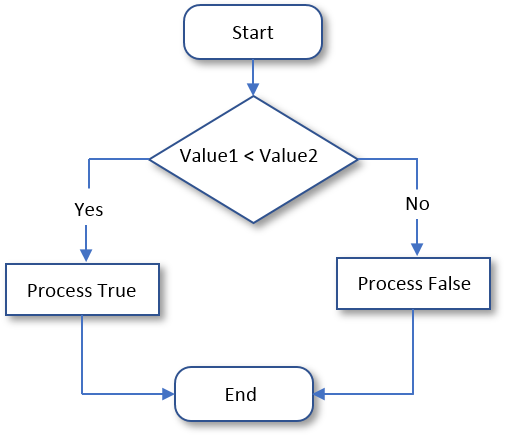
For a "Less Than" operation, the formula of the conditional statement is:
if(operand1 < operand2)
    statement(s);
Here is an example:
#include <iostream>
using namespace std;

int main()
{
    int salary = 66800;
    auto employmentStatus = "Full-Time";

    if (salary < 40000)
        employmentStatus = "Part-Time";

    cout << "Employee Record" << endl;
    cout << "-----------------------------" << endl;
    cout << "Yearly Salary:     " << salary << endl;
    cout << "Employment Status: " << employmentStatus << endl;
    cout << "=============================" << endl;
}
This would produce:
Employee Record
-----------------------------
Yearly Salary:     66800
Employment Status: Full-Time
=============================

Press any key to close this window . . .
Another way to use the < operator is to assign its operation to a variable. Here are examples:
#include <iostream>
using namespace std;

int main()
{
    int value1 = 212;
    int value2 = 246;
    int value3 = (value1 < value2);

    cout << "Value 1   = " << value1 << '\n';
    cout << "Value 2   = " << value2 << '\n';
    cout << value1 << " < " << value2 << " = " << value3 << '\n';
    cout << "----------------\n";

    int value4 = 246;
    int value5 = 212;
    int value6 = (value4 < value5);

    cout << "Value 4   = " << value4 << '\n';
    cout << "Value 5   = " << value5 << '\n';
    cout << value4 << " < " << value5 << " = " << value6 << '\n';
    cout << "================";
}
This would produce:
Value 1   = 212
Value 2   = 246
212 < 246 = 1
----------------
Value 4   = 246
Value 5   = 212
246 < 212 = 0
================
Press any key to close this window . . .
Practical Learning: Comparing for a Lesser Value
#include <iostream>
using namespace std;

int main()
{
    cout << "FUN DEPARTMENT STORE\n";
    cout << "==========================================\n";
    cout << "Item Preparation\n";
    cout << "------------------------------------------\n";
    cout << "Enter the following pieces of information\n";
    cout << "------------------------------------------\n";

    int discountRate = 75;
    double discountAmount = 0.00;
    double discountedPrice = 0.00;

    cout << "Original Price: ";
    double originalPrice;
    cin >> originalPrice;
    cout << "Days in Store:  ";
    int daysInStore;
    cin >> daysInStore;

    if (daysInStore < 60)
        discountRate = 50;
    if (daysInStore < 45)
        discountRate = 35;
    if (daysInStore < 35)
        discountRate = 15;
    if (daysInStore < 15)
        discountRate = 0;

    discountAmount = originalPrice * discountRate / 100;
    discountedPrice = originalPrice - discountAmount;

    cout << "+=+=+=+=+=+=+=+=+=+=+=+=+=+=+=+=+=+=+=+=+=\n";
    cout << "FUN DEPARTMENT STORE\n";
    cout << "==========================================\n";
    cout << "Store Inventory\n";
    cout << "------------------------------------------\n";
    cout << "Original Price:   " << originalPrice << '\n';
    cout << "Days in Store:    " << daysInStore << '\n';
    cout << "Discount Rate:    " << discountRate << "%\n";
    cout << "Discount Amount:  " << discountAmount << '\n';
    cout << "Discounted Price: " << discountedPrice << '\n';
    cout << "==========================================\n";
}FUN DEPARTMENT STORE ========================================== Item Preparation ------------------------------------------ Enter the following pieces of information ------------------------------------------ Original Price: 89.95 Days in Store: 28 +=+=+=+=+=+=+=+=+=+=+=+=+=+=+=+=+=+=+=+=+= FUN DEPARTMENT STORE ========================================== Store Inventory ------------------------------------------ Original Price: 89.95 Days in Store: 28 Discount Rate: 15% Discount Amount: 13.4925 Discounted Price: 76.4575 ========================================== Press any key to close this window . . .
FUN DEPARTMENT STORE
==========================================
Item Preparation
------------------------------------------
Enter the following pieces of information
------------------------------------------
Original Price: 89.95
Days in Store:  46
+=+=+=+=+=+=+=+=+=+=+=+=+=+=+=+=+=+=+=+=+=
FUN DEPARTMENT STORE
==========================================
Store Inventory
------------------------------------------
Original Price:   89.95
Days in Store:    46
Discount Rate:    50%
Discount Amount:  44.975
Discounted Price: 44.975
==========================================

Press any key to close this window . . .
#include <iostream>
using namespace std;

int main()
{
    string firstName, lastName;
    double hSalary;
    double mon, tue, wed, thu, fri;

    cout << "FUN DEPARTMENT STORE\n";
    cout << "==========================================\n";
    cout << "Payroll Preparation\n";
    cout << "------------------------------------------\n";
    cout << "Enter the following pieces of information\n";
    cout << "------------------------------------------\n";
    cout << "Employee Information\n";
    cout << "------------------------------------------\n";
    cout << "First Name:    ";
    cin >> firstName;
    cout << "Last Name:     ";
    cin >> lastName;

    cout << "Hourly Salary: ";
    cin >> hSalary;
    cout << "------------------------------------------\n";
    cout << "Time worked\n";
    cout << "------------------------------------------\n";

    cout << "Monday:        ";
    cin >> mon;
    cout << "Tuesday:       ";
    cin >> tue;
    cout << "Wednesday:     ";
    cin >> wed;
    cout << "Thursday:      ";
    cin >> thu;
    cout << "Friday:        ";
    cin >> fri;

    double timeWorked = mon + tue + wed + thu + fri;

    double netPay = hSalary * timeWorked;

    cout << "+=+=+=+=+=+=+=+=+=+=+=+=+=+=+=+=+=+=+=+=+=\n";
    cout << "FUN DEPARTMENT STORE\n";
    cout << "==========================================\n";
    cout << "Payroll Evaluation\n";
    cout << "==========================================\n";
    cout << "Employee Information\n";
    cout << "------------------------------------------\n";
    cout << "Full Name:\t\t" << firstName << " " << lastName << '\n';
    cout << "Hourly Salary:\t\t" << hSalary << '\n';
    cout << "==========================================\n";
    cout << "Time Worked Summary\n";
    cout << "------------------------------------------";
    cout << "\n\tMonday:\t\t" << mon;
    cout << "\n\tTuesday:\t" << tue;
    cout << "\n\tWednesday:\t" << wed;
    cout << "\n\tThursday:\t" << thu;
    cout << "\n\tFriday: \t" << fri << '\n';
    cout << "------------------------------------------\n";
    cout << "Pay Summary\n";
    cout << "------------------------------------------";
    cout << "\n\tTotal Time:\t" << timeWorked << '\n';
    cout << "==========================================";
    cout << "\n\tNet Pay:\t" << netPay;
    cout << "\n==========================================";
}| First Name: | Michael |
| Last Name: | Carlock |
| Hourly Salary: | 28.25 |
| Monday | 7 |
| Tuesday: | 8 |
| Wednesday: | 6.5 |
| Thursday: | 8.5 |
| Friday: | 6.5 |
FUN DEPARTMENT STORE
==========================================
Payroll Preparation
------------------------------------------
Enter the following pieces of information
------------------------------------------
Employee Information
------------------------------------------
First Name:    Michael
Last Name:     Carlock
Hourly Salary: 28.25
------------------------------------------
Time worked
------------------------------------------
Monday:        7
Tuesday:       8
Wednesday:     6.5
Thursday:      8.5
Friday:        6.5
+=+=+=+=+=+=+=+=+=+=+=+=+=+=+=+=+=+=+=+=+=
FUN DEPARTMENT STORE
==========================================
Payroll Evaluation
==========================================
Employee Information
------------------------------------------
Full Name:              Michael Carlock
Hourly Salary:          28.25
==========================================
Time Worked Summary
------------------------------------------
        Monday:         7
        Tuesday:        8
        Wednesday:      6.5
        Thursday:       8.5
        Friday:         6.5
------------------------------------------
Pay Summary
------------------------------------------
        Total Time:     36.5
==========================================
        Net Pay:        1031.12
==========================================
Press any key to close this window . . .| First Name: | Catherine |
| Last Name: | Busbey |
| Hourly Salary: | 24.37 |
| Monday | 9.50 |
| Tuesday: | 8 |
| Wednesday: | 10.50 |
| Thursday: | 9 |
| Friday: | 10.50 |
FUN DEPARTMENT STORE
==========================================
Payroll Preparation
------------------------------------------
Enter the following pieces of information
------------------------------------------
Employee Information
------------------------------------------
First Name:    Catherine
Last Name:     Busbey
Hourly Salary: 24.37
------------------------------------------
Time worked
------------------------------------------
Monday:        9.5
Tuesday:       8
Wednesday:     10.5
Thursday:      9
Friday:        10.5
+=+=+=+=+=+=+=+=+=+=+=+=+=+=+=+=+=+=+=+=+=
FUN DEPARTMENT STORE
==========================================
Payroll Evaluation
==========================================
Employee Information
------------------------------------------
Full Name:              Catherine Busbey
Hourly Salary:          24.37
==========================================
Time Worked Summary
------------------------------------------
        Monday:         9.5
        Tuesday:        8
        Wednesday:      10.5
        Thursday:       9
        Friday:         10.5
------------------------------------------
Pay Summary
------------------------------------------
        Total Time:     47.5
==========================================
        Net Pay:        1157.58
==========================================
Press any key to close this window . . .A Value Greater Than Another: >
To find out if one value is greater than the other, the operator to use is >. Its formula is:
value1 > value2
Both operands, in this case value1 and value2, can be variables or the left operand can be a variable while the right operand is a character, a string or a number. If the value on the left of the > operator is greater than the value on the right side or a constant, the comparison produces a True. Otherwise, the comparison renders False. This operation can be illustrated as follows:

Here is an example:
#include <iostream>
using namespace std;

int main()
{
    int salary = 48250;
    auto employmentStatus = "Part-Time";

    if (salary > 50000)
        employmentStatus = "Full-Time";

    cout << "Employee Record" << endl;
    cout << "-----------------------------" << endl;
    cout << "Yearly Salary:     " << salary << endl;
    cout << "Employment Status: " << employmentStatus << endl;
    cout << "=============================" << endl;
}
This would produce:
Employee Record
-----------------------------
Yearly Salary:     48250
Employment Status: Part-Time
=============================

Press any key to close this window . . .
Another way to use the > operator is to assign its operation to a variable. Here are examples:
#include <iostream>
using namespace std;

int main()
{
    int value1 = 212;
    int value2 = 246;
    int value3 = (value1 > value2);

    cout << "Value 1   = " << value1 << '\n';
    cout << "Value 2   = " << value2 << '\n';
    cout << value1 << " > " << value2 << " = " << value3 << '\n';
    cout << "----------------\n";

    int value4 = 246;
    int value5 = 212;
    int value6 = (value4 > value5);

    cout << "Value 4   = " << value4 << '\n';
    cout << "Value 5   = " << value5 << '\n';
    cout << value4 << " > " << value5 << " = " << value6 << '\n';
    cout << "================";
}
This would produce:
Value 1   = 212
Value 2   = 246
212 > 246 = 0
----------------
Value 4   = 246
Value 5   = 212
246 > 212 = 1
================
Press any key to close this window . . .
Practical Learning: Finding Out Whether a Value is Greater Than Another
#include <iostream>
using namespace std;

int main()
{
    string firstName, lastName;
    double hSalary;
    double mon, tue, wed, thu, fri;

    cout << "FUN DEPARTMENT STORE\n";
    cout << "==========================================\n";
    cout << "Payroll Preparation\n";
    cout << "------------------------------------------\n";
    cout << "Enter the following pieces of information\n";
    cout << "------------------------------------------\n";
    cout << "Employee Information\n";
    cout << "------------------------------------------\n";
    cout << "First Name:    ";
    cin >> firstName;
    cout << "Last Name:     ";
    cin >> lastName;

    cout << "Hourly Salary: ";
    cin >> hSalary;
    cout << "------------------------------------------\n";
    cout << "Time worked\n";
    cout << "------------------------------------------\n";

    cout << "Monday:        ";
    cin >> mon;
    cout << "Tuesday:       ";
    cin >> tue;
    cout << "Wednesday:     ";
    cin >> wed;
    cout << "Thursday:      ";
    cin >> thu;
    cout << "Friday:        ";
    cin >> fri;

    double timeWorked = mon + tue + wed + thu + fri;

    double regTime = timeWorked;
    double overtime = 0.00;
    double overPay = 0.00;
    double regPay = hSalary * timeWorked;

    if (timeWorked > 40.00)
    {
        regTime = 40.00;
        regPay = hSalary * 40.00;
        overtime = timeWorked - 40.00;
        overPay = hSalary * 1.50 * overtime;
    }

    double netPay = regPay + overPay;

    cout << "+=+=+=+=+=+=+=+=+=+=+=+=+=+=+=+=+=+=+=+=+=\n";
    cout << "FUN DEPARTMENT STORE\n";
    cout << "==========================================\n";
    cout << "Payroll Evaluation\n";
    cout << "==========================================\n";
    cout << "Employee Information\n";
    cout << "------------------------------------------\n";
    cout << "Full Name:\t\t" << firstName << " " << lastName << '\n';
    cout << "Hourly Salary:\t\t" << hSalary << '\n';
    cout << "==========================================\n";
    cout << "Time Worked Summary\n";
    cout << "------------------------------------------";
    cout << "\n\tMonday:\t\t" << mon;
    cout << "\n\tTuesday:\t" << tue;
    cout << "\n\tWednesday:\t" << wed;
    cout << "\n\tThursday:\t" << thu;
    cout << "\n\tFriday: \t" << fri << '\n';
    cout << "------------------------------------------\n";
    cout << "Pay Summary\n";
    cout << "------------------------------------------";
    cout << "\n\tRegular Time:\t" << regTime;
    cout << "\n\tRegular Pay:\t" << regPay << '\n';
    cout << "------------------------------------------";
    cout << "\n\tOvertime:\t" << overtime;
    cout << "\n\tOvertime Pay:\t" << overPay << '\n';
    cout << "==========================================";
    cout << "\n\tNet Pay:\t" << netPay;
    cout << "\n==========================================";
}FUN DEPARTMENT STORE
==========================================
Payroll Preparation
------------------------------------------
Enter the following pieces of information
------------------------------------------
Employee Information
------------------------------------------
First Name: Michael
Last Name: Carlock
Hourly Salary: 28.25
------------------------------------------
Time worked
------------------------------------------
Monday: 7
Tuesday: 8
Wednesday: 6.5
Thursday: 8.5
Friday: 6.5
+=+=+=+=+=+=+=+=+=+=+=+=+=+=+=+=+=+=+=+=+=
FUN DEPARTMENT STORE
==========================================
Payroll Evaluation
==========================================
Employee Information
------------------------------------------
Full Name: Michael Carlock
Hourly Salary: 28.25
==========================================
Time Worked Summary
------------------------------------------
Monday: 7
Tuesday: 8
Wednesday: 6.5
Thursday: 8.5
Friday: 6.5
------------------------------------------
Pay Summary
------------------------------------------
Regular Time: 36.5
Regular Pay: 1031.12
------------------------------------------
Overtime: 0
Overtime Pay: 0
==========================================
Net Pay: 1031.12
==========================================
Press any key to close this window . . .FUN DEPARTMENT STORE
==========================================
Payroll Preparation
------------------------------------------
Enter the following pieces of information
------------------------------------------
Employee Information
------------------------------------------
First Name: Catherine
Last Name: Busbey
Hourly Salary: 24.37
------------------------------------------
Time worked
------------------------------------------
Monday: 9.5
Tuesday: 8
Wednesday: 10.5
Thursday: 9
Friday: 10.5
+=+=+=+=+=+=+=+=+=+=+=+=+=+=+=+=+=+=+=+=+=
FUN DEPARTMENT STORE
==========================================
Payroll Evaluation
==========================================
Employee Information
------------------------------------------
Full Name: Catherine Busbey
Hourly Salary: 24.37
==========================================
Time Worked Summary
------------------------------------------
Monday: 9.5
Tuesday: 8
Wednesday: 10.5
Thursday: 9
Friday: 10.5
------------------------------------------
Pay Summary
------------------------------------------
Regular Time: 40
Regular Pay: 974.8
------------------------------------------
Overtime: 7.5
Overtime Pay: 274.163
==========================================
Net Pay: 1248.96
==========================================
Press any key to close this window . . .Enumerations
An enumeration provides a technique of setting a list of integers where each item of the list is ranked and has a specific name. For example, instead of numbers that represent players of a football (soccer) game such as 1, 2, 3, 4, 5, you can use names instead. This would produce GoalKeeper, RightDefender, LeftDefender, Stopper, Libero. The syntax of creating an enumeration is
enum Series_Name {Item1, Item2, Item_n};
In our example, the list of players by their name or position would be
enum Players { GoalKeeper, RightDefender, LeftDefender, Stopper, Libero };
Each name in this list represents a constant number. Since the enumeration list is created in the beginning of the program, or at least before using any of the values in the list, each item in the list is assigned a constant number. The items are counted starting at 0, then 1, etc. By default, the first item in the list is assigned the number 0, the second is 1, etc. Just like in a game, you do not have to follow a strict set of numbers. Just like a goalkeeper could have number 2 and a midfielder number 22, you can assign the numbers you want to each item, or you can ask the list to start at a specific number.
In our list above, the goalkeeper would have No. 0. To make the list start at a specific number, assign the starting value to the first item in the list. Here is an example:
enum Players { GoalKeeper = 12, RightDefender, LeftDefender, Stopper, Libero };
This time, the goalkeeper would be No. 12, the RightDefender would be No. 13, etc.
You still can assign any value of your choice to any item in the list, or you can set different ranges of values to various items. You can create a list like this:
enum Days { Mon, Tue, Wed, Thu, Fri, Sat, Sun = 0 };
Since Sun is No. 0, Sat would be No. –1, Fri would be –2 and so on. On the other hand, you can set values to your liking. Here is an example:
enum Colors { Black = 2, Green = 4, Red = 3, Blue = 5, Gray, White = 0 };
In this case, the Gray color would be 6 because it follows Blue = 5.
Once the list has been created, the name you give to the list, such as Players, becomes an identifier of its own, and its can be used to declare a variable. Therefore, a variable of the enumerated type would be declared as:
Series_Name Variable;
You can declare more than one variable of such a type. An example of the type of our list of players would be:
Players Defense, Midfield, Attack;

Players HandBall, BasketBall, VolleyBall;
Instead of declaring variables after the list has been created, you can declare the variables of that type on the right side of the list but before the closing semi-colon. Here is an example of a color enumeration and variables declared of that type:
enum Flags {Yellow, Red, Blue, Black, Green, White} Title, Heading1, BottomLine;
#include <iostream>
using namespace std;

main()
{
	enum PizzaSize {psSmall, psMedium, psLarge, psJumbo};

	cout << "The small pizza has a value of " << psSmall << endl;
	cout << "The medium pizza has a value of " << psMedium << endl;
	cout << "The large pizza has a value of " << psLarge << endl;
	cout << "The jumbo pizza has a value of " << psJumbo << endl;
}
|
To assign your own values to the list, you could change the enumeration as follows: |
enum PizzaSize {psSmall = 4, psMedium = 10, psLarge = 16, psJumbo = 24};
To get the starting as you want, change the enumeration as follows: |
#include <iostream>
using namespace std;

main()
{
	enum PizzaSize {psSmall = 4, psMedium, psLarge, psJumbo};

	cout << "The small pizza has a value of " << psSmall << endl;
	cout << "The medium pizza has a value of " << psMedium << endl;
	cout << "The large pizza has a value of " << psLarge << endl;
	cout << "The jumbo pizza has a value of " << psJumbo << endl;
}
This would produce:
The small pizza has a value of 4
The medium pizza has a value of 5
The large pizza has a value of 6
The jumbo pizza has a value of 7

Press any key to continue...
To assign values at random, you could change the list of pizzas as follows:
enum PizzaSize {psSmall = 2, psMedium, psLarge = 14, psJumbo = -5};
This would produce:
The small pizza has a value of 2
The medium pizza has a value of 3
The large pizza has a value of 14
The jumbo pizza has a value of -5

Press any key to continue...
===============================================
A Constant Boolean Variable
If you are planning to use a Boolean variable whose value will never change, you can declare it as a constant. To do this, apply the const keyword to the variable and initialize it. Here is an example:
const bool driverIsSober = true;
|
|
|||
| Previous | Copyright © 2002-2026, FunctionX | Wednesday 25 September 2025, 15:52 | Next |
|
|
|||