Introduction to Logical Equalities

Introduction to Logical Equalities
Conditions for Equality
Introduction
We are now familiar with the ability to find out whether one value is higher or lower than the other. In some cases, you want to know whether two values share a similarity.
 Practical Learning: Introducing Conditions
#include <iostream>
using namespace std;

int main()
{
    string firstName, lastName;
    double hSalary;
    double mon, tue, wed, thu, fri;

    cout << "FUN DEPARTMENT STORE\n";
    cout << "==========================================\n";
    cout << "Payroll Preparation\n";
    cout << "------------------------------------------\n";
    cout << "Enter the following pieces of information\n";
    cout << "------------------------------------------\n";
    cout << "Employee Information\n";
    cout << "------------------------------------------\n";
    cout << "First Name:    ";
    cin >> firstName;
    cout << "Last Name:     ";
    cin >> lastName;

    cout << "Hourly Salary: ";
    cin >> hSalary;
    cout << "------------------------------------------\n";
    cout << "Time worked\n";
    cout << "------------------------------------------\n";

    cout << "Monday:        ";
    cin >> mon;
    cout << "Tuesday:       ";
    cin >> tue;
    cout << "Wednesday:     ";
    cin >> wed;
    cout << "Thursday:      ";
    cin >> thu;
    cout << "Friday:        ";
    cin >> fri;

    double timeWorked = mon + tue + wed + thu + fri;

    double netPay = hSalary * timeWorked;

    cout << "+=+=+=+=+=+=+=+=+=+=+=+=+=+=+=+=+=+=+=+=+=\n";
    cout << "FUN DEPARTMENT STORE\n";
    cout << "==========================================\n";
    cout << "Payroll Evaluation\n";
    cout << "==========================================\n";
    cout << "Employee Information\n";
    cout << "------------------------------------------\n";
    cout << "Full Name:\t\t" << firstName << " " << lastName << '\n';
    cout << "Hourly Salary:\t\t" << hSalary << '\n';
    cout << "==========================================\n";
    cout << "Time Worked Summary\n";
    cout << "------------------------------------------";
    cout << "\n\tMonday:\t\t" << mon;
    cout << "\n\tTuesday:\t" << tue;
    cout << "\n\tWednesday:\t" << wed;
    cout << "\n\tThursday:\t" << thu;
    cout << "\n\tFriday: \t" << fri << '\n';
    cout << "------------------------------------------\n";
    cout << "Pay Summary\n";
    cout << "------------------------------------------";
    cout << "\n\tTotal Time:\t" << timeWorked << '\n';
    cout << "==========================================";
    cout << "\n\tNet Pay:\t" << netPay;
    cout << "\n==========================================";
}| First Name: | Michael |
| Last Name: | Carlock |
| Hourly Salary: | 28.25 |
| Monday | 7 |
| Tuesday: | 8 |
| Wednesday: | 6.5 |
| Thursday: | 8.5 |
| Friday: | 6.5 |
FUN DEPARTMENT STORE
==========================================
Payroll Preparation
------------------------------------------
Enter the following pieces of information
------------------------------------------
Employee Information
------------------------------------------
First Name:    Michael
Last Name:     Carlock
Hourly Salary: 28.25
------------------------------------------
Time worked
------------------------------------------
Monday:        7
Tuesday:       8
Wednesday:     6.5
Thursday:      8.5
Friday:        6.5
+=+=+=+=+=+=+=+=+=+=+=+=+=+=+=+=+=+=+=+=+=
FUN DEPARTMENT STORE
==========================================
Payroll Evaluation
==========================================
Employee Information
------------------------------------------
Full Name:              Michael Carlock
Hourly Salary:          28.25
==========================================
Time Worked Summary
------------------------------------------
        Monday:         7
        Tuesday:        8
        Wednesday:      6.5
        Thursday:       8.5
        Friday:         6.5
------------------------------------------
Pay Summary
------------------------------------------
        Total Time:     36.5
==========================================
        Net Pay:        1031.12
==========================================
Press any key to close this window . . .| First Name: | Catherine |
| Last Name: | Busbey |
| Hourly Salary: | 24.37 |
| Monday | 9.50 |
| Tuesday: | 8 |
| Wednesday: | 10.50 |
| Thursday: | 9 |
| Friday: | 10.50 |
FUN DEPARTMENT STORE
==========================================
Payroll Preparation
------------------------------------------
Enter the following pieces of information
------------------------------------------
Employee Information
------------------------------------------
First Name:    Catherine
Last Name:     Busbey
Hourly Salary: 24.37
------------------------------------------
Time worked
------------------------------------------
Monday:        9.5
Tuesday:       8
Wednesday:     10.5
Thursday:      9
Friday:        10.5
+=+=+=+=+=+=+=+=+=+=+=+=+=+=+=+=+=+=+=+=+=
FUN DEPARTMENT STORE
==========================================
Payroll Evaluation
==========================================
Employee Information
------------------------------------------
Full Name:              Catherine Busbey
Hourly Salary:          24.37
==========================================
Time Worked Summary
------------------------------------------
        Monday:         9.5
        Tuesday:        8
        Wednesday:      10.5
        Thursday:       9
        Friday:         10.5
------------------------------------------
Pay Summary
------------------------------------------
        Total Time:     47.5
==========================================
        Net Pay:        1157.58
==========================================
Press any key to close this window . . .To compare two variables for equality, C# provides the == operator. The formula to use it is:
value1 == value2
The equality operation is used to find out whether two variables (or one variable and a constant) hold the same value. The operation can be illustrated as follows:
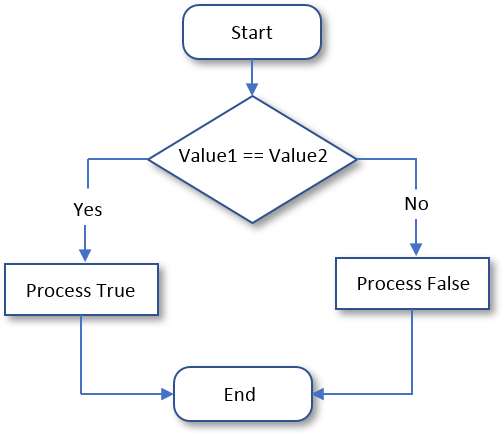
Unlike the "Less Than" (<) and the "Greater Than" (>) operations, the equality (==) operator cannot use the is operator. Based on this, here is an example of using the if conditional statement applied to an equality operator:
#include <iostream>
using namespace std;

int main()
{
    double startingSalary = 34000;
    string employmentStatus = "Full-Time";

    if (employmentStatus == "Full-Time")
        startingSalary = 50000;

    cout << "Employee Record" << endl;
    cout << "----------------------------------" << endl;
    cout << "Employment Status:      " << employmentStatus << endl;
    cout << "Starting Yearly Salary: " << startingSalary << endl;
    cout << "==================================" << endl;
}
This would produce:
Employee Record
----------------------------------
Employment Status:      Full-Time
Starting Yearly Salary: 50000
==================================

Press any key to close this window . . .
It is important to make a distinction between the assignment "=" and the logical equality operator "==". The first is used to give a new value to a variable, as in Number = 244. The operand on the left side of = must always be a variable and never a constant. The == operator is never used to assign a value; this would cause an error. The == operator is used only to compare two values. The operands on both sides of == can be variables, constants, or one can be a variable while the other is a constant.
Most of the comparisons performed in C++ will be applied to conditional statements; but because a comparison operation produces an integral result, the result of the comparison can be displayed on the monitor screen using a cout extractor. Here is an example:
#include <iostream>
using namespace std;

int main()
{
    int value = 15;

    cout << "Value: " << value;
    cout << "\nComparison of Value == 32 produces " << (value == 32) << '\n';
}
This would produce:
Value: 15
Comparison of Value == 32 produces 0

Press any key to close this window . . .
The result of a comparison can also be assigned to a variable. As done with a cout << operation, to store the result of a comparison, you should include the comparison operation between parentheses. Here is an example:
#include <iostream>
using namespace std;

int main()
{
    int value1 = 15;
    int value2 = (value1 == 24);

    cout << "Value 1 = " << value1 << '\n';
    cout << "Value 2 = " << value2 << '\n';
    cout << "Comparison of Value1 == 15 produces " << (value1 == 15);
}
This would produce:
Value 1 = 15
Value 2 = 0
Comparison of Value1 == 15 produces 1

Press any key to close this window . . .
Logical Difference
We already know that the == operator is used to find out if two values are the same. The opposite is to find out whether two values are different. The operator to do this is !=. It can be illustrated as follows:
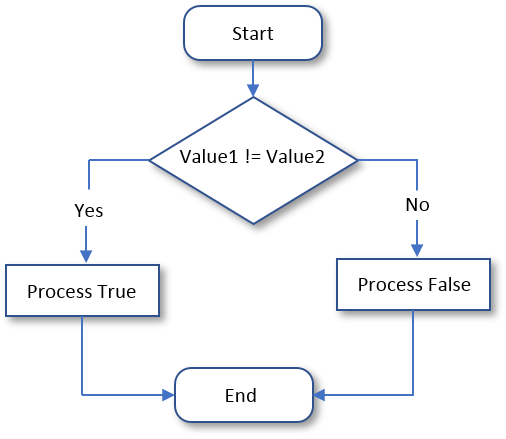
A typical Boolean expression involves two operands separated by a logical operator. Both operands must be of the same type. These rules apply to the logical difference. It can be used on numbers, strings, etc. If both operands are different, the operation produces a True result. If they are the exact same, the operation produces False.
The formula to use the != operator is:
value1 != value2
The != is a binary operator that is used to compare two values. The values can come from two variables as in variable1 != variable2. Upon comparing the values, if both variables hold different values, the comparison produces a true or positive value. Otherwise, the comparison renders false or a null value. Here is an example:
#include <iostream>
using namespace std;

int main()
{
    char certification = 'Q';
    string employmentStatus = "Hired";

    cout << "Do you have experience with C++ programming (y = Yes)? ";
    cin >> certification;

    iif (certification != 'y')
        employmentStatus = "This employment requires a high level of experience in C++ programming. We will get back to you.";

    cout << "==================================================================================================" << endl;
    cout << "Employment Verification" << endl;
    cout << "--------------------------------------------------------------------------------------------------" << endl;
    cout << "Experience with C++ programming? " << certification << endl;
    cout << "Human Resources Recommendations: " << employmentStatus << endl;
    cout << "==================================================================================================" << endl;
}
Here is an example of running the program:
Do you have experience with C++ programming (y = Yes)? y
==================================================================================================
Employment Verification
--------------------------------------------------------------------------------------------------
Experience with C++ programming? y
Human Resources Recommendations: Hired
==================================================================================================

Press any key to close this window . . .
Here is another example of running the program:
Do you have experience with C++ programming (y = Yes)? n
==================================================================================================
Employment Verification
--------------------------------------------------------------------------------------------------
Experience with C++ programming? n
Human Resources Recommendations: This employment requires a high level of experience in C++ programming. We will get back to you.
==================================================================================================

Press any key to close this window . . .
Another way to use the != operator is to assign its operation to a variable. Here is an example:
#include <iostream>
using namespace std;

int main()
{
    int value1 = 212;
    int value2 = -46;
    int value3 = (value1 != value2);

    cout << "Value 1          = " << value1 << '\n';
    cout << "Value 2          = " << value2 << '\n';
    cout << "value1 != value2 = " << value3 << '\n';
    cout << "======================";
}
This would produce:
Value 1          = 212
Value 2          = -46
value1 != value2 = 1
======================
Press any key to close this window . . .
Less Than Or Equal To: <=
The Equality (==) and the Less Than (<) operations can be combined to compare two values. This allows you to know if two values are the same or if the first value is lower than the second value. The operator used is <= and its syntax is:
value1 <= value2
The <= operation performs a comparison as any of the last two. If both value1 and value2 hold the same value, the result is True. If the left operand, in this case value1, holds a value lower than the second operand, in this case value2, the result is still True. The <= operation can be illustrated as follows:
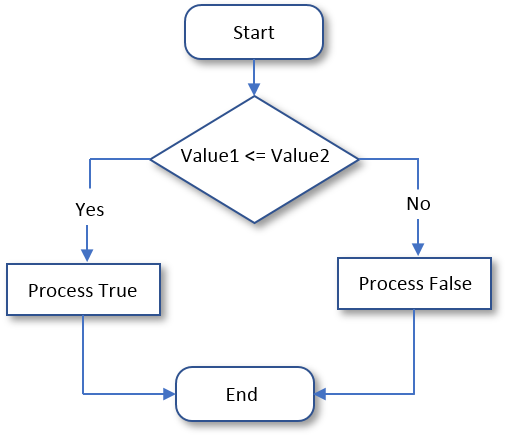
Here is an example that uses the <= operator:
#include <iostream>
using namespace std;

int main()
{
    double originalPrice = 124.50;
    double discountRate = 35; // %
    double number_of_days_in_store = 75;

    if (number_of_days_in_store <= 45)
        discountRate = 25.00;

    double discountAmount = originalPrice * discountRate / 100.00;
    double markedPrice = originalPrice - discountAmount;

    cout << "Fun Department Store" << endl;
    cout << "----------------------------------" << endl;
    cout << "Original Price:  " << originalPrice << endl;
    cout << "Days in Store:   " << number_of_days_in_store << endl;
    cout << "Discount Rate:   " << discountRate << endl;
    cout << "Discount Amount: " << discountAmount << endl;
    cout << "Marked Price:    " << markedPrice << endl;
    cout << "==================================" << endl;

    number_of_days_in_store = 22;

    if (number_of_days_in_store <= 45)
        discountRate = 25.00;

    discountAmount = originalPrice * discountRate / 100.00;
    markedPrice = originalPrice - discountAmount;

    cout << "Fun Department Store" << endl;
    cout << "----------------------------------" << endl;
    cout << "Original Price:  " << originalPrice << endl;
    cout << "Days in Store:   " << number_of_days_in_store << endl;
    cout << "Discount Rate:   " << discountRate << endl;
    cout << "Discount Amount: " << discountAmount << endl;
    cout << "Marked Price:    " << markedPrice << endl;
    cout << "==================================" << endl;
}
This would produce:
Fun Department Store
----------------------------------
Original Price:  124.5
Days in Store:   75
Discount Rate:   35
Discount Amount: 43.575
Marked Price:    80.925
==================================
Fun Department Store
----------------------------------
Original Price:  124.5
Days in Store:   22
Discount Rate:   25
Discount Amount: 31.125
Marked Price:    93.375
==================================

Press any key to close this window . . .
Practical Learning: Comparing for a Lesser Value
#include <iostream>
using namespace std;

int main()
{
    string firstName, lastName;
    double hSalary;
    double mon, tue, wed, thu, fri;

    cout << "FUN DEPARTMENT STORE\n";
    cout << "==========================================\n";
    cout << "Payroll Preparation\n";
    cout << "------------------------------------------\n";
    cout << "Enter the following pieces of information\n";
    cout << "------------------------------------------\n";
    cout << "Employee Information\n";
    cout << "------------------------------------------\n";
    cout << "First Name:    ";
    cin >> firstName;
    cout << "Last Name:     ";
    cin >> lastName;

    cout << "Hourly Salary: ";
    cin >> hSalary;
    cout << "------------------------------------------\n";
    cout << "Time worked\n";
    cout << "------------------------------------------\n";

    cout << "Monday:        ";
    cin >> mon;
    cout << "Tuesday:       ";
    cin >> tue;
    cout << "Wednesday:     ";
    cin >> wed;
    cout << "Thursday:      ";
    cin >> thu;
    cout << "Friday:        ";
    cin >> fri;

    double timeWorked = mon + tue + wed + thu + fri;

    double regTime = 40.00;
    double regPay = hSalary * 40.00;
    double overtime = timeWorked - 40.00;
    double overPay = hSalary * 1.50 * overtime;

    if (timeWorked <= 40.00)
    {
        regTime = timeWorked;
        regPay = hSalary * timeWorked;
        overtime = 0.00;
        overPay = 0.00;
    }

    double netPay = regPay + overPay;

    cout << "+=+=+=+=+=+=+=+=+=+=+=+=+=+=+=+=+=+=+=+=+=\n";
    cout << "FUN DEPARTMENT STORE\n";
    cout << "==========================================\n";
    cout << "Payroll Evaluation\n";
    cout << "==========================================\n";
    cout << "Employee Information\n";
    cout << "------------------------------------------\n";
    cout << "Full Name:\t\t" << firstName << " " << lastName << '\n';
    cout << "Hourly Salary:\t\t" << hSalary << '\n';
    cout << "==========================================\n";
    cout << "Time Worked Summary\n";
    cout << "------------------------------------------";
    cout << "\n\tMonday:\t\t" << mon;
    cout << "\n\tTuesday:\t" << tue;
    cout << "\n\tWednesday:\t" << wed;
    cout << "\n\tThursday:\t" << thu;
    cout << "\n\tFriday: \t" << fri << '\n';
    cout << "------------------------------------------\n";
    cout << "Pay Summary\n";
    cout << "------------------------------------------";
    cout << "\n\tRegular Time:\t" << regTime;
    cout << "\n\tRegular Pay:\t" << regPay << '\n';
    cout << "------------------------------------------";
    cout << "\n\tOvertime:\t" << overtime;
    cout << "\n\tOvertime Pay:\t" << overPay << '\n';
    cout << "==========================================";
    cout << "\n\tNet Pay:\t" << netPay;
    cout << "\n==========================================";
}FUN DEPARTMENT STORE
==========================================
Payroll Preparation
------------------------------------------
Enter the following pieces of information
------------------------------------------
Employee Information
------------------------------------------
First Name: Michael
Last Name: Carlock
Hourly Salary: 28.25
------------------------------------------
Time worked
------------------------------------------
Monday: 7
Tuesday: 8
Wednesday: 6.5
Thursday: 8.5
Friday: 6.5
+=+=+=+=+=+=+=+=+=+=+=+=+=+=+=+=+=+=+=+=+=
FUN DEPARTMENT STORE
==========================================
Payroll Evaluation
==========================================
Employee Information
------------------------------------------
Full Name: Michael Carlock
Hourly Salary: 28.25
==========================================
Time Worked Summary
------------------------------------------
Monday: 7
Tuesday: 8
Wednesday: 6.5
Thursday: 8.5
Friday: 6.5
------------------------------------------
Pay Summary
------------------------------------------
Regular Time: 36.5
Regular Pay: 1031.12
------------------------------------------
Overtime: 0
Overtime Pay: 0
==========================================
Net Pay: 1031.12
==========================================
Press any key to close this window . . .FUN DEPARTMENT STORE
==========================================
Payroll Preparation
------------------------------------------
Enter the following pieces of information
------------------------------------------
Employee Information
------------------------------------------
First Name: Catherine
Last Name: Busbey
Hourly Salary: 24.37
------------------------------------------
Time worked
------------------------------------------
Monday: 9.5
Tuesday: 8
Wednesday: 10.5
Thursday: 9
Friday: 10.5
+=+=+=+=+=+=+=+=+=+=+=+=+=+=+=+=+=+=+=+=+=
FUN DEPARTMENT STORE
==========================================
Payroll Evaluation
==========================================
Employee Information
------------------------------------------
Full Name: Catherine Busbey
Hourly Salary: 24.37
==========================================
Time Worked Summary
------------------------------------------
Monday: 9.5
Tuesday: 8
Wednesday: 10.5
Thursday: 9
Friday: 10.5
------------------------------------------
Pay Summary
------------------------------------------
Regular Time: 40
Regular Pay: 974.8
------------------------------------------
Overtime: 7.5
Overtime Pay: 274.163
==========================================
Net Pay: 1248.96
==========================================
Press any key to close this window . . .#include <iostream>
using namespace std;
int main()
{
cout << "===================================================================" << endl;
cout << "Machine Depreciation Evaluation - Straight-Line Method" << endl;
cout << "===================================================================" << endl;
int estimatedLife;
double machineCost, salvageValue;
cout << "Enter the values to evaluation the depreciation of the machine" << endl;
cout << "Machine Cost: ";
cin >> machineCost;
cout << "Salvage Value: ";
cin >> salvageValue;
cout << "Estimated Life: ";
cin >> estimatedLife;
double depreciationRate = 100 / estimatedLife;
double yearlyDepreciation = (machineCost - salvageValue) / estimatedLife;
double bookValueYear0 = machineCost - (yearlyDepreciation * 0);
double bookValueYear1 = machineCost - (yearlyDepreciation * 1);
double bookValueYear2 = machineCost - (yearlyDepreciation * 2);
double bookValueYear3 = machineCost - (yearlyDepreciation * 3);
double bookValueYear4 = machineCost - (yearlyDepreciation * 4);
double bookValueYear5 = machineCost - (yearlyDepreciation * 5);
double bookValueYear6 = machineCost - (yearlyDepreciation * 6);
double bookValueYear7 = machineCost - (yearlyDepreciation * 7);
double bookValueYear8 = machineCost - (yearlyDepreciation * 8);
double bookValueYear9 = machineCost - (yearlyDepreciation * 9);
double bookValueYear10 = machineCost - (yearlyDepreciation * 10);
double accumulatedDepreciation1 = yearlyDepreciation * 1;
double accumulatedDepreciation2 = yearlyDepreciation * 2;
double accumulatedDepreciation3 = yearlyDepreciation * 3;
double accumulatedDepreciation4 = yearlyDepreciation * 4;
double accumulatedDepreciation5 = yearlyDepreciation * 5;
double accumulatedDepreciation6 = yearlyDepreciation * 6;
double accumulatedDepreciation7 = yearlyDepreciation * 7;
double accumulatedDepreciation8 = yearlyDepreciation * 8;
double accumulatedDepreciation9 = yearlyDepreciation * 9;
double accumulatedDepreciation10 = yearlyDepreciation * 10;
cout << "===================================================================" << endl;
cout << "Machine Depreciation Evaluation - Straight-Line Method" << endl;
cout << "===================================================================" << endl;
cout << "Machine Cost: " << machineCost << endl;
cout << "-------------------------------------------------------------------" << endl;
cout << "Salvage Calue: " << salvageValue << endl;
cout << "-------------------------------------------------------------------" << endl;
cout << "Estimated Life: " << estimatedLife << " years\n";
cout << "===================================================================" << endl;
cout << "Depreciation Rate: " << depreciationRate << " %\n";
cout << "-------------------------------------------------------------------" << endl;
cout << "Yearly Depreciation: " << yearlyDepreciation << "/year\n";
cout << "-------------------------------------------------------------------" << endl;
cout << "Monthly Depreciation: " << (yearlyDepreciation / 12) << "/month\n";
cout << "=====+=====================+============+==========================" << endl;
cout << "Year | Yearly Depreciation | Book Value | Accumulated Depreciation" << endl;
cout << "-----+---------------------+------------+--------------------------" << endl;
int year = 0;
cout << " " << year << " | | " << bookValueYear0 << " | " << endl;
cout << "-----+---------------------+------------+--------------------------" << endl;
cout << " " << year + 1 << " | " << yearlyDepreciation << " | " << bookValueYear1 << "\t| " << accumulatedDepreciation1 << endl;
cout << "-----+---------------------+------------+--------------------------" << endl;
cout << " " << year + 2 << " | " << yearlyDepreciation << " | " << bookValueYear2 << "\t| " << accumulatedDepreciation2 << endl;
cout << "-----+---------------------+------------+--------------------------" << endl;
cout << " " << year + 3 << " | " << yearlyDepreciation << " | " << bookValueYear3 << "\t| " << accumulatedDepreciation3 << endl;
cout << "-----+---------------------+------------+--------------------------" << endl;
cout << " " << year + 4 << " | " << yearlyDepreciation << " | " << bookValueYear4 << "\t| " << accumulatedDepreciation4 << endl;
cout << "-----+---------------------+------------+--------------------------" << endl;
cout << " " << year + 5 << " | " << yearlyDepreciation << " | " << bookValueYear5 << "\t| " << accumulatedDepreciation5 << endl;
cout << "-----+---------------------+------------+--------------------------" << endl;
cout << " " << year + 6 << " | " << yearlyDepreciation << " | " << bookValueYear6 << "\t| " << accumulatedDepreciation6 << endl;
cout << "-----+---------------------+------------+--------------------------" << endl;
cout << " " << year + 7 << " | " << yearlyDepreciation << " | " << bookValueYear7 << "\t| " << accumulatedDepreciation7 << endl;
cout << "-----+---------------------+------------+--------------------------" << endl;
cout << " " << year + 8 << " | " << yearlyDepreciation << " | " << bookValueYear8 << "\t| " << accumulatedDepreciation8 << endl;
cout << "-----+---------------------+------------+--------------------------" << endl;
cout << " " << year + 9 << " | " << yearlyDepreciation << " | " << bookValueYear9 << "\t| " << accumulatedDepreciation9 << endl;
cout << "-----+---------------------+------------+--------------------------" << endl;
cout << " " << year + 10 << " | " << yearlyDepreciation << " | " << bookValueYear10 << "\t| " << accumulatedDepreciation10 << endl;
cout << "=====+=====================+============+==========================" << endl;
}=================================================================== Machine Depreciation Evaluation - Straight-Line Method =================================================================== Enter the values to evaluation the depreciation of the machine Machine Cost: 8568.95 Salvage Value: 550 Estimated Life: 5 =================================================================== Machine Depreciation Evaluation - Straight-Line Method =================================================================== Machine Cost: 8568.95 ------------------------------------------------------------------- Salvage Calue: 550 ------------------------------------------------------------------- Estimated Life: 5 years =================================================================== Depreciation Rate: 20 % ------------------------------------------------------------------- Yearly Depreciation: 1603.79/year ------------------------------------------------------------------- Monthly Depreciation: 133.649/month =====+=====================+============+========================== Year | Yearly Depreciation | Book Value | Accumulated Depreciation -----+---------------------+------------+-------------------------- 0 | | 8568.95 | -----+---------------------+------------+-------------------------- 1 | 1603.79 | 6965.16 | 1603.79 -----+---------------------+------------+-------------------------- 2 | 1603.79 | 5361.37 | 3207.58 -----+---------------------+------------+-------------------------- 3 | 1603.79 | 3757.58 | 4811.37 -----+---------------------+------------+-------------------------- 4 | 1603.79 | 2153.79 | 6415.16 -----+---------------------+------------+-------------------------- 5 | 1603.79 | 550 | 8018.95 -----+---------------------+------------+-------------------------- 6 | 1603.79 | -1053.79 | 9622.74 -----+---------------------+------------+-------------------------- 7 | 1603.79 | -2657.58 | 11226.5 -----+---------------------+------------+-------------------------- 8 | 1603.79 | -4261.37 | 12830.3 -----+---------------------+------------+-------------------------- 9 | 1603.79 | -5865.16 | 14434.1 -----+---------------------+------------+-------------------------- 10 | 1603.79 | -7468.95 | 16037.9 =====+=====================+============+========================== Press any key to close this window . . .
===================================================================
Machine Depreciation Evaluation - Straight-Line Method
===================================================================
Enter the values to evaluation the depreciation of the machine
Machine Cost:   15889
Salvage Value:  1250
Estimated Life: 10
===================================================================
Machine Depreciation Evaluation - Straight-Line Method
===================================================================
Machine Cost:         15889
-------------------------------------------------------------------
Salvage Calue:        1250
-------------------------------------------------------------------
Estimated Life:       10 years
===================================================================
Depreciation Rate:    10 %
-------------------------------------------------------------------
Yearly Depreciation:  1463.9/year
-------------------------------------------------------------------
Monthly Depreciation: 121.992/month
=====+=====================+============+==========================
Year | Yearly Depreciation | Book Value | Accumulated Depreciation
-----+---------------------+------------+--------------------------
   0 |                     | 15889      |
-----+---------------------+------------+--------------------------
   1 |       1463.9        | 14425.1    |        1463.9
-----+---------------------+------------+--------------------------
   2 |       1463.9        | 12961.2    |        2927.8
-----+---------------------+------------+--------------------------
   3 |       1463.9        | 11497.3    |        4391.7
-----+---------------------+------------+--------------------------
   4 |       1463.9        | 10033.4    |        5855.6
-----+---------------------+------------+--------------------------
   5 |       1463.9        | 8569.5     |        7319.5
-----+---------------------+------------+--------------------------
   6 |       1463.9        | 7105.6     |        8783.4
-----+---------------------+------------+--------------------------
   7 |       1463.9        | 5641.7     |        10247.3
-----+---------------------+------------+--------------------------
   8 |       1463.9        | 4177.8     |        11711.2
-----+---------------------+------------+--------------------------
   9 |       1463.9        | 2713.9     |        13175.1
-----+---------------------+------------+--------------------------
  10 |       1463.9        | 1250       |        14639
=====+=====================+============+==========================

Press any key to close this window . . .
A Value Greater Than or Equal to Another: >=
The greater than or the equality operators can be combined to produce an operator as follows: >=. This is the "greater than or equal to" operator. The formula it follows is:
value1 >= value2
The comparison is performed on both operands: value1 and value2:
This operation can be illustrated as follows:

Here is an example that uses the >= operator:
#include <iostream>
using namespace std;

int main()
{
    double consumption = 0.74;
    double pricePerCCF = 0.00;

    if (consumption >= 0.50)
        pricePerCCF = 35.00;

    double monthlyCharges = consumption * pricePerCCF;

    cout << "Gas Utility Company" << endl;
    cout << "----------------------" << endl;
    cout << "Gas Consumption: " << consumption << endl;
    cout << "Price Per CCF:   " << pricePerCCF << endl;
    cout << "Monthly Charges: " << monthlyCharges << endl;
    cout << "======================";
}
This would produce:
Gas Utility Company
----------------------
Gas Consumption: 0.74
Price Per CCF:   35
Monthly Charges: 25.9
=======================
Press any key to close this window . . .
Practical Learning: Comparing for a Value Greater Than or Equal to Another
#include <iostream>
using namespace std;

int main()
{
    cout << "===================================================================" << endl;
    cout << "Machine Depreciation Evaluation - Straight-Line Method" << endl;
    cout << "===================================================================" << endl;

    int estimatedLife;
    double machineCost, salvageValue;
    cout << "Enter the values to evaluation the depreciation of the machine" << endl;
    cout << "Machine Cost:   ";
    cin >> machineCost;
    cout << "Salvage Value:  ";
    cin >> salvageValue;
    cout << "Estimated Life: ";
    cin >> estimatedLife;

    double depreciationRate = 100 / estimatedLife;
    double yearlyDepreciation = (machineCost - salvageValue) / estimatedLife;

    double bookValueYear0 = machineCost - (yearlyDepreciation * 0);
    double bookValueYear1 = machineCost - (yearlyDepreciation * 1);
    double bookValueYear2 = machineCost - (yearlyDepreciation * 2);
    double bookValueYear3 = machineCost - (yearlyDepreciation * 3);
    double bookValueYear4 = machineCost - (yearlyDepreciation * 4);
    double bookValueYear5 = machineCost - (yearlyDepreciation * 5);
    double bookValueYear6 = machineCost - (yearlyDepreciation * 6);
    double bookValueYear7 = machineCost - (yearlyDepreciation * 7);
    double bookValueYear8 = machineCost - (yearlyDepreciation * 8);
    double bookValueYear9 = machineCost - (yearlyDepreciation * 9);
    double bookValueYear10 = machineCost - (yearlyDepreciation * 10);

    double accumulatedDepreciation1 = yearlyDepreciation * 1;
    double accumulatedDepreciation2 = yearlyDepreciation * 2;
    double accumulatedDepreciation3 = yearlyDepreciation * 3;
    double accumulatedDepreciation4 = yearlyDepreciation * 4;
    double accumulatedDepreciation5 = yearlyDepreciation * 5;
    double accumulatedDepreciation6 = yearlyDepreciation * 6;
    double accumulatedDepreciation7 = yearlyDepreciation * 7;
    double accumulatedDepreciation8 = yearlyDepreciation * 8;
    double accumulatedDepreciation9 = yearlyDepreciation * 9;
    double accumulatedDepreciation10 = yearlyDepreciation * 10;

    cout << "===================================================================" << endl;
    cout << "Machine Depreciation Evaluation - Straight-Line Method" << endl;
    cout << "===================================================================" << endl;
    cout << "Machine Cost:         " << machineCost << endl;
    cout << "-------------------------------------------------------------------" << endl;
    cout << "Salvage Calue:        " << salvageValue << endl;
    cout << "-------------------------------------------------------------------" << endl;
    cout << "Estimated Life:       " << estimatedLife << " years\n";
    cout << "===================================================================" << endl;
    cout << "Depreciation Rate:    " << depreciationRate << " %\n";
    cout << "-------------------------------------------------------------------" << endl;
    cout << "Yearly Depreciation:  " << yearlyDepreciation << "/year\n";
    cout << "-------------------------------------------------------------------" << endl;
    cout << "Monthly Depreciation: " << (yearlyDepreciation / 12) << "/month\n";
    cout << "=====+=====================+============+==========================" << endl;
    cout << "Year | Yearly Depreciation | Book Value | Accumulated Depreciation" << endl;
    cout << "-----+---------------------+------------+--------------------------" << endl;

    int year = 0;

    cout << "   " << year << " |                     | " << bookValueYear0 << "\t| " << endl;
    cout << "-----+---------------------+------------+--------------------------" << endl;
    if (bookValueYear1 >= 0)
    {
        cout << "   " << year + 1 << " |       " << yearlyDepreciation << "       | " << bookValueYear1 << "\t|        " << accumulatedDepreciation1 << endl;
    }
    if (bookValueYear2 >= 0)
    {
        cout << "-----+---------------------+------------+--------------------------" << endl;
        cout << "   " << year + 2 << " |       " << yearlyDepreciation << "       | " << bookValueYear2 << "\t|        " << accumulatedDepreciation2 << endl;
    }
    if (bookValueYear3 >= 0)
    {
        cout << "-----+---------------------+------------+--------------------------" << endl;
        cout << "   " << year + 3 << " |       " << yearlyDepreciation << "       | " << bookValueYear3 << "\t|        " << accumulatedDepreciation3 << endl;
    }
    if (bookValueYear4 >= 0)
    {
        cout << "-----+---------------------+------------+--------------------------" << endl;
        cout << "   " << year + 4 << " |       " << yearlyDepreciation << "       | " << bookValueYear4 << "\t|        " << accumulatedDepreciation4 << endl;
    }
    if (bookValueYear5 >= 0)
    {
        cout << "-----+---------------------+------------+--------------------------" << endl;
        cout << "   " << year + 5 << " |       " << yearlyDepreciation << "       | " << bookValueYear5 << "\t|        " << accumulatedDepreciation5 << endl;
    }
    if (bookValueYear6 >= 0)
    {
        cout << "-----+---------------------+------------+--------------------------" << endl;
        cout << "   " << year + 6 << " |       " << yearlyDepreciation << "       | " << bookValueYear6 << "\t|        " << accumulatedDepreciation6 << endl;
    }
    if (bookValueYear7 >= 0)
    {
        cout << "-----+---------------------+------------+--------------------------" << endl;
        cout << "   " << year + 7 << " |       " << yearlyDepreciation << "       | " << bookValueYear7 << "\t|        " << accumulatedDepreciation7 << endl;
    }
    if (bookValueYear8 >= 0)
    {
        cout << "-----+---------------------+------------+--------------------------" << endl;
        cout << "   " << year + 8 << " |       " << yearlyDepreciation << "       | " << bookValueYear8 << "\t|        " << accumulatedDepreciation8 << endl;
    }
    if (bookValueYear9 >= 0)
    {
        cout << "-----+---------------------+------------+--------------------------" << endl;
        cout << "   " << year + 9 << " |       " << yearlyDepreciation << "       | " << bookValueYear9 << "\t|        " << accumulatedDepreciation9 << endl;
    }
    if (bookValueYear10 >= 0)
    {
        cout << "-----+---------------------+------------+--------------------------" << endl;
        cout << "  " << year + 10 << " |       " << yearlyDepreciation << "       | " << bookValueYear10 << "\t|        " << accumulatedDepreciation10 << endl;
    }
    cout << "=====+=====================+============+==========================" << endl;
}=================================================================== Machine Depreciation Evaluation - Straight-Line Method =================================================================== Enter the values to evaluation the depreciation of the machine Machine Cost: 8568.95 Salvage Value: 550 Estimated Life: 5 =================================================================== Machine Depreciation Evaluation - Straight-Line Method =================================================================== Machine Cost: 8568.95 ------------------------------------------------------------------- Salvage Calue: 550 ------------------------------------------------------------------- Estimated Life: 5 years =================================================================== Depreciation Rate: 20 % ------------------------------------------------------------------- Yearly Depreciation: 1603.79/year ------------------------------------------------------------------- Monthly Depreciation: 133.649/month =====+=====================+============+========================== Year | Yearly Depreciation | Book Value | Accumulated Depreciation -----+---------------------+------------+-------------------------- 0 | | 8568.95 | -----+---------------------+------------+-------------------------- 1 | 1603.79 | 6965.16 | 1603.79 -----+---------------------+------------+-------------------------- 2 | 1603.79 | 5361.37 | 3207.58 -----+---------------------+------------+-------------------------- 3 | 1603.79 | 3757.58 | 4811.37 -----+---------------------+------------+-------------------------- 4 | 1603.79 | 2153.79 | 6415.16 -----+---------------------+------------+-------------------------- 5 | 1603.79 | 550 | 8018.95 =====+=====================+============+========================== Press any key to close this window . . .
===================================================================
Machine Depreciation Evaluation - Straight-Line Method
===================================================================
Enter the values to evaluation the depreciation of the machine
Machine Cost:   15889
Salvage Value:  1250
Estimated Life: 10
===================================================================
Machine Depreciation Evaluation - Straight-Line Method
===================================================================
Machine Cost:         15889
-------------------------------------------------------------------
Salvage Calue:        1250
-------------------------------------------------------------------
Estimated Life:       10 years
===================================================================
Depreciation Rate:    10 %
-------------------------------------------------------------------
Yearly Depreciation:  1463.9/year
-------------------------------------------------------------------
Monthly Depreciation: 121.992/month
=====+=====================+============+==========================
Year | Yearly Depreciation | Book Value | Accumulated Depreciation
-----+---------------------+------------+--------------------------
   0 |                     | 15889      |
-----+---------------------+------------+--------------------------
   1 |       1463.9       | 14425.1     |        1463.9
-----+---------------------+------------+--------------------------
   2 |       1463.9       | 12961.2     |        2927.8
-----+---------------------+------------+--------------------------
   3 |       1463.9       | 11497.3     |        4391.7
-----+---------------------+------------+--------------------------
   4 |       1463.9       | 10033.4     |        5855.6
-----+---------------------+------------+--------------------------
   5 |       1463.9       | 8569.5      |        7319.5
-----+---------------------+------------+--------------------------
   6 |       1463.9       | 7105.6      |        8783.4
-----+---------------------+------------+--------------------------
   7 |       1463.9       | 5641.7      |        10247.3
-----+---------------------+------------+--------------------------
   8 |       1463.9       | 4177.8      |        11711.2
-----+---------------------+------------+--------------------------
   9 |       1463.9       | 2713.9      |        13175.1
-----+---------------------+------------+--------------------------
  10 |       1463.9       | 1250        |        14639
=====+=====================+============+==========================

Press any key to close this window . . .
Options on Conditional Statements
if Boolean is a Condition
One way to formulate a conditional statement is to find out whether a situation is true or false. In this case, one of the operands must be a Boolean value as true or false. The other operand can be a Boolean variable. Here is an example:
#include <iostream>
using namespace std;

int main()
{
    bool employeeIsFullTime = false;
    int startingSalary = 72650;

    cout << "Employment Hiring" << endl;
    cout << "---------------------------------" << endl;
    cout << "Employee is Full-Time:  " << employeeIsFullTime << endl;
    cout << "Starting Yearly Salary: " << startingSalary << endl;
    cout << "=================================" << endl;

    if (employeeIsFullTime == false)
        startingSalary = 42500;

    cout << "Employee is Full-Time:  " << employeeIsFullTime << endl;
    cout << "Starting Yearly Salary: " << startingSalary << endl;
    cout << "=================================" << endl;
}
This would produce:
Employment Hiring
---------------------------------
Employee is Full-Time:  0
Starting Yearly Salary: 72650
=================================
Employee is Full-Time:  0
Starting Yearly Salary: 42500
=================================

Press any key to close this window . . .
When performing this type of comparison, the left operand can be a value, such as true or false. Here is an example:
#include <iostream>
using namespace std;

int main()
{
    bool employeeIsFullTime = false;
    int startingSalary = 72650;

    cout << "Employment Hiring" << endl;
    cout << "---------------------------------" << endl;
    cout << "Employee is Full-Time:  " << employeeIsFullTime << endl;
    cout << "Starting Yearly Salary: " << startingSalary << endl;
    cout << "=================================" << endl;

    if (false == employeeIsFullTime)
        startingSalary = 42500;

    cout << "Employee is Full-Time:  " << employeeIsFullTime << endl;
    cout << "Starting Yearly Salary: " << startingSalary << endl;
    cout << "=================================" << endl;
}
One of the operands can also be an expression that holds a Boolean value.
Imagine that you want to evaluate the condition as true. Here is an example:
bool employeeIsFullTime = true;

if( employeeIsFullTime == true)
{

}
if a Condition is True
Consider the following code:
#include <iostream>
using namespace std;

int main()
{
    bool employeeIsFullTime = false;
    int startingSalary = 0;

    cout << "Employment Hiring" << endl;
    cout << "---------------------------------" << endl;
    cout << "Employee is Full-Time:  " << employeeIsFullTime << endl;
    cout << "Starting Yearly Salary: " << startingSalary << endl;
    cout << "---------------------------------" << endl;

    if (employeeIsFullTime == false)
        startingSalary = 42660;

    cout << "Employee is Full-Time:  " << employeeIsFullTime << endl;
    cout << "Starting Yearly Salary: " << startingSalary << endl;
    cout << "---------------------------------" << endl;

    employeeIsFullTime = true;

    if (employeeIsFullTime == true)
        startingSalary = 68500;

    cout << "Employee is Full-Time:  " << employeeIsFullTime << endl;
    cout << "Starting Yearly Salary: " << startingSalary << endl;
    cout << "=================================" << endl;
}
This would produce:
Employment Hiring
---------------------------------
Employee is Full-Time:  0
Starting Yearly Salary: 0
---------------------------------
Employee is Full-Time:  0
Starting Yearly Salary: 42660
---------------------------------
Employee is Full-Time:  1
Starting Yearly Salary: 68500
=================================

Press any key to close this window . . .
If a Boolean variable (currently) holds a true value (at the time you are trying to access it), when you are evaluating the expression as being true, you can omit the == true or the true == expression in your statement. Therefore, the above expression can be written as follows:
#include <iostream>
using namespace std;

int main()
{
    bool employeeIsFullTime = false;
    int startingSalary = 0;

    cout << "Employment Hiring" << endl;
    cout << "---------------------------------" << endl;
    cout << "Employee is Full-Time:  " << employeeIsFullTime << endl;
    cout << "Starting Yearly Salary: " << startingSalary << endl;
    cout << "---------------------------------" << endl;

    if (employeeIsFullTime == false)
        startingSalary = 42660;

    cout << "Employee is Full-Time:  " << employeeIsFullTime << endl;
    cout << "Starting Yearly Salary: " << startingSalary << endl;
    cout << "---------------------------------" << endl;

    employeeIsFullTime = true;

    if (employeeIsFullTime)
        startingSalary = 68500;

    cout << "Employee is Full-Time:  " << employeeIsFullTime << endl;
    cout << "Starting Yearly Salary: " << startingSalary << endl;
    cout << "=================================" << endl;
}
This would produce the same result as previously.
If you have a logical expression or value, to let you get its logical opposite, the C++ language provides the logical NOT operator represented by !. The formula to use it is:
!variable-or-expression
Actually there are various ways the logical NOT operator can be used. The classic way is to check the state of a variable. To nullify a variable, you can write the exclamation point to its left. Here is an example:
#include <iostream>
using namespace std;

int main()
{
    bool employeeIsFullTime = false;
    int startingSalary = 0;

    cout << "Employment Hiring" << endl;
    cout << "---------------------------------" << endl;
    cout << "1. Employee is Full-Time:  " << employeeIsFullTime << endl;
    cout << "   Starting Yearly Salary: " << startingSalary << endl;
    cout << "---------------------------------" << endl;

    if (employeeIsFullTime == false)
        startingSalary = 42660;

    cout << "2. Employee is Full-Time:  " << employeeIsFullTime << endl;
    cout << "   Starting Yearly Salary: " << startingSalary << endl;
    cout << "---------------------------------" << endl;

    employeeIsFullTime = true;

    if (employeeIsFullTime == true)
        startingSalary = 68500;

    cout << "3. Employee is Full-Time:  " << employeeIsFullTime << endl;
    cout << "   Starting Yearly Salary: " << startingSalary << endl;
    cout << "---------------------------------" << endl;

    if (employeeIsFullTime)
        startingSalary = 72250;

    cout << "4. Employee is Full-Time:  " << employeeIsFullTime << endl;
    cout << "   Starting Yearly Salary: " << startingSalary << endl;
    cout << "---------------------------------" << endl;

    if (!employeeIsFullTime)
        startingSalary = 45500;

    cout << "5. Employee is Full-Time:  " << employeeIsFullTime << endl;
    cout << "   Starting Yearly Salary: " << startingSalary << endl;
    cout << "---------------------------------" << endl;

    employeeIsFullTime = true;

    if (employeeIsFullTime == true)
        startingSalary = 68500;

    cout << "6. Employee is Full-Time:  " << employeeIsFullTime << endl;
    cout << "   Starting Yearly Salary: " << startingSalary << endl;;
    cout << "---------------------------------" << endl;

    employeeIsFullTime = false;

    if (!employeeIsFullTime)
        startingSalary = 37500;

    cout << "7. Employee is Full-Time:  " << employeeIsFullTime << endl;
    cout << "   Starting Yearly Salary: " << startingSalary << endl;
    cout << "=================================" << endl;
}
This would produce:
Employment Hiring
---------------------------------
1. Employee is Full-Time:  0
   Starting Yearly Salary: 0
---------------------------------
2. Employee is Full-Time:  0
   Starting Yearly Salary: 42660
---------------------------------
3. Employee is Full-Time:  1
   Starting Yearly Salary: 68500
---------------------------------
4. Employee is Full-Time:  1
   Starting Yearly Salary: 72250
---------------------------------
5. Employee is Full-Time:  1
   Starting Yearly Salary: 72250
---------------------------------
6. Employee is Full-Time:  1
   Starting Yearly Salary: 68500
---------------------------------
7. Employee is Full-Time:  0
   Starting Yearly Salary: 37500
=================================

Press any key to close this window . . .
When a variable is declared and receives a value (this could be done through initialization or a change of value) in a program, it becomes alive. When a variable is not being used or is not available for processing, to make a variable (temporarily) unusable, or to make a variable unavailable during the evolution of a program, apply the logical not operator which is !. The formula to follow is:
!value
To nullify a variable, you can assign it to another variable. Here is an example:
#include <iostream>
using namespace std;

int main()
{
    bool value1 = true;
    bool value2 = false;
    bool value3 = !value1;

    // Display the value of a variable
    cout << "Value 1 = " << value1 << "\n";
    // Logical Not a variable and display its value
    cout << "Value 2 = " << value2 << "\n";
    // Display the value of a variable that was logically "notted"
    cout << "Value 3 = " << value3 << "\n";
}
This would produce:
Value 1 = 1
Value 2 = 0
Value 3 = 0

Press any key to close this window . . .
When a variable holds a value, it is "alive". To make it not available, you can nullify it. When a variable has been nullified, its logical value has changed. If the logical value was true, which is 1, it would be changed to false, which is 0. Therefore, you can inverse the logical value of a variable by nullifiying or not nullifying it. This is illustrated in the following example:
#include <iostream>
using namespace std;

int main()
{
    bool value1 = true;
    bool value2 = !value1;

    cout << "    Value 1 = " << value1 << '\n';
    cout << "    Value 2 = " << value2 << '\n';
    cout << "Not Value 2 = " << !value2;
}
This would produce:
    Value 1 = 1
    Value 2 = 0
Not Value 2 = 1

Press any key to close this window . . .
When a variable has been "negated", its logical value changes. If the logical value was true, it would be changed to false. Therefore, you can inverse the logical value of a variable by "notting" or not "notting" it.
A Summary of Logical Operators
As you might have found out, every logical operator has an opposite. They can be resumed as follows:
| Operator | Meaning | Example | Opposite | |
| == | Equality to | a == b | != | |
| != | Not equal to | 12 != 7 | == | |
| < | is < | Less than | 25 < 84 | >= |
| <= | is <= | Less than or equal to | Cab <= Tab | > |
| > | is > | Greater than | 248 > 55 | <= |
| >= | is >= | Greater than or equal to | Val1 >= Val2 | < |
|
|
|||
| Previous | Copyright © 2002-2026, FunctionX | Wednesday 24 September 2025, 17:16 | Next |
|
|
|||