Declaring a Variable
|
Declaring a Variable |
|
Introduction |
|
To declare a variable, you use the DECLARE operator in the following formula: DECLARE @VariableName DataType; Here is an example: DECLARE @Category int; You can also declare more than one variable. To do that, separate them with a comma. The formula would be: |
DECLARE @Variable1 DataType1, @Variable2 DataType2, @Variable_n DataType_n; Unlike many other languages like C/C++, C#, Java, or Pascal, if you declare many variables that use the same data type, the name of each variable must be followed by its own data type.
After declaring a variable, to initialize it, type the SELECT or the SET keyword followed by the name of the variable, followed by the assignment operator "=", followed by an appropriate value. The formula used is: SELECT @VariableName = DesiredValue or SET @VariableName = DesiredValue Here is an example DECLARE @Category int SET @Category = 1450 PRINT @Category GO This would produce: (1 rows affected) 1> DECLARE @Category INT; 2> SET @Category = 1450; 3> PRINT @Category; 4> GO 1450 (1 rows affected) Here is another example: 1> DECLARE @StudentAge tinyint;
2> SET @StudentAge = 14;
3> SELECT @StudentAge AS [Student's Age];
4> GO
Student's Age
-------------
14
(1 rows affected)
Here is another example: 1> DECLARE @NumberOfPages SMALLINT;
2> SET @NumberOfPages = 16;
3> SELECT @NumberOfPages AS [Number of Pages];
4> GO
Number of Pages
---------------
16
(1 rows affected)
Here is another example: 1> DECLARE @CountryPopulation BigInt;
2> SET @CountryPopulation = 16500000;
3> SELECT @CountryPopulation AS 'Country Population';
4> GO
Country Population
--------------------
16500000
(1 rows affected)
Here is another example: 1> DECLARE @Distance DECIMAL; 2> SET @Distance = 648.16; 3> PRINT @Distance; 4> GO 648 Here is another example: 1> DECLARE @Radius FLOAT;
2> SET @Radius = 48.16;
3> SELECT @Radius AS Radius;
4> GO
Radius
------------------------
48.159999999999997
(1 rows affected)
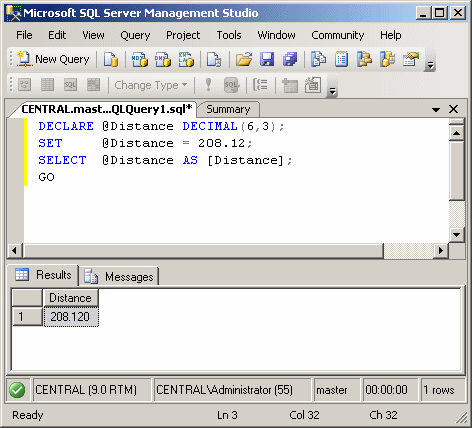
Here is another example:
Here is another example: 1> DECLARE @YearlyIncome Money;
2> SET @YearlyIncome = 48500.15;
3> SELECT @YearlyIncome AS [Yearly Income];
4> GO
Yearly Income
---------------------
48500.1500
(1 rows affected)
Here is another example: 1> DECLARE @IndependenceDay datetime2; 2> SET @IndependenceDay = N'01/01/1960'; 3> SELECT @IndependenceDay AS [Independence Day]; 4> GO Independence Day ----------------------- 1960-01-01 00:00:00.000 (1 rows affected) Here is another example: 1> DECLARE @ArrivalTime datetime2; 2> SET @ArrivalTime = N'18:22'; 3> SELECT @ArrivalTime AS [Arrival Time]; 4> GO Arrival Time ----------------------- 1900-01-01 18:22:00.000 (1 rows affected) |
|
|
||
| Home | Copyright © 2007-2009 FunctionX, Inc. | |
|
|
||