
Conditions and Record Sets
|
|
Conditions and Record Sets |
Applying a Condition to a Record Set
Locating a Record
In our introductions to record sets, we saw that you can locate a record by going through the record set from beginning to end, then checking the name and value of each field. In the Microsoft Access Object Library, this can be done as follows:
Private Sub cmdUpdate_Click()
    Dim curDatabase As Object
    Dim fldEmployee As Object
    Dim rstEmployees As Object

    Set curDatabase = CurrentDb
    Set rstEmployees = curDatabase.OpenRecordset("Employees")

    With rstEmployees
        Do Until .EOF
            For Each fldEmployee In .Fields
                If fldEmployee.Name = "EmployeeID" Then
                    If fldEmployee.Value = CInt(txtEmployeeID) Then
                        ' The record to be edited has been located

                        Exit For
                    End If
                End If
            Next
            .MoveNext
        Loop
    End With
End Sub
 Practical
Learning: Introducing Conditions with Record Sets
Practical
Learning: Introducing Conditions with Record Sets
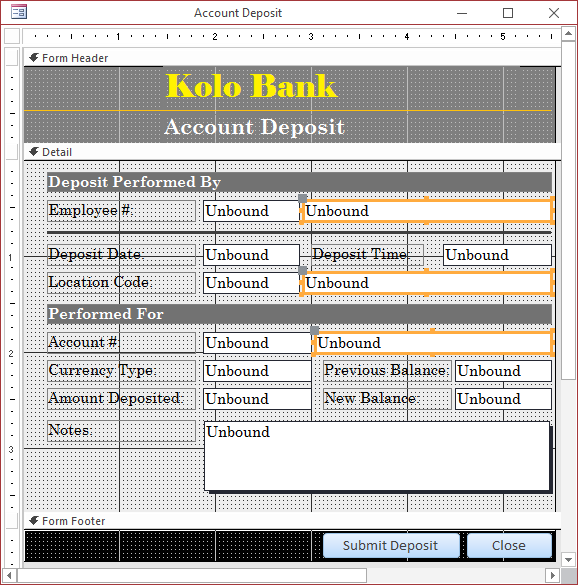
| Control | Name | |
| Text Box |
 |
txtEmployeeName |
| Text Box |
|
txtLocationName |
| Text Box |
|
txtCustomerName |


Introduction to Setting a Condition in a Record set
Besides simply selecting records from a table or a query, the Recprdset (in DAO, or its equivalent Object object in MAOL) allows you to set a condition by which to select records. The condition is formulated using the WHERE operator and it is included in the first argument of the OpenRecordset() method.
Practical
Learning: Setting a Condition in a Record set

Private Sub txtEmployeeNumber_LostFocus()
On Error GoTo txtEmployeeNumber_LostFocus_Error

    Dim rstEmployees As Object
    Dim strEmployeeName As String
    Dim dbDepartmentStore As Object

    If IsNull(txtEmployeeNumber) Then
        Exit Sub
    End If

    ' Get a reference to the current database
    Set dbDepartmentStore = CurrentDb
    ' Get the records from the Employees table
    Set rstEmployees = dbDepartmentStore.OpenRecordset("SELECT FirstName, LastName " & _
                                                       "FROM Employees " & _
                                                       "WHERE EmployeeNumber = '" & txtEmployeeNumber & "'")

    txtEmployeeName = CStr(rstEmployees("LastName").Value) & ", " & CStr(rstEmployees("FirstName").Value)
    txtTimeSheetNumber = "1000"
    timeSheetFound = False

    Exit Sub

txtEmployeeNumber_LostFocus_Error:
    If Err.Number = 3021 Then
        MsgBox "Invalid Employee Number: The employee number you entered was not found in the database.", _
               vbOKOnly Or vbInformation, "Fun Department Store"
           Exit Sub
    Else
        MsgBox "A problem occurred when trying to retrieve the employee information." & vbCrLf & _
               "Error #:     " & Err.Number & vbCrLf & _
               "Description: " & Err.Description, _
               vbOKOnly Or vbInformation, "Fun Department Store"
    End If

    Resume Next
End SubPrivate Sub txtEmployeeNumber_LostFocus()
Dim dbKoloBank As Database
Dim rstEmployees As Recordset
Set dbKoloBank = CurrentDb
Set rstEmployees = dbKoloBank.OpenRecordset("SELECT FirstName, MiddleName, LastName " & _
"FROM Employees " & _
"WHERE EmployeeNumber = '" & txtEmployeeNumber & "';", _
RecordsetTypeEnum.dbOpenDynamic, _
RecordsetOptionEnum.dbConsistent, _
LockTypeEnum.dbOptimistic)
If rstEmployees.RecordCount > 0 Then
If IsNull(rstEmployees!MiddleName) Then
txtEmployeeName = rstEmployees!FirstName & " " & rstEmployees!LastName
Else
txtEmployeeName = rstEmployees!FirstName & " " & rstEmployees!MiddleName & " " & rstEmployees!LastName
End If
End If
Set rstEmployees = Nothing
Set dbKoloBank = Nothing
End Sub
Private Sub txtAccountNumber_LostFocus()
    Dim dbKoloBank As Database
    Dim rstCustomers As Recordset, rstTransactions As Recordset

    Set dbKoloBank = CurrentDb
    Set rstCustomers = dbKoloBank.OpenRecordset("SELECT FirstName, MiddleName, LastName " & _
                                                "FROM Customers " & _
                                                "WHERE AccountNumber = '" & txtAccountNumber & "';", _
                                                RecordsetTypeEnum.dbOpenForwardOnly, _
                                                RecordsetOptionEnum.dbForwardOnly, _
                                                LockTypeEnum.dbOptimisticValue)
    Set rstTransactions = dbKoloBank.OpenRecordset("SELECT Balance " & _
                                                   "FROM Transactions " & _
                                                   "WHERE AccountNumber = '" & txtAccountNumber & "';", _
                                                   RecordsetTypeEnum.dbOpenForwardOnly, _
                                                   RecordsetOptionEnum.dbForwardOnly, _
                                                   LockTypeEnum.dbOptimisticValue)

    If rstCustomers.RecordCount > 0 Then
        If IsNull(rstCustomers!MiddleName) Then
            txtCustomerName = rstCustomers!FirstName & " " & rstCustomers!LastName
        Else
            txtCustomerName = rstCustomers!FirstName & " " & rstCustomers!MiddleName & " " & rstCustomers!LastName
        End If
    End If

    If rstTransactions.RecordCount > 0 Then
        rstTransactions.MoveLast
        txtPreviousBalance = rstTransactions!Balance
        txtCurrentBalance = rstTransactions!Balance
    Else
        txtPreviousBalance = "0.00"
        txtCurrentBalance = "0.00"
    End If

    Set rstCustomers = Nothing
    Set dbKoloBank = Nothing
End SubPrivate Sub txtEmployeeNumber_LostFocus()
Dim dbKoloBank As Database
Dim rstEmployees As Recordset
Set dbKoloBank = CurrentDb
Set rstEmployees = dbKoloBank.OpenRecordset("SELECT FirstName, MiddleName, LastName " & _
"FROM Employees " & _
"WHERE EmployeeNumber = '" & txtEmployeeNumber & "';", _
RecordsetTypeEnum.dbOpenDynamic, _
RecordsetOptionEnum.dbConsistent, _
LockTypeEnum.dbOptimistic)
If rstEmployees.RecordCount > 0 Then
If IsNull(rstEmployees!MiddleName) Then
txtEmployeeName = rstEmployees!FirstName & " " & rstEmployees!LastName
Else
txtEmployeeName = rstEmployees!FirstName & " " & rstEmployees!MiddleName & " " & rstEmployees!LastName
End If
End If
Set rstEmployees = Nothing
Set dbKoloBank = Nothing
End Sub
Private Sub txtAccountNumber_LostFocus()
    Dim dbKoloBank As Database
    Dim rstCustomers As Recordset, rstTransactions As Recordset

    Set dbKoloBank = CurrentDb
    Set rstCustomers = dbKoloBank.OpenRecordset("SELECT FirstName, MiddleName, LastName " & _
                                                "FROM Customers " & _
                                                "WHERE AccountNumber = '" & txtAccountNumber & "';", _
                                                RecordsetTypeEnum.dbOpenForwardOnly, _
                                                RecordsetOptionEnum.dbForwardOnly, _
                                                LockTypeEnum.dbOptimisticValue)
    Set rstTransactions = dbKoloBank.OpenRecordset("SELECT Balance " & _
                                                   "FROM Transactions " & _
                                                   "WHERE AccountNumber = '" & txtAccountNumber & "';", _
                                                   RecordsetTypeEnum.dbOpenForwardOnly, _
                                                   RecordsetOptionEnum.dbForwardOnly, _
                                                   LockTypeEnum.dbOptimisticValue)

    If rstCustomers.RecordCount > 0 Then
        If IsNull(rstCustomers!MiddleName) Then
            txtCustomerName = rstCustomers!FirstName & " " & rstCustomers!LastName
        Else
            txtCustomerName = rstCustomers!FirstName & " " & rstCustomers!MiddleName & " " & rstCustomers!LastName
        End If
    End If

    If rstTransactions.RecordCount > 0 Then
        rstTransactions.MoveLast
        txtPreviousBalance = rstTransactions!Balance
        txtCurrentBalance = rstTransactions!Balance
    Else
        txtPreviousBalance = "0.00"
        txtCurrentBalance = "0.00"
    End If

    Set rstCustomers = Nothing
    Set dbKoloBank = Nothing
End SubPrivate Sub txtEmployeeNumber_LostFocus()
Dim dbKoloBank As Database
Dim rstEmployees As Recordset
Set dbKoloBank = CurrentDb
Set rstEmployees = dbKoloBank.OpenRecordset("SELECT FirstName, MiddleName, LastName " & _
"FROM Employees " & _
"WHERE EmployeeNumber = '" & txtEmployeeNumber & "';", _
RecordsetTypeEnum.dbOpenDynamic, _
RecordsetOptionEnum.dbConsistent, _
LockTypeEnum.dbOptimistic)
If rstEmployees.RecordCount > 0 Then
If IsNull(rstEmployees!MiddleName) Then
txtEmployeeName = rstEmployees!FirstName & " " & rstEmployees!LastName
Else
txtEmployeeName = rstEmployees!FirstName & " " & rstEmployees!MiddleName & " " & rstEmployees!LastName
End If
End If
Set rstEmployees = Nothing
Set dbKoloBank = Nothing
End Sub
Private Sub txtAccountNumber_LostFocus()
On Error GoTo txtAccountNumber_LostFocusError

    Dim dbKoloBank As Database
    Dim rstCustomers As Recordset, rstTransactions As Recordset

    Set dbKoloBank = CurrentDb
    Set rstCustomers = dbKoloBank.OpenRecordset("SELECT FirstName, MiddleName, LastName " & _
                                                "FROM Customers " & _
                                                "WHERE AccountNumber = '" & txtAccountNumber & "';", _
                                                RecordsetTypeEnum.dbOpenForwardOnly, _
                                                RecordsetOptionEnum.dbForwardOnly, _
                                                LockTypeEnum.dbOptimisticValue)
    Set rstTransactions = dbKoloBank.OpenRecordset("SELECT Balance " & _
                                                "FROM Transactions " & _
                                                "WHERE AccountNumber = '" & txtAccountNumber & "';", _
                                                RecordsetTypeEnum.dbOpenForwardOnly, _
                                                RecordsetOptionEnum.dbForwardOnly, _
                                                LockTypeEnum.dbOptimisticValue)

    If rstCustomers.RecordCount > 0 Then
        If IsNull(rstCustomers!MiddleName) Then
            txtCustomerName = rstCustomers!FirstName & " " & rstCustomers!LastName
        Else
            txtCustomerName = rstCustomers!FirstName & " " & rstCustomers!MiddleName & " " & rstCustomers!LastName
        End If
    End If

    If rstTransactions.RecordCount > 0 Then
        rstTransactions.MoveLast
        txtPreviousBalance = rstTransactions!Balance
        txtNewBalance = rstTransactions!Balance
    Else
        txtPreviousBalance = "0.00"
        txtNewBalance = "0.00"
    End If

    Set rstCustomers = Nothing
    Set dbKoloBank = Nothing

    Exit Sub

txtAccountNumber_LostFocusError:
    If Err.Number = 3021 Then
        MsgBox "Invalid Account Number: The account number you entered was not found in the database.", _
               vbOKOnly Or vbInformation, "Kolo Bank"
           Exit Sub
    Else
        MsgBox "A problem occurred when trying to retrieve account information." & vbCrLf & _
               "Error #:     " & Err.Number & vbCrLf & _
               "Description: " & Err.Description, _
               vbOKOnly Or vbInformation, "Kolo Bank"
    End If

    Resume Next
End Sub
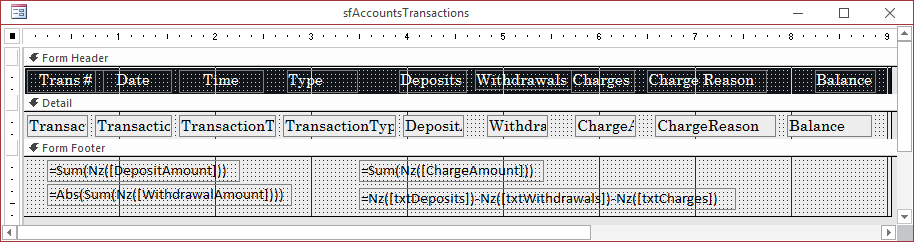
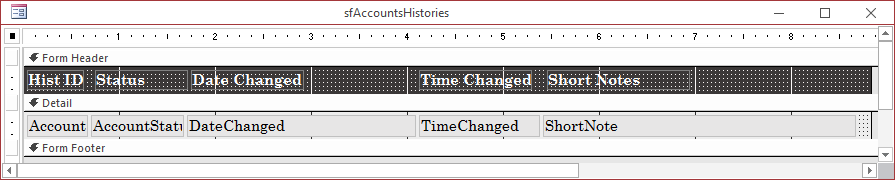
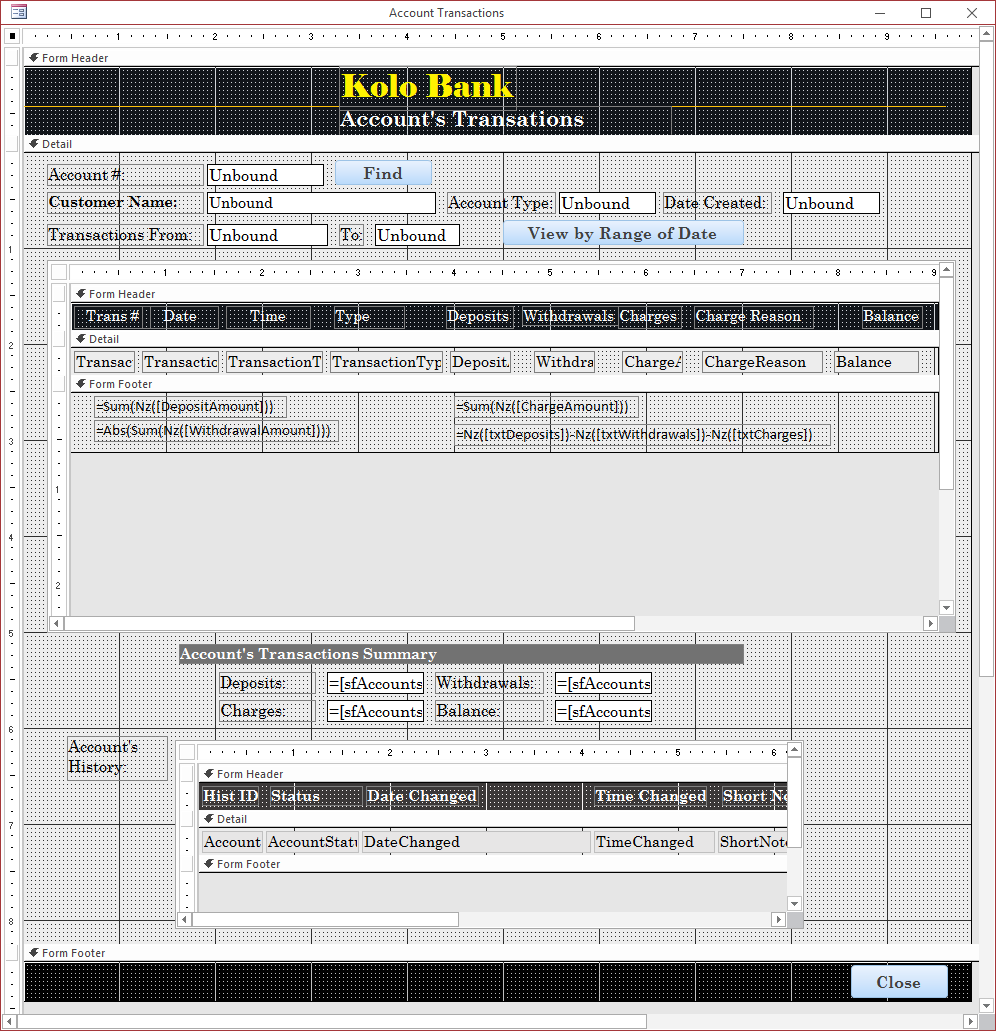
Private Sub cmdFind_Click()
On Error GoTo cmdSubmit_ClickError

    Dim dbKoloBank As Database
    Dim rstCustomers As Recordset
    Dim rstTransactions As Recordset
    Dim rstAccountsHistories As Recordset

    ' Get a reference to the current database
    Set dbKoloBank = CurrentDb

    If IsNull(txtAccountNumber) Then
        MsgBox "You must provide a valid account number.", _
               vbOKOnly Or vbInformation, "Kolo Bank"
        Exit Sub
    End If

    Set rstCustomers = dbKoloBank.OpenRecordset("SELECT DateCreated, AccountType, FirstName, MiddleName, LastName " & _
                                                "FROM Customers " & _
                                                "WHERE AccountNumber = '" & txtAccountNumber & "';",
                                                RecordsetTypeEnum.dbOpenDynamic, _
                      	                        RecordsetOptionEnum.dbAppendOnly, _
                          	                LockTypeEnum.dbOptimistic)


    If rstCustomers.RecordCount > 0 Then
        If IsNull(rstCustomers!MiddleName) Then
            txtCustomerName = rstCustomers!FirstName & " " & rstCustomers!LastName
        Else
            txtCustomerName = rstCustomers!FirstName & " " & rstCustomers!MiddleName & " " & rstCustomers!LastName
        End If

        txtAccountType = rstCustomers!AccountType
        txtDateCreated = rstCustomers!DateCreated

        Forms![Account Transactions].sfAccountsTransactions.Form.RecordSource = _
            "SELECT Transactions.TransactionNumber, " & _
            "       Transactions.EmployeeNumber, " & _
            "       Transactions.LocationCode, " & _
            "       Transactions.TransactionDate, " & _
            "       Transactions.TransactionTime, " & _
            "       Transactions.AccountNumber, " & _
            "       Transactions.TransactionType, " & _
            "       Transactions.CurrencyType, " & _
            "       Transactions.DepositAmount, " & _
            "       Transactions.WithdrawalAmount, " & _
            "       Transactions.ChargeAmount, " & _
            "       Transactions.ChargeReason, " & _
            "       Transactions.Balance " & _
            "FROM Transactions " & _
            "WHERE AccountNumber = '" & txtAccountNumber & "' " & _
            "ORDER BY TransactionDate, TransactionTime;"

        Forms![Account Transactions].sfAccountsHistories.Form.RecordSource = _
            "SELECT AccountsHistories.AccountHistoryID, " & _
            "       AccountsHistories.AccountNumber, " & _
            "       AccountsHistories.AccountStatus, " & _
            "       AccountsHistories.DateChanged, " & _
            "       AccountsHistories.TimeChanged, " & _
            "       AccountsHistories.ShortNote " & _
            "FROM AccountsHistories " & _
            "WHERE AccountNumber = '" & txtAccountNumber & "';"

        sfAccountsTransactions.Visible = True
        txtDeposits.Visible = True
        txtWithdrawals.Visible = True
        txtCharges.Visible = True
        txtBalance.Visible = True
        sfAccountsHistories.Visible = True
    End If

    Set rstCustomers = Nothing
    Set dbKoloBank = Nothing

    Exit Sub

cmdSubmit_ClickError:
    MsgBox "The withdrawal was not processed because of an error." & vbCrLf & _
           "Error #:     " & Err.Number & vbCrLf & _
           "Description: " & Err.Description, _
           vbOKOnly Or vbInformation, "Kolo Bank"
    Resume Next
End Sub
The Type of Value of a Criterion
As mentioned in the previous lesson, conditions are applied in different types of values. If the value is not a string, or it is coming from a control such as a text box or other, make sure you first convert it to the appropriate value.
Practical
Learning: Dealing with Categories of Values
Private Sub txtEmployeeNumber_LostFocus()
On Error GoTo txtEmployeeNumber_Error

    Dim dbFunDS As Object
    Dim rsEmployees As Object
    Dim rsFilingStatus As Object
    Dim iFilingStatus As Integer
    Dim rsMaritalStatus As Object
    Dim iMaritalStatus As Integer

    If IsNull(txtEmployeeNumber) Or IsEmpty(txtEmployeeNumber) Then
        Exit Sub
    Else
        Set dbFunDS = CurrentDb
        Set rsEmployees = dbFunDS.OpenRecordset("SELECT EmployeeNumber, FirstName, LastName, " & _
                                                "Address, City, County, State, ZIPCode, " & _
                                                "MaritalStatus, Exemptions, HourlySalary, FilingStatus " & _
                                                "FROM Employees " & _
                                                "WHERE EmployeeNumber = '" & txtEmployeeNumber & "';")

        rsEmployees.MoveLast

        txtFirstName = rsEmployees("FirstName")
        txtLastName = rsEmployees("LastName")
        txtAddress = rsEmployees("Address")
        txtCity = rsEmployees("City")
        txtCounty = rsEmployees("County")
        txtState = rsEmployees("State")
        txtZIPCode = rsEmployees("ZIPCode")
        txtExemptions = rsEmployees("Exemptions")
        txtHourlySalary = rsEmployees("HourlySalary")

        iMaritalStatus = rsEmployees("MaritalStatus")
        iFilingStatus = rsEmployees("FilingStatus")

        Set rsMaritalStatus = dbFunDS.OpenRecordset("SELECT MaritalStatusID, MaritalStatus " & _
                                                    "FROM MaritalsStatus " & _
                                                    "WHERE MaritalStatusID = " & iMaritalStatus & ";")
        txtMaritalStatus = rsMaritalStatus("MaritalStatusID") & " - " & rsMaritalStatus("MaritalStatus")

        Set rsFilingStatus = dbFunDS.OpenRecordset("SELECT FilingStatusID, FilingStatus " & _
                                                   "FROM FilingsStatus " & _
                                                   "WHERE FilingStatusID = " & iFilingStatus & ";")
        txtFilingStatus = rsFilingStatus("FilingStatusID") & " - " & rsFilingStatus("FilingStatus")

        Set dbFunDS = Nothing
        Set rsFilingStatus = Nothing
        Set rsMaritalStatus = Nothing
        Set rsEmployees = Nothing
        Exit Sub
    End If

txtEmployeeNumber_Error:
    If Err.Number = 3021 Then
        MsgBox "Invalid Employee Number: The employee number you entered was not found in the database.", _
               vbOKOnly Or vbInformation, "Kolo Bank"

        ResetForm
        Exit Sub
    Else
        MsgBox "A problem occurred when trying to retrieve the employee record." & vbCrLf & _
               "Error #:     " & Err.Number & vbCrLf & _
               "Description: " & Err.Description, _
               vbOKOnly Or vbInformation, "Fun Department Store"

        ResetForm
        Exit Sub
    End If

    Resume Next
End SubPrivate Sub cmdFind_Click()
On Error GoTo cmdFindClick_Error
Dim dbFunDS As Object
Dim rsPayrolls As Object
Dim iFilingStatus As Integer
Dim rsFilingStatus As Object
Dim rsMaritalStatus As Object
Dim iMaritalStatus As Integer
Set dbFunDS = CurrentDb
If IsNull(txtPayrollNumber) Or IsEmpty(txtPayrollNumber) Then
MsgBox "You must specify the payroll number to display.", _
vbOKOnly Or vbInformation, "Fun Department Store"
Exit Sub
Else
Set rsPayrolls = dbFunDS.OpenRecordset("SELECT PayrollNumber, EmployeeNumber, EmployeeFirstName, EmployeeLastName, EmployeeAddress, EmployeeCity, " & _
" EmployeeCounty, EmployeeState, EmployeeZIPCode, EmployeeMaritalStatus, EmployeeExemptions, " & _
" EmployeeHourlySalary, EmployeeFilingStatus, TimeSheetNumber, TimeSheetStartDate, TimeSheetWeek1Monday, " & _
" TimeSheetWeek1Tuesday, TimeSheetWeek1Wednesday, TimeSheetWeek1Thursday, TimeSheetWeek1Friday, " & _
" TimeSheetWeek1Saturday, TimeSheetWeek1Sunday, TimeSheetWeek2Monday, TimeSheetWeek2Tuesday, " & _
" TimeSheetWeek2Wednesday, TimeSheetWeek2Thursday, TimeSheetWeek2Friday, TimeSheetWeek2Saturday, TimeSheetWeek2Sunday, " & _
" RegularTime, Overtime, RegularPay, OvertimePay, GrossSalary, TaxableGrossWagesCurrent, AllowancesCurrent, FederalIncomeTaxCurrent, " & _
" SocialSecurityTaxCurrent, MedicareTaxCurrent, StateIncomeTaxCurrent, " & _
" TaxableGrossWagesYTD, AllowancesYTD, FederalIncomeTaxYTD, " & _
" SocialSecurityTaxYTD, MedicareTaxYTD, StateIncomeTaxYTD " & _
"FROM PayrollSystem " & _
"WHERE PayrollNumber = " & CLng(txtPayrollNumber) & ";")
With rsPayrolls
If .RecordCount > 0 Then
txtTimeSheetNumber = .Fields("TimeSheetNumber").Value
txtStartDate = .Fields("TimeSheetStartDate").Value
txtEmployeeNumber = .Fields("EmployeeNumber").Value
txtFirstName = .Fields("EmployeeFirstName").Value
txtLastName = .Fields("EmployeeLastName").Value
txtAddress = .Fields("EmployeeAddress").Value
txtCity = .Fields("EmployeeCity").Value
txtCounty = .Fields("EmployeeCounty").Value
txtState = .Fields("EmployeeState").Value
txtZIPCode = .Fields("EmployeeZIPCode").Value
iMaritalStatus = .Fields("EmployeeMaritalStatus").Value
txtExemptions = .Fields("EmployeeExemptions").Value
txtHourlySalary = .Fields("EmployeeHourlySalary").Value
iFilingStatus = .Fields("EmployeeFilingStatus")
txtWeek1Monday = .Fields("TimeSheetWeek1Monday").Value
txtWeek1Tuesday = .Fields("TimeSheetWeek1Tuesday").Value
txtWeek1Wednesday = .Fields("TimeSheetWeek1Wednesday").Value
txtWeek1Thursday = .Fields("TimeSheetWeek1Thursday").Value
txtWeek1Friday = .Fields("TimeSheetWeek1Friday").Value
txtWeek1Saturday = .Fields("TimeSheetWeek1Saturday").Value
txtWeek1Sunday = .Fields("TimeSheetWeek1Sunday").Value
txtWeek2Monday = .Fields("TimeSheetWeek2Monday").Value
txtWeek2Tuesday = .Fields("TimeSheetWeek2Tuesday").Value
txtWeek2Wednesday = .Fields("TimeSheetWeek2Wednesday").Value
txtWeek2Thursday = .Fields("TimeSheetWeek2Thursday").Value
txtWeek2Friday = .Fields("TimeSheetWeek2Friday").Value
txtWeek2Saturday = .Fields("TimeSheetWeek2Saturday").Value
txtWeek2Sunday = .Fields("TimeSheetWeek2Sunday").Value
txtWeek1Monday = .Fields("TimeSheetWeek1Monday").Value
txtRegularTime = .Fields("TimeSheetRegularTime").Value
txtOvertime = .Fields("Overtime").Value
txtRegularPay = .Fields("RegularPay").Value
txtOvertimePay = .Fields("OvertimePay").Value
txtGrossSalary = .Fields("GrossSalary").Value
txtTaxableGrossWagesCurrent = .Fields("TaxableGrossWagesCurrent").Value
txtAllowancesCurrent = .Fields("AllowancesCurrent").Value
txtFederalIncomeTaxCurrent = .Fields("FederalIncomeTaxCurrent").Value
txtSocialSecurityTaxCurrent = .Fields("SocialSecurityTaxCurrent").Value
txtMedicareTaxCurrent = .Fields("MedicareTaxCurrent").Value
txtStateIncomeTaxCurrent = .Fields("StateIncomeTaxCurrent").Value
txtTaxableGrossWagesYTD = .Fields("TaxableGrossWagesYTD").Value
txtAllowancesYTD = .Fields("AllowancesYTD").Value
txtFederalIncomeTaxYTD = .Fields("FederalIncomeTaxYTD").Value
txtSocialSecurityTaxYTD = .Fields("SocialSecurityTaxYTD").Value
txtMedicareTaxYTD = .Fields("MedicareTaxYTD").Value
txtStateIncomeTaxYTD = .Fields("StateIncomeTaxYTD").Value
txtStartDate_LostFocus
Set rsMaritalStatus = dbFunDS.OpenRecordset("SELECT MaritalStatusID, MaritalStatus " & _
"FROM MaritalsStatus " & _
"WHERE MaritalStatusID = " & iMaritalStatus & ";")
txtMaritalStatus = rsMaritalStatus("MaritalStatusID") & " - " & rsMaritalStatus("MaritalStatus")
Set rsFilingStatus = dbFunDS.OpenRecordset("SELECT FilingStatusID, FilingStatus " & _
"FROM FilingsStatus " & _
"WHERE FilingStatusID = " & iFilingStatus & ";")
txtFilingStatus = rsFilingStatus("FilingStatusID") & " - " & rsFilingStatus("FilingStatus")
CalculateWeek1Monday
CalculateWeek1Tuesday
CalculateWeek1Wednesday
CalculateWeek1Thursday
CalculateWeek1Friday
CalculateWeek1Saturday
CalculateWeek1Sunday
CalculateWeek2Monday
CalculateWeek2Tuesday
CalculateWeek2Wednesday
CalculateWeek2Thursday
CalculateWeek2Friday
CalculateWeek2Saturday
CalculateWeek2Sunday
txtWeek1TotalTimeWorked = CDbl(txtWeek1Monday) + CDbl(txtWeek1Tuesday) + CDbl(txtWeek1Wednesday) + CDbl(txtWeek1Thursday) + CDbl(txtWeek1Friday) + CDbl(txtWeek1Saturday) + CDbl(txtWeek1Sunday)
txtWeek1TotalRegularTime = CDbl(txtWk1MonRegularTime) + CDbl(txtWk1TueRegularTime) + CDbl(txtWk1WedRegularTime) + CDbl(txtWk1ThuRegularTime) + CDbl(txtWk1FriRegularTime) + CDbl(txtWk1SatRegularTime) + CDbl(txtWk1SunRegularTime)
txtWeek1TotalOvertime = CDbl(txtWk1MonOvertime) + CDbl(txtWk1TueOvertime) + CDbl(txtWk1WedOvertime) + CDbl(txtWk1ThuOvertime) + CDbl(txtWk1FriOvertime) + CDbl(txtWk1SatOvertime) + CDbl(txtWk1SunOvertime)
txtWeek1TotalRegularPay = CDbl(txtWk1MonRegularPay) + CDbl(txtWk1TueRegularPay) + CDbl(txtWk1WedRegularPay) + CDbl(txtWk1ThuRegularPay) + CDbl(txtWk1FriRegularPay) + CDbl(txtWk1SatRegularPay) + CDbl(txtWk1SunRegularPay)
txtWeek1TotalOvertimePay = CDbl(txtWk1MonOvertimePay) + CDbl(txtWk1TueOvertimePay) + CDbl(txtWk1WedOvertimePay) + CDbl(txtWk1ThuOvertimePay) + CDbl(txtWk1FriOvertimePay) + CDbl(txtWk1SatOvertimePay) + CDbl(txtWk1SunOvertimePay)
txtWeek2TotalTimeWorked = CDbl(txtWeek2Monday) + CDbl(txtWeek2Tuesday) + CDbl(txtWeek2Wednesday) + CDbl(txtWeek2Thursday) + CDbl(txtWeek2Friday) + CDbl(txtWeek2Saturday) + CDbl(txtWeek2Sunday)
txtWeek2TotalRegularTime = CDbl(txtWk2MonRegularTime) + CDbl(txtWk2TueRegularTime) + CDbl(txtWk2WedRegularTime) + CDbl(txtWk2ThuRegularTime) + CDbl(txtWk2FriRegularTime) + CDbl(txtWk2SatRegularTime) + CDbl(txtWk2SunRegularTime)
txtWeek2TotalOvertime = CDbl(txtWk2MonOvertime) + CDbl(txtWk2TueOvertime) + CDbl(txtWk2WedOvertime) + CDbl(txtWk2ThuOvertime) + CDbl(txtWk2FriOvertime) + CDbl(txtWk2SatOvertime) + CDbl(txtWk2SunOvertime)
txtWeek2TotalRegularPay = CDbl(txtWk2MonRegularPay) + CDbl(txtWk2TueRegularPay) + CDbl(txtWk2WedRegularPay) + CDbl(txtWk2ThuRegularPay) + CDbl(txtWk2FriRegularPay) + CDbl(txtWk2SatRegularPay) + CDbl(txtWk2SunRegularPay)
txtWeek2TotalOvertimePay = CDbl(txtWk2MonOvertimePay) + CDbl(txtWk2TueOvertimePay) + CDbl(txtWk2WedOvertimePay) + CDbl(txtWk2ThuOvertimePay) + CDbl(txtWk2FriOvertimePay) + CDbl(txtWk2SatOvertimePay) + CDbl(txtWk2SunOvertimePay)
Else
MsgBox "There is no existing payroll with that number.", _
vbOKOnly Or vbInformation, "Fun Department Store"
txtTimeSheetNumber.Visible = False
ResetForm
txtStartDate = ""
txtEndDate = ""
End If
End With
Set dbFunDS = Nothing
Set rsPayrolls = Nothing
Exit Sub
End If
cmdFindClick_Error:
If Err.Number = 3021 Then
MsgBox "Invalid operation: A problem occurred when trying to submit the payroll." & vbCrLf & _
"Error #: " & Err.Number & vbCrLf & _
vbOKOnly Or vbInformation, "Fun Department Store"
ResetForm
Exit Sub
Else
End If
Resume Next
End SubPrivate Sub cmdSubmit_Click()
On Error GoTo cmdSubmitClick_Error
Dim dbFunDS As Object
Dim rsPayrolls As Object
Set dbFunDS = CurrentDb
If IsNull(txtStartDate) Or IsEmpty(txtStartDate) Or IsNull(txtEmployeeNumber) Or IsEmpty(txtEmployeeNumber) Then
MsgBox "You must specify the time sheet start date and the employee number."
Exit Sub
Else
' We need to find out whether the user is creating a new payroll record or she is updating an existing time sheet
Set rsPayrolls = dbFunDS.OpenRecordset("SELECT PayrollNumber, EmployeeNumber, EmployeeFirstName, " & _
" EmployeeLastName, EmployeeAddress, EmployeeCity, " & _
" EmployeeCounty, EmployeeState, EmployeeZIPCode, " & _
" EmployeeMaritalStatus, EmployeeExemptions, " & _
" EmployeeHourlySalary, EmployeeFilingStatus, " & _
" TimeSheetNumber, TimeSheetStartDate, TimeSheetWeek1Monday, " & _
" TimeSheetWeek1Tuesday, TimeSheetWeek1Wednesday, " & _
" TimeSheetWeek1Thursday, TimeSheetWeek1Friday, " & _
" TimeSheetWeek1Saturday, TimeSheetWeek1Sunday, " & _
" TimeSheetWeek2Monday, TimeSheetWeek2Tuesday, " & _
" TimeSheetWeek2Wednesday, TimeSheetWeek2Thursday, " & _
" TimeSheetWeek2Friday, TimeSheetWeek2Saturday, TimeSheetWeek2Sunday, " & _
" RegularTime, Overtime, RegularPay, OvertimePay, GrossSalary, " & _
" TaxableGrossWagesCurrent, AllowancesCurrent, FederalIncomeTaxCurrent, " & _
" SocialSecurityTaxCurrent, MedicareTaxCurrent, StateIncomeTaxCurrent, " & _
" TaxableGrossWagesYTD, AllowancesYTD, FederalIncomeTaxYTD, " & _
" SocialSecurityTaxYTD, MedicareTaxYTD, StateIncomeTaxYTD " & _
"FROM PayrollSystem " & _
"WHERE PayrollNumber = " & iPayrollNumber & ";")
With rsPayrolls
If .RecordCount > 0 Then
' If a record was found with the current employee number
' and the specified start date, the employee probably simply wants to update her time sheet
.Edit
.Fields("EmployeeFirstName").Value = txtFirstName
.Fields("EmployeeLastName").Value = txtLastName
.Fields("EmployeeAddress").Value = txtAddress
.Fields("EmployeeCity").Value = txtCity
.Fields("EmployeeCounty").Value = txtCounty
.Fields("EmployeeState").Value = txtState
.Fields("EmployeeZIPCode").Value = txtZIPCode
.Fields("EmployeeMaritalStatus").Value = Left(txtMaritalStatus, 1)
.Fields("EmployeeExemptions").Value = txtExemptions
.Fields("EmployeeHourlySalary").Value = txtHourlySalary
.Fields("EmployeeFilingStatus").Value = Left(txtFilingStatus, 1)
.Fields("TimeSheetWeek1Monday").Value = txtWeek1Monday
.Fields("TimeSheetWeek1Tuesday").Value = txtWeek1Tuesday
.Fields("TimeSheetWeek1Wednesday").Value = txtWeek1Wednesday
.Fields("TimeSheetWeek1Thursday").Value = txtWeek1Thursday
.Fields("TimeSheetWeek1Friday").Value = txtWeek1Friday
.Fields("TimeSheetWeek1Saturday").Value = txtWeek1Saturday
.Fields("TimeSheetWeek1Sunday").Value = txtWeek1Sunday
.Fields("TimeSheetWeek2Monday").Value = txtWeek2Monday
.Fields("TimeSheetWeek2Tuesday").Value = txtWeek2Tuesday
.Fields("TimeSheetWeek2Wednesday").Value = txtWeek2Wednesday
.Fields("TimeSheetWeek2Thursday").Value = txtWeek2Thursday
.Fields("TimeSheetWeek2Friday").Value = txtWeek2Friday
.Fields("TimeSheetWeek2Saturday").Value = txtWeek2Saturday
.Fields("TimeSheetWeek2Sunday").Value = txtWeek2Sunday
.Fields("RegularTime").Value = txtRegularTime
.Fields("Overtime").Value = txtOvertime
.Fields("RegularPay").Value = txtRegularPay
.Fields("OvertimePay").Value = txtOvertimePay
.Fields("GrossSalary").Value = txtGrossSalary
.Fields("TaxableGrossWagesCurrent").Value = txtTaxableGrossWagesCurrent
.Fields("AllowancesCurrent").Value = txtAllowancesCurrent
.Fields("FederalIncomeTaxCurrent").Value = txtFederalIncomeTaxCurrent
.Fields("SocialSecurityTaxCurrent").Value = txtSocialSecurityTaxCurrent
.Fields("MedicareTaxCurrent").Value = txtMedicareTaxCurrent
.Fields("StateIncomeTaxCurrent").Value = txtStateIncomeTaxCurrent
.Fields("TaxableGrossWagesYTD").Value = txtTaxableGrossWagesYTD
.Fields("AllowancesYTD").Value = txtAllowancesYTD
.Fields("FederalIncomeTaxYTD").Value = txtFederalIncomeTaxYTD
.Fields("SocialSecurityTaxYTD").Value = txtSocialSecurityTaxYTD
.Fields("MedicareTaxYTD").Value = txtMedicareTaxYTD
.Fields("StateIncomeTaxYTD").Value = txtStateIncomeTaxYTD
.Update
MsgBox "The payroll has been updated.", _
vbOKOnly Or vbInformation, "Fun Department Store"
Else
' If no payroll record was found with the current employee number
' and the specified start date, let's generate a new payroll
.AddNew
.Fields("EmployeeNumber").Value = txtEmployeeNumber
.Fields("EmployeeFirstName").Value = txtFirstName
.Fields("EmployeeLastName").Value = txtLastName
.Fields("EmployeeAddress").Value = txtAddress
.Fields("EmployeeCity").Value = txtCity
.Fields("EmployeeCounty").Value = txtCounty
.Fields("EmployeeState").Value = txtState
.Fields("EmployeeZIPCode").Value = txtZIPCode
.Fields("EmployeeMaritalStatus").Value = Left(txtMaritalStatus, 1)
.Fields("EmployeeExemptions").Value = txtExemptions
.Fields("EmployeeHourlySalary").Value = txtHourlySalary
.Fields("EmployeeFilingStatus").Value = Left(txtFilingStatus, 1)
.Fields("TimeSheetNumber").Value = txtTimeSheetNumber
.Fields("TimeSheetStartDate").Value = txtStartDate
.Fields("TimeSheetWeek1Monday").Value = txtWeek1Monday
.Fields("TimeSheetWeek1Tuesday").Value = txtWeek1Tuesday
.Fields("TimeSheetWeek1Wednesday").Value = txtWeek1Wednesday
.Fields("TimeSheetWeek1Thursday").Value = txtWeek1Thursday
.Fields("TimeSheetWeek1Friday").Value = txtWeek1Friday
.Fields("TimeSheetWeek1Saturday").Value = txtWeek1Saturday
.Fields("TimeSheetWeek1Sunday").Value = txtWeek1Sunday
.Fields("TimeSheetWeek2Monday").Value = txtWeek2Monday
.Fields("TimeSheetWeek2Tuesday").Value = txtWeek2Tuesday
.Fields("TimeSheetWeek2Wednesday").Value = txtWeek2Wednesday
.Fields("TimeSheetWeek2Thursday").Value = txtWeek2Thursday
.Fields("TimeSheetWeek2Friday").Value = txtWeek2Friday
.Fields("TimeSheetWeek2Saturday").Value = txtWeek2Saturday
.Fields("TimeSheetWeek2Sunday").Value = txtWeek2Sunday
.Fields("RegularTime").Value = txtRegularTime
.Fields("Overtime").Value = txtOvertime
.Fields("RegularPay").Value = txtRegularPay
.Fields("OvertimePay").Value = txtOvertimePay
.Fields("GrossSalary").Value = txtGrossSalary
.Fields("TaxableGrossWagesCurrent").Value = txtTaxableGrossWagesCurrent
.Fields("AllowancesCurrent").Value = txtAllowancesCurrent
.Fields("FederalIncomeTaxCurrent").Value = txtFederalIncomeTaxCurrent
.Fields("SocialSecurityTaxCurrent").Value = txtSocialSecurityTaxCurrent
.Fields("MedicareTaxCurrent").Value = txtMedicareTaxCurrent
.Fields("StateIncomeTaxCurrent").Value = txtStateIncomeTaxCurrent
.Fields("TaxableGrossWagesYTD").Value = txtTaxableGrossWagesYTD
.Fields("AllowancesYTD").Value = txtAllowancesYTD
.Fields("FederalIncomeTaxYTD").Value = txtFederalIncomeTaxYTD
.Fields("SocialSecurityTaxYTD").Value = txtSocialSecurityTaxYTD
.Fields("MedicareTaxYTD").Value = txtMedicareTaxYTD
.Fields("StateIncomeTaxYTD").Value = txtStateIncomeTaxYTD
.Update
MsgBox "A new payroll has been created.", _
vbOKOnly Or vbInformation, "Fun Department Store"
End If
End With
' After creating a new time sheet or updating
' an existing one, reset the form
txtTimeSheetNumber.Visible = False
ResetForm
txtStartDate = ""
txtEndDate = ""
Set dbFunDS = Nothing
Set rsPayrolls = Nothing
Exit Sub
End If
cmdSubmitClick_Error:
If Err.Number = 3021 Then
MsgBox "Invalid operation: A problem occurred when trying to submit the payroll." & vbCrLf & _
"Error #: " & Err.Number & vbCrLf & _
vbOKOnly Or vbInformation, "Fun Department Store"
ResetForm
Exit Sub
Else
End If
Resume Next
EEnd SubPrivate Sub txtLoanNumber_LostFocus()
Dim rsPayments As Recordset
Dim dbWattsALoan As Database
Dim rsLoansAllocations As Recordset
If IsNull(txtLoanNumber) Then
Exit Sub
End If
Set dbWattsALoan = CurrentDb
Set rsPayments = dbWattsALoan.OpenRecordset("SELECT Balance " & _
"FROM Payments " & _
"WHERE LoanNumber = " & CLng(Nz(txtLoanNumber)) & ";")
Set rsLoansAllocations = dbWattsALoan.OpenRecordset("SELECT CustomerFirstName, " & _
" CustomerLastName, " & _
" LoanAmount, " & _
" MonthlyPayment, " & _
" FutureValue " & _
"FROM LoansAllocations " & _
"WHERE LoanNumber = " & CLng(Nz(txtLoanNumber)) & ";")
If rsLoansAllocations.RecordCount > 0 Then
txtLoanDetails = "Loan granted to " & rsLoansAllocations!CustomerFirstName & ", " & _
rsLoansAllocations!CustomerLastName & " for " & _
rsLoansAllocations!loanAmount & " paid at " & rsLoansAllocations!MonthlyPayment & "/Month"
If rsPayments.RecordCount = 0 Then
' If this is the first payment, the balance starts with the future value of the loan
txtBalanceBeforePayment = FormatNumber(rsLoansAllocations.Fields("FutureValue").Value)
Else
' If at one payment was already made on the loan, get its balance
txtBalanceBeforePayment = FormatNumber(rsPayments.Fields("Balance").Value)
End If
txtAmountPaid = rsLoansAllocations.Fields("MonthlyPayment").Value
txtBalanceAfterPayment = FormatNumber(CDbl(Nz(txtBalanceBeforePayment)) - CDbl(Nz(txtAmountPaid)))
End If
rsLoansAllocations.Close
dbWattsALoan.Close
End Sub|
|
||
| Previous | Copyright © 2008-2022, FunctionX, Inc. | Next |
|
|
||