Introduction to Boolean Values

Introduction to Boolean Values
Fundamentals of Boolean Values
The Boolean Data Type
A value is referred to as Boolean if it can be either true or false. Like a number or a string, a Boolean value can be stored in a variable. To declare such a variable, use the Boolean keyword. Here is an example:
Public Module Exercise

    Public Function Main() As Integer
        Dim EmployeeIsMarried As Boolean

        Return 0
    End Function

End Module
To actually use a Boolean variable, you can assign a value to it. By default, if you declare a Boolean variable but do not initialized it, it receives a value of False:
Public Module Exercise

    Public Function Main() As Integer
        Dim EmployeeIsMarried As Boolean

        MsgBox("Employee Is Married? " & EmployeeIsMarried)
        Return 0
    End Function

End Module
This would produce:

To initialize a Boolean variable, assign it a True or a False value. In the Visual Basic language, a Boolean variable can also deal with numeric values. The False value is equivalent to 0. For example, instead of False, you can initialize a Boolean variable with 0. Any other numeric value, whether positive or negative, corresponds to True:
Public Module Exercise

    Public Function Main() As Integer
        Dim EmployeeIsMarried As Boolean

        EmployeeIsMarried = -792730
        MsgBox("Employee Is Married? " & EmployeeIsMarried)
        Return 0
    End Function

End Module
The number can be decimal or hexadecimal:
Public Module Exercise

    Public Function Main() As Integer
        Dim EmployeeIsMarried As Boolean

        EmployeeIsMarried = &HFA26B5
        MsgBox("Employee Is Married? " & EmployeeIsMarried)
        Return 0
    End Function

End Module
|
Passing a Boolean Variable as Argument |
As done with the other data types we have used so far, a Boolean values can be involved with a procedure. This means that a Boolean variable can be passed to a procedure and/or a function can be made to return a Boolean value.
To pass an argument as a Boolean value, in the parentheses of the procedure, type the name of the argument followed by the As Boolean expression. Here is an example:
Private Sub CheckingEmployee(ByVal IsFullTime As Boolean)

End Sub
In the same way, you can pass as many Boolean arguments as you need, and you can combine Boolean and non-Boolean arguments as you judge necessary. Then, in the body of the procedure, use (or don't use) the Boolean argument.
|
Returning a Boolean Value |
Just as done for the other data types, you can create a function that returns a Boolean value. When declaring the function, specify its name and the As Boolean expression on the right side of the closing parenthesis. Here is an example:
Public Function IsDifferent() As Boolean

End Function
Of course, the function can take arguments of any kind you judge necessary:
Public Function IsDifferent(ByVal Value1 As Integer,
                            ByVal Value2 As Integer) As Boolean

End Function
In the body of the function, do whatever you judge necessary. Before exiting the function, you must return a value that evaluates to True or False.
 |
Logical Operators |
|
Introduction |
|
A comparison is an operation used to get the Boolean result of two values one checked against the other. Such a comparison is performed between two values of the same type.
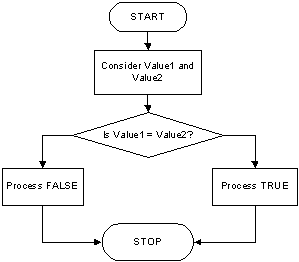
To compare two variables for equality, use the = operator. Its syntax is: Value1 = Value2 |
The equality operation is used to find out whether two variables (or one variable and a constant) hold the same value. From our syntax, the value of Value1 would be compared with the value of Value2. If Value1 and Value2 hold the same value, the comparison produces a True result. If they are different, the comparison renders false or 0.
Here is an example:
Module Exercise

    Public Function Main() As Integer
        Dim IsFullTime As Boolean

        MsgBox("Is Employee Full Time? " & IsFullTime)

        IsFullTime = True
        MsgBox("Is Employee Full Time? " & IsFullTime)
        Return 0
    End Function

End Module
This would produce:
 |
 |
As opposed to checking for equality, you may instead want to know whether two values are different. The operator used to perform this comparison is <> and its formula is:
Variable1 <> Variable2
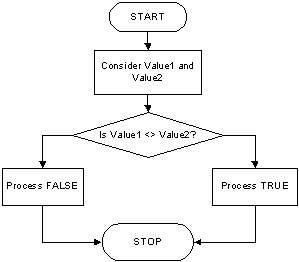
If the operands on both sides of the operator are the same, the comparison renders false. If both operands hold different values, then the comparison produces a true result. This also shows that the equality = and the inequality <> operators are opposite.
Here is an example:
Module Exercise

    Public Function IsDifferent(ByVal Value1 As Integer,
                                ByVal Value2 As Integer) As Boolean
        Return (Value1 <> Value2)
    End Function

    Public Function Main() As Integer
        Dim a%, b%
        Dim Result As Boolean

        a% = 12 : b% = 48
        Result = IsDifferent(a%, b%)

        MsgBox("The resulting comparison of 12 <> 48 is " & Result)
        Return 0
    End Function

End Module
This would produce:

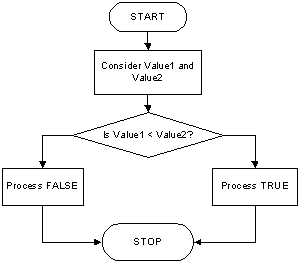
To find out whether one value is lower than another, use the < operator. Its syntax is:
Value1 < Value2
The value held by Value1 is compared to that of Value2. As it would be done with other operations, the comparison can be made between two variables, as in Variable1 < Variable2. If the value held by Variable1 is lower than that of Variable2, the comparison produces a True.
Here is an example:
Module Exercise

    Public Function Main() As Integer
        Dim PartTimeSalary, ContractorSalary As Double
        Dim IsLower As Boolean

        PartTimeSalary = 20.15
        ContractorSalary = 22.48
        IsLower = PartTimeSalary < ContractorSalary

        MsgBox("Part Time Salary:  " & PartTimeSalary & vbCrLf &
               "Contractor Salary: " & ContractorSalary & vbCrLf &
               "Is PartTimeSalary < ContractorSalary? " & IsLower)

        PartTimeSalary = 25.55
        ContractorSalary = 12.68
        IsLower = PartTimeSalary < ContractorSalary

        MsgBox("Part Time Salary:  " & PartTimeSalary & vbCrLf &
               "Contractor Salary: " & ContractorSalary & vbCrLf &
               "Is PartTimeSalary < ContractorSalary? " & IsLower)
        Return 0
    End Function

End Module
This would produce:
 |
 |
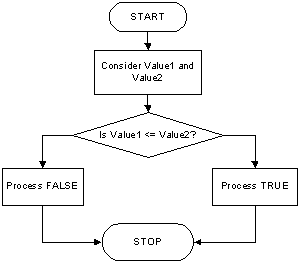
The previous two operations can be combined to compare two values. This allows you to know if two values are the same or if the first is less than the second. The operator used is <= and its syntax is:
Value1 <= Value2
The <= operation performs a comparison as any of the last two. If both Value1 and VBalue2 hold the same value, result is true or positive. If the left operand, in this case Value1, holds a value lower than the second operand, in this case Value2, the result is still true:
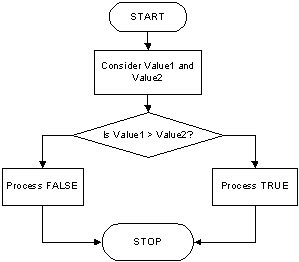
When two values of the same type are distinct, one of them is usually higher than the other. VBasic provides a logical operator that allows you to find out if one of two values is greater than the other. The operator used for this operation uses the > symbol. Its syntax is:
Value1 > Value2
Both operands, in this case Value1 and Value2, can be variables or the left operand can be a variable while the right operand is a constant. If the value on the left of the > operator is greater than the value on the right side or a constant, the comparison produces a True value. Otherwise, the comparison renders False or null:
Here is an example:
Module Exercise

    Public Function Main() As Integer
        Dim PartTimeSalary, ContractorSalary As Double
        Dim IsLower As Boolean

        PartTimeSalary = 20.15
        ContractorSalary = 22.48
        IsLower = PartTimeSalary > ContractorSalary

        MsgBox("Part Time Salary:  " & PartTimeSalary & vbCrLf &
               "Contractor Salary: " & ContractorSalary & vbCrLf &
               "Is PartTimeSalary > ContractorSalary? " & IsLower)

        PartTimeSalary = 25.55
        ContractorSalary = 12.68
        IsLower = PartTimeSalary > ContractorSalary

        MsgBox("Part Time Salary:  " & PartTimeSalary & vbCrLf &
               "Contractor Salary: " & ContractorSalary & vbCrLf &
               "Is PartTimeSalary > ContractorSalary? " & IsLower)
        Return 0
    End Function

End Module
This would produce:
 |
 |
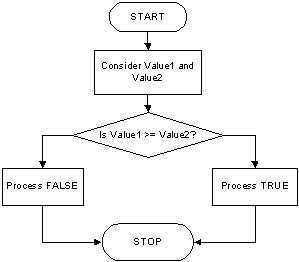
The greater than or the equality operators can be combined to produce an operator as follows: >=. This is the "greater than or equal to" operator. Its syntax is:
Value1 >= Value2
A comparison is performed on both operands: Value1 and Value2. If the value of Value1 and that of Value2 are the same, the comparison produces a True value. If the value of the left operand is greater than that of the right operand, the comparison still produces True. If the value of the left operand is strictly less than the value of the right operand, the comparison produces a False result:
|
|
|||
| Previous | Copyright © 2008-2026, FunctionX | Monday 14 February 2016 | Next |
|
|
|||