|
Fundamentals of Time Values |
|
|
|
As mentioned previously, both Transact-SQL and the .NET
Framework provide functions, structures, and classes to perform various
types of operations on time values. Also, you can borrow functions from the
Visual Basic library for the same purpose.
|
Like C# (or rather the .NET Framework), Transact-SQL
supports time values. Transact-SQL provides the TIME
data type. To declare a variable that would hold a time value, use TIME
as the data type. The primary formulas of a time values are defined in the
Time tab of the Customize Regional Options of Control Panel:
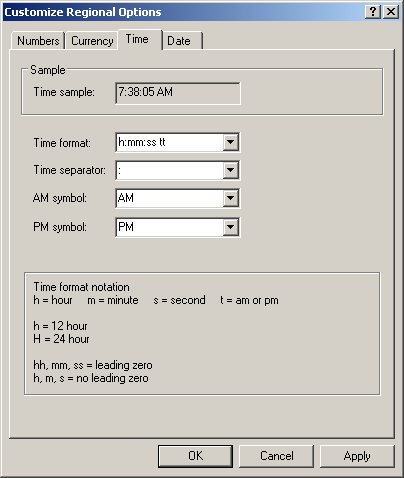
To initialize the variable, use the following formula:
hh:mm
hh:mm:ss
hh:mm:ss[.fractional seconds]
The first part includes the hour with a value between
1 and 23. If the value is less than 10, you can write it with a leading 0,
as in 08.
The second part represents the minutes and holds a
value between 1 and 59. If the value is less than 10, you can type it with
a leading 0, as in 04. The values are separated by :. The value is
included in single-quotes. To indicate that you want to follow Unicode
rules, precede the value with N. Here is an example:
void btnDatabaseClick(object sender, EventArgs e)
{
    using (SqlConnection connection =
            new SqlConnection("Data Source=(local);" +
                              "Database='Exercise1';" +
                              "Integrated Security=yes;"))
    {
        SqlCommand command = new SqlCommand("DECLARE @ArrivalTime time; " +
                                            "SET     @ArrivalTime = N'18:22'; " +
                                            "SELECT  @ArrivalTime; ",
                                            connection);
        connection.Open();
        SqlDataReader rdr = command.ExecuteReader();

        while (rdr.Read())
            MessageBox.Show("Arrival Time: " + rdr[0].ToString(),
                            "Database Application",
                            MessageBoxButtons.OK,
                            MessageBoxIcon.Information);
    }
}
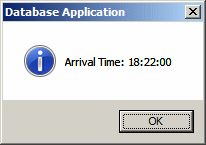
This would produce:
The third part of our formula is optional and
represents the seconds portion of the time and holds a value between 1 and
59. If the value is less than 10, you can provide it with a leading 0.
This part is separated from the previous one with :.
The last part also is optional. It allows you to
provide the milliseconds part of the time. If you want to provide it,
enter a value between 1 and 999. This is separated from the seconds part
with a period ".".
As mentioned already, Transact-SQL provides a data
type named time that is a good candidate for time values. You can
apply that data type to a column.
|
Data Entry on Time-Based Columns
|
|
To specify the time value of a TIME-based
column, you use the same formulas we saw for the variables:
hh:mm
hh:mm:ss
hh:mm:ss[.fractional seconds]
|
Time-Based Column Data Entry Using Windows
Controls
|
|
The value of a time-based column can be provided by a
text box, a masked text box, or a time picker. In the Transact-SQL, a
time field holds only a value between midnight and 23:59 (or 11:59
PM). When creating the control in a graphical application, you can
(should) use the time picker that imposes on the user to specify a time
value. You can then retrieve that value and pass it as a string to the
time-based column of a table. Here is an example:
using System;
using System.Data;
using System.Drawing;
using System.Windows.Forms;
using System.Data.SqlClient;

public class Exercise : System.Windows.Forms.Form
{
    Label lblPizzaSize;
    ComboBox cbxPizzaSize;
    Label lblDateOrdered;
    DateTimePicker dtpDateOrdered;
    Label lblTimeOrdered;
    DateTimePicker dtpTimeOrdered;
    Button btnCreateDatabase;
    Button btnCreatePizzaOrder;

    public Exercise()
    {
        InitializeComponent();
    }

    void InitializeComponent()
    {
        btnCreateDatabase = new Button();
        btnCreateDatabase.Text = "Create Database";
        btnCreateDatabase.Location = new Point(12, 12);
        btnCreateDatabase.Width = 120;
        btnCreateDatabase.Click += new EventHandler(btnCreateDatabaseClick);

        lblPizzaSize = new Label();
        lblPizzaSize.AutoSize = true;
        lblPizzaSize.Text = "Pizza Size:";
        lblPizzaSize.Location = new Point(12, 44);

        cbxPizzaSize = new ComboBox();
        cbxPizzaSize.Items.Add("Small");
        cbxPizzaSize.Items.Add("Medium");
        cbxPizzaSize.Items.Add("Large");
        cbxPizzaSize.DropDownStyle = ComboBoxStyle.DropDownList;
        cbxPizzaSize.Location = new Point(110, 44);

        lblDateOrdered = new Label();
        lblDateOrdered.AutoSize = true;
        lblDateOrdered.Text = "Date Ordered:";
        lblDateOrdered.Location = new Point(12, 66);

        dtpDateOrdered = new DateTimePicker();
        dtpDateOrdered.Location = new Point(110, 66);

        lblTimeOrdered = new Label();
        lblTimeOrdered.AutoSize = true;
        lblTimeOrdered.Text = "Time Orderd:";
        lblTimeOrdered.Location = new Point(12, 88);

        dtpTimeOrdered = new DateTimePicker();
        dtpTimeOrdered.Location = new Point(110, 88);
        dtpTimeOrdered.ShowUpDown = true;
        dtpTimeOrdered.Width = 100;
        dtpTimeOrdered.Format = DateTimePickerFormat.Time;

        btnCreatePizzaOrder = new Button();
        btnCreatePizzaOrder.Text = "Create Pizza Order";
        btnCreatePizzaOrder.Location = new Point(12, 112);
        btnCreatePizzaOrder.Width = btnCreateDatabase.Width;
        btnCreatePizzaOrder.Click += new EventHandler(btnCreatePizzaOrderClick);

        Text = "Database Exercise";
        Controls.Add(lblPizzaSize);
        Controls.Add(cbxPizzaSize);
        Controls.Add(lblDateOrdered);
        Controls.Add(dtpDateOrdered);
        Controls.Add(lblTimeOrdered);
        Controls.Add(dtpTimeOrdered);
        Controls.Add(btnCreatePizzaOrder);
        Controls.Add(btnCreateDatabase);

        StartPosition = FormStartPosition.CenterScreen;
    }

    void btnCreateDatabaseClick(object sender, EventArgs e)
    {
        using (SqlConnection cntExercise =
            new SqlConnection("Data Source='EXPRESSION';" +
                              "Integrated Security='SSPI';"))
        {
            SqlCommand cmdExercise =
                new SqlCommand("IF EXISTS (SELECT name " +
                               "FROM sys.databases WHERE name = N'Exercise1' " +
                               ") " +
                               "DROP DATABASE Exercise1; " +
                               "CREATE DATABASE Exercise1;", cntExercise);

            cntExercise.Open();
            cmdExercise.ExecuteNonQuery();
        }

        using (SqlConnection cntExercise =
            new SqlConnection("Data Source='EXPRESSION';" +
                              "Database='Exercise1'; " +
                              "Integrated Security='SSPI';"))
        {
            SqlCommand cmdExercise =
                new SqlCommand("CREATE TABLE PizzaOrders" +
                               "(" +
                               "    PizzaSize nvarchar(30)," +
                               "    DateOrdered date," +
                               "    TimeOrdered time" +
                               ");",
                               cntExercise);

            cntExercise.Open();
            cmdExercise.ExecuteNonQuery();
        }
    }

    private void btnCreatePizzaOrderClick(object sender, EventArgs e)
    {
        using (SqlConnection cntExercise =
            new SqlConnection("Data Source='EXPRESSION';" +
                              "Database='Exercise1';" +
                              "Integrated Security=SSPI;"))
        {
            SqlCommand cmdExercise =
                new SqlCommand("INSERT INTO PizzaOrders " +
                               "VALUES('" + cbxPizzaSize.Text + "', '" +
                               dtpDateOrdered.Value + "', '" + dtpTimeOrdered.Value + "');",
                               cntExercise);

            cntExercise.Open();
            SqlDataReader rdrEmployees = cmdExercise.ExecuteReader();
        }
    }
}

public class Program
{
    [STAThread]
    static int Main()
    {
        System.Windows.Forms.Application.Run(new Exercise());
        return 0;
    }
}
If you use a text box or a masked text box to let the
user specify a time value, you should make sure to validate the time value
or to convert the value to a valid time before passing it to the table.
When it comes to date and time values, because they
can be (very) complex and not forgiving, you can either apply a
string-based data type to the column and take care of conversion on the
graphical application side, or you should anticipate difficult behaviors
and take care of conversions yourself.
|
Data Analysis On Time Values
|
|
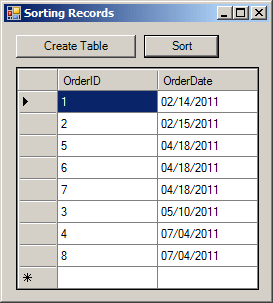
When you sort records based on a column that uses a
time-based column, the SQL interpreter must be able to
identify each time value. Fortunately, the database engine will have
validated each time value and reject those that were not valid.
If you sort records based on a column that uses a time
type and if the column has null fields, the records with null would show
first. The values are sorted in their order of occurrence. If the table
has only time values, the database engine would (or may) consider that all
time values occur on the same day. In that case (or if that's the case),
if you sort the records on the column that has the time values, the values
closer to 0:01 AM would first appear, then the values that occur closer to
23:59 (midnight) on the same day would appear last.
|
Time Values and Logical Comparisons
|
|
Remember that Transact-SQL supports all regular
logical operators:
- When the equality comparison is performed on time values, they
must occur at the exact same time, not a second earlier or later. This
means that the data type specified for the column and the way data
entry was performed are very important
- If the inequality comparison is performed on time values, it may
produce more positive (meaning that the values are different) than
negative result
- If the comparison for lower value is performed on two time values,
the first time value must occur before the second
|
Time Values and Functions
|
|
|
Creating a Time From Parts
|
|
As mentioned already, a time value is made an hour
value, a minute value, and the seconds. We already saw how to supply those
values as a string. As an alternative, to let you create a time value if
you have those parts, Transact-SQL provides a function named
TIMEFROMPARTS. Its syntax is:
time TIMEFROMPARTS(int hour, int minute, int seconds, int fractions, int precision);
The hour value must be between 0 and 23. The
minute must be between 0 and 59. The second argument must have
a value between 0 and 59. Whenever the seconds are not important to
represent the time, provide their value as 0. Here is an example:
DECLARE @TimeValue time;
SET @TimeValue = TIMEFROMPARTS(8, 20, 42, 0, 0);
SELECT @TimeValue;
GO
A time value is subject to precision, that is, how
accuracter the value should be. That's the role of the last two arguments
of the TIMEFROMPARTS() function. These two arguments should be
provided together because one controls the other:
- If precision is passed as 0 or 1, fraction must be 0
and represents 5/100 of seconds
- If precision is passed as 2, fraction must be
between 0 and 99 and represents 50/100 of seconds. Here is an example:
DECLARE @TimeValue time;
SET @TimeValue = TIMEFROMPARTS(8, 20, 42, 99, 2);
SELECT @TimeValue [Time Value];
GO
- If precision is passed as 3, fraction must be
between 0 and 999 and represents 500/1000 of seconds. Here is an
example:
DECLARE @TimeValue time;
SET @TimeValue = TIMEFROMPARTS(8, 20, 42, 999, 2);
SELECT @TimeValue [Time Value];
GO
- If precision is passed as 4, fraction must be
between 0 and 9999 and represents picoseconds
- If precision is passed as 5, fraction must be
between 0 and 99999 and represents the nanoseconds
- If precision is passed as 6, fraction must be
between 0 and 999999 and represents 10 nanoseconds
- If precision is passed as 7, fraction must be
between 0 and 9999999 and represents 100 nanoseconds Here is an
example:
DECLARE @TimeValue time;
SET @TimeValue = TIMEFROMPARTS(8, 20, 42, 9999999, 7);
SELECT @TimeValue [Time Value];
GO
The fraction argument must not have a value
other than those ones; otherwise you would receive an error.
Remember that the .NET Framework provides the
DateTime structure to handle time values.
To let you get the current (date and) time of the
computer, Transact-SQL provides various functions. One of them is named
GETDATE. Its syntax is:
GETDATE();
This function simply returns the (date and) time of
the computer where the function is called. As mentioned already, time is
subject to precision. For that matter, Transact-SQL provides a function
named SYSDATETIME. Its syntax is:
SYSDATETIME();
To get the current time from the .NET Framework, the
DateTime structure provides a property named Now:
public static DateTime Now { get; }
|
Converting a String to Time
|
|
As mentioned previously, to let you convert a value
from one type to another, such as to convert a a string to a time,
Transact-SQL provides the TRY_PARSE() and TRY_CONVERT()
functions. These functions take a string as argument and they scan that
argument. If the value is not a valid time, the functions returns NULL.
If the value is a valid (date or) time, the function returns it. Here is
an example:
DECLARE @StrValue nvarchar(20),
        @TimeValue time;
SET @StrValue = N'10:08';
SET @TimeValue = TRY_CONVERT(time, @StrValue);
SELECT @StrValue;
SELECT @TimeValue;
GO
To convert a string to a time value in the .NET
Framework, the DateTime structure provides the Parse()
method.
Even though there is usually a standard way to display
time, Transact-SQL provides a function to control how a time value should
be presented. The function to do this is named FORMAT and its
syntax is:
nvarchar FORMAT(value, nvarchar format [, nvarchar culture ] )
In the same way, the string data type provides
the Format() method that is overloaded with various versions. One
of the versions uses a syntax as follows:
public static string Format(string format, Object value);
The function and the method take two required
arguments. The third argument of the function is optional. The value
argument is the original time value. The format argument
specifies how the formatting must be carried. The computer has a default
way to display time. In US English, the default time is from 00:00 to
23:59. To present a time value in the default format, pass the second
value as c (in lowercase. Here is an example:
DECLARE @StrValue nvarchar(20),
        @TimeValue time;
SET @TimeValue = N'09:24 PM';
SET @StrValue = FORMAT(@TimeValue, N'c');
SELECT @StrValue;
SELECT @TimeValue;
GO
One of the primary operations you may want to perform
on a date or a time value would consist of adding a value to it. To
support this operation, Transact-SQL provides the DATEADD()
function. Its syntax is:
DATEADD(TypeOfValue, ValueToAdd, DateOrTimeReferenced)
The third argument to this function is the value of a
time on which the operation will be performed. It can be a constant value
that uses a valid format. The second argument is the value that will be
added. It should be a constant integer, such as 8, or a floating point
value, such as 4.06.
When calling this function, you must first specify the
type of value that you want to add. This type is passed as the first
argument. It is used as follows:
| If the
TypeOfValue is |
As a result |
| Hour |
hh |
A number of hours will be added to the time value |
| minute |
n |
mi |
A number of minutes will be added to the time value |
| second |
s |
ss |
A number of seconds will be added to the time value |
| millisecond |
ms |
A number of milliseconds will be added to the time value |
Here is an example that adds two hours to a time
value:
DECLARE @TimeValue time,
	@Result time;
SET     @TimeValue = N'23:38';
SET     @Result = DATEADD(hh, 2, @TimeValue);
SELECT @TimeValue;
SELECT @Result;
GO
The .NET Framework provides alternative ways to
perform time-based operations such as adding two time values.
Another regular operation performed on a time value
consists of getting the number of units that has elapsed in the range of
two time values. To support this operation, Transact-SQL provides the
DATEDIFF() function. Its syntax is:
DATEDIFF(TypeOfValue, StartDate, EndDate)
This function takes three arguments. The second
argument is the starting time of the range to be considered. The third
argument is the end or last time of the considered range. You use the
first argument to specify the type of value you want the function to
produce. This argument uses the same value as those of the DATEADD()
function. Here is an example:
DECLARE @Start time,
	@End time,
	@Result int;
SET     @Start = N'12:24';
SET     @End = N'15:06';
SET     @Result = DATEDIFF(n, @Start, @End);
SELECT @Start [Start Time];
SELECT @End [End Time];
SELECT @Result;
GO
|
The Part Name of a Time Value
|
|
Sometime you want to get a component of a date, such
as the hour, the minute, or the second. To assist you with this,
Transact-SQL is equipped with a function named DATENAME. Its syntax
is:
nvarchar DATENAME(integer ReturnedValue, date Value);
The first argument specifies the value you want to get
from the function. That argument can be one of the following:
| If the
ReturnedValue is |
The function will return |
| Hour |
hh |
The hour part |
| minute |
n |
mi |
The minute part |
| second |
s |
ss |
The second |
| millisecond |
ms |
The millisecond |
| microsecond |
mcs |
The microsecond |
| nanosecond |
ns |
The nanosecond |
The second argument is the time that hold the value
from which the value will be produced. Here is an example:
DECLARE @TimeValue time,
	@Result int;
SET     @TimeValue = N'23:38';
SET     @Result = DATENAME(hh, @TimeValue);
SELECT @TimeValue;
SELECT @Result;
GO
Besides DATENAME(), Transact-SQL also provides
a function named DATEPART. Its syntax is:
int DATEPART (integer datepart, date Value)
This function takes the exact same arguments as
DATENAME and both functions essentially behave the same. The main
difference is that DATENAME() returns a string while DATEPART()
returns an integer. Remember that what you are interested in is the value
of the first argument. This means that these two functions perform the
same operation.
|
Combining Date and Time Values
|
|
Instead of singly declaring a date or a time value,
you may want to combine both values into one. To support this,
Transact-SQL provides the DATETIME2 data type. This data type
counts dates from January 1st, 0001 and ends on December 31st, 9999.
Therefore, to declare a variable that supports a date value, a time value,
or a combination of a date and time values, use the DATETIME2 data
type. To initialize the variable, use one of the following formulas:
YYYYMMDD
YYYYMMDD hh:mm:ss
YYYYMMDD hh:mm:ss[.fractional seconds]
YYYY-MM-DD
YYYY-MM-DD hh:mm:ss
YYYY-MM-DD hh:mm:ss[.fractional seconds]
MM-DD-YY
MM-DD-YY hh:mm:ss
MM-DD-YY hh:mm:ss[.fractional seconds]
MM-DD-YYYY
MM-DD-YYYY hh:mm:ss
MM-DD-YYYY hh:mm:ss[.fractional seconds]
MM/DD/YY
MM/DD/YY hh:mm:ss
MM/DD/YY hh:mm:ss[.fractional seconds]
MM/DD/YYYY
MM/DD/YYYY hh:mm:ss
MM/DD/YYYY hh:mm:ss[.fractional seconds]
Remember to include the value in single-quotes. Here
are examples:
using System;
using System.Drawing;
using System.Windows.Forms;
using System.Data.SqlClient;
public class Exercise : System.Windows.Forms.Form
{
Button btnDatabase;
public Exercise()
{
InitializeComponent();
}
void InitializeComponent()
{
btnDatabase = new Button();
btnDatabase.Text = "Database";
btnDatabase.Location = new Point(12, 12);
btnDatabase.Click += new EventHandler(btnDatabaseClick);
Controls.Add(btnDatabase);
}
void btnDatabaseClick(object sender, EventArgs e)
{
string result = "";
using (SqlConnection connection =
new SqlConnection("Data Source=(local);" +
"Database='Exercise1';" +
"Integrated Security=yes;"))
{
SqlCommand command = new SqlCommand("DECLARE @FullName nvarchar(60), " +
" @DateOfBirth date, " +
" @DateRegistered datetime2; " +
"SET @FullName = N'John Summons'; " +
"SET @DateOfBirth = N'19960426'; " +
"SET @DateRegistered = N'20100629'; " +
"SELECT @FullName, " +
" @DateOfBirth, " +
" @DateRegistered; ",
connection);
connection.Open();
SqlDataReader rdr = command.ExecuteReader();
while (rdr.Read()){
result = string.Format("Full Name:\t{0}\n" +
"Date of Birth:\t{1}\n" +
"Date Registered:\t{2}",
rdr[0].ToString(),
rdr[1].ToString(),
rdr[2].ToString());
}
MessageBox.Show(result,
"Database Application",
MessageBoxButtons.OK,
MessageBoxIcon.Information);
}
using (SqlConnection connection =
new SqlConnection("Data Source=(local);" +
"Database='Exercise1';" +
"Integrated Security=yes;"))
{
SqlCommand command = new SqlCommand("DECLARE @FullName nvarchar(60), " +
" @DateOfBirth date, " +
" @DateRegistered datetime2; " +
"SET @FullName = N'James Haans'; " +
"SET @DateOfBirth = N'1994-10-25'; " +
"SET @DateRegistered = N'2009-08-02'; " +
"SELECT @FullName, " +
" @DateOfBirth, " +
" @DateRegistered; ",
connection);
connection.Open();
SqlDataReader rdr = command.ExecuteReader();
while (rdr.Read())
{
result = string.Format("Full Name:\t{0}\n" +
"Date of Birth:\t{1}\n" +
"Date Registered:\t{2}",
rdr[0].ToString(),
rdr[1].ToString(),
rdr[2].ToString());
}
MessageBox.Show(result,
"Database Application",
MessageBoxButtons.OK,
MessageBoxIcon.Information);
}
using (SqlConnection connection =
new SqlConnection("Data Source=(local);" +
"Database='Exercise1';" +
"Integrated Security=yes;"))
{
SqlCommand command = new SqlCommand("DECLARE @FullName nvarchar(60), " +
" @DateOfBirth date, " +
" @DateRegistered datetime2; " +
"SET @FullName = N'Gertrude Monay'; " +
"SET @DateOfBirth = N'06-16-92'; " +
"SET @DateRegistered = N'2009-12-24 12:36'; " +
"SELECT @FullName, " +
" @DateOfBirth, " +
" @DateRegistered; ",
connection);
connection.Open();
SqlDataReader rdr = command.ExecuteReader();
while (rdr.Read())
{
result = string.Format("Full Name:\t{0}\n" +
"Date of Birth:\t{1}\n" +
"Date Registered:\t{2}",
rdr[0].ToString(),
rdr[1].ToString(),
rdr[2].ToString());
}
MessageBox.Show(result,
"Database Application",
MessageBoxButtons.OK,
MessageBoxIcon.Information);
}
using (SqlConnection connection =
new SqlConnection("Data Source=(local);" +
"Database='Exercise1';" +
"Integrated Security=yes;"))
{
SqlCommand command = new SqlCommand("DECLARE @FullName nvarchar(60), " +
" @DateOfBirth date, " +
" @DateRegistered datetime2; " +
"SET @FullName = N'Philomène Guillon'; " +
"SET @DateOfBirth = N'1996-10-16'; " +
"SET @DateRegistered = N'10/14/08 09:42:05.136'; " +
"SELECT @FullName, " +
" @DateOfBirth, " +
" @DateRegistered; ",
connection);
connection.Open();
SqlDataReader rdr = command.ExecuteReader();
while (rdr.Read())
{
result = string.Format("Full Name:\t{0}\n" +
"Date of Birth:\t{1}\n" +
"Date Registered:\t{2}",
rdr[0].ToString(),
rdr[1].ToString(),
rdr[2].ToString());
}
MessageBox.Show(result,
"Database Application",
MessageBoxButtons.OK,
MessageBoxIcon.Information);
}
using (SqlConnection connection =
new SqlConnection("Data Source=(local);" +
"Database='Exercise1';" +
"Integrated Security=yes;"))
{
SqlCommand command = new SqlCommand("DECLARE @FullName nvarchar(60), " +
" @DateOfBirth date, " +
" @DateRegistered datetime2; " +
"SET @FullName = N'Eddie Monsoon'; " +
"SET @DateOfBirth = N'08/10/96'; " +
"SET @DateRegistered = N'2009-06-02 12:36'; " +
"SELECT @FullName, " +
" @DateOfBirth, " +
" @DateRegistered; ",
connection);
connection.Open();
SqlDataReader rdr = command.ExecuteReader();
while (rdr.Read())
{
result = string.Format("Full Name:\t{0}\n" +
"Date of Birth:\t{1}\n" +
"Date Registered:\t{2}",
rdr[0].ToString(),
rdr[1].ToString(),
rdr[2].ToString());
}
MessageBox.Show(result,
"Database Application",
MessageBoxButtons.OK,
MessageBoxIcon.Information);
}
using (SqlConnection connection =
new SqlConnection("Data Source=(local);" +
"Database='Exercise1';" +
"Integrated Security=yes;"))
{
SqlCommand command = new SqlCommand("DECLARE @FullName nvarchar(60), " +
" @DateOfBirth date, " +
" @DateRegistered datetime2; " +
"SET @FullName = N'Peter Mukoko'; " +
"SET @DateOfBirth = N'03-10-1994'; " +
"SET @DateRegistered = N'7/22/2009 10:24:46.248'; " +
"SELECT @FullName, " +
" @DateOfBirth, " +
" @DateRegistered; ",
connection);
connection.Open();
SqlDataReader rdr = command.ExecuteReader();
while (rdr.Read())
{
result = string.Format("Full Name:\t{0}\n" +
"Date of Birth:\t{1}\n" +
"Date Registered:\t{2}",
rdr[0].ToString(),
rdr[1].ToString(),
rdr[2].ToString());
}
MessageBox.Show(result,
"Database Application",
MessageBoxButtons.OK,
MessageBoxIcon.Information);
}
using (SqlConnection connection =
new SqlConnection("Data Source=(local);" +
"Database='Exercise1';" +
"Integrated Security=yes;"))
{
SqlCommand command = new SqlCommand("DECLARE @FullName nvarchar(60), " +
" @DateOfBirth date, " +
" @DateRegistered datetime2; " +
"SET @FullName = N'Chritian Allen'; " +
"SET @DateOfBirth = N'06/16/1995'; " +
"SET @DateRegistered = N'02-09-2009 12:36'; " +
"SELECT @FullName, " +
" @DateOfBirth, " +
" @DateRegistered; ",
connection);
connection.Open();
SqlDataReader rdr = command.ExecuteReader();
while (rdr.Read())
{
result = string.Format("Full Name:\t{0}\n" +
"Date of Birth:\t{1}\n" +
"Date Registered:\t{2}",
rdr[0].ToString(),
rdr[1].ToString(),
rdr[2].ToString());
}
MessageBox.Show(result,
"Database Application",
MessageBoxButtons.OK,
MessageBoxIcon.Information);
}
}
public static int Main()
{
System.Windows.Forms.Application.Run(new Exercise());
return 0;
}
}
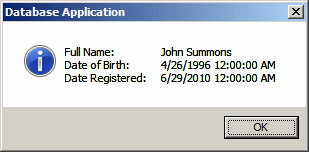
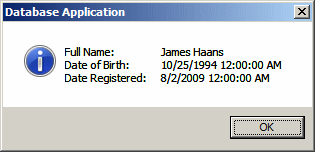
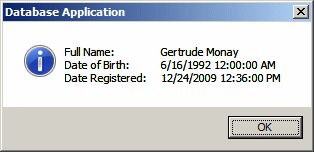
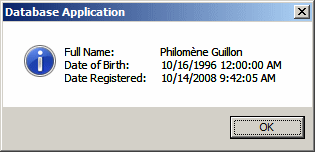
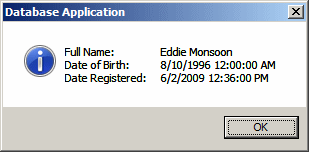
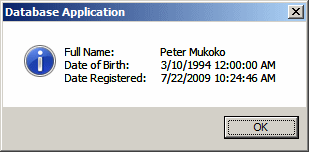
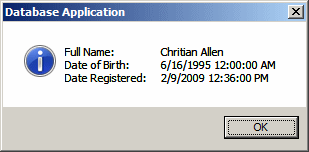
This would produce:
If you start the value with two digits, the first part
is considered a month and not the year.
Besides the DATE,
the TIME, and the DATETIME2 data types, Transact-SQL
supports the smalldatetime and the datetime data types.
These are old data types. Although still available, they are kept for
backward compatibility and you should stop using them.
One of the ways you can create a value that is a
combination of date and time is by using a function named
DATETIME2FROMPARTS. Its syntax is:
datetime2 DATETIME2FROMPARTS(int year,
                             int month,
                             int day,
                             int hour,
                             int minute,
                             int seconds,
                             int fractions,
                             int precision);
As you can see, this function takes 8 required
arguments. As mentioned already, the datetime2 is a combination of
date and time. Based on this, the first 3 arguments are the same used in
the DATEFROMPARTS() function. The other arguments are the same used
in the TIMEFROMPARTS() Function.