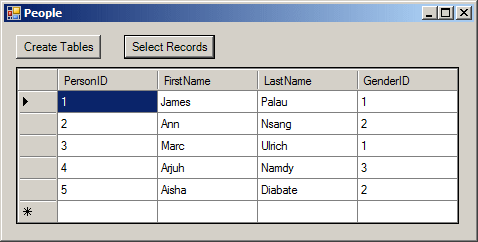
To apply the rules of relational databases, you create some types of relationships among the objects of the database. The transactions among the various objects of a database should make sure information of one object is accessible to another object. The objects that hold information, as we have mentioned already, are the tables. To manage the flow of information from one table (A) to another table (B), the table that holds the information, A, must make it available to other tables, such as B. There are various issues that must be dealt with:
These problems are solved by specifying a particular column as the "key" of the table. Such a column is referred to as the primary key. In a relational database, which is the case for most of the databases you will be creating, each table should have at least one primary key. As an example, a primary key on an car table of a car rental company can be set on a Tag Number field because each car should have a unique tag number. A table can also use more than one column to represent the primary key if you judge it necessary. Once you have decided that a table will have a primary key, you must decide what type of data that field will hold. If you are building a table that can use a known and obvious field as unique, an example would be the shelf number of a library, you can set its data type as char or varchar and make it a primary key. In many other cases, for example if you cannot decide on a particular field that would hold unique information, an example would be customers Contact Name, you should create your own unique field and make it the Primary Key. Such a field should have an int data type.
To create a primary key column using SQL, the first thing to do is, on the right side of the column definition, type PRIMARY KEY. Here is an example: CREATE TABLE Persons
(
PersonID int PRIMARY KEY NOT NULL,
FirstName nvarchar(20),
LastName nvarchar(20) NOT NULL
);
In the SQL, you can give a specific name to a primary key. To do this, you can first create the column. Then, somewhere before the closing parenthesis of the table, specify the primary key column using the following formula: CONSTRAINT PrimaryKeyName PRIMARY KEY(ColumnName) In this formula, the CONSTRAINT keyword and the PRIMARY KEY (case-insensitive) expression are required. In the PrimaryKeyName placeholder, enter the name you want to give to the primary key. In the parentheses of the PRIMARY KEY expression, enter the name of the column that will be used as the primary key. Here is an example: CREATE TABLE Persons
(
PersonID int NOT NULL,
FirstName nvarchar(20),
LastName nvarchar(20) NOT NULL,
CONSTRAINT PrimKeyPeople PRIMARY KEY(PersonID)
);
By convention or tradition, the name of the primary starts with PK_ followed by the name of the table. Here is an example: CREATE TABLE Persons
(
PersonID int NOT NULL,
FirstName nvarchar(20),
LastName nvarchar(20) NOT NULL,
CONSTRAINT PK_Persons PRIMARY KEY(PersonID)
);
Continuing with our car rental database, imagine a customer comes to rent a car. We already established that it would be redundant to create new car information every time you process a new customer order. Instead, you would get the car's information from the table that holds data for the cars, and provide that information to the table used to process orders. As we described earlier, the car table should be able to provide its data to the other tables that would need that data. To make this flow of information possible from one table to another, you must create a relationship between them. To make it possible for a table B to receive data from a table A, the table B must have a column that represents the table A. This columns acts as an "ambassador" or a link. As a pseudo-ambassador, the column in the table B almost does not belong to that table: it primarily allows both tables to communicate. For this reason, the column in the table B is called a foreign key. A foreign key is a column on a table whose data is coming from another table.
The table that contains a primary key and that holds the information that another table would use is called the primary table or the parent table. The table that will receive the information from the other table is called the foreign table or the child table. The basic formula to create a foreign key in the SQL is: FOREIGN KEY REFERENCES ParentTableName(ForeignKeyCcolumn) The FOREIGN KEY expression and the REFERENCES keyword are required. In the ParentTableName placeholder, enter the name of the primary table that holds the information that will be accessed in the current table. In the parentheses of ParentTableName, enter the name of the primary column of the parent table. Here is an example: CREATE TABLE Persons
(
PersonID int PRIMARY KEY NOT NULL,
FirstName nvarchar(20),
LastName nvarchar(20) NOT NULL,
GenderID int NULL FOREIGN KEY REFERENCES Genders(GenderID)
);
Based on the above technique, notice that the foreign key does not have an object name as we saw for the primary key. If you do not specify a name for the foreign key, the SQL interpreter would automatically create a default name for you. Otherwise, to create a name, after creating the column, enter the CONSTRAINT keyword followed by the desired name and continue the rest as we saw above. Her is an example: CREATE TABLE Persons
(
PersonID int PRIMARY KEY NOT NULL,
FirstName varchar(20),
LastName varchar(20) NOT NULL,
GenderID int NULL CONSTRAINT FKGenders
FOREIGN KEY REFERENCES Genders(GenderID)
);
You can also create a foreign key as its own constraint, which is another technique to name a foreign key. To assign a desired name to a foreign key, you must create it as a constraint. To do this, after defining the column that holds the foreign key before the end of defining the table, create a constraint using the following formula: CONSTRAINT Name FOREIGN KEY(Foreign Key) REFERENCES Parent(Foreign Key) Here is an example: CREATE TABLE Genders
(
GenderID int NOT NULL,
Gender nvarchar(20) NOT NULL,
CONSTRAINT PK_Genders PRIMARY KEY(GenderID)
);
CREATE TABLE Persons
(
PersonID int PRIMARY KEY NOT NULL,
FirstName nvarchar(20),
LastName nvarchar(20) NOT NULL,
GenderID int,
Comments nvarchar(max),
CONSTRAINT FK_Genders FOREIGN KEY(GenderID) REFERENCES Genders(GenderID)
);
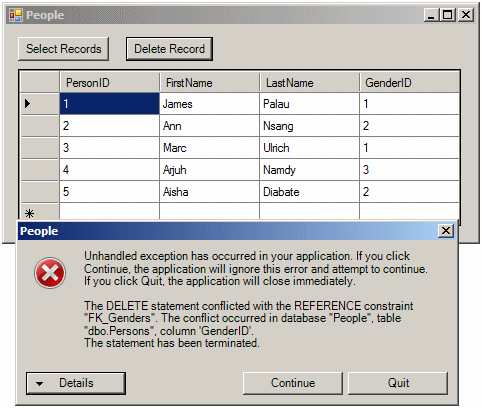
Data relationships allow records from one object to be available to other objects. When a relationship has been established between two tables, one of the concerns is to plan what would happen if a record from a parent table is deleted or moved. Referential integrity is the ability to take appropriate actions when tables or records involved in a relationship are affeected. When a relationship has been established between two tables, you can ask the database engine to observe some rules between the tables on one hand and among the records on the other hand. Remember how to create a foreign key with code. Here is an example: void CreateTable(object sender, EventArgs e)
{
using (SqlConnection connection =
new SqlConnection("Data Source=(local);" +
"Database='People';" +
"Integrated Security=yes;"))
{
SqlCommand command =
new SqlCommand("CREATE TABLE Persons " +
"( " +
" PersonID int PRIMARY KEY NOT NULL, " +
" FirstName nvarchar(20), " +
" LastName nvarchar(20) NOT NULL, " +
" GenderID int FK_Genders FOREIGN KEY REFERENCES Genders(GenderID) " +
");",
connection);
connection.Open();
command.ExecuteNonQuery();
MessageBox.Show("A table named \"Persons\" has been created.",
"People",
MessageBoxButtons.OK,
MessageBoxIcon.Information);
}
}
To specify what action to take on the foreign key when a record is deleted, add an ON DELETE expression: CREATE TABLE Persons
(
PersonID int PRIMARY KEY NOT NULL,
FirstName nvarchar(20),
LastName nvarchar(20) NOT NULL,
GenderID int FOREIGN KEY REFERENCES Genders(GenderID)
ON DELETE . . .
);
GO
To specify what action to take on the foreign key when a record has changed, add an ON UPDATE expression: CREATE TABLE Persons
(
PersonID int PRIMARY KEY NOT NULL,
FirstName nvarchar(20),
LastName nvarchar(20) NOT NULL,
GenderID int FOREIGN KEY REFERENCES Genders(GenderID)
ON UPDATE . . .
);
GO
In both cases, you must specify what option to apply. |
|
|||||||||||||||||||||||||||
|
|
||||||||||||||||||||||||||||