|
The Collection of Attributes of an Element
|
|
So far, we have used only one attribute per element.
Fortunately, you can create as many attributes as you judge necessary in an
element. To do this, type the name of each attribute, assign it a
double-quoted string and separate the attribute from the next with an empty
space. Here is an example of an element with different attributes:
<video ISBN="0-7888-1623-3" ScreenRatio="Standard" SoundtrackAvailable="True" />
As mentioned already and as you should always remember,
attributes belong to an element. To support them, the attributes of an
element are stored in the Attributes property of the XmlElement
class. The XmlElement.Attributes property is based on a class called
XmlAttributeCollection.
To know the number of attributes in an element, you can
use the XmlNamedNodeMap.Count property.
Whether using its index or name, after accessing an
attribute, you can manipulate it as you see fit. For example, you can change
or delete it using the same techniques we saw to perform on an individual
attribute.
As mentioned already, the attributes are stored as a
list. Because you have complete access to this list and the positions of its
attributes, when creating or adding a new attribute, you can specify the
position the new attribute should have in the collection. To create an
attribute as the first in an element, you can call the
XmlAttributeCollection.Prepend() method. Its syntax is:
public virtual XmlAttribute Prepend(XmlAttribute node);
Another technique you can use consists of locating an
attribute first. Once you have one, to create a new attribute before it, you
can call the XmlAttributeCollection.InsertBefore() method. Its syntax
is:
public virtual XmlAttribute InsertBefore(XmlAttribute newNode,
					 XmlAttribute refNode);
To add a new attribute after the current one, you can
call the XmlAttributeCollection.InsertAfter() method. Its syntax is:
public virtual XmlAttribute InsertAfter(XmlAttribute newNode,
					XmlAttribute refNode);
To add an attribute at the end of the list of attributes
of an element, you can call the XmlAttributeCollection.Append()
method. Its syntax is:
public virtual XmlAttribute Append(XmlAttribute node);
|
 Practical
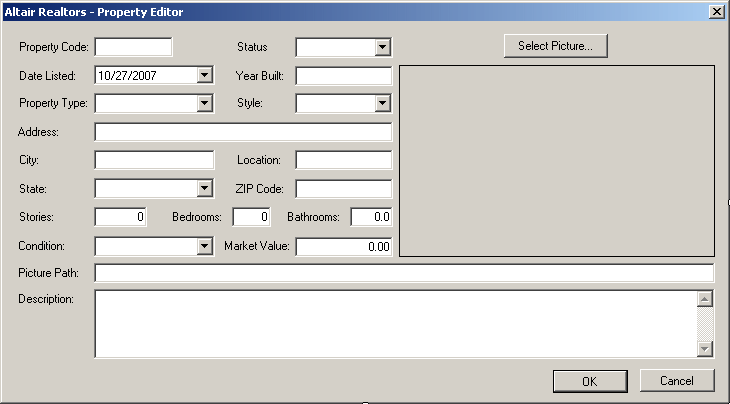
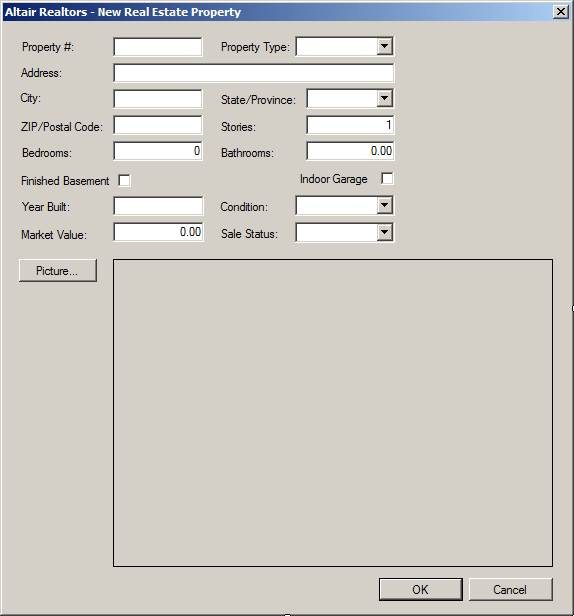
Learning: Adding Attributes Practical
Learning: Adding Attributes
|
|
- To add a few attributes, change the file as follows:
private void btnNewProperty_Click(object sender, EventArgs e)
{
    // Get a reference to the property editor
    PropertyEditor editor = new PropertyEditor();
    // If this directory doesn't exist, create it
    string strDirectory = @"C:\Altair Realtors";
    Directory.CreateDirectory(strDirectory);
    // This is the XML file that holds the list of proeprties
    string strFilename = @"C:\Altair Realtors\properties.xml";

    Random rnd = new Random();
    editor.txtPropertyCode.Text = rnd.Next(100, 999).ToString() +
                                  "-" + rnd.Next(100, 999).ToString();
    string strPicturePath;

    if (editor.ShowDialog() == DialogResult.OK)
    {
        string PropertyCode, PropertyType, Location,
        SaleStatus, Style, Condition,
        Address, City, State, ZIPCode, Description;
        DateTime DateListed;
        int YearBuilt, Stories, Bedrooms;
        float Bathrooms;
        double MarketValue;

        // We will need a reference to the XML document
        XmlDocument docProperties = new XmlDocument();

        // Find out if the file exists already
        // If it doesn't, then create it
        if (!File.Exists(strFilename))
        {
            docProperties.LoadXml("<?xml version=\"1.0\" encoding=\"utf-8\"?>" +
                                  "<Listing></Listing>");
            docProperties.Save(strFilename);
        }

        // Open the XML file
        docProperties.Load(strFilename);

        // Get a reference to the root node
        XmlElement nodRoot = docProperties.DocumentElement;

        PropertyCode = editor.txtPropertyCode.Text;
        SaleStatus = editor.cbxStatus.Text;
        DateListed = editor.dtpDateListed.Value;
        YearBuilt = int.Parse(editor.txtYearBuilt.Text);
        PropertyType = editor.cbxPropertyTypes.Text;
        Style = editor.cbxStyle.Text;
        Condition = editor.cbxConditions.Text;
        Location = editor.txtLocation.Text;
        Address = editor.txtAddress.Text;
        City = editor.txtCity.Text;
        State = editor.cbxStates.Text;
        ZIPCode = editor.txtZIPCode.Text;
        Stories = int.Parse(editor.txtStories.Text);
        Bedrooms = int.Parse(editor.txtBedrooms.Text);
        Bathrooms = float.Parse(editor.txtBathrooms.Text);
        Description = editor.txtDescription.Text;
        MarketValue = double.Parse(editor.txtMarketValue.Text);
        strPicturePath = editor.txtPicturePath.Text;

        // Get a reference to the root element
        XmlElement elmRoot = docProperties.DocumentElement;
        // Create a node named Property
        XmlElement elmProperty = docProperties.CreateElement("Property");

        // Create an attribute for the Propety node
        elmProperty.SetAttribute("Code", PropertyCode);

        // Create an attribute for the Propety node
        elmProperty.SetAttribute("Status", SaleStatus);
        // Add it to the root element
        elmRoot.AppendChild(elmProperty);

        // Create a node named Property
        elmProperty = docProperties.CreateElement("DateListed");
        XmlText txtProperty = docProperties.CreateTextNode(DateListed.ToString("d"));
        elmRoot.LastChild.AppendChild(elmProperty);
        elmRoot.LastChild.LastChild.AppendChild(txtProperty);
        elmRoot.LastChild.AppendChild(elmProperty);

        // Create an attribute for the DateListed element
        XmlAttribute atrProperty = docProperties.CreateAttribute("YearBuilt");
        atrProperty.Value = YearBuilt.ToString();
        elmProperty.SetAttributeNode(atrProperty);

        // Create a node named PropertyType
        elmProperty = docProperties.CreateElement("PropertyType");
        txtProperty = docProperties.CreateTextNode(PropertyType);
        elmRoot.LastChild.AppendChild(elmProperty);
        elmRoot.LastChild.LastChild.AppendChild(txtProperty);

        // Create an attribute for the PropertyType element
        atrProperty = docProperties.CreateAttribute("Style");
        atrProperty.Value = Style;
        elmProperty.SetAttributeNode(atrProperty);

        // Create an attribute for the PropertyType element
        atrProperty = docProperties.CreateAttribute("Condition");
        atrProperty.Value = Condition;
        elmProperty.SetAttributeNode(atrProperty);

        // Create a node named Location
        elmProperty = docProperties.CreateElement("Location");
        txtProperty = docProperties.CreateTextNode(Location);
        elmRoot.LastChild.AppendChild(elmProperty);
        elmRoot.LastChild.LastChild.AppendChild(txtProperty);

        // Create some attributes for the Location element
        atrProperty = docProperties.CreateAttribute("Address");
        atrProperty.Value = Address;
        elmProperty.Attributes.Append(atrProperty);

        atrProperty = docProperties.CreateAttribute("City");
        atrProperty.Value = City;
        elmProperty.Attributes.Append(atrProperty);

        atrProperty = docProperties.CreateAttribute("State");
        atrProperty.Value = State;
        elmProperty.Attributes.Append(atrProperty);

        atrProperty = docProperties.CreateAttribute("ZIPCode");
        atrProperty.Value = ZIPCode;
        elmProperty.Attributes.Append(atrProperty);

        // Create a node named Stories
        elmProperty = docProperties.CreateElement("Stories");
        txtProperty = docProperties.CreateTextNode(Stories.ToString());
        elmRoot.LastChild.AppendChild(elmProperty);
        elmRoot.LastChild.LastChild.AppendChild(txtProperty);

        // Create a node named Bedrooms
        elmProperty = docProperties.CreateElement("Bedrooms");
        txtProperty = docProperties.CreateTextNode(Bedrooms.ToString());
        elmRoot.LastChild.AppendChild(elmProperty);
        elmRoot.LastChild.LastChild.AppendChild(txtProperty);

        // Create a node named Bathrooms
        elmProperty = docProperties.CreateElement("Bathrooms");
        txtProperty = docProperties.CreateTextNode(Bathrooms.ToString("F"));
        elmRoot.LastChild.AppendChild(elmProperty);
        elmRoot.LastChild.LastChild.AppendChild(txtProperty);

        // Create a node named MarketValue
        elmProperty = docProperties.CreateElement("MarketValue");
        txtProperty = docProperties.CreateTextNode(MarketValue.ToString("F"));
        elmRoot.LastChild.AppendChild(elmProperty);
        elmRoot.LastChild.LastChild.AppendChild(txtProperty);

        // Create a node named Description
        elmProperty = docProperties.CreateElement("Description");
        txtProperty = docProperties.CreateTextNode(Description);
        elmRoot.LastChild.AppendChild(elmProperty);
        elmRoot.LastChild.LastChild.AppendChild(txtProperty);

        // Save the XML file
        docProperties.Save(strFilename);

        if (strPicturePath.Length != 0)
        {
            // The following code gets a reference to the picture's name
            FileInfo flePicture = new FileInfo(strPicturePath);
            // Then it copies it to the directory of this business
            // It changes its name to be the same as the property code
            flePicture.CopyTo(@"C:\Altair Realtors\" + PropertyCode + flePicture.Extension, true);
        }

        ShowListing();

        if( lvwProperties.Items.Count > 0 )
            lvwProperties.Items[0].Selected = true;
    }
}

void ShowListing()
{
}
- Execute the application and
create a few
properties
- Close the form and return to your programming environment
|
Access to an XML Attribute
|
|
To access an attribute by its position in the
collection, you can use the XmlNamedNodeMap.Item() method.
The XmlAttributeCollection class is equipped with
an ItemOf indexed property. This property is overloaded in three
versions. The first version has the following syntax:
public virtual XmlAttribute this[int i] {get;}
This property allows you to access an attribute by
considering that the attributes are stored in an array. The first or most
left attribute has an index of 0; the second attribute from left (of course
without counting the name of the element) has an index of 1, and so on.
It can be difficult and sometimes unpredictable, in some
scenarios, to access an attribute by its index because you must know exactly
where each attribute is positioned. Consider the following version of our
Videos.xml XML file:
<?xml version="1.0" encoding="utf-8" ?>
<videos FileDesc="Personal Video Collection">
    <video ISBN="0-7888-1623-3"
	   ScreenRatio="Standard"
	   SoundtrackAvailable="True">
        <title StoryBy="Marty Kaplan and Jonathan Reynold"
	       Screenplay="Marty Kaplan">The Distinguished Gentleman</title>
        <director>Jonathan Lynn</director>
        <actors></actors>
        <length>112 Minutes</length>
        <format>DVD</format>
        <rating>R</rating>
    </video>
    <video ISBN="0-7907-3900-3">
        <title Screenplay="Charlie Peter">Her Alibi</title>
        <director>Bruce Beresford</director>
        <length>94 Mins</length>
        <format>DVD</format>
        <rating>PG-13</rating>
    </video>
</videos>
In the first video, the name of the screenplay writer is
stored at index 1. In the second video, the name of the screenplay writer is
stored at index 0. In this case, it may not be a good item to use the index
to locate an attribute. Fortunately, the second version of the overloaded
XmlAttributeCollection.ItemOf[] property has the following syntax:
public virtual XmlAttribute this[string name] {get;}
With this version, you can explicitly specify the name
of the attribute that you want.
|
Practical
Learning: Accessing Some Attributes
|
|
- Display the AltairRealtors.cs file and double-click an unoccupied
area of its body
- Implement the event as follows:
void ShowListing()
{
    XmlDocument docProperties = new XmlDocument();
    string strFilename = @"C:\Altair Realtors\properties.xml";

    if (File.Exists(strFilename))
    {
        lvwProperties.Items.Clear();

        docProperties.Load(strFilename);
        XmlElement elmProperty = docProperties.DocumentElement;
        XmlNodeList lstProperties = elmProperty.ChildNodes;

        int i = 1;

        foreach (XmlNode node in lstProperties)
        {
           ListViewItem lviProperty = new ListViewItem(i.ToString());

           lviProperty.SubItems.Add(node.Attributes[0].InnerText);
           lviProperty.SubItems.Add(node.FirstChild.NextSibling.InnerText);
           lviProperty.SubItems.Add(node.FirstChild.NextSibling.Attributes[1].InnerText);
           lviProperty.SubItems.Add(node.FirstChild.NextSibling.NextSibling.InnerText);
           lviProperty.SubItems.Add(node.FirstChild.NextSibling.NextSibling.NextSibling.InnerText);
           lviProperty.SubItems.Add(node.FirstChild.NextSibling.NextSibling.NextSibling.NextSibling.InnerText);
           lviProperty.SubItems.Add(node.FirstChild.NextSibling.NextSibling.NextSibling.NextSibling.NextSibling.InnerText);
           lviProperty.SubItems.Add(node.FirstChild.NextSibling.NextSibling.NextSibling.NextSibling.NextSibling.NextSibling.InnerText);
           lvwProperties.Items.Add(lviProperty);
           i++;
       }

       txtDescription.Text = lstProperties[0]["Description"].InnerText;
    }
}

private void AltairRealtor_Load(object sender, EventArgs e)
{
    ShowListing();

    if( lvwProperties.Items.Count > 0 )
        lvwProperties.Items[0].Selected = true;
}
- Return to the form and double-click the list view
- Implement the event as follows:
private void lvwProperties_SelectedIndexChanged(object sender, EventArgs e)
{
    if( (lvwProperties.SelectedItems.Count == 0) ||
        (lvwProperties.SelectedItems.Count > 1) )
         return;

    string strPropertyCode = lvwProperties.SelectedItems[0].SubItems[1].Text;

    // Make a list of the picture files
    string strDirectory = @"C:\Altair Realtors";
    DirectoryInfo dirProperties = new DirectoryInfo(strDirectory);
    FileInfo[] PictureFiles = dirProperties.GetFiles();

    // Look for a file that holds the same name as the item number
    foreach (FileInfo fle in PictureFiles)
    {
        // Get the name of the file without its extension
        string fwe = Path.GetFileNameWithoutExtension(fle.FullName);

        if( fwe == strPropertyCode )
            pbxProperty.Image = Image.FromFile(strDirectory +
                  "\\" + strPropertyCode + fle.Extension);
    }

    XmlDocument docProperties = new XmlDocument();
    string strFilename = @"C:\Altair Realtors\properties.xml";

    if( File.Exists(strFilename) )
    {
        docProperties.Load(strFilename);
        XmlElement elmProperty = docProperties.DocumentElement;
        XmlNodeList lstProperties = elmProperty.ChildNodes;

        foreach(XmlNode node in lstProperties)
        {
            if( node.Attributes[0].InnerText == strPropertyCode )
                txtDescription.Text = node["Description"].InnerText;
        }
    }
}
- Return to the form and double-click the Close button
- Implement the event as follows:
private void btnClose_Click(object sender, EventArgs e)
{
    Close();
}
- Execute the application
Using the list of attributes of an element, you can
delete one or all attributes of an element. Since the attributes are stored
in a collection, you can locate the undesired attribute by its index and
then delete it. To do this, you can call the
XmlAttributeCollection.RemoveAt() method. Its syntax is:
public virtual XmlAttribute RemoveAt(int i);
This method expects the index of the attribute that
needs to be removed. As mentioned for the XmlAttributeCollection.ItemOf
indexed property, to efficiently use this RemoveAt() method, you
should know the exact index of the attribute, otherwise, you may access and
therefore delete the wrong attribute. An alternative is to explicitly
identify the attribute you want to delete. To do this, you can call the
XmlAttributeCollection.Remove() method. Its syntax is:
public virtual XmlAttribute Remove(XmlAttribute node);
This method takes as attribute the XmlAttribute
identification of the attribute you want to remove.
To delete all attributes of an element, you can call the
XmlAttributeCollection.RemoveAll() method. Its syntax is:
public virtual void RemoveAll();
This method would simply remove all attributes that
belong to an XmlElement object.
|
Overview of Types of Nodes
|
|
To differentiate the various nodes that belong to an XML
file, they are classified by their category. As mentioned earlier, the types
of node are listed in the XmlNodeType enumerator.
A comment is a character, a line or a paragraph that is
not considered as part of the XML code that needs to be processed. A comment
allows you to insert notes or personal observations inside an XML file. For
this reason, a commented section can be written any way you like. This means
that a comment can include plain text, formulas, expressions, or even XML
code as long as you know that that XML code will not be validated: it will
ignored by the parser.
To create a comment, you use the following formula:
<!-- Blah Blah Blah ->
Between <!-- and -->, any text in that section is
considered a comment and you can include anything you want. Both sections of
the comment use two dashes, not more, not less. Here is an example:
<?xml version="1.0" encoding="utf-8"?>
<!-- In this collection, we will keep each title "as is" -->
<videos>
  <video>
	<title>The Distinguished Gentleman</title>
	<director>Jonathan Lynn</director>
	<length>112 Minutes</length>
	<format>DVD</format>
	<rating>R</rating>
  </video>
  <video>
	<title>Her Alibi</title>
	<director>Bruce Beresford</director>
	<length>94 Mins</length>
	<format>DVD</format>
	<rating>PG-13</rating>
  </video>
</videos>
This would produce:
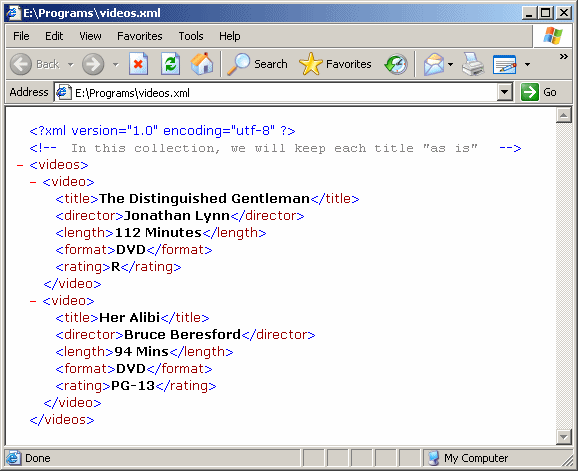
The System.Xml represents a comment through the
XmlComment class. Like any other part of an XML file, a comment is
represented by the XmlComment.Name property. This allows you to
retrieve the name of a comment that is included in the document.
To create a comment, you can call the
XmlDocument.CreateComment() method. Its syntax is:
public virtual XmlComment CreateComment(string data);
This method takes as argument the text that would go
into the commented section. After calling it, if the method succeeds, which
it usually does, it returns the XmlComment object that was created.
|
Practical
Learning: Creating Comments
|
|
- Access the AltairRealtors.cs file and change it as follows:
using System;
using System.Collections.Generic;
using System.ComponentModel;
using System.Data;
using System.Drawing;
using System.Linq;
using System.Text;
using System.Windows.Forms;
using System.IO;
using System.Xml;
namespace AltairRealtors2
{
public partial class AltairRealtor : Form
{
public AltairRealtor()
{
InitializeComponent();
}
private void btnNewProperty_Click(object sender, EventArgs e)
{
// Get a reference to the property editor
PropertyEditor editor = new PropertyEditor();
// If this directory doesn't exist, create it
string strDirectory = @"C:\Altair Realtors";
Directory.CreateDirectory(strDirectory);
// This is the XML file that holds the list of proeprties
string strFilename = @"C:\Altair Realtors\properties.xml";
Random rnd = new Random();
editor.txtPropertyCode.Text = rnd.Next(100, 999).ToString() +
"-" + rnd.Next(100, 999).ToString();
string strPicturePath;
if (editor.ShowDialog() == DialogResult.OK)
{
string PropertyCode, PropertyType, Location,
SaleStatus, Style, Condition,
Address, City, State, ZIPCode, Description;
DateTime DateListed;
int YearBuilt, Stories, Bedrooms;
float Bathrooms;
double MarketValue;
// Create the values of the nodes and attributes
PropertyCode = editor.txtPropertyCode.Text;
SaleStatus = editor.cbxStatus.Text;
DateListed = editor.dtpDateListed.Value;
YearBuilt = int.Parse(editor.txtYearBuilt.Text);
PropertyType = editor.cbxPropertyTypes.Text;
Style = editor.cbxStyle.Text;
Condition = editor.cbxConditions.Text;
Location = editor.txtLocation.Text;
Address = editor.txtAddress.Text;
City = editor.txtCity.Text;
State = editor.cbxStates.Text;
ZIPCode = editor.txtZIPCode.Text;
Stories = int.Parse(editor.txtStories.Text);
Bedrooms = int.Parse(editor.txtBedrooms.Text);
Bathrooms = float.Parse(editor.txtBathrooms.Text);
Description = editor.txtDescription.Text;
MarketValue = double.Parse(editor.txtMarketValue.Text);
strPicturePath = editor.txtPicturePath.Text;
// We will need a reference to the XML document
XmlDocument docProperties = new XmlDocument();
XmlElement elmRoot;
// Find out if the file exists already
// If it doesn't, then create it
if (!File.Exists(strFilename))
{
docProperties.LoadXml("<?xml version=\"1.0\" encoding=\"utf-8\"?>" +
"<Listing></Listing>");
// Get a reference to the root element
elmRoot = docProperties.DocumentElement;
// Add a comment to it
string strComment = "This is code for a real estate business.\n";
XmlComment cmtDescription = docProperties.CreateComment(strComment);
docProperties.InsertBefore(cmtDescription, elmRoot);
// Get a reference to the root element
elmRoot = docProperties.DocumentElement;
strComment = "A property is created with the Property element.\n";
strComment += "\tFor each property, a random number is created.\n";
strComment += "\tThis number is made of two parts that each\n";
strComment += "\tranges from 100 to 999.\n";
strComment += "\tBoth parts are separated by a dash.";
cmtDescription = docProperties.CreateComment(strComment);
elmRoot.AppendChild(cmtDescription);
strComment = "The sale status, named Status, indicates whether\n";
strComment += "\tthe property is currently available or has\n";
strComment += "\talready been sold.\n";
strComment += "\tThe possible values are Available and Sold.";
cmtDescription = docProperties.CreateComment(strComment);
elmRoot.AppendChild(cmtDescription);
// Create a node named Property
XmlElement elmProperty = docProperties.CreateElement("Property");
// Create an attribute for the Propety node
elmProperty.SetAttribute("Code", PropertyCode);
// Create an attribute for the Propety node
elmProperty.SetAttribute("Status", SaleStatus);
// Add it to the root element
elmRoot.AppendChild(elmProperty);
strComment = "An element named DateListed specifies when\n";
strComment += "\tthe property was added to the listing\n";
strComment += "\tor when it entered in the market.";
cmtDescription = docProperties.CreateComment(strComment);
elmRoot.LastChild.AppendChild(cmtDescription);
strComment = "As its name suggests, the YearBuilt attribute\n";
strComment += "\tindicates the year the property was built.";
cmtDescription = docProperties.CreateComment(strComment);
elmRoot.LastChild.AppendChild(cmtDescription);
// Create a node named Property
elmProperty = docProperties.CreateElement("DateListed");
XmlText txtProperty = docProperties.CreateTextNode(DateListed.ToString("d"));
elmRoot.LastChild.AppendChild(elmProperty);
elmRoot.LastChild.LastChild.AppendChild(txtProperty);
// Create an attribute for the DateListed element
XmlAttribute atrProperty = docProperties.CreateAttribute("YearBuilt");
atrProperty.Value = YearBuilt.ToString();
elmProperty.SetAttributeNode(atrProperty);
strComment = "The property type must be\n";
strComment += "\t* Single Family: For a house that stands by itself\n";
strComment += "\t* Townhouse: For a full house but that is attached\n";
strComment += "\t\tto at least another house.\n";
strComment += "\t* Condominium: For a type of apartment that\n";
strComment += "\t\tbelongs to a building.";
cmtDescription = docProperties.CreateComment(strComment);
elmRoot.LastChild.AppendChild(cmtDescription);
// Create a node named PropertyType
elmProperty = docProperties.CreateElement("PropertyType");
txtProperty = docProperties.CreateTextNode(PropertyType);
elmRoot.LastChild.AppendChild(elmProperty);
elmRoot.LastChild.LastChild.AppendChild(txtProperty);
strComment = "The style of a property indicates a type of ";
strComment += "\tarchitecture.\n";
strComment += "\tThe possible styles are Contemporary, Colonial,\n";
strComment += "\tVictorian, or Farmhouse.";
cmtDescription = docProperties.CreateComment(strComment);
elmRoot.LastChild.AppendChild(cmtDescription);
// Create an attribute for the PropertyType element
atrProperty = docProperties.CreateAttribute("Style");
atrProperty.Value = Style;
elmProperty.SetAttributeNode(atrProperty);
strComment = "The Condition attribute specifies whether the\n";
strComment += "\tproperty can currently be presented to a customer,\n";
strComment += "\tor at least how it appears at the moment.\n";
strComment += "\tThe possible conditions are:\n";
strComment += "\t* Excellent: This suggests that the property has\n";
strComment += "\t\tlittle to no flaw\n";
strComment += "\t* Good: This means that the property is mostly\n";
strComment += "\t\tacceptable and can be presented to a potential buyer.\n";
strComment += "\t\tIn this case, something such as a refrigerator or\n";
strComment += "\t\ta dishwasher may be missing; or something such as\n";
strComment += "\t\tthe garbage dispenser may need to be fixed, or a\n";
strComment += "\t\tpiece of carpet that needs to be cleaned before the\n";
strComment += "\t\tproperty is actually ready for sale\n";
strComment += "\t* Needs Repair: This means that the property is\n";
strComment += "\t\tin a good selling condition.";
cmtDescription = docProperties.CreateComment(strComment);
elmRoot.LastChild.AppendChild(cmtDescription);
// Create an attribute for the PropertyType element
atrProperty = docProperties.CreateAttribute("Condition");
atrProperty.Value = Condition;
elmProperty.SetAttributeNode(atrProperty);
strComment = "A property can be located by its address which\n";
strComment += "\tin most cases is made of an address, a city,\n";
strComment += "\ta state (US, DE, AU, NG, etc) or\n";
strComment += "\tprovince (CA, CM, etc), a ZIP Code (US) or\n";
strComment += "\tpostal code (CA, GB, BE, etc).";
cmtDescription = docProperties.CreateComment(strComment);
elmRoot.LastChild.AppendChild(cmtDescription);
strComment = "To make it easy to locally find a property,\n";
strComment += "\tthe location may not be an actual\n";
strComment += "\tcity and usually people out of town may have a\n";
strComment += "\thard time finding it on a map. Nevertheless,\n";
strComment += "\tlocal people, the inhabitants, and those\n";
strComment += "\tinterested in real estate properties would\n";
strComment += "\tbe familiar with the place.";
cmtDescription = docProperties.CreateComment(strComment);
elmRoot.LastChild.AppendChild(cmtDescription);
// Create a node named Location
elmProperty = docProperties.CreateElement("Location");
txtProperty = docProperties.CreateTextNode(Location);
elmRoot.LastChild.AppendChild(elmProperty);
elmRoot.LastChild.LastChild.AppendChild(txtProperty);
// Create some attributes for the Location element
atrProperty = docProperties.CreateAttribute("Address");
atrProperty.Value = Address;
elmProperty.Attributes.Append(atrProperty);
atrProperty = docProperties.CreateAttribute("City");
atrProperty.Value = City;
elmProperty.Attributes.Append(atrProperty);
atrProperty = docProperties.CreateAttribute("State");
atrProperty.Value = State;
elmProperty.Attributes.Append(atrProperty);
atrProperty = docProperties.CreateAttribute("ZIPCode");
atrProperty.Value = ZIPCode;
elmProperty.Attributes.Append(atrProperty);
strComment = "Stories is the number\n";
strComment += "\tof levels (in other countries such as AU).\n";
strComment += "\tThis includes the basement (if any), the\n";
strComment += "\tfloor level, and the upper level(s), if any.\n";
strComment += "\tMost new constructions of single families in\n";
strComment += "\tUS, CA, DE, GB, and AU have three stories but you\n";
strComment += "\tmust check. Most condos have one story but it\n";
strComment += "\tis not uncommon for a condo to have 2 stories.";
cmtDescription = docProperties.CreateComment(strComment);
elmRoot.LastChild.AppendChild(cmtDescription);
// Create a node named Stories
elmProperty = docProperties.CreateElement("Stories");
txtProperty = docProperties.CreateTextNode(Stories.ToString());
elmRoot.LastChild.AppendChild(elmProperty);
elmRoot.LastChild.LastChild.AppendChild(txtProperty);
strComment = "A bedroom is a clearly designated area made for\n";
strComment += "\tsleeping. It is easily identifiable in any\n";
strComment += "\tconstruction. Still, if the basement of a house\n";
strComment += "\tis finished, unless it is clearly made as a\n";
strComment += "\tbedroom, it should not be counted as such.";
cmtDescription = docProperties.CreateComment(strComment);
elmRoot.LastChild.AppendChild(cmtDescription);
// Create a node named Bedrooms
elmProperty = docProperties.CreateElement("Bedrooms");
txtProperty = docProperties.CreateTextNode(Bedrooms.ToString());
elmRoot.LastChild.AppendChild(elmProperty);
elmRoot.LastChild.LastChild.AppendChild(txtProperty);
strComment = "In our real estate listing, there are two\n";
strComment += "\ttypes of bathrooms, full and half:\n";
strComment += "\t* A bathroom is counted as full if it is\n";
strComment += "\t\tequipped with either a shower area, a bath tub,\n";
strComment += "\t\tor both. In addition, it should have toilet\n";
strComment += "\t\tand a sink\n";
strComment += "\t* A bathroom is considered half if it (typically)\n";
strComment += "\t\thas neither a shower area nor a bath tub.\n";
strComment += "\t\tIn most single family and townhouses, a half bath\n";
strComment += "\t\tis constructed on the floor level to\n";
strComment += "\t\tconveniently serve the visitors who enter the house.\n";
strComment += "\t\tA typical half bathroom has a toilet (to\n";
strComment += "\t\tdo the business) and a sink to wash the hands.";
cmtDescription = docProperties.CreateComment(strComment);
elmRoot.LastChild.AppendChild(cmtDescription);
// Create a node named Bathrooms
elmProperty = docProperties.CreateElement("Bathrooms");
txtProperty = docProperties.CreateTextNode(Bathrooms.ToString("F"));
elmRoot.LastChild.AppendChild(elmProperty);
elmRoot.LastChild.LastChild.AppendChild(txtProperty);
strComment = "The value of the property, also referred to as\n";
strComment += "\tthe market value or the listing value, can be\n";
strComment += "\tthe asking price for the property.";
cmtDescription = docProperties.CreateComment(strComment);
elmRoot.LastChild.AppendChild(cmtDescription);
// Create a node named MarketValue
elmProperty = docProperties.CreateElement("MarketValue");
txtProperty = docProperties.CreateTextNode(MarketValue.ToString("F"));
elmRoot.LastChild.AppendChild(elmProperty);
elmRoot.LastChild.LastChild.AppendChild(txtProperty);
strComment = "The description of a property gives an overview\n";
strComment += "\tof what the property offers. It is\n";
strComment += "\tusually written with positive words that\n";
strComment += "\tcan entice, we mean invite :), a pontential\n";
strComment += "\tbuyer to feel comfortable with the idea of\n";
strComment += "\tacquiring the property.";
cmtDescription = docProperties.CreateComment(strComment);
elmRoot.LastChild.AppendChild(cmtDescription);
// Create a node named Description
elmProperty = docProperties.CreateElement("Description");
txtProperty = docProperties.CreateTextNode(Description);
elmRoot.LastChild.AppendChild(elmProperty);
elmRoot.LastChild.LastChild.AppendChild(txtProperty);
// Save the XML file
docProperties.Save(strFilename);
}
else
{
// Open the XML file
docProperties.Load(strFilename);
// Get a reference to the root element
elmRoot = docProperties.DocumentElement;
// Create a node named Property
XmlElement elmProperty = docProperties.CreateElement("Property");
// Create an attribute for the Propety node
elmProperty.SetAttribute("Code", PropertyCode);
// Create an attribute for the Propety node
elmProperty.SetAttribute("Status", SaleStatus);
// Add it to the root element
elmRoot.AppendChild(elmProperty);
// Create a node named Property
elmProperty = docProperties.CreateElement("DateListed");
XmlText txtProperty = docProperties.CreateTextNode(DateListed.ToString("d"));
elmRoot.LastChild.AppendChild(elmProperty);
elmRoot.LastChild.LastChild.AppendChild(txtProperty);
elmRoot.LastChild.AppendChild(elmProperty);
// Create an attribute for the DateListed element
XmlAttribute atrProperty = docProperties.CreateAttribute("YearBuilt");
atrProperty.Value = YearBuilt.ToString();
elmProperty.SetAttributeNode(atrProperty);
// Create a node named PropertyType
elmProperty = docProperties.CreateElement("PropertyType");
txtProperty = docProperties.CreateTextNode(PropertyType);
elmRoot.LastChild.AppendChild(elmProperty);
elmRoot.LastChild.LastChild.AppendChild(txtProperty);
// Create an attribute for the PropertyType element
atrProperty = docProperties.CreateAttribute("Style");
atrProperty.Value = Style;
elmProperty.SetAttributeNode(atrProperty);
// Create an attribute for the PropertyType element
atrProperty = docProperties.CreateAttribute("Condition");
atrProperty.Value = Condition;
elmProperty.SetAttributeNode(atrProperty);
// Create a node named Location
elmProperty = docProperties.CreateElement("Location");
txtProperty = docProperties.CreateTextNode(Location);
elmRoot.LastChild.AppendChild(elmProperty);
elmRoot.LastChild.LastChild.AppendChild(txtProperty);
// Create some attributes for the Location element
atrProperty = docProperties.CreateAttribute("Address");
atrProperty.Value = Address;
elmProperty.Attributes.Append(atrProperty);
atrProperty = docProperties.CreateAttribute("City");
atrProperty.Value = City;
elmProperty.Attributes.Append(atrProperty);
atrProperty = docProperties.CreateAttribute("State");
atrProperty.Value = State;
elmProperty.Attributes.Append(atrProperty);
atrProperty = docProperties.CreateAttribute("ZIPCode");
atrProperty.Value = ZIPCode;
elmProperty.Attributes.Append(atrProperty);
// Create a node named Stories
elmProperty = docProperties.CreateElement("Stories");
txtProperty = docProperties.CreateTextNode(Stories.ToString());
elmRoot.LastChild.AppendChild(elmProperty);
elmRoot.LastChild.LastChild.AppendChild(txtProperty);
// Create a node named Bedrooms
elmProperty = docProperties.CreateElement("Bedrooms");
txtProperty = docProperties.CreateTextNode(Bedrooms.ToString());
elmRoot.LastChild.AppendChild(elmProperty);
elmRoot.LastChild.LastChild.AppendChild(txtProperty);
// Create a node named Bathrooms
elmProperty = docProperties.CreateElement("Bathrooms");
txtProperty = docProperties.CreateTextNode(Bathrooms.ToString("F"));
elmRoot.LastChild.AppendChild(elmProperty);
elmRoot.LastChild.LastChild.AppendChild(txtProperty);
// Create a node named MarketValue
elmProperty = docProperties.CreateElement("MarketValue");
txtProperty = docProperties.CreateTextNode(MarketValue.ToString("F"));
elmRoot.LastChild.AppendChild(elmProperty);
elmRoot.LastChild.LastChild.AppendChild(txtProperty);
// Create a node named Description
elmProperty = docProperties.CreateElement("Description");
txtProperty = docProperties.CreateTextNode(Description);
elmRoot.LastChild.AppendChild(elmProperty);
elmRoot.LastChild.LastChild.AppendChild(txtProperty);
// Save the XML file
docProperties.Save(strFilename);
}
if (strPicturePath.Length != 0)
{
// The following code gets a reference to the picture's name
FileInfo flePicture = new FileInfo(strPicturePath);
// Then it copies it to the directory of this business
// It changes its name to be the same as the property code
flePicture.CopyTo(@"C:\Altair Realtors\" + PropertyCode + flePicture.Extension, true);
}
ShowListing();
if (lvwProperties.Items.Count > 0)
lvwProperties.Items[0].Selected = true;
}
}
void ShowListing()
{
XmlDocument docProperties = new XmlDocument();
string strFilename = @"C:\Altair Realtors\properties.xml";
if (File.Exists(strFilename))
{
lvwProperties.Items.Clear();
docProperties.Load(strFilename);
XmlElement elmProperty = docProperties.DocumentElement;
XmlNodeList lstProperties = elmProperty.GetElementsByTagName("Property");
XmlNodeList lstPropertyTypes = elmProperty.GetElementsByTagName("PropertyType");
XmlNodeList lstLocations = elmProperty.GetElementsByTagName("Location");
XmlNodeList lstStories = elmProperty.GetElementsByTagName("Stories");
XmlNodeList lstBedrooms = elmProperty.GetElementsByTagName("Bedrooms");
XmlNodeList lstBathrooms = elmProperty.GetElementsByTagName("Bathrooms");
XmlNodeList lstMarketValues = elmProperty.GetElementsByTagName("MarketValue");
for (int i = 0; i < lstProperties.Count; i++ )
{
ListViewItem lviProperty = new ListViewItem((i + 1).ToString());
lviProperty.SubItems.Add(lstProperties[i].Attributes[0].InnerText); // Property Code
lviProperty.SubItems.Add(lstPropertyTypes[i].InnerText); // Property Type
lviProperty.SubItems.Add(lstPropertyTypes[i].Attributes[1].InnerText); // Property Condition
lviProperty.SubItems.Add(lstLocations[i].InnerText);
lviProperty.SubItems.Add(lstStories[i].InnerText);
lviProperty.SubItems.Add(lstBedrooms[i].InnerText);
lviProperty.SubItems.Add(lstBathrooms[i].InnerText);
lviProperty.SubItems.Add(lstMarketValues[i].InnerText);
lvwProperties.Items.Add(lviProperty);
}
txtDescription.Text = lstProperties[0]["Description"].InnerText;
}
}
private void AltairRealtor_Load(object sender, EventArgs e)
{
ShowListing();
if( lvwProperties.Items.Count > 0 )
lvwProperties.Items[0].Selected = true;
}
private void btnClose_Click(object sender, EventArgs e)
{
Close();
}
private void lvwProperties_SelectedIndexChanged(object sender, EventArgs e)
{
if ((lvwProperties.SelectedItems.Count == 0) ||
(lvwProperties.SelectedItems.Count > 1))
return;
string strPropertyCode = lvwProperties.SelectedItems[0].SubItems[1].Text;
// Make a list of the picture files
string strDirectory = @"C:\Altair Realtors";
DirectoryInfo dirProperties = new DirectoryInfo(strDirectory);
FileInfo[] PictureFiles = dirProperties.GetFiles();
// Look for a file that holds the same name as the item number
foreach (FileInfo fle in PictureFiles)
{
// Get the name of the file without its extension
string fwe = Path.GetFileNameWithoutExtension(fle.FullName);
if (fwe == strPropertyCode)
pbxProperty.Image = Image.FromFile(strDirectory +
"\\" + strPropertyCode + fle.Extension);
}
XmlDocument docProperties = new XmlDocument();
string strFilename = @"C:\Altair Realtors\properties.xml";
if (File.Exists(strFilename))
{
docProperties.Load(strFilename);
XmlElement elmProperty = docProperties.DocumentElement;
XmlNodeList lstProperties = elmProperty.GetElementsByTagName("Property");
for (int i = 0; i < lstProperties.Count; i++ )
{
if (lstProperties[i].Attributes[0].InnerText == strPropertyCode)
txtDescription.Text = lstProperties[i]["Description"].InnerText;
}
}
}
}
}
Except for comments, the parser is used to "scan" the
whole XML file to analyze it. Every tag is then interpreted. As we mentioned
already, the value of each tag can be displayed in a browser between its
opening and its closing tag, and the browser uses different font styles to
make a distinction. When creating some tags and some sections of the file,
you may want the parser to consider those particular tags and sections as
regular text. That is, you may want the parser to treat a certain tag and
its value as if it were regular text even though it is created as an XML
file.
To prevent the parser from interpreting a tag regularly
but to treat that tag and its value as regular text, you can create it in a
CDATA section. To do this, create a section that starts with
<![CDATA[, followed by anything you want, and ending with ]]>.
The formula used is:
<![CDATA[ Blah Blah Blah ]]>
Between <![CDATA[ and ]]>, you can type
anything, including one or more normal XML tags. Here is an example:
<?xml version="1.0" encoding="utf-8"?>
<!-- In this collection, we will keep each title "as is" -->
<videos>
  <![CDATA[<VdoColl>Collection of Videos</VdoColl>]]>
  <video>
	<title>The Distinguished Gentleman</title>
	<director>Jonathan Lynn</director>
	<length>112 Minutes</length>
	<format>DVD</format>
	<rating>R</rating>
  </video>
  <video>
	<title>Her Alibi</title>
	<director>Bruce Beresford</director>
	<length>94 Mins</length>
	<format>DVD</format>
	<rating>PG-13</rating>
  </video>
</videos>
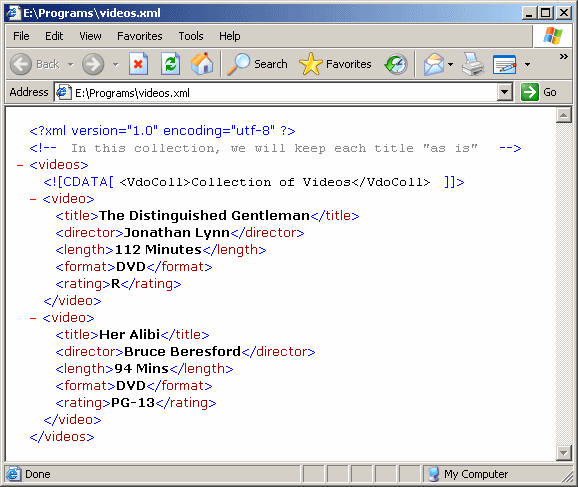
The .NET Framework
supports the creation of a CDATA section through the
XmlCDataSection class. This class is equipped with a Name property that
allows you t retrieve the name of a CDATA section in an
XmlDocument object.
To programmatically create a CDATA section, you
can call the XmlDocument.CreateCDataSection() method. Its syntax is:
public virtual XmlCDataSection CreateCDataSection(string data);
|
|